


Speed is one of the pillars of our hosting services and wе’re constantly working on making our infrastructure faster and more reliable. One of the essentials for a fast loading speed is the way the PHP is handled on the web server and now, with our new Site Tools platform and without the constraints of the old system, our DevOps team got the opportunity to develop a new and ultrafast PHP setup that is up to 30% faster and as secure as everything we do.
Ultrafast, yet Super Secure PHP Setup
On its own, running a fast PHP is not a difficult task. However, if you want a fast, stable, and secure PHP while supporting Apache and the variety of .htaccess rules defined by users and apps, things get complicated. We wanted to solve these problems and at the same time increase the page loading speed and improve the server stability during traffic spikes. So once we released the new Client area and Site Tools and got rid of major constraints that our old platform was putting on us, modifying our PHP setup became one of the priorities of our DevOps team.
After several iterations, we managed to overcome the biggest “speed over security” challenge and delivered a fast PHP with our WAF and account isolation integrated, thus getting better performance results without compromising with security. The new implementation is super fast, secure, and efficient.
Our Ultrafast PHP vs Our Standard PHP
While the new, ultrafast PHP setup is faster and is recommended for websites with a lot of traffic, the standard PHP setup provides some extra flexibility for PHP versions and variables management.
Our Ultrafast PHP – Recommended for Well-visited Sites
The websites that will benefit most from the ultrafast PHP are those that get solid traffic and may be experiencing resource deficit on the current plan they use. Based on the preliminary statistics we have run, we see the following raw data:
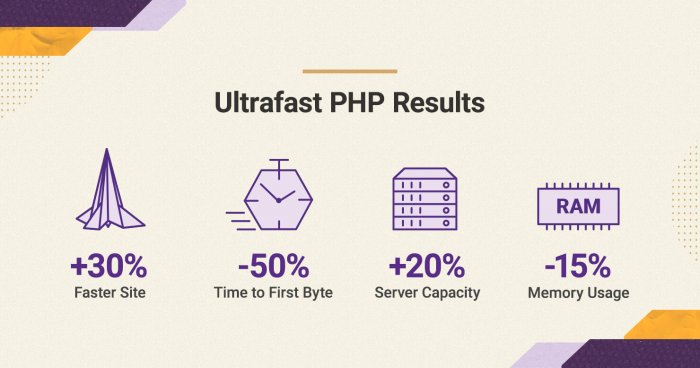
- Faster page response: up to 50% drop in the TTFB (time to first byte), which will make your pages load faster than before.
- Increased server capacity: the host node will be able to process about 20-30% more requests, which means it will be able to handle traffic spikes even better than before.
- Lower server memory usage: up to 15% drop in the memory usage, which again vacates server resources for handling more of your traffic faster.
- Expected overall performance improvement: currently the new, ultrafast PHP averages at being 30% faster than the old setup.
Note: the numbers above are average and are based on internal tests. Results may vary per site.
The new PHP setup is available for websites hosted on GrowBig, GoGeek and Cloud plans, as these plans usually host the type of sites that are most likely to benefit from the performance improvements it brings. It’s important to point out that it works for sites running on PHP 7.3 or higher and is not compatible with older versions. Furthermore, when using the ultrafast PHP service, all subdomains under your site will inherit the PHP version and variables settings from the site’s primary domain.
Our Standard PHP Allows Different PHP Settings for Each Subdomain
The standard PHP setup is the one all StartUp accounts use. It is also available as an alternative to the ultrafast PHP setup on Site Tools-based GrowBig, GoGeek and Cloud accounts. Its performance is excellent for small and standard sites. Its biggest advantage is that it enables you to manage the PHP versions and variables separately for every subdomain in your site.
As the standard PHP gives more flexibility for experiments, all staging sites are set up with it too. So if you need to use an older PHP than 7.3 or you need a setup with different PHP versions and variables per subdomain, the standard PHP setup is the one for you.
How to Switch to the Ultrafast PHP?
- All new sites created on Site Tools-based GrowBig, GoGeek or Cloud plan come with the new, ultrafast PHP switched on by default.
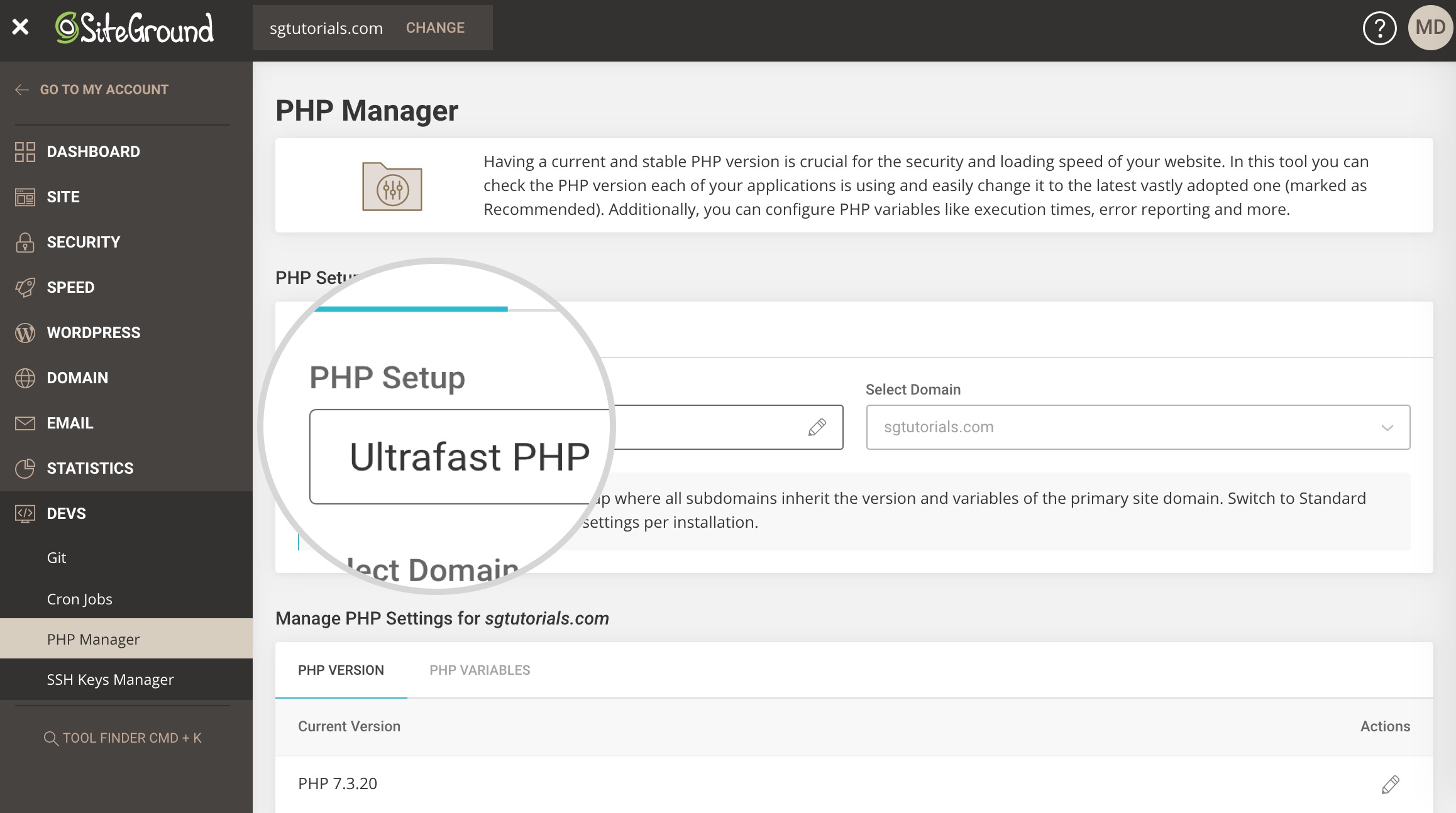
- For existing sites hosted on Site Tools-based GrowBig, GoGeek and Cloud Plans, the ultrafast PHP is now available in Site Tools > PHP Manager and clients can instantly enable it from there.
- If you are a SiteGround client and have a Site Tools-based StartUp plan, you may upgrade it to a higher plan to get access to the ultrafast PHP setup.
[subscribe_cta]
Hey, I am in the cPanel “mode” for quite a long, is there a way to speed up the migration to Site Tools?
Please, refer to my previous reply.
Wow, my sites just got faster approx 40%, thank you Siteground for continuous upgrades to your services and absolute best customer support. You have a customer for life 🙂
Great! We’re very happy that it had worked well for you!
Is the default WordPress installation compatible?
Yes
You guys rock!
This is awesome. Thanks so much!
How about us Go Geeks still waiting for many months for Site Tools and your fancy CPanel replacement? How long do you expect the wait to continue so we can enjoy SiteGround’s new features?
We will publish soon another blog post that will shed light on the migration schedule. Generally, we’re going as fast as possible without causing damage. Our goal is to finish all cloud migrations and considerably speed up the shared servers migrations by the end of the year.
Many customers know that Siteground is a great provider, including myself, I started as a customer since 2016 and my plan is to continue my loyalty to Siteground. Although it’s frustrating to know that we are the last in line and we are disconnected from the modern tools.
I think that instead of creating a migration schedule (something that should have been published many months ago), you should create a quick action plan at least for easy migrations and not release new features until most of cpanel/whm is migrated, because this is creating a large customers dissatisfaction (GoGeek/Cloud)
Please, refer to my previous reply.
We’ve been waiting over a year now… would it be faster if I were to purchase new hosting and simply migrated my site to new hosting, as opposed to waiting for Site Tools on current hosting? This is driving me a little crazy…
Please, refer to my previous reply.
I am also keen to get migrated to the new site tools. And since I think just under a year I only hear from you that it will come soon.
So a migration plan and a speedy migration is appreciated.
We’re moving around 900 cPanel accounts every day. Soon we should finish with all sdandard Cloud accounts and proceed to shared ones. We are really doing this as fast as possible.
Thanks for the reply.
Let’s hope this happens fast then as we are on a cloud account.
Cheers
Jan
Been with siteground for 4+ years, us old ones pay more than anyone signing up now, and also we get to use deprecated systems, and pray for a migration at some point. ugh
None of the cPanel systems we use are depricated. We just can’t add the new technology we come up with to cPanel. That was one of the main reasons for us to start developing Site Tools in first place. Right now we’re migrating around 900 cPanel accounts a day. Hopefully, we will soon proceed to moving them on an even higher pace. Note, that people signing up now get an empty account. That’s easy. Migrating an existing one without causing harm to all the configurations and settings is extremely difficult task.
I was just wondering about this myself. Spent a while trying to find how to do the above as I received a message in June about site migration but I now realise that that migration doesn’t appear to be related to getting access to the CPanel replacement and site tools. 🙁
The migration you were notified was about us moving to a better and faster hosting infrastructure. Right now we’re working on placing everyone on the new Site Tools system.
I was going to ask the same question; really excited to hear about this enhancement – but then immediately disappointed to read it’s not available to those of us stuck on CPanel. Having raised expectations back in October 2019 there’s been inadequate information for those of us waiting for the new site tools. I rarely complain about anything, and generally I love SiteGround – but this is testing my patience to the point of looking for alternative providers. Just saying…!
We value and appreciate all our customers, both existing and new ones. This said, it is easy to start a new account for a new client – it is empty and created directly on the new system. On the other hand migrating a cPanel account to Site Tools is incredibly complex task that takes huge ammount of work from our team. Right now, we’re moving around 900 cPanel accounts on a daily basis which is really super fast pace. Our plan is to improve the speed even more but we’re not going to sacrifice quality over speed in this case.
In addition to that, even though we can’t (not that we don’t want to) add the new features to cPanel it has been updated and kept up-to-date and as stable and fast as usual until the migration day comes. There will be a blog post coming up next week that will share more details regarding the migration schedule and why you have to wait so long but in summary it is a very, very difficult migration that requires time.
Would it be better to start a new account to have site tools than move the site from current cpanel site over?
You can do that, or you can wait for us to migrate it to the new platform. Both are viable options 🙂
This was my question exactly. We were told migration would take a few months to complete, but that was in September last year, and I’m still waiting…
Please, refer to my previous reply.
agree…
They’re going fast as possible without causing damage. Causing damage is the operative term. This broke my site and it took ~ two months of back and forth and a lot of effort on our part to get back to baseline. Also, with site tools many applications. from cPanel disappear. Finally the site tools, file management interface as many minor issues and annoyances. We’ve been with siteground for 10+ years, the performance of the site is quite good. But the move was jarring, support was helpful, did a lot for us, but it was not painless. FYI we’re on Drupal, and many things that were standard in cPanel, became “non-standard” on site tools. So, to me waiting is the better option.
If there are some complications in upgrading, is there an easy option to revert to the standard plan once again?
This is really great news! You guys are the best…
Yes, you can switch back to Standard right away from the same tool 🙂
Hello,
I have a GooGeek hosting but can’t find “Client Area > Site Tools”. I only have access to CPanel but couldn’t find any option to activate Ultrafast PHP
The new setup is available only for Site Tools. Once your server is scheduled for migration from cPanel to Site Tools, you will receive an email with detailed info about the migration.
How to set this on a domain hosted on a cloud server, for some reason I am unable to activate site tools and can only choose php version from cpanel account not superfast
The new PHP is available only on Site Tools. However, since you’re on a Cloud, your server should be in queue for migration. You will receive an official notice with details about it soon.
I have the geek plan, but do not find this. Cpanel looks total diffrent, I still have the old cpanel. Can you tell me how to activate this in old cpanel?
This update is available only on our new Site Tools system. We will shortly start with the shared account migration from cPanel to Site Tools. Once your site is migrated, you will get the new interfaces.
What version is UltraFastPHP using? Will my WordPress site and plugins which are compatible with PHP version 7.3 also work on UltraFastPHP?
It supports. PHP 7.3 and 7.4 as of now. We will add more versions once they are stable 🙂
This is a great speed boost, but hopefully, WordPress plugin developers will catch up. Enabling Ultrafast PHP broke a handful of plugins on my website, so had to switch back to Standard PHP for now. I’ll give it a few weeks before enabling this again. 🙂
There shouldn’t be a difference. Please, make sure that once you switch to Ultrafast the PHP version you set is the same 🙂
So how do we do this through cPanel?
The new setup is available only for Site Tools. Once your server is scheduled for migration from cPanel to Site Tools, you will be notified over email.
i have a cloud plan, running WHM and cpanels. was trying to find the ultrafast option but no luck.
is it available in the cpanel/whm accounts?
No, it’s available for Site Tools only. However, we’re migrating around 900 cPanel cloud accounts at the moment so soon you should receive notice about your server being scheduled for migration.
Hi,
i have not well understood the technology behind this speed improvement.
Can you give us more details?
Thank you.
It is a custom way of running PHP developed by our devops team. Basically, the service itself is now running faster than before.
Newest test results show a 30-40% increase in speed 😍
THANK YOU for constantly improving your service – SiteGround rocks!
Cheers!
Hi i have received an email about updating my PHP via site tools. Where is this and how to i access it?
You can switch from Site Tools -> Devs -> PHP Manager 🙂
this is amazing!!
Incredible! What is behind the technology and do you mind sharing any bits about how it works and how it compares to other providers?
This is pretty much the fastest way you can run PHP. I haven’t done tests againt competitors but generally PHP doesn’t get much faster (prior PHP 8 and hopefully one day a preloading mechanism that doesn’t require service restart).
Is there any way to make this update using CPanel instead of through the SiteGround dev tools? We host a number of customers all in WHM rather than one single site. Love to take advantage of the upgrade.
One of the main reasons for us to start developing Site Tools was that the old system was limiting our ability to innovate. This said, since you’re on a Cloud server, you should soon receive migration notice because at the moment we’re migrating Cloud accounts at a great pace.
Hi there! I have a GoGeek account with Cpanel interfase. How do I switch to Site Tools based interfase?
You will receive an email when your server is scheduled for migration.
I’m using wordfence, after the upgrade to ultrafastPHP the Wordfence Web Application Firewall notice came up … “To make your site as secure as possible, take a moment to optimize the Wordfence Web Application Firewall: If you cannot complete the setup process, click here for help.”
There were a few extra steps i had to configure when setting this up before so I am curious if you guys have a new set of instructions or what is it i have to do now to make the firewall work with the new ultrafastPHP?
thanks
Please, update your .htaccess manually and if you have issues with that, check with the WordFence team. They do some smart checks and I think they haven’t covered our new setup yet.
So no way for us old customers to upgrade yet then
Not a fan of the new Site tools control panel some of the services that are currently free in cpanel are now paid for in new site tools set up – I have my old account as go geek and another, for a client, on the new cpanel.
The update is available for Site Tools only. Which are those services? Site Tools doesn’t limit or charge extra for functionality.
Backups – Current system allows for manual backups using softaculous
Site tools does not seem to allow ad-hoc manual backups
There is a cost for ad-hoc backups with site tools
One time backups have always been free only on GoGeek plans and above. Actually, now you have more slots since on cPanel you had 5 per account and on Site Tools you have 5 per site. Softaculous is a third-party app that zips your site that came as is and was simply creathing an archive of your site with the db inside. You can do the same with the File Manager Tool.
I’m rather disappointed that you would offer this service before you can even update those of us who have been customer for a long time. I reached out to support to as why my admin panel didn’t look like this and didn’t know where to go to do so. I then found out that it’s not yet available because my sites haven’t been upgraded. I then ask to be upgraded and am told that it’s scheduled at some unknown time in the future, probably months! I’m sorry you guys have always been on top of it and I’ve been very pleased but why send the email to those of us who haven’t been upgraded? Also I highly suggest a way for us to ask to be upgraded.
Rant over, just disappointed.
Thanks,
Brent
Please, refer to my previous reply.
Thanks for the reply! have a great day.
That sounds awesome, but when will Cloud accounts (still with cPanel) finally be migrated? The wait is surely getting close to years, not months since you announced the move!
We hope to migrate the majority of our Cloud servers by the end of this month.
Hey , is the ultrafast php available on growbig plans ?
As mentioned in the post, it’s available on GoGeek and Cloud servers only 🙂
I have the GoGeek plan, but am unable to find that screen shot you show above in my account to make the switch. How do I get to that menu? I only can manage to get to my cPanel.
The new service is available for Site Tools only. Once your account is migrated, you will have it available. You will receive an email once your account is scheduled for migration.
How do you enable this? I don’t see any dashboard that looks like the above? My channel still looks like it was from 1980?!?
The current update is available only for Site Tools.
This sounds wonderful, Hristo, but when can I expect the migration to Site Tools? A year has passed and I’m still on cPanel.
Please, refer to my previous reply.
My site with Magento 2, ffter use Ultrafast PHP, my site can not work. And I also try to restore my site from Backup (not with Ultrafast PHP) but still now work. please help urgently.
Just checked, product page can not open its go to direct download.
This seemed its my clouldflare cache working, I flushed clouldflare cache site all page now not work.
Can anyone faster? Where are you? pls online faster. No anyone?
Are you changing versions too? Ultrafast supports 7.3 and 7.4. There shouldn’t be such issues with it.
Hi there Hristo and thank you & the SiteGround team for both the good news & this feature.
How can I best test this to see the difference? I tried yesterday + today and hadn’t noticed any difference including after clearing the SG cache. Perhaps I’m missing something. Thanks.
The easisest way would be to check your site while logged. Note, that our caching is using an NGINX reverse proxy and if you are serving content from it the request doesn’t even reach the web server or the PHP so you won’t see a difference. Logged in, backend, dynamic hits on excluded from cache pages should show you difference. Of course, if your site is already very optimized the difference won’t be that big.
Thank you. 🙂
My first try gave a 502, switched back and things are fine.
You can try again and make sure that you’re on the same PHP version. Clear the cache too 🙂
When I started blogging in 2016, my blog’s size was significantly over 1 MB, it took 111 requests and about 6-7 seconds to be fully loaded.
Yesterday, I learnt about SiteGround’s Ultrafast PHP and decided to move my blog to SiteGround right away. After completing the migration process and setting up SG Optimizer plugin, my blog started to load as fast as never before!
Now, my blog is loaded in about 1 second from any part of the world, it takes less than 200 KB and only 11 requests to be fully loaded.
According to GTmetrix, my website’s optimization scores are equal to 99/100 and 98/100.
Google PageSpeed Insights shows 82/100 for mobile and 99/100 for desktop devices!
WebPageTest shows 5 A scores (including TTFB), and Dotcom-Tools shows 1.3 sec for the first run and about 700-800 ms for the second run of the test (these are the results of the test taken from all 25 possible locations – includes Europe, North America, South America, Asia, and Australia).
I managed to achieve all these results with just SiteGround’s GoGeek account (I haven’t activated cloud account yet) and their SG Optimizer plugin!
The only addition was a free CAOS plugin, which I use to store the Google Analytics file locally.
It’s really incredible that SiteGround’s team managed to do such amazing work!
I tested a few other hosts (including premium providers) and a few WordPress plugins, but there’s no hosting company neither any tool which would be able to optimize my site better or even equally as SiteGround did.
I’m very, very excited, and it blows my mind that such great results are possible on this inexpensive hosting with a FREE optimization plugin! 🙂
Thanks for the kind words! I am glad that you’re enjoying it!
Hi I’ve updated to teh ultrafast php and definitely see some speed improvements. However, when i try to edit a post or add a new post (using wordpress), it brings me to a 502 bad gateway error. Have tried clearing cache and whatnot to no avail. Any ideas? Site runs fine otherwise
Something is timing out, can you check your logs?
This looks great! Is this totally independent of PHP version? (e.g. 7.1, 7.3, etc.)
It sounds like this is totally different right, and I’d still have a PHP version, too?
Yes, but the Ultrafast PHP supports 7.3 and 7.4 only as of now. Older versions are not suitable for it.
Hi Hristo, my client has received an email about ultrafast php. the site is only expected to achieve 2k visits a month, so i am not certain whether swithing it on is the right move. Can you help?
You should check it out, in 99% of the cases it should work faster 🙂
Hello Hristo! I need some help and support doesn’t know the answer. It is regarding an upgrade from GoGeek to Cloud. I have 2 woocommerce sites and we are close to the daily cpu limits, we want to know how much websites like the ones we have, with the same traffic, can we have on the entry level cloud hosting (let’s say the are clones). Support doesn’t know the answer, because the problem is on GoGeek you measure CPU usage but on Cloud you don’t measure that, so how can we as a client compare between both? You are giving us a hard time understanding how much websites as the ones we have, can we fit on cloud. From a sales perspective there is something wrong because support doesn’t know. Can we have an expert analysis so we can make the upgrade?
The best approach would be to get a Business cloud and enable the automatic scaling for it. Then monitor how it behaves and how much resources are added to the cloud. It should configure itself basically. It is very difficult to match a shared account with a cloud one with absolute certainty that’s why support aren’t very eager to give you an exact plan.
Imagick not set up with Ultrafast php?
We get error after switching to Ultrafast php and one of our plugins trying to call the Imagick library
No, please use the GD Library instead.
I tried the Ultrafast PHP on 4 different WordPress websites, and test them before and after on GTMetrix. All became slower by 2-3 seconds after switching (tested multiple times). Had to switch back to the standard PHP. Am I doing anything wrong?
Most probably something is timing out. Check your plugins, perform a database optimization and flush all caches you have. Then make sure you’re switching to the same PHP version on the new setup.
Is UltraPHP still matters if we’re using a caching plugin?
Having a faster PHP is always beneficial. No caching mechanism can cover 100% of the hits so yes, it does matter.
Is UltraPHP compatible with and existing Magento 2.3.x installation and would Magento benefit from it?
It should work just fine as long as you pick the right version and it is supported by all your app extensions.
I am not seeing Ultra-fast. But I am seeing version 7.4.8. Is this the same thing?
The Ultrafast PHP setup is available only on GoGeek and Cloud plans.
I have the GoGeek plan (since I joined a year ago) but Ultrafast is not available in my choices. I am currently on 7.4.8…when will Ultrafast be available for me?
Ultrafast is available only for Site Tools. You will receive an email once your account is scheduled for migration.
have started using UltraPHP it on my xenforo forums and it works a treat!
well done siteground, excellent initiative!
one happy customer!
I’d hoped to test Ultrafast PHP on a staging copy, I see that’s not available. So… before I pull the trigger, can one revert BACK to standard PHP if the change causes any problems? Is there a list of plugins that are known to have conflicts with this new technology?
You can switch between the two instantly with a click. If your site is running on 7.3 Standard, it should run just fine on 7.3 Ultrafast just…faster 🙂 So if you’re not switching the version but only the setup, it would be relatively safe to do so and you can rollback right away if needed.
Could you please inform me if the site tool also comes with the option for WebP photos, thank you
Yes, you will find it as a feature in the SG Optimizer.
This is the biggest improvement since php 7 itself. My site is loaded with a lot of plugins and this helped alot! Thanks, thanks, thanks 🙂
Hi will this work well with Joomla 4 as well?
It should work just fine 🙂
Thank you for all your amazing work Hristo, difference is truly stunning as advertised! Is there any particular PHP variables tuning that can be done here?
Many thanks for your confirmation!
Best regards
Glad that you’re enjoying the new PHP! I don’t think there are any modifications needed unless your site requires something speciffic.
Can you give us more details about how this ultrafast php works? What is the difference with vanilla PHP?
There are a number of ways to run PHP – mod php, php-fpm, etc. This is our custom implementation which performs best on our servers. In terms of PHP code compatibility there are no differences.
Hi, dumb question, can I get notified by mail when there’s a new post on your blog?
Currently there’s no such option, but we are always adding new things, so stay tuned. Existing customers receive once a month a newsletter with all new articles published.
My GoGeek account was recently switched to the new Site Tools. Today I upgraded my PHP from Standard to Ultrafast but my GTMetrix scores show my site is slower now than before. Does it take awhile for the Ultrafast PHP to kick in?
No, it starts working right away. Make sure your Dynamic caching is working, there is no way the Utlrafast PHP can slow down your site. Faulty plugin / theme update or something not working properly can be the culprit but surely not the new PHP.
wow this was released around September, and I have just found out about it.
I enabled it, my website became really faster… thanks Siteground 🙂
I have a question… are there some plugins not compatible with Ultrafast PHP?
The way we run PHP doesn’t affect compatibility, it is the same PHP 7.4 or 7.3 just faster. So if your plugins are compatible with the selected versions, they will run even better on Ultrafast PHP.
Yes, there is at least one plugin – for example – that is not compatible with UltraFast PHP: Bookme Pro
That plugin hasn’t been updated for the past 3 years and has only 300 installs in the WP repository. There aren’t plugins incompatible with UltraFast PHP. If it runs fine on 7.3 Standard it will run fine on 7.3 UltraFast, there is no difference in the way PHP code is processed.
We have a WP plugin that is not compatible with UltraFast PHP (under PHP 7.3.X, 7.4.X, or 8.0.X). So, where can we find the technical details for UltraFast PHP so the plugin developer(s) can fix the incompatibility? We contacted SG Support and checked all other blogs on UltraFast PHP and couldn’t find any answers. This is affecting one small — but important — part of our website. Thank you!
I would recommend getting in touch with a developer and do some troubleshooting. It must be an error with the plugin itself because there is no difference in the way PHP code is interpred.
wow
Do you use NVME drives please?
No, we are using Google’s SSD persistent storage, which has multiple redundancies. What this means is that your website data is not stored on a single physical machine. In case of hardware failure, your data is still safe from loss.