Meet the new AI Store Agent, a powerful new worker inside your store

A digital graphic illustrating AI-assisted e-commerce management against a dark green grid background. On the left, a SiteGround user dashboard welcomes the store owner with "Welcome back, Jane" alongside an online store setup checklist. In the center, a photograph shows a worker in an apron using a barcode scanner on cardboard boxes at a packing table with a laptop. On the right, a dark glassmorphism "AI Assistant" window displays the message "Hi! What would you like to do today?" above a user prompt asking "Show orders from today" and a mock table with "Order ID" and "Customer" columns. Floating nearby are text-formatting controls and three dark glass icons representing payment cards, AI sparkles, and an e-commerce shopping cart with a notification badge.

Your online store just got а new team member – the built-in AI Store Agent. It smartly analyzes your store data and answers any question about it in seconds. What is more, it can also execute real tasks for you – from creating coupons to bulk-editing your entire catalog on a single command. Learn what the AI store agent can do for you.

What is the AI Store Agent?

The AI Store Agent is an AI-powered analyst and store manager built into SiteGround Ecommerce. Ask it a direct business question, like which products deserve more promotion, whether your prices hold up within a category, or which customers keep coming back, and it digs through your orders, products, categories, customer accounts, reviews, coupons, brands, and attributes to give you an answer you can act on. Not a data dump or a link to a report. An answer, the way an analyst on your team would deliver it, so you can make the decision and move on.

And it doesn’t stop at analysis. The Agent executes too: it creates and manages products, coupons, and more, right from the same conversation where you made the call.
Because it’s powered by AI rather than a fixed set of buttons, you’re not limited to a menu of preset commands. You describe what you need in plain language, and the Agent figures out how to get it done.

You’ll find the AI Store Agent in the Store section of your dashboard, which got upgraded so you can click less and do more, and keep your new assistant within a click’s reach. No setup, no configuration, no plugins. Open the chat and put it to work.

Get answers that drive decisions

Every store decision starts with a question. Should you reorder products? Is that promotion worth repeating? Are prices in that category too low? The answers were always in your store data, but getting to them meant reports, filters, and spreadsheet exports. Now you just ask, in plain language, the way you’d ask a colleague:

  • What’s my top performing product this month?
  • What’s the average price of products in the Accessories category?
  • How many orders came in last week compared to the week before?
  • Which coupon was used the most in the last 30 days?
  • Which of my products don’t have any reviews yet?
  • List the customers who placed more than one order this quarter.

Each answer feeds a real decision. Your top performer tells you what to restock and feature on your homepage. The category price average tells you whether a new product is priced to compete. The coupon comparison tells you which promotion to run again and which to retire. Products without reviews are your next follow-up email campaign. And because the answers take seconds instead of an evening, you make these calls while they still matter, not weeks later when the moment has passed.

Switch on ‘Power Mode’ and delegate the work

Insight is only half the job. With Power Mode enabled, the AI Store Agent goes from telling you what’s happening in your store to doing something about it. It can create and manage products, coupons, customer accounts, brands, and more, straight from the same chat:

  • Create a 15% off coupon for orders over $50, valid until the end of August.
  • Add a new product called “Linen Tote Bag” priced at $39 in the Bags category.
  • Create a brand called Aurora and assign it to my outdoor products.

The decision and the action happen in one place. You spot that a promotion worked, and in the next message you launch the follow-up. The coupon setup before every campaign, the product updates you keep postponing: they become one-line instructions.

Bulk edits: one instruction, your whole catalog

Where Power Mode really shines is the repetitive work. So much of running a store is the same small task multiplied across dozens of products: the same price change, the same description tweak, the same formatting, over and over. In a traditional dashboard, that’s an evening of clicking. With the Agent, it’s one sentence:

  • Reduce the price of all products in my winter collection by 10%.
  • Add “dishwasher safe” to the descriptions of all products in the Kitchen category.
  • Import these products to my store.

The Agent applies the change across every matching product, so a fifty-product update takes the same effort as a one-product update. That’s hours back every week to spend on the parts of the business only you can do.

Power Mode is off by default and you decide when to turn it on. To enable it, open your AI Store Agent Settings and switch on Power Mode. You can toggle it off again at any time, so you’re always in control of whether the Agent can make changes to your store or simply report on it.

Included with your plan, powered by AI Studio tokens

The AI Store Agent is available on the Sell, Grow, and Scale plans of SiteGround Ecommerce at no extra cost. It runs on the same AI Studio tokens you already have as a SiteGround customer, and every SiteGround customer gets 20,000 AI Studio tokens included with their account. Your new worker is already on the team. No hiring, no salary, no onboarding.

How to put it to work

  1. Log in to your SiteGround Ecommerce dashboard and take a look around the new layout.
  2. Go to the Store section and open the AI Store Agent.
  3. Ask your first question, ideally one you already know the answer to, and put it to test.
  4. When you’re ready to delegate, open AI Store Agent Settings and enable Power Mode.

Your store’s smartest hire

Every tool we add to SiteGround Ecommerce has to pass one test: does it give you back time to grow your business? The AI Store Agent passes it twice. It answers the questions that drive your decisions, and it carries out the work those decisions create, all from a chat inside your new dashboard. And since we keep teaching it new skills, the worker you meet today is the least capable it will ever be.

The new dashboard and the AI Store Agent are live now. Log in, ask your store a question, and see what it comes back with.

[103]

Meet the new SiteGround website builder: from an essential site builder to a complete platform to build, sell, and grow online

The New SiteGround Website Builder – build, sell, and grow online

Since we launched SiteGround Website Builder last year, thousands of you have used it to build websites, open online stores, and grow your online presence. We’ve been building right alongside you, working to give you a more powerful design experience, stronger ecommerce capabilities, and the tools you need to do more with your site at every stage.

Today, we’re announcing a major new version of SiteGround Website Builder. It’s a significant step forward for the entire platform, and it comes with new dedicated plans designed around how you actually build and grow online.

More design freedom with new drag-and-drop builder

Gif showing SiteGround Website Builder drag-and-drop grid editor in action

At the heart of the building experience is a grid-based drag-and-drop editor that gives you full creative control over your layout. Place any element (text, images, buttons, forms) exactly where you want on the page. Drag it, resize it, layer it. Smart alignment guides keep everything polished, but the design is entirely yours.

And the control goes well beyond layout. Choose independent colors for any component. Select different fonts for each heading type and paragraph. Crop images directly on the canvas. Fine-tune borders and corner rounding. You have full control to customize your site.

Start from a professionally designed template, bring in ready-made sections and blocks, or build from scratch. Use the AI assistant to generate copy, pull from the built-in image gallery, and let automatic mobile optimization handle the rest. Whether you spend twenty minutes or two hours customizing, the result is a site that looks like it was built specifically for your brand.

A complete ecommerce platform, built right in

A professional website is a great starting point. But if your goal is to sell online, you shouldn’t need a separate platform to make it happen.

SiteGround Ecommerce lets you run a full online store from the same place you design your site. Go from zero to selling in hours, not weeks. No plugins, no third-party integrations, no separate systems to learn.

Start with a store template designed to showcase and sell your products effectively, then customize it to match your brand. From there, you have everything you need to get selling:

SiteGround Website Builder ecommerce tools – manage products, orders, and customers in one place

Setup your online store

  • Products. Sell physical goods, downloadable products, or services. Add product variations, upload images, and manage your catalog in bulk. The built-in AI assistant helps you generate product titles, descriptions, and categories, so you can populate your store faster.
  • Payments. Accept payments with multiple options right out of the box. Your checkout is optimized for conversion, following ecommerce best practices, and runs at your own domain.
  • Shipping and taxes. Set shipping rules in minutes with easily modifiable shipping zones. Tax calculation is built in and customizable.
  • Order management. Process orders, issue refunds, and manage deliveries from a single dashboard. Track inventory at a glance, including low stock alerts and best-selling products.
  • Customers. View customer information, monitor purchase behavior, and let buyers create accounts to track orders and come back easily.
SiteGround Website Builder marketing tools – SEO, analytics, discounts, and multi-channel product feeds

Grow and convert better 

  • Discounts and promotions. Create targeted offers with full control over discount types, duration, and availability. Launch immediately or schedule for a specific date. Add wishlists so shoppers can save products and return when they’re ready.
  • Product feeds and tracking. Connect your store to social platforms, Google Merchant Center, ChatGPT feeds, and Meta Commerce Manager for multi-channel selling. Track performance across channels with Google Tag Manager and Meta Pixel integrations.
  • SEO and analytics. Built-in SEO tools with automatic sitemaps, SEO-friendly URLs, and AI product categorization help your products get found. Real-time analytics for orders, sales, and traffic let you see what’s working and where to focus next.

Everything you need to launch, manage, and grow an online store without stitching tools together.

New plans designed for each phase of your growth

As the SiteGround Website Builder has grown from a simple site creator into a full platform for building, selling, and growing online, we’ve introduced dedicated plans to match. Each plan is tailored to a different stage of your journey.

All plans include premium SiteGround hosting, powerful AI tools, and 24/7 expert support. And you can try any plan free for 14 days with full access to every feature, no credit card required.

Try the new Website Builder

Your feedback shaped every part of this upgrade, from the grid editor to the ecommerce toolkit to the plans themselves. Now we want you to try it for yourself.

Start a free trial, start building, and tell us what you think.

Email Marketing Service Updates: More value and flexibility to boost your email marketing success [January]

SiteGround Email Marketing January Updates

SiteGround Email Marketing tool keeps getting better and better! This month alone, we launched several exciting new features that make it even easier to collect leads, create emails and send campaigns, and get results!

Integration with Elementor Pro and Contact Form 7 plugins

Our main mission is to help you collect and turn website visitors into paying customers using email marketing. That is why we created a Lead generation plugin for WordPress that makes it easy to add subscription forms to your site. Plus, we are proactively building integrations with other popular WordPress lead generation plugins that will automatically add new leads to your SiteGround Email Marketing tool, and have more options to grow your list.

Our latest integrations serve the users of Elementor Pro forms and Contact Form 7. If you have any of these plugins installed on your website, you need to add and activate SiteGround’s Lead generation plugin, which will start doing its magic and automatically populate your leads from Elementor Pro or Contact Form 7 into the Email Marketing tool.

Use any domain to send emails with our tool

You can now send email campaigns through our Email Marketing tool using any domain, even for websites not hosted by us. This means you can add SiteGround Email Marketing to all your sites, regardless of where they are hosted. This new feature extends our services to a broader range of domains, offering you more flexibility and options to grow your marketing efforts.

The success of your emails equally depends on your copy and your images. While email copy writing is already really easy with our integrated AI writing assistant, getting fancy images for your emails has been a wild card. Many users would either shop stock photos or hire photographers to create custom looks for their campaigns. Pretty costly and time-consuming. That is why we are now excited to introduce our free AI-generated image gallery – with tons of images across topics and styles, it allows you to build engaging emails easily, quickly, and at no extra cost!

Save your custom email templates

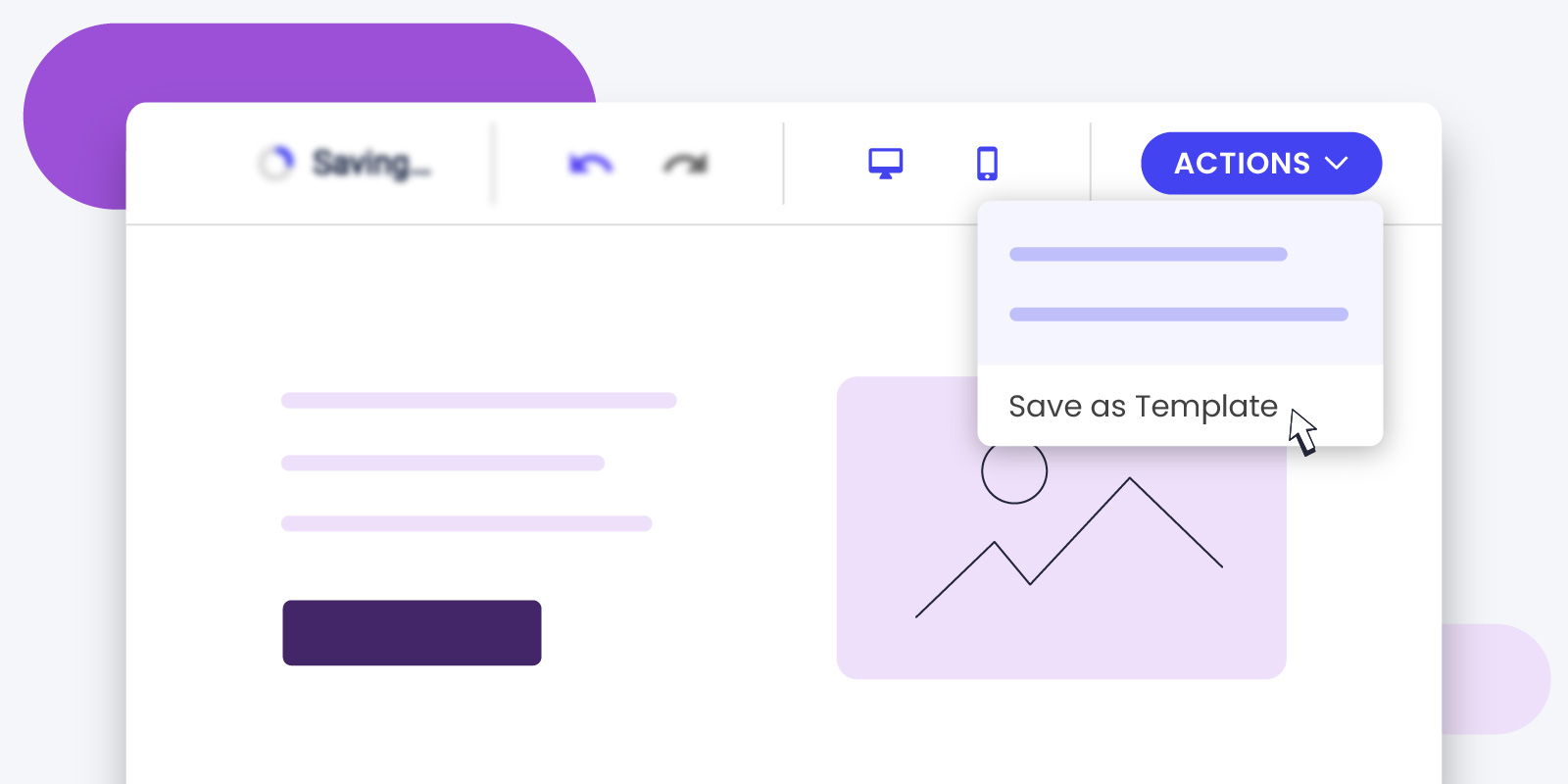
By popular demand, SiteGround Email Marketing users can now save custom templates. Imagine you create an email design you love. Now, you can save it and use it again whenever you want. This means you don’t have to start from scratch every time you send an email, and your emails will look consistently awesome!

Add bullet points and numbered lists 

You can now use bullets and numbered lists to organize and structure your content in a more easily readable format. Bulleted and numbered lists break down information into manageable chunks, making your emails easier to skim and understand, which is very important considering the attention span we people have nowadays. And it also highlights key points, increasing the likelihood of your audience taking the desired action. This feature is designed to improve user experience and engagement, ultimately boosting your email’s success.

New Email Marketing Features: AI Email Writer, Scheduling Emails, and more

New Email Marketing Features: AI Email Writer, Scheduling Emails, and more

The shopping season is upon us, and screens worldwide are about to start glittering with attractive deals. But here’s the burning question: How does your business break through the clutter and make those sales? 

Well, email marketing is your powerful ally and here at SiteGround you have the perfect tool to capture its potential. Designed for ease, our tool ensures even beginners can create and deliver professional emails that drive results. Even more, right on time for Black Friday, we are launching  fresh-out-of-the oven features – from special, pre-made Black Friday and Cyber Monday email templates and an AI email writer to smart scheduling options and a sprinkle of playful emojis.

Black Friday & Cyber Monday Email Templates That Help You Sell

Black Friday and Cyber Monday are fast approaching! And with so many preparations to do in so little time, your email marketing could be up for a challenge. But don’t worry, we’ve got you! To make sure your email campaigns are a success, we’ve made a set of pre-designed templates, which empower you to launch impactful email campaigns with just a few clicks. Dive in, make a few finishing touches and send away with ease.

Black Friday & Cyber Monday Email Templates That Help You Sell

AI Email Assistant That Writes For You 🤖 

Have you ever sat down to write an email and found that the words just won’t come? We’ve been there, staring at the black screen, the clock ticking away. But here’s the good news. With our powerful AI email writing assistant, those frustrating moments are a thing of the past. Just share a bit about what you want to say, set the mood, and watch the AI email writer craft the perfect message for you. 

AI Email Assistant That Writes For You

Scheduling Emails To Reach Your Audience At The Perfect Time

In the world of email marketing, timing can be the difference between engagement and being overlooked. That’s why we’re thrilled to introduce our new scheduling feature. Now, you can plan your email campaigns in advance, having the freedom of sending them whenever you want and ensuring they reach your audience at the perfect time. Whether you’re targeting early birds or night owls, different time zones or else, this feature ensures your emails land in the inboxes at just the right time.

Scheduling Emails To Reach Your Audience At The Perf

Supporting Emojis, Supporting Your Freedom of Expression 😍

In the digital age, emojis are the new universal language. And guess what? SiteGround’s email tool is now fluent in it! We now support emojis, allowing you to add a bit more character and flair to your emails. Whether it’s a smiley face to brighten someone’s day or a thumbs up for a job well done, let your emails speak louder and more expressively. 

Supporting Emojis, Supporting Your Freedom of Expression

We can’t wait to see how these new features transform your email campaigns and business results! As always, our mission is to make your online journey as delightful as possible, and we’re here to support you every step of the way. 

[Webinar Q&A] Black Friday Success with Email Marketing

Webinar Q&A Black Friday Success with Email Marketing

Just in time for Black Friday, let’s see how effortlessly you can launch promotional emails or newsletters with our SiteGround Email Marketing tool – no marketing expertise required.

We hosted an insightful live webinar with our Innovations Director, Hristo Pandjarov, alongside Kiril Tsankov, the Lead Product Manager for our Email Marketing tool who showcased the simplicity of our tool, but also shared best practices for email marketing that are designed to help your campaign’s success.

If you did not have a chance to attend, or you simply want to rewatch the session, you can now catch up with the recording of our Email Marketing live webinar on YouTube.

We also got a great deal of interesting questions, so we summarized the most popular ones, as well the ones that we didn’t have enough time to answer during the live webinar in the blog post below.

Integration and Compatibility

Is there a plugin for WordPress that people can sign up with and automatically be added to email groups?

We have designed a Lead Generation Plugin for WordPress specifically for our Email Marketing tool that allows users to easily create sign-up forms and automatically add people to email groups. Clients using the Email Marketing tool can download the plugin from the interface and it will soon be available in the wordpress.org/plugins repo. This streamlines the process of growing your email list and ensures that your audience segments are organized from the outset.

Can we use the email feature while having a Google Workspace with the same domain?

Yes, you can use our Email Marketing tool while having a Google Workspace with the same domain. The DNS change required for the setup of both products is completely different and there is absolutely no conflict in using the two products simultaneously. 

Is this service only compatible with WordPress websites?

SiteGround’s Еmail Мarketing tool is not limited to WordPress websites. It offers flexibility and can be integrated with any type of website, providing a robust solution for your email marketing needs regardless of the platform you use. Do bear in mind however, that our contact generation plugin is currently only available for WordPress websites.

List Management and Segmentation

Can this service handle an email list of 20,000 or more?

Our tool is capable of managing large email lists, including those with 20,000 and up to 50,000 contacts. This scalability ensures that as your business grows, your email marketing efforts can expand accordingly.

Can you segment lists with tags?

Yes you can! In SiteGround Email Marketings “tags” are called “Groups” and offer a simple, yet effective way of segmenting your audience. Using Groups, you can separate your contact list based on different demographics or interests and engage your subscribers with more personalized communication. A common example of this is creating one group for your Leads and another for Existing Customers. Using this approach, you can offer ongoing subscription benefits to your existing customers, while advertising a first-time sign-up incentive for your leads. 

Email Design

Yes, you can customize and add your brand logo to the emails sent through SiteGround’s Email Marketing tool. This ensures that your emails are not only visually appealing but also reflect your brand identity, building trust and recognition among your recipients. 

To customize your brand logo, all you need to do is go to the Email Marketing > Sender Details page and scroll down to the Brand Identity section and upload your logo. Bear in mind it’s a good idea to upload a high-resolution logo, so it does not appear pixelated on high-resolution devices. Even if you need to upload a larger image, fret not, as we will resize it appropriately to make sure it looks great in your campaigns. You can find all the extra details about what size logo to use in our knowledge base – here.

What if we have different styles for different groups; can we configure different template styles?

Not yet, but it will be available in the next few months. 

We know how tempting it can be to experiment with different designs targeting different segments and we are working to give you the flexibility to do so. However, we have to emphasize that for brand awareness purposes, it is better and quite important to adopt a single style of sending emails. That way you keep reinforcing the same brand visuals and your users get used to recognizing your brand. 

To achieve such a single style, users can conveniently tick the box “Apply this design to future campaigns” when sending an email, to ensure future campaigns are consistent with the chosen design.

Email Campaigns

Is this only for Black Friday campaigns?

No, SiteGround’s email marketing tool is not limited to Black Friday campaigns or other seasonal promotions. You can utilize this powerful tool for any project, be it announcing new product launches, sharing valuable content, or nurturing customer relationships throughout the year. We have focused our communication on the Black Friday topic since this is a prime time for email marketing campaigns, for which we have added special thematic layouts in the tool. 

User Experience and Accessibility

Can we add alt tags to the images?

With SiteGround’s Email Marketing tool, you can easily add alternative text (alt tags) to images in your emails. Alt tags not only ensure that visually impaired recipients can understand the content of your emails but also improve your email deliverability and search engine optimization (SEO) efforts.

Is there an option to “Unsubscribe” from these emails when clients desire to do so?

Yes, there is an unsubscribe link which is automatically added to every email you send through the tool, which recipients can use to unsubscribe from your list. Respecting your recipients’ preferences is crucial for maintaining a positive brand image and complying with email marketing regulations.Therefore, once a recipient has opted out of your mailing list, we will automatically exclude them from your future mailing attempts. Recipients can subscribe again to your email list by using a form on your website. Additionally, provided a recipient has consented to re-join your mailing list, you can send them a double opt-in Re-subscribe email through the system. 

Improved SiteGround Email Marketing Tool, Now With Lead Generation Plugin for WordPress

Improved SiteGround Email Marketing tool, now with lead generation plugin for WordPress

Crafting a successful online presence is an on-going process. From curating engaging content to showcasing your standout products or services, you’ve done it all. But despite all your efforts to engage users on your website, do you still find visitors leaving without taking any action? It’s time to transform those missed opportunities into meaningful connections.

At SiteGround, we totally get the ups and downs of building an online presence. So, here’s some good news: we’ve just improved our SiteGround Email Marketing tool with the new Lead Generation Plugin for WordPress. We crafted an easy way to encourage visitors to engage, subscribe to your email list, and become part of your brand’s journey. Even if you’re new to email marketing, we’re here to sprinkle a bit of magic on your journey.

Build your email list and generate high-quality leads with SiteGround

Lead generation is about connecting with real people who genuinely vibe with what you offer. Your website? That’s where you can find high-quality leads. And, with SiteGround’s new lead generation plugin and email marketing tool, you can attract them with sign-up forms, nurture your leads and clients, and ultimately, increase conversions.

Easy plugin setup and integration

If you’re new to building an email list, don’t worry! Just download and activate our new lead generation plugin for WordPress. Easily connect the plugin with your SiteGround email marketing account, so anyone who signs up will automatically land in your contacts as a “Subscriber”.

Create a form in minutes

Easily create your sign-up form and greet your new subscribers with a “successful subscription” message. Plus, you can assign Groups for each form you make for precise audience segmentation. This ensures that the right message always reaches the right person.

Add a form on your site with ease

SiteGround makes it easy to embed a form on your website, allowing you to connect with users and grow your mailing list. Once you create your form, we’ll provide a handy shortcode for you to place wherever you like on your website. Alternatively, you can seamlessly integrate the form using WordPress Blocks within your WordPress editor – just search for our plugin and pop it in.

Built to match your brand

Whether you use Gutenberg or Elementor for your website, our forms seamlessly adapt to your website’s style, ensuring a consistent brand look. Plus, you can tweak fonts and colors to suit your taste perfectly within your WordPress editor.

More ways to engage

Our plugin seamlessly integrates a sign-up checkbox into your WooCommerce checkout and standard WordPress forms. This gives visitors various and convenient ways to hop onto your mailing list.

Why embed a form on your website?

Putting a form on your website is a smart move. Here’s why: 

Build your email list

Collecting email addresses to build your mailing list is the starting point for any email marketing campaign. It allows you to nurture relationships, share updates, and promote special offers directly to those who have shown interest in your brand.

Engage your audience

Adding a form to your website creates an opportunity for visitors to connect with your brand. This establishes a direct line of communication and helps engage your audience, turning casual visitors into loyal customers.

Market your brand with easy email marketing

Build and grow your email list with our new lead generation plugin for WordPress and start sending the right message to the right audience with our intuitive SiteGround Email Marketing tool. Craft compelling campaigns to engage your audience and drive growth, creating a full brand experience.

Ready to boost your email marketing? If you’re a SiteGround client, simply log into your Client Area -> Marketplace -> Email marketing. Once you’ve added the service, you can easily find and download our lead generation plugin in the SiteGround Email Marketing Dashboard under Contacts -> Connect WP Site.

Raising WordPress Default Memory Limit for SiteGround Clients

raising WordPress memory limit to 256 mb

At SiteGround we always strive to go the extra mile for our clients and make website management on our platform as easy and hassle-free as possible. This is especially true for WordPress websites, us being one of the first web hosts to start offering managed WordPress services to spare you tons of manual work and hassle. The extra effort we put into it goes steadily throughout the years, complemented by a strong involvement from our team in the WordPress dev and hosting projects. 


As of recently, we have been receiving a growing amount of requests from clients for an increase of the default WP memory limits – a request reinforced by a new discussion within the WordPress community about raising the default memory limit of the software, since the current values are old and no longer relevant to the present day. Being the resource efficiency geeks that we are, we decided to increase the default values at a platform level and offer a global solution for all WordPress users on our hosting.

Why is an update of the WP memory limits needed?

The WordPress ecosystem, including WordPress themes, plugins, and the software itself is constantly evolving and growing and with that, the need for more resources. WordPress site builders, online store management, e-learning management, etc. get more complex and heavier with time, and require more resources to operate properly. If you have a low memory setting, this can lead to issues with saving your page (as WordPress does not have enough Memory to save the page content to the database). This can also be a cause for critical error messages, or memory-exhausted errors on your WordPress site.

The current WordPress default memory limits are 40 МВ for WP and 64 for WPMU – while many new plugins and themes require a minimum of 128 MB of memory to run properly – and most of them recommend 256 MB, if possible. We’ve always made sure to provide plenty of hosting resources for our clients but unfortunately, the way your application default settings are set to work plays a big role into how efficiently you are using the resources we provide. For example, the current PHP Memory Limit on SiteGround servers is 768 MB, so it definitely allows a higher WP Memory limit.

Currently, if you’re using a heavier plugin, and need a higher WordPress memory limit, you have to specifically contact your hosting provider and request it, or you have to do it manually yourself. But it’s a hassle, even if you know what you’re doing. 
That’s why we decided to override the default WordPress memory settings for SiteGround clients, increasing them to 256M from the default 40 МВ for WP and 64 for WPMU. Here is how we went about it:

All new WordPress Installations on SiteGround Now Come with the Higher Memory Limit Out of the box

We started out by including a new custom config file which overrides and automatically updates the default memory limit for all our new WordPress installations through SiteGround Site Tools. That way all new WordPress instances on our servers get a head start straight from the moment of installation. Same goes for all new WordPress transfers from other hosting companies to our servers, performed with our free WordPress Auto-migrator plugin.

All Existing WP instances will be gradually updated to the new default ones

The situation with our existing WordPress clients was a bit more complicated to tackle, since we needed to be mindful that some of you may have already set a custom WordPress memory limit on your applications. So our solution will not override any custom WordPress memory limit you might have set yourself.

Since we always test, double test, and then test some more everything before going full-scale, we have decided to start gradually updating only the default WordPress memory limit server by server to monitor and perform health checks for each. 

!NB If you have installed WordPress manually in your account, and have not added it to your Site Tools, then our system has no way of knowing about you using it, and your default WordPress limit will not be updated. You will need to do that manually yourself, if needed. In any case, adding your WordPress applications is quite easy. You can do that with a few clicks from Site Tools > WordPress > Install & Manage > Add Existing Site.

That’s why we highly recommend you use our WordPress installer whenever launching new WordPress installations, or WordPress Auto-migrator when migrating an existing WordPress site to us. That way you can take full advantage of our best-in-class WordPress managed hosting services, and multiple improvements that we keep on adding.

How can you check your WordPress Memory limit?

To check the current WP memory limit of your installation you can access your WP admin backend and go to Tools –> Site Health. Then select “Info” and expand the “WordPress Constants” list. Look for WP_MEMORY_LIMIT – this is the memory limit for the website you want to check.

[subscribe_cta]

SiteGround Addresses Critical Security Vulnerability in Elementor WordPress Plugin on Day 0

The Elementor 3.6.0 version of the WordPress website builder plugin introduced a new functionality for easy plugin setup. Unfortunately a serious security vulnerability has been detected, which if exploited, allows full website access, rendering all Elementor 3.6.0 – 3.6.2 versions vulnerable. SiteGround took immediate action to protect our WordPress clients using the plugin, resulting in all instances on our servers being updated to resolve the issue on day 0 of the vulnerability report. Read on for more information on how we have protected our clients.

How severe is the vulnerability?

The issue is critical, since it allows regular website users, including subscribers, to fake an Elementor Pro .zip file, upload and activate it to a website, executing pretty much any code part of the archive. That means that if you are using Elementor version 3.6.0, 3.6.1 or 3.6.2 for your WordPress site, and user registration is enabled on it (for example WooCommerce websites, membership websites, etc.) an attacker could get full access to your site.

What did we do to protect SiteGround clients?

Due to the severity of the issue, we immediately updated all Elementor plugin instances on our hosting servers. We did that for all clients using the Elementor plugin for WordPress on SiteGround – both the free and the paid versions of the plugin – just to be on the safe side. So, if you’re a SiteGround client, your Elementor plugin version is updated to fix the vulnerability. If you have a WordPress website using the Elementor plugin hosted elsewhere, we recommend updating your plugin version immediately to avoid staying vulnerable.

[subscribe_cta]

New Critical Linux Kernel Vulnerability (Dirty Pipe) Patched Hours After Detection

Earlier today our security team received confirmation about a critical vulnerability in Linux affecting all kernels since 5.8 (CVE-2022-0847). Dubbed The Dirty Pipe, the vulnerability poses an extremely high-security risk, allowing attackers to overwrite key website files and gain full access to servers. Needless to say, that is a huge security threat with a very large scope that allows unprivileged access to root processes and configuration files.

Our security team started working on it immediately after the initial reports. Even though the Linux kernel is a third-party software, at SiteGround we’ve always been proactive, with a dedicated hands-on expert security team instead of waiting for an official patch release. Our kernel specialists developed a custom mitigation which was extensively tested. Once we were certain no other functionalities were affected, the fix was deployed across all our systems and servers, hours after the vulnerability was discovered.

We were among the very first, if not the first host, to successfully write and deploy a patch against this high-risk security threat. At the moment, no SiteGround servers are affected by this vulnerability and there was zero downtime involved in the entire process. Our clients are fully protected and don’t need to make any changes!

[subscribe_cta]

Speed Optimizer (formerly SG Optimizer) is Now Available аnd Free for All WordPress Sites

When we started developing the SiteGround Optimizer plugin back in 2012 we wanted it to be a bridge between our services and our clients’ WordPress sites. During the years we introduced more and more features and the SiteGround Optimizer (now named Speed Optimizer) became one of the best performance optimization plugins for WordPress, based on popular ratings. And naturally, we started getting inquiries about how websites non-hosted on our platform could benefit from it. That interest gave us a push to decouple the plugin from its dependency on our infrastructure and convert it into a hosting-agnostic, completely free solution for all. We are now excited to announce that as of its latest version, the Speed Optimizer plugin can be used by any WordPress website, regardless where it’s hosted! 

Features Available on Any Hosting Platform

Making the Speed Optimizer available on other platforms wasn’t a simple task. Part of the success of the plugin is tied to the SiteGround server setup that is built with performance in mind and takes advantage of some of its unique features. To open it up, for every feature that was dependent on our platform’s services, we had to come up with a solution that would work just as effectively on different platforms and configurations. 

File-based Caching (NEW FEATURE)

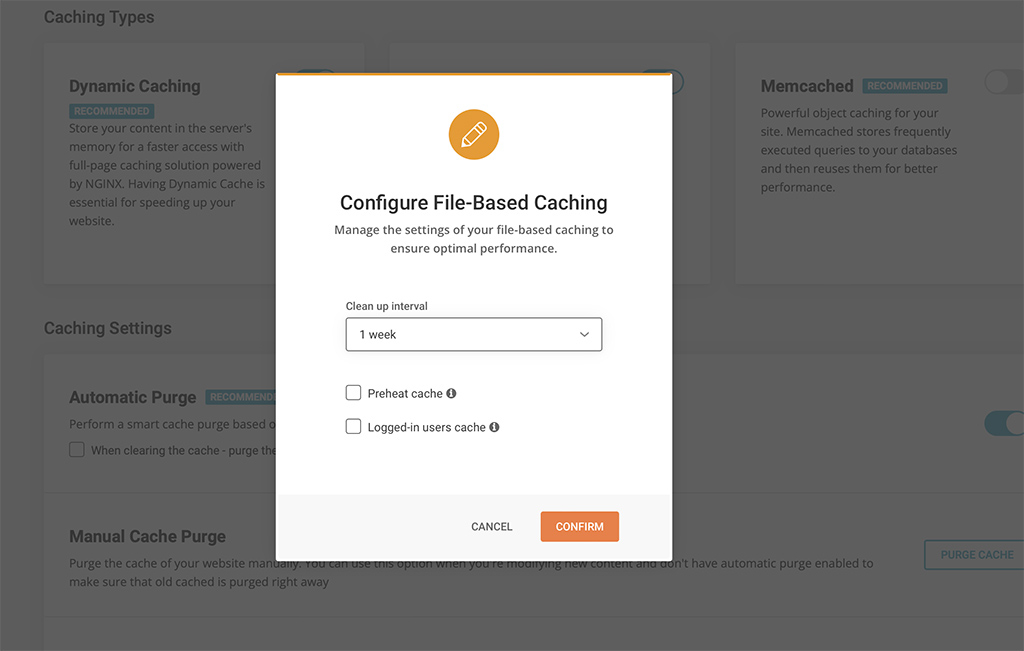
File-based Caching introduces preheating and cache for logged-in users!

Nowadays caching is one of the most effective means to optimize performance. When looking for alternatives to Dynamic Caching (built-in feature for all SiteGround websites) we decided to implement File-based caching because of its versatility and compatibility with different hosting configurations. File-based Caching can be used on its own on websites hosted outside SiteGround or as an additional caching layer for SiteGround customers who already have Dynamic Caching and Object caching (Memcached) enabled. 

Some great features of the File-based caching are the ability to keep cache for logged in users, pre-heating cache (especially useful for rarely opened pages that are opened for the first time in a while) and defining longer cache expiration. These options are configurable in the plugin interface. Although file-based caching alone is generally slower than the Dynamic caching, our tests show that its implementation in Speed Optimizer is still up to 20% faster than any other plugin that provide similar performance-optimization functionality that we have tested.

Environment Optimizations

All users can enjoy several types of environment optimizations that will tidy up your WordPress environment to achieve top performance. Here you can find features like WordPress Heartbeat Optimization where you can define how the WordPress API interacts with your application to optimize resource usage, and  Schedule Weekly Database Maintenance to make sure that your WordPress remains tidy and uncluttered.

Frontend Optimizations

The website’s front-end code can often be heavy and significantly reduce loading speed. There are several features in the Speed Optimizer that can optimize it and as a result speed up your website. Minifying your HTML, CSS and JavaScript output will decrease the size and number of server requests related to these types of files and as a result decrease loading time. We have made these functionalities available through simple toggles in the plugin. You can specify which types of files you want to minify, combine and even exclude from minification or combination. And if all of this sounds too technical for you, you can just look for the “Recommended” labels next to each option to figure out what would have the greatest impact on your website’s performance.

Media Optimizations

There are several media optimization tools in the Speed Optimizer that will work on all hosting platforms. You can enable Lazy Load with which only the media in the visible part of the browser will be loaded. This makes loading faster and smoother for longer pages with multiple media items. You can also define the Maximum Image Width allowed for images on your website. A lot of themes and plugins tend to upload excessively large images that slow loading speed without ever being displayed in their full width. 

SiteGround Exclusive Features

As mentioned earlier, our platform has some unique speed settings and services, which cannot be replaced with plugin functionality alone since they need the specific server environment to run as designed. These remain exclusively available to websites hosted on SiteGround. 

Dynamic Caching and Object Caching 

One of the best speed-enhancing features you can get for your website and our top choice when we talk about speed, is the Dynamic Caching. The Dynamic Caching is part of our proprietary 3-level server caching implementation that relies on NGINX Direct Delivery for static cache handling, Dynamic Cache for dynamic content and Object Caching (Memcached) for storing data and objects in the RAM. We believe that Dynamic Caching is essential for every website and we have it included in all of our hosting plans. From the Speed Optimizer plugin you have control over advanced WordPress-specific settings for the Dynamic Cache and Memcached to get the most of this technology. 

Image compression and WebP

The Image Compression and WebP features of the Speed Optimizer plugin are two essential features available to websites on the SiteGround platform exclusively. With our image compression algorithm you can decrease your image size (and respectively the time it takes for your images to load) by up to 85%, while keeping the image quality high for your visitors. You can also enable WebP which will convert your images to a WebP format which adds an additional reduction in size without affecting image quality. 

Opening the plugin to websites hosted outside of SiteGround was a big step for us. After running multiple tests on different hosting platforms and benchmarking performance against WordPress plugins with similar functionalities, we’re confident that the Speed Optimizer plugin is the best performance optimization tool you can get for your website regardless where it’s hosted. And it’s completely free. Download it here, try it yourself and let us know how it works for you by leaving a comment in the section below.

[subscribe_cta]