Status Report on the Switch from cPanel to Site Tools

It has been а little over a year since we launched our new client interfaces – the revamped Client Area and the in-house developed Site Tools that is replacing cPanel. In August 2019 we started onboarding all new clients to the new interfaces and shortly after we began working on the migration of our existing clients. As of now, all our clients are using the new Client Area and we have also successfully converted more than 9000 servers from cPanel to Site Tools. 

Looking back on the past 12 months, evaluating the complexity of the transfer process and the non-transfer related challenges 2020 has placed in front of us, I believe that we have managed to keep a healthy migration pace. This was achieved thanks to the tremendous amount of work of all teams involved in the transfer and despite the occasional slowdowns coming from various circumstances.

Still, we have a lot more accounts and servers to convert and many of you may be wondering why it is taking time and when is your site’s turn coming. That is why we decided to do a follow-up and tell you the story of what we have done behind the scenes during the past year and what’s the forecast for the upcoming months. 

The innate complexity of the migration

It is not surprising that the migration of over a million live sites from cPanel to Site Tools is a tremendously complex process. I might say it is comparable in terms of efforts and resources needed for the creation of the new interfaces and systems themselves. It is quite a challenge to move operational sites from one platform with a certain structure to a new platform with a completely different one, without affecting the availability and functioning of these sites. 

On the surface, it seems that there is just one simple difference between the two frameworks —  no addon sites under one hood. What this actually means is that we have to be able to untangle any subordinate sites from the main cPanel account and recreate them as separate stand-alone accounts in our new platform. And to illustrate how complex this process may be for different website setups I will list a few examples below:

Multiple addon domains using one and the same database

Normally, this is not a reasonable thing to happen, as each website, even addon ones, should be using their own database. However, this was technically possible with cPanel and there are actual sites set up this way by our customers. When such a site needs to be migrated, our migration script has to detect the case and create a separate database for every site and copy the data. After that, the script automatically reconfigures each website to use the respective database.

Applications with absolute paths in their configuration

Another thing that the migration script should fix is multiple applications set to use absolute paths in their configuration. The system has to detect those and once they become independent sites with different system users, to automatically reconfigure them to use the new system paths.

The Addon/Parked/Subdomain infinite setup options 

The infinite number of ways users can set up and sometimes mess up their document root paths for the different applications when using the addon, parked, and subdomain functionalities in cPanel is the biggest challenge for our transfer process. We have managed to list more than 30 different ways of unorthodox document root path cases. One of the most common examples is when more than one addon domains are configured to use the same folder.

This is a common “hack” of the cPanel system people use to park a second domain to an addon site — an option that is officially not allowed in cPanel. So in such setups, the system has to automatically decide which site is each domain going to and in what role (primary or parked). In some cases, the setup is so complex that the domains cannot be configured automatically and the migration should be attended manually.

Serious Development Assignment 

Automating all possible processes

We started our first migrations in September last year very cautiously. The migrated sites were manually reviewed and each of the issues described above, plus many more that appeared, have been addressed with new iterations of the migration script. Needless to say, the manual checks of the first migrations took a lot of time and was not something that could be sustainable in the long run, so we have added several additional automations to the migration script. 

We now do automated pre-checks of all accounts to be migrated. If there is an indication of a possible problem, we fix it before the migration has started. After that, the account is actually migrated from cPanel to Site Tools. Once the migration is over, we run another automatic check for post-migration issues. If any issue is detected the account is marked for manual review.

Additionally, we have developed an automated system for communicating the progress of this process with the customer whоse accounts are being migrated. With all these systems now being in use, we are able to convert about 900 cPanel accounts per day with a very low fail rate. 

Switching to the New Customer Area first

In the beginning, we planned to migrate each customer simultaneously to the new Client Area and the new Site Tools. However, we soon realized that it will be much better to untangle the new Client Area from Site Tools and move all clients to the new Client Area first. There were several reasons for this decision: 

  • First, the Client Area migration was in itself less risky, as it did not directly affect the hosted websites functionality. 
  • Second, we figured out that providing the Client Area first will give all our customers some time to get used to the new interfaces. We do appreciate the effort needed to learn a new interface, so by getting used to our new UX logic with the Client Area, we wanted to make the transition to the more functionality-dense Site Tools smoother for our users. 
  • And third, daily maintenance of two Client Area interfaces was taking away precious time from our technical teams. Time that could have been spent on perfecting the migration scripts.

The decision to untangle the transfer to both interfaces required temporary focus change, as we now had to invest some development time into accommodating cPanel accounts in the new Client Area interface, which was not initially planned. However, in the long run, we believe that this decision brought the end date of the whole migration closer. We are very proud to have all our clients successfully using the new Client Area since May 2020. 

The challenges of 2020

As we all know this year has been extremely unpredictable and for perfectionists like our managerial team, planning has become a nightmare with too many variables and dynamic factors that inevitably slowed down the migrations during the year. 

Transfer to Google Cloud Platform

One of the things that made us reorganize our initial plans was really positive — the finalization of our contract with Google Cloud. Moving our service to a cloud-based platform was the other big project we had been working on in the past years. We knew that moving to Google Cloud would provide a lot of immediate benefits to all our customers and completing this migration first would enable us to dedicate all resources to the much more complex switch to Site Tools.

Therefore, once we finalized the contract with Google, the migration to Google Cloud was prioritized in the queue of our DevOps and SysAdmin teams. They worked fast and did a great job – we managed to migrate our whole platform to Google Cloud in less than 4 months. And we are talking about more than 4 PB of data! Though a big part of our resources was invested in the Google migration for several months, we still managed to do considerable work on polishing the Site Tools migration scripts in the meantime.  

The COVID-19 effect

Of course, we cannot forget the COVID-19 effect. During April and May, with quarantines affecting many of our geographical markets, we have seen an unprecedented uprisal in support inquiries. It was only natural, as the online presence has suddenly become much more important for a great number of people and businesses, leading to a higher level of activity by all website owners.

We were truly swamped and for the first time since we started operations, we had to literally throw all our resources into customer support. Despite hiring new people, the volume of work was so big that every department had to focus and contribute in some way to the provisioning of the service and optimization of how that service was delivered. Again, that was putting the focus away from the migrations and even though we kept a core team working on them, the managerial and operation attention was elsewhere and migrations were going slower during this period.

That being said, I still believe we managed to address both of the big 2020 events quite well and managed to remain reasonably on track with our third main endeavor — the transfer to the new interfaces. 

Current status of the migration

At the moment Cloud accounts are being migrated with the highest priority. We aim to complete the migration of the majority of the clouds by mid-December. There is a small percentage of Cloud accounts that are not included in this plan. These are accounts where existing WHM functionality was used to create custom cPanel plans. This means that custom resource limits were set by the cloud owner to the separate cPanel accounts on the cloud. As preserving these settings is a serious additional complexity to be addressed by the migration script, we will have to postpone such accounts’ migration. (In case you own such a cloud account, and you believe you do not need to keep your custom cPanel account settings, you may contact us through the Other Technical Issues category in your Help Desk and request your cloud inclusion in the current migration schedule.)

In the meantime, we are also working hard on the shared server migrations. Due to the larger volume of data on them and the different setup specifics, their migration rate is much lower at the moment. However, now that we are close to finishing the cloud account migration, we have focused more resources on optimizing the shared servers migration process and expect to see a larger number of shared accounts migrated in the next several weeks. 

On behalf of the whole SiteGround team, I would like to thank you all for the patience this year. We are fully aware we have created expectations for a change and it may be taking longer than you have anticipated, but we really do our best to make this super complex switch happen as soon as possible and at the same time to be a safe and easy experience for all our customers.

[subscribe_cta]

New, Ultrafast PHP for up to 30% Faster Websites

Custom PHP Setup on Site Tools

Speed is one of the pillars of our hosting services and wе’re constantly working on making our infrastructure faster and more reliable. One of the essentials for a fast loading speed is the way the PHP is handled on the web server and now, with our new Site Tools platform and without the constraints of the old system, our DevOps team got the opportunity to develop a new and ultrafast PHP setup that is up to 30% faster and as secure as everything we do.

Ultrafast, yet Super Secure PHP Setup

On its own, running a fast PHP is not a difficult task. However, if you want a fast, stable, and secure PHP while supporting Apache and the variety of .htaccess rules defined by users and apps, things get complicated. We wanted to solve these problems and at the same time increase the page loading speed and improve the server stability during traffic spikes. So once we released the new Client area and Site Tools and got rid of major constraints that our old platform was putting on us, modifying our PHP setup became one of the priorities of our DevOps team.  

After several iterations, we managed to overcome the biggest “speed over security” challenge and delivered a fast PHP with our WAF and account isolation integrated, thus getting better performance results without compromising with security. The new implementation is super fast, secure, and efficient.

Our Ultrafast PHP vs Our Standard PHP

While the new, ultrafast PHP setup is faster and is recommended for websites with a lot of traffic, the standard PHP setup provides some extra flexibility for PHP versions and variables management.  

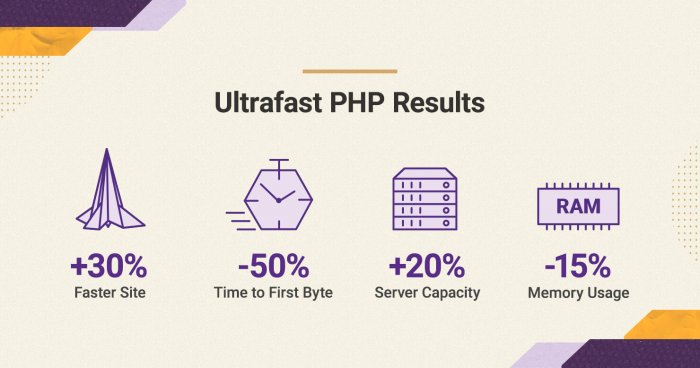
The websites that will benefit most from the ultrafast PHP are those that get solid traffic and may be experiencing resource deficit on the current plan they use. Based on the preliminary statistics we have run, we see the following raw data:

  • Faster page response: up to 50% drop in the TTFB (time to first byte), which will make your pages load faster than before.
  • Increased server capacity: the host node will be able to process about 20-30% more requests, which means it will be able to handle traffic spikes even better than before. 
  • Lower server memory usage: up to 15% drop in the memory usage, which again vacates server resources for handling more of your traffic faster.
  • Expected overall performance improvement: currently the new, ultrafast PHP averages at being 30% faster than the old setup.

Note: the numbers above are average and are based on internal tests. Results may vary per site. 

The new PHP setup is available for websites hosted on GrowBig, GoGeek and Cloud plans, as these plans usually host the type of sites that are most likely to benefit from the performance improvements it brings. It’s important to point out that it works for sites running on PHP 7.3 or higher and is not compatible with older versions. Furthermore, when using the ultrafast PHP service, all subdomains under your site will inherit the PHP version and variables settings from the site’s primary domain.

Our Standard PHP Allows Different PHP Settings for Each Subdomain 

The standard PHP setup is the one all StartUp accounts use. It is also available as an alternative to the ultrafast PHP setup on Site Tools-based GrowBig, GoGeek and Cloud accounts. Its performance is excellent for small and standard sites. Its biggest advantage is that it enables you to manage the PHP versions and variables separately for every subdomain in your site. 

As the standard PHP gives more flexibility for experiments, all staging sites are set up with it too. So if you need to use an older PHP than 7.3 or you need a setup with different PHP versions and variables per subdomain, the standard PHP setup is the one for you.

How to Switch to the Ultrafast PHP?

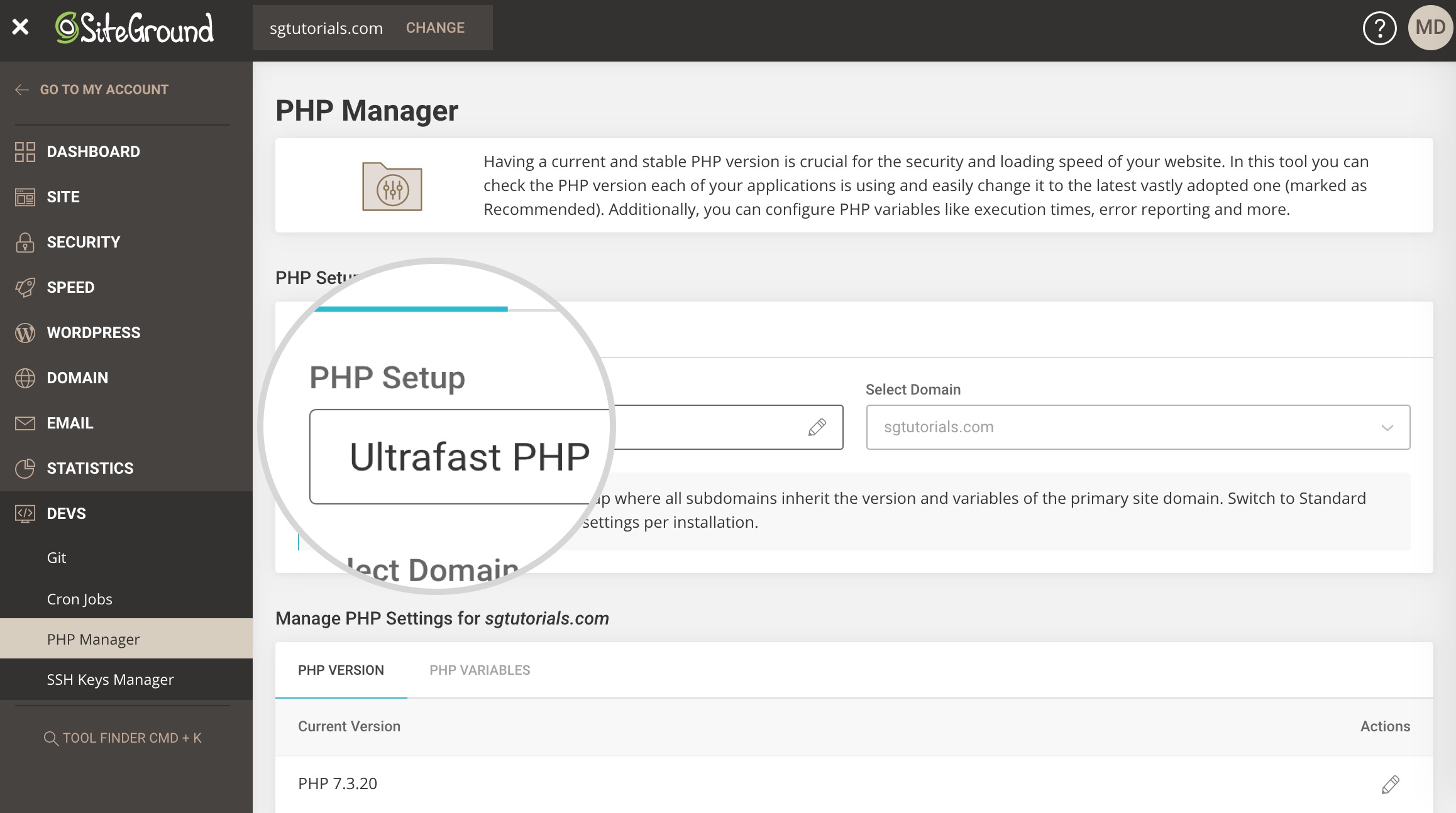
ultrafast PHP setup
  • All new sites created on Site Tools-based GrowBig, GoGeek or Cloud plan come with the new, ultrafast PHP switched on by default. 
  • For existing sites hosted on  Site Tools-based GrowBig, GoGeek and Cloud Plans, the ultrafast PHP is now available in Site Tools > PHP Manager and clients can instantly enable it from there. 
  • If you are a SiteGround client and have a Site Tools-based StartUp plan, you may upgrade it to a higher plan to get access to the ultrafast PHP setup.

[subscribe_cta]

New Webmail App To Manage Email Settings

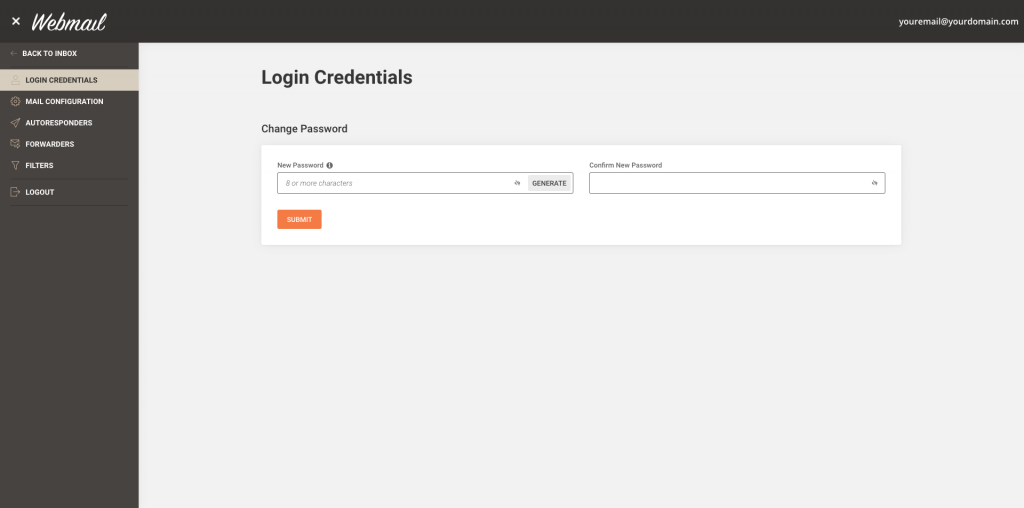
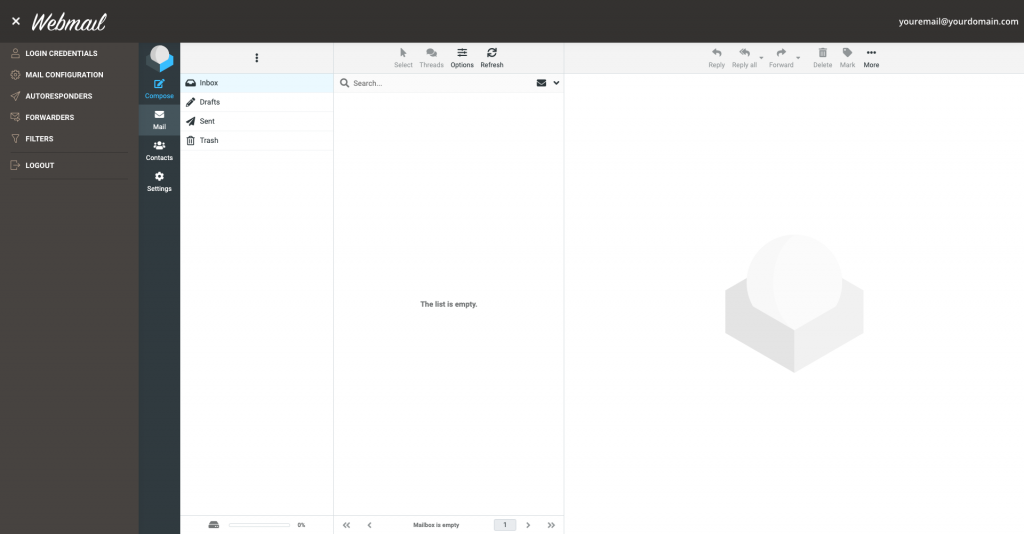
We have just released a stand-alone Webmail application for hosting plans using Site Tools, which allows all email users to change their password and set up different email automation like autoresponders, filters, and forwarders. Until now users could access their mail through a browser (yourdomain.com/webmail* or via the server name), but certain control features were a privilege of the hosting account owner through Site Tools only. 

Users can change passwords and manage settings from their webmail interface

Hosting account owners have had access to a number of tools through Site Tools that allowed them to change passwords and set configurations for all the email accounts created and hosted on their hosting plan. Through the Webmail app now each individual email user gets access to the same tools for their account only:

  • Email users can change their email password directly from the Webmail app. 
  • Users can download an auto-config file for setting up their email account on different email clients or just get the needed settings to do it manually. 
  • Autoresponders can now be created and managed through the Webmail app. 
  • Webmail users can set up their own forwarding rules. 
  • Different email filters can be configured directly in the Webmail application to enable email users to organize and automate the distribution of their incoming emails. 
how to login in siteground webmail

More convenience for our clients and their users

Thanks to the new Webmail app, our clients and hosting account owners can now grant access to their users to all relevant email tools they need to manage their individual email accounts. That will offload part of the email maintenance work you may have been doing for your clients. 

 siteground new webmail app

When accessed through the webmail app, these tools work exclusively for the specific email account in which the user is logged. All the changes made through the Webmail are automatically reflected in Site Tools (the same applies in the opposite direction, too). That will allow you, the account owner, to monitor the changes your users make through Site Tools and intervene if anyone needs help.

If you need more guidance, feel free to check out our tutorial on how to use webmail in Site Tools

NOTE:

Just a reminder that you can access yourdomain.com/webmail only if your domain is pointed to our servers and if you have an SSL installed. If you don’t have an SSL, the browser will display an error.

[subscribe_cta]

Free CPU and RAM Added to All our Cloud Accounts

Starting today we are increasing the resources available to all our new and existing cloud plans with 1CPU Core and 2 GB RAM at no additional cost. The upgrade will make our cloud service faster and more reliable than ever. During the last few months, we have implemented multiple service improvements and the current cloud update is another enhancement made possible by our recent switch to Google Cloud Platform.

More Value With Our Managed Cloud Service on GCP

When we decided to move our infrastructure from bare metal servers to cloud infrastructure, we wanted to get the most out of that switch. We considered all the data redundancy factors, network capabilities, and of course the speed of the new platform compared to the old infrastructure. What was offered by Google Cloud on these parameters was really impressive. We knew that even the mere switch from the previous platform to the new one would result in performance improvements. But what motivated us, even more, to move to Google Cloud Platform were the opportunities we saw to optimize our resource usage, become more efficient and give more value to our clients. The current cloud upgrade is a direct result of the optimization opportunities we have on the new platform. Now our cloud services are not only hosted on a better infrastructure provided by Google Cloud but also receive more resources at the same price as before.  

New Clouds – More Resources at the Old Price

All our cloud offers now come with 1CPU Core and 2 GB RAM more without any change in their current price. Therefore, our entry cloud plan now includes 3CPU cores, 6 GB RAM, and 40 GB space at just 80 USD per month*, which sets the base for any configuration of CPU, RAM, and storage that you wish to create. Additional resource units can be added to this new base at the same prices as before. 

Current Cloud Plans – a Free Upgrade

In the next few days, all our existing cloud users will also receive a free update of their cloud features and will have 1CPU Core and 2 GB RAM added to their existing plan. 

No downtime is expected during this upgrade. However, the option to upgrade or downgrade cloud resources will be temporarily disabled in the Client Area during the upgrade process. Only the Autoscale option will be available to accommodate any urgent need for additional CPU or RAM that may arise during the short period of the feature update. 

* Prices depends on geographical region of the client starting from: 80 USD/mo; 64 EUR/mo; 48 GBP/mo; 80 AUD/mo

[subscribe_cta]

Faster CPUs, More Data Centers, Bigger GoGeek Plans

When we migrated our infrastructure to Google Cloud Platform a few months ago, we knew this was not just a one-time event but the base for continuous improvements for our customers. Today we are happy to announce that thanks to this move, we are able to perform a massive upgrade to faster CPUs, we have two more data center locations and our GoGeek plan offers more space than before. 

40% Faster Processors 

We will update all processors used to host our clients on the Google Cloud infrastructure. The new N2 CPUs perform roughly 40% faster than the ones we used previously. Both our shared and cloud customers will benefit from faster delivery of dynamic content due to more efficient script execution. With the upgrade, your site is expected to need less CPU seconds than before when serving the same type and number of visitor requests. This generally means more room for growth before you need a plan upgrade. Of course, the benefit for each individual site will be unique, based on its own code and database optimizations. 

The upgrade of our current CPUs will be done in the next few weeks. There will be a 24-hour notification about it in your Customer Area. The upgrade will involve minimal downtime due to a necessary reboot (roughly 15 minutes per server). Upgrades are scheduled to happen during the time of the day with historically least amount of traffic. Basically, that should happen very early in the morning, taking your data center local time into consideration. 

Two new data centers – Sydney and Frankfurt

Another great benefit of our migration to the Google Cloud Platform is that we can now add more data center locations around the world. It is a great advantage that we can now count on a single data center partner everywhere and benefit from their uniform high-quality service. We have been a host of choice for many Australians for the past 15 years and now we are extremely happy to provide a data center location on their own continent – in Sydney. 

A data center in Frankfurt, Germany is also available as a response to the numerous requests for German location by our customers. All new plans for customers from these locations are now activated in the new data centers. Existing hosting accounts can be relocated through the marketplace page in the customer area.

More space for GoGeek hosting plan

Our GoGeek hosting plan is often chosen by people reselling hosting service or hosting multiple sites of their own customers. After the move to Google Cloud platform, we are now able to increase one of the resources our resellers need most — the webspace, without changing the plan price. The GoGeek plans have been upgraded with 10 GB, and now include 40 GB disk space. Existing GoGeek plans have also received this upgrade completely free of charge.

[subscribe_cta]

Accessibility in Our New Client Area and Site Tools

As you probably know, we have recently introduced our new, in-house built interfaces for hosting account and website management. One thing we are truly proud of in both Client Area and Site Tools design is the attention paid to web accessibility. We have invested seriously in implementing multiple features that make our service easier to use for everyone, including people with different levels of motor or visual disabilities.

High Contrast Themes in Both Interfaces

Our designers, with the help of accessibility testers and consultants, have created high-contrast themes optimized for visual accessibility. Viewing a high contrast content is generally easier to comprehend, read, and navigate through, and is proven to be beneficial for some eye conditions.

High-contrast settings are also great if you’re working outside and you need a little something to fight sun glare. We have added standard contrast light and dark themes so that any user can choose the best color combination for them.

You can also enable the Easy Read Font option, which is specifically designed to improve readability. This makes the font in your Client Area and Site Tools dashboard more visually appealing and easy to read. 

To manage your theme and font settings, click your profile picture/initials in the upper-right corner > Appearance.

How to navigate to the Appearance page in the Client Area

Keyboard Handling 

Keyboard handling, or the functionality to navigate through a website just with your keyboard, is essential for people who need to use screen readers to navigate and read through web content, as well as users who are permanently or temporarily unable to use mouse and touchpads for a variety of reasons.

Besides an accessibility must-have, the keyboard handling implementation generally makes navigation through different tools and pages faster and more convenient for users, who spend a lot of time managing their site and tweaking multiple settings. You can try it yourself – start with the tab to move between elements and click on enter when you want to activate a switch or enter a menu.

Screen Reader Support

A considerable number of web users heavily rely on using a screen reader software for navigating the web due to permanent or temporary visual disability. Generally, just having a good code is enough to make your site readable for most screen readers.

However, a web application with a variety of custom tools, elements, and different settings such as the Client Area and Site Tools needs a bit more work done to make it accessible for screen reader users. We have dedicated a lot of time to research, develop and test each page in both interfaces to make sure that the content is readable in the most popular screen reader software programs such as JAWS, NVDA, and Voice Over.

Implementing screen reader support for the complex components needed for web hosting tools was uncharted territory for us. We have started the implementation following established accessibility standards and along the way, we have invited accessibility experts with different visual impairments to help us test and improve what we have done. Working closely with them and observing how our work enabled people to do things they weren’t able to do before made our efforts worthwhile.

What’s Next?

We consider the implementations described above essential for any web page. And while they certainly cover a lot of people’s needs for accessibility, we want to go even further and make the Client Area and Site Tools as accessible and easy to use as possible. To do that, in the next few weeks we’ll be releasing additional accessibility features such as an easy-read font.

Help Us Make Our Product Even More Accessible

We understand that due to the diversity of needs users may have and the variety of different software, browsers, and devices used, we may have missed something. Having said that, we’re constantly working on improving the accessibility of both interfaces and we’d love to hear your suggestions and feedback on what we’ve done so far.

If you’re using one of the accessibility features and notice behavior that may be improved, or you’re having trouble accessing specific content, drop us a line in the comments section below.

[subscribe_cta]

Custom Hosting Packages and Roles for your Clients

Custom Hosting Packages And Roles For Your Clients

We are excited to introduce two newly released functionalities for our Cloud hosting plans working with Site Tools – the options to create Hosting Packages and define Client Roles. The Hosting Packages feature allows you to tailor the resources allocated to each of the sites hosted on your cloud, while the client role allows you to specify which site management tools will be available to your clients. 

Customize the hosting resources of your clients 

Customise the hosting resources of your clients
You can specify what resources each package has access to.

With the new Hosting Package feature you can create a custom hosting package for each of the websites hosted on your cloud. By default, every website on a cloud can use the cloud’s full capacity, but with the new feature, you can easily limit any website to the resources you consider appropriate. If you host multiple clients on a cloud plan, this feature will make it easier for you to provide a tailor-made hosting plan to each of them.

Manage the set of tools available to your clients

Manage the set of tools available to your clients
You can specify which tools will be available for each of your clients.

With the new Client Role feature, you can control which tools will be available to the clients hosted on your cloud. By default, all clients you create receive full access to all management tools in a white label version of our Site Tools. By creating custom roles and assigning them to your clients, you can choose which tools exactly to be included in the Site Tools of each of your clients.  

Who has access to these features?

Тhe new features are available to our existing Cloud customers using Site Tools and new Cloud clients. If you are a SiteGround client and have a Cloud plan with WHM and cPanel, have no worry! We will be switching all our cloud users to Site Tools in the upcoming months and once we do, you will be able to take advantage of these functionalities, no later than March 2021.

[subscribe_cta]

Even faster WordPress sites with our Speed Optimizer plugin (formerly SiteGround Optimizer)

Even faster WordPress sites with our SiteGround Optimizer plugin

During the past few years, the SiteGround Optimizer plugin has become an essential part of the SiteGround WordPress hosting product. We’re constantly adding new features and improving existing functionality to make your WordPress sites faster. Now, we would like to tell you more about the most exciting changes we have introduced with the latest versions of our plugin. Read below to find out about the most recent front end and media optimizations in the plugin and how to test your site speed easily through your site backend using our cool integration of the Google PageSpeed test.  

Stop render-blocking JavaScripts from slowing down your site

Very often JavaScripts in the site header do not allow the rendering of the rest of your web page until they are fully loaded. With our new feature you can defer render-blocking JS and load the rest of the page without waiting. Thus, your visitors will see a fully loaded page faster. We are aware that some scripts should always remain render-blocking. For example, like in the case of the jQuery script, there might be other scripts that rely on them. To accommodate such scripts, we’ve created an easy-to-use functionality to exclude specific scripts from being deferred. You can find and manage this new option in the Front End tab of the SiteGround Optimizer plugin.

Stop render-blocking JavaScripts from slowing down your site

Avoid unnecessary video loading with our new lazy load options

Lazy load of images has been available in the SiteGround Optimizer for quite some time. When enabled, it stops images from loading until they are scrolled to in the browser. Thus the first visible part of your page is loaded faster without waiting for images, that may never be reached by the visitor, to load at the background. Now you can use lazy load for iframes (YouTube, Vimeo & other embeds) and directly imported videos too. Another new feature allows you to select whether you want to lazy load your site on mobile devices or not.

Avoid unnecessary video loading with our new lazy load options

Use the latest and fastest web image format – WebP

WebP is the newest, extremely exciting image format that has a great potential to optimize loading speed of all images on the web. This format may decrease the size of your images between 25% and 35%. The SiteGround Optimizer now allows you to create webP versions of all the images from your WordPress site with a click. Once you do that, we will load these smaller and faster images for browsers that support this format.

Use the latest and fastest web image format - WebP

IMPORTANT: WebP support is available for websites hosted at SiteGround using our Site Tools. 

Load Google Fonts without slowing down your website

Using multiple fonts, weights and languages from an outside source like Google can easily add up a lot to the number of site requests and slow it down if those requests are done in a render-blocking way. To tackle this, we’ve developed a mechanism to catch loaded fonts, parse them and load them in-line asynchronously. This method proved to be the fastest way to handle Google fonts, the most commonly used font sets online. Once they get cached by your browser, the effect they have on your page speed is reduced to zero.

Load Google Fonts without slowing down your website

Test your site speed with Google Pagespeed 

Another great functionality we’ve added to the plugin is the ability to test your site speed using the Google Pagespeed test right from the SiteGround Optimizer interface. Not only that, but we’ve linked each performance recommendation to a specific functionality in the plugin to guide you how to better optimize your site and achieve top performance!

Test your site speed with Google Pagespeed

Although we believe that the plugin now is the best optimization solution for every WordPress site on a SiteGround server, there are still things that we want to implement and will introduce with upcoming updates. Our roadmap is full of awesome new ideas that will soon become available to you. So keep an eye on our blog and the SiteGround Optimizer change log!

[subscribe_cta]

Moving to Google Cloud

We are excited to announce that we have started using the Google Cloud platform to host part of our infrastructure.  We are constantly researching possible new data center options so that we can offer the newest technologies and the highest level of speed and reliability at convenient geographical locations to our clients. During the last year, we have explored services provided by the biggest cloud providers to evaluate who could meet our needs best and the Google Cloud platform stood out. The first Google Cloud locations, which we already use, are in Iowa, USA; Eemshaven, Netherlands; London, UK; and Singapore. All of our new customers get activated in these locations and we have started to move some of the existing US and European customers too.  

Continue reading “Moving to Google Cloud”

Moving to PHP 7.3 and Managed PHP Updates

An update of our default server PHP version is planned for February 26, 2020. We are going to move forward to PHP 7.3. The version has been around long enough and has already become widely compatible with different CMS’s, themes and plugins. With PHP 7.3 we will be also introducing our new Managed PHP service. Its purpose is to automatically update the PHP version of all users that are currently relying on our choice of default server PHP.

PHP 8.4: Stay Updated! 🚀 Check out our latest blog post to explore the newest features and enhancements in PHP 8.4.

Continue reading “Moving to PHP 7.3 and Managed PHP Updates”