


We have just released a stand-alone Webmail application for hosting plans using Site Tools, which allows all email users to change their password and set up different email automation like autoresponders, filters, and forwarders. Until now users could access their mail through a browser (yourdomain.com/webmail* or via the server name), but certain control features were a privilege of the hosting account owner through Site Tools only.
Users can change passwords and manage settings from their webmail interface
Hosting account owners have had access to a number of tools through Site Tools that allowed them to change passwords and set configurations for all the email accounts created and hosted on their hosting plan. Through the Webmail app now each individual email user gets access to the same tools for their account only:
- Email users can change their email password directly from the Webmail app.
- Users can download an auto-config file for setting up their email account on different email clients or just get the needed settings to do it manually.
- Autoresponders can now be created and managed through the Webmail app.
- Webmail users can set up their own forwarding rules.
- Different email filters can be configured directly in the Webmail application to enable email users to organize and automate the distribution of their incoming emails.
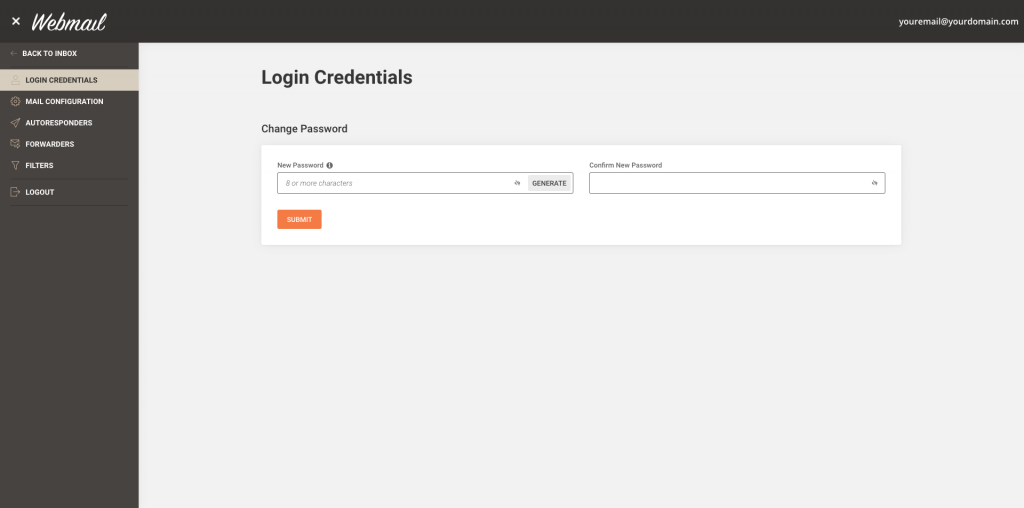
More convenience for our clients and their users
Thanks to the new Webmail app, our clients and hosting account owners can now grant access to their users to all relevant email tools they need to manage their individual email accounts. That will offload part of the email maintenance work you may have been doing for your clients.
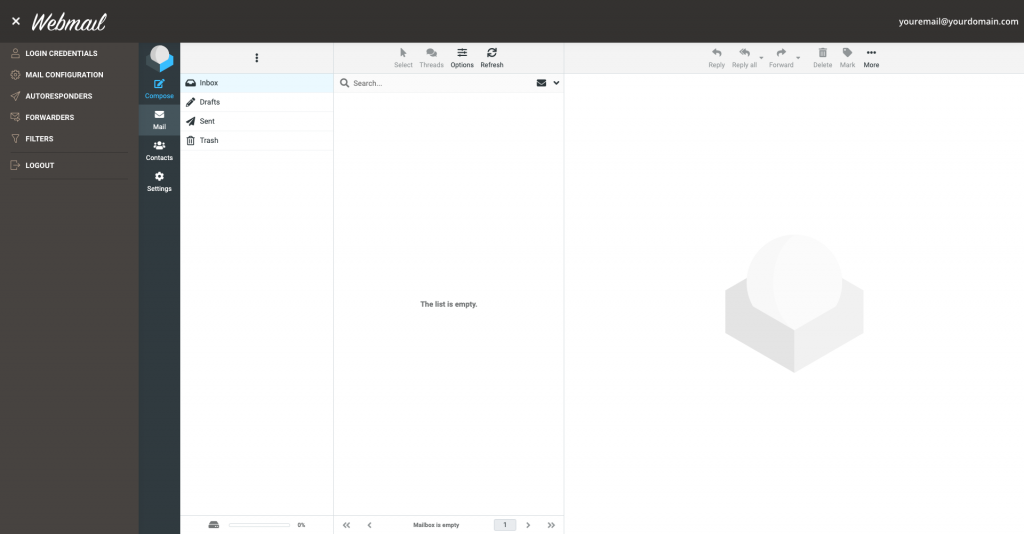
When accessed through the webmail app, these tools work exclusively for the specific email account in which the user is logged. All the changes made through the Webmail are automatically reflected in Site Tools (the same applies in the opposite direction, too). That will allow you, the account owner, to monitor the changes your users make through Site Tools and intervene if anyone needs help.
If you need more guidance, feel free to check out our tutorial on how to use webmail in Site Tools
NOTE:
Just a reminder that you can access yourdomain.com/webmail only if your domain is pointed to our servers and if you have an SSL installed. If you don’t have an SSL, the browser will display an error.
[subscribe_cta]
Hi Monika, how do I install this if I am interested to try for my web mails?
Hello Gary! The Webmail app is available for all sites with Site Tools – if you have one, you can go ahead and just type yourdomain.com/webmail and log into it with Site Tools hosted email and password. It will be available for all sites migrated from cPanel to Site Tools as well, once the migrations are completed.
I can only get into webmail now by signing into Site Tools, whereas with RoundCube I was able to just hit their URL and type in my password. Can I just type my password into mydomain.com/webmail page, or do now have to first sign into SiteGround/Site Tools?
That’s right, you can just type the user/pass, no need to log in to Site Tools first.
Thats not working for me when i type in my url/webmail. It just goes to my website. I would like to access webmail without logging into to siteground.
Hey there, you can directly access your webmail by typing “http://yourdomain.com/webmail” into your browser’s address bar, replacing “yourdomain.com” with your actual domain name. If this redirects you to your website instead of the webmail login page, it’s possible that a redirection is set up in your website’s configuration. If that’s the case, we recommend reaching out directly to our support team. Here are the steps: stgrnd.co/contactus/. They are available 24/7 and would be happy to investigate this further.
Hi, Monica, this is a bit off topic, but since you mentioned it, when do SG anticipate the completion of migration from cPanel to Site Tools? Could the delay be due to the fact that some WPMU installations may have sub-domain email accounts (e.g. name@sub.domain.com)?
It is not connected to WPMU installations. We hope to be able to post an update soon.
It will be awesome to include delete mail filter by date.
That’s a great suggestion, Konstantinos! We’ll discuss it with the Webmail team and consider it for future upgrades.
I love this update! I used to have to ask clients if they wanted us to set up auto-responders ETC for them, but now, they can easily do it themselves! This saves a load of hassle, as we just decided to not offer those features, but now we can offer them, and they’re easy to use! Thank you for this update!!
Glad that you like it, Conrad!
Great news!! Thank you Siteground team!
This will make webmail accounts much more secure, no more sending users their passwords via email!
Will there be more options added for the domain admins?
For example to enforce and monitor users’ password requirements. (Password Policy)
We’re glad that you like it, James! The Webmail has the same password requirements as the ones we use for emails created in Site Tools. We take security very seriously and email users are required to use a secure password. Even if they wanted to use a weak (or a common) password, our system will not allow it and point out what the issue with the weak password is, so that user would know how to choose a more secure password.
Is 2FA coming for emails as well? This would drastically enhance email security!
It would be indeed useful. Thank you for the suggestion.
Is this something that will be added in the future or do you have any feedback from your developers?
We don’t have an ETA when 2FA authentication will be added to our mail login services.
This feature is VERY important. Can your team please push to have it implemented?
It is in our roadmap but I can’t give you an ETA when we will make it available at this point.
My site is still showing the old version?
It is available for sites with Site Tools. As soon as your sites are migrated from cPanel to Site Tools, it will be available for you as well.
This is FANTASTIC! So much easier to manage.
is there any android app available ?
Hi, Webmail is mobile friendly and you can use it on any resolution.
Can I access Webmail through its own page like I used to do with Softcube, or do I have to access webmail through SiteGround itself?
You type yourdomainname.com/webmail to access it, no need to log in to your SiteGround account.
This is pulling up my website and giving me 404 error, not webmail.
Either the app is causing issues redirecting to a 404 or your domain is not pointed to us. Please, contact support for additional assistance.
Is there an App for cell phones?
There’s no specific app for phones, but Webmail is mobile friendly and you can certainly use it there.
This is really helpful. However my sites are still on cpanel, when will they be migrated to the new site tools? And will other functions that are currently available in cpanel also be available in site tools?
We will be able to post a detailed update in the following days. We appreciate your patience.
When will the Site Tool be available, I don’t see this option in my dashboard.
We will post an update about the migration schedule soon.
Any ideas when hosted accounts will be migrated from cPanel to Site Tools ?
We should be able to post more info on that in the following days.
I feel I am slightly behind the times still being on the cPanel version of your site. I could have done with that recently since I wanted to show someone your system for them to move their hosting to you. Sigh.
We are really sorry for this. We hope to be able to share some good news soon.
I’ve been waiting over a year for the upgrade to Site Tools. During most of that time I’ve been stuck halfway between not quite control panel and not Site Tools. Frustrating to see yet something else I can’t take advantage of while I continue to pay the same as everyone else.
We are sorry for the inconvenience. We will be able to post a detailed update in the following days. After the complex process of migrating all Cloud accounts has been successfully completed, we plan to start the mass migration of shared accounts soon.
Thank you. This is the first time anyone has given me an explanation of what is happening with the migration.
How do I connect my contact form on my website to webmail ?
It depends on the application you are using for your website. If your website is on WordPress, please check this tutorial for the required steps: https://www.siteground.com/tutorials/wordpress/use-smtp/
Thank you for your response. I shall give it a go. My site is on WordPress.
How do I get notified when I receive new emails?
You could get notifications if you install a desktop-based email client.
I keep getting Authentication Failed when I try to log in on the Webmail app. If I go through RoundCube no problem using the same log in info.
Could you please try deleting your cache and logging in again? If the problem persists, please contact our Support team so they can check in detail.
hi, I have question about forward email.
Can I use one to many?
I mean when someone send to email A, they will automatic forward to email B, C & D etc..
How to set up?
Thanks
Here is a tutorial on setting up forwarders: https://www.siteground.com/tutorials/email/forwarding-aliases/
In the “To email address” field you can add multiple email addresses.
this is great. I can only sign into the app via firefox. when using chrome on different devices it gives me “required files are empty” error. Yes the details are obviously in the fields. clear cache etc and still same error. ideas?
We don’t have reports about such an issue. Could you please post a ticket, so that our techs could look into it?
I have just moved our site to SiteGround and I am having the same issue
Please reach our Support via the ? icon > View Help > Center Contact Us section. We would be glad to guide you further.
Exclente! Muchas Gracias!
This is great news. Looking forward to this kind of update for cpanel as well where clients can have access to the ‘cpanel’
Is the site different on a computer .v. An iPad as i cant seem to find the side menu bar to set things up?
On iPad you will see the mobile-friendly version of the page. Click on the 3 horizontal lines in the top left corner to access the menu.
I can log in using this if I do it on a desktop but on my phone it says authentication failed
To exclude a caching issue, please delete the cache first and then try logging in again. If the problem persists, please contact our Support team through your Client Area.
I appreciate that you have upgrade the tools, but removing the webmail access that has always been yourdomain.com/webmail has caused a ton of problems for my clients. I did open a chat discussion, but nothing was actually fixed. I was just given a new URL to give to my clients… that said, its really wasting my time when perhaps you should have continued to support that feature.
We are sorry for this inconvenience. We are working on a solution and hope to be able to release it soon.
Hi, I’m curios first how to switch from cpanel to sitetools and second, aren’t these webmail features already available with roundcube?
Thanks
You will be notified when your account is scheduled for migrations. All accounts will be migrated to Site Tools eventually. As to your other question – no, password management was not part of the tool.
Is there any way i can download this app on my android phone? is it available on Google playstore?
It is available through your browser, we don’t have stand alone mobile apps.
Hey, Is their any app on playstore for using Webmail?
It’s a web app, you simply access it through your browser 🙂
Hello MARINA YORDANOVA,
let say if my main domain is http://www.123.com
and I have a subdomain webmail.123.com and it was pointed to siteground.
can use that siteapp if I type webmail.123.com/webmail? ( am I be able to access to my email XXX@123.com?
Hello Susi, are you going to use the webmail.123.com subdomain as a stand-alone website, or do you simply want to use it for checking webmail?
If are using it as a stand-alone website and create email addresses at @sub.domain.com, then you will be able to check these addresses only under sub.domain.com/webmail. Addresses created at @domain.com will be possible to be checked under domain.com/webmail (if the main domain is also pointed to SiteGround).
Alternatively, if you do not use webmail.123.com as a stand-alone website, but only for webmail check, you could set it up in a way that webmail.123.com opens 123.com/webmail, where you would be able to check your email XXX@123.com. Please contact our technical support directly for additional information.
Hi Marina. Is there any way we can set up an avatar with our web mail so that when we send an email, the photo will appear next to our names (same way as we can do for gmail)
That only works if you are mailing from and to Gmail. We don’t plan adding such functionality since we don’t have the massive adoption rate of Gmail 🙂
Hi – I’m toggling between the various user interfaces offered under settings, but now the one I’ve selected doesn’t have a settings button to get back to change out of it – please help!
Please, contact our support team, they will gladly assist you 🙂
Hi! Will it ever be possible to let clients have email adresses that i (the hosting owner) don’t have access to? If my clients change the password in their webmail app i still can access their emails, as i dont need a password if i enter webmail from site tools. But my clients don’t want me to have access to their mails. Why do you not have a solution for that? Are their any other solutions how to do that?
I am afraid that’s not an option. Emails reside on your hosting account to which you have access anyway so that wouldn’t make much sense. You need to have some sort of an agreement with your clients or configure the account so they are owners of the account and then you’re added as collaborator. This way they will manage the email service all by themselves.
not a great email system to be honest. takes a long time having to delete emails. all my other hosting packages with other hosting companies you can quickly delete emails but not with siteground. when are you going to come out of the dark ages into the modern world and allow people to delete the emails more quickly
Bulk delete is available and very easy to do. Just use the shift key to mark multiple mails or hold the Ctrl / Cmd key to mark individual ones and then delete them.
Hi, How can I quickly delete old emails without going through a lot of pages? (To make space for new emails) Are there a option to delete them by date?
Great question, Henlo! You can delete multiple emails at once, once you select the necessary ones.(You can check the available options for email selection here)
Is there any way to manage email accounts through a 3rd party app? or is there a way to add a collaborator that only sees email in site tools?
“Hello, Dimitri! Yes, you can set up your SiteGround email to work with any number of 3rd party apps like Outlook, MacMail, or Thunderbird. More info: https://www.siteground.com/kb/how_to_configure_my_mail_client/ .
Right now there isn’t an option to add a dedicated email collaborator. However, you can achieve almost the same result by providing the configuration settings to anyone you wish to access and manage your emails via a third-party tool. Based on your questions, we’d like to also mention that we recently launched an in-house built Email Migrator app to assist you in moving the email content to us. Check out our article, hope it is useful to you:
https://www.siteground.com/blog/new-email-migrator-tool-for-fast-and-easy-email-transfers/ .
Thank you for the comment and the suggestion as well. In case you have further questions – please contact us directly from the Help Center. Cheers!”
Glad to have found out this solution, however I’d be more than pleased to see it displayed on the new control panel. Or at least shown in the tutorials section rather than in a blog post that you may never stumble upon.
Hello, ELF, thank you for commenting! The Webmail app is listed in the Email Accounts section of your Site Tools. It is available for all sites hosted in your SiteGround account. Here are some Webmail tutorials you might find helpful: https://www.siteground.com/tutorials/email/webmail/
Good morning,
Can someone help me please. I am not receiving any emails since 16:00 03/06/24
Hey there, we are sorry to hear about the issue you are experiencing. To assist you efficiently, could you please reach out directly to our support team by following the steps outlined here: https://stgrnd.co/contactus. Our team is available 24/7 and will be more than happy to further investigate and troubleshoot. We look forward to hearing from you!
How can I create email distribution list in siteground
Thank you for your question. You can create different groups directly in your Webmail:
Access your Webmail and navigate to the Contact tab. While there are three default groups available (Personal Addresses, Collected Recipients, and Trusted Senders), you can create your own list by clicking on the three dots menu and selecting “Add group.”
If you need any further assistance setting up your email groups, please don’t hesitate to reach out to our support team. Here are the steps: https://stgrnd.co/contactus
While the new password reset feature is a welcome improvement, I would like to highlight two major issues:
1. Lack of full language localization – The webmail interface still displays most menus and settings exclusively in English. As a client from Portugal, and on behalf of my non-English-speaking clients, I urge SiteGround to implement complete multilingual support across the entire interface — not just the mailbox or message area.
2. Missing white-label customization – The webmail UI continues to show SiteGround branding and offers no option for resellers to personalize or remove it. This undermines the professional experience we try to offer our clients.
Please consider these points in future updates. They are essential for both usability and brand coherence in white-label environments.
Hello André! We appreciate your direct feedback about having Webmail fully translated into any language you choose; it is duly noted. In terms of white-label options, your GoGeek account allows you to create a Client User role, providing a full white-label experience for your clients, including Site Tools and Webmail. We understand how adding the possibility to customize your own white-label experience can be an exciting feature though, and we thank you for that suggestion as well. Our team remains available from the Help Center if you’d like us to cover anything in more detail.