Starting 2022 with 98% Client Satisfaction Rate

Client survey results 2021

At the end of every year, we turn to our clients for the most important mark that really matters – how you rate our efforts and services throughout the year in our traditional client satisfaction survey. Each year we are amazed and humbled by the positive feedback we receive, and every time we manage to raise the bar a tad higher. In 2021, the result is a stellar 98% overall client satisfaction rating, which is spectacular in any type of client service business, but especially so in the website hosting industry. 

Of course it’s hard to put a number to satisfaction, but it’s a pointer that takes into account your ratings of the main pillars of our web hosting services – website speed, security and support, which we keep strengthening and improving on year after year. Here is a breakdown of some of the things we did in these key directions and the impact that they had on your websites, leading up to such staggering satisfaction numbers in all aspects of our service.
97.7% Client Satisfaction with Website Speed 

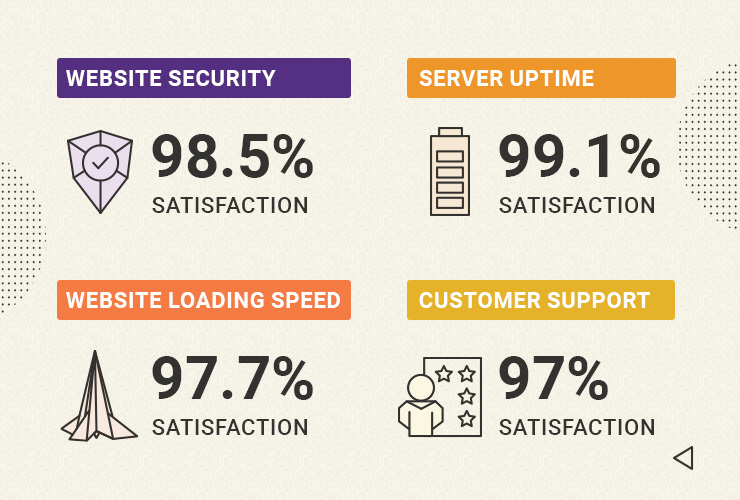
We’ve always been famous for proactively adopting the latest web speed technologies for the benefit of our clients. In 2021 we again introduced multiple new website performance enhancements at no extra cost. We started off by enabling Google’s state-of-the art Brotli image compression algorithm on our servers, ensuring between 15% to 20% website speed gains for clients right out of the box. To add to that, our new MySQL setup allowed websites hosted with us to serve more visitors simultaneously, lowering the number of slow website queries between 10x to 20x times. And by enabling our unique Dynamic caching by default on all hosting plans, clients now enjoy up to 5x times faster page loading time. These are just some of the latest and major improvements we introduced to make your websites run faster, improve your website’s user experience, conversions, and SEO rankings. In return you rated our website speed efforts with the highest marks in the history of our end-of-year client survey – a stellar 97.7% Website Speed Satisfaction Rate!

98.5% Client Satisfaction with Website Security

Parallel to our website speed improvements, we’re always working on new ways to help you with the never-ending quest of securing your website. Our mission to provide the best data protection took another big step this year with the launch of our off-site backups. Apart from our free daily backups and easy restore, we deployed a geo-redundant backup system which minimizes the risk of data loss in case a whole data center facility is in jeopardy for whatever reason. That way we ensure a safe recovery of your site with minimum downtime. In addition to that, our SiteGround Site Scanner security service got improved to include a new scanning method that allows users to run a thorough file scan of their site directly on the host server with a single click. And we also introduced our new centralized DNS for faster, safer, and easier hosting. 

4.3/5 Stars for our Client Tools and Services
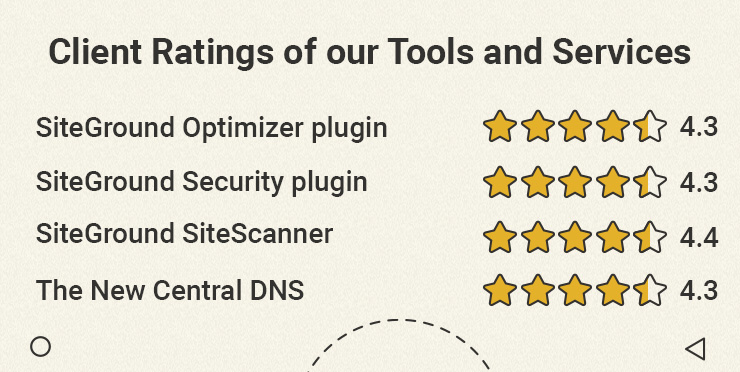
This year was especially rich in new website tools and services for our WordPress users. We launched the SiteGround Security plugin for WordPress – a free tool that greatly improves WordPress security in just a few clicks. And it’s available for everyone, not just SiteGround clients. Just a few months after its release, the plugin was awarded Silver for Best WordPress Security Plugin in the biggest WordPress community award, Monster’s Award. And to round off our list with added-valued services and tools, we released a new version of our SiteGround Optimizer WordPress plugin to upgrade its functionality and add new features for even more site speed and convenience for webmasters. All of these efforts did not go unnoticed, and we got an average rating of 4.3 out of 5 stars for each of our latest tool releases.

  • SiteGround Optimizer WP plugin → 4.3/5 rating
  • SiteGround WP Security plugin → 4.3/5 rating
  • SiteGround Site Scanner → 4.4/5 rating
  • The New Central DNS → 4.3/5 rating

A Look Back and a Look Ahead

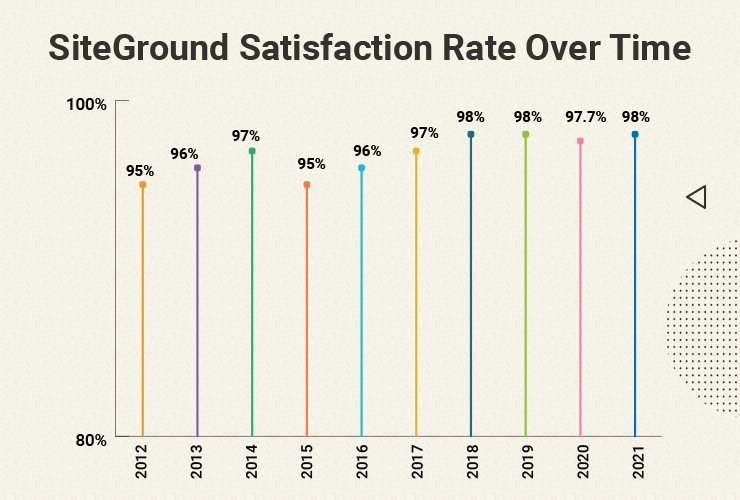
We’ve been doing our client end-of-year survey for 10 years now, the first one dating back to 2012. A decade later, with over 2,800,000 hosted domains, your feedback ratings still manage to go up – starting from 95% overall client satisfaction, up to а steady 98% in the last couple of years.
We are thankful for your feedback and for helping us improve our services year after year. In 2022 we will continue to improve our tools and services and launch new ones for existing and potential clients alike, and hopefully manage to further exceed your expectations yet again.

[subscribe_cta]
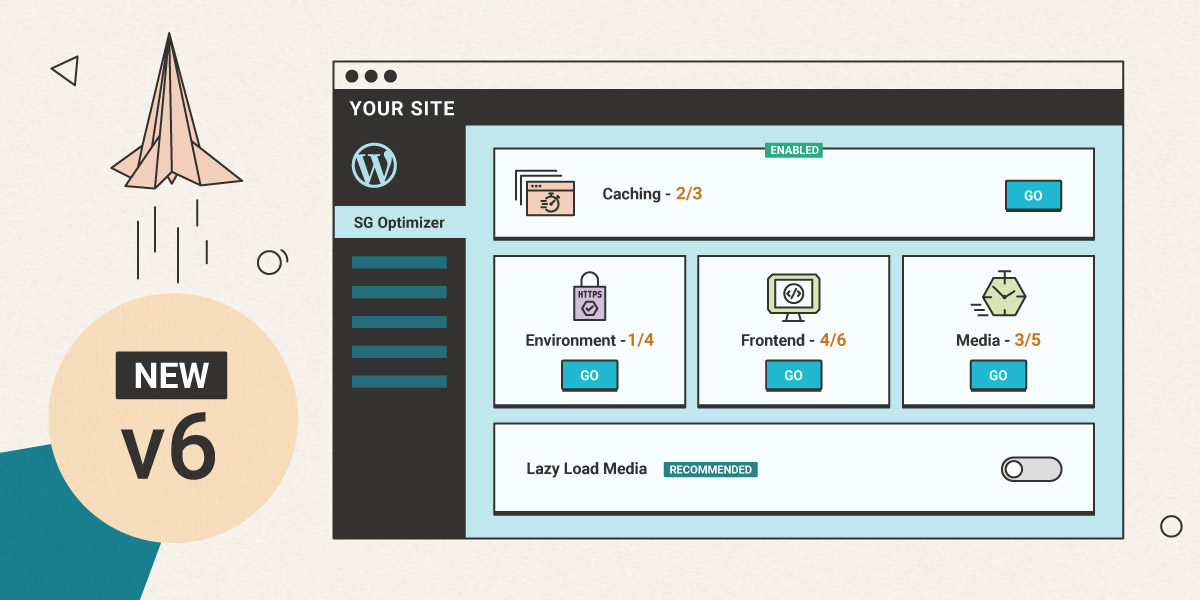
SiteGround Optimizer V6

Since the launch of the SiteGround Optimizer plugin, we have been constantly working on adding new features, improving existing ones, and making sure that we use the best technology available to achieve a blazing fast loading speed for all of our users. That being said, we’re happy to introduce a major update to the SiteGround Optimizer plugin – v6. 

Brand New Design and Structure

One of the biggest changes you’ll notice is our brand new design with separate pages and a brand new dashboard. We have been adding more and more features to the plugin recently and we decided that the previous tab structure was not the best interface for the numerous improvements we have in mind. That’s why we have divided the interface into 5 pages, consisting of separate sets of carefully crafted tools, designed to optimize your website, improve loading speed and even decrease your resource usage. 

New Page – The Dashboard

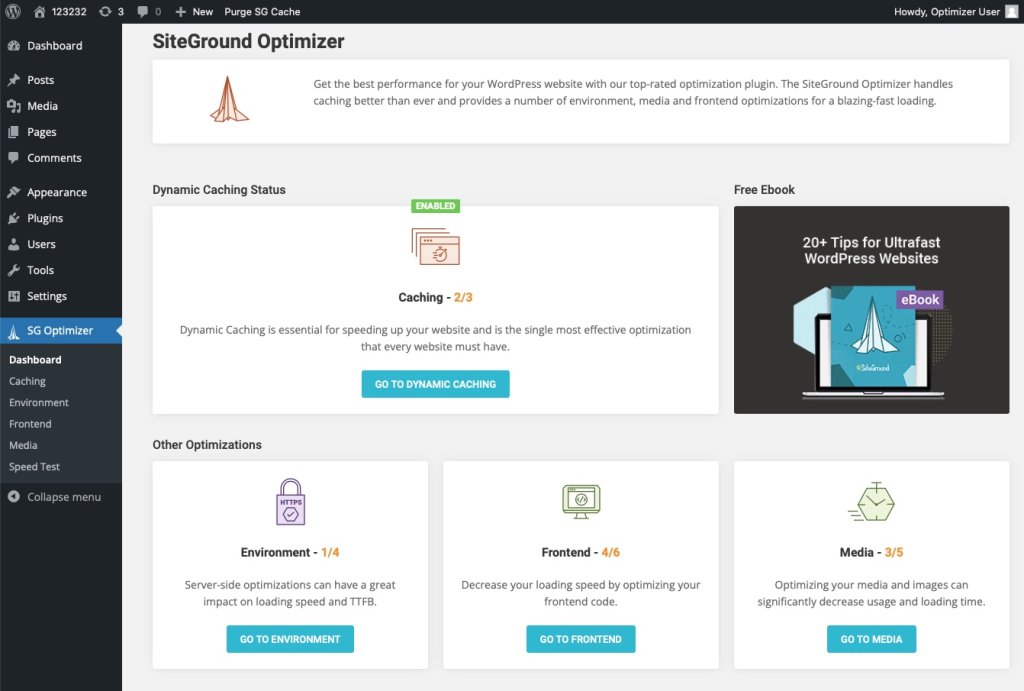
SiteGround Optimizer Dashboard

The entirely new Dashboard offers a quick look at the current optimization status of your website, along with shortcuts to the relevant pages where optimizations may be in order. Since keeping your WordPress application, plugins, and themes up to date is important for your website speed and security, we’ve made sure to add a notification in the Dashboard in case your WordPress and/or plugins need an update.

Recommended Features Tag

Recommended features tag

While we’ve always done our best to explain the different features you can find in the Optimizer, we realise that some of them may still sound complicated to the regular WordPress user and one can find themself struggling to figure out which of the features they need to use. To help you make the best choice for your website, we have added a “Recommended” tag to all SiteGround Optimizer features that we’re certain to speed up your website without breaking something or interfering with other settings.

Improved Image Compression and Image Features

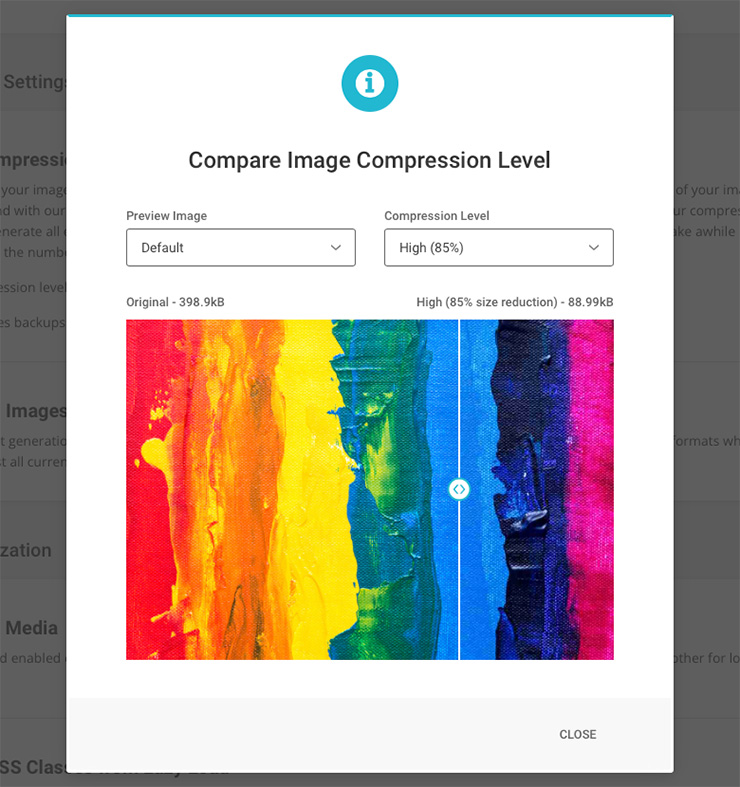
We have significantly improved our image compression technology to ensure that even at the highest compression and size savings, your images continue to look as good as ever. Additionally, we have added a “Preview” option so you can ensure that the compression level you have selected does not visibly affect the quality of your images. You can also choose to do a backup of your original images before you start the compression process – this is a great feature in case you plan to change the compression level in future or you just want to have a piece of mind.

WebP image generation has also been improved and a new option was added for larger images – automatic resizing for all images whose width is larger than 2560px, which is more than enough for most displays where websites appear. 

Code Refactoring

The plugins redesign and restructuring gave us an opportunity to refactor our code and make sure that everything is optimized and tested for the best possible performance. While the whole plugin has benefited from the refactoring, there are two tools where the change was noticeable – the WordPress Heartbeat Optimization (available in the Environment page) which precision and options were improved, and the Automatic Cache Purge (available in Caching) which now includes the option to purge the WordPress API Cache too. 

We have really enjoyed making this brand new version of the SiteGround Optimizer and we’re confident that the tools we have developed will help you serve the fastest and best version of your site. Drop us a comment to say which of the Optimizer features you like most and what would you like to see in future releases. 

[subscribe_cta]

Centralized DNS for Faster, Safer and Easier Hosting

Looking back 2 years ago at our promise to unleash a series of service enhancements after switching fully to Site Tools, we keep delivering! After launching the Ultrafast PHP, new MySQL setup on shared and cloud, SG Optimizer new features, and more, we have also reworked our DNS service to make it faster, safer, more flexible and easy to use than ever. Take a read at what we have done and how that affects your websites hosted on our platform. 

What’s under the hood of our new DNS service 

Let us first make a quick reminder – the DNS (domain name system) is what makes it possible for a domain name to open a specific website. This system indicates on which of all the servers in the whole internet your website is hosted. Usually, a specific set of 2 nameservers and 2 IPs correspond to each server and they should be added in your domain’s management panel for the system to work. Each server also has a DNS service installed on it that processes the DNS queries and shows the proper website when a visitor types your domain in the browser. 

With our new centralized DNS setup we no longer need DNS service installed on each of our production servers that host your website. We are able to move all our DNS services to a completely separate cluster of multiple servers. This cluster is dedicated for DNS service only and is geographically dispersed around the globe thanks to the super cool Anycast network routing technology. Centralized DNS also allows us to have just one pair of nameservers and IPs for all the servers that SiteGround manages, and these are:

  • ns1.siteground.net
  • ns2.siteground.net

What are the benefits of our new DNS service

Faster Domain Resolving, Faster Website Loading

When a visitor searches for your website’s domain, the first thing that the browser does is make a DNS lookup to see on which IP the domain resolves and connects to the server with that IP. With the previous DNS setup lookup requests coming from a different continent from your server’s were handled a bit slower due to the physical distance between the visitor and the server resolving your domain. Now, with the centralized DNS which works on five different geographical locations and multiple instances, the resolving is handled by the closest node saving networking delays and improving your website loading speed.

Enhanced Redundancy 

As the new DNS setup relies on multiple geographically dispersed machines, it is extremely resilient. For example if one of the DNS servers goes down, the DNS requests would be handled by the second closest point, which is up and running. This setup also guards against DDoS attacks, as if there is a high amount of malicious traffic, it will be distributed among multiple DNS machines and it becomes much more difficult for such an attack to succeed. On top of that the DNS service is super scalable, and new machines can be added easily whenever there is a need for more resources.

If you are using your domain simultaneously for your hosting at SiteGround and other services too (for example your MX records are pointed to Gmail), having the DNS service hosted on a different location from your website has one more advantage. In case your hosting server goes down, your DNS will still work and your outside services will still resolve without being affected. 

Seamless Migrations Between Servers 

It’s part of our job to move data around – whether we transfer your account from an old hardware to a newer one, from cPanel server setup to machines with Site Tools setup, or from an old data center to Google Cloud infrastructure, migrations are something that happen and will continue to happen. Every time we migrate servers, one of the biggest challenges is handling the DNS zones. The new server comes with new nameservers and once websites get transferred, the domains have to be pointed to use the new nameservers. We have been updating them automatically for all domains managed via our control panels, but external domains needed manual change by webmasters. In both cases, there would be DNS propagation with potential downtime impact. With the new Centralized DNS it will be much easier to migrate and perform server upgrades in the future. In most of the cases such migrations would not involve any kind of DNS settings change thus preventing any issues caused by propagation. 

More Convenience & Ease of Use for you

With the decentralized DNS, people managing multiple sites on different servers have to keep track of different sets of nameservers, which may be inconvenient. The new centralized DNS simplifies multiple web site management processes for our clients, as all domains of all sites hosted on our platform, regardless of their hosting account or server can now use the same pair of nameservers.

When will the new DNS service become available?

All new websites created on our platform are already using the new DNS service. For older websites, we are now starting a gradual switch to the new centralized DNS. We will be updating nameservers for all domains registered with us automatically. For external domains used with our system, we will be informing our clients by email, confirming when it will be safe to update their DNS settings to the new ones. The old DNS system will continue to be supported for several more months, till the migration to the new one is fully completed. 

[subscribe_cta]

Optimizing the RAM Utilization by the MySQL on the Cloud

Over the last 6 months, it has been all about speed at SiteGround. We have boosted the performance of the websites hosted with SiteGround up to 5 times by launching the new Ultrafast PHP and MySQL setups and enabling the dynamic cache (full page caching) for all sites. As a next major step in this process, we have turned our attention to our cloud servers and are glad to announce that we rolled out a new dynamic RAM-allocation algorithm that further improves the resource utilization of the MySQL and makes the database-intensive websites hosted on our higher cloud plans run faster. 

What is the problem with MySQL?

MySQL could be a real troublemaker. When left untamed, it devours resources and keeps asking for more. If it doesn’t get what it wants, it starts slowing processes one after the other and turns into a bottleneck for database-driven apps like WordPress. So the MySQL settings are the key to resolving many of the site slow issues reported, but many webmasters have difficulties tracing the origins of the slow performance. It is not just a question of adding more RAM. This RAM should be smartly utilized in a way that allows MySQL to run as fast as possible, but still to be restrained from eating up all the available resources.  

We have been helping clients with evaluating what is an optimal allocation of RAM to the MySQL given the specific services running on the website and the available specs and manually resolving those case by case, but, now we have come up with a way to automate that and diminish the amount of work and expertise required by our clients in the process.

What have we done?

We have implemented a dynamic configuration that depends on the amount of memory your Cloud account has. This means that MySQL settings will be adjusted depending on the available resources. We will not only start new Cloud instances with predefined configurations, but in case of an Automatic Scale event (or upgrade), the server config will adjust itself for optimal resource utilization without manual intervention.  That means that database queries will be processed faster and the I/O usage will be lower. Last, but not least, the additional RAM you add will now be utilized more efficiently, and even fast-growing sites will have to add less of it less often and thus save on their hosting expenses.  

Who Gets It?

The new system is already deployed on all Cloud servers! You don’t need to enable it or otherwise configure it. Just watch out for performance improvements and do let us know your feedback. The more database-intensive your site is (such are, for example, membership sites, online stores, forums, etc.), the bigger the improvement from the change will be!

[subscribe_cta]

SuperCacher and Up to 5 Times Faster Sites for All!

It was in the ancient 2012 when we announced our SuperCacher – the feature that allowed our clients to enable static cache, dynamic cache, and Memcached for their accounts. Since then, we have heavily enhanced the technology and fine-tuned its behavior and we believe it is one of the most powerful speed tools we have created for our clients. Currently, the most massively used part of our SuperCacher is the Static cache (NGINX direct delivery), as it is switched on by default on all our plans. Today we take a major step that will result in much more massive adoption of the other two SuperCacher layers and will significantly increase the speed of the sites we host. We now make Dynamic Cache and Memcached available at no additional cost on our StartUp plans too. Additionally, the dynamic cache will be activated on our servers by default. 

Dynamic caching ON for everybody!

Between 50% and 500% faster page loading

To briefly recap, dynamic caching is a technology that caches the HTML output of your PHP code. The PHP language is used so that the content of that same HTML is changed dynamically and upon a set of conditions predefined by the web creator. When using cache, next time that a page is requested, the pure HTML will be displayed from the Cache which is in the server’s RAM, as opposed to wasting CPU and I/O resources to read the PHP file from the disk. Thanks to that mechanism the web page loads significantly faster. And by “faster”, we mean like 50-500% faster based on our internal statistics for sites that have it turned on. The bigger the impact we see on heavier sites – those with more products and queries. Once you enable the cache, the pages start loading as fast as your Internet allows it, literally, since the page response is returned instantaneously from the memory of the server.

WordPress cached out-of-the-box, other applications can also be configured

Until now, the dynamic cache has been available on our GrowBig and higher plans and had to be activated by the users through our WordPress SiteGround Optimizer plugin. Now, we are making the cache available on all plans and we are activating it by default on all servers. Thus, all WordPress sites hosted on our platform will be cached out of the box. Additionally, our clients will be able to configure other applications to take advantage of the cache too. For instructions on how to use the Dynamic Cache with some of the other popular applications, you can refer to our SuperCacher Knowledge base articles.

Dynamic cache management options 

As already mentioned, our dynamic cache option will now work with WordPress installations out-of-the-box. However, WordPress users will achieve the best results through the Dynamic Cache controls of our SiteGround Optimizer plugin. The plugin acts as an additional connector between our dynamic cache and the WordPress application. For example, the SiteGround Optimizer tells your server to clean the cache automatically on each relevant content change and it provides you with an easy option to exclude URLs from being cached altogether. You can also turn off the caching through the plugin. 

If you are using another application, you may need to allow the caching from its backend in order to start using it, regardless that it is activated on server level by us.

As for the flush option, if a change on your website is not shown immediately, as the cached version is still served, you may always use the Flush button in your Site Tools. 

Memcached available on all plans to opt-in

Memcached is probably the most popular memory caching system that is used by thousands of database-driven sites, which speeds up these websites by caching results from database queries in the server’s RAM. Thus, if the result of the same query is needed again, it will be instantaneously taken from the RAM, rather than generated again from the Database, which is usually a slower process and requires more computing power.

Memcached is now available on StartUp plans with Site Tools as well. You can enable it from Site Tools > Speed > Caching, look for tab Memcached. However, please bear in mind that you also need to configure your application to use this cache, once you switch it on from our interface. For WordPress, this takes just a click in our SiteGround Optimizer plugin > Memcached control section, for some of the other popular applications you can refer to our SuperCacher Knowledge base articles

Note:

The described changes will affect only our Site Tools based servers. However, in case your account is still on cPanel, don’t you worry – by the end of March 2021 we aim to complete all migrations from cPanel to Site Tools so you’ll also get these SuperCacher enhancements soon.

[subscribe_cta]

New MySQL Setup For Faster Query Processing

Update

We’re currently migrating all our servers to MySQL 8. Learn more about the migration process in our blog post.

Two of the most frequent reasons a site might be slow are unoptimized PHP processes and heavy MySQL queries. Website code optimization is always a crucial part of the constant battle for more website speed. However, webmasters hosting with SiteGround, have always had a reliable ally by their side in this quest.

Recently we have announced the new Ultrafast PHP, which significantly speeds up the processing of PHP scripts and improve the website performance up to 30%. 
As a natural next step in our efforts to offer a premium and superfast service, we deployed a server-side solution to optimise database queries which has already brought down the number of slow queries between 10 and 20 times!

What are slow MySQL queries and why they matter ?

If you are managing an active site with a database, you probably understand that when a visitor enters your site, there are tons of scripts that start running, some of which ask your database for information. For example, if you have an online shop and a visitor is trying to purchase an item, your store should check for its availability in the database and display if it’s possible to be ordered. That check triggers a MySQL query. And depending on how that query is written it may be quite heavy and time-consuming to be processed by the server. For you as a webmaster, these slow queries are a problem because you will be losing clients. You know how visitors drop out of the site when they have to wait longer than 2-3 seconds for a page to load? Well, you get it. For us as your host, we don’t like it when our servers get throttled processing too many slow queries because this means that the CPU and RAM of the machine get blocked and cannot be used for other processes, which are also important for yours and the other websites hosted on the server.

What did we do?

The battle with slow MySQL queries is an ongoing process, which involves both the webmaster and the host. That is why we recently launched a new MySQL setup on our servers, which takes an innovative approach to distributing the server RAM and allocating it to the MySQL. The new setup allows a much higher number of parallel requests to be processed simultaneously and this has a great impact on the effective handling of heavy MySQL queries. So great that the Sys Admins, watching the server load after the new MySQL setup launch, still don’t believe it – they saw a drop in slow queries between 10 and 20 times! 

All of our latest service improvements such as the Ultrafast PHP and now the MySQL setup are possible thanks to two things – the Google Cloud platform and the switch from cPanel to Site Tools. Since moving to Google Cloud, we upgraded our server configurations with more RAM. The RAM unit price is not cheaper, but working in the cloud offers possibilities for better distribution of that resource among different machines. And the fact that we don’t comply with third-party’s software resource requirements such as cPanel, gives us more freedom to innovate. Our DevOps feel empowered to create and keep developing smart technologies that benefit the greater majority of the sites we host spot on!

Who gets it?

Everyone hosted on our shared Site Tools servers already got the new MySQL setup! If you have been seeing an enhancement in the performance for the last week or so, it’s because of the new setup.

That means it’s less likely that you hear from us asking you to fix a slow query and “socially-distancing” your site due to that. Fewer slow queries, faster servers, less hassle for you!


Cloud accounts are also scheduled to receive the new MySQL setup by the end of February, 2021.

Still a SiteGround client on cPanel? We expect to migrate everyone by the end of March 2021 so all you need to do is wait just a little bit longer.

[subscribe_cta]

More Site Speed Gains with Brotli Compression Algorithm

We are happy to announce that we have deployed and enabled by default the Brotli compression algorithm on our Site Tools servers so websites hosted there could get up to 15-20% speed gains from using it. 

What is Brotli?

Brotli is a next generation compression algorithm developed by Google as a successor to the popular gzip method that we’ve had running on our servers for ages. The idea is simple – once your application produces the HTML output of your website and the output is compressed together with all the resources it loads, the data is transmitted over the Internet and then the browser decompresses the content before rendering it. This process significantly reduces the size of data that’s been moved from the server to the visitor, resulting in speed gains multiple times bigger than the milliseconds lost for compression and decompression.

How much faster is Brotli compared to gzip?

The new algorithm provided by Brotli compresses the website into smaller data size, which makes it faster to transfer. JavaScript files compressed with Brotli are roughly 15% smaller than the ones compressed with gzip. HTML files are around 20% smaller and CSS files get around 16% size reduction. Those numbers of course will differ depending on your particular files.

A test with one of the WordPress’s default themes – TwentyTwenty shows that it produces a 19584 bytes of data uncompressed, 6003 bytes compressed with gzip and only 4863 bytes when compressed with Brotli! This means that you get more than 75% reduction in size from uncompressed content and 19.5% from gzip. 

How to use Brotli?

We have enabled Brotli on all our Site Tools servers and if your account is hosted on one of these, your site will automatically take advantage of it. You don’t have to do anything to get it! 🙂 Browsers that support Brotli compression, which are the majority of the browsers now, pass the appropriate “accept-encoding: br” header when performing the request and get the Brotli-compressed content. Older browsers that don’t support it will be served with gzip-compressed data. If you are still hosted on a cPanel server, don’t worry – we expect migrations to Site Tools to be completed by the end of March 2021 so you won’t have to wait long to get it as well.

[subscribe_cta]

New, Ultrafast PHP for up to 30% Faster Websites

Custom PHP Setup on Site Tools

Speed is one of the pillars of our hosting services and wе’re constantly working on making our infrastructure faster and more reliable. One of the essentials for a fast loading speed is the way the PHP is handled on the web server and now, with our new Site Tools platform and without the constraints of the old system, our DevOps team got the opportunity to develop a new and ultrafast PHP setup that is up to 30% faster and as secure as everything we do.

Ultrafast, yet Super Secure PHP Setup

On its own, running a fast PHP is not a difficult task. However, if you want a fast, stable, and secure PHP while supporting Apache and the variety of .htaccess rules defined by users and apps, things get complicated. We wanted to solve these problems and at the same time increase the page loading speed and improve the server stability during traffic spikes. So once we released the new Client area and Site Tools and got rid of major constraints that our old platform was putting on us, modifying our PHP setup became one of the priorities of our DevOps team.  

After several iterations, we managed to overcome the biggest “speed over security” challenge and delivered a fast PHP with our WAF and account isolation integrated, thus getting better performance results without compromising with security. The new implementation is super fast, secure, and efficient.

Our Ultrafast PHP vs Our Standard PHP

While the new, ultrafast PHP setup is faster and is recommended for websites with a lot of traffic, the standard PHP setup provides some extra flexibility for PHP versions and variables management.  

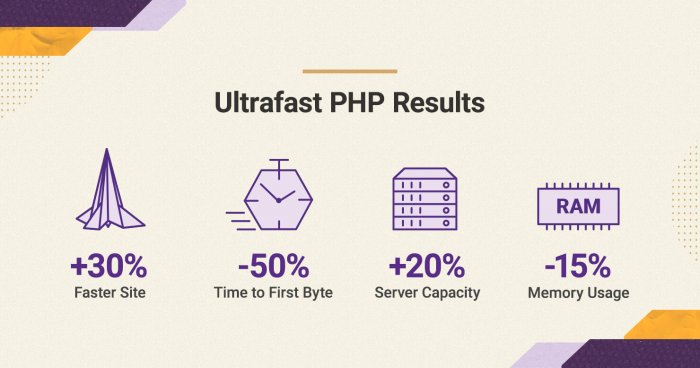
The websites that will benefit most from the ultrafast PHP are those that get solid traffic and may be experiencing resource deficit on the current plan they use. Based on the preliminary statistics we have run, we see the following raw data:

  • Faster page response: up to 50% drop in the TTFB (time to first byte), which will make your pages load faster than before.
  • Increased server capacity: the host node will be able to process about 20-30% more requests, which means it will be able to handle traffic spikes even better than before. 
  • Lower server memory usage: up to 15% drop in the memory usage, which again vacates server resources for handling more of your traffic faster.
  • Expected overall performance improvement: currently the new, ultrafast PHP averages at being 30% faster than the old setup.

Note: the numbers above are average and are based on internal tests. Results may vary per site. 

The new PHP setup is available for websites hosted on GrowBig, GoGeek and Cloud plans, as these plans usually host the type of sites that are most likely to benefit from the performance improvements it brings. It’s important to point out that it works for sites running on PHP 7.3 or higher and is not compatible with older versions. Furthermore, when using the ultrafast PHP service, all subdomains under your site will inherit the PHP version and variables settings from the site’s primary domain.

Our Standard PHP Allows Different PHP Settings for Each Subdomain 

The standard PHP setup is the one all StartUp accounts use. It is also available as an alternative to the ultrafast PHP setup on Site Tools-based GrowBig, GoGeek and Cloud accounts. Its performance is excellent for small and standard sites. Its biggest advantage is that it enables you to manage the PHP versions and variables separately for every subdomain in your site. 

As the standard PHP gives more flexibility for experiments, all staging sites are set up with it too. So if you need to use an older PHP than 7.3 or you need a setup with different PHP versions and variables per subdomain, the standard PHP setup is the one for you.

How to Switch to the Ultrafast PHP?

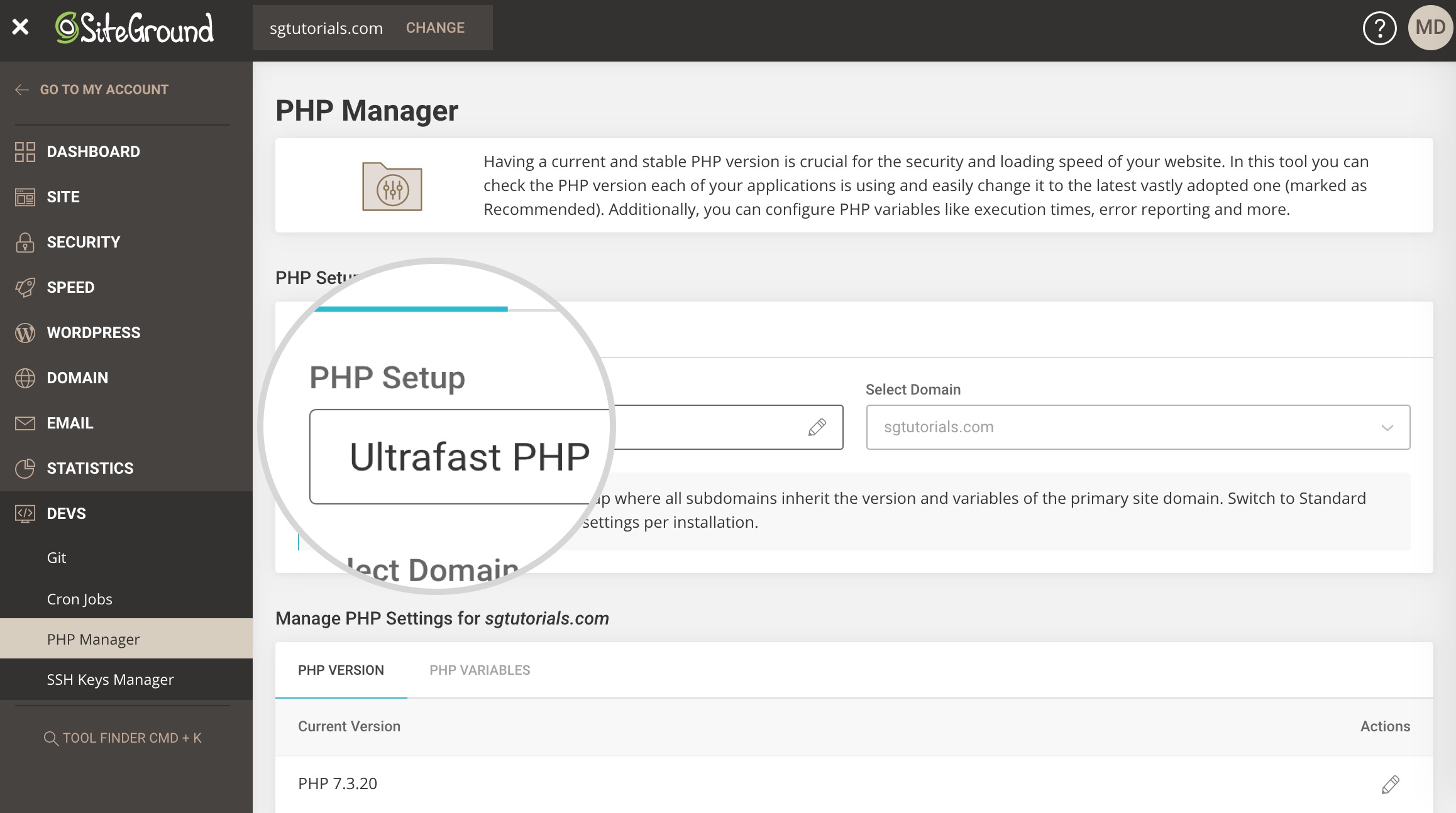
ultrafast PHP setup
  • All new sites created on Site Tools-based GrowBig, GoGeek or Cloud plan come with the new, ultrafast PHP switched on by default. 
  • For existing sites hosted on  Site Tools-based GrowBig, GoGeek and Cloud Plans, the ultrafast PHP is now available in Site Tools > PHP Manager and clients can instantly enable it from there. 
  • If you are a SiteGround client and have a Site Tools-based StartUp plan, you may upgrade it to a higher plan to get access to the ultrafast PHP setup.

[subscribe_cta]

Free CPU and RAM Added to All our Cloud Accounts

Starting today we are increasing the resources available to all our new and existing cloud plans with 1CPU Core and 2 GB RAM at no additional cost. The upgrade will make our cloud service faster and more reliable than ever. During the last few months, we have implemented multiple service improvements and the current cloud update is another enhancement made possible by our recent switch to Google Cloud Platform.

More Value With Our Managed Cloud Service on GCP

When we decided to move our infrastructure from bare metal servers to cloud infrastructure, we wanted to get the most out of that switch. We considered all the data redundancy factors, network capabilities, and of course the speed of the new platform compared to the old infrastructure. What was offered by Google Cloud on these parameters was really impressive. We knew that even the mere switch from the previous platform to the new one would result in performance improvements. But what motivated us, even more, to move to Google Cloud Platform were the opportunities we saw to optimize our resource usage, become more efficient and give more value to our clients. The current cloud upgrade is a direct result of the optimization opportunities we have on the new platform. Now our cloud services are not only hosted on a better infrastructure provided by Google Cloud but also receive more resources at the same price as before.  

New Clouds – More Resources at the Old Price

All our cloud offers now come with 1CPU Core and 2 GB RAM more without any change in their current price. Therefore, our entry cloud plan now includes 3CPU cores, 6 GB RAM, and 40 GB space at just 80 USD per month*, which sets the base for any configuration of CPU, RAM, and storage that you wish to create. Additional resource units can be added to this new base at the same prices as before. 

Current Cloud Plans – a Free Upgrade

In the next few days, all our existing cloud users will also receive a free update of their cloud features and will have 1CPU Core and 2 GB RAM added to their existing plan. 

No downtime is expected during this upgrade. However, the option to upgrade or downgrade cloud resources will be temporarily disabled in the Client Area during the upgrade process. Only the Autoscale option will be available to accommodate any urgent need for additional CPU or RAM that may arise during the short period of the feature update. 

* Prices depends on geographical region of the client starting from: 80 USD/mo; 64 EUR/mo; 48 GBP/mo; 80 AUD/mo

[subscribe_cta]

SiteGround Optimizer 5.6 – Heartbeat control, Automatic Database Optimization and More for Even Faster Websites!

We have just launched the latest major update of the SiteGround Optimizer plugin. The new version greatly enhances what’s already the best performance solution for your website if you are hosted with SiteGround! If you follow the plugin’s changelog you will notice that for the last few years we’ve constantly improved and added more and more functionalities turning the plugin from a simple connector to our server caching systems to an overall performance solution for your WordPress site. Now I am excited to guide you through the most recent features that will help you make your site run even faster:

WordPress Heartbeat Control

The Heartbeat API allows your browser to communicate with the WordPress application when you’re logged into your admin panel. This functionality makes it possible to handle things like scheduled tasks, post and page revisions, locking of a post when someone else is editing it, and more. 

Although it’s a great piece of functionality it may cause excessive CPU usage when left unsupervised. For example, if you just leave a couple of tabs open in your browser on the post edit page, that will execute a script saving your content as a draft for each tab every 15 seconds. That alone results in 480 executions per hour and 11520 per day.

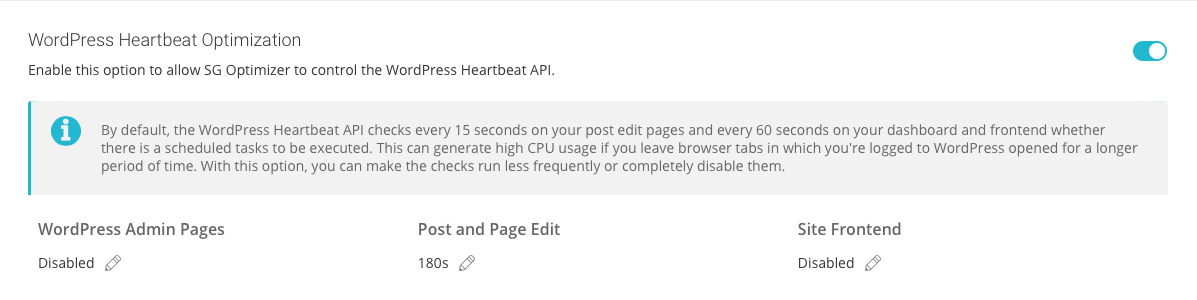
Most people don’t need to save that often. For example, if you’re writing a blog post, having a save every 3 minutes is perfectly fine. With the new settings in the SiteGround Optimizer, you can either completely disable the Heartbeat API if you don’t have any functionality requiring it, or you can set it to work at far bigger intervals. By default, we disable it on your admin and frontend pages and leave it only on post edit to run every 180 seconds.

WordPress Heartbeat Optimization

Automatic Database Maintenance

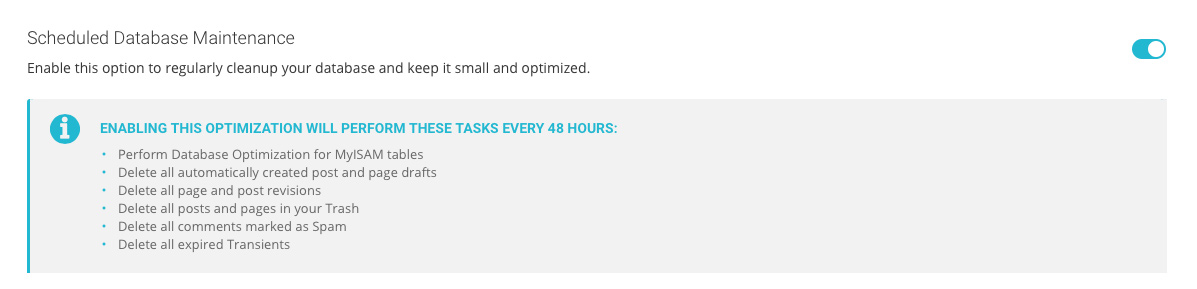
This optimization is really important for WordPress websites but often neglected by webmasters. That’s why we’ve added it to the plugin and set it to run every week. Having that feature enabled will automatically clean your spam comments and trashed posts and pages, and will perform a table optimization and clear all the expired transients from your database. Basically, you will be sure that your database is in a top condition without having to perform the same tasks manually on a regular basis.

WordPress Database Optimization

DNS Pre-fetch 

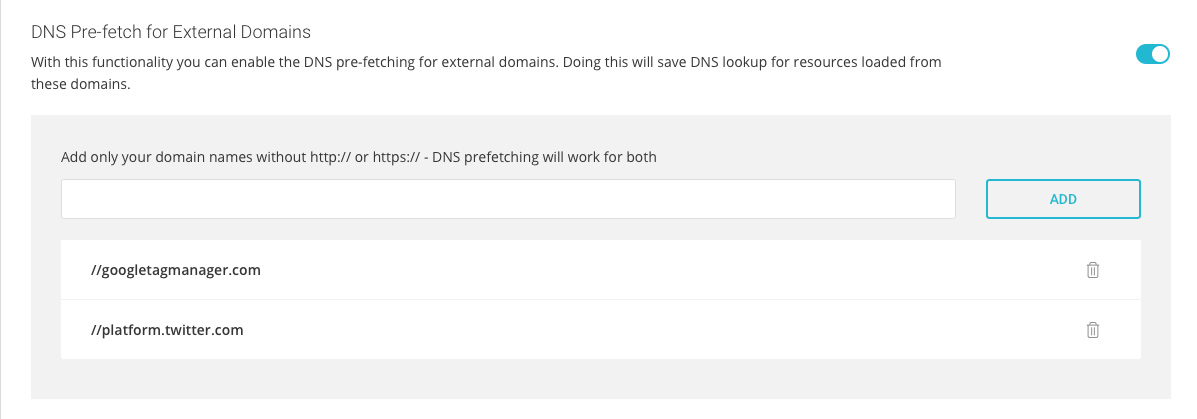
With this option, you can easily add all external domains that your site uses to serve external resources so your site can tell browsers to pre-fetch them and save time from resolving these domains each time they are used by a resource.

By default, browsers are pretty smart when it comes to domain resolution and pre-fetching all commonly used external domains. They manage to avoid resolving the same domain multiple times. But, their automatic pre-fetch doesn’t work at all times. For example, if you have external resources in your CSS and JS they won’t be automatically pre-fetched by the browser. That is why we added an option in the SiteGround Optimizer where you can list all external domains and thus make sure that the browsers will have those domains’ IP addresses ready for use. That feature helps reduce page loading times. 

Improved Memcached Integration

Memcached is a great optimization feature, but due to compulsory Memcached limits it works only for objects smaller than 1MB. That’s more than enough in 99% of the cases, but as more and more plugins and themes are dropping huge chunks of data into the options table, we have started to notice more attempts for using Memcached for bigger objects. That is why we have come up with a smart way to use Memcached in such cases too. We have added a self-learning mechanism that excludes the options with the biggest values from the object that needs to be cached, so it stays under 1MB. This way we manage to provide Memcached at least for a part of the initial big object. 

Deprecation of the PHP Switcher

In this version, we’ve decided to completely remove the functionality to switch the PHP version of a website. We took that decision for two main reasons – we wanted to avoid duplication of the functionality as that version control already exists in cPanel and Site Tools, where it logically belongs; and to alleviate the plugin so it takes less disk space and inodes.