We recently launched our Monthly Security Reports that give you valuable information about what we’re doing to secure your site and highlight measures you may have overlooked. As we have seen a great interest in the reports and given the fact that website speed is just as important as website security, we’ve decided to provide you with yet another useful feature – Monthly Performance Reports. These reports will inform you about different areas related to your website speed and will help you identify things that may be improved.
What you’ll find in the Monthly Performance Reports
Each month we’ll automatically check a number of performance categories for your site: cache ratio, CDN usage, data center and network speed, WordPress optimization, and others. Then, you’ll receive a report with the results which will include your total website performance score, a breakdown score for each category, and actionable recommendations if some areas need improvement – straight to your inbox.
What are the benefits of the Monthly Performance Reports
Easy and regular access to information
With our Monthly Performance Reports you will be receiving regular information about your site status, delivered by email. It will include important areas that may be hard for our clients to check themselves on a regular basis. For example, we will be monitoring what percentage of your traffic is served from the cache each month (the higher the percentage, the faster your site is) and will inform you if this ratio is not optimal.
Actionable tips
On top of all that, you’ll get actionable tips in case any of the performance categories need improvement. We’ll let you know how to make the most of each optimization option that is available on our platform with clear and easy instructions. Let’s say that we identify you’re not using our Dynamic cache option, or our CDN, or our WordPress Optimization plugin. In such a case, we’ll notify you about this and provide you with information on why to use it and how to switch it on.
User-friendly structure
You’ll be able to quickly scan through the results and spot the tips in an easy-to-follow, color-coded structure of the report. You’ll also get an overall score for the month both in points and percentages, as well as a comparison of how it has changed from the previous month.
How to receive your Monthly Performance Reports
You get this feature for free and it’ll be available for you if you are a site owner of at least 1 active website.
We will gradually begin to proactively send the reports to all our clients, but you may sign up yourself today to be among the first to receive their report.
As of February 28th, 2023, all clients using our CDN have been migrated to its latest version, SiteGround CDN 2.0, providing faster and even more efficient site performance. Our in-house built CDN is included for free in all our plans, so all new clients will also be able to activate it.
Website loading speed may have a serious impact on search engine standings, bounce rates and sales conversions of your site. As a web hosting provider we are able to contribute to your website’s success by helping it load faster. That’s why at SiteGround we’re constantly implementing new speed-enhancing technologies that are more powerful and easier to use for our clients.
One of our latest products, that ensures faster sites for our clients, is our custom-built CDN. Just a few months after its launch, it is already used by hundreds of thousands of domains. We have seen the service has a considerable positive impact on our clients’ website performance and we are also receiving a steady flow of positive feedback from the users.
To improve the service even more, we have just deployed version 2.0 of SiteGround CDN. It employs the power of anycast routing and Google network edge locations and thus increases the website loading speed by 20% on average and may go up to 100% for visitors located in some specific parts of the world.
Why is the CDN 2.0 faster?
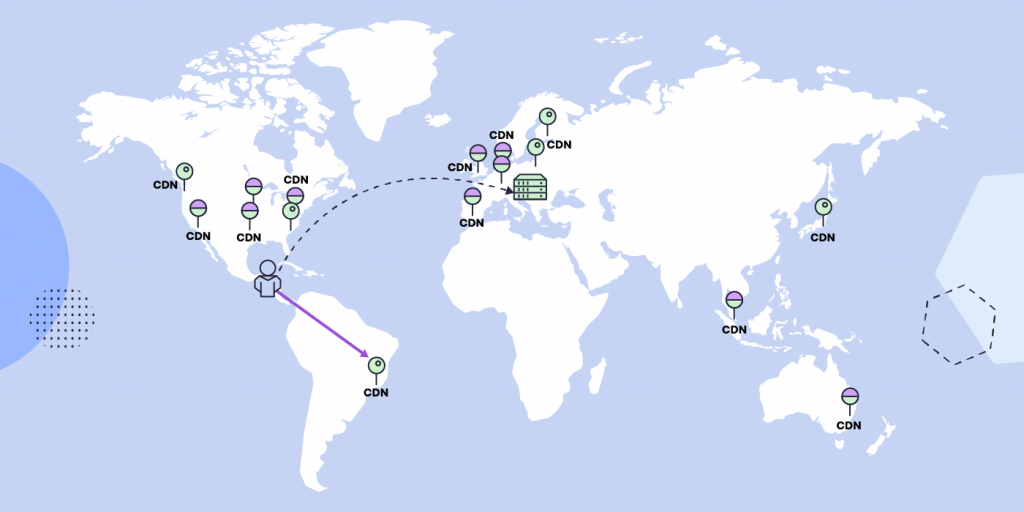
As you probably already know, the idea of the CDN (Content Delivery Network) is to keep a copy of your website on multiple locations called points of presence (PoPs) around the globe. When you have website visitors located far away from the original server that hosts your site, the CDN allows them to see a version of your site from the closest PoP. Thus the time needed for the data to reach your visitors is shorter than if it was served by the original server and your site loads faster. The closer your visitor is to a PoP the shorter the time it takes your site to load.
But apart from the geographical distance between the visitor and the PoP there are, of course, other factors that influence the speed with which the PoP is reached. It makes a difference if the data travels through the public network or through the much faster Google Cloud internal network.
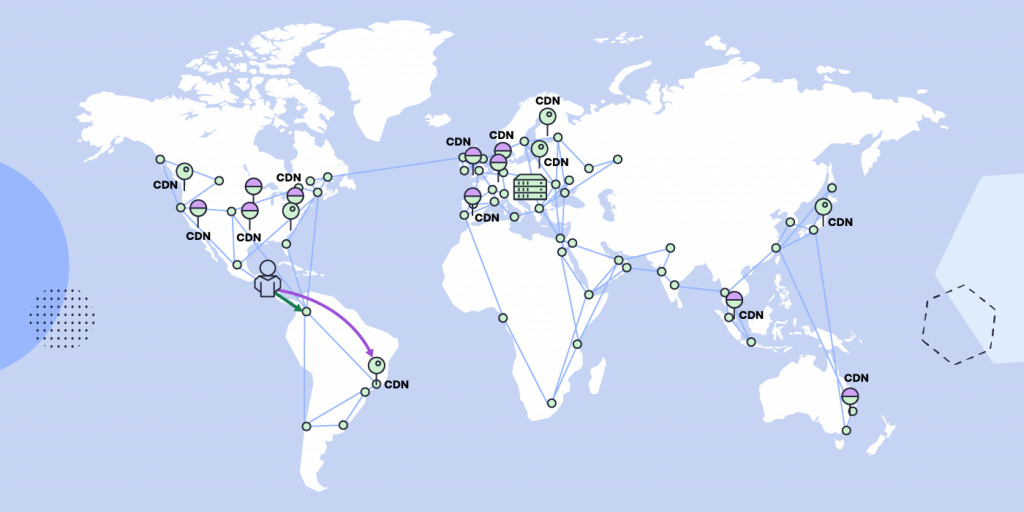
In our initial CDN setup each PoP had its own unique IP address and required the central DNS system to calculate the distance between users and PoPs, determining the best routing through the public network. Now in the CDN 2.0 we have implemented an anycast layer which ensures that IP addresses remain the same for all our PoPs. This way we eliminate the DNS layer calculations and clients requests are automatically routed to the closest edge location of Google network. Once the request reaches the edge location, it enters the much faster Google Internal network and reaches the closest SiteGround CDN PoP almost instantly. So now the closer your visitors are to the network edge location, the faster your site loads.
The great news is that Google Cloud network already has 200+ edge locations around the globe, which means that most visitors are always very near one of these. Also whenever new such points are added by Google, they will naturally make our CDN faster in new regions.
What are the benefits of the CDN 2.0?
Faster sites and better TTFB
Due to the implementation of the anycast routing and the fact that we are able to take advantage of the extraordinary speed of the Google internal network, now millions of visitors of the sites that use our CDN service will have better experience and have the requested sites load faster.
Time to First Byte (TTFB) is a measurement of the time it takes for a browser to receive the first byte of response data from a web server after making a request. When comparing the first byte response times from more than 50 locations the TTFB improvement is around 20% on average and up to 100% in regions that were further from the SiteGround’s CDN PoPs.
Higher CDN reliability
CDN 2.0 is backed by cross-region load balancing, including automatic multi-region failover which allows them to react instantaneously to changes in users, traffic, network, backend health, and other related conditions. This helps to ensure that the content remains available, even in case any of the CDN PoPs goes down.
How to get the CDN 2.0?
Starting from the middle of February, we will gradually switch both the Free SiteGround CDN users and the Premium SiteGround CDN users to the new version of the service. The process wouldn’t require any action on the client’s end and will be fully automated. If you are still not taking advantage of our CDN, it is a great time to add CDN to your site now through your client area.
It’s that time of the year when the days go faster than the speed of light – which is what we’d wish for all websites! In honor of the shortest month of the year, this February, we are taking website speed to Olympic heights!
Page loading time on the web is a never-ending optimization championship for website owners. But with the right tools and services, you can achieve the coveted “gold medal”. Take our quiz, get our free guide, and follow our Website Speed blog section for regular tips on how to optimize your website for best performance.
Website speed optimization is crucial for creating a positive user experience. A positive user experience is marketing speak for happy users. Happy users visit your site and buy things. Unhappy users leave because they are tired of waiting for your website to load. Marketers call this “bounce rate” but really, it’s just unhappy users.
Why is site speed so important?
In the early days of the web, our mantra was “Content is King”. These days, if content truly is King, the Queen is speed. They go hand-in-hand. The best content or even product or service in the world won’t get noticed on a slow website.
User experience (Usability)
As we said above, a slow website can lead to a poor user experience. This can cause visitors to leave the site and potentially lead to a high bounce rate. A fast website, on the other hand, leads to a better user experience, which increases user engagement. When people don’t have to wait for the page they want to read to slowly load, they are more likely to stick around and read it. If that page is selling them your widgets, then they are more likely to buy them because they read your page.
All search engines have announced that they now use website speed as a ranking factor for their mobile search results as well. This means that a website that is not optimized for speed may rank lower in mobile search results than a faster website, which could lead to a decline in both traffic and revenue.
Website speed optimization is critical for your business if your users are primarily mobile.
Conversion (for E-commerce sites)
When a website is slow, users may become frustrated and abandon their shopping carts, leading to lost revenue for your business. A fast website, on the other hand, can provide a seamless shopping experience, which will increase conversions and ultimately drive more revenue.
Amazon is famous for computing the price of a second of load time. The slower their site loads, the less they sell and they know exactly how much. You may not be able to calculate your loss like that, but you will see that when you optimize your website’s speed, your sales will increase.
In summary, if you aren’t getting the page views you think you should be, maybe it’s time to look at optimizing your website speed. Optimizing your website for speed can lead to a better user experience, improved search engine rankings, and higher revenue. Here are our best website optimization tips and tricks:
How to check the performance of your website
There are many good tools on the web to help you compute your website’s speed so you can tell if your site is running fast or not.
SiteGround Optimizer Plugin and Google PageSpeed
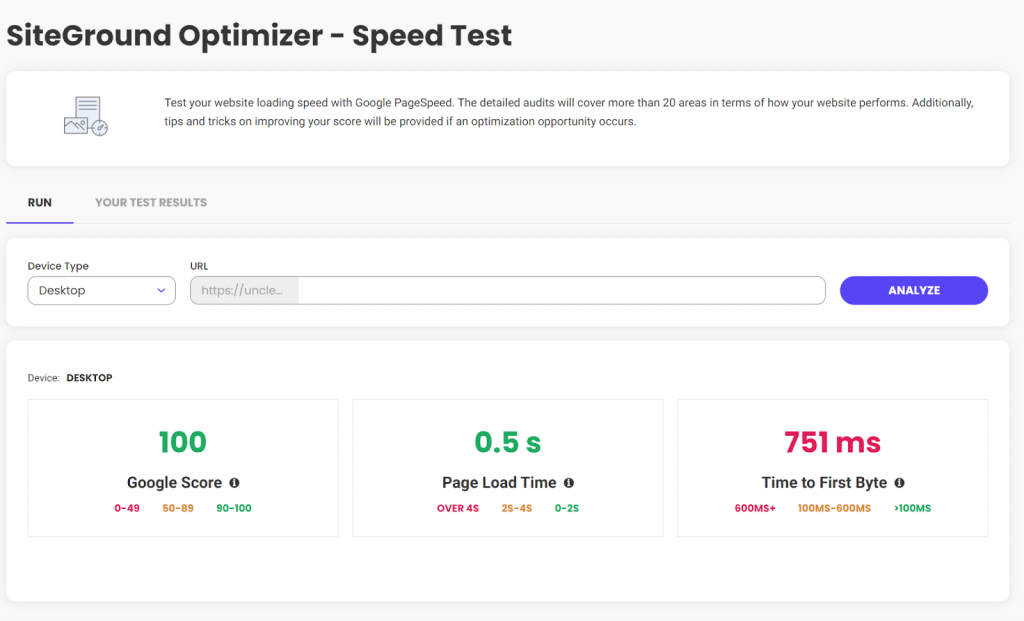
One of the best tools for measuring website speed metrics out there is Google PageSpeed. There are several tools you can use to increase your site’s PageSpeed score, my favorite is the SiteGround Optimizer plugin. I have it installed on almost all of my WordPress sites and using it, my Google PageSpeed score is only a couple of clicks away. If you already have SiteGround Optimizer installed, then just click on the menu and select “Speed Test”. If you don’t yet have SiteGround Optimizer installed, it’s free and works even if you don’t host with SiteGround.
As a bonus, if your score isn’t as high as you want it, SiteGround Optimizer will help you increase your score. After implementing the suggestions, SiteGround Optimizer had for one of my graphic-heavy sites, this is my Google PageSpeed score.
Yeah, that’s not bad at all.
webpagetest.org
The other tool I’ve been using for the past 10+ years is webpagetest.org. Whereas Google PageSpeed boils everything down to three easy-to-understand numbers, if you want to dig into the details, you need a tool like webpagetest.org. It gives most website owners more information that is easily digested, but if you spend the time to learn what the numbers mean, they can give you some deep insights into why your website loads the way it does. webpagetest.org also lets you configure things like desktop vs. mobile, where you are testing from, etc.
6 Undisputable Website Optimization Tips
Now that we’ve discussed why website speed optimization is so important, let’s talk about six things you, as a non-technical site owner, can do to make sure you are running at optimal speed.
Achieve lightning-fast loading times by choosing the right host
Choosing the right web host is one of the most important factors in website speed optimization. It is also the first decision you need to make. Honestly, if your host is slow, none of the rest of these optimization tips are going to make much difference.
Choose a website theme that won’t weigh you down
If your site uses WordPress, the theme you choose for your WordPress website will have a significant impact on its speed. A well-designed and optimized theme can help improve website speed and performance, while a poorly designed theme can have the opposite effect.
All themes can stand to lose a little weight, even the best ones. So to help your site reach its maximum speed, make sure that you have SiteGround Optimizer installed and configured. As discussed above, it can really make a difference in your site’s overall speed.
When choosing a theme for your website, it’s important to consider things like code quality, graphic sizes, and support.
Code quality
A well-coded theme will be lightweight, use minimal resources, and be optimized for speed. It is important to choose a theme that is coded to the latest web standards, WordPress standards, and has been reviewed by other users.
Graphics Sizes
All themes will let you use your graphics, however, some work with plugins to optimize graphic size, while others do not. If you choose a theme for your website that does not automatically optimize the graphic sizes for speed, all is not lost, you can install the SiteGround Optimizer plugin. It will not only optimize all of your existing images, but will automatically optimize any new graphic as you upload it.
Support and updates
A theme that is regularly updated and supported by the developer can help ensure that your website stays optimized. As technologies change, you want to make sure your theme changes with them to ensure it is always the fastest that it can be.
If you have a WordPress website, hosted with SiteGround, you benefit from their in-house WordPress Autoupdate feature, which automatically backups and upgrades your site each time there is a new WordPress version, along with all of your plugins, if you wish so. That helps you avoid vulnerabilities related to the old application, and you’re up to date with the latest security fixes.
Choosing the right theme is just one part of website optimization. You’ll still need to do things like minify code, and use caching to help improve website speed.
The theme you choose for your WordPress website can have a significant impact on website optimization. By considering the factors mentioned above, you can choose a theme that is well-designed, optimized for speed, and will provide a better user experience for your visitors.
Trim down unnecessary plugins
In the past, I’ve written about removing unused or deactivated plugins. One of the main reasons to do this is speed. The less code there is, the faster your site will run. Even disabled plugins force WordPress to decide between them at each page load. If you delete them, WordPress doesn’t need to worry about them.
Once a year – or more frequently, if possible – you should do a complete audit of the plugins installed on your site. Deactivate and delete any that are not actively being used. If you need them again later, then reinstall them later.
Remove unnecessary redirects
Redirects will affect website speed optimization.
They add an additional step to the page load process, which can increase the amount of time it takes for a page to load. This will negatively impact the user experience and website speed.
Search engines follow redirects to find the final URL of a page. When search engines crawl your website, they follow each redirect, which can slow down the crawling process and affect your website’s SEO. Additionally, redirects can cause the search engines to see the redirecting page and the final page as two different pages, which can lead to duplicate content issues and affect the website’s SEO.
Redirects can be confusing for users and will lead to a poor user experience. If a user clicks on a link that redirects them to a different page than they expected, they may become frustrated and leave the website.
Redirects can be useful in certain situations, such as when a web page has moved or is no longer available, or when you want to redirect traffic from a non-preferred domain to a preferred domain. In these cases, it’s important to use the correct type of redirects and to minimize the number of redirects used to maintain website speed and SEO.
To avoid the negative impact of redirects on website optimization, it’s important to use them sparingly and to use the correct type of redirect. Additionally, implementing a proper redirect strategy and keeping track of the redirects that are in place can help to minimize the negative impact on website optimization.
Cache your way to faster load times
Caching can have a positive impact on website optimization by improving your website’s speed and performance. Caching is the process of storing a copy of a web page or its resources, such as images or scripts. When a user visits a website, their browser can load the cached version of the page, which can reduce the amount of time it takes for the page to load.
Caching can be implemented at different levels, such as browser caching and server-side caching. Each type of caching can have a positive impact on website optimization.
Browser caching
When a user visits a website, their browser stores a copy of the web page and its resources on their device. When the user visits the website again, their browser can load the cached version of the page, which will dramatically reduce the page’s load time.
If you’re using the SiteGround Optimizer plugin for WordPress, available for free download on any hosting platform, you can use the browser caching option it provides. This feature stores the static content of your website in the users’ browsers and cache longer. If you’re a SiteGround client, this option in the plugin will be enabled by default for you.
Server-side caching
Server-side caching can reduce the amount of time it takes for a page to load by storing a copy of the page on the server. When a user visits the website, the server can deliver the cached version instead of having to regenerate it each time. This will reduce page load time.
If you’re hosted with SiteGround, you already take advantage of their powerful caching technology – SuperCacher which includes three levels of server-side caching:
NGINX Direct Delivery Caches static content like images, CSS files, JavaScript
Dynamic Cache Dynamic cache caches your dynamic content and stores it in the server’s RAM
Memcached An object caching mechanism designed to improve the connection between your application and its database
When all these three are in action, they improve your website performance up to 5 times!
Speed up your site with CDN
A good CDN, or Content Delivery Network, is a critical next step for optimizing your website’s speed. A CDN is a group of servers in different locations around the world that work together to deliver your website to users faster by delivering large files from servers near your users.
When a user visits your website, the CDN will direct them to the server that is closest to them. This can help reduce the distance between the user and the server, which will improve website speed.
CDNs also help to reduce the number of requests made to your server, which can help to improve website speed. This is because CDNs can store a copy of your website’s files, such as images and videos, and deliver them to users without having to request them from your server.
The less work your server has to do, the faster it will do the work only it can do.
Using a CDN will help to improve the website’s speed and that will create a better user experience for your visitors. It’s a great option to consider if you want to optimize your website and reach a global audience.
You can use a third-party CDN, which will take some time and extra knowledge to configure. Alternatively, you can ask your host to help you select one and then pay them to configure it. A better option is to use SiteGround’s native CDN. SiteGround has a one-click CDN that is already integrated and configured for your site. They offer the essential features free for all customers hosting websites on their platform. For those needing more, they offer a premium version for heavy international traffic websites.
How to Speed up Your WordPress Website Like a Pro – Video Tutorial
Conclusion
Entire books have been written on the topic of optimizing a website’s speed. In this article, we’ve taken a look at why it’s important, discussed some tools you can use to see how fast your site is now, and then six things you can do without the help of a programmer to speed things up.
It is important that before you start tinkering with your website to optimize it, you check its speed first. Then, do one thing at a time and after each change you make, re-test. This is the only way to tell for sure that you are making things better and not worse.
The results from our traditional annual client survey are here! Looking back at 2022, we’ve been working hard to introduce new and improve existing tools and services that make your websites even faster and safer. But at the end of the day, what really matters is the impact of these improvements and the positive effect they brought for our users. Here is what you had to say and how you rated our efforts and your experience with our hosting services throughout the past year.
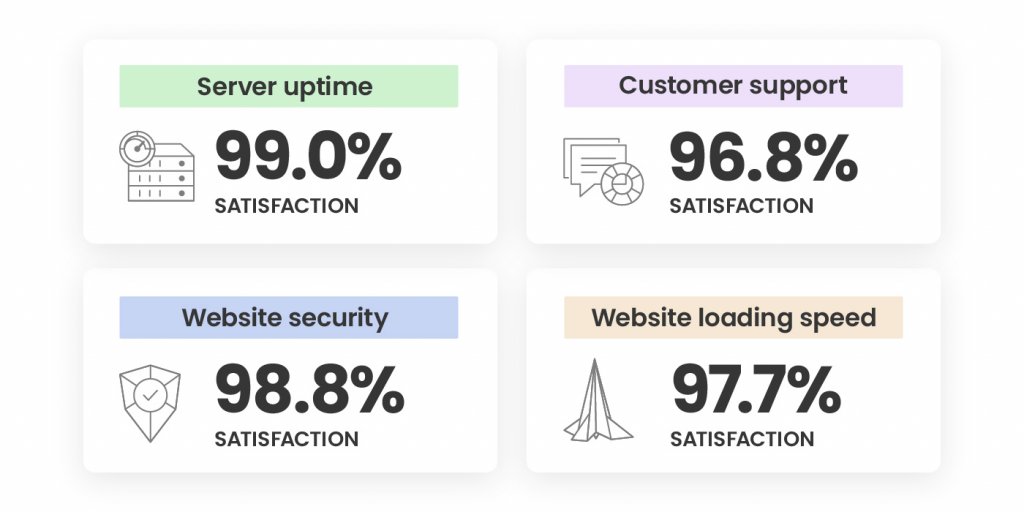
An Outstanding 98.8% Satisfaction with Site Security
Securing your websites has always been a top priority for us during the years. 2022 was not an exception and our efforts didn’t go unnoticed – our Website Security was rated high by an overwhelming 98.8% of all respondents! Here’s what we did to achieve that:
We improved our already great-performing Site Scanner with features improving early malware detection and introduced a new plan with proactive reaction tools in case of a website attack. During our #CyberSecurityMonth campaign last October, we went even further. We not only ran an intense email awareness campaign about website security, but we also introduced new security features, such as an on-demand IP and Geo traffic blocking tool. We also improved our AI-driven brute-force prevention system and its state-of-art self-learning mechanism, which now blocks over 95% more bad traffic before it even reaches our servers. Here’s a recap of all essential website security features for your website, in case you’ve missed it.
Last but not least, towards the end of 2022, we launched our new monthly security reports, included for free with all our plans. You can now sign up and receive directly in your inbox a personalized security overview of your website(s) every month, with highlights of what security measures we’ve applied and suggestions of what you can improve.
A Supreme 97.7% Satisfaction with Website Loading Speed
Website loading speed is important for your conversion rates, SEO rankings, and users’ experience. That’s why boosting website performance is of utmost importance to us and we’re constantly working on making your websites as fast as possible.
As early as February 2022, we introduced a newer version of our SiteGround Optimizer plugin for WordPress, making it available and free to all WordPress users, regardless of where they host their websites and included new advanced speed features, such as file-based caching. The plugin now has over 1 Million active installations and was voted Silver in the top 3 best WordPress optimization plugins in the annual WordPress community awards.
One of our biggest speed-boosting achievements in 2022 was the launch of our in-house built SiteGround CDN which not only makes websites load blazingly fast around the world, but it’s super simple to configure in a few clicks and included free in all our plans. We didn’t stop there and kept on growing our CDN and data center networks with a new location in Madrid and a few new locations in the USA.
Top Marks for Easy Website Migration and Setup
We’re happy to welcome those of you who have recently joined SiteGround as clients.
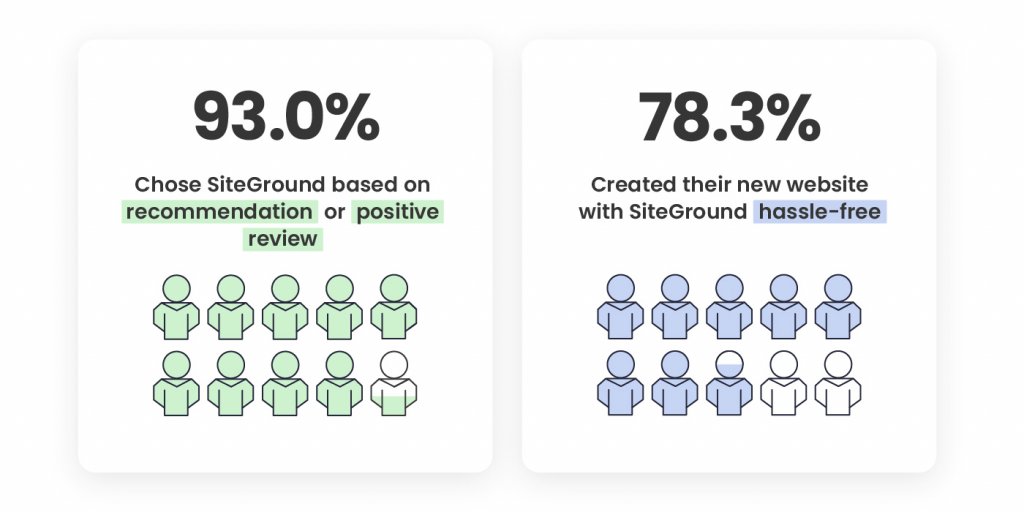
48.6% of our new clients say that the number one factor that led to the decision to get on board was a recommendation for SiteGround by someone they trust. 44.4% of you point out positive reviews about SiteGround were what influenced your decision to choose our hosting services, which is the greatest mark for the level of quality we provide, and the recognition and loyalty of our clients.
Your feedback about how easy our onboarding process is was also extremely valuable. A total of 78.3% of you, who created a new website with us, have noted that setting up a website on SiteGround wasa hassle-free process. 76.9% of you, who switched over from another host, pointed out in the survey that transferring your websites to us was a seamless process.
Now it’s even easier to migrate and manage all elements of your website presence to SiteGround with our newly launched Email Migrator tool. It helps you transfer emails to SiteGround servers easily, securely, and automatically.
We’re looking forward to making your future experience with us even better and contributing to your websites’ success.
A Steady 98% Overall Satisfaction In the Last Few Years
We completed 2022 with an overall client satisfaction rating of 98.1% which solidifies our top-rank customer happiness rate in the last couple of years. The overall satisfaction rate is based on your reviews for the following services we provide:
The breakdown of the satisfaction rate of each aspect of our services is based on the evaluation of both long-term and new clients. The overall ratio of all respondents is 90.40% long-term clients and 9.6% clients who have joined in the past 12 months. The fact that the majority of respondents have been with us for a couple of years now, and continue to express their satisfaction with our services with top marks is the greatest recognition a company can have.
You Helped the Environment by Completing Our Client Survey
Just like everything else we do, we also tried to maximize the impact of our client survey this year. In return for completing it, we committed to donate funds for planting a SiteGround forest. Thanks to you, we’ve already planted more than 11,000 trees worldwide – in the USA, Spain, Portugal, France, Indonesia, Madagascar.
We’d like to thank you for your trust, for your feedback, and for helping the environment! Stay tuned for all the upcoming services improvements and new tools launches that will aim to make your websites even more secure, better-performing and successful in 2023.
Last week, we helped you get your website ready for the Black Friday traffic spikes. Now that you’re all set to handle the upcoming traffic, do you know how much of it is real and how much – non-human? According to Statista, in 2022 more than 40% of Internet traffic is from bots, and a significant portion of that is bad bot traffic. This kind of bot traffic hurts your online business and can lead to both financial and conversion losses. Let’s dig deeper into what bot traffic is, why most of it is so harmful, and how to avoid it during the busiest time of the year.
What is bot traffic and why it should be cut down to a minimum
Bot traffic is any non-human traffic that comes to a website or app. Some of it is good, when it originates from SEO crawlers (such as Google crawl bot), commercial, site-monitoring, or feed bots. Needless to say, all of these cause no harm to your site. On the other hand, bad bots come with malicious intent. These can leave spam comments, irrelevant backlinks, weird advertisements, collect private information, reuse your content, perform DDoS attacks, and other malicious activities.
How bad bot traffic affects your website
Bad bot traffic may have different consequences on your website and business, causing multiple damages:
Website security and availability damage
Bad bot traffic hurts your website security and availability. For instance, these massive amounts of traffic to your site are a way for hackers to cause a DDoS attack. During such an attack, the traffic is so massive that the server where your site is hosted cannot handle it. This can make your website slow, unreliable or even unavailable for your users.
Bad bots are also the main force of a brute-force attack – a way to guess your password/login details by trying numerous combinations of letters, numbers and symbols. If such an attack is successful, malicious hackers gain access to your account and/or private information.
Website speed issues
Even if it doesn’t cause massive hacker attacks, bad bots activity can make your website much slower or even unavailable for your real visitors, affecting their overall user experience. To have your visitors stay longer on your site and turn them into clients, you’d want them to have an excellent user experience. A huge part of that is your website loading speed being as fast as possible.
Analytics metrics and SEO rankings chaos
Bad bot traffic can also hurt your analytics metrics and SEO rankings. For example, too much bad bot traffic can bring your site down and cause 503 errors (“site is temporarily unavailable”). This directly negatively impacts your SEO rankings. What is more, bad bots can affect your analytics metrics, causing abnormally high pageviews and bounce rates, sudden drop/increase in session durations, and fake conversions. All these factors may confuse you as a site owner and you may not be able to make sense of your analytics data.
How we decrease bad bot traffic at SiteGround
At SiteGround we take multiple measures at different levels to reduce bad bot activity by default for the websites hosted on our servers, so you can have peace of mind.
Improved and advanced AI anti-bot system
Our AI anti-bot system has successfully been blocking millions of brute-force attempts per day. Recently, we improved it even further, resulting in 95% less bad traffic. Its core features are still there – analyzing and recognizing traffic patterns to eventually stop brute-force attempts. With each new brute-force attempt, the system’s knowledge expands and it gets better at preventing future attacks. As of recently, we’ve upgraded the system with a traffic validation feature that stops even more malicious non-human bots by minimizing the number of brute-force attacks. Currently, the system blocks a huge percentage of bad bots traffic towards our servers, allowing more capacity for your websites for legitimate traffic.
Combined with our enterprise-grade security system, these server-level security optimizations block the majority of all bad bot traffic and ensure website protection on a global scale. Let the numbers speak for themselves – 99,99% of bad traffic is blocked before it even reaches your website.
Smart, server-level WAF
Hacker attacks usually increase during the Black Friday season. A single outdated WordPress plugin, theme, or vulnerability can easily be used for massive damages during this busiest time of the year. That’s where our smart Web Application Firewall comes to the rescue. Our security experts closely monitor security bulletins and server activity 24/7, and in case of reported exploits, immediately add custom WAF rules (patches) into our server firewall to protect your site from current hacks and breaches due to outdated plugins, and other vulnerabilities. Our proactive security approach allows us to react much faster, often before the original plugin, theme or app developers have had the chance to release an official update. The most recent example of this was just last month, with two previous major ones not so far behind – a plugin vulnerability patched on day 0, and a Linux Kernel vulnerability patched within hours of detection.
DDoS protection
To address potential DDoS attacks from bad bots, we have a system of hardware and software mechanisms to protect your sites:
A hardware firewall that filters flooding traffic;
A local software firewall with more complex functions and traffic monitoring;
А limit to the number of connections a remote host can establish;
A check for a high number of failed login attempts from hosts and filtering them, if any.
24/7 server monitoring system
Again, in addition to all monitoring and prevention systems and checks in place, our expert system administrators team are monitoring our servers 24/7 for any system issues and in case of any, can react quickly to save the day.
How to identify that you have bad bot traffic coming to your site
Now, you probably wonder what are some signs and symptoms of bad bot traffic that will help you identify whether your site is in danger. Here are some of the red flags and ways to prevent them:
Check your site traffic stats
You also need to check your traffic statistics, especially the IP addresses and the sources of traffic. For example, regular and high number of visits from the same IP address or increase in traffic from other regions or countries, from which you didn’t have (much) traffic before, could be an indication of bad bot traffic. As a SiteGround customer, you can easily check your traffic statistics in Site Tools > Statistics > Traffic.
Keep an eye for unusual users’ behavior
Remember to monitor your users’ behavior regularly. In case there are increased spam comments under your posts, strange user registrations, and/or increased blocked login attempts, these are all red flags that you might be getting bad bot traffic to your site. WordPress users, who have the free SiteGround Security plugin installed, can monitor their site and login page for unauthorized visits and brute-force attempts from their Activity Log menu. What is more, they can easily block suspicious IPs and visitors.
Make regular speed tests
You probably already do that, but if you don’t, it’s a good idea to start making regular website speed tests. For this purpose, you can use a number of different tools to measure your site speed, such as Google PageSpeed Insights, Pingdom, GTMetrix, and others that generate results in all the major speed metrics.
In case you have the free SiteGround Optimizer plugin installed on your WordPress website, you can run a speed test within the plugin in its Speed test functionality. The check uses Google PageSpeed, provides information on the level of optimization in over 20 different areas, and gives you optimization suggestions.
If you identify that your site is experiencing page loading speed issues, dig deeper into the problem to find out the causes. These might not necessarily be bad bot traffic issues, but that’s one of the main potential reasons behind the slow speed results.
How to filter bad bot traffic yourself on SiteGround
Some of the traffic that reaches your websites may seem legitimate, even if it’s not. Thankfully, there are a number of ways and free services we offer to let you filter good from bad website traffic all by yourself:
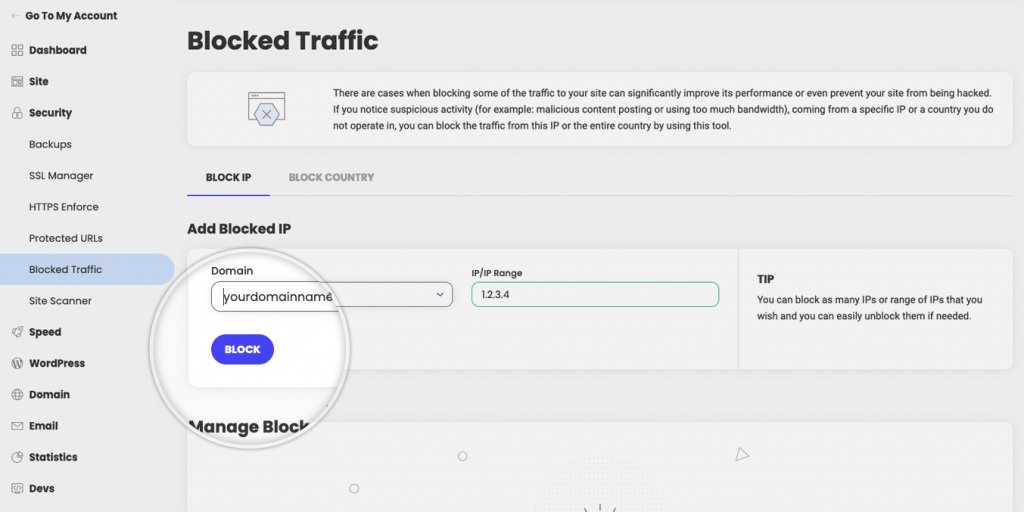
Both options allow you to easily block suspicious or malicious traffic to your website. If you want to block a specific IP address from accessing your site, because, for example, you see it’s using too much bandwidth, you simply go to Site Tools > Security > Block Traffic, choose the domain for which you want to block access, then add the IP address (or a whole range in IP/IP Range), and finally click ‘Block’.
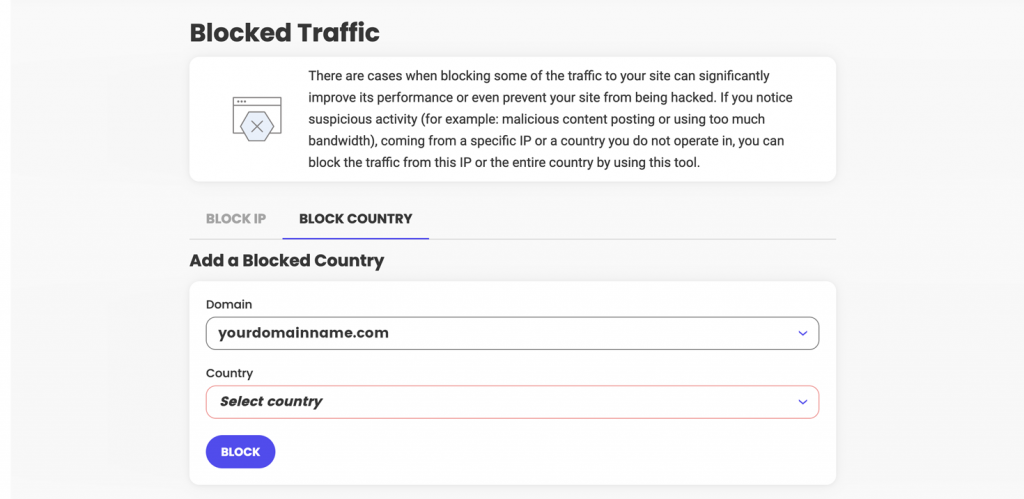
Similarly, if you notice that you get suspicious abnormal activity from a country you don’t usually operate in or have clients from, you can easily block traffic from it in a few clicks. You need to go to Site Tools > Security > Block Traffic > Block Country. There, you choose the domain for which you want to block access, pick the desired country to block in the Country dropdown, and finally click ‘Block’.
These two options will help you not only block bad bot traffic coming to your site, but they can also significantly improve your site performance by reducing the unwanted traffic and giving your site more capacity to handle real human traffic.
Improving your site capacity to handle more requests
In case you’ve identified that your site still gets some bad bot traffic which cannot be easily filtered or removed, you can decrease its negative impact by improving your website speed and performance, which will allow more capacity to handle any type of traffic altogether. Here’s how to do that:
We’ve developed a powerful caching system to help you cache as much content on your website as possible. Cached content is served much faster to visitors and thus improves your site capacity to handle traffic. Our system is comprised of three caching options that are all available in your Site Tools > Speed > Caching: NGINX Direct Delivery for caching static content, such as images and CSS files; Dynamic Caching for dynamic content to be stored in the server RAM, and Memcached for storing data and objects in memory (best for database-driven websites).
Use our other optimization services
We do a lot to improve website performance and you can make use of our premium solutions. Here are three of the main ones that can speed up your website and make room for more visitors’ requests.
Our in-house developed SiteGround CDN requires no configuration, it’s easy-to-manage with just a few clicks, and above all, makes your site load blazingly-fast for visitors around the world. Its Basic version comes completely free of charge and provides your site with all the essential features to handle international traffic from various international locations.
Another in-house developed speed tool is the free SiteGround Optimizer plugin for WordPress websites. It provides you with many different optimization options (media, frontend, environment) that can all be enabled in a few clicks.
Last, but not least, our unique ultrafast PHP setup makes your pages load up to 30% faster and allows the server to process your website’s visits quicker.
Wrap-up
While most people are busy selling and buying goods and services during the Black Friday period, bad bots are also more active than ever, “visiting” websites and causing all kinds of potential issues. If not addressed on time and in the proper manner, they can ruin a big chunk of your holiday conversions during that time of the year, when you worked hard to get the highest number of sales.
Your website speed is a crucial part of your online success. To help you optimize your website loading time even further, we recently launched our own SiteGround CDN for our clients. Since many of you were curious about this in-house solution, we organized a live webinar with our Product and Technology Lead to answer the most common questions about our latest speed-boosting CDN service, available for free with each of our hosting plans as a Basic version, and as a paid upgrade Premium version. Here are the answers to the frequently asked questions by our webinar audience, as well as to those that we didn’t have the time to answer during the live session.
What is a CDN?
Every website lives on a server somewhere around the world. For example, SiteGround offers several data center locations in the U.S., Europe, Asia and Australia, which you can choose from when purchasing our web hosting services. When your website visitors open your website, they connect to the server that hosts your website. The closer your visitors are to your host server, the faster your website loads, and the better their user experience. However, the purpose of a website is to be accessible and fast from every point of the world, 24/7/365. For this purpose, a CDN exists.
What does CDN mean? It’s a content delivery network that caches parts of your website or the entire website and distributes it on servers that are closer to your visitors. Basically, it keeps copies of your website in many locations around the world. Thus, if you have an active CDN, every time a user visits your site, it will be loaded from a location that’s the closest to them instead of loading it from the origin server. As a result, a CDN service tremendously reduces page loading times and speeds up your website.
What are the benefits of using a CDN for your website?
Websites with international visitors
If your website has a lot of international traffic, it will be distributed well among different CDN locations. For example, when we launched our SiteGround CDN in locations where we didn’t have data centers, the response time for end users improved drastically – between 6 and 8 times for some websites, and even 10 times for others. Currently, SiteGround has 14 CDN locations all over the world (including the newest CDN location in Sao Paulo, Brazil, as well as our new data center and CDN location in Madrid, Spain) that optimize website performance for international visitors.
Websites with users in remote areas
In many locations around the world, people do not have access to fast internet. Thus, a CDN is very beneficial for users in remote areas, where the internet connection is not so good. When they want to load a website, they will be connected to a server which is closer to their location and thus the website will load faster.
Websites that change content frequently
A CDN caches your website content on a server close to your site visitors and delivers this cached version to them every time they visit your site. So the period you want the CDN to keep a cache of your files is important. If you set your CDN to keep the cached copies for too long – for example, one month – but you make changes to your site frequently within this timeframe, then they won’t be displayed live until you clear the cache manually. Similarly, if you set the cache time to be too short, then it will pretty much not be working as it should be, because the idea behind it is to store a cached version for a particular period of time. Therefore, it’s good to choose a period of time that will suit your site depending on how frequently you intend to make changes to it. For instance, SiteGround CDN cache time to live is set by default to 12 hours, and you can easily customize cache time to live to your own needs on the Premium version.
You also need to consider your website software application. For example, for WordPress websites, we have the SiteGround Optimizer plugin which connects to WordPress in such a way that when you make changes to your site (e.g., change a post or theme, install a plugin, etc.), the plugin detects those changes in real time, it connects to our CDN and flushes only the respective pages that have been changed. This is super handy! For any other type of CMS/application that you may use on your site, we honor the standard cache headers of your application. If your application allows you to set a certain amount of time for caching your pages and resources, then our CDN will honor that time.
CDN Benefits for websites with no international traffic
Even websites with no international traffic will benefit from using a CDN. For instance, if your business is in the U.S., you may have website visitors from the East coast, from the West coast and the central states. If you have a US-based website with us, it will be hosted in our data center in Iowa. In this case a visitor from New York for example will have to wait some more time compared to other users, if you don’t have a CDN enabled. Switching on our CDN service that offers several CDN locations in the US will make your website load much faster for all US-based users. A similar case scenario applies to pretty much all the rest of the continents in the world.
How does SiteGround CDN compare to third-party services?
Compared to a third-party provider, SiteGround CDN offers many benefits for your website, because it is a service developed around three main pillars:
Easy-to-use
Let’s assume you’re using a third-party CDN provider that’s not integrated with your hosting provider’s services. Then, you’ll need to manage the hosting from one place and configure the CDN settings from another place which often may cause issues. What is more, you’ll have to apply different configurations on your own, depending on the CDN provider you use. For example, in certain cases, when you enable a specific CDN provider, you need to go and reconfigure all of your images to be loaded from specific URLs, in order for those images to be loaded from the CDN.
Therefore, we built our SiteGround CDN in a way that doesn’t need much configuration to be enabled. In fact, you just click one button and it starts working. What is more, it is super easy to use. We’ve given you the smart defaults and from then on you can change some of the things depending on your website needs with just a few clicks. Our CDN allows you to enable it without technical knowledge required, as well as use and change its functionalities hassle-free, with a click of a button.
Blazingly-fast
Another benefit of our CDN is that it makes your website load blazingly-fast because it’s based on the same cloud network which our hosting services are based on – the Google Cloud network. What is more, by utilizing this network, data travels securely through it. Using the same private network allows us to improve website performance and offer fast website loading speed.
In-house built
Safety net for issues
Usually, a lot of website owners use a CDN service. If something goes wrong with this service, their whole website and/or business depends on it. Therefore, we believe it’s important that we have full control over any potential issues that may arise and thus, we built our SiteGround CDN in-house. Since it’s an in-house built product, our support team will be able to fix a potential issue with it, as it is a core service we offer.
Room for expansion
There is always room for improvement and when the time comes for a new feature or our clients require a new functionality, we’ll be able to add them, as we’ve already built the service ourselves and know its technical specifics. We will consider and evaluate feature requests based on the business case and the feature type. What is more, we’ll be able to do it in a timely manner, as we’ve built the whole CDN for a year and a half (including the research phase). This gives us the confidence that we can expand the service as much as we want to.
Do you need to first disable other CDNs?
In the general use case scenario, it’s enough to have the domain pointed to the SiteGround Central DNS and enable SiteGround CDN. In this way, the DNS will route the requests to our CDN, even if you have Cloudflare enabled, for example. However, in some cases, the apps are configured to use CDN subdomains for static resources, for example, or in other custom CDN setups, it would be better to disable the other CDN and enable only SiteGround CDN.
Can you use SiteGround CDN with our SiteGround Optimizer plugin for WordPress?
A lot of you already use our top-rated SiteGround Optimizer plugin for your WordPress sites. Since the plugin offers multiple website caching benefits, resulting in optimized WordPress website performance, we get a lot of questions about how that would work with our CDN. One of the perks that both of these tools were developed in-house by our team, is that they are designed to be compatible and complement each-other. For example, if you have SiteGround CDN enabled, purging the cache from the SiteGround Optimizer will purge the cache both on the CDN and your origin server. This is true for every type of our CDN plan. Keep in mind that this will not be working for combinations with other CDN providers, i.e. the SiteGround Optimizer plugin won’t flush the cache on another CDN provider.
Website Caching and SiteGround CDN
Is it best to use several of your options or is CDN alone enough?
Your website would be optimized for the best performance, if you have Premium CDN with the following features enabled: Advanced dynamic caching and “Always online” mode to ensure that the CDN edges will serve cached copies of your pages, if there’s a problem with the site on the origin server. What is more, when hosted with us, our Dynamic cache feature will be enabled by default for your site. If you’re using WordPress for your website, you can also take advantage of our SiteGround Optimizer plugin which offers powerful caching options that complement the rest of the above-mentioned features.
Is dynamic content cached statically or is it computed at the CDN edge?
Dynamic cache means that after the PHP on the origin server processes the PHP request and generates the HTML, the origin server sends this HTML as a response and the HTML itself is cached on the CDN edge servers. The default cache time to live (TTL) on the CDN edges is set at 12 hours. However, you can always change the cache TTL from your application or .htaccess file. Alternatively, if you have the SiteGround CDN Premium, you can customize your cache TTL with just a few clicks.
What happens to sites that pull data into the site real time, e.g. a real estate site?
The answer to that question would depend on whether you want to pull the data each time, or pull the data and then cache it. If you want to pull and cache the data, it’s better to use our Premium CDN with dynamic cache. However, if you want to pull the data from the remote source on each request without caching it, and to deliver the freshly pulled data to your client, then you don’t necessarily need dynamic cache.
What is and isn’t delivered by the CDN local node?
If you use the free CDN, only your static files will be delivered from the CDN edge cache. If you use Premium CDN, you can also have dynamic cache. This caching logic is similar to the SiteGround hosting server’s cache logic. Just like it is on the SiteGround hosting server, logged in users, carts, checkout pages and others are bypassed by the cache. What is more, if you’re using WordPress, you can also download the SiteGround Optimizer plugin to exclude specific pages from the cache.
Does it matter for the CDN, if the website is WordPress or not WordPress content-based?
The simple answer to this question is no, the CDN is respecting the cache-control headers and you can pass such headers to control the CDN cache, no matter what application you’re using. The cache files generation and manipulation works the same way for every application.
However, for WordPress sites we do more and automate cache flushing for example. Certain WordPress pages are excluded by default too. We do advise WordPress users to go for the Premium CDN combined with the WordPress Optimizer plugin.
How quickly does a cached page update over the CDN when a page is updated?
If you’re using WordPress with our SiteGround Optimizer plugin, you can take advantage of all caching features and purging options, such as “Purge cache” or “Auto-purge” from the plugin. If you’re not a WordPress+SiteGround Optimizer user, there won’t be an auto-purge, so you’ll need to purge the cache from your Site Tools > CDN section. The cache purge usually happens immediately but in some cases, you might need to allow 30 seconds for the cache to be purged on all CDN edges.
How to choose between SiteGround Free CDN with each hosting plan & Premium CDN Version
Can you touch on the difference between free version and premium version?
Our SiteGround CDN is an in-house built solution that comes with each of our hosting plans completely free of charge. The free plan allows you to take advantage of different functionalities, such as caching of your website static content; up to 10 GB bandwidth CDN traffic per month; immediate initiation of purge of all cached resources for your website (the cache purge usually happens immediately, but in some cases you might need to allow 30 seconds to purge the cache on all edges); development mode to temporarily suspend caching, make changes to cacheable content and see those changes right away.
What is more, SiteGround CDN also comes with a Premium version that offers even more benefits for your website. The Premium plan allows for advanced dynamic caching; unlimited CDN traffic; activation of the CDN for all your domains (including subdomains and parked); custom time to live for you to choose for how long website resources are cached; “always online” feature that will keep delivering the already cached pages, in case your website starts returning errors.
What happens if you exceed the traffic quota on the Basic plan?
As mentioned above, the traffic quota on the Basic plan is limited to 10 GB per month. If you reach that limit, the Free CDN will automatically stop working. Yet, 10 GB is enough for all the small to medium-sized businesses hosted with us, because that was one of the conclusions during the SiteGround CDN Beta period. If your website makes more traffic than that, you’ll definitely need to upgrade to the Premium version.
How to set up SiteGround CDN?
The setup of SiteGround CDN is easy – you can enable it with the click of a button from your Site Tools > Speed > CDN section.
How will this process affect the existing DNS entries?
In order to use our CDN, you need to be using our central DNS service. To do that, you need to make sure that your domain is pointing to our name servers: ns1.siteground.net & ns2.siteground.net. Read some more information on how to change the name servers of your domain. Why do we need to be in control of the whole DNS zone for your domain name? So that we know exactly how to configure the service without breaking anything else, such as Microsoft Office 365, or Google Workspace, or a similar service.
What will we do? We’ll only change the DNS A records for your domain name and for www.yourdomainname.com. Thus, by enabling the CDN, we’ll change the IP address to which your domain name resolves, but other than that, there won’t be any other changes. All the traffic for your domain name and for www.yourdomainname.com will be routed to the closest CDN location, but no other related services should be affected. That’s the perk of us controlling all these services, such as web hosting, DNS part, and CDN part – we can guarantee to some extent that we will not break other connected services.
Note: If you are migrating your DNS management to SiteGround’s Central DNS please make sure that you manually create all needed DNS records via the Site Tools interface before actually pointing your domain name to ns1.siteground.net and ns2.siteground.net.
Do I have to run my server to www or can I do it without www?
There’s no need to convert your website to a www version (if it’s not), as SiteGround CDN works either way.
Does the CDN give you any extra server resources?
If you use the SiteGround CDN, it will allow you to better utilize the existing resources of your hosting plan. This means that extra resources will not be added but your current hosting plan will probably be able to handle a bit more traffic.
What is the best way to set up SiteGround CDN for client sites?
The setup process is a piece of cake. As mentioned above, as long as the domain is using our name servers, it’s a matter of a few clicks in your Site Tools.
Can you enable the CDN once for all sites you run?
If you have more than one website, the SiteGround CDN should be enabled separately per each individual website from the SiteGround Site Tools panel.
We’ve already launched a newer, even faster version of our CDN service – SiteGround CDN 2.0! It increases the website loading speed by 20% on average, going up to 100% for visitors located in some specific parts of the world, by utilizing the power of anycast routing and Google network edge locations.
We are excited to announce that the SiteGround CDN is out of its beta period and is now officially available for use to all our customers. SiteGround CDN is a site speed optimization service developed in-house specifically for our customers, who receive traffic from different geographic locations. Thousands of users have enabled the CDN during its beta phase and are already actively using it. We are happy and thankful for their strong positive feedback and their input that helped us apply the final touches to our CDN before its official release today.
What are the benefits of the SiteGround CDN
Our SiteGround CDN is an in-house built solution that provides you with a simple On/Off service with smart defaults and native server performance. It is carefully developed to incorporate all related services needed for best results. Here are some of its main benefits:
Blazing-fast websites loading speed
Our SiteGround CDN ensures the fastest loading speed for your websites to its visitors from different parts of the world, thanks to the facts that:
Our CDN service is hosted entirely in the Cloud where content is cached and replicated across multiple locations on 4 continents and thus served to your website visitors with minimal latency.
Our CDN ensures blazing-fast loading speed of your websites because it uses a super fast private network between our client-specific CDN locations and our hosting servers.
No configuration and easy management
Setting up your SiteGround CDN and managing its features happens with a few simple clicks in your Site Tools -> Speed -> CDN section, thanks to the fact that every layer of our system is built in-house. The activation of the CDN happens with a single click with NO additional site reconfiguration needed regardless of your site setup. No matter if your site is opened with www, or without www, or if it uses SSL or not, the CDN simply works.
SiteGround CDN plans and features
SiteGround CDN includes a free and a premium plan, that you can choose from, based on your website’s needs. Find out more about the two plans in the following sections:
Features in the Free CDN plan
If you choose to use the Free CDN plan, you can take advantage of the following functionalities, completely free of charge:
CDN activation for primary domain names with just one click
Caching of your website static content on CDN servers
Up to 10 GB bandwidth CDN traffic per month
Immediate initiation of purge of all cached resources for your website
Development mode for checking the latest website changes live quickly and ensuring everything looks good
Features in the Premium CDN plan
The Premium CDN plan includes all of the above-mentioned features in the free plan and in addition, it gives you access to the complete list of premium CDN functionalities:
CDN activation for all domains, including subdomains and parked domains
Advanced dynamic caching, delivering cached copies of the dynamically generated pages of your site by default
Unlimited CDN traffic
Custom TTL (time to live) that allows you to choose your desired cache time to live
“Always online” feature that keeps delivering the already cached pages from our CDN servers, in case your site starts returning errors
How to get started
You can switch on the Free CDN for your website with a single click from your Site Tools > Speed > CDN section. If you want to unlock the premium CDN features, you need to purchase the Premium CDN service from Client Area > Marketplace > Hosting Services > Additional Services, currently available with 50% off for the first 12 months, starting from $7.49/mo USD (prices are subject to change).
If you would like to use the SiteGround CDN, keep in mind that you cannot use it simultaneously in combination with another CDN. To be able to utilize the CDN service, you need to be using our centralized DNS as well, i.e. your domain should point to our name servers:
ns1.siteground.net
ns2.siteground.net
Try out our new CDN service for yourself and feel free to leave us a comment, in case you have any feedback or suggestions.
Not so long ago we launched a Centralized Anycast DNS service which made DNS management on SiteGround really easy and significantly boosted domain name resolving speed and redundancy for SiteGround clients compared to using local DNS servers. Our Centralized DNS also laid the foundation for another feature that is essential to website speed and performance – our own Cloud-based Content Delivery Network – SiteGround CDN.
Why did we develop SiteGround CDN?
For the past 10 years, we’ve been partnering with CDN providers to offer free built-in CDN as part of our hosting services. However, third-party services invariably require additional setup and configuration, often involving managing things from separate interfaces or technical knowledge about DNS, HTTP, cookies, etc. On top of this, using third-party services may sometimes cause confusion for users or issues which are outside of our control. And at SiteGround, we’ve always strived to minimize the hassle as much as possible for our clients.
That’s why we wanted to build our own CDN solution to provide a simple On/Off service with smart defaults and native server performance. SiteGround CDN is developed specifically for our clients to incorporate all related services needed for best results:
Smart Anycast DNS to route the traffic to the geographically nearest CDN location
More control over the backend hosting servers to increase redundancy and offer more features out of the box
Greater flexibility to configure things for our clients without them having to do anything
What are the benefits of SiteGround CDN compared to a third-party service?
Cloud-native Performance
Our new CDN service is hosted entirely in the Cloud – multi-region, highly available, and redundant groups of servers, making it possible for your content to be cached and replicated across multiple locations, and be served to your website visitors with minimal latency. It works with our Centralized DNS and its high-speed Anycast routing technology to direct your site’s visitor requests to the closest SiteGround CDN location. In turn, it will serve the content from the cache in our CDN cloud (if the specific content has been cached previously) or proxy it to your site’s hosting server ensuring near-native server performance.
Client-specific Locations with Premium Networking
We carefully analyzed the aggregated main website traffic sources on our servers and created the following list of locations currently powering our CDN network: Tokyo (Japan), Singapore, Sydney (Australia), Warsaw (Poland), Hamina (Finland), London (England), Frankfurt (Germany), Eemshaven (Netherlands), Council Bluffs (Iowa, US), Moncks Corner (South Carolina, US), The Dalles (Oregon, US), Los Angeles (California, North America).
Having CDN cloud servers at the locations above gives us a great advantage in terms of network performance. The fact that we have network control over both the CDN layer and your website’s hosting server makes the communication between them blazing-fast. By using internal routes between the servers we are eliminating any delays and latency that might be observed with third-party CDN providers utilizing the public network to communicate with your site’s hosting server. In short, this ensures the fastest private network between our CDN locations and our shared hosting servers, resulting in faster website loading speeds for our clients.
No Configuration and Simple Management
Thanks to the fact that every layer of our system – from the hosting environment, through your website management panel, to the Centralized DNS – is built in-house, we can provide our clients with an easy and comfortable way to add a CDN layer to their websites with literally one click. It also allows us to implement the CDN functionalities you need and make them available in an easy-to-use interface directly within SiteGround’s website management interface – Site Tools.
Everything from setting up your SiteGround CDN to enabling/disabling a certain feature is handled automatically in our backend. The only thing left for you to do is click a few simple buttons in the Site Tools -> Speed -> CDN section of your site. This way we’re saving you a ton of annoying actions:
No external CDN control panels – you don’t need to log anywhere else except your Site Tools area
No need to change and use external Nameservers – it all happens within our central DNS records
No need to create additional DNS records for the www-prefixed version of your domains – we will route absolutely everything through our CDN service, regardless of whether your site is opened with the WWW or non-WWW version of your domain.
No additional HTTP configuration – no specific Cookie settings, no need to implement anything in your application. You just click the “On” button and your content will be served from the closest SiteGround CDN location point to your site visitors.
SiteGround CDN Beta Features
After successfully passing our detailed internal testing, SiteGround CDN Beta is now available for testing. Currently, SiteGround clients can enable it for their sites’ primary domain names with one click, absolutely free. Here’s a quick overview of the features that are currently available for all users that decide to use the SiteGround Cloud CDN in Beta:
Accessall available CDN locations that we currently offer
Static & Dynamic caching with no extra configuration – third-party CDN services usually only cache and serve static content by default ( website images, CSS, Javascript, ect). With SiteGround Cloud CDN, you can choose to cache both your site’s static and dynamic content with a single click. This way our CDN will instantly deliver cached copies of the dynamically generated pages of your site by default, instead of static content only.
Cache TTL (time to live) modification – SiteGround CDN currently has a global default value of 12 hours. However, if you want to set a different cache TTL you will be able to do it by simply choosing the desired cache time to live from a drop-down menu in your Site Tools interface.
Development mode – caching is good, but we know that sometimes you want to check the latest website changes live quickly to ensure everything looks good. Our Development modefunctionality will allow you to bypass the cache and fetch fresh content from your site’s hosting server, instead of the CDN. So there’s no need to turn the CDN service on and off again and again when you’re making website changes.
“Always online” feature – wealso know that sometimes things can go wrong. Our Always onlinefeature tells our system to keep delivering the cached pages from our CDN servers, which comes in handy if your website application starts returning an error for some reason.
You can find detailed instructions on how to use our CDN interfaces in our CDN tutorial.
How to take advantage of the SiteGround CDN Beta?
You can activate SiteGround CDN Beta from Site Tools -> Speed -> CDN section of your site. Currently, it’s available for primary domain names only, and completely free with its full feature list. The official SiteGround CDN release will feature two plans – basic and paid with different functionality. All clients who activate the Beta version of our CDN get access to the complete list of features, and will be able to continue using them for free for 3 months after the Beta period is over.
Gaining even more data and insights during the Beta period, in addition to client feedback, would help us polish and perfect the nitty-gritty details. All clients using SiteGround CDN in Beta will be able to test its performance benefits and provide feedback about the service or what we can improve directly in our Support HelpDesk, so you’ll be able to communicate and share your opinion directly with the people who designed and developed the whole system. And how often, really, do you get to have that – free performance optimization and a direct feedback loop to the people who created it. At SiteGround it’s a win-win for all.
When we started developing the SiteGround Optimizer plugin back in 2012 we wanted it to be a bridge between our services and our clients’ WordPress sites. During the years we introduced more and more features and the SiteGround Optimizer (now named Speed Optimizer) became one of the best performance optimization plugins for WordPress, based on popular ratings. And naturally, we started getting inquiries about how websites non-hosted on our platform could benefit from it. That interest gave us a push to decouple the plugin from its dependency on our infrastructure and convert it into a hosting-agnostic, completely free solution for all. We are now excited to announce that as of its latest version, the Speed Optimizer plugin can be used by any WordPress website, regardless where it’s hosted!
Features Available on Any Hosting Platform
Making the Speed Optimizer available on other platforms wasn’t a simple task. Part of the success of the plugin is tied to the SiteGround server setup that is built with performance in mind and takes advantage of some of its unique features. To open it up, for every feature that was dependent on our platform’s services, we had to come up with a solution that would work just as effectively on different platforms and configurations.
File-based Caching (NEW FEATURE)
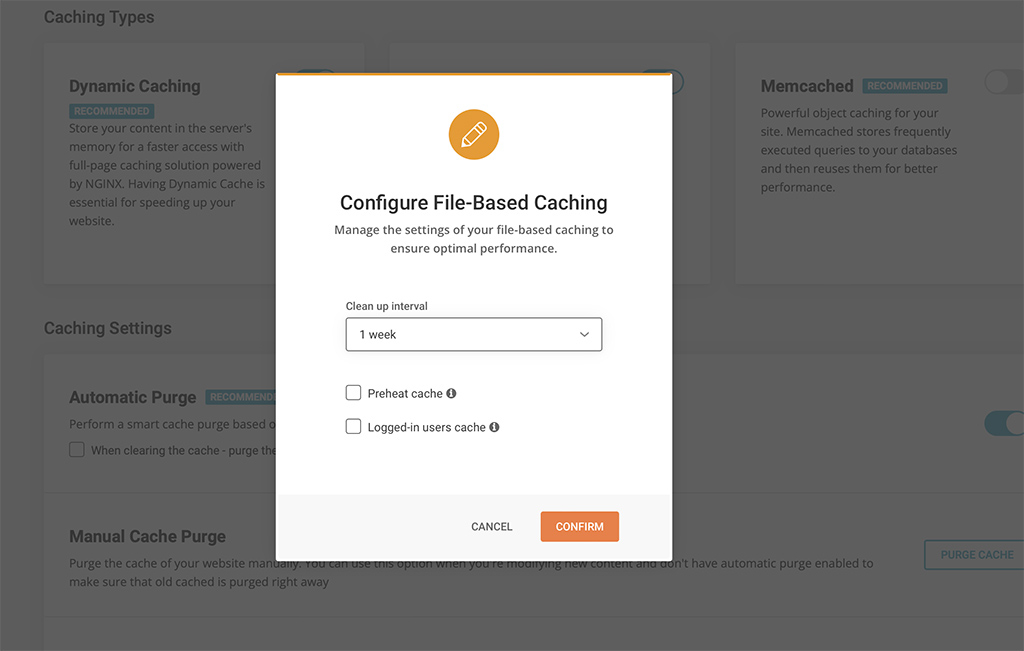
File-based Caching introduces preheating and cache for logged-in users!
Nowadays caching is one of the most effective means to optimize performance. When looking for alternatives to Dynamic Caching (built-in feature for all SiteGround websites) we decided to implement File-based caching because of its versatility and compatibility with different hosting configurations. File-based Caching can be used on its own on websites hosted outside SiteGround or as an additional caching layer for SiteGround customers who already have Dynamic Caching and Object caching (Memcached) enabled.
Some great features of the File-based caching are the ability to keep cache for logged in users, pre-heating cache (especially useful for rarely opened pages that are opened for the first time in a while) and defining longer cache expiration. These options are configurable in the plugin interface. Although file-based caching alone is generally slower than the Dynamic caching, our tests show that its implementation in Speed Optimizer is still up to 20% faster than any other plugin that provide similar performance-optimization functionality that we have tested.
Environment Optimizations
All users can enjoy several types of environment optimizations that will tidy up your WordPress environment to achieve top performance. Here you can find features like WordPress Heartbeat Optimization where you can define how the WordPress API interacts with your application to optimize resource usage, and Schedule Weekly Database Maintenance to make sure that your WordPress remains tidy and uncluttered.
Frontend Optimizations
The website’s front-end code can often be heavy and significantly reduce loading speed. There are several features in the Speed Optimizer that can optimize it and as a result speed up your website. Minifying your HTML, CSS and JavaScript output will decrease the size and number of server requests related to these types of files and as a result decrease loading time. We have made these functionalities available through simple toggles in the plugin. You can specify which types of files you want to minify, combine and even exclude from minification or combination. And if all of this sounds too technical for you, you can just look for the “Recommended” labels next to each option to figure out what would have the greatest impact on your website’s performance.
Media Optimizations
There are several media optimization tools in the Speed Optimizer that will work on all hosting platforms. You can enable Lazy Load with which only the media in the visible part of the browser will be loaded. This makes loading faster and smoother for longer pages with multiple media items. You can also define the Maximum Image Width allowed for images on your website. A lot of themes and plugins tend to upload excessively large images that slow loading speed without ever being displayed in their full width.
SiteGround Exclusive Features
As mentioned earlier, our platform has some unique speed settings and services, which cannot be replaced with plugin functionality alone since they need the specific server environment to run as designed. These remain exclusively available to websites hosted on SiteGround.
Dynamic Caching and Object Caching
One of the best speed-enhancing features you can get for your website and our top choice when we talk about speed, is the Dynamic Caching. The Dynamic Caching is part of our proprietary 3-level server caching implementation that relies on NGINX Direct Delivery for static cache handling, Dynamic Cache for dynamic content and Object Caching (Memcached) for storing data and objects in the RAM. We believe that Dynamic Caching is essential for every website and we have it included in all of our hosting plans. From the Speed Optimizer plugin you have control over advanced WordPress-specific settings for the Dynamic Cache and Memcached to get the most of this technology.
Image compression and WebP
The Image Compression and WebP features of the Speed Optimizer plugin are two essential features available to websites on the SiteGround platform exclusively. With our image compression algorithm you can decrease your image size (and respectively the time it takes for your images to load) by up to 85%, while keeping the image quality high for your visitors. You can also enable WebP which will convert your images to a WebP format which adds an additional reduction in size without affecting image quality.
Opening the plugin to websites hosted outside of SiteGround was a big step for us. After running multiple tests on different hosting platforms and benchmarking performance against WordPress plugins with similar functionalities, we’re confident that the Speed Optimizer plugin is the best performance optimization tool you can get for your website regardless where it’s hosted. And it’s completely free. Download it here, try it yourself and let us know how it works for you by leaving a comment in the section below.