WCUS 2023 In a Nutshell

david wolfpaw wordcamp us

As an organizer of WordCamp US 2023, I am overjoyed with how the event turned out. This was my first in-person WordCamp in nearly four years, and it did not disappoint. There were insightful sessions, plenty of fruitful networking opportunities, and community engagement that made this WordCamp a tremendous success. This was my first time helping to organize such a large-scale WordCamp, and the experience was rewarding.

Community Summit

The first two full days that I was in Washington DC were the Community Summit. There were dozens of discussions, brainstorming sessions, and planning for the future of WordPress. While I can’t speak to specifics of the event, raw notes for each session are available on the Make Summit site.

My personal highlight discussion was the session on DEIB and the WordPress community. While the conversation itself was convivial, the hard and harsh reality of the negative aspects of the community made it a stressful discussion to be a part of. Still, I’m hopeful from this and other sessions that we’ve identified areas where we can improve, and more importantly some methods that can help to get us there.

The WordPress community deserves the best and has the ability to do better all the time. This summit was proof of that!

Contributor Day

Part of WordCamp US 2023 that I had a lot of input and focus on was Contributor Day. A Contributor Day is part of a WordCamp where the WordPress community comes together to work on the project itself. Whether it is writing code for core and plugins and themes, translating things, making new educational content, or finding ways that the community can bring others in, there are a lot of ways to get involved.

One of the most important things for Contributor Day this year was to ensure that we were welcoming new contributors as best as possible. I have been to many contributor days, and most follow a similar format. The organizers share a brief overview of the different Make teams, groups split up and try to figure out how to get into the wifi and on Slack, they work on things throughout the day, then share at the end what they worked on.

This time, we decided to cut out the first and last portion, since teams provide updates at their own pace, and can also post them online. Instead, we had new contributors arrive an hour earlier than returning contributors to go through an onboarding session. We also gave color-coded bandanas to team leads and new contributor guides to make them easy to find. The new contributor guides were important to make sure that people felt comfortable walking up to someone and knowing that they could ask questions without bothering them.

“Contributor Day is one of the things that I was most looking forward to.”

~ david wolfpaw

Of everything about WordCamp US this year, Contributor Day is one of the things that I was most looking forward to. Not just because I helped to organize it, but because it would be one of the first times in years that so many people involved in WordPress were able to gather in person and work on the project in groups. Being able to collaborate remotely is great, but having those in person hours to really hash things out together is priceless.

This has to have been one of the largest contributor days ever for a WordCamp. Around 500 people came together to work on writing code, creating documentation, doing translations, developing training, and doing things that make WordPress better all around.

~ david wolfpaw

One of the downsides to being an organizer means that I didn’t get to be quite as involved as I’d like to be. Instead of sitting down with the Community team or one of the coding teams, I was constantly checking in to make sure that everyone had what they needed to succeed. It was a good problem to have, but it kept me away from having the same experience. Still, I am thankful that I was able to play my small role in ensuring a good day. While I couldn’t solve every problem that came up on Contributor Day, I still helped to put together a space where all of these contributors could do work, and where new contributors could learn and get involved. I’m proud of the work done this year, and I look forward to the recap so that we can learn what worked and what didn’t to refine again for next year.

If you have any interest in how to get involved in the WordPress community, check out make.wordpress.org to see the teams that you can get involved with, and how to contact each of them.

Conference Days

After the Community Summit and Contributor Day, I was already three days into WordCamp US before we even got to the actual main event. To say that I was running low on energy is an understatement! Even my daily morning iced espresso wasn’t enough on its own to keep me focused on the day.

What really kept me focused and active were the wonderful conversations that I had. This was with old friends who I hadn’t seen in person in nearly four years, as well as new friends who I got to learn about and bond with throughout the week. Nothing perks you up like an interesting conversation with an engaging partner. 

I started my conference days by helping with registration. The first hour of day one is the most physically active, as everyone is arriving at the venue at the same time to check in. While there were booths setup to print badges, it still caused a queue to form, so I helped by handing out lanyards and pins in advance, and sharing information on when and where events were, as well as preparing attendees to go to the sponsor area and to get their attendee shirts.

Honestly, the meat of WordCamp US 2023 was the two conference days at the end. Over 30+ sessions there were speakers, new and old, sharing their experiences and knowledge with eager audiences. I sat in on sessions where I could, and as expected everything was well prepared and interesting. I came away with even more notes and ideas on projects to work on when the conference is over.

The Expo Hall

Sometimes people avoid the expo hall at events because sponsors and vendors can feel a bit spammy. The feeling is that they will do anything to sell you on their products, and that they don’t provide real value. At WordCamps this can’t be farther from the truth. These are companies that underpin the community, and their employees literally help make the community and code happen. I’ve always found people to be there because they want to be, not because their company made them attend.

These are companies that underpin the community, and their employees literally help make the community and code happen.

~ david wolfpaw

Part of my day was spent with my friends at SiteGround at their booth. I love folks walking up to me and asking me questions about hosting, considering that I use multiple hosts and don’t work for SiteGround. I can honestly answer about the pros and cons about various hosts, and the fact that I have been a consistent customer for a decade at this point. People really seem to want to know more about businesses in the sponsor area of WordCamps, and not just pass by for the free swag. That said, the swag was pretty nice! I already put a foil SiteGround unicorn sticker on my coffee cup, and the tote bag will be getting a lot of use.

If you ever find yourself at a WordCamp, don’t skip out on the sponsor hall!

“It’s where you’ll make great connections, meet new people, and find companies to work with.”

~ david wolfpaw

Most Valuable Lesson as an Organizer

Undoubtedly, the most valuable lesson I took away from being a small part of the WordCamp 2023 organizing team was the significance of meticulous planning and effective delegation. Coordinating a large event like this requires a well-structured timeline, clear communication, and a dedicated team. By delegating tasks to individuals with specific expertise, the team was able to ensure that each aspect of the event was well-executed and no detail was overlooked.

Additionally, I witnessed the importance of adaptability and contingency planning. Despite our best efforts, unforeseen challenges will always arise, and this WordCamp was no exception. Being prepared to pivot and find solutions on the spot helped us maintain a smooth experience for attendees and speakers alike.

The most important takeaway when it comes to adaptability is to listen in the moment to attendees, and to ensure that the full volunteer and organizing team are ready to report any issues that they see. We organized via Slack, and the proper person to solve a problem was ready to see and react as soon as an issue was spotted. Whether updating signage, changing a room for talks when the existing one didn’t work out properly, or helping attendees with individual needs, we were ready to respond.

Future Involvement

Would I help to organize WordCamp US or another WordCamp again in the future? Absolutely. This is far from my first event, but it was my first event as an organizer in four years.

I feel like I have a renewed sense of commitment to the WordPress community. Having to meet remotely only led to a bit of burnout.

As someone who works almost exclusively online, the in-person events are a lifeline and reminder that none of us are in this alone.”

~ david wolfpaw

WordCamp US 2023 was one of my most memorable events yet, and I appreciate the support given to me by SiteGround and everyone else who made it an enjoyable and fruitful conference.

I hope to see you at WordCamp US 2024!

[subscribe_cta]

How to Get Ready for WordCamp USA 2023

WordCamp USA 2023 Insider Series SiteGround

Welcome to my series about life at a major WordCamp! My name is David Wolfpaw, and I am a SiteGround Ambassador, WordPress developer, and have been a WordCamp organizer since 2012. This year the SiteGround team and I decided to give you an insider perspective from the flagship WordCamp North America event, where I’ll be happily volunteering as an organizer.

WordCamps are annual gatherings of business owners, bloggers, developers, designers, and anyone else with an interest in WordPress. They take place all over the world, and are a core part of the WordPress community.

The flagship event for North America, WordCamp US, starts this week. I’ve been attending them for years, and I’m excited for my first WordCamp US where I will be volunteering as an event organizer. My intent with this series is to share my firsthand experience at the event, as well as some behind-the-scenes planning work, and tips to make the most of attending a WordCamp, or any other professional conference.

The most important things at a professional event like WordCamps are the following:

  • Networking and making connections for your business
  • Getting valuable information and ideas from speakers
  • Finding the fulfillment in your WordPress journey

Throughout the week I’ll be offering ideas and resources on how to achieve the above, and how better to start than with pre-event planning? Today we’ll discuss:

  • Finding sessions to attend
  • Connecting with speakers
  • Finding other attendees in your space
  • Ensuring that travel and tools are planned

Crafting a Session Schedule

The wide variety of sessions available at a flagship WordCamp like WordCamp US can be overwhelming. This year has over thirty sessions across two days in three rooms, and that’s toned down from years prior! With so many sessions, it can be hard to figure out what to prioritize.

When I look to the schedule I have a few criteria in mind. Sometimes I look to the speakers, looking for names that I know from social media and blogs. Sometimes I read through every session description, taking note of technologies and tools that I’ve been interested in learning, or just choosing based on an interesting title. There have been a lot of serendipitous session choices in the past, like a session on web publishing that I attended solely because I liked the speaker, and it turned into a conversation that led to a new client.

If you see multiple sessions that you want to attend at the same time, check to see if they will be recorded. Most WordCamps record their sessions to later post to WordPress.tv, making it easier to avoid the FOMO that comes from two great talks happening at once.

Connecting with Speakers

The conversations that you have at a WordCamp can easily be the most valuable part of attending the event in person. Content is great, but connections are better. Getting face-time with speakers can put you on their radar when it comes to work. As both an event speaker, and an attendee, I’ve found that it really breaks the ice to have something to talk about already, which can easily lead to further conversations. Most of my clients have come from word-of-mouth, including from speakers and attendees at WordCamps.

You don’t just have to wait until the event to reach out though! I don’t recommend blindly spamming all event speakers, but look through bios and talk descriptions and see if there are any individuals that you want to ensure that you connect with. Send them a short message, expressing your interest and excitement for their presentation, and your wish to say hi during the conference. Event speakers have already put themselves out there by applying to speak, and absolutely want to share with attendees.

Finally, make sure that you find out what communication methods the speakers that you’ve connected with in person prefer for followups after the event. Again, they came to share and they want to talk to attendees as well! Don’t be afraid to talk to them, and don’t be afraid to follow up later if they share contact information with you.

Networking with Attendees

Speakers aren’t the only people that you’ll want to connect with at WordCamp. You’ll also want to find like-minded attendees who you can build business relationships with.

It’s easy to assume that anyone else working in the same space as you is a direct competitor, but WordCamps are a great example of the opposite. I have met plenty of other WordPress maintenance providers who could be considered competitors to my company, FixUpFox. But I’ve met other agency owners who shared tips with me, passed along client contacts, and have become clients themselves.

We all have our own niches and specialties, and when the customer who just isn’t right for you comes along, but you know someone who might be a better fit, wouldn’t you want to pass them along? And you’ll be on the top of their mind when they have clients that fit your niche in return.

Preparing your Tools and Travel

WordCamp US has made part of my travel easier, by hosting in a convention center with a hotel, making it easy to get around the event. But prior to the event I needed to make sure that I had a flight to a nearby airport, a ride lined up for there and home, and I’ve checked the train schedules in advance to ensure that I can easily go from airport to hotel.

I’m also making sure to create a packing list, ensuring that I have everything that I need to stay connected and comfortable at the event. Take a bit of time to think about what you need while at a conference, from clothing to coffee, toiletries to technology. And while you’re at it, check out the SiteGround TikTok account for some quick tips and additional resources for preparing for WordCamps.

One more tip that I want to make sure to address is to listen to your body and focus on your health before, during, and after events. I unfortunately had to skip my last WordCamp because I got sick, and I didn’t want to spread that to any other attendees. I’ll be watching my health this week, including while I’m at the event. 

Sometimes you just need some quiet time to yourself, and that’s ok! You’ll never be able to do everything at an event, but that’s ok. Knowing that there are limits to the number of sessions that you can attend and the number of people that you can talk to means you can prioritize what is most important to you at the moment.

Finally, take care of yourself post-event. It is easy to get caught up in the emotions of an event where you are surrounded with hundreds or thousands of like-minded attendees. Then you get back home, to your day job, where you have the daily grind of life to attend to. If you have the ability, take a day off after the event to rest and recharge. Even extroverts can get worn out from lots of social time.

More to Come

Follow along for the rest of the week while I share the journey to WordCamp US as an organizer and attendee. And if you are attending yourself, come say hi!

[subscribe_cta]
Migrate to Google Analytics 4

the new features of google analytics 4

This July 1, 2023, Google permanently retires the application that has accompanied us in our web analytics for the last ten years: Universal Analytics. In doing so, it concludes a migration process that began three years ago, with the introduction of Google Analytics 4 in 2020. Although at that time it was not yet called that.

The change has caused an earthquake in the digital ecosystem since both versions are not compatible with each other, and switching from one to another involves a process, misnamed migration, which can sometimes be complex.

Indeed, Google Analytics 4 does not allow the import of historical data stored in Universal Analytics, which can be strategically important for those who need to perform comparative analysis with previous periods. For example, the case with an ecommerce that needs to contrast the results of this year’s Black Friday campaign with those of previous years.

To avoid this problem, the Google team insisted over the last two years that we install the new GA4 in parallel to UA, thus overlapping both measurements. As was predictable, many people did not carry out the integration until the last moment. Some have not even done it after the blackout.

In the following lines, we will try to find a solution to this situation.

What changes does GA4 entail?

GA4 represents a radical change in the way data from your digital assets is acquired and processed. There are several very important differences compared to previous versions.

Web + app

Google Analytics 4 allows tracking and analysis of both websites and mobile applications. This means you can gain insights and metrics on the performance of your website as well as the usage of your mobile app, all in one place. This is especially useful in a world where many businesses have a presence on both the web and mobile platforms.

All is about events

One of the main features of GA4 is that it is based on an event-centric model. In previous versions of Google Analytics, the focus was primarily on page views. However, in GA4, all data is collected and organized into events. An event can be any action that users take on your website or app, such as clicking a button, playing a video, or submitting a form. This allows for a higher level of flexibility and customization in data analysis.

Machine learning

GA4 leverages the power of machine learning to provide more detailed and valuable insights. It uses machine learning algorithms to perform advanced data analysis and uncover hidden patterns and trends. This helps identify opportunities and challenges for your business such as high-value audience segments, revenue predictions, and specific user behaviors. The artificial intelligence and machine learning in GA4 also allow for the creation of custom models to predict future user behavior.

Cross-platform and cross-device tracking

GA4 has an enhanced ability to effectively distinguish users who browse your site from different devices or browsers. It can now tell if the same user accessed your website from their mobile browser in the morning, through the office computer in the afternoon, and on your business app from their tablet at night. User accounting is thus more accurate, and we can fully trace the customer journey.

Data-driven attribution

GA4 offers more accurate and comprehensive data-based attribution compared to previous versions. With data-based attribution, you can better understand how different marketing channels and user actions contribute to your business goals. You can see which traffic sources and marketing tactics generate more conversions and make informed decisions about resource allocation. The attribution of responsibility for each marketing action is much more precise and fair as it is distributed based on how effective it has been with each type of user, statistically speaking.

Should I install GA4?

The answer to this question is always “it depends.” If you’ve used Universal Analytics on your website, it seems reasonable to make the switch and collect data in GA4. However, this has its technical and legal implications.

As you may already know, the General Data Protection Regulation, or GDPR, requires user permission to perform analytical processing of their data. This reason alone justifies the use of a cookie banner for any website whose potential target is not only the European Union, but also other countries like the United Kingdom, Japan, Argentina, Uruguay, Switzerland, Canada, some states in the U.S., and increasingly more countries around the world.

On the other hand, it’s very likely that for many of the people reading this article, server analytics will be sufficient, thus avoiding this small legal quandary.

Statistics on SiteGround

At SiteGround, we have an entire section in the Site Tools dedicated exclusively to statistics, where you’ll find very interesting information about your website.

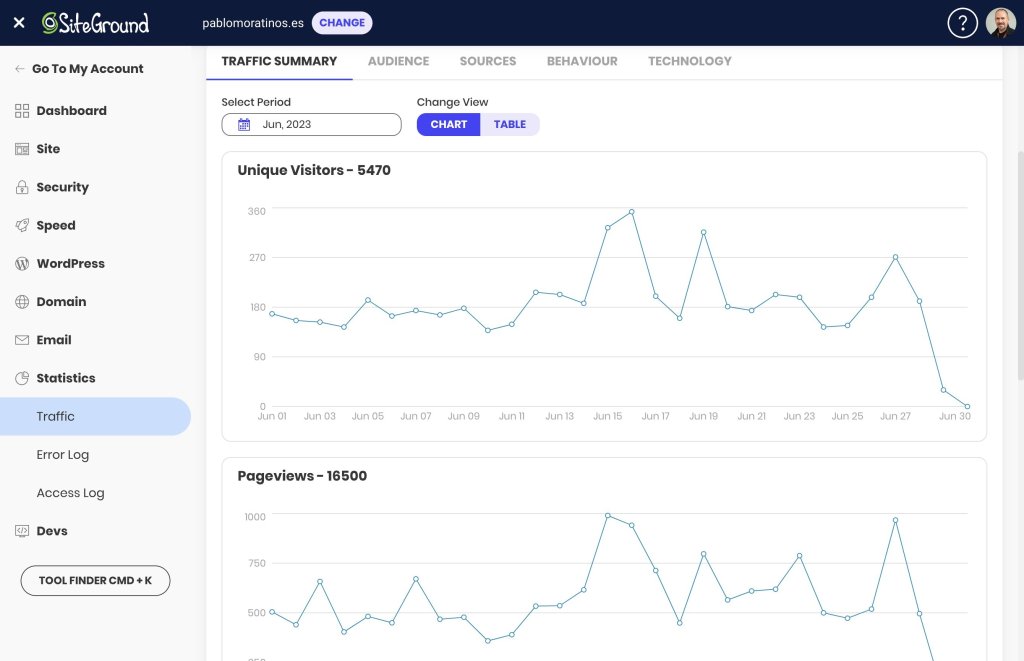
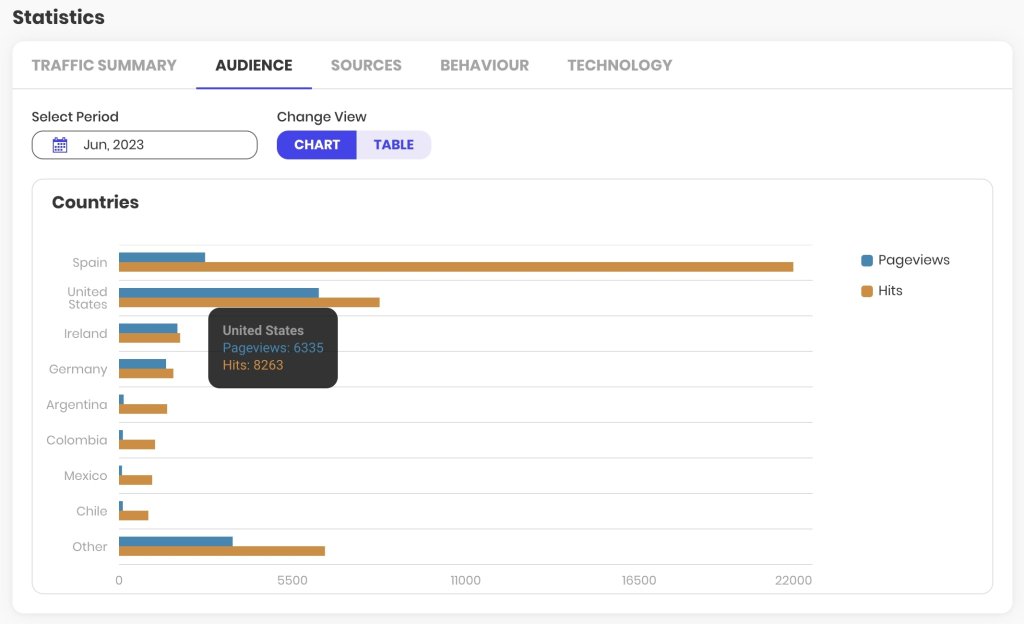
In it, you can access useful information such as the volume of traffic your website receives, the countries of origin, the source of visits (search engines, social networks, other sites), your most viewed content or pages, and the technology used by your visitors (browser and operating system).

The collected information can be viewed both in line chart format to measure temporal evolution, as well as in bar charts or tables to consult absolute values.

The analysis periods are monthly, and the information is updated with a frequency much higher than that of Google Analytics, which can take up to 24 hours to consolidate its data.

The main aspect you should consider with these reports is that they are based on what is known as server logs, a type of data that does not discriminate between bots and human users. Therefore, the data volumes may not accurately represent the number of readers or customers of your online asset. In any case, the evolutionary information of the traffic, month by month, is very useful to understand the growth of your website and the content with the highest demand.

Alternatives to GA4

If the information from SiteGround’s statistics is not enough and you want to continue avoiding managing legal aspects related to user privacy, it is recommended that you install another general analytics solution like Matomo, or specific ones for WordPress like Fathom, Koko Analytics, or Simple Analytics, for example.

But if you want to conduct a thorough analysis of your site’s traffic and performance, understand how users interact with your content, identify the most effective traffic acquisition channels, or discover those elements with the greatest potential for improvement on your website, GA4 is the most comprehensive tool and the current industry standard. Moreover, there is already quite comprehensive official documentation, tons of guides on user blogs, and thousands of videos showing many of its advanced features.

How to install GA4

There are several ways to install GA4. All of them work similarly to how it was done with Universal Analytics. If you were already using this tool, the easiest way is to change the tracking code or the identifier from one to the other.

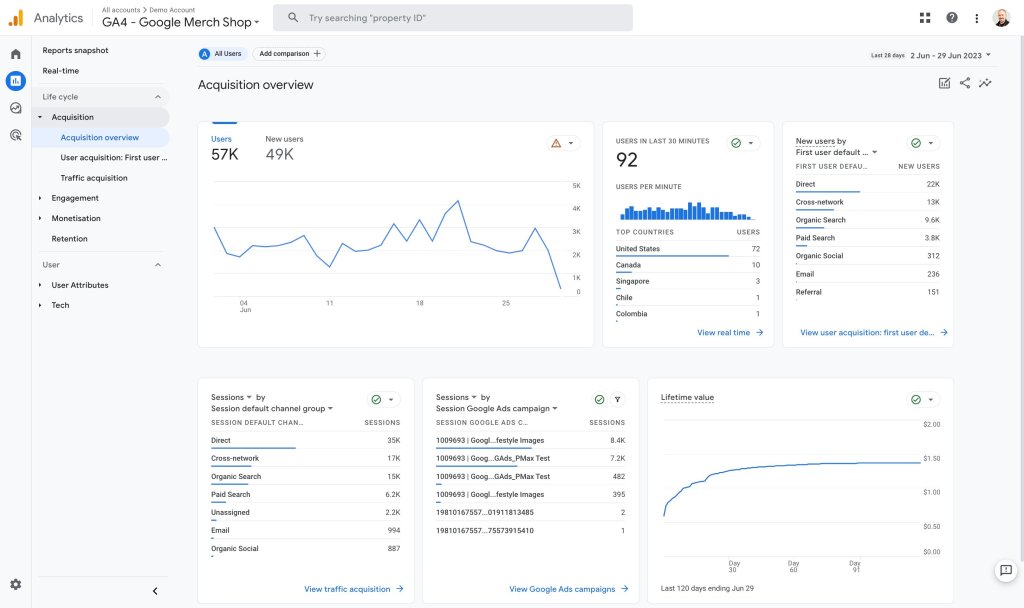
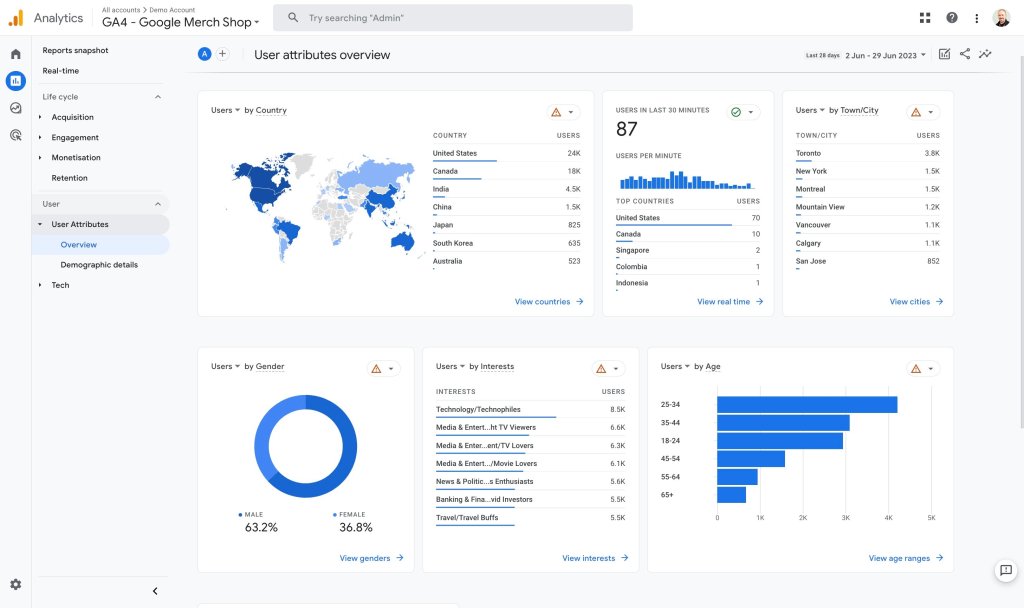
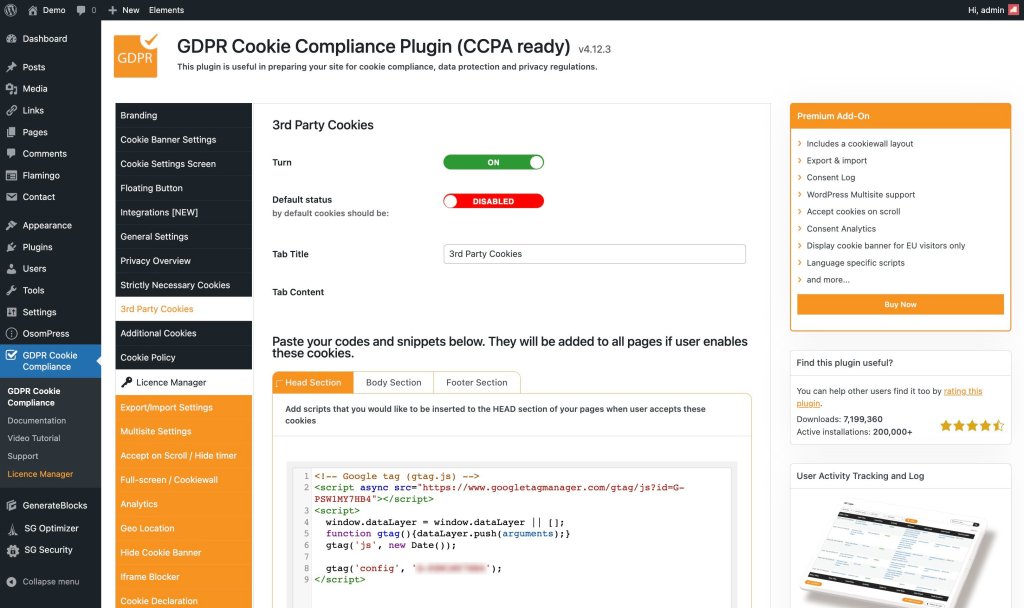
You will find the Measurement ID in Admin > Data Streams > Web Stream Details, and you will recognize it because it is a ‘G’ followed by a dash and a series of characters, for example, G-PSW1MY7HB4. This ID from the example is the web stream identifier of the Google Merchandise Store, a property that Google shares for demonstration purposes and that you can consult whenever you already have a Google user.

In this same space, a little further down, in the Google Tag section, you will find the View Tag Instructions section, where Google offers some recommendations on how to install the tracking code on your website, either through the Measurement ID that you obtained in the previous step, or through the complete script for a manual installation.

The most comprehensive formula for all those WordPress users who care about respecting the privacy of their visitors is to add the GA4 tracking script to their website through a cookie plugin. For example, GDPR Cookie Compliance has a section in its settings for third-party cookies where you can add it.

As soon as you complete and save the configuration (follow the official plugin documentation to make sure you don’t miss anything), your GA4 property will be tracking all those visits that accept the cookie policy of your website.

The future of GA4

Over the next few years, Google Analytics 4 will be present on millions of websites. Not only on those where its tracking code is installed, but also in hundreds of thousands of tutorials, manuals, tips, and courses.

You can be sure that Google Analytics will continue to be the standard and that its tool will continue to grow day by day. The current version still needs to be polished in many aspects, but changes and updates that increase its potential are published every week.

The closure of Universal Analytics should mean a reorientation to GA4 of the many resources it consumed, so it seems logical to think that the steps it will take in the coming times will be larger and more firm.

For those of us who have been working with it daily for many months, it is already a very useful resource that is difficult to tame but gives us a much broader and deeper view of our digital assets. We know that the learning curve is steep and that it is difficult to overcome resistance to change, but we are sure that if you give a little love to your Google Analytics 4, you will be getting sparks out of it in a few hours.

Have you tried it yet? What did you think? Have you encountered any problems? We would love to hear about your experience in the comments.

[subscribe_cta]
Discover Your Entrepreneurial Persona with Our Personality Quiz

discover your entrepreneurial persona

May marks National Small Business Week in the USA for the past 60 years now. It recognizes the importance of SMBs to the U.S. economy. This year at SiteGround we went beyond that first week, and dedicated the whole month of May to helping small businesses start, grow and succeed online with informative content and useful resources:

  • Email course that helps you start your business online with actionable challenges to master your business skill set in one month;
  • Free guide: Journey of an online buyer that helps you learn how to build and optimize your website to increase conversions, based on the modern online buyer’s journey;
  • Tips from top business experts that help you navigate through everything you need to manage yourself – from the must-have elements on your website to the fundamental marketing channels, and many more.

To wrap up the SMB month, we prepared a fun business personality quiz to help you discover your entrepreneurial spirit and find out who is your perfect business match.

This content is only visible when the visitor has consented to marketing cookies.

Answer a few witty questions on how you approach your work and business tasks in order to:

  • Find out your entrepreneurial alter ego

Which one of the 16 business personalities are you – a Visionary Entrepreneur that approaches work with thoughtfulness and imagination, a Devoted Perfectionist that is committed to hard work, or someone else? Take our quiz to get a full description of your business personality straight to your inbox.

  • Unlock and download your custom digital badge

Once you complete the quiz, you’ll also receive your custom digital avatar, free to download and share with your friends and fellow business partners. It will correspond to your work approach and be a nice addition to your social media profiles.

  • Discover your entrepreneurial “soulmate”

As a bonus, you’ll learn what are the three business personalities that you work best with. Share your results with friends to find out who is your perfect business match among your friends and fellow entrepreneurs.

[subscribe_cta]
Celebrating 20 Years WordPress

wordpress 20th anniversary

This is a special time of the year for SiteGround and the vast WordPress community worldwide – WordPress, the platform that powers over 40% of all websites on the internet, is turning 20 on May 27, 2023! During almost all of its life, SiteGround has been actively involved with the WordPress project and its community, contributing, sponsoring, and providing expert WordPress hosting services to more than 2+ million WordPress sites. As we celebrate WordPress’ 20th birthday, we want to reflect on our shared journey, commemorate milestones, and express our unwavering commitment to empowering you – our valued customers and WordPress users.

A Shared Journey

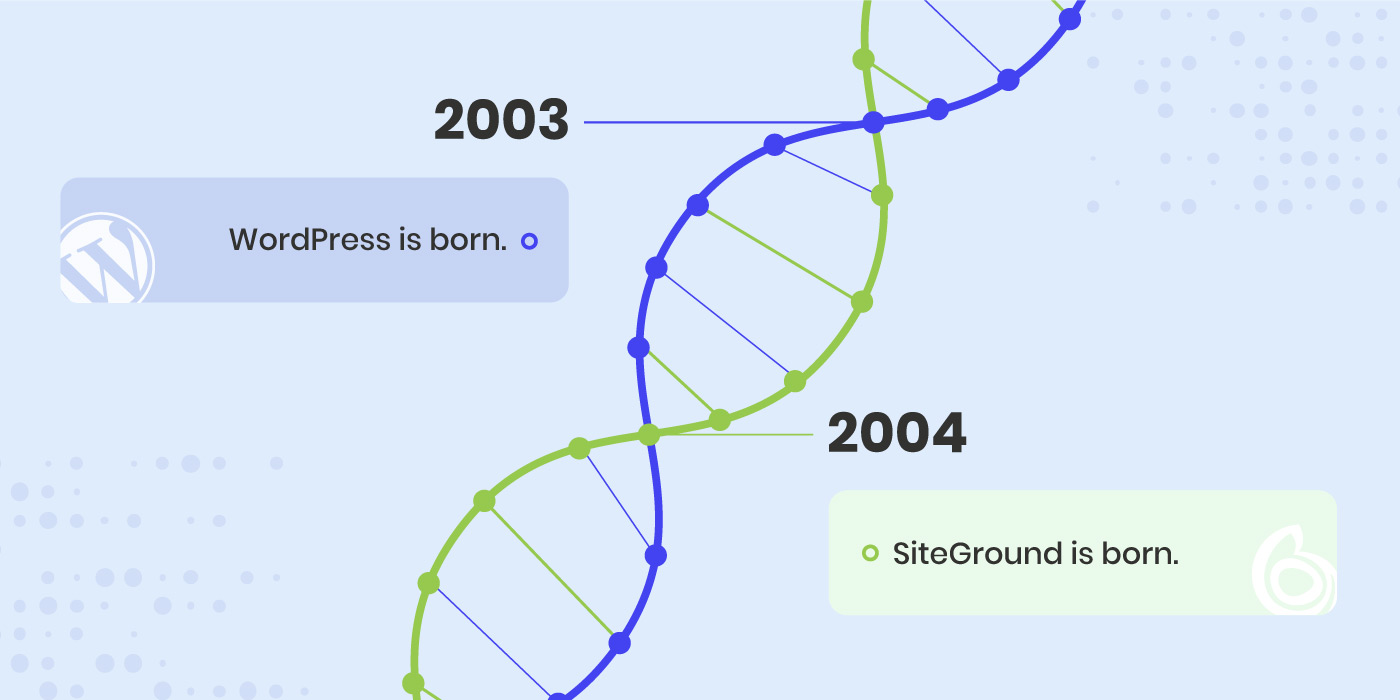
From the moment SiteGround was founded in 2004 (just 1 year after WordPress emerged), we recognized WordPress amazing potential. Back then, it was a new, blogging platform that had the opportunity to change the web – and it did! It evolved into one of the most powerful open source content management systems used by millions of websites worldwide. In these almost two decades, we have worked closely with the WordPress community, sponsoring and participating in hundreds of WordCamps and WordPress Meetups worldwide. During all these years we have been contributing to the project, offering our expertise, and developing a powerful platform for WordPress users to create, innovate, and thrive.

Contributing to better WordPress

Ever since the beginning, WordPress development has relied heavily on the contributions of its users. There is tons of voluntary work involved in maintaining, improving and developing WordPress. SiteGround has dedicated many hours of work of different members of its team to address various needs of the project. Some of our team members have contributed code, others organized events and translated help articles, etc. We have also supported external contributors, all with the purpose of helping make WordPress better for everyone using it. As a company, we believe that contributing to the WordPress project is one of the ways to pay back to the community and the opportunities WordPress brought to us and our clients. You can check our company profile and current list of active contributors on wordpress.org website.

In addition to contributing to the WordPress core and project needs, we have developed two of the most popular free-for-all plugins – the SiteGround Security and SiteGround Optimizer plugins. The plugins provided us with the opportunity to share our hosting expertise beyond our own hosting platform and enabled millions of WordPress users to immensely improve their websites’ security and performance – two of the pillars of any successful website.

Bringing the WordPress community closer

One of the key pillars holding WordPress community together are the community events – the most common being the WordPress Meetups and the WordCamps where diverse WordPress members come together to get to know each other, exchange ideas and find ways of cooperating more efficiently. Ever since 2011, SiteGround has been one of the main sponsors of WordCamps and later on of Meetups, helping empower these live interactions. As of this month (June 2023) we are also a Global WordPress sponsor, thus supporting pretty much all WordPress events around the world.

Providing hosting expertise

Throughout this amazing journey, SiteGround has been proudly supporting WordPress users in creating and managing their digital presence with premium hosting services designed specifically for WordPress websites, custom tools and features, custom plugins and more. Our commitment to delivering a high quality service has been recognized on the official wordpress.org/hosting website, where we are one of the only three recommended hosting providers.

Together with WordPress, we’ve reached numerous milestones. From WordPress’ evolution as a simple blogging platform to a full-fledged content management system, to SiteGround’s development of a state-of-the-art hosting platform with powerful WordPress tools and features, our combined journey has been nothing short of spectacular.

We invite you to visit our dedicated page showing how SiteGround and WordPress paths have crossed over the past 20 years, helping us achieve numerous milestones.

> > VISIT PAGE

Our Continued Commitment

We are incredibly proud of our close relationship with WordPress and the immense value it has brought to our users. As a testament to this commitment, we continue to innovate and offer an extensive suite of WordPress-specific features and a premium hosting service. As WordPress continues to grow and innovate, so do we. Our goal remains to provide you with the best possible hosting environment for your WordPress website.

Thank you for being part of this incredible journey! Here’s to WordPress’ 20th Birthday, and here’s to another 20 years of innovation, growth, and shared success with SiteGround and WordPress!

[subscribe_cta]

How to Reduce Your Website’s Carbon Footprint: Twitter Chat

sustainability twitter chat

If the internet was a country, it would be the 4th largest source of carbon emissions. On average, a website produces 1.76g of CO2 per visit from the processing power needed to load and deliver the page. That’s why as a website hosting provider we have a responsibility to optimize our services and the performance of our clients’ sites to minimize these negative effects as much as possible.

To dive deeper into the topic of website sustainability, we organized a #WebSustainabilityChat on Twitter along with several experts in different fields of website development – Nora Ferreirós (@noraferreiros), Responsible UX/UI Designer, Ari Stathopoulos (@aristath), Web Developer, Accessibility & Sustainability Evangelist, and Marketa Benisek (@MarketaBenisek), Digital Sustainability Lead at WholeGrain Digital. Here’s a summary of their discussion with some useful tips and tools to help you measure and reduce your website carbon footprint.

How do websites contribute to carbon emissions

In short, the faster your website, the less server resources it uses. Likewise, the simpler the website, the less data it uses. Website speed optimization and keeping things simple are good both for the environment and for saving energy.

“Every bit of information you put on a website will need energy. The more information you put on your website, the more energy you need, and the more carbon emissions you will contribute to,” points out Nora Ferreirós, Responsible UX/UI Designer.

How to measure your website’s carbon footprint

Our experts agree that there’s no need to use many tools to measure your website’s carbon footprint, but rather find one tool that gets the job done. You simply run a test, make improvements on your site and see if that has an impact: “It doesn’t matter which tool you use, just use one consistently and make comparisons to see if your changes make sense,” says Ari Stathopoulos, Web Developer, Accessibility & Sustainability Evangelist. Here are a few examples that you can use:

The Website Carbon Calculator “gives context about the energy you consume with your website by comparing it with non-digital stuff – your website consumes X kg of CO2, and it’s the size of a car, for example”, explains Nora Ferreirós.

“Ecograder is more about metrics and all the settings you should improve in order to reduce your website’s carbon emissions,” says Nora Ferreirós.

Keep in mind that apart from using such tools, it’s even more important to have context about sustainability, Nora Ferreirós, points out because “sustainability is a way of doing things and understanding how they work – it’s not just about metrics”. The decisions you make about your website are just as important as the technology and tools you use, she adds.

5 tips to reduce your website’s carbon footprint

Once you’ve measured the carbon impact of your website or particular webpage, it’s time to work out a way to reduce their carbon emissions. Here are some top tips and immediate actions you can undertake to improve your website sustainability:

Improve your website’s performance

Let’s first look at the bigger picture in terms of website performance. According to Ari Stathopoulos, the best way to optimize your site is to get rid of all the things that are not related to what you actually want to do.

To explore this point, he gives an example with a website that sells T-shirts, for instance. In his opinion, most website owners would want their site to have everything – 10 images on the product page, a video presentation, plus a slider at the top with related products, and all that other stuff that are not really necessary in order to sell the actual T-shirt.

Marketa Benisek, Digital Sustainability Lead at WholeGrain Digital, elaborates further and explains that it all comes down to the elements that are causing the individual webpages and the website to be larger than necessary. In her opinion, these are usually “either very large stock images, or videos that are data heavy”. Here’s some advice on the images and videos:

  • Reduce the size of your images

As Marketa Benisek points out: “For example, if you have thumbnail images on the website’s team page, even though those images appear small on the site, they can sometimes be uploaded as full-size, like 1MB or 2MB. By reducing the size of those images, you also significantly improve the speed of that page.”

  • Rethink how you use videos on your site

If you have any videos, you might need to rethink the way you use them. First of all, “think whether the video really serves the purpose or whether it can be replaced, perhaps, with an svg animation, instead of a full-on video, and also avoid autoplay videos,” Marketa Benisek continues. Ari Stathopoulos adds another smart alternative as well – if you want to show a presentation of a product, you don’t need to embed a video, you could just link to the video on YouTube.

Optimize your website’s data transfer

To optimize your website’s data transfer, your starting point should be the notion that everything you put on your website is data – “every single pixel is a piece of data that people will have to download from the website,” Marketa Benisek points out.

You need to start with one step at a time. As Nora Ferreirós advises, it’s important to begin with having less things on your website (just the ones you need) and then build them up, if needed. The reason is that it would be more difficult to optimize a website later on, once it’s already big and has a lot of things: “If you want to optimize your data transfer, just transfer less data,” Nora Ferreirós says.

In case you already have lots of things on your website, you need to reduce them, as this can significantly reduce the overall size of the website, therefore the data transferred, and eventually the carbon footprint.

Bottom line is to keep everything on your website simple, minimal and clear for your users to easily find what they’re looking for. To achieve this, you need to “think about what would be most useful to your users and have an understanding of who your users are,” Marketa Benisek concludes.

Apply UX/UI optimizations

Not only should you have an understanding of who your users are, but also an understanding of how they are interacting with your website. For this purpose, you need to design the user journey on your website.

If you’re clear on who your audience is, then design your website accordingly, “simplify the entire user experience and make sure people find it easy to navigate when they visit your website”, Marketa Benisek advises. Nora Ferreirós shares an insight on how to achieve that: “A great exercise to keep things simple is to think about you as a user. When you’re a user, you don’t want things to be complicated, you want to understand what people are selling to you, so think as you navigate a website and apply this to your own.”

Once you’ve identified the user journey, the best way to achieve the objectives you have for your users, is to focus on one thing that you want to say. In Marketa Benisek’s opinion, simplicity on websites signifies a lot of confidence. For instance, Apple is one of the best examples to take as an inspiration. They have very little information on their pages, but they’re straight to the point. They only feature the information that people are looking for.

When your objectives and messages are clear, think about the website as a whole project, not about specific features (sliders, or videos, etc.) – only then you’ll be able to optimize your website and your UX/UI, Nora Ferreirós advises. Every part of your website should then work together for that main objective, she adds.

Adapt SEO practices

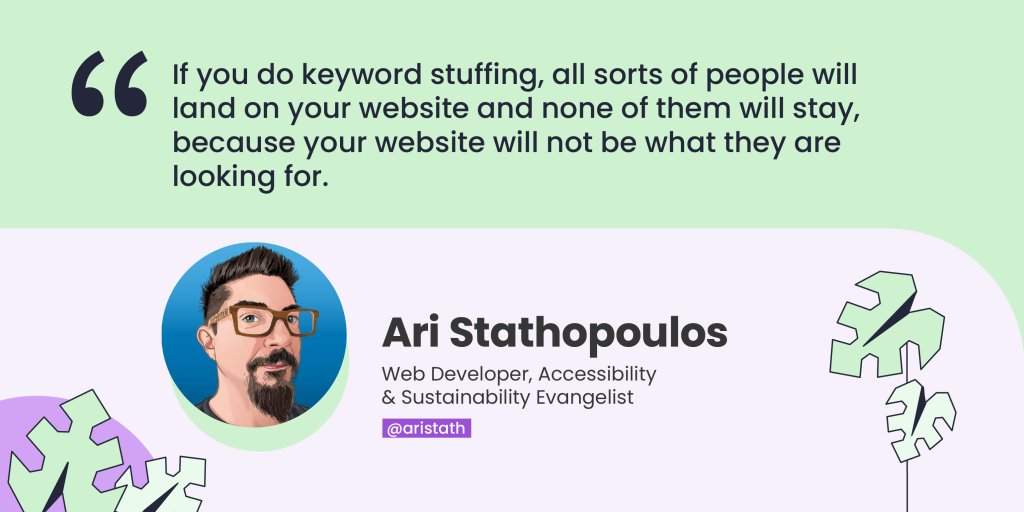
SEO also plays a huge role in website sustainability. For this purpose, Ari Stathopoulos advises you to think about the user journey again. He explains that most people go in a search engine, search for something, land on a website, and if it’s the wrong website, they try again with the next one and so on. Therefore, you need to be concise with your message – the clearer the text is, the more related users you’ll get, in his opinion. He warns that, on the contrary, “if you do keyword stuffing, all sorts of people will land on your website and none of them will stay, because your website will not be what they are looking for”.

SEO is indeed important, but we also need to keep it human, Nora Ferreirós warns. We sometimes begin to work for machines, while we’re supposed to work for people – get your website ready for helping humans and for giving them services and products they need, she points out.

Choose a sustainable hosting partner

The last but not least part of the puzzle is your web hosting provider. Ari Stathopoulos points out that there’s a lot of blame on hosting providers, regarding greenhouse emissions, but in conclusion he agrees that more web hosting companies are turning green, and that’s a strong and important tendency.

Here are a few questions to ask when choosing your web hosting provider, in order to make sure they are providing green and sustainable services:

  • Do they use renewable energy for their data centers?
  • Do they improve server software to minimize resource consumption?
  • Do they optimize websites for higher performance and less data transfer?
  • Do they have a sustainability-oriented company culture?

At SiteGround, for example, our efforts are dedicated to creating a green web hosting environment that helps both our business and our clients’ websites be sustainable. 

  • Our data center network is powered by the premium Google Cloud platform that matches all electricity consumed by the servers with energy from renewable sources;
  • Our custom PHP setup lowers the server memory usage and gives more space for the server to handle more website traffic faster;
  • Our SiteGround CDN, SuperCacher, and other in-house built solutions maximize websites’ performance and increase their efficiency;
  • Our company operates in green offices and regularly initiates and supports green social causes.

Wrap up

The top advice our experts recommend to all website owners is to keep things as simple as possible. That will not only help your users navigate easily through your website, but also significantly reduce your website’s carbon footprint.

Check our YouTube recording to hear the whole Twitter chat conversation and follow us on Twitter for more news and discussions on useful topics.

[subscribe_cta]

Start, Grow & Succeed Online with Tips from Top Business Experts

smb growth twitter chat

As a small business owner, you need to manage almost everything yourself – your brand, your store, your website, etc. To help navigate through all that, we’ve got you covered with professional advice from top experts that will help you start, grow, and succeed online.

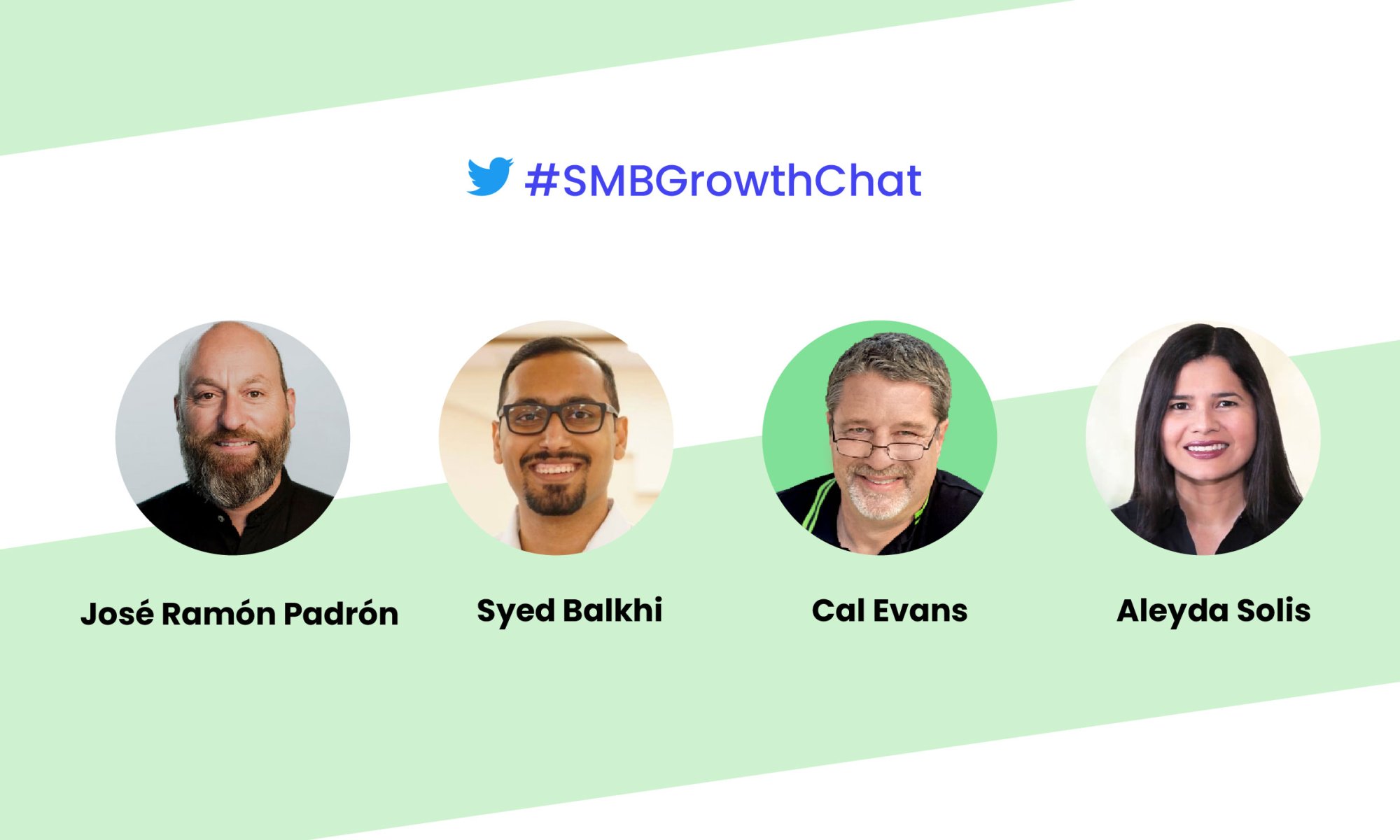
We organized an #SMBGrowthChat on Twitter Spaces along with Syed Balkhi (@syedbalkhi), Entrepreneur, Investor & CEO, Cal Evans (@CalEvans), eCommerce expert & Internet entrepreneur, Aleyda Solis (@aleyda), International SEO Consultant & Entrepreneur, and José Ramón Padrón (@monchomad), SiteGround Spain Country Manager. Here’s a summary of their discussion with some expert tips on how to succeed online.

Essential steps when starting an online business

The very first essential step to starting an online business is knowing your target market. “In my mind, the most important thing for a business is knowing who your customers are and how you can get that customer,” notes Syed Balkhi, Entrepreneur, Investor & CEO.

As a next step, you need to come up with a domain name and website idea. Aleyda Solis, International SEO Consultant & Entrepreneur, points out that “the building block, the main pillar of your online business should be your website”.

Create your small business website

Now that you are at the stage of building your website, you need to choose carefully which website building app to use for your small business site. It will all depend on the functionalities you need in order to provide your services or products, as well as on your own capabilities. 

For example, if you have technical capacity, you’d probably be able to develop your website from scratch. However, that would take you much time and effort. For this purpose, as a programmer, Cal Evans recommends using WordPress: “The reason I say that is because I’m a programmer, but I can spin up WordPress and put a theme in there and put together 5-6 plugins and usually get exactly what I’d have done, without having to program”. Syed Balkhi also recommends WordPress and points out that 43% of the web uses it, including SMBs, developers, entrepreneurs, and others.

Must-have elements on your website

After you’ve built your website, let’s explore what are some of the must-have elements to include on it.

No matter what type of website you have, you need to communicate what you do. Aleyda Solis points out that “you should have at least a landing page, explaining what you’re offering, what’s the value of it, its price (range), and a contact form, so people can get in touch with you.” She adds that if you have many products, categories, or brands, then you need proper navigation that allows users to go through your web structure and reach your different offerings. Of course, if your website is very complex, you need to add a search feature as well.

Syed Balkhi builds upon this idea and notes that you need to have a way to stay in touch with your users, to enhance their user experience and help them get to the goal of conversion (subscribing, buying, etc.). In his opinion, it’s good to “add an email newsletter, or a push notification platform, because you need a way to connect to your visitors after they leave (the majority of people leave your website and they never come back – it’s like 70% or for some websites it’s even 97%), or even SMS notification.”

A general rule to follow when adding these elements is that “the most important content should be no more than two clicks away,” José Ramón Padrón says. Think about the user experience and the importance of CTAs – make it clear and simple for your users to get the information they need with minimum clicks.

Scale your online business

“You can not improve what you can not measure,” points out Syed Balkhi. To scale your business, you need to know your visitors – how they are finding and using your website, because this helps you focus on the content and products that matter the most, he adds.

For this purpose, Aleyda Solis recommends using marketing analysis tools “to better assess which are the keywords that are already bringing traffic to your website from an organic search point and from paid search perspective as well.” Some of the most popular marketing analysis tools you can use are Google Analytics, MonsterInsights, SEMRush, etc.

As a next step for scaling your business, Aleyda Solis recommends using marketing automation tools: “such tools will allow you to easily follow up with your customers, if at some point they leave a landing page, before converting […], to collect and develop your audience with forms that you can easily create, similar to email marketing.” If you’ve chosen WordPress, there are many plugins that can provide this automation, as well as plenty of integrations with some of the top marketing automation platforms.

“When you already have a product and you know what’s working, now you have to do a lot of testing and optimization, so you can use a landing page builder that lets you do dynamic personalization – you can try different offers, different PPC ads,” adds Syed Balkhi.

When your business is growing, it’s also important to use a hosting provider that offers a variety of products in order to avoid further migrations. As José Ramón Padrón points out, “you need a hosting provider with many data centers, CDN points all over the world, specific tools for improving website security”.

Sometimes, when the business grows, the team also grows with it. For this reason, there is a need for automation of internal processes – how the information flows inside the company – tools like Jira, Slack, etc. are important, José Ramón Padrón adds.

Fundamental marketing channels

The number one channel to reach your customers is through search engines (the biggest ones being Google and YouTube), thus SEO would be your most important starting point. Aleyda Solis advises you to have an SEO specialist, when building your website in order for SEO practices to be taken into consideration right from the start, so that later on, when you’re ready to launch your full SEO strategy, it would be easy for you to do so.

“Keyword research within the SEO process is super valuable not only for SEO, but also to understand when you still don’t have internal data, how your audience is looking for your products or services, and how to position yourself versus your competitors,” Aleyda adds.

Your mailing list is the next important marketing channel – “it doesn’t need to be a full email marketing strategy at the beginning, but starting to collect email contacts right away is something I’d recommend,” notes Aleyda Solis. This will allow you to build an audience and engage with it later on in a more personal way.

After that, you can start building your mailing list with people that are interested in what you might be selling or the services you offer, as noted by Cal Evans, eCommerce expert & Internet entrepreneur. He adds that once you know you’ve got a product market fit and a website, then you can register your Twitter, Instagram and other accounts, and start building your mailing list.

Syed Balkhi gives you a bonus tip for you to engage and connect with the audience you’ve built by now: “Push notifications work equally as good, if not better than email marketing, and that would be a less known tip that not many SMBs take advantage of”.

Growing your mailing list

Now that you have a mailing list with subscribers, you need to figure out a way to further grow this list. We’ve got you covered with actionable tips from our experts:

  • Create compelling content

It’s easier to create compelling content than you think. “Look around for the questions that people ask you, and you can put together something like a pdf and build a landing page with it with OptinMonster,” explains Cal Evans.

  • Run social media campaigns

Cal Evans also shares that to boost his subscription rates, he runs social media campaigns about once a month and it works for him. “You have to be careful – you can end up spending a lot of money and getting absolutely nothing, but you’ve got to figure out where your target market/audience is – are they on Twitter, Facebook, etc.,” adds Cal Evans.

  • Implement exit intent

Exit intent is that thing you see when you start taking the mouse towards exiting the website – like a pop-up, for example. “Some people might think it’s really annoying, but the reality is that that user was going to leave. By showing them a good and targeted offer, it converts 2% of the users into subscribers,” Syed Balkhi points out.

  • Add content upgrades

It’s also important to analyze where your traffic is going to and then add content upgrades to these pages, such as your most popular blog post, for instance. “In this blog post, create a lead magnet – an eBook, a chat list, a worksheet, etc. – a freebie that’s specific to that blog post. For example, you have 12 tips to get more traffic, and then 5 bonus tips that you’d only be able to get, if you subscribe,” Syed Balkhi explains.

Do this by adding a CTA at the top, middle/bottom of your page (or both places). When the user clicks that link, a pop-up comes up and they should enter their name and email to access that content upgrade, Syed Balkhi advises.

  • Do on-site retargeting

You can always spend money on Google or Facebook retargeting ads, but there’s also a way to do on-site retargeting. If a user came to your website, then they left, and later on came back, there are ways to target that customer, using a plugin like OptinMonster, as Syed Balkhi points out. A simple message like “Welcome back! Consider joining our list, so you can get updates?” could do the trick.

  • Run on-site follow-up campaigns

When somebody visits a specific page on your website, you can prepare a follow-up, especially for them. “Maybe they’re already a subscriber to your email list, and when they come back to a specific page, you can give them an exclusive discount or a coupon. Also, if you’re just starting out, you can use giveaways,” advises Syed Balkhi.

These are all great ways to boost conversions and get more subscribers. A general advice that applies to all of these tips is to be very natural with them and avoid an intrusive approach. They “can be embedded/integrated within the workflow that you have for your user journey, in a way that’s actually attractive and appealing to the user,” Aleyda Solis summarizes.

Final thoughts

In 2020, we saw a lot of new businesses starting online, and then disappearing in 2021 or 2022. To avoid having such a short business lifetime, follow our experts’ tips and make sure you define your target market, prepare a competition analysis, build a marketing strategy, and create a website with customer experience around the product or service you want to sell. 

Check our YouTube recording to hear the whole Twitter chat conversation and follow us on Twitter for more news and discussions on useful topics.

[subscribe_cta]

Spring Clean Your Website for Stronger Security and Faster Speed

spring clean your website for better security

Like your home, your website also accumulates dust and clutter over time that can slow it down and make it vulnerable to security threats. So cleaning your website is just as important as spring cleaning your home, and with our help, it can be much easier and faster.

Get started with our actionable tips on how to declutter your site for even stronger security and faster speed.

Clean up your WordPress website

For all of you, using WordPress, we’ve identified some crucial, yet easy-to-follow tips that will help you take special security and speed care of your WordPress website.

Quick website security tips

  • Keep your WordPress version and plugins up-to-date

It’s important to keep your WordPress version and plugins updated to the latest version, because hackers use every opportunity and backdoor to attack your website and get access to your files or valuable information. Keep an eye on the latest WordPress versions and plugins and install them in a timely manner. Luckily, SiteGround clients don’t have to worry about this, as we do it automatically for them – we autoupdate all WordPress installations, hosted with us.

  • Clean up your user roles and permissions

Make sure you review and remove inactive users or limit access for certain users only to the resources they require. For instance, give administrator access to your site only when strictly necessary and only to users that actually need it. The same applies to the login details for your hosting account.

  • Enforce strong and secure passwords

Weak passwords are one of the most common reasons sites get hacked. Always use secure credentials for accessing your account. On top of this, remember to store your passwords only in password vaults – no plain text, no writing them down, no sharing. As a complementary step, you’d also need to implement 2-factor authentication for login access. It will require an additional step of verification upon each log-in for an extra layer of security.

  • Clean up unused plugins and themes

Outdated plugins and themes can open up the backdoor for hackers to gain access to your website. That’s true even for deactivated plugins and themes. For this reason, delete any plugins and themes that you’re not using to lower the risk of security breaches on your site.

These are just some of the steps to follow in order to spring clean and secure your WordPress website. The good news is that you don’t have to do them on your own and one by one. Some of them and many more you can find as one-click features in the free SiteGround Security plugin, available for all WordPress users. Download it now and enable many powerful security options in just a few clicks. For SiteGround clients, it’s already been installed and working out-of-the-box.

Easy-to-follow website speed advice

  • Clean up your WordPress database

Your WordPress database can significantly affect the speed of your website, which, in turn, affects its overall health and search engine rankings. To ensure optimal performance, it is important to keep the database clean. Cleaning up your WordPress database is a vital part of refreshing your website and optimizing its functionality.

  • Compress large images

Large images can significantly slow down your WordPress website. Use image compression to speed up your site. You can compress them as much as you like, without compromising on their quality. For this purpose, make sure to always take advantage of the latest image formats, such as WebP format.

  • Minify CSS and JavaScript files

Minify your CSS and JavaScript files which will basically remove all unnecessary characters from them. Minification of CSS & JS files will speed up your website by reducing your site’s code weight.

  • Preload your fonts

Your website’s fonts are yet another thing that the browser needs to load in order for the users to see it. To keep them from slowing down your website and allow the browser to render faster, you need to preload your fonts. Keep in mind to preload only the font files that you use most oftenly, not all of them; otherwise, you might end up slowing down your site further.

To help you get access and enable most of the above options and many more with just a few clicks, we have an in-house developed SiteGround Optimizer plugin that’s free and available for all WordPress users. It also offers powerful caching features, frontend optimizations, as well as media and environmental optimizations.

Scan your website thoroughly

Continue with performing a complete and regular scan of your website, checking it for potential malware-infection and other security threats over time. There are different types of site scanning services available out there. At SiteGround, we have our in-house developed Site Scanner security service. The Site Scanner checks your entire website for malware and the latest threats, notifies you about any potential security issues in a timely manner, giving you enough time and tools to react in case of any suspicious activity.

Apply powerful website performance optimizations

Level up your website speed by implementing these powerful optimization tips:

  • Make sure your PHP is fast

Ensure that your website is running on the latest and fastest PHP version and that your web server handles that in the best way possible. SiteGround clients have the opportunity to take advantage of our ultrafast PHP setup that cuts the TTFB (time to first byte) and makes web pages load 30% faster in comparison to standard PHP setups.

  • Leverage caching

Caching is one of the most powerful techniques to make your website load even faster. You can apply caching at different levels, such as browser caching and server-side caching. SiteGround clients take advantage of our powerful caching technology out-of-the-box that’s built in-house on three levels – Nginx Direct Delivery for static content, Dynamic caching for dynamic content, and Memcached (object caching). All three can speed up website performance up to 5 times.

  • Use CDN

Speed up your website even further by enabling a content delivery network (CDN). A CDN keeps copies of your website on servers that are geographically closer to your end users. Then, when they request to see a web page, it gets served faster from a location that’s close to them. SiteGround clients take advantage of our free in-house built SiteGround CDN which now comes in version 2.0 that is even faster and more efficient.

Check your website security and speed status regularly

Once you’ve done all of the above, it’s good to keep an eye on your website security and speed status regularly. Make sure you’re aware of any potential backdoors on your website that might still be open for the hackers, or any performance issues that might slow down your website.

At SiteGround, we know how much time and effort this might cost you. That’s why our clients receive monthly security and performance reports, delivered straight into their inboxes, at no extra cost. 

In the monthly security reports, we provide them with digestive summary results from automated security checks that we perform for their websites. Our clients get their site security status in a user-friendly and understandable format, along with actionable tips on how to reduce the risk of malicious attacks, in case we’ve identified areas that need their attention. With the free monthly security reports, we help our clients stay in control of their website security in the long run.

Similarly, the monthly performance reports provide our clients with easy access to information about their website speed status. We check a number of performance categories for our clients’ websites (e.g. cache ratio, CDN usage, WordPress optimization, and more), and give them an overall performance score in a user-friendly structure, plus actionable recommendations, if some areas need improvement.

As you can see, website security and speed are an ongoing process that needs your attention throughout the whole year, not just in the spring. Yet, now is the best time to start taking care of your site speed and safety in order to avoid any potential issues in the future.

[subscribe_cta]

How to Maximize Your Website Speed on a Budget: Twitter Chat

twitter chat about maximising website speed on a budget

As a small business owner, your website performance is crucial for your users’ experience, SEO rankings and even more importantly – for your conversion rates.

 To help you maximize your website speed on a budget, we organized an #SMBGrowthChat on Twitter Spaces along with Arnout Hellemans (@hellemans), Online Strategy Consultant & SEO Expert, and Nat Miletic (@natmiletic), Web Dev, WordPress, SEO, Agency Growth. Here’s a summary of their discussion with some professional advice and expert tips on improving your website speed in a cost-effective way.

Why should you care for your website speed

Before digging deep into improving your website speed, let’s explore why it’s so important for your small business. A faster website means:

  • Better user experience

Your website performance impacts your users’ experience – when your site loads faster, users are more likely to interact with it and spend more time on it. The happier they are with your website, the more visits you’re likely to have, because your brand reputation will also improve.

  • Higher SEO rankings

Website speed is one of the metrics Google looks at from an SEO perspective. Arnout Hellemans, Online Strategy Consultant & SEO Expert, notes that “if a user can’t get to your site or it takes too long to load, they might not be able to consume the information on it, will go back to the search engine, and click on another result – that’s a signal you haven’t been able to answer a user’s query, which has a big influence on ranking”. 

  • More conversions

Website performance is also a very important factor for your conversion rates. Nat Miletic, Web Dev, WordPress, SEO, Agency Growth, points out that it’s “even more important when it comes to eCommerce because how long the checkout process takes, directly impacts sales, sign-ups, etc.”

How to track your website performance

Given the fact that your website speed is so important for your small business, you’re probably wondering how to figure out how your site is performing. Here are a few free tools you can use, recommended by our experts: GTMetrix, Google PageSpeed Insights, webpagetest.org, or SEO tools, such as ahrefs and SEMrush, which also test for speed.

“For simple tests, I like to use GTMetrix – it gives you a good overview, it’s free to use, they even have bookmarks, so you go to a page, you click it, and it’ll automatically generate a report,” suggests Arnout Hellemans.

If you’re using Google Chrome, “you can basically right click and Inspect element – you get a console and go to the Performance tab, do a Lighthouse test, which will test the whole page. Half a year ago, they introduced Performance Insights that will show you which elements on the site are influencing the core web vitals scores,” adds Arnout Hellemans.

In case you decide to use the Chrome development tools to run performance tests, beware that “it will show you localized performance tests. If you have a very fast machine and internet connection, by default, it will show you that you’ve got great performance, but if you test with some other options […], your performance picture is going to look a lot different,” warns Nat Miletic.

How to speed up your website cost-effectively

If the tests show that your website performance needs improvement, here are some professional tips from our experts on how to do that in a cost-effective way:

1. Choose a good hosting provider 

If you’re still at the very beginning – in the process of starting a website, begin by picking a good hosting provider: “From my experience, I think one of the main things to worry about is the hosting and what is going on in the background. […] It all starts with good quality hosting to improve performance,” advises Nat Miletic.

2. Pick a fast and efficient theme (if you’re using WordPress)

While you’re building a website, “if you’re using WordPress, pick a fast and efficient theme, because it will make all the difference and go a long way in terms of website performance,” notes Nat Miletic. He points out that there are a lot of free themes that you can use, such as Astra, GeneratePress, and many others.

3. Apply caching mechanisms

“My personal preference for free or inexpensive tools – caching is a must, especially for WordPress sites […] It creates static pages on the server that are quicker to come up on a user’s browser,” explains Nat Miletic. 

However, Arnout Hellemans warns that “when you refresh pages, make sure you purge the cache, because otherwise, people will still see the older version – if you remove a link, it will still be there”.

What is more, there are different types of caching, which can be quite complicated, especially for small business owners. That’s why Nat Miletic advises you to “pick a tool that’s easy to use – SiteGround Optimizer is very easy to use and has fairly simple options […] It’s now available to any site owner”.

4. Use a CDN

Usually, if you have website visitors from all over the world, but even if you don’t,  you should consider using a CDN. It helps serve your website to your visitors from where they actually are geographically, but it also helps serve your content faster in general. 

Nat Miletic reminds that “it goes back to the hosting – a lot of hosting providers have these things baked in already, so they have their own CDN network, they have their own plugins to help with performance”.

This is also true about SiteGround – our in-house built SiteGround CDN is free and makes websites load blazingly fast around the world. It now comes with Version 2.0 which increases the website loading speed by 20% on average, going up to 100% for visitors located in some specific parts of the world.

5. Compress images

There are large images that slow down websites, but there are also ways to compress them and make them more efficient: “You’ve got all kinds of image compression tools out there. Most of them are free. WebP format, in the majority of cases, is 20% better in size than .jpg,” suggests Arnout Hellemans. “There are also plugins for WordPress – SiteGround Optimizer can be used to convert images to WebP format,” adds Nat Miletic.

6. Minify JavaScript and CSS files

Excessive JavaScript and CSS also slow down your website by adding a lot of code to the weight of your site. To speed up your website, you need to minify JavaScript and CSS files, which removes all unnecessary characters from them. For this purpose, you can use a free plugin, such as the SiteGround Optimizer plugin for WordPress websites, which will do all that for you, no matter where your site is hosted. 

7. Optimize fonts

Another thing that can slow down your site is the fonts. These can be things like little emojis or social share buttons. “What you can do, instead of loading those social share icons, for example, is using the .svg version of that. If you need a Twitter button, or a Facebook button, use an .svg version of that – it’s going to be much smaller than the font,” advises Nat Miletic.

He adds that “a lot of people use Google Fonts which are typically hosted outside of your website, using the Google service. You’re making round trips to their servers in order to download fonts and it’s not very efficient. Sometimes, there are options to download those fonts locally on your site and then use them”.

With the free SiteGround Optimizer plugin for WordPress websites, you can do the above-mentioned tips with a few simple clicks. Our in-house built plugin provides you powerful features that are available to you even if you’re not that technically advanced.

Wrap up

Our experts all agree that website performance is an ongoing process – there’s always something to fix, so you need to make small improvements as you go and keep speeding up your website.

You can listen to the whole Twitter chat conversation by checking our YouTube recording. Follow us on Twitter for more news and discussions on useful topics.

[subscribe_cta]

Monthly Performance Reports Now Available

monthly performance reports

We recently launched our Monthly Security Reports that give you valuable information about what we’re doing to secure your site and highlight measures you may have overlooked. As we have seen a great interest in the reports and given the fact that website speed is just as important as website security, we’ve decided to provide you with yet another useful feature – Monthly Performance Reports. These reports will inform you about different areas related to your website speed and will help you identify things that may be improved.

What you’ll find in the Monthly Performance Reports

Each month we’ll automatically check a number of performance categories for your site: cache ratio, CDN usage, data center and network speed, WordPress optimization, and others. Then, you’ll receive a report with the results which will include your total website performance score, a breakdown score for each category, and actionable recommendations if some areas need improvement – straight to your inbox.

What are the benefits of the Monthly Performance Reports

Easy and regular access to information 

With our Monthly Performance Reports you will be receiving regular information about your site status, delivered by email. It will include important areas that may be hard for our clients to check themselves on a regular basis. For example, we will be monitoring what percentage of your traffic is served from the cache each month (the higher the percentage, the faster your site is) and will inform you if this ratio is not optimal.

Actionable tips

On top of all that, you’ll get actionable tips in case any of the performance categories need improvement. We’ll let you know how to make the most of each optimization option that is available on our platform with clear and easy instructions. Let’s say that we identify you’re not using our Dynamic cache option, or our CDN, or our WordPress Optimization plugin. In such a case, we’ll notify you about this and provide you with information on why to use it and how to switch it on.

User-friendly structure

You’ll be able to quickly scan through the results and spot the tips in an easy-to-follow, color-coded structure of the report. You’ll also get an overall score for the month both in points and percentages, as well as a comparison of how it has changed from the previous month.

How to receive your Monthly Performance Reports

You get this feature for free and it’ll be available for you if you are a site owner of at least 1 active website.

We will gradually begin to proactively send the reports to all our clients, but you may sign up yourself today to be among the first to receive their report.

Subscribe for your report in your Client Area -> Notification Preferences -> Monthly Performance Reports. The reports will be sent via email from 15th to 25th of each month and will contain information about the last 30 days. You can see detailed information on subscription, content, and score calculation in our Performance Reports Explained article

Sign up now to receive important speed information about your website straight into your inbox.

[subscribe_cta]