Stay ahead of the curve with expert updates on server technology, security protocols, and performance optimizations. This section covers essential hosting advancements, from PHP and MySQL upgrades to practical tips for securing and scaling your online presence.
As of February 28th, 2023, all clients using our CDN have been migrated to its latest version, SiteGround CDN 2.0, providing faster and even more efficient site performance. Our in-house built CDN is included for free in all our plans, so all new clients will also be able to activate it.
Website loading speed may have a serious impact on search engine standings, bounce rates and sales conversions of your site. As a web hosting provider we are able to contribute to your website’s success by helping it load faster. That’s why at SiteGround we’re constantly implementing new speed-enhancing technologies that are more powerful and easier to use for our clients.
One of our latest products, that ensures faster sites for our clients, is our custom-built CDN. Just a few months after its launch, it is already used by hundreds of thousands of domains. We have seen the service has a considerable positive impact on our clients’ website performance and we are also receiving a steady flow of positive feedback from the users.
To improve the service even more, we have just deployed version 2.0 of SiteGround CDN. It employs the power of anycast routing and Google network edge locations and thus increases the website loading speed by 20% on average and may go up to 100% for visitors located in some specific parts of the world.
Why is the CDN 2.0 faster?
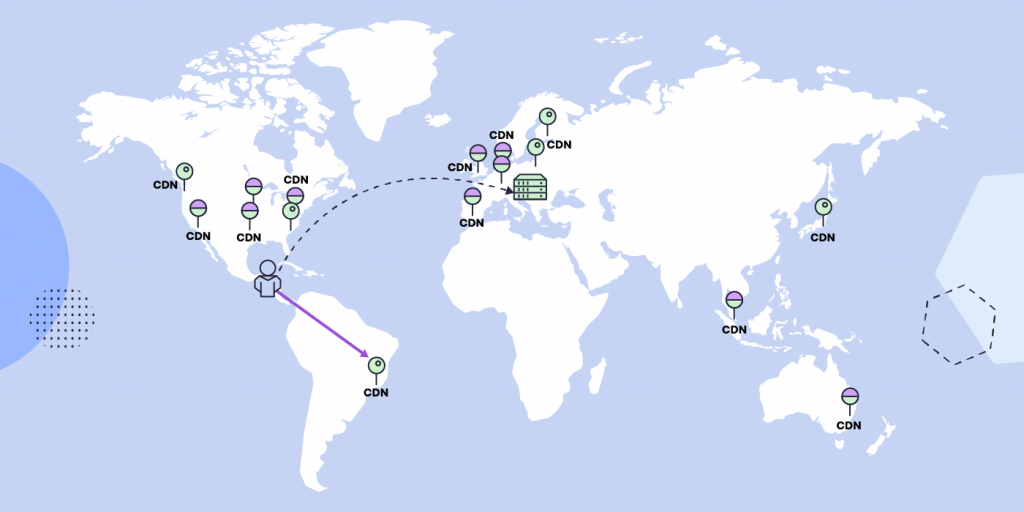
As you probably already know, the idea of the CDN (Content Delivery Network) is to keep a copy of your website on multiple locations called points of presence (PoPs) around the globe. When you have website visitors located far away from the original server that hosts your site, the CDN allows them to see a version of your site from the closest PoP. Thus the time needed for the data to reach your visitors is shorter than if it was served by the original server and your site loads faster. The closer your visitor is to a PoP the shorter the time it takes your site to load.
But apart from the geographical distance between the visitor and the PoP there are, of course, other factors that influence the speed with which the PoP is reached. It makes a difference if the data travels through the public network or through the much faster Google Cloud internal network.
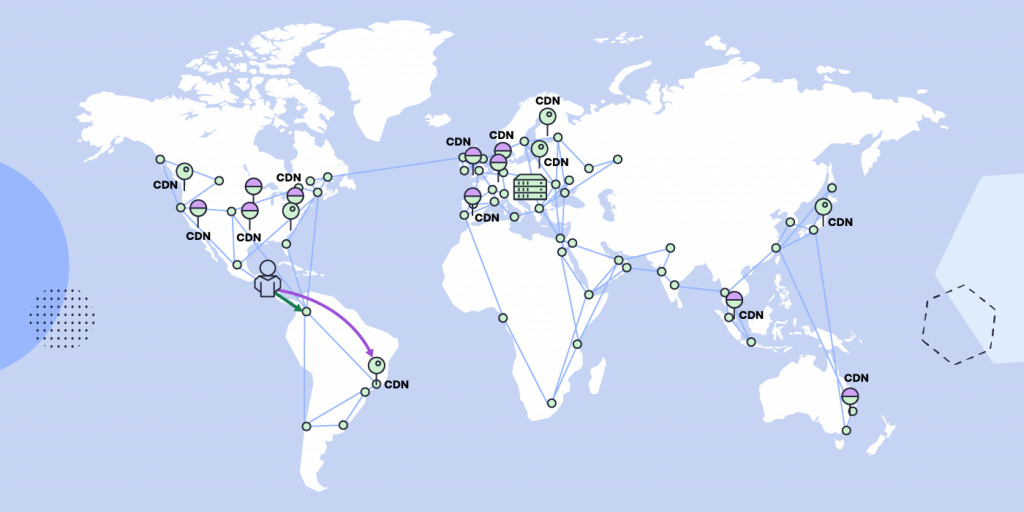
In our initial CDN setup each PoP had its own unique IP address and required the central DNS system to calculate the distance between users and PoPs, determining the best routing through the public network. Now in the CDN 2.0 we have implemented an anycast layer which ensures that IP addresses remain the same for all our PoPs. This way we eliminate the DNS layer calculations and clients requests are automatically routed to the closest edge location of Google network. Once the request reaches the edge location, it enters the much faster Google Internal network and reaches the closest SiteGround CDN PoP almost instantly. So now the closer your visitors are to the network edge location, the faster your site loads.
The great news is that Google Cloud network already has 200+ edge locations around the globe, which means that most visitors are always very near one of these. Also whenever new such points are added by Google, they will naturally make our CDN faster in new regions.
What are the benefits of the CDN 2.0?
Faster sites and better TTFB
Due to the implementation of the anycast routing and the fact that we are able to take advantage of the extraordinary speed of the Google internal network, now millions of visitors of the sites that use our CDN service will have better experience and have the requested sites load faster.
Time to First Byte (TTFB) is a measurement of the time it takes for a browser to receive the first byte of response data from a web server after making a request. When comparing the first byte response times from more than 50 locations the TTFB improvement is around 20% on average and up to 100% in regions that were further from the SiteGround’s CDN PoPs.
Higher CDN reliability
CDN 2.0 is backed by cross-region load balancing, including automatic multi-region failover which allows them to react instantaneously to changes in users, traffic, network, backend health, and other related conditions. This helps to ensure that the content remains available, even in case any of the CDN PoPs goes down.
How to get the CDN 2.0?
Starting from the middle of February, we will gradually switch both the Free SiteGround CDN users and the Premium SiteGround CDN users to the new version of the service. The process wouldn’t require any action on the client’s end and will be fully automated. If you are still not taking advantage of our CDN, it is a great time to add CDN to your site now through your client area.
It’s that time of the year when the days go faster than the speed of light – which is what we’d wish for all websites! In honor of the shortest month of the year, this February, we are taking website speed to Olympic heights!
Page loading time on the web is a never-ending optimization championship for website owners. But with the right tools and services, you can achieve the coveted “gold medal”. Take our quiz, get our free guide, and follow our Website Speed blog section for regular tips on how to optimize your website for best performance.
Website speed optimization is crucial for creating a positive user experience. A positive user experience is marketing speak for happy users. Happy users visit your site and buy things. Unhappy users leave because they are tired of waiting for your website to load. Marketers call this “bounce rate” but really, it’s just unhappy users.
Why is site speed so important?
In the early days of the web, our mantra was “Content is King”. These days, if content truly is King, the Queen is speed. They go hand-in-hand. The best content or even product or service in the world won’t get noticed on a slow website.
User experience (Usability)
As we said above, a slow website can lead to a poor user experience. This can cause visitors to leave the site and potentially lead to a high bounce rate. A fast website, on the other hand, leads to a better user experience, which increases user engagement. When people don’t have to wait for the page they want to read to slowly load, they are more likely to stick around and read it. If that page is selling them your widgets, then they are more likely to buy them because they read your page.
All search engines have announced that they now use website speed as a ranking factor for their mobile search results as well. This means that a website that is not optimized for speed may rank lower in mobile search results than a faster website, which could lead to a decline in both traffic and revenue.
Website speed optimization is critical for your business if your users are primarily mobile.
Conversion (for E-commerce sites)
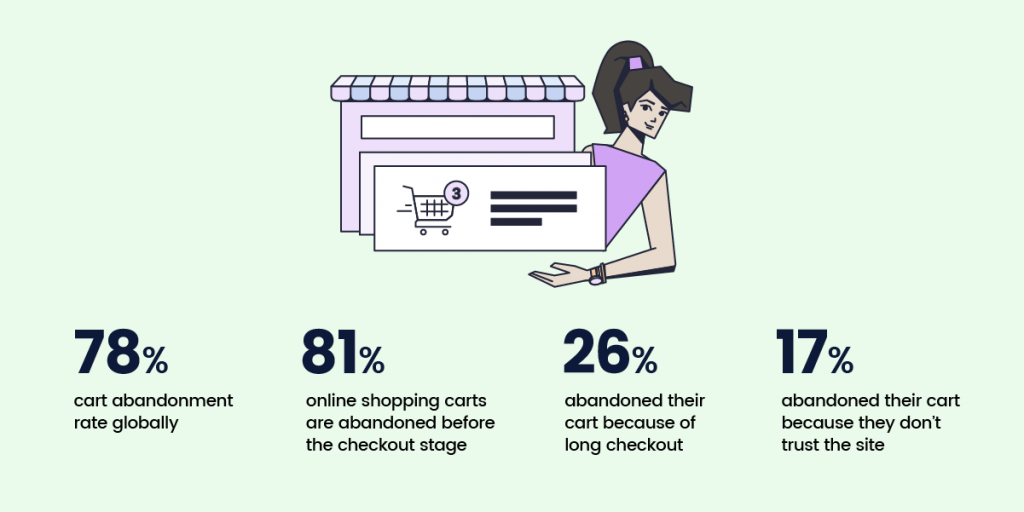
When a website is slow, users may become frustrated and abandon their shopping carts, leading to lost revenue for your business. A fast website, on the other hand, can provide a seamless shopping experience, which will increase conversions and ultimately drive more revenue.
Amazon is famous for computing the price of a second of load time. The slower their site loads, the less they sell and they know exactly how much. You may not be able to calculate your loss like that, but you will see that when you optimize your website’s speed, your sales will increase.
In summary, if you aren’t getting the page views you think you should be, maybe it’s time to look at optimizing your website speed. Optimizing your website for speed can lead to a better user experience, improved search engine rankings, and higher revenue. Here are our best website optimization tips and tricks:
How to check the performance of your website
There are many good tools on the web to help you compute your website’s speed so you can tell if your site is running fast or not.
SiteGround Optimizer Plugin and Google PageSpeed
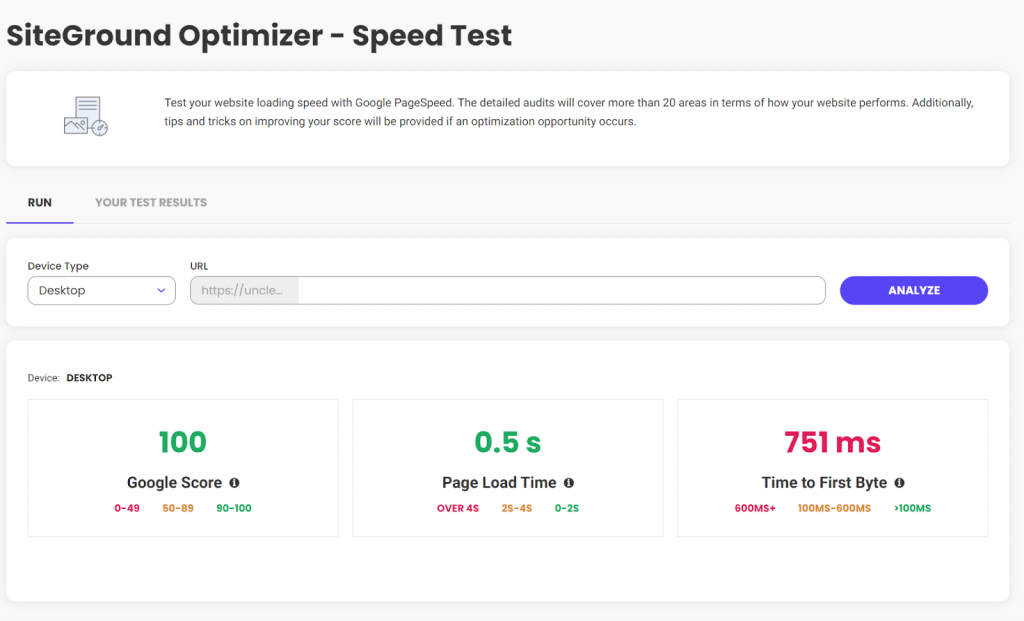
One of the best tools for measuring website speed metrics out there is Google PageSpeed. There are several tools you can use to increase your site’s PageSpeed score, my favorite is the SiteGround Optimizer plugin. I have it installed on almost all of my WordPress sites and using it, my Google PageSpeed score is only a couple of clicks away. If you already have SiteGround Optimizer installed, then just click on the menu and select “Speed Test”. If you don’t yet have SiteGround Optimizer installed, it’s free and works even if you don’t host with SiteGround.
As a bonus, if your score isn’t as high as you want it, SiteGround Optimizer will help you increase your score. After implementing the suggestions, SiteGround Optimizer had for one of my graphic-heavy sites, this is my Google PageSpeed score.
Yeah, that’s not bad at all.
webpagetest.org
The other tool I’ve been using for the past 10+ years is webpagetest.org. Whereas Google PageSpeed boils everything down to three easy-to-understand numbers, if you want to dig into the details, you need a tool like webpagetest.org. It gives most website owners more information that is easily digested, but if you spend the time to learn what the numbers mean, they can give you some deep insights into why your website loads the way it does. webpagetest.org also lets you configure things like desktop vs. mobile, where you are testing from, etc.
6 Undisputable Website Optimization Tips
Now that we’ve discussed why website speed optimization is so important, let’s talk about six things you, as a non-technical site owner, can do to make sure you are running at optimal speed.
Achieve lightning-fast loading times by choosing the right host
Choosing the right web host is one of the most important factors in website speed optimization. It is also the first decision you need to make. Honestly, if your host is slow, none of the rest of these optimization tips are going to make much difference.
Choose a website theme that won’t weigh you down
If your site uses WordPress, the theme you choose for your WordPress website will have a significant impact on its speed. A well-designed and optimized theme can help improve website speed and performance, while a poorly designed theme can have the opposite effect.
All themes can stand to lose a little weight, even the best ones. So to help your site reach its maximum speed, make sure that you have SiteGround Optimizer installed and configured. As discussed above, it can really make a difference in your site’s overall speed.
When choosing a theme for your website, it’s important to consider things like code quality, graphic sizes, and support.
Code quality
A well-coded theme will be lightweight, use minimal resources, and be optimized for speed. It is important to choose a theme that is coded to the latest web standards, WordPress standards, and has been reviewed by other users.
Graphics Sizes
All themes will let you use your graphics, however, some work with plugins to optimize graphic size, while others do not. If you choose a theme for your website that does not automatically optimize the graphic sizes for speed, all is not lost, you can install the SiteGround Optimizer plugin. It will not only optimize all of your existing images, but will automatically optimize any new graphic as you upload it.
Support and updates
A theme that is regularly updated and supported by the developer can help ensure that your website stays optimized. As technologies change, you want to make sure your theme changes with them to ensure it is always the fastest that it can be.
If you have a WordPress website, hosted with SiteGround, you benefit from their in-house WordPress Autoupdate feature, which automatically backups and upgrades your site each time there is a new WordPress version, along with all of your plugins, if you wish so. That helps you avoid vulnerabilities related to the old application, and you’re up to date with the latest security fixes.
Choosing the right theme is just one part of website optimization. You’ll still need to do things like minify code, and use caching to help improve website speed.
The theme you choose for your WordPress website can have a significant impact on website optimization. By considering the factors mentioned above, you can choose a theme that is well-designed, optimized for speed, and will provide a better user experience for your visitors.
Trim down unnecessary plugins
In the past, I’ve written about removing unused or deactivated plugins. One of the main reasons to do this is speed. The less code there is, the faster your site will run. Even disabled plugins force WordPress to decide between them at each page load. If you delete them, WordPress doesn’t need to worry about them.
Once a year – or more frequently, if possible – you should do a complete audit of the plugins installed on your site. Deactivate and delete any that are not actively being used. If you need them again later, then reinstall them later.
Remove unnecessary redirects
Redirects will affect website speed optimization.
They add an additional step to the page load process, which can increase the amount of time it takes for a page to load. This will negatively impact the user experience and website speed.
Search engines follow redirects to find the final URL of a page. When search engines crawl your website, they follow each redirect, which can slow down the crawling process and affect your website’s SEO. Additionally, redirects can cause the search engines to see the redirecting page and the final page as two different pages, which can lead to duplicate content issues and affect the website’s SEO.
Redirects can be confusing for users and will lead to a poor user experience. If a user clicks on a link that redirects them to a different page than they expected, they may become frustrated and leave the website.
Redirects can be useful in certain situations, such as when a web page has moved or is no longer available, or when you want to redirect traffic from a non-preferred domain to a preferred domain. In these cases, it’s important to use the correct type of redirects and to minimize the number of redirects used to maintain website speed and SEO.
To avoid the negative impact of redirects on website optimization, it’s important to use them sparingly and to use the correct type of redirect. Additionally, implementing a proper redirect strategy and keeping track of the redirects that are in place can help to minimize the negative impact on website optimization.
Cache your way to faster load times
Caching can have a positive impact on website optimization by improving your website’s speed and performance. Caching is the process of storing a copy of a web page or its resources, such as images or scripts. When a user visits a website, their browser can load the cached version of the page, which can reduce the amount of time it takes for the page to load.
Caching can be implemented at different levels, such as browser caching and server-side caching. Each type of caching can have a positive impact on website optimization.
Browser caching
When a user visits a website, their browser stores a copy of the web page and its resources on their device. When the user visits the website again, their browser can load the cached version of the page, which will dramatically reduce the page’s load time.
If you’re using the SiteGround Optimizer plugin for WordPress, available for free download on any hosting platform, you can use the browser caching option it provides. This feature stores the static content of your website in the users’ browsers and cache longer. If you’re a SiteGround client, this option in the plugin will be enabled by default for you.
Server-side caching
Server-side caching can reduce the amount of time it takes for a page to load by storing a copy of the page on the server. When a user visits the website, the server can deliver the cached version instead of having to regenerate it each time. This will reduce page load time.
If you’re hosted with SiteGround, you already take advantage of their powerful caching technology – SuperCacher which includes three levels of server-side caching:
NGINX Direct Delivery Caches static content like images, CSS files, JavaScript
Dynamic Cache Dynamic cache caches your dynamic content and stores it in the server’s RAM
Memcached An object caching mechanism designed to improve the connection between your application and its database
When all these three are in action, they improve your website performance up to 5 times!
Speed up your site with CDN
A good CDN, or Content Delivery Network, is a critical next step for optimizing your website’s speed. A CDN is a group of servers in different locations around the world that work together to deliver your website to users faster by delivering large files from servers near your users.
When a user visits your website, the CDN will direct them to the server that is closest to them. This can help reduce the distance between the user and the server, which will improve website speed.
CDNs also help to reduce the number of requests made to your server, which can help to improve website speed. This is because CDNs can store a copy of your website’s files, such as images and videos, and deliver them to users without having to request them from your server.
The less work your server has to do, the faster it will do the work only it can do.
Using a CDN will help to improve the website’s speed and that will create a better user experience for your visitors. It’s a great option to consider if you want to optimize your website and reach a global audience.
You can use a third-party CDN, which will take some time and extra knowledge to configure. Alternatively, you can ask your host to help you select one and then pay them to configure it. A better option is to use SiteGround’s native CDN. SiteGround has a one-click CDN that is already integrated and configured for your site. They offer the essential features free for all customers hosting websites on their platform. For those needing more, they offer a premium version for heavy international traffic websites.
How to Speed up Your WordPress Website Like a Pro – Video Tutorial
Conclusion
Entire books have been written on the topic of optimizing a website’s speed. In this article, we’ve taken a look at why it’s important, discussed some tools you can use to see how fast your site is now, and then six things you can do without the help of a programmer to speed things up.
It is important that before you start tinkering with your website to optimize it, you check its speed first. Then, do one thing at a time and after each change you make, re-test. This is the only way to tell for sure that you are making things better and not worse.
The results from our traditional annual client survey are here! Looking back at 2022, we’ve been working hard to introduce new and improve existing tools and services that make your websites even faster and safer. But at the end of the day, what really matters is the impact of these improvements and the positive effect they brought for our users. Here is what you had to say and how you rated our efforts and your experience with our hosting services throughout the past year.
An Outstanding 98.8% Satisfaction with Site Security
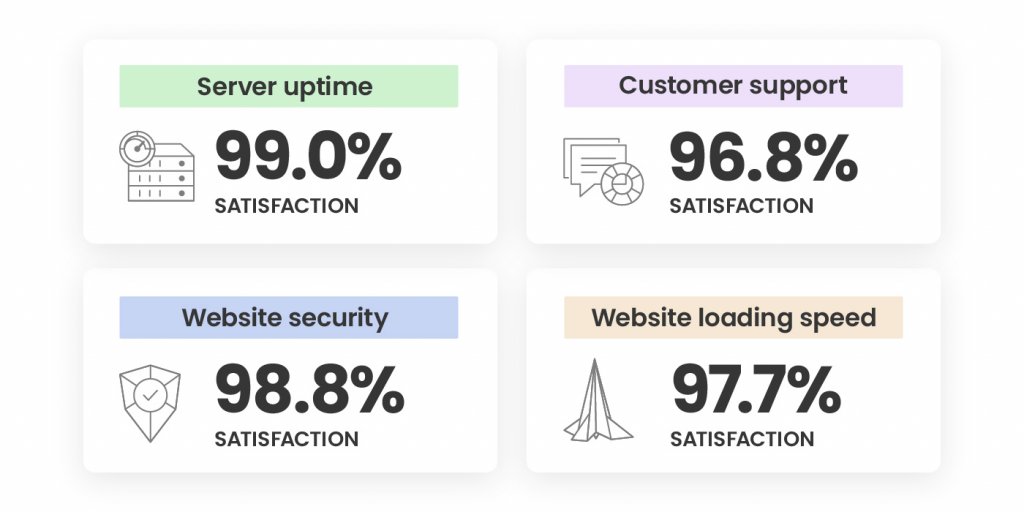
Securing your websites has always been a top priority for us during the years. 2022 was not an exception and our efforts didn’t go unnoticed – our Website Security was rated high by an overwhelming 98.8% of all respondents! Here’s what we did to achieve that:
We improved our already great-performing Site Scanner with features improving early malware detection and introduced a new plan with proactive reaction tools in case of a website attack. During our #CyberSecurityMonth campaign last October, we went even further. We not only ran an intense email awareness campaign about website security, but we also introduced new security features, such as an on-demand IP and Geo traffic blocking tool. We also improved our AI-driven brute-force prevention system and its state-of-art self-learning mechanism, which now blocks over 95% more bad traffic before it even reaches our servers. Here’s a recap of all essential website security features for your website, in case you’ve missed it.
Last but not least, towards the end of 2022, we launched our new monthly security reports, included for free with all our plans. You can now sign up and receive directly in your inbox a personalized security overview of your website(s) every month, with highlights of what security measures we’ve applied and suggestions of what you can improve.
A Supreme 97.7% Satisfaction with Website Loading Speed
Website loading speed is important for your conversion rates, SEO rankings, and users’ experience. That’s why boosting website performance is of utmost importance to us and we’re constantly working on making your websites as fast as possible.
As early as February 2022, we introduced a newer version of our SiteGround Optimizer plugin for WordPress, making it available and free to all WordPress users, regardless of where they host their websites and included new advanced speed features, such as file-based caching. The plugin now has over 1 Million active installations and was voted Silver in the top 3 best WordPress optimization plugins in the annual WordPress community awards.
One of our biggest speed-boosting achievements in 2022 was the launch of our in-house built SiteGround CDN which not only makes websites load blazingly fast around the world, but it’s super simple to configure in a few clicks and included free in all our plans. We didn’t stop there and kept on growing our CDN and data center networks with a new location in Madrid and a few new locations in the USA.
Top Marks for Easy Website Migration and Setup
We’re happy to welcome those of you who have recently joined SiteGround as clients.
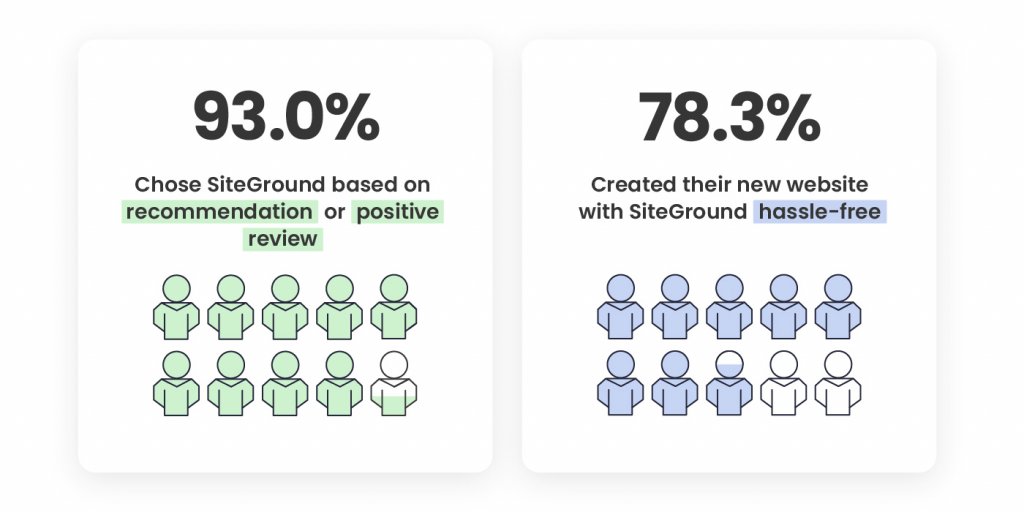
48.6% of our new clients say that the number one factor that led to the decision to get on board was a recommendation for SiteGround by someone they trust. 44.4% of you point out positive reviews about SiteGround were what influenced your decision to choose our hosting services, which is the greatest mark for the level of quality we provide, and the recognition and loyalty of our clients.
Your feedback about how easy our onboarding process is was also extremely valuable. A total of 78.3% of you, who created a new website with us, have noted that setting up a website on SiteGround wasa hassle-free process. 76.9% of you, who switched over from another host, pointed out in the survey that transferring your websites to us was a seamless process.
Now it’s even easier to migrate and manage all elements of your website presence to SiteGround with our newly launched Email Migrator tool. It helps you transfer emails to SiteGround servers easily, securely, and automatically.
We’re looking forward to making your future experience with us even better and contributing to your websites’ success.
A Steady 98% Overall Satisfaction In the Last Few Years
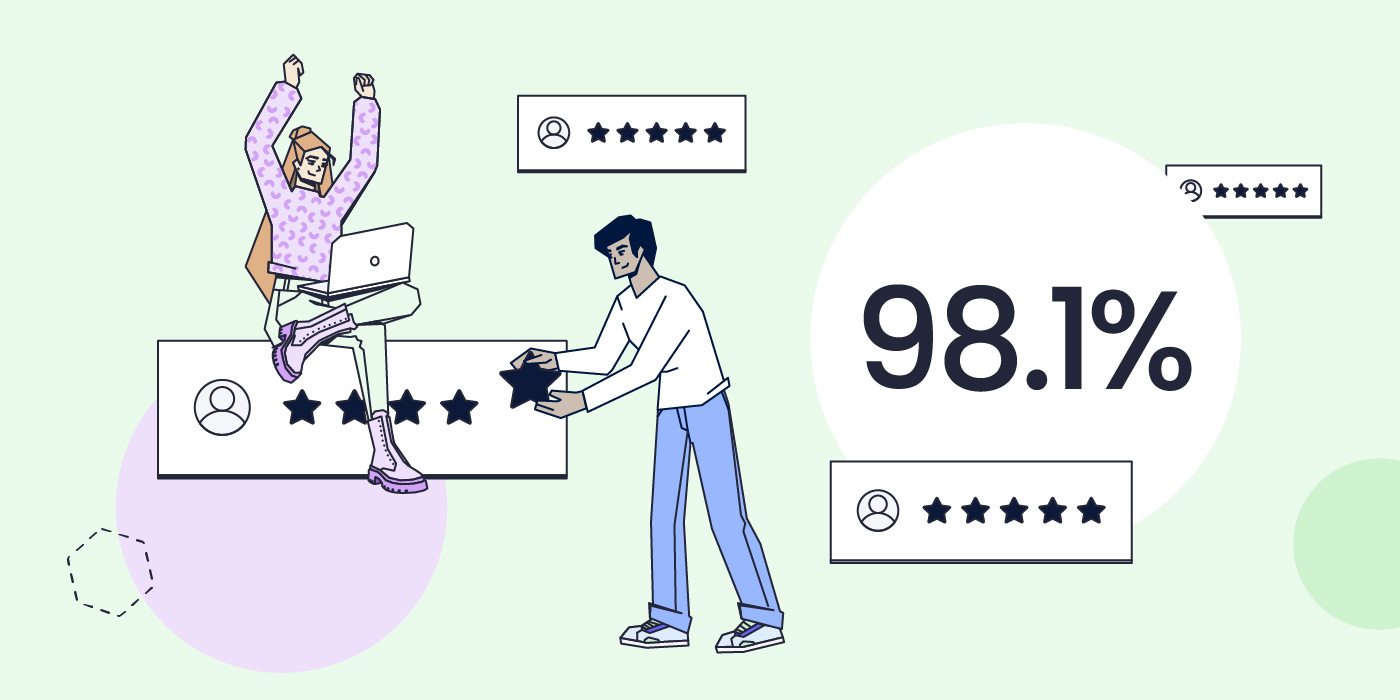
We completed 2022 with an overall client satisfaction rating of 98.1% which solidifies our top-rank customer happiness rate in the last couple of years. The overall satisfaction rate is based on your reviews for the following services we provide:
The breakdown of the satisfaction rate of each aspect of our services is based on the evaluation of both long-term and new clients. The overall ratio of all respondents is 90.40% long-term clients and 9.6% clients who have joined in the past 12 months. The fact that the majority of respondents have been with us for a couple of years now, and continue to express their satisfaction with our services with top marks is the greatest recognition a company can have.
You Helped the Environment by Completing Our Client Survey
Just like everything else we do, we also tried to maximize the impact of our client survey this year. In return for completing it, we committed to donate funds for planting a SiteGround forest. Thanks to you, we’ve already planted more than 11,000 trees worldwide – in the USA, Spain, Portugal, France, Indonesia, Madagascar.
We’d like to thank you for your trust, for your feedback, and for helping the environment! Stay tuned for all the upcoming services improvements and new tools launches that will aim to make your websites even more secure, better-performing and successful in 2023.
The new year is here, and what better way to start it off right than turning a business idea into reality? You can do just that with SiteGround’s new email course – Start Your Business Online in 2023. This comprehensive course will teach you everything you need to know to get your business up and running – from ideation to execution.
What does the course cover?
This email course provides a step-by-step blueprint for successfully launching a business. Over a month, you’ll receive eight in-depth emails that will teach you how to:
Validate your idea and define your target audience
Develop your brand identity
Craft your SEO strategy
Build, customize, and optimize your website
Launch your project and start growing
The email course comes with a bundle of downloadable assets and additional resources to help you throughout the learning process. By the end of the course, you’ll be ready to launch your dream project.
Who is this course for?
This course is perfect for entrepreneurs of all experience levels looking to start their own business. Whether you’re starting from scratch or need guidance on where to go next with your existing project, this course will provide invaluable insights tailored to help power up your inner entrepreneur.
Win free hosting!
We believe in the power of new ideas to drive business success. That’s why, as a special bonus, five people who sign up for the course in January will receive one year of free hosting from SiteGround.
So don’t wait any longer – start your business in 2023 with SiteGround’s email course and make your dreams a reality. Your future success is just a few clicks away!
The webinar recording is available on our official YouTube channel for those interested in getting started with a WordPress website, or brushing up on their knowledge:
We also got a great deal of interesting questions which we didn’t have the time to address during the webinar, so we’ve provided the answers in the blog post below.
First Steps in WordPress Site Management
How do you customize my URL, so it just has my own domain and doesn’t include “wordpress”?
It seems that you are hosting on WordPress.com and using a free wordpress.com domain name, hence the wordpress keyword in your domain name. You should be able to purchase a custom domain and change it from your WordPress.com control panel.
If you move to a paid hosting provider such as SiteGround, you can register any domain name you wish as long as it’s not taken by someone else, and easily set your site to be accessible by that domain.
When I go to my website link /wp-admin WordPress login page, the SiteGround login does not come up. How do I sign in to my SiteGround website?
The key factor here is that the SiteGround.com portal and the Admin panel of your website are two different areas. By accessing your SiteGround Client Area, you can manage all your sites and payments, and access site-specific tools such as backups, emails, etc. The wp-admin page will lead you to log into your WordPress Admin panel to edit and customize the content of a specific site. To access your SiteGround Client Area, you need to go to login.siteground.com and type your SiteGround username and password. They may be different from the ones you use for accessing your WordPress Admin, so if the system does not accept them, you can use the Login recovery option available on screen.
How do I go about adding a new site to my plan on SiteGround? When is it advisable to have multiple sites?
All hosting plans we offer, except for the StartUp package, allow you to create and manage multiple websites. To create another site under your account, simply access your Client Area > Websites > Add new and go through our Website Setup Wizard. It takes just a few minutes to spin off new sites using the wizard and we have depicted the whole process in these guides.
It’s advisable to create an additional website in case you have a plan of what you want to use it for and, of course, time, as you will need some extra effort to develop and maintain the site. If you want to write on a totally different topic or start a completely new project, then it’s a good idea to create a new site for it.
Customizing your WordPress Site
Can I publish/display a “coming soon”/”under construction” page as the Home page while I work on my website in private?
In case you haven’t started your site yet, you can always create it on a temporary url provided by SiteGround which is not indexable by search engines (so random people on the web can’t find it accidentally) and later change it to your real domain name. By doing this, you won’t have to worry about installing additional plugins or doing additional configuration.
If you already created your site, one of the easiest ways to create a “Coming soon”, “Under Maintenance” or similar landing page is by using a plugin. It will allow you to design the page using a template and show it to your regular site visitors, while you will be able to access your dashboard and work on your site as usual. Once you’re ready to go live, you can easily disable the page and show the expected content. There are multiple Maintenance plugins available for free in the WordPress repository and one of the best documented is SeedProd.
If I have some pages that I only want subscribers to see, how do I control the login process?
Depending on your final objective, you have a couple of options.
The simplest way that does not require any plugins or whatsoever is to set your desired pages to require username and password to be accessed. This way only website users who have the necessary credentials may be able to view the content on the page. You can password protect your pages from the native WordPress Password Protected option described in our tutorial on adding pages to WordPress. Among the downsides is that there is no automation, in other words you will have to provide the credentials manually to each user.
If you are looking for more robust options for turning WordPress into a community site, you can install a Membership plugin. It comes with elaborate options that you can set to your preference, including enhancing the registration process and personalizing the login screen and dashboard. One of these plugins is BuddyPress and you may read more about it in our tutorial.
How can we add more themes to WordPress?
Additional themes can be installed from the WordPress Admin panel > Appearance > Themes > Add New. You can check our tutorial for step-by-step instructions or watch the webinar from this moment, if you prefer to see the steps.
If we change themes and there are some leftover images and text of the first theme, how can we remove them and troubleshoot this issue?
This looks like a development question, related to the specific site setup, but generally changing your theme should not affect your image and text content because the latter is added by you, while the theme is only responsible for the overall appearance of your site.
If you are referring to demo/imported content from the previous theme that you don’t need, you can either delete it manually from your posts/pages/media library or if you want to start literally from scratch, you can delete WordPress, reinstall it from Site Tools and apply the new theme.
Can I embed code from another site for my contact form?
You can copy and embed code from a different site into WordPress, but this usually requires advanced coding skills to configure properly. Most of the time, it’ll be easier to check if the other site offers a plugin for better integration.
Should I ask for the contact plugin from the email provider I will use?
The actual contact form setup depends on the email provider you’ve chosen. If you are using a business email provider (SiteGround offers business email service on all hosting plans at no additional cost), it’s likely that they do not offer a contact form plugin as it’s not within their scope. This is the more common scenario and what you can do is download and use a free third-party contact form plugin from the WordPress repository and set it up with your business email address. The one that we recommended during the webinar was WPForms and it has detailed instructions on how to create a contact form and add it to a page.
On the other hand, there are email marketing platforms that come with a greater toolkit for managing emails, but usually have a corresponding cost. If you’re using such a service, then it probably offers a plugin that lets you easily integrate the contact form you create on its platform with your own site. You would find information about their plugin, instructions on how to use and get support directly on their website.
Do you recommend using Divi/Elementor? If so, could you do one of these workshops on how to best use it?
With WordPress, you get a built-in block editor that is capable of both formatting and editing content, and our Start creating content with WordPress webinar covers exactly that. Divi and Elementor are addons that work on top of this native framework with some caveats among which is the fact that each comes with its own learning curve, which will require additional time and effort to master. Certainly, you can use them, but it’s best to get a better understanding of the basic WordPress framework before using any addons, partly because these addons largely revolve around it as well.
Check out our YouTube channel for an introductory webinar on Divi.
When Your WordPress Site is Ready to Go Live
Is the HTTPS protocol enabled automatically for WordPress websites?
Securing your website with HTTPS protocol is essential. We install an SSL certificate automatically for free on all new websites as long as the website is resolving from our servers. WordPress requires an additional step required before your site loads with HTTPS – to reconfigure your urls and enforce the HTTPS protocol.
We do not automate this, as it is a webmaster decision that we cannot make on behalf of the owner of the site, but we have developed a tool that allows you to do it instantly. If you are already using the SiteGround Optimizer plugin, access its Settings > Environment settings > HTTPS Enforce. In rare occasions, some of your site elements (most often images) may still load with http leading to the so-called mixed content issue. If this happens and your site does not appear as fully secure, toggle also the Fix Insecure Content option. More details can be found in our article.
How do I connect Google Search Console to my site?
To add your site to Google, you will need to verify that you are its owner. This can be done in several ways, but one of the easiest methods, if you are a SiteGround customer, is to create a TXT record in your Site Tools DNS Zone Editor. You’ll be able to get the TXT record during the setup.
Head to the Google Search Console website to get started and check out their official guide for step-by-step instructions.
Will you be doing a webinar on e-commerce on your site?
We’re passionate about eCommerce and we’re definitely considering it. Meanwhile, you may want to check out some of our previous webinars on using WordPress as an eCommerce tool, such as our step-by-step walkthrough on setting up WordPress as a store with WooCommerce.
Do you know how secure your site is and if its security level is changing over time? Have you ever wondered how many actual attacks toward your site are being mitigated? Do you want to know if you have missed doing something easy that may protect your site from incidents?
Now with SiteGround’s Monthly Security Reports, you can get all that information and more – straight to your inbox. Just sign up and start receiving an actionable monthly report covering what SiteGround is doing to safeguard your site and highlighting security measures that you may have overlooked.
What’s in the Monthly Security Reports?
Each month we will perform automated security checks for your website covering malware protection, SSL certificates, software exploits, brute force attacks, and other security areas. Based on our checks, you’ll receive a digestible summary of the results – including a total site security score, breakdown score for each security check, and actionable tips if some area needs your attention. The monthly security reports will be your go-to place to get an overview of your website security status.
The benefits of the Monthly Security Reports
Site security information in one place
Performing website security checks manually can be an investment of valuable time, effort, and money that most website owners can’t commit. With the monthly security reports, SiteGround will handle the heavy lifting for you, performing all necessary security checks and delivering user-friendly reports straight into your inbox. So you get to know everything with no effort required on your side.
Easy to understand format
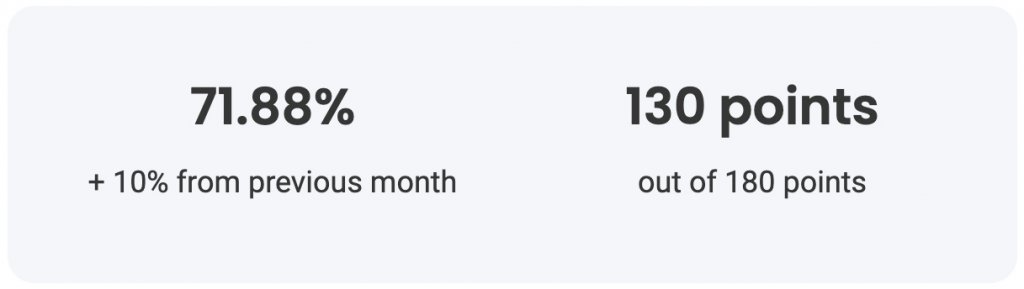
With our user-friendly design, you can quickly scan the report and easily identify areas that need your attention, if any. All you have to do is follow our straightforward color codes: green when everything is good; yellow: needs improvement; red: definitely needs attention. You also receive an overall score for the month and information how it has changed in comparison with the previous month.
Actionable advice when needed
If we have identified an area of your site security that may be improved, the report will include easy-to-follow instructions on what can be done. For example, if we detect that you don’t have an SSL certificate installed on your site, it will provide you with a link to the information on how to set it up.
Confidence that your website is protected
By signing up for our monthly security reports, you may easily monitor what we do on a regular basis to keep your website safe. Each month you will see information like: how many software vulnerability attacks have been prevented; how many malicious IPs were stopped from reaching your site; how many backups you may count on, etc. Making sure your site is secure is an enormous part of our job as a host, and with the reports you can keep an eye on this process.
How to get the Monthly Security Reports?
Starting from next year we will gradually begin to proactively send the reports to all our clients. However, you may hurry up and sign in yourself today and be among the first to receive their report in early January 2023.
The reports are sent out at the beginning of each month for sites that have been active for more than 30 days and have their domains pointed to SiteGround. You can see detailed information on subscription, content and score calculation in our Security Reports Explained article.
Sign up today and sleep soundly, knowing that all relevant site security information is right at your fingertips.
When you’re busy processing tons of emails each day, and we all are, the last thing you need is a bunch of spam messages sneaking into your inbox. Spam protection has always been an important part of our email service and in our strive to constantly improve it we are now introducing a new in-house built solution. It is designed to efficiently minimize the amount of SPAM emails delivered to your inbox, while constantly learning from your email reading behavior. It is also built specifically for our clients and works seamlessly as part of our hosting environment.
Efficient and easy to use for our clients
Less SPAM messages delivered to your inbox
Based on our multiple years of managing email services, we have created a system that decides with a high amount of accuracy which messages are legitimate and should reach your inbox, which are suspicious and should be delivered in your Junk folder, and which are outright dangerous and should not reach your email at all and will bounce instead.
Your email reading behavior trains the system
Your natural actions, while working with your mailbox will train the system. Whenever you move a message to or from your Junk folder you will improve its accuracy. Based on your action the system will add your personal perception of what is SPAM on top of its own underlying rules. Thus your feedback is taken into account seamlessly, without a need for you to use an additional SPAM management interface.
Easy interface to allow and block senders
And also, if you would like to tell the Spam protection system directly how to treat a certain sender, you can still use our easy interface to block or allow specific senders. By adding an email address or an entire domain to the Block or Allow List you indicate how you want this sender to be treated by the system. Check the following tutorial on how to use the Spam Protection service in Site Tools.
Better control and easier scalability for us
We may address our clients’ needs
By using an in-house solution we can more easily address our clients’ specific needs and introduce new features and improvements faster. For example, we have noticed that the current setup makes it difficult for our users to find out when a legitimate email is not delivered to them and is marked as spam by the system. This happens because the message is placed in a quarantine folder in a separate tool that is not part of the user’s natural email management. With the new solution we were able to address this issue by using the much more visible Junk folder instead.
We may handle email usage spike better
When we manage the spam protection system as part of our own infrastructure, we can easily scale it. Even if there is a steep global increase in the email traffic we can seamlessly add the resources needed for the evaluation of the excessive messages. Thus the email delivery will not be delayed for our clients, regardless of the unexpected usage spike.
How to use SiteGround Spam Protection?
All SiteGround clients have our state-of-the-art Spam Protection features enabled by default.
The infrastructure that runs the Internet’s email hasn’t changed a whole lot in the past 30 years. Yes, we’ve layered a few things on top of it like Sender Policy Framework (SPF) and DomainKeys Identified Mail (DKIM) but at its heart, the protocol remains the same. That’s the problem. Email was designed in a simpler time. A time when the Internet was a trusted resource and nobody gave a second thought to the fact that it’s easy to say fudge the headers on an email so that it looks like your boss is getting an email from the President of the United States commending you for all your excellent work. I’m not saying that has happened or that I was a part of it…but hypothetically, it is possible.
So, if email can’t be trusted, what can we do? Well first, these days email is a lot more trustworthy. It is much easier to detect emails sent from someone, but say they are from the President, thanks to things like Sender Policy Framework (SPF) and DomainKeys Identified Mail (DKIM).
Even with these new technologies though, email scams are still rampant. As we charge headlong into the holiday season, let’s stop for a moment and look at a few things you can do to make sure you don’t fall for the latest scam. (Which is not sending emails to unsuspecting bosses…)
Email Scams You Need to Be Aware Of
Let’s take a look at a few of the many ways that bad people try to do bad things to you via email. This first group of scams all fall into the category of Phishing scams. A Phishing scam is basically an email designed to fool you into thinking it is from someone it is not and convince you to click on a link embedded in the email.
The Fake ‘’Account verification’’ Requests
These can seem to come from your bank, Netflix, Twitter, or one of those sites that you don’t admit to having an account on. It doesn’t matter where they are coming from, they all have the same basic message.
“Your account has been locked for a REASON. To unlock your account before we delete it totally, click on this link.
Here’s a hint, no trusted system out there sends these emails out randomly. If you get one and you are not currently interacting with this organization, then it is almost assuredly a phishing scam.
When in doubt, pull out the paperwork you have for this organization, find a phone number and call them. Ask if there is a problem with your account. When they say no, thank them, wish them a great day, hang up, mark the email as spam, and move on with your life.
The unexpected ‘’Billing error’’ notifications
Did you know that it is possible for bad people to figure things out about you without you telling them? It is relatively simple to find out where a website is hosted. When bad people find out information like this, they like to use it for their gain and your loss. Such is the “Billing Error” notice.
For instance, if you are a SiteGround customer and you get an email from SiteGround notifying you that there has been a billing error and you now owe $XXXXX more, stop. Don’t click any links in the email. Instead, go to the SiteGround support page and start a chat session with one of their great support people. They can tell you if there’s an issue with your account or not.
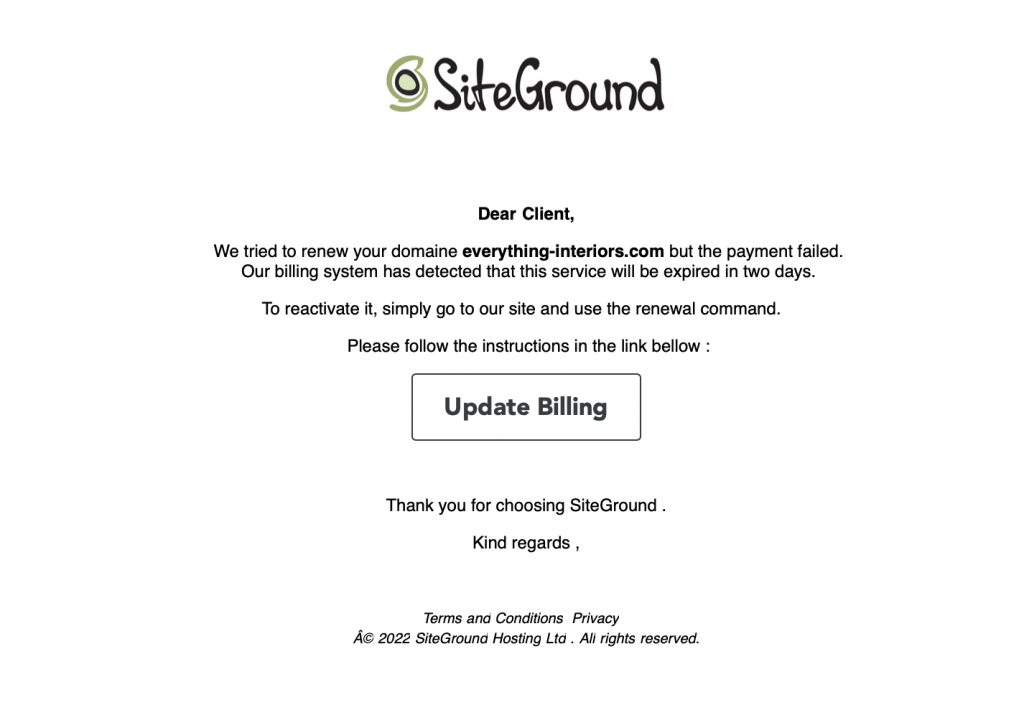
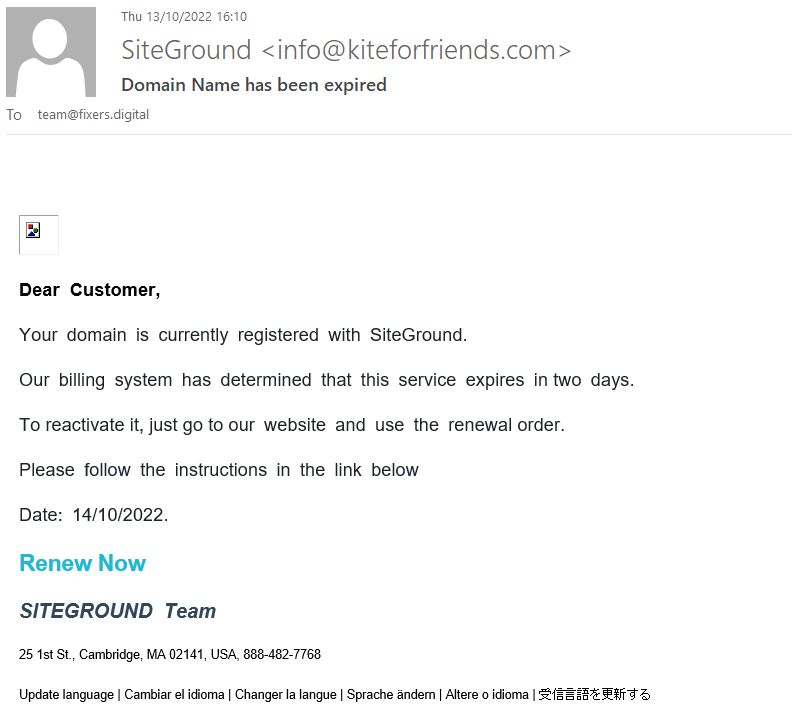
Here’s an example of a phishing email that requests from a SiteGround customer to update their billing details in order to be able to renew their domain:
Scam email example
Notice that this fake email does not contain the name of the recipient, and SiteGround original emails should include the name you’ve used for registering your account.
Next, notice that this email has grammar and spelling mistakes. These are red flags for a scam email along with the poor formatting.
Finally, the signature is not the one used by the SiteGround team.
When you confirm that there is not actually a billing error, thank the nice support person, wish them a wonderful day, disconnect, mark the email as spam, and move on with your life.
The ‘’Order confirmation’’ requests
An oldie but a goodie – and one that pops up a lot these days because ecommerce has exploded – is the “Order Confirmation” email. These are most effective when they are from companies that you’ve never dealt with. They usually involve large sums of money as well. The idea here is to alarm you so much that you will obviously click the link to “Unconfirm” the order.
If the email looks like it is from a company you don’t do business with, ignore it. Mark it as spam, and move on with your life.
If it looks like it is from a company you do or have done business with, contact them directly outside of the email. Talk with the sales or accounting department and see if someone has placed an order on your behalf… When you find that the answer is no…well, you know the drill by now.
The ‘’Click and collect’’ scam
Thanks to the recent pandemic, “Click and Collect” has become a common way to shop. You buy something online from a nearby retailer. You drive to their store and let them know you are there, they bring the item out to your car. Sometimes, they even put it in your trunk so you don’t have to even meet them face to face.
Nowhere in the Click and Collect workflow is there an email that says “Click here if you didn’t order this.” Treat these the same as Order Confirmation requests. If you don’t deal with the company, it’s a scam. If you deal with the company but haven’t placed an order, it’s a scam. If you are in doubt, contact the company directly, not by replying to the questionable email.
Sometimes, scammers are really REALLY good. They send you an email that looks exactly right.
Real Life Phishing Emails (Well, Screenshots)
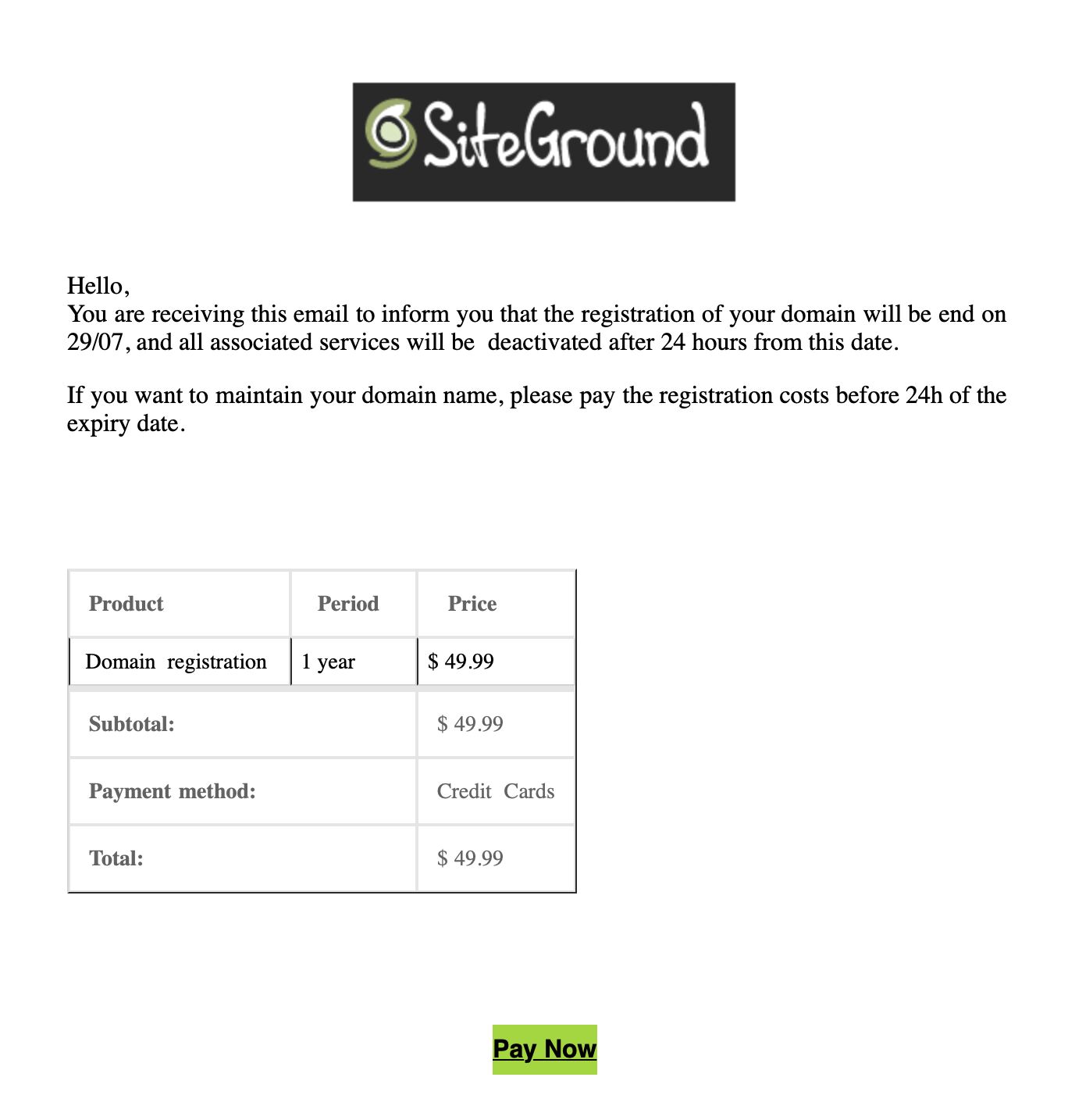
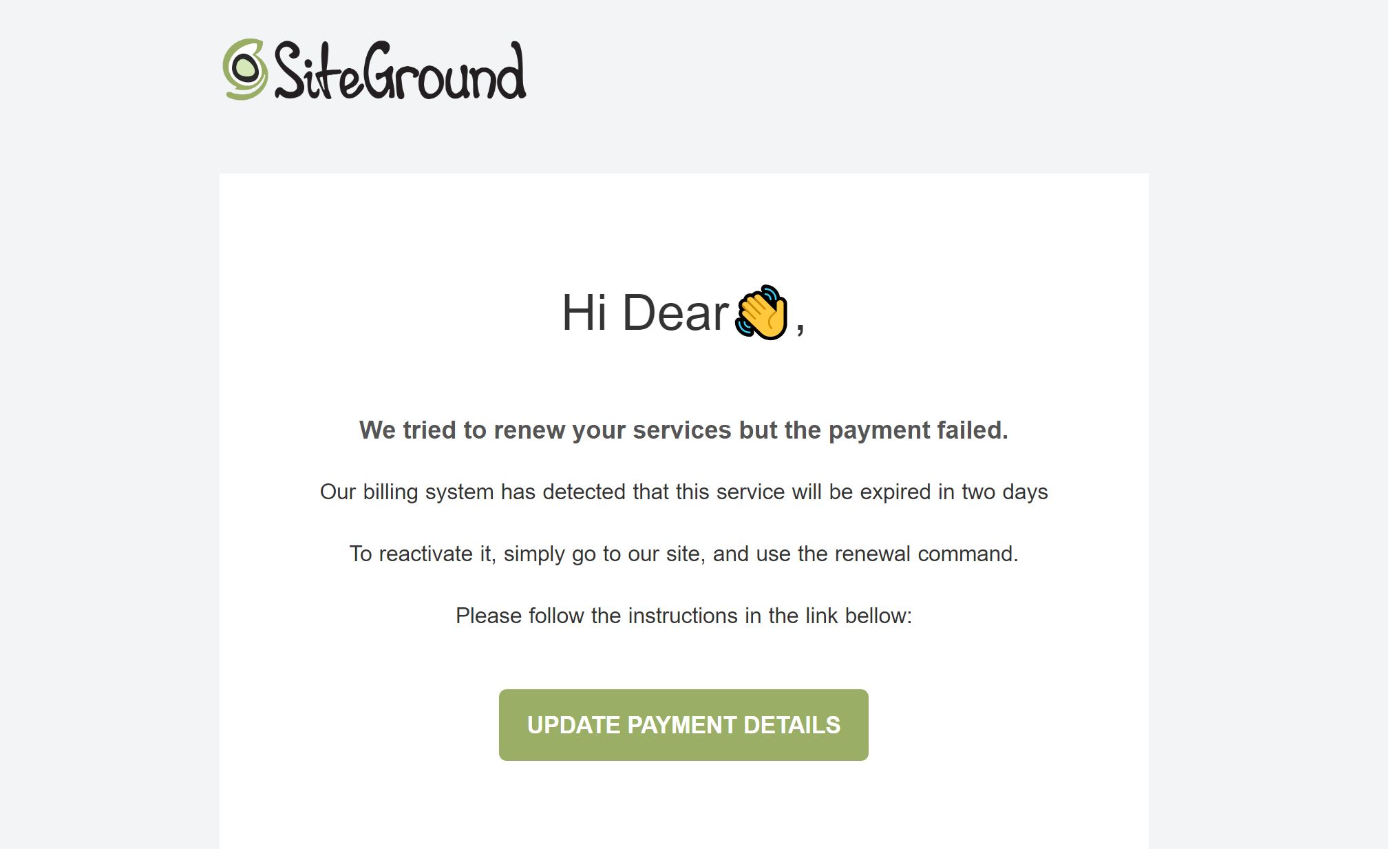
What do good phishing emails look like? Here are a few examples of actual phishing scam emails sent to SiteGround customers.
Scam emails examples
Apart from all the red flags already covered above, the ‘from’ email address of these emails is not a valid SiteGround email. What is more, a proper SiteGround email would never mention the payment method used by you to pay for the service in question.
If you’re a SiteGround customer who comes to report such emails, SiteGround would ask you to send the whole email as an attachment, as they use it to train their own systems to block such emails (in case your email is hosted with SiteGround), so that they do not reach your inbox. In case your email is not hosted with SiteGround, you can mark it as spam in your email provider.
To learn more about how to stay safe from phishing email attacks, check out the blog post on this topic.
How Do You Stay Safe from Email Scams During the Holidays?
So how would you tell if this was a scam email? Well the easy answer is to “practice safe email”. Here are a few of the things I do before I click a link on an email, any email.
Check the ‘from’ address. We’ve already done this but so very many phishing emails come from implausible email addresses. Most scammers don’t bother to try and hide it because so few people pay attention. A recent phishing attempt sent to me purported to come from NetFlix. However, the email address was XXX@yahoo.jp. Yes, Yahoo has a Japan domain but they don’t send email for NetFlix from it! Not even to Japanese customers.
A good rule of thumb is if you were not expecting an email from someone, even a family member or friend, treat it as suspicious until you know it was actually from them. If you don’t recognize the person it came from, then automatically assume it is malicious until you can prove otherwise.
Check all links before clicking. Most email clients these days will let you hover over a link that says “Click Here” (or wherever) and see what the actual URL is. Read it VERY CAREFULLY. Pay attention to the domain name. https://goog.le is not the same as https://google.com. Read it carefully. If it looks suspicious, do not click it.
Some email programs will show you the link in a popup when you click it and ask for verification before it actually opens a browser to that link. If your email program will do this, by all means turn this feature on. Yes, it adds an extra step before you can see that precious baby picture your friend sent you, but it allows you to make sure that you are actually going to see a baby picture and not install malware on your computer.
Do not automatically download attachments Your email program should be set to not automatically download attachments. This means that if you download something from an email, you will have to do it on purpose. If the email doesn’t seem right or fails any of the checks we’ve discussed here, don’t download anything. Even things like Microsoft Word documents which seem innocuous (click here to see the invoice for the service you didn’t order) can do malicious things if you open them. If you weren’t expecting someone to send you an email attachment, don’t open it!
Read The Headers Ok, this is for the hardcore email nerds out there but those of us who have been doing this a while can discover a lot by reading the headers that come with every email. These days email programs hide the headers from you but they are there if you want to read them.
Listen to your gut My wife, The lovely and talented Kathy, got an email from our worship pastor one day with the subject line “I love you”. She was good friends with this man and while the subject line confused her, it also piqued her interest. She opened it only to find that there was a malicious script attached to the email. It deleted about ½ of the images we had stored on our home server before I could stop it. Thankfully, I had a backup so there was no loss, other than the hours it took to clean up the mess. Had she simply called him, opened a new email and written him at the address she had in her contacts list, or contacted him in any of a half-dozen other ways, she could have found out that it was not from him but was a scam. Instead of trusting her gut, she opened the email.
Other Black Friday Scams To Be Aware Of
Email is by far the easiest way for bad actors to get unsuspecting people to do bad things. However, there are a couple of other ways.
Links to malicious ‘’Copycat websites’’
If you get an email with a link to goog.le, it’s easy enough to spot. However, if you are doing your shopping at https://reallyLongDomainName.com and you misspell it or “fat finger” it (typo), then you might end up at a site that looks exactly like the one you were aiming for.
Bad actors look for common misspellings for profitable domains. They buy them up and put copycat sites up. These are sites that look just like the one you were looking for. They probably even have products and a shopping cart. However, make no mistake, they are scams. When you put in your personal information and credit card number, you are not going to get those purple widgets you ordered that your sister will just love. You won’t get anything but a nasty surprise when your credit card statement arrives.
This is really easy to thwart, if you pay attention.
First, after you arrive at a site, look at the address bar. Is there a little lock next to the domain name?
The little lock means that the domain you are using has a secure certificate and that it is valid. If you don’t have a little lock, or if there is a line through it, that means that either the certificate does not exist, or that it is invalid for that domain. Both of those are really big red flags that you don’t want to do any business on this site or put in any of your personal information.
A SSL certificate isn’t always enough to prove that you are on the right website. Scammers can register sitegroound.com, for example, and install a certificate on it. The certificate just provides encryption in most cases. It’s always a good idea to also double check the URL address, especially when you make payments, create accounts, fill out forms, etc.
Sites impersonating landing or login pages
The final type of website scam we’ll talk about are fake login pages. These might be part of a very good looking fake, or you might arrive at a site only to find that before you can get to the good stuff, you have to enter your login credentials. If this is an ecommerce vendor you normally do business with, or an institution you bank with, stop. Don’t do anything else. Sites like that don’t just put up a login page without letting everyone know well in advance. These are nothing more than “password collectors”.
If you do enter your credentials into the site, they won’t work…because they are fake. But humans are stubborn. You will assume that you mis-typed something…especially if you are using a long and very secure password. So you’ll try again.
If you are like most of us, when it doesn’t work the second time, you will assume that you’ve used the wrong password and you’ll try another password, and another, and maybe even a 4th one before starting to think that something may be wrong.
Every set of credentials you entered have gone into a database and bad people will start using them to try and sign in to any site they think you may have an account on. Since you were giving them real login credentials, you’ve given away the keys to the kingdom.
Be watchful, be alert, be suspicious bordering on paranoid. Make sure before you put any information into a website, you are absolutely sure you are at the right website. Looks can be deceiving.
How to Practice Safe Internetting This Holiday Season
Always be suspicious of unknown or unexpected emails. If you don’t know the person, or even if you do know them but aren’t expecting to hear from them, be suspicious. Yes, your long lost aunt may be contacting you via email with a hotmail.com email address to tell you that she’s leaving you her entire fortune when she dies and she needs you to sign the will, but chances are really good that it might NOT be her. Verify before you take any action.
Don’t click a link in an email until you are absolutely sure you know where it is going and what is going to happen.
Don’t provide your personal information to any site unless you are positive and you know that it is the site you think it is. If you don’t think you are on the right site, close the browser immediately.
Whenever possible, use a Virtual Private Network (VPN) from a reputable provider. I won’t name my Internet provider but I will say that I do not trust them. They have been known to make it easy for bad people to watch the traffic going across their network and pull out information as they see it. These days almost all websites use encryption to make sure that’s not easily done, but it is still possible for people with enough time, money, and determination. So whenever possible, I use a VPN to encrypt my traffic even further.
VPN software isn’t expensive these days, as a matter of fact, if you are a “computer person” you can download, configure, and run your own. I don’t recommend that as it’s easy to get it wrong, but I’ll admit to having done that in the past. These days, I use a commercial VPN that comes with my virus protection. Now, my neighbor can’t see any of my traffic because I’ve got an encrypted tunnel between my network and a server in Miami, FL, USA. (I can choose from about 50)
Don’t use the same password on any 2 websites Look, I know how hard this is. It’s difficult to come up with one secure password that you can remember, let alone the 20-30 you need to make sure every site is different. I suggest using a password manager from a reputable software company. There are a few of them out there. The one I use works on Windows, Mac, iOS, iPadOS, and Android. So, no matter where I am at, my passwords are with me. All my passwords on all major sites are long, random, and unique. If you know one of them, you can’t get into anything but that one service I use it for.
Wrap-up
Stay safe out there this holiday season. Have fun, enjoy the company of family, and if you get an email from me saying that Bill Gates is giving 1 Bitcoin to each person that forwards this email…well, you get the idea.
This blog post outlines SiteGround’s Journey of an Online Buyer infographic. Download the full guide to learn about the shifts in customer behavior and how to prepare your website for them.
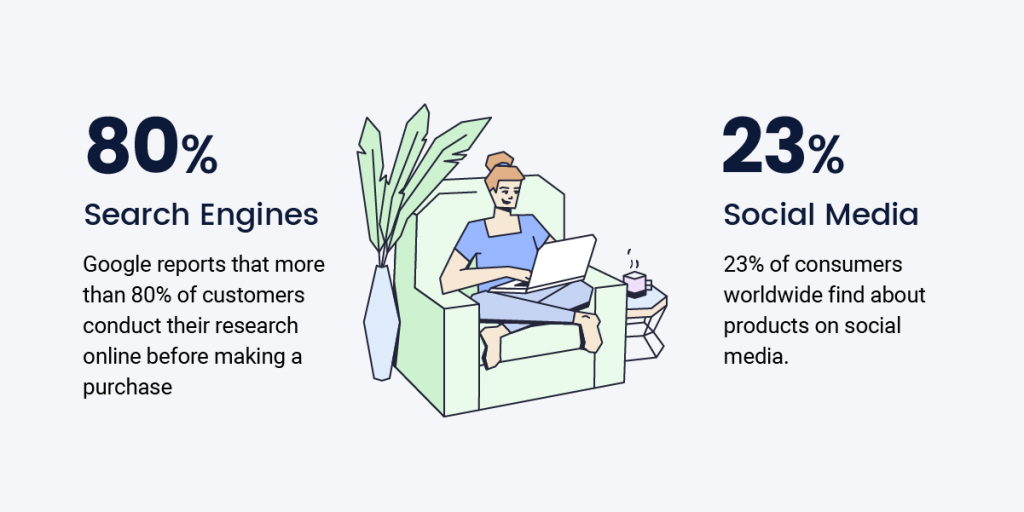
With consumers changing the way they shop, have you changed the way you sell? Buyers today are more informed, involved, and connected than ever before. And in today’s digital landscape, the buyer’s journey has taken on new shapes and forms. It is no longer a linear process but a complicated web of touchpoints and interactions. To keep ahead of the competition as a small business and website owner, it’s critical to grasp this new buyer’s journey online.
What is the buyer’s journey?
The buyer’s journey is the process consumers go through, from initial awareness to final purchase. It illustrates how each step leads to the next to ensure you are aware of the actions that cause potential clients to either make a purchase, or back out of it. By understanding the buyer’s journey, you can better anticipate the needs of your customers and provide them with a seamless experience from start to finish.
The three stages of the buyer’s journey
It’s up to you to observe how potential buyers react to your selling approach and determine precisely where to focus your marketing and sales efforts. The buyer’s journey is mapped out in three stages. Each stage allows for distinct interactions between you and your users.
Awareness stage
During the awareness stage, the buyer becomes aware of a problem or challenge they face. They will then begin to search for solutions to that problem. Your job during this stage is to make sure you are visible to the buyer and that they are aware of your product as a solution to their problem.
Consideration stage
The consideration stage is when the buyer narrows their options and compares different solutions. Usually, this happens on your website. During this phase, it is your responsibility to give the customer the best user experience possible, which entails having a fast and secure website. Also, give them more information about your product and how it compares to competing products.
Decision stage
The decision stage is when the buyer finally chooses a solution. Your job during this stage is to make the purchase process as easy as possible and address any final buyer concerns.
Your website’s role in the buyer’s journey
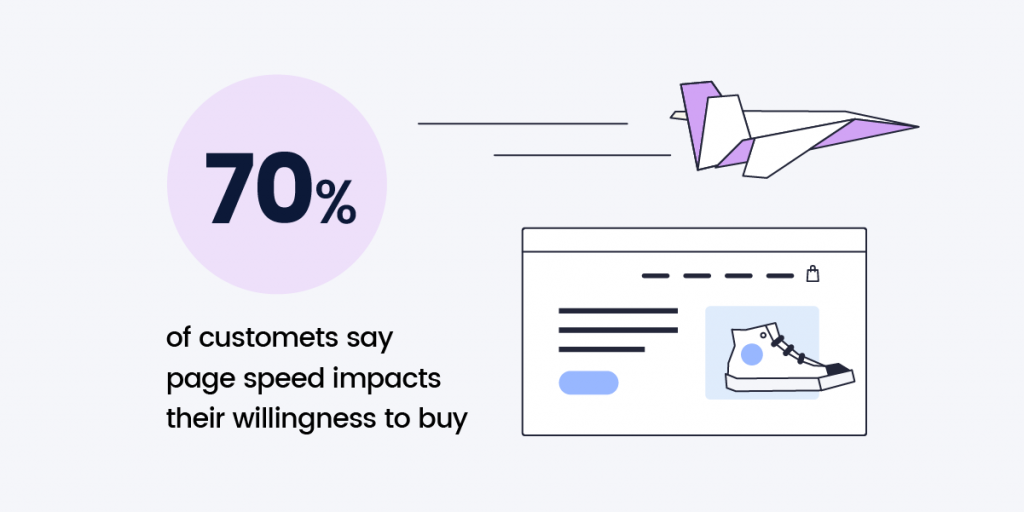
While the buyer’s journey may start elsewhere, such as with a Google search, a large part of it will happen on your website. This is why it’s essential to have a website optimized for SEO that provides a great user experience, including ultrafast website speed, security, and reliability. If you can do this, you’ll be able to guide the buyer through the journey and ultimately convert them into a customer.
The 2022 online buyer’s journey highlights
Online shopping has evolved beyond simply being more convenient
Online shopping has come a long way since its inception. What started out as a convenient way to search for items has evolved into a major part of the retail landscape. Consumers around the world were once skeptical about online shopping, but that has changed dramatically over time – especially after the pandemic. Statista reports that in 2021, retail ecommerce sales were 5.2 trillion US dollars globally. They estimate this number will grow 56% in the next years, amounting to 8.1 trillion by 2026.
Seasonal shopping now starts much earlier
In the past, people would wait until the last minute to do their holiday shopping. However, people now do their seasonal shopping much earlier. They have many more options to choose from online, and want to take their time to find the perfect purchase. This is due to several factors, one of which is the growth of online shopping. With the shopping season starting earlier and earlier each year, small business owners need to be prepared to accommodate early shoppers.
As advertising costs soar, brands prioritize building customer lifetime value
Building customer lifetime value is more important than ever. As advertising costs rise, brands are increasingly focused on creating long-term relationships with their customers. And that’s okay because we’re also seeing a shift in the way consumers choose from whom to buy. They’re much more likely now to purchase from companies with strong brands that identify with their consumers. It’s important to remember that sustainable growth comes from focusing on your customers. So you need to build a brand that customers can trust and foster a sense of community.
Download the full guide below to explore the changes in customer behavior and learn how to get your website visitors a step closer to the “buy” button on every step of their online journey.