

The security of our clients’ websites has always been an extremely important part of our web hosting services. Some of the brightest technical minds in our team have been continuously dedicated to crafting unique security solutions and keep the safety level of our hosting infrastructure on an unmatched high level. We have been an industry pioneer in developing server level protections like account isolation, server health monitoring, anti-bot traffic prevention, etc. We also know that on top of the server level solutions, the security of each individual website should be strengthened on application level too. That is why we provide services like auto updates, backups and WAF protection to our clients.
Today we are happy to introduce another tool that can greatly enhance any WordPress site security – our brand new plugin – Security Optimizer (formerly SiteGround Security). The Security Optimizer plugin is available for free download for anyone and it comes preinstalled with all new WordPress installations hosted at SiteGround and provides its users an easy way to protect a WordPress site from malicious attacks. It also includes valuable tools that can help a website owner react in case there is a suspicion that the site might have been compromised. Read below to learn how to make your site safer with our new plugin.
Protect your WordPress against common attacks
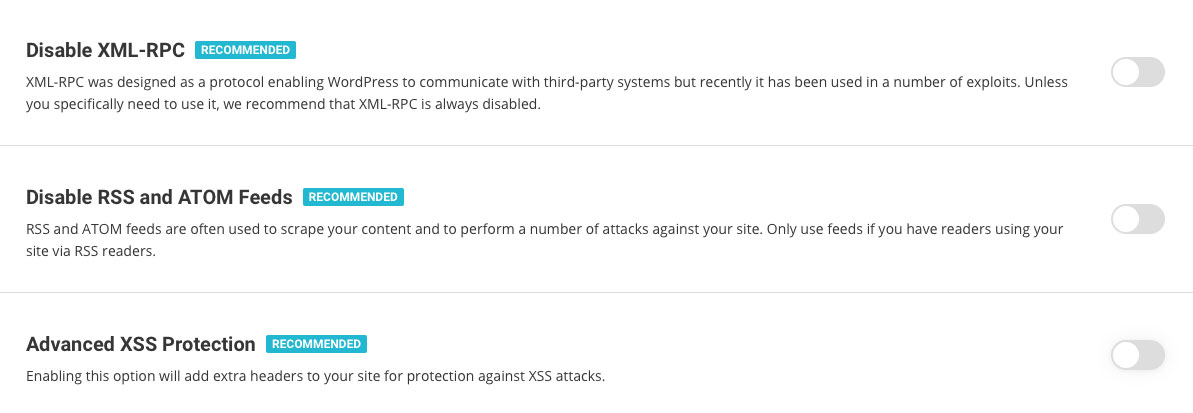
In the Site Security section of our plugin you will be able to easily switch on several rules that will harden your website security and prevent common malware, bruteforce and other security issues. Some of these rules, like hiding your WordPress version or deleting your default readme.txt, will make it harder for crawlers to detect you’re even using WordPress. Thus your website will not be easily identified as a possible attack victim when a vulnerability appears. Other rules in this section will add advanced XSS protection and protect your system folders from being injected with malicious files.
Strengthen your login security
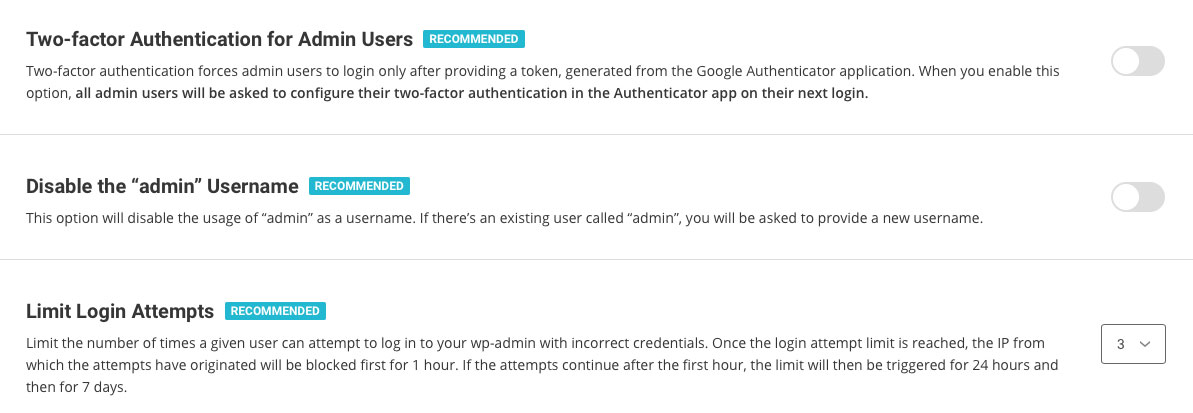
In the Login Security section of our plugin you will be able to apply several methods that protect your login from unauthorised access. One of the most recommended methods to protect your login is the 2-factor authentication and with the Security Optimizer plugin, you can easily switch it on for your WordPress administrative area. Some simple, yet very effective protection measures like changing your login URL and not allowing “admin” to be used as a username can be also easily set here. You can also limit the number of login attempts from one and the same IP, which will block attackers trying to guess your password through brute force. And if you want to go even deeper in protecting your WordPress login, there are two more advanced options available. You can specify the IPs from which your login page can be accessed. The option should be used with caution if you use dynamic IP, so that you do not block yourself out.
Monitor your admin area activity log
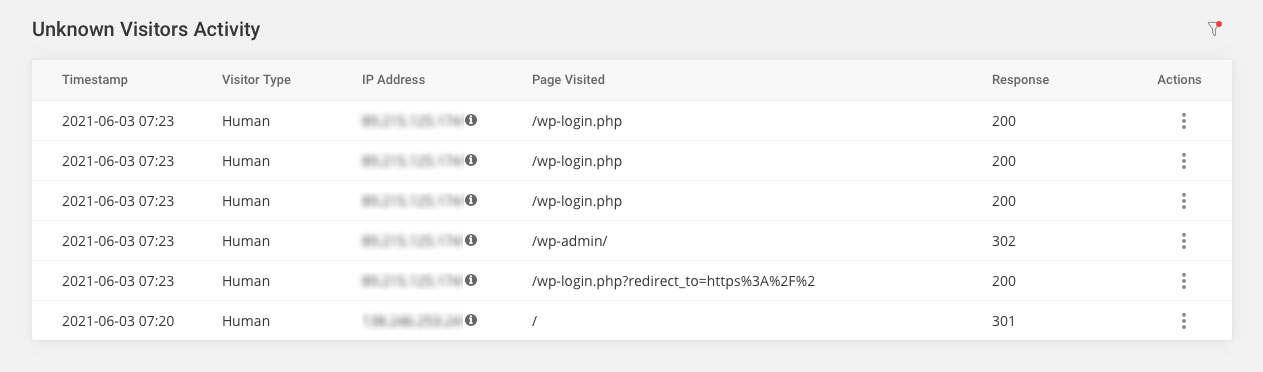
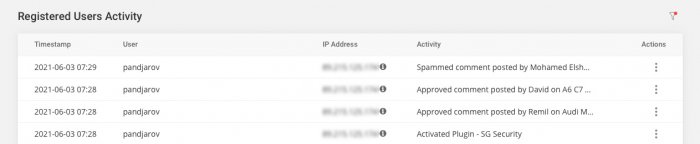
One of the best plugin features is the detailed Activity log. It allows you to pinpoint things like bad IP addresses that try to access your website as well as registered users that are performing tasks they are not supposed to. For example, you can block with one click IPs that have numerous incorrect logins and at the same time find out which user has deleted that post you are missing. For the initial version, we keep the log 16 days back so it’s worth giving it a look every now and then especially if you have a busy site and number of users with the capabilities to edit content.
React if you suspect your site might have been compromised.
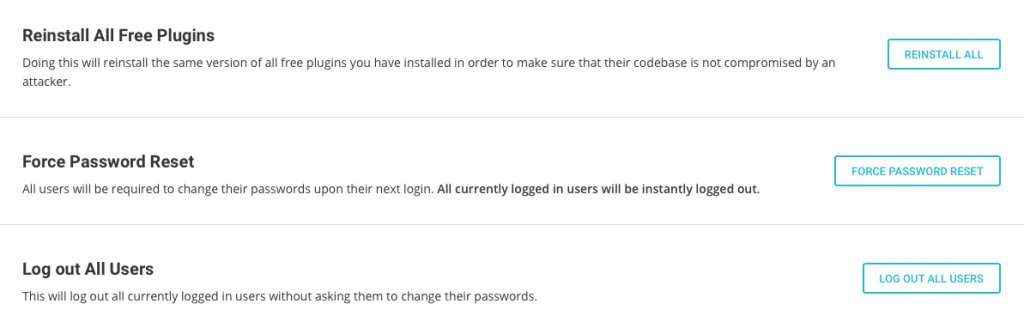
In the Post-hack section of the plugin you will find a set of actions that are useful, if you believe your site security has been compromised. Here you will be able to automatically log out all users and force them to change passwords. This way if any user was compromised, you may stop the malicious access through its account. You will also be able to reinstall all your current plugins. This will make sure you are using a clean copy of each plugin instead of a possible compromised one. Please bear in mind that although these post-hack actions are handy, they are not a substitute to a thorough site clean up that might need to be done by a WordPress security expert, if there are signs that your website might have been hacked.
How to get Security Optimizer?
Security Optimizer is available as any other free WordPress plugin. You can find it in the official WordPress plugin repository (https://wordpress.org/plugins/sg-security/) or install it directly through your WordPress admin area. If you host your next WordPress website at SiteGround, using the plugin comes right out-of-the-box, since all new WordPress installations now come with the plugin preinstalled with some of its features enabled by default.
This is the first plugin we are releasing whose full functionality can be used by anyone, even people that are not hosted by SiteGround. This said, we haven’t done excessive testing on every other company so issues caused by their particular setup may occur. If that’s the case, don’t hesitate to post a thread in the plugin forum in the WordPress repository, we will do our best to make sure it works great on all platforms.
[subscribe_cta]
Thank you for the exciting new plugin!
Can I use it with Wordfence?
Generally it’s not a good idea to duplicate functionality so I wouldn’t advice you to use both together.
On the face of it, Wordfence offers a lot of functions that SG Security doesn’t (yet) have. So, if a user already has Wordfence, should we stick with that (at least until the two plugins are a closer match).
I don’t think there are any important functionality missing between the two. Especially, since we have a server-side WAF running already.
Thanks, Hristo. I’m not an expert on this area of WordPress, but Wordfence has a scanning function which checks, for example, whether plug-ins are obsolete or any files have deviated from the version at wordpress.org. I can’t see that in SG Security. Am I not looking properly … or are you saying it’s not an important functionality to have?
It’s on the roadmap but not available in our initial release.
Hi Simon, did you stay with Wordfence or change to the SG? I am wondering the same. What did you decide in the end?
How about Jetpack?
Jetpack is a meta plugin, if you are using it only for security, you can replace it. Just don’t duplicate functionality.
Hi,
I have tried setting up the 2FA function. However, it keeps coming up with an error, when I scan the QR code. I don’t use Google Authenticator, but Keeper Security. The TOTP function is supposed to be identical to that of Google’s and all other 2FA codes work on other websites. This is the first TOTP issue I have ever had. So, I just wondered where the error may lie or if I am doing something incorrectly. Could you advise please?
Our 2FA authentication system works only with Google Authenticator. The QR code won’t work with any other application.
It also works with 1Password OTP feature flawlessly 🙂
the GA is a horrible 2FA, with no backup or recovery, but the AUTHY app is compatible with the GA and I never had issues for the past 3 years I used it as a GA alternative.
Glad that your app works. I’ve been using GA for years for 2FA and it has never underperformed. We will consider adding different options in the future though.
Can I use my yubikey for 2fa with this plugin?
We have not tested the 2FA setup with this particular authenticator app type. If you set it up, please remember to save the QR code that you might need later for completing the setup on any additional yubikeys.
Do you have a roadmap for the development of this plugin? I would like to see the WP API locked down, protection against zero-day vulnerabilities, and a threat feed block list.
Not a public one. We do have zero-day vulnerabilities protection on a server level. As for the API lockdown, we will consider it or at least the front-facing part because it is widely used, including for our own plugin interface based on React.
Great work you guys. But I also use the WPS hide login plugin and that gave a critical error. Couldn’t login in the backend anymore. I deactivated WPS and everything works fine now. Is this maybe an extra feature that can be integrated in SG security. Or do you know alternatives? Keep up the great work SG.
Custom login URL functionality is coming up shortly with the next plugin update!
Thumbs up to this feature from me. Its a standard setup item on most sites we manage. it rmeoves 90% of kiddy scripters trying to bludgeon the system to death.
I turned on the feature to prevent use of the admin username, but I am not prompted to change it when logging in. It still allows me to login with admin. On the users screen in wordpress, I am not allowed to change username at all. I tried turning off the “prevent admin” feature in the plugin, and it prompts me to change the username there, but when I put in a new username, I get an error and it won’t let me save.
In this version the plugin does not rename existing users (that’s coming up). We only block the creation of new users with admin as user.
I’m on SG and I already have Defender Pro. Do I need this?
You can save money and use only the SiteGround Security plugin 🙂
You say in your article above that, “..we provide services like auto updates, backups and WAF protection to our clients.”. I wasn’t aware that you provide a WAF service, in fact, I called recently about your SG Scanner addon service to ask whether this included a WAF, and the answer from your support team was ‘No’. Could you please provide further details on your WAF service?
The SG Scanner scans for malicious code and reports if there’s an intrusion. Our WAF runs on all our servers together with the AI anti-bot system. You don’t need to configure or purchase anything, it’s there and working 🙂
Yes, but is this advertised as part of SG hosting services? Seems odd that you would not promote that this valuable feature (WAF) is included in your hosting packages, especially given that you’re not exactly the cheapest hosts.
Thanks for pointing this out, I will discuss it with the team to make it more clear on our hosting page that this is indeed a feature of our hosting service.
I had to enable the SiteGround Security plugin for WAF protection. WAF was not available simply by being hosted on SiteGround.
Hello Hannah,
SiteGround custom WAF (Web Application Firewall) and our Anti-bot system run on server level, without the need of any additional components to be installed/added to the website. Those are crucial layers to ensure the safe environment for each website. In addition to that, each client can enable the Security Optimizer for additional security steps for individual websites.
Hi,
Have installed plugin on one of my website, but Google Authenticator doesnt work while login. How do I connect GA with login.?
You need to enable the 2FA authenticator and logout. Then, on the first login, simply scan the QR code with the GA application and your site will be synced.
Is it comparable with Wordfence?
With the SiteGround Security plugin and the SiteGround WAF already running on all servers you don’t need Wordfence. Having two security plugins will only slow your site down. No, there won’t be a conflict but that doesn’t make it a good idea to use both.
Hi, I’ve been using Cerber secruity plugin will it conflict with this plugin?
I would recommend replacing it with ours instead of using both.
Would you recommend All-in-one SiteGround Security Plugin instead of the free version of Wordfence and IThemes Security?
What are the benefits with All-in-one SiteGround Security Plugin comparted to Wordfence and IThemes Security?
Our plugin is designed to secure and protect your site without harming its loading speeds. Even if we still lack few functionalities, you can safely use it instead of any combination of other plugins out there.
Let’s say I limit login to a range of IP’s and I need SG to take a look at a site. Do I have to temporarily disable that option or not?
Yes, although our support team should be able to bypass that restriction 🙂
My WordPress site is hosted by Siteground. Do I need this security plug-in ?
Yes, I would totally recommend using it.
Greetings,
Thanks for your initiative to develop this plugin.
I already have AIO WPS installed and set up, though I do not know the details.
Will your security plugin interfere with AIO WPS? Do you expect that AIO WPS be de-activated and deleted before downloading and setting up your plugin (or afterward)?
Regards,
Ben
I would recommend replacing it with our plugin and not duplicate functionality since that may cause conflicts.
Thrilled that SG continues to provide such great tools for users. Thank you!
Can this plugin block by country or just IPs?
Do you recommend using this and the paid Site Scanner together or overkill?
You can use both, they do different things 🙂 As to the GeoIP blocking it is on the roadmap but I can’t give you an ETA when it will happen.
Hello Vickie, we are excited to inform you that this functionality is now available to all our clients! You can manage it from Site Tools > Security > Blocked IPs > Blocked Country.
Will we be able to block certain countries in the future?
Does it work on multisite?
Not yet, we will soon have features specifically for MS.
Cerber has an anti-spam feature. So this plugin provide that as well?
It’s coming up shortly 🙂
+1 vote on changing the admin directory! Tried turning on IP restriction but still says any IP can login so having tech check it out. Great tool and looking forward to additional features to keep us safe.
I am on SG and use Bullet Proof Security Pro. Has it the same functionality and level of protection?
We believe our pluigin has everything you need. I am not sure about the one you mention. If you don’t have any crucial functionality missing, you can safely replace it.
i am not ready yet to let go of wordfence, can the plugin work side by side with wordfence ?
Yes, as long as you don’t duplicate functionality. Check out the settings and make sure you’re not doing the same through both plugins.
Where is the activity log data stored and how bloated will it make the database? There does not seem to be a way to clear it.
It’s stored in the database in an optimized way. There is log rotation se to 16 days by defailt that can be adjusted through a filter to store less data.
You mentioned it is possible to change the login URL with this plugin but I don’t see the option. Can you point me in the right direction?
It’s coming up in the next update!
Ideally, what I’d love to be able to do is provide my clients with a white-labellesweekly or monthly report showing how effective my security(this plugin’s security, hopefully) is. As Cerber does. This would really be a killer addition for my monthly maintenance clients.
1) Can you consider this?
2) Could it be as comprehensive or something like Cerbers’ weekly report:
Weekly Report
1520 Malicious activities mitigated
1 Spam comments denied
0 Spam form submissions denied
447 Malicious IP addresses detected
28 Lockouts occurred
Activity details
Request to XML-RPC API denied 2001
Login failed 1751
Attempt to access prohibited URL 730
Attempt to log in with non-existing username 665
Probing for vulnerable code 118
IP blocked 28
Request to REST API denied 27
Malicious request denied 6
Spam comment denied 1
Attempts to log in with non-existing usernames
team-sitename 507
admin 139
admin-2 19
We’re working on scheduled notifications that are configurable and include only the information you actually want to receive. As to the plugin being whitelabeled, we don’t have such plans at this moment.
You guys are incredible! NO WEB HOST does what you do. Thank you for these extra kick-ass products and services.
If you’re unhappy with your current host or just want more features while paying the same amount you are now OR cheaper, take 10 minutes and read these 3 reviews done in 2021:
– https://www.wpbeginner.com/hosting/siteground/
– https://inlinehostblogger.com/siteground-review/
– https://digital.com/web-hosting/siteground/
If you’re a “Sitegrounder” already and you haven’t submitted a review, SHAME ON YOU! I’ve submitted 3 of them. Take 5 min and do one now!
https://www.trustpilot.com/review/www.siteground.com
If you develop WordPress websites, do yourself a favor and at least look into these guys. The data you find will convince you!
Wow! Kudos to SiteGround for developing and releasing this plugin, SG Security. Up to this point, we were using iThemes Security Pro but their latest upgrade – V7.0.0 – has been a flop. So, after thorough testing and evaluation, we have decided to drop iThemes Security Pro and use SG Security instead. We are confident SiteGround will continuously update SG Security until it catches up and surpasses all other security plugins in the market. Way to go, SiteGround. Jog well done!
Hi! I installed it today but when i click on the right pannel on SG Security everything is empty, blank, nada 🙁
Based on your description, it seems there is an incompatibility between the new plugin installed and the ones already in use. In such cases, deactivating the installed plugins one by one would help to isolate the culprit.
Would you guys can make a post for sitegound plugins vs jetpack? I’m not sure that should I install both or sitegound plugins is enough?
In this case, we would recommend the general rule of thumb, which is not to duplicate functionalities. If you are using Jetpack solely for its security features, feel free to use our SiteGround Security plugin instead.
Is it optimize for the only SiteGround hosting users or it can work on any hosting platform? I have some site on Siteground now but some other site on VPS, so wondering if I can install it on some WordPress site on VPS. For now, I’m comparing between SiteGround Security and Itheme Security
The plugin is free for installation and usage. You can take advantage of it, even if your websites are not hosted with SiteGround currently. 🙂
Hi, so thrilled about this new plugin and thank you for continuing to add value to your users. Just wanted to share something to consider for the roadmap. If there is a way to hide wordpress as much possible, that would be great. For example, hiding the login page and the theme and plugin names from view. The bad guys won’t know which ones are vulnerable. It doesn’t change the location of files, but just the access to it.
Thanks for the kind words 🙂 That’s coming literally in the next release!
I’ve just recently noticed the option to use a custom login url. Are there any instructions with examples and/or a tutorial?
Thank you in advance,
Please, check our SiteGround Security tutorial: https://www.siteground.com/tutorials/wordpress/sg-security/ we will update it later today with the new functionalities added.
REstricting the ip address only works if I have a static IP. Can you put a range in, allowing for /16 /24 addresses. this will cover ip addresses in my local cable company nework.
Thanks for the recommendation, we will do our best to add it as soon as possible.
Hi Hristo, I am running the Securi plugin and use Securi WAF. Do they provide the same features as sg-security? Thanks in advance. Peter
You can check the different plugins feature pages, I don’t have one to provide. We believe SiteGround provides everything you need to run on your application.
Hi,
the plugin causes some issues on my page design. The page looks different in the Elementor editing preview then in the live version. I deactived and reactivated all plugins and identified that this plugin is causing the issue. When I deactivate it, the issue is gone. How can I solve this?
Thanks,
Christian
Please, post a thread in the plugin forum providing the necessary info to recreate it and we will do our best to assist you further with this: https://wordpress.org/plugins/sg-security/
Hi there,
Does this plugin work with Google Ads Bot crawler?
I should give it a try, if it’s a properly written plugin there shouldn’t be a conflict.
This looks very interesting. Do you have a projected date for the next update?
At this point we don’t keep a public roadmap.
I’m using the Porto WordPress theme and have today updated it, on doing so my product filters on the category pages stopped loading and the product pages also stopped loading. I narrowed the problem down to be when the ‘hide wordpress version’ is activated. Now I’ve disabled this the website is working fine again. Would you like any further details to investigate?
Please, use the plugin forum to report such issues, we are looking into each thread very carefuly: https://wordpress.org/plugins/sg-security/
Hi, I’d like to solve these issues that I have on every website hosted on Siteground with Siteground security installed.
– Cookie Does Not Contain The “secure” Attribute
– Slow HTTP POST vulnerability
Is it possible with your plugin?
The first issue should be addressed by your application while the protection for the second one is server-based 🙂 Neither should be covered by the plugin.
I wanted to avoid automated/bots forgot password requests so I tried to change the path to login url, the problem is that the system still uses the same url wp-login.php?action=lostpassword is there any way to work better for me?
Please, post a thread in the SGS forum and we will look into your particular case.
What about the speed / server load. I know Wordfence’s server load does slow down your website. How about the SG Site Scanner, does it affect the website speed perfomance in the slightest way?
SiteGround security does not impact your site performance unlike similar plugins. Our WAF is running on server level and will not slow down your pages.
Congratulations on this PlugIn, it was a very good idea and it shows you work for your clients.
I am using a dynamic IP Address assignment from my ISP
How can I specify an Ip Address Range for example 73.0.0.0/8 that is 73.0.0.0 – 73.254.254.254?
Thanks
Blocking networks is coming in the next updates 🙂
Hallo, ich habe mich selbst durch das Siteground Security Plugin ausgesperrt! Ich habe nur meine Ip Adresse zugelassen, da ich eine feste Ip habe. Ich hatte die Begrenzung auf 3 Falscheingaben des Passwortes gesetzt! Meine Frage: Wie lange sperrt das Siteground Security Plugin meine Ip Adresse?
Danke! Gruß Denny
Beim ersten Mal wird Ihre IP für eine Stunde eingeschränkt. Sie können auf Ihr WordPress-Dashboard auch über die Site-Tools zugreifen, Abschnitt WordPress > Installieren und verwalten.
9Do you guys have a back up of this log, I backed up my site to a previous backup (through siteground backup) due to a security breach, but I lost the log in the process.
Thank you for the comment, Zoe! Our system creates daily account backups (which include the full site data) stored for 30 days for shared accounts and 7 days for Cloud accounts. Our support team can help you check for an available site backup from the day you restored your website and provide further assistance. Feel free to contact them at any time through your account’s Help Center page.
Looking forward to using this plugin, just have a question regarding the do not be challenged for 30 days option for 2FA. Does it apply to session cookies or to the user so if they connect from different IP it still triggers the 30 days?
Hi Steve, Great question! The option applies to the user and is tied to their session cookie. So, even if they connect from a different IP, but from the same browser, the 30-day period will still be in effect. You can read more about the plugin features here.
Do you have any plans to add login notification? Currently with some security plugins (Wordfence, Securi) there’s an admin notification (email) configurable by level, so I can receive email notifications when admins login. I don’t use this on all sites, but on some sites I find it useful, for several reasons.
Appreciate the input, Edward, we’ll forward it to our plugin team. We can see how this can be useful, especially if you’re managing multiple websites. Right now you can double-check the options available on the Login Security page to secure your website against malicious login attempts: https://eu.siteground.com/tutorials/wordpress/security-optimizer/login-security/ .
Thanks Ivan!
No problem, happy to read your feedback and suggestions!
Hi, I changed the custom login url. No login possible – 404 Site not found, what can I do?
I entered “maintain.php” in the custom login url mask/form , how is the resulting url-scheme for the login page? (tutorial page don`t explain)
Hello Chris, thank you for the question. Using maintain.php as a Custom Login URL should not work as this is an invalid format for the login URL. We’d suggest getting in touch with our team directly from the Help Center so we can take a look and assist. Here are the steps to follow: https://stgrnd.co/contactus/ .
Custom Login URL this is causing issues to my website like I have user role director which will be login from from-end login form of the website but this plugin is not allowing user to login due to that custom login URL feature
Hey there, thank you for reaching out. The issue you are describing can be caused by various factors. To provide a specific reason and a precise course of action to resolve it, please reach out directly to our support team, and we’ll be happy to troubleshoot and assist from there. Here are the steps to contact us: stgrnd.co/contactus. We are available 24/7 and would be more than happy to assist. Looking forward to hearing from you.
I just can’t get the Two-factor Authentication for Admin & Editors Users option to work. I’ve tried google authenticator and nothing. Errors. Digital XXX XXX Tried with and without space. Manually and Copy and paste.
Hey there, thank you for reaching out. This is not a common issue and could be related to the specific setup of Google Authenticator. To help resolve this efficiently, we recommend reaching out directly to our support team, who can investigate further and ensure everything is set up properly. Here are the steps to contact us: stgrnd.co/contactus/. We look forward to hearing from you!
Will the security data from Wordfence be transferred to the SG Security plugin?
Hey there, each plugin operates independently and uses its own methods to secure your website. Therefore, it is not possible to transfer data. If you are switching to the SiteGround Security Optimizer plugin, you’ll need to configure its settings according to your needs. Here you can find detailed guidance on setting up and using our plugin: https://my.siteground.com/support/tutorials/wordpress/security-optimizer/. If you have any other questions or concerns, please don’t hesitate to reach out directly to our support team by following the steps outlined here: https://stgrnd.co/contactus. We are available 24/7 and would be happy to assist you!
When I get the Security Optimizer Activity Report, it reports on human vs bot traffic, however the numbers are wildly different to the traffic reports I see on Google Analytics. Like, thousands versus hundreds. What is your definition of traffic in this instance?
Thank you for your question, Sascha. The difference you are noticing most likely stems from how these two tools define and measure traffic. The SiteGround Security Optimizer plugin logs every single request made to your website, including all human visits, bot crawls, and other interactions. For a detailed breakdown of what’s included in your Activity Log, you can check this article: https://my.siteground.com/support/tutorials/wordpress/security-optimizer/activity-log/. As you can see, the Security Optimizer plugin captures a broad spectrum of activity, including automated traffic and bots that may not be counted as “visits” in other analytic tools.
For more specific information on what Google Analytics counts as traffic, we recommend reaching out directly to them, as they can provide the most accurate and up-to-date information on their metrics.
We hope this helps clarify the discrepancy. If you have any other questions or concerns, don’t hesitate to reach out directly to our support team. We are available 24/7 and will be happy to assist you.
I add a user with administrative rights, but after logging in with that user, they don’t have administrative privileges.
Where can I set it?
Hello Levi, happy to help! Log into your WP instance. On the left, click Users, then hover over the selected user, click Edit, go to Role and choose the one you need. On the bottom of the page save the changes via Update User.
If you have similar questions – give our AI Assistant a go. Just log into your account, go to the Help Center ( https://my.siteground.com/support/instantaihelp/ ) and select Instant AI Assistant. In seconds you’ll be able to resolve a vast majority of the questions you may have and you always can contact our support team for more advanced queries.
Recently (the past several weeks at least), the security plugin in its weekly email report has been reporting zero blocked login attempts and zero blocked visit attempts for the week. In the three or so years that I have been running the plugin, I have never previously seen either of these values reported as zero (blocked login attempts are usually between several dozen and several hundred), and I don’t believe that attempts against the website have ceased, so my conclusion is that there is a problem with the plugin and that it is not reporting these attempts correctly.
This is indeed odd behavior to have 0 for the 2 values for multiple days. We definitely want to review in details this specific case, and the fastest way would be to reach our Support team via the Help Center of the Client Area. Our team is always 24/7 available via the Help Center > Contact Us > WordPress category. Our team will check the plugin and all related server logs, to ensure that the Security Optimizer plugin is working as expected.