If your website uses the UpdraftPlus backup plugin, here is the short version: a critical vulnerability was discovered in the plugin, and we have already updated it to the patched version on all affected sites we host. You are protected, and there is nothing you need to do.
Below is what happened, what we did, and what to keep an eye on.
Your site is already protected
On June 11, 2026, our engineering team force-updated the UpdraftPlus plugin across all hosted sites running a vulnerable version. Every affected installation was moved to version 1.26.5, which contains the official fix. More than 128 000 sites on our platform were running a vulnerable version, and all of them have been patched.
We tested the upgrade paths before rolling anything out and found no issues. We do not expect any site breakages as a result of this update.
What the vulnerability is
The flaw, tracked as CVE-2026-10795, is an Unauthenticated Authentication Bypass affecting UpdraftPlus versions up to 1.26.4. In plain terms, it allowed attackers to gain administrator access to a WordPress site without knowing any username or password. From there, they could execute code on the site, which is about as serious as a plugin vulnerability gets.
The “unauthenticated” part is what makes this critical. Many vulnerabilities require an attacker to already have some level of access, like a subscriber or contributor account. This one required nothing at all. Any site running a vulnerable version was exposed to anyone who knew about the flaw.
What we did and when
As soon as the vulnerability was disclosed, it took our team less than an hour to proactively complete the update of the patched version of the plugin to all affected sites, acting immediately to close the exposure window before attackers could exploit it at scale, rather than waiting for site owners to update manually, or be affected in any way.
Here is what the response looked like:
We identified all hosted sites running UpdraftPlus versions 1.24.x, 1.25.x and 1.26.x.
We tested upgrades from 1.24.x to 1.26.x and other affected versions to 1.26.5 in advance to confirm the update would not cause problems.
We force-updated more than 128 000 affected installations to the patched version 1.26.5.
The whole process was complete in ~52 mins.
Will the update affect my website?
We do not expect it to. Plugin updates between these versions were tested before the rollout, and no issues came up.
That said, if you want extra peace of mind, here are two quick things you can check:
Confirm your backup schedule in UpdraftPlus is still configured the way you set it.
Verify that your most recent backup completed successfully.
Both take less than a minute from your WordPress dashboard.
Why we force updates for critical vulnerabilities
When a vulnerability is critical, trivially exploitable, and publicly disclosed, every hour of delay matters. Attackers begin scanning for vulnerable sites within hours of a disclosure like this one, and waiting for each site owner to update manually would leave thousands of sites exposed in the meantime.
In those situations, we patch first and notify right after. We believe a proactive update is always the better trade compared to leaving sites open to full takeover.
As a general rule, we also recommend keeping plugin auto-updates enabled wherever possible. It is the single most effective habit for staying ahead of vulnerabilities like this one.
The last few weeks have been busy for anyone who runs Linux servers for a living. Between late April and mid-May, security researchers disclosed five serious kernel vulnerabilities, each one giving any logged-in user a path to full root access on the machine. Several of them came with working exploit code published on day one.
SiteGround applied fixes for every single one of them on our hosting infrastructure without rebooting a single server and without interrupting a single customer’s service.
What this would have meant for your sites
In plain terms: if any one of these vulnerabilities had been exploited on a server before being patched, an attacker who already had even the smallest foothold (a compromised WordPress plugin, a leaked FTP password, a vulnerable script) could have escalated from a single low-privilege account inside one site to full control of the underlying host. From there, the usual playbook: read other tenants’ files, plant persistent backdoors, harvest credentials, pivot deeper into the network.
These aren’t theoretical risks. Public exploit code existed for every single one of these flaws. Copy Fail in particular was being actively used in the wild within days of disclosure.
What actually happened
In rough order, here’s what hit the Linux world:
April 29, Copy Fail (CVE-2026-31431)Disclosed – A single 732-byte Python script could turn any normal user into root on essentially every Linux distribution shipped since 2017. No timing tricks, no guesswork, just a logic bug in the kernel’s crypto subsystem. CISA added it to their actively-exploited list within days.
May 7, Dirty Frag – xfrm/ESP flaw (CVE-2026-43284)Disclosed – A flaw in the kernel’s IPsec ESP networking code that lets an attacker write arbitrary data into the memory copy of read-only system files. Often referred to as “Copy Fail 2.”
May 7, Dirty Frag – RxRPC flaw (the second half of the chain) – A companion bug in the kernel’s RxRPC networking module. Chained with the xfrm/ESP flaw above, it gives a normal user full root.
May 13, Fragnesia / Copy Fail 3.0 (CVE-2026-46300) Disclosed – The third bug in three weeks, same family as Dirty Frag, also in the kernel’s IPsec subsystem. A working proof-of-concept was published the same day.
May 14, ssh-keysign / chage pidfd flawDisclosed and patched by Linus Torvalds – A different kind of bug – not root escalation, but it let any unprivileged user read root-owned files like /etc/shadow (the password hashes) and SSH host keys.
How we fixed it without downtime
Four choices we’ve made about how SiteGround operates made this manageable, and given what’s coming, all four are going to matter even more, not less.
We watch the threat landscape constantly. Our security team monitors kernel mailing lists, CVE feeds, and disclosure channels around the clock. We knew about Copy Fail the day it was disclosed, Dirty Frag the day it dropped, and Fragnesia within hours of the proof-of-concept being posted. There’s no substitute for having eyes on this in real time. By the time these stories hit mainstream tech news, the exploit code has usually already been out for days. As AI-driven discovery accelerates the disclosure cadence, this kind of constant monitoring becomes essential rather than optional.
We have engineers on call 24/7. Critical kernel patches don’t wait for business hours, and neither do we. For every one of these vulnerabilities, we had patches built, tested, and rolled out across our fleet within 48 hours of public disclosure, which is usually well before most distributions had even released their official packages.
We use live kernel patching. This is the part that matters most for you. Traditional kernel patching requires a reboot, which means downtime for every service running on the machine. Live patching applies the fix to the running kernel in memory, so the vulnerability is closed without restarting anything. Your websites, databases, mail, and SSH sessions all kept running through every single one of these patch cycles. When patch frequency goes up, the cost of “just reboot the server” goes up with it — live patching is what keeps that cost at zero for you.
We keep our kernels lean. A big part of why these bugs are dangerous is that the vulnerable code ships enabled by default on most distributions. Copy Fail lived in the AF_ALG kernel crypto interface. Dirty Frag and Fragnesia lived in the esp4, esp6, and rxrpc modules — IPsec and AFS networking code that the vast majority of web servers will never use in their lifetime. We don’t load kernel modules we don’t need. That means a chunk of the attack surface for these exploits simply didn’t exist on our machines in the first place, giving us extra breathing room to apply the proper fix.
The AI factor, and why this is only the beginning
One detail in the Copy Fail disclosure deserves special attention. The bug wasn’t found by a human researcher staring at code for weeks. It was surfaced by an AI-powered code auditing tool (Xint Code) in roughly one hour of scan time against the Linux kernel’s crypto subsystem. The same scan also surfaced “other high-severity bugs, still in coordinated disclosure,” meaning more disclosures are already in the pipeline.
This is a major shift in how vulnerabilities get found. For years, the bottleneck on discovering critical kernel bugs was the limited number of expert humans willing to spend months reading kernel source code. That bottleneck is gone. AI auditing tools can now scan entire subsystems at machine speed, and they’re finding things that have been sitting in stable kernels for nearly a decade.
What this means practically: the rate of serious vulnerability disclosures is going to keep climbing. Three universal local-root exploits in three weeks isn’t a fluke; it’s a preview. The reactive patching cycles that worked when one critical kernel bug landed every six months are not going to work when one lands every two weeks. The ability to detect, react, and patch within hours rather than days is no longer a nice-to-have. Instead it’s the baseline for staying safe.
The takeaway
Linux is going through an unusually rough stretch for kernel security: three universal local-root exploits in three weeks is not normal, and it’s not slowing down. With AI-powered auditing tools now scanning the kernel at speeds no human team could match, we expect the discovery rate of serious vulnerabilities to keep accelerating. The bugs that have been sitting quietly in stable kernels for years are getting found, one subsystem at a time.
What we can promise is that the way we handled these is the way we handle every serious vulnerability: monitor early, patch fast, fix live, and keep the attack surface as small as possible in the first place. Your sites stay up. The exploits don’t. And as the cadence picks up, that’s only going to matter more.
The internet can often feel like the Wild West—a vast frontier filled with opportunities but also teeming with hidden dangers. Cyber threats are everywhere, and while website security vulnerabilities might not sound as thrilling as a high-stakes showdown, it’s absolutely vital.
Imagine leaving your front door wide open—hackers are like unwelcome visitors who can sneak in to steal sensitive data, damage your reputation, or drain your wallet. Sounds rather unpleasant, doesn’t it? This guide addresses the most common website security vulnerabilities, breaking it all down in plain English, with explanations that are easy to understand and actions you can take to keep your site safe.
What are Website Security Vulnerabilities?
Website security vulnerabilities are weaknesses or flaws in a website’s code, architecture, or implementation that can be exploited by attackers. These web vulnerabilities may allow unauthorized access by hackers to sensitive information, to manipulate data, or even to attain total control over a website. They can arise from various sources, including poor coding practices, outdated software, and human error. These include website vulnerabilities as well as web application security vulnerabilities, which specifically target the functionality of web applications and their underlying code.
Not only can dealing with these kinds of issues create loads of extra work for you and your business, but the fallout can be much more widespread: loss of sales or, worse, loss of consumer confidence. So that’s why it’s so very important to understand how to prevent, identify and fix website vulnerabilities.
Most Common Website Security Vulnerabilities
While there’s an unfortunately long list of ways your website could be vulnerable to hackers and other bad actors, most web security vulnerabilities boil down to just a common handful. So today we’re tackling the top seven most-likely issues, and, thankfully, explaining them—and how to address them—in terms that we can all understand and act on.
First, we’ll tackle the most common website vulnerabilities in order to understand what they are and how they impact your site. Then, we’ll discuss the solutions separately, as many fixes address multiple vulnerabilities at once, making them more efficient and impactful.
1. SQL Injection
So let’s say your website has a form—as it probably does!—such as a login box or a search bar. With SQL injection, hackers trick the form into giving them access to your website’s database, where all the important information is stored. This can happen if the website doesn’t double-check what users type into these fields. Hackers might steal customer information, change data, or even erase everything.
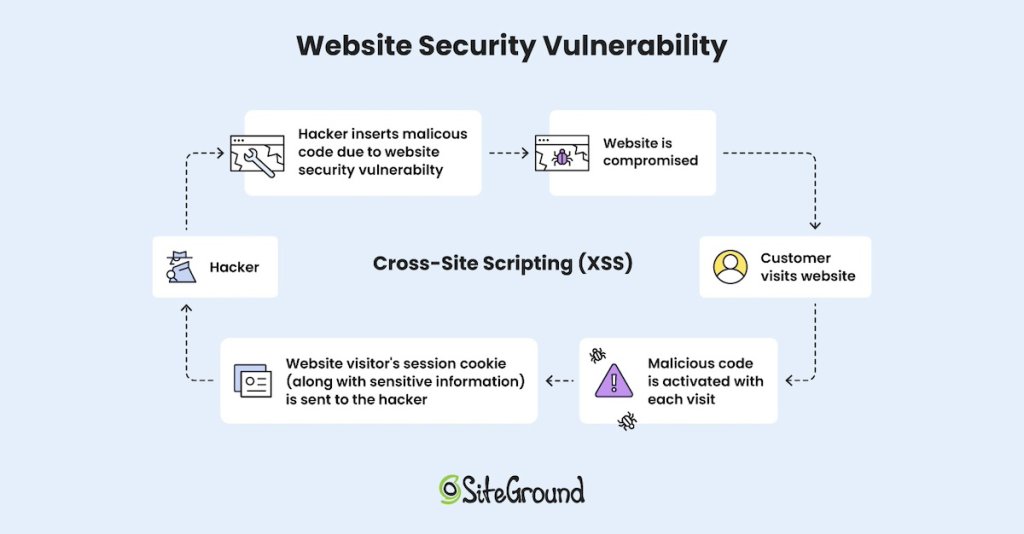
2. Cross-Site Scripting (XSS)
Cross-site scripting (XSS) is like someone slipping a harmful note into your website that your visitors accidentally read. These harmful notes (scripts, or malicious codes, as they are called) are a threat to site security, as they can steal personal information, mess up how your site looks, or send users to dangerous websites. The worst part? Your visitors might think it’s your fault, even though the hacker is behind it.
3. Broken Access Controls
This happens when your website doesn’t do a good job of keeping certain areas or actions off-limits to unauthorized users. For example, picture someone sneaking into a staff-only area of a store—that’s what broken access controls are like online. Hackers might use this lack of login security to view private information or make changes they shouldn’t be allowed to.
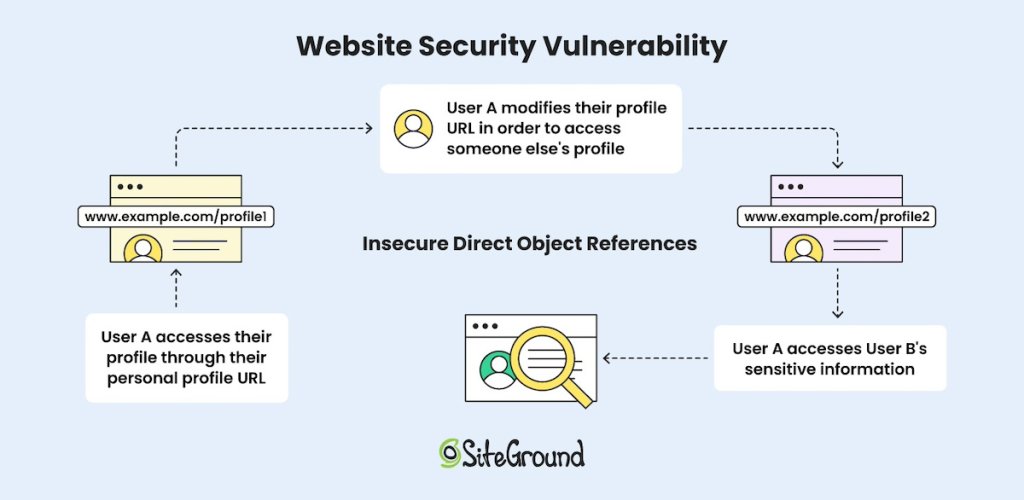
4. Insecure Direct Object References (IDOR)
Would you leave a key under the doormat where anyone could easily and predictably find it? With IDOR you’re doing just that if you give website users direct links to sensitive information (such as “www.example.com/profile1”). That’s because a hacker could guess or change those links (like to “www.example.com/profile2”) to see someone else’s sensitive information. As such, IDOR happens when websites don’t check who’s allowed to see what, and pay close attention to user roles and access and other security measures.
5. Security Misconfiguration
Security misconfiguration occurs when websites are launched with default settings, outdated software, or unnecessary features enabled, leaving the door wide open for hackers. Common examples include using default passwords, failing to apply security patches, or enabling services that aren’t needed. These oversights give attackers more opportunities to exploit vulnerabilities, gain unauthorized access, or steal sensitive information.
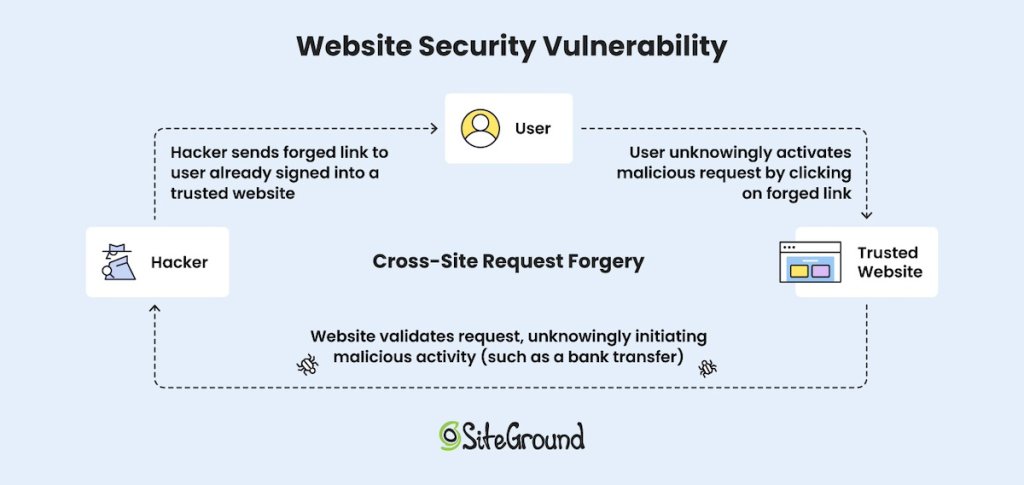
6. Cross-Site Request Forgery (CSRF)
CSRF is when hackers trick you into doing something you didn’t mean to do. For example, you’re already signed into your bank account, then you receive a bogus email with a link or button that’s disguised as something harmless. You innocently click on it, and it ends up transferring money from your account to the hacker, or perhaps it performs some other malicious action on the website where you’re logged in. You’ve essentially just been fooled into signing a virtual blank check.
7. Unvalidated Redirects and Forwards
This issue occurs when a website sends users to another page without checking if the destination is safe. Hackers can use this to redirect your visitors to harmful sites, like phishing pages or ones that install viruses. Think of it as though someone handed you directions to a fake address where bad things happen.
With all of these web vulnerabilities, it might seem a bit intimidating to even think about how to mitigate them. But there’s great news: we’re going to break it down into simple solutions that can quickly and easily improve your website security outlook.
Simple Fixes to Address Website Security Vulnerabilities
Now that you understand the most common website security vulnerabilities, let’s discuss some of the straightforward ways you can address them, as well as other website security tips. The bonus is that these web vulnerability solutions are easy to understand and act on, even if you don’t have a technical background.
1. Choose a Good Hosting Provider
The first and most important step you can make in this process is choosing a solid hosting provider—it’s essentially the online home for your website, and it plays a vital role in protecting your site from the website security vulnerabilities we’ve discussed above. Not only that, but a good hosting provider will offer maximum uptime and optimized website speed, ensuring that your website performance is reliable and top notch.
How to do it:
Look for a hosting provider that provides a free SSL certificate and daily backups, as well as other important security measures, such as daily malware scans, and a server-level WAF (not sure what we’re talking about here? Don’t worry, we’ll cover it all in a minute!). Do your research, and check reviews to make sure the provider you choose has a good reputation, along with superb customer service.
2. Perform Regular Maintenance and Updates
Keeping your website’s software, plugins, and tools up to date is a no-brainer on your list for stronger web security. Developers frequently release updates to fix vulnerabilities and improve performance. By staying on top of these updates, you can protect your site from previously mentioned web vulnerabilities, such as SQL injection, cross-site scripting (XSS), and insecure direct object references.
How to do it:
Create a schedule to check your CMS (such as WordPress), plugins, themes, and tools weekly, or enable automatic updates if your platform supports them. This is where those free daily backups are essential, though, because before you make any updates, always back up your website to prevent data loss or compatibility issues.
For added safety, test updates in a staging environment to ensure everything works smoothly before applying them to your live site.
To make web management easier and less stressful, consider using a managed WordPress hosting with free backups that handles updates, (free!) backups, and maintenance for you, helping keep your site secure without all the extra effort on your part.
[80]
3. Implement Input Validation
Input validation verifies that any data users enter into forms or search bars is checked and cleaned to fit the expected format, thus blocking harmful code. This security measure helps prevent hackers from injecting malicious commands, protecting your website from SQL injection and cross-site scripting (XSS) attacks that could compromise data or functionality.
How to do it:
Use easy-to-install tools or plugins that automatically clean up and check the information users enter on your site.
Focus on areas like forms, search bars, and comment sections.
For extra protection, set up these checks both on the user’s side (their browser) and on your website’s server, so you catch anything suspicious before it can cause harm.
4. Strengthen Access Control
Access control means deciding who can do what on your website. This includes using strong passwords, setting up roles like “admin” or “user,” and limiting what each role can access or change. These steps help keep hackers out of sensitive areas and protect your website from common vulnerabilities like unauthorized access or data leaks.
How to do it:
Assign user roles carefully, making sure each person only has the permissions they need.
Also be sure to implement strong, unique passwords for all accounts and enable two-factor authentication (2FA) for an extra layer of security.
It’s also helpful to install a plugin that keeps an activity log of your website, tracking events like login attempts, user activity, and bot visits, so you can quickly spot and address suspicious behavior.
5. Use Monitoring Tools and Scanners
Monitoring tools and scanners act as security guards for your website by watching for unusual activity or hidden threats. They can alert you to suspicious or malicious behavior, such as injected code, compromised files, or web vulnerabilities that could be exploited by attackers. This helps you catch problems early before they cause serious harm.
How to do it:
Look for a malware scanner tool that offers automated file scans and malware cleanups. A good tool will offer detailed reports and recommendations for resolving issues, making it easier to maintain a secure website. This can also help prevent future attacks by identifying weak points in your website’s security configuration.
6. Secure Your Connections
A secure connection encrypts data sent between your website and its users, often using HTTPS (look for the padlock symbol in the browser). The distinction between HTTPS versus HTTP is an important one: it signals this secure connection—and thus trust and confidence—to your website users. It also keeps hackers from intercepting sensitive information, adding extra protection against data theft.
How to do it:
Make sure your site uses HTTPS by installing an SSL certificate. Certain hosting providers, including SiteGround, will provide you with a free SSL certificate that can easily be implemented on your website, making HTTPS implementation as easy as the flip of a switch.
7. Improve Redirection Security
A redirect is when a user is automatically taken from one URL to another. So redirection security involves checking these links or forwards from your website to make sure they lead to safe destinations. This stops hackers from tricking your site into redirecting visitors to malicious websites.
How to do it:
Limit the use of redirections and always verify that any destination URLs are trustworthy before implementing them. Regularly review your redirects to ensure they haven’t been altered or exploited, and consider using tools to monitor and secure your redirection paths.
8. Employ a Web Application Firewall (WAF)
A Web Application Firewall (WAF) is specifically designed to protect your website from security vulnerabilities, such as SQL injection, XSS, and CSRF, by safeguarding features like user forms, search fields, and API endpoints. It works by stopping harmful requests before they can cause damage, ensuring your site remains secure.
How to do it:
Many hosting providers offer built-in WAF options, as it’s an essential security feature. While there are numerous WAF options available, including WordPress plugins and third-party services, having a server-level WAF is imperative. This type of WAF operates with large-scale data and provides real-time protection, ensuring a higher level of security.
At SiteGround, our security team keeps a close eye on security bulletins to identify potential exploits and web vulnerabilities. In doing so, they promptly develop custom security rules and integrate them into an advanced, in-house managed WAF. This robust protection is automatically applied to all websites hosted on our platform.
A CDN, or Content Delivery Network—as it’s called—helps protect your website by spreading traffic across multiple servers around the world.It not only improves your site’s speed but also provides an essential layer of protection against web server vulnerabilities. By distributing traffic and blocking harmful bots, a CDN prevents malicious traffic from overwhelming your server, keeps data safe with encryption, and stops potential attacks before they reach your site.
How to do it:
Quite simply, select a hosting provider that leverages a CDN. SiteGround’s CDN, for example, helps safeguard your website by mitigating web server vulnerabilities, blocking harmful traffic, and encrypting data. Additionally, with the Always Online feature, even if your server goes down, the CDN enables a cached version of your site that remains accessible and secure.
10. Install a Reliable Security Plugin
There are many plugins out there to help address the web security vulnerabilities mentioned above. And if you’re using WordPress, the SiteGround Optimizer Plugin is particularly ideal, as it allows you to prevent many of the aforementioned web vulnerabilities but with just one plugin – easily and for free.
The SiteGround Security Optimizer Plugin provides a combination of enhanced login security, firewall settings, and activity tracking, with an all-in-one solution that fortifies your site. It safeguards key system directories, enables protection against XSS, prevents unauthorized access, hardens login security, and continuously monitors for any unusual activity. In the event of a breach, the comprehensive activity logs allow you to swiftly identify what occurred and take the necessary steps to resolve it. It’s basically a one-stop shop for securing your WordPress site.
Final Word on Website Security Vulnerabilities
In the end, website security doesn’t have to be a daunting task. By applying simple fixes to these common website security vulnerabilities, you not only protect your site but also build trust with your visitors. Take action today to lock down your site and keep those Wild Western cyber bandits at bay—after all, a little effort now can save you a lot of headaches down the road.
Meanwhile, you can make addressing website security extra worry-free by taking advantage of SiteGround Hosting. We put our all into security measures that go above and beyond so that you can rest easy. Plus, we offer unparalleled speed and service.
Back in May, we shared the news that PHP 8.2 is becoming the default version for all new sites hosted on our servers. Now, as of this month, we’re thrilled to announce that PHP 8.2 is fully rolled out across our entire infrastructure for existing sites as well. This significant upgrade provides SiteGround clients with enhanced security improvements and superior performance, ensuring you get the best out of PHP 8.2 right from the start.
Implementing this change on such a large scale was a complex and extensive process, but we carefully planned and executed it. Our unique approach was guided by our commitment to providing clients with seamless, high-quality service and ensuring each of their websites is faster, safer, and better equipped for the future. Here’s more about the journey behind this upgrade.
PHP 8.4: Stay Updated! 🚀 Check out our latest blog post to explore the newest features and enhancements in PHP 8.4.
Smooth Transition and Optimized PHP Experience for Faster and Safer Hosting
The scale of this project was immense, involving hundreds of hours of planning, testing, and implementation by our DevOps team. All this to ensure a smooth, free-of-charge transition to PHP 8.2 for customers who have switched on their Managed PHP service. Here’s a snapshot of the results:
✅ Our team spent 88 days on preparation and gradual upgrades across shared and cloud servers.
📊 Millions of websites with managed PHP underwent comprehensive compatibility checks.
🎉 A massive 92.92% of sites passed the PHP 8.2 check with no issues and were classified as low-risk and directly upgraded to PHP 8.2.
⏰ Only about 7% of sites were identified as high-risk and were granted additional time to use PHP 7.4 to ensure stability and client peace of mind.
Why the PHP 8.2 Upgrade is Complex – and Necessary
PHP 8.2 brings powerful improvements to our customers’ websites in terms of speed, security, and efficiency. It is designed to handle PHP requests faster, which improves performance across all types of websites. PHP 8.2 is considered a mature release and is the primary version actively supported by PHP core developers, ensuring it remains well-patched.
It includes new functionalities such as read-only properties and deprecation of dynamic properties, allowing developers to produce safer code and leading to a more secure website overall. Plus, it is completely compatible with other software hosted on our platform, and all major apps, like WordPress and Joomla, already support PHP 8.2.
With all this in mind, this was the right time for SiteGround to make PHP 8.2 the default and ensure our clients get the best from their hosting environment. However, moving to a major PHP version like this one is challenging because it affects almost every application and domain hosted on our servers.
Moreover, some website elements, like old plugins or custom code, may have compatibility issues when moving to a new PHP version. This is why the transition to PHP 8.2 was both important and complex. While new websites on our servers have been using PHP 8.2 by default since May 2024, updating all sites using our Managed PHP service required a meticulous approach.
Initial Testing, Compatibility Checks, and Risk Management
In July, we began a phased upgrade process for clients using our Managed PHP service. We started with the first shared server test and performed detailed checks with sites to verify if they would load correctly with PHP 8.2. These tests were performed in isolation, ensuring that live client sites were unaffected during the assessment process.
This test allowed us to understand whether the sites were ready for PHP 8.2. Our comprehensive compatibility checks helped us categorize websites into low-risk and high-risk groups to better manage the rollout and reduce potential risks for clients.
Low-risk: websites that our tests detect as properly loading on PHP 8.2
High-risk: websites that we have detected as having some compatibility issues
To all sites that loaded without a problem, we sent a notification a week before the actual upgrade, ensuring complete transparency and zero surprises for our clients. For sites that did not pass the compatibility check, we kept them on PHP 7.4. This allowed clients to update their site’s code for compatibility while remaining fully functional.
We also contacted such clients with a recommendation to switch back to managed PHP after they resolve the compatibility issues so that we could continue updating their sites automatically and save them time and effort.
Gradual Upgrade of Clients’ Sites with Managed PHP
To ensure stability and minimize risks, our PHP 8.2 upgrade process was gradual and carefully controlled. After the initial server test, we performed a phased upgrade, starting with a five-server batch, then scaling up to 50, 250, and finally 500 shared servers per week. This gradual approach ensured that we could quickly catch and resolve any issues that arose.
By mid-September, the PHP 8.2 upgrade was complete for all our shared hosting servers. At the end of August, we started the upgrade process to our cloud servers which was on track and successfully completed by the end of October.
For Those Still On PHP 7.4, We Strongly Recommend Moving to PHP 8.2 For clients who manage their own PHP version and are still using PHP 7.4, we encourage you to upgrade to PHP 8.2 soon, as this version is more secure, faster, and fully supported. Versions below 8.2 are no longer supported by the core PHP developers and will become more and more vulnerable as time passes. Note that PHP 7.3 will be removed from SiteGround servers in 2025, as it reaches the end of its lifecycle. For your convenience, we provide a PHP compatibility check,performed by our technical experts as part of the Expert Care service.
We’re happy to have achieved the huge upgrade to PHP 8.2 successfully, maintaining our commitment to a secure and up-to-date hosting environment. As always, our team is here to help with any questions and guidance you may need to ensure you get the most out of PHP and beyond!
At SiteGround, we proudly embrace our reputation as “security freaks” – we continually enhance our infrastructure, systems, and tools to protect our customers’ websites and information. Since launching our Site Scanner service, we’ve been inspired by your stories of how it has shielded your websites from potential security disasters. Now, we’re excited to take your protection to the next level with Site Scanner’s latest updates.
New in Site Scanner Basic: Automated Weekly File Scan
Our current Site Scanner Basic plan features an automated Daily URL Scan that checks your website’s URLs every day for any publicly detectable malware. However, when it came to File Scans, up until now you had to initiate that type of scan manually yourself.
We’ve rectified that with the addition of an automated Weekly File Scan, making our Site Scanner Basic plan even more convenient. Now your website’s files will be automatically scanned for malware every 7 days, ensuring regular and thorough protection without any extra effort on your part. Site Scanner Basic users can now enjoy enhanced security and peace of mind with our new weekly file scans!
New in Site Scanner Premium: Unlimited 1-Click Malware Cleanups
Our Site Scanner tool has been a favorite among our clients, but there was one feature you’ve been eagerly anticipating – Malware Cleaning. Until now, Site Scanner provided valuable timely information about potential malware threats found on your account. Now, we’re excited to offer not just insights and timely alerts, but also an easy resolution with our new 1-click Malware Cleanup feature, exclusively available for Site Scanner Premium users.
Here’s an overview of the two methods for using the malware cleanup feature:
Scenario 1: Malware is detected after a scan
Imagine malware is detected on your website. With Site Scanner on, you’ll receive an immediate notification via email. Your next step is to go to your Site Scanner interface in Site Tools. Here, you’ll see more information about the detected threat and have the option to remove the malicious code identified during the scan. Our Malware Cleanup feature now allows you to swiftly remove the malware from your site and eliminates the need for third-party solutions, saving you both time and money. You can initiate the cleanup with 1 click. The possible results will be:
Successful Cleanup: The malware is effectively removed, and a subsequent scan verifies that your site is clean.
Unsuccessful Cleanup: If the cleanup tool encounters issues, an automatic support ticket is created for further investigation by our support team experts.
In the CLEANUPS tab of your Site Scanner interface, you can access your history of all cleanups, with successful ones accompanied by a detailed report of the files that were cleaned.
And voila! Your site is malware-free again.
Scenario 2: Quarantine files
If you have your Site Scanner quarantine setting enabled and there is a malicious attempt to upload potentially harmful files to your site, these will be detected and not automatically published in your public website folder, but safely quarantined in a folder isolated from your website.
Now you have the option to use our automatic cleanup process for these files too. When initiated, our Malware Cleanup feature will automatically delete the content it considers malicious from the quarantine files and will safely move the cleaned files to the public folder.
For more detailed guidance on using the Site Scanner tool and how it protects your website, please refer to our Site Scanner Knowledge Base tutorial.
Activate or Upgrade Site Scanner for Unmatched Peace of Mind
With Site Scanner’s new automated Weekly File Scans in the Basic Plan and 1-click Malware Cleanup in the Premium Plan, along with many other site protection features, you can enjoy seamless defense against malware threats.
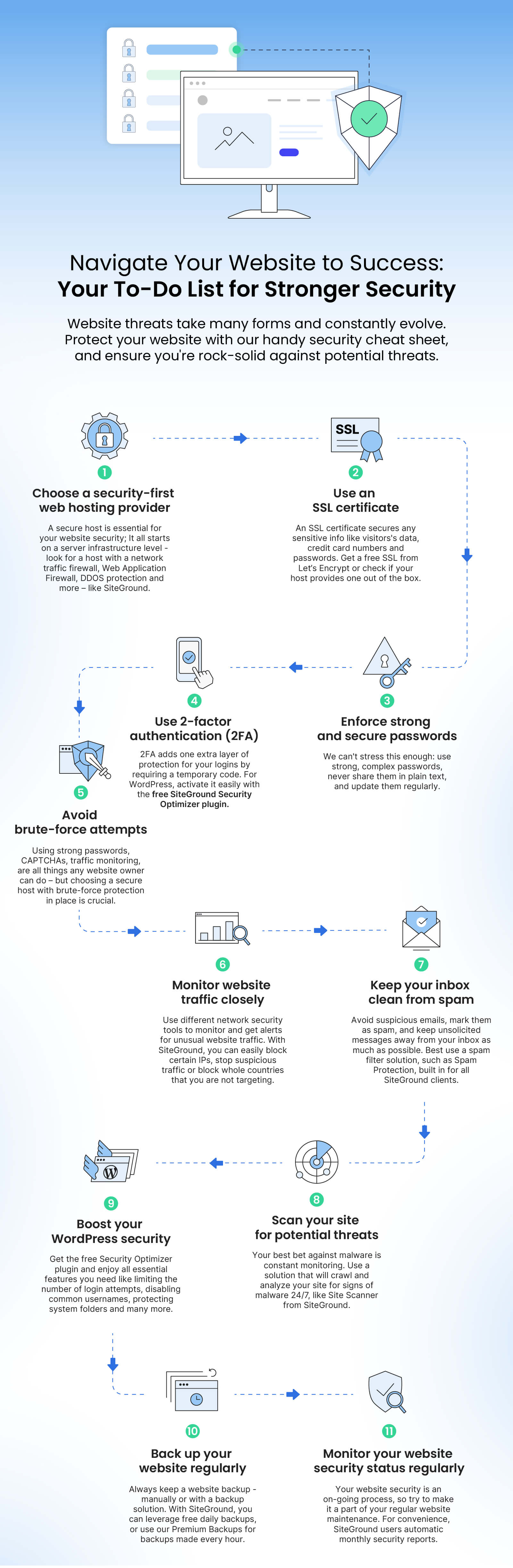
On your journey to a more successful online presence, there’s one essential step you should never neglect – website security. At SiteGround we’re constantly updating your security arsenal with out-of-the-box security technology and additional features. But there are a few extra steps you can take to protect your site so that when your online business gathers speed, you and your clients have ultimate peace of mind.
Your Ultimate Website Security Improvement To-do List:
Website threats take many forms and constantly evolve: phishing, malware, ransomware, DDoS attacks, identity theft, customer data leakage, and even human error. To protect your website on multiple levels, we’ve compiled an extensive but easy-to-follow list with actionable tips. Complete each step to make sure your website is rock-solid against potential threats.
1. Choose a hosting provider that safeguards server infrastructure
💡WHY: Choosing a secure web hosting provider is the first step towards a secure website. A good hosting provider would protect your website on various levels, starting with their servers’ infrastructure security. Some essential and effective security measures on server-level include a network traffic firewall, Web Application Firewall, DDOS protection and more. All these help filter bad traffic and block brute-force attacks, denial of service, malware injections, and others.
❓HOW: When choosing or switching to a new hosting provider, research their hosting infrastructure and security measures provided. Check their website for security tech info or better yet, contact them directly with specific questions.
At SiteGround, we not only provide all essential security measures, but we go the extra mile. Instead of making them operate stand-alone, we have built a Central Security System that ensures all our servers are protected at all times by constantly gathering and analyzing data from all individual server security systems, and distributing smart security rules, applied to all machines. At SiteGround, your website is safe with:
24/7 server monitoring system that checks the server status every 0.5 seconds, far more often than standard monitoring systems in our industry. On top of detecting and fixing current issues, it also foresees and prevents a variety of problems automatically.
Smart web application firewall system on server-level that monitors the traffic and prevents hackers from exploiting the most popular CMSs and their plugins. Our Security Team constantly creates new custom security rules and adds them to our smart WAF to protect sites hosted with us out-of-the-box.
Powerful AI anti-bot system that stops malicious traffic before it reaches our customers’ websites, blocking between 25 and 30 million brute-force attempts per hour across all our servers.
Daily geographically distributed backups, stored in a data center location, different from the one hosting the live account, and Premium Backup service that provides up to 60 additional backup copies of our clients’ websites and allows downloading all backups to our clients’ local machines.
The latest software versions, such as the default PHP 8.2 and the latest MySQL 8 that are used on all SiteGround servers. It’s important that your software is up-to-date at all times, because older software versions inevitably become vulnerable to hacker attacks with time.
2. Protect your data with an SSL certificate
💡WHY: Having an SSL certificate on your website is a must and an industry standard. Here are some of the main reasons why you should have one – an SSL certificate secures sensitive information, such as credit card numbers, IDs, passwords, messages, etc. by encryption; verifies your website’s identity; and ensures that your website meets the requirements of search engines which flag unsecured sites.
❓HOW: As a website owner, you can get a free SSL certificate from Let’s Encrypt, for example, or you can ask your hosting provider whether they offer SSL certificates. As a SiteGround client, you get free Standard and Wildcard SSL certificates with all our hosting plans, for all your websites. Мanage your active SSL certificates easily from your Site Tools control panel – just go to Site Tools > Security > SSL Manager. Once logged in, you can also switch from the free Standard SSL to the free Wildcard SSL (for medium-sized websites), or upgrade to the Premium Wildcard SSL (for large business websites).
3. Enforce strong and secure passwords
💡WHY: The password for logging in to your website admin panel is one of the first things that hackers will try to crack. If your password is weak, such as your name, or your date of birth, for example, hackers would need just a few attempts to guess it successfully and get access to all your website information. That’s why it’s crucial to use strong and secure passwords for your login.
❓HOW: To have a strong and secure password, make sure you use long passwords, with numbers, uppercase and lowercase letters, special characters, numbers, etc. Never write it down (neither physically, nor electronically), but keep it in a secure password vault management system. And remember to update them regularly, since if you use the same one over and over again, it will get vulnerable at some point.
4. Use 2-factor authentication
💡WHY: Even with the hardest to guess passwords, there’s still a possibility that it can be compromised. This could be due to a human error, or a brute-force attack, where hackers use different combinations to guess your password – on a huge scale, hundreds of thousands of attempts per hour, for example.
❓HOW: To further strengthen your login, implement 2-factor authentication (2FA). It requires one additional step to be completed before anyone can access your data. That’s one more layer of authentication – a temporary dynamically generated code on your phone or email. The 2-factor authentication feature is a click away in the free SiteGround Security Optimizer plugin for WordPress websites.
5. Stop brute-force attempts
💡WHY: Brute-force attacks by bots are a severe global issue for any website nowadays. They cover a huge scale of multiple websites on one or more servers, making it a very serious issue whether your site is big or small, business-critical or just an online portfolio. A brute-force attack is a hacking technique that uses trial and error to guess and crack your passwords, login credentials, and encryption keys, on a massive scale. A successful brute-force attack can cause huge financial losses; steal personal information, such as bank details, confidential medical information, etc.; and many other damages.
❓HOW: There are multiple measures that you can take in order to protect your site from brute-force attacks. These include having strong passwords, limiting the login attempts to your website admin panel, monitoring IP addresses for anomalous behavior, using CAPTCHAs, creating a unique login URL for your website admin panel, and others.
All of the above aside, your choice of web hosting provider plays a crucial role in securing your site against brute-force attempts. At SiteGround, we have developed a sophisticated AI anti-bot system that blocks millions of brute-force attempts per hour.After the system’s latest upgrade, it filters 95% more of the malicious queries by constantly learning from thousands of brute-force attempts per day and adding a traffic validation functionality that minimizes the number of brute-force attacks. SiteGround clients benefit from this advanced system by default, no action needed on their part.
6. Monitor your website traffic closely
💡WHY: As a website owner, you can sometimes notice specific patterns or suspicious traffic coming to your website. Imagine that you monitor abnormally high traffic from a country you’re not targeting, you receive too many spam comments on your blog from а specific location, or any other unusual behavior from a certain geographical region.
In such cases, it would be useful to be able to stop the traffic from that location, as many times it might turn out to be malicious. Stopping the traffic from a specific country could also benefit your business, if, for example, legal requirements prevent you from providing your service in that country, or there are heavy taxation requirements, and others.
❓HOW: To monitor your website traffic, you can use different network security tools that alert you of potential malicious activity in your network, or you can also set up alerts yourself, whenever you encounter login attempts or suspicious activity from certain IP addresses.
SiteGround clients can easily block specific IP addresses or whole countries and stop traffic from countries that are not relevant to your business or online presence. If you are a SiteGround client, control your website traffic in Site Tools > Security > Blocked Traffic.
7. Keep your inbox clean from spam messages
💡WHY: Dealing with multiple emails is part of our daily work routine nowadays. Yet, when there are a number of spam messages in your inbox by the hour, the task becomes even more tedious and annoying. You have to manually process each email and mark as spam those that sneaked into your inbox. But there’s more to spam than simply a cluttered inbox – it’s dangerous, because it can be the main source of phishing and other hacker attacks. It goes the other way round, too.
Spam messages can negatively affect not only the receiver, but the sender as well. If another user on your server has sent uncontrolled spam, then there’s a chance that your entire server address will get blacklisted. This will affect you when you try to send an otherwise legitimate email, which might not get to the recipient simply because it’s coming from an already compromised server address.
❓HOW: First and foremost, make sure to not delete spam messages from your inbox, but rather mark them as spam, so that your spam filter will know not to let any more messages from this address into your inbox. Second, if you can tell that the message is spam, even before opening it, then delete it without clicking on it, or downloading anything. Such messages can contain malicious software! Other rules to follow in order to avoid spam, include keeping your email address as private as possible, unsubscribing from email lists, or simply using a third-party spam filtering service.
SiteGround clients enjoy an in-house built Spam Protection solution that keeps both incoming and outgoing spam away. Our solution not only efficiently minimizes the amount of spam messages delivered to your inbox, but it also constantly learns from your email reading behavior and actions to add even more custom rules for spam messages. As a result, our system blocks 12 Million spam emails from even reaching your mailboxes every day, while 600,000 get filtered directly in the spam folder. It also extremely efficiently detects and stops outgoing spam messages from our servers, giving you an extra layer of security.
SiteGround clients have our built-in Spam Protection features enabled by default, but can also easily control them via an easy interface to allow and block senders. They simply need to go to Site Tools > Email > Spam Protection and directly tell the system how to treat a certain sender by adding an email address or an entire domain to their block/allow lists.
8. Scan your website for potential threats regularly
💡WHY: Hackers invent new and smarter ways to “hijack” websites, by the hour. Your website can get infected with malware in numerous ways – compromised login credentials, corrupted or outdated software, infected or fake plugins and themes, and many others. If your site gets infected with malware, this can have serious consequences on your whole business, not only on the website itself.
❓HOW: Your best bet against malware is constant monitoring. However, as a website owner, you have many other responsibilities in regard to your website. You simply cannot monitor it for suspicious behavior on your own 24/7. But your hosting provider can and should.
With SiteGround, our clients can activate Site Scanner – a security add-on that crawls your websites daily, warns you of potential malware and other security threats, and provides tools for reaction if your sites are under attack. Here’s how Site Scanner protects your websites.
9. Boost your WordPress security
💡WHY: WordPress is the most popular CMS platform in the world, and as such, it’s also a preferred target for hackers. Even though all of the above tips apply to WordPress as well, there are a few extra things you can do to make sure that your WordPress website is fully secured against malicious threats.
❓HOW: We have identified some important, yet easy-to-follow tips to help you take special security care of your WordPress website:
Keep your WordPress version and plugins up-to-date
It’s important to keep your WordPress version and plugins up-to-date with their latest possible versions, because hackers use any vulnerability or backdoor to get access to your website’s files, sensitive information, etc. Simply log in to your WordPress admin and go to Settings or plugins to check if there’s a newer version.
At SiteGround, we automatically update all WordPress sites hosted with us to the latest stable WordPress version, as well as the free plugins, depending on clients’ settings in their Site Tools > WordPress > Autoupdate.
Review your user roles and permissions
Make sure to review and clean up inactive users or limit access for certain users only to the information and resources they require for that specific role. For example, let the administrator level accounts only for the people responsible for the technical aspects of your site, but give edit access to your blog only to users that manage content or users on your site.
Avoid common usernames
Remember that your WordPress login consists of your username and password. However, all WordPress installations by default come with the user “Admin” which means that hackers already know one of the two pieces of your login information. That’s why it’s important to change your username to a custom one.
Limit login attempts
Another way a hacker would try to crack your username and/or password is to try and guess them on the login form with numerous consecutive attempts. What you can do is limit the number of consecutive unsuccessful login attempts by blocking their IP for a certain period of time after they reach a set amount of attempts. With the free Security Optimizer plugin by SiteGround, you can activate this feature with a click of a button.
Clean up unused or outdated plugins and themes
Unused or outdated plugins and themes, including deactivated ones, also open the backdoor for hackers to get to your website. To avoid that possibility, simply delete any unused plugins and themes on your website.
Add an extra layer of security with a trusted plugin
With the free Security Optimizer plugin available for all WordPress websites, you get all the security features you need to protect your WordPress website. Its user-friendly interface allows you to enable a variety of safety features with a few clicks – from hiding your WordPress version, locking and protecting system folders, to hardening different aspects of your login security, as well as monitoring visits, bots, etc. in a detailed activity log.
10. Back up your website regularly
💡WHY: Even if you’ve taken multiple security measures, unexpected events still happen – an update might go wrong, you can accidentally break something on your site, or any other unforeseen circumstances can require you to revert to an older version of your website. Just like an UNDO button in real life. That’s why it’s a must to keep several backup copies of your website in order to revert any mishaps in due time.
❓HOW: There are two main ways to back up your website – manually and with a third-party backup service. If you want to back up your site yourself, you need to log in to your web hosting account, locate the directory with your website’s files, use an FTP client to download this directory on your local computer and store it in a safe place. This is useful but can be impractical because you never know when mistakes will happen – so having an automated backup is crucial.
At SiteGround, we know how often backups can save an emergency situation with your website. That’s why we have a sophisticated system for creating and keeping backups of your website automatically. We generate a backup of your website every day and store each for up to 30 days. What’s more, we keep these backups in a data center location different from the one hosting the live account, which is an extra layer of security for your data, in case something affects your whole data center. SiteGround clients can easily manage backups from Site Tools > Security > Backups.
For the ultimate peace of mind of our clients, we have recently launched our new Premium Backup service that provides clients with automatic backups made every hour, on-demand backups for a full backup of their sites (whenever they need it), 7 additional automated daily backups on top of the ones included in their plan, and allows for downloading all backups to their local machine.
11. Keep an eye on your website security status regularly
💡WHY: Even if your site is secured and backed up, you still need to check its security status regularly. It’s important to know how secure your site is and whether the security level has changed – keep an eye on how many attacks have been mitigated, or find new ways to further protect your site from incidents.
❓HOW: To check your website security status, you can use a free open-source web security testing tool. There are many such tools available online. If you’re using WordPress, you can also run a security scan with various free plugins to scan your website and detect vulnerabilities. After you check the status of your website security, it’s important to analyze the results and take measures where necessary.
SiteGround clients receive free monthly security reports, delivered straight into their inboxes. In these reports, they get a summary result of their site’s security check, along with actionable advice on how to reduce the risk of malicious attacks, if there are any weak areas identified. All this information is compiled in a user-friendly format, and the feature is enabled by default for all our clients. To manage their preferences for the reports for any of their websites, they simply need to go to their Client Area > Click on User Avatar > Notification Preferences and click the pencil icon next to Monthly Security Reports.
Wrap-up
A website is the most important and valuable digital asset you have, so you would want to make sure that it’s as secure as possible, time after time. By constantly reviewing and implementing new security measures, you ensure your site’s at maximum security level. This way your business, your visitors’ information, and your reputation will be safe during any business season.
At SiteGround, we always take proactive measures to identify and address potential vulnerabilities promptly. This was the case with the latest critical vulnerability for WordPress sites using the popular WP Fastest Cache plugin. By upgrading the vulnerable WP Fastest Cache plugin to version 1.2.2, we remedied a critical SQL injection vulnerability within an hour since it was reported.
Understanding the Vulnerability
The WP Fastest Cache plugin is widely used to enhance website performance by generating static HTML files. However, versions prior to 1.2.2 of this plugin were found to have a severe SQL injection vulnerability, reported last week. This vulnerability allowed unauthenticated attackers to inject additional SQL queries into existing queries, potentially compromising the security of the website’s database.
This security flaw scored 9.8 out of 10, indicating its critical nature. As a result, it was crucial for us to take immediate action to protect our clients’ websites.
Upgrading the Plugin for Enhanced Security
To safeguard our clients’ websites, we proactively upgraded the WP Fastest Cache plugin on their behalf. Our dedicated team upgraded over 98% of the plugin users on our servers to version 1.2.2 . The mass upgrade was completed within an hour, effectively eliminating the critical SQL injection risk.
However, a very small portion of WordPress websites did not receive the plugin upgrade despite multiple attempts. If you are using the WP Fastest Cache plugin, please check your current version from the WordPress dashboard of your website. We strongly advise you to take action immediately and either manually upgrade the plugin to version 1.2.2 or remove it from your website altogether. With this upgrade, we ensure that your websites are protected against potential exploits and unauthorized access to sensitive information.
If you’re looking for a reliable alternative to the WP Fastest Cache plugin, we recommend trying the SiteGround WordPress Optimizer plugin. It’s trusted by over 1,000,000 WordPress webmasters, and is ranked among the best WordPress performance plugins by the WordPress community. It’s pre-installed by default for all SiteGround clients, and completely free and available to download on any other hosting provider, if you have WordPress websites hosted elsewhere.
Our Commitment to Website Security
At SiteGround, we continuously monitor the security landscape for potential vulnerabilities. We prioritize addressing critical security issues, even in the event of third-party plugins – like the SQL injection vulnerability in the WP Fastest Cache plugin. Our proactive approach in upgrading the plugin for our clients demonstrates our commitment to providing a secure hosting environment.
If you have any questions or concerns about the security of your website, our dedicated support team is available to assist you. We are here to ensure that your WordPress website remains safe and protected.
As a leading provider of web hosting services, at SiteGround we continually strive to offer the most advanced and reliable solutions to our customers, with a strong focus on website security. In our latest Website Horror Stories series for #cybersecuritymonth, we even gathered real stories of webmasters who suffered some kind of website attack or hack, which could have easily been avoided with our suite of website security services. Now we’re excited to announce a new feature addition to our security features – ‘Under Attack Mode’, part of SiteGround in-house CDN.
Our hosting services already encompass robust network attack protection. Our Distributed Denial of Service (DDoS) protection effectively blocks a significant percentage of malicious traffic, ensuring your websites remain accessible and secure. But despite the effectiveness of all our website protection systems and security features, some HTTP attacks are more sophisticated and can circumvent traditional solutions. To further fortify your website’s defenses against these advanced threats, we’ve developed the new ‘Under Attack Mode’ feature, now part of our SiteGround CDN service.
Understanding SiteGround’s ‘Under Attack Mode’
SiteGround CDN’s ‘Under Attack Mode’ adds an additional layer of protection against potentially malicious HTTP traffic. If your website is under an HTTP attack, it’s immediately overloaded with fake traffic requests, usually coming from malicious bots, which makes it inaccessible for real users.
When turned on, our Under Attack feature challenges website visits with an automatic CAPTCHA, verifying that they are humans and not bots. It leverages JavaScript to perform automated mathematical calculations in the visitor’s browser. While these calculations are being processed, the end visitors see a loading message for a few seconds. Once the challenge is solved, indicating the visitor is most likely a real human, the system automatically redirects them to the website. This means your website will remain accessible to your real users even if it’s under attack – legitimate traffic will be allowed to proceed to your site, while we block the fake bot traffic.
How to Enable Under Attack Mode
Our ‘Under Attack Mode’ is available as part of our Premium CDN plan. If you’re looking for a way to further enhance the security of your website against sophisticated HTTP attacks, our paid plan now offers this advanced feature, together with a myriad of speed and security enhancements.
Once you’re using SiteGround CDN’s Premium plan, enabling the ‘Under Attack Mode’ is simple. It can be activated per domain name from the Site Tools management interface. Once enabled, the ‘Under Attack’ mode feature operates for a period of 24 hours, after which it is automatically disabled by the system.
Please note that while ‘Under Attack Mode’ is enabled, some third-party website analytics tools may not function correctly, as they may not be able to pass the challenge. This is why the feature is automatically disabled after 24 hours – to prevent any prolonged disruption to your website analytics.
SiteGround CDN’s ‘Under Attack Mode’ applies to all website visitors and all traffic towards the domain. This means all requests – from real users, bots, to API requests from third-party systems – are challenged, ensuring comprehensive protection.
Conclusion
Our latest SiteGround CDN security feature, the ‘Under Attack Mode’ is a testament to SiteGround’s commitment to providing superior security for our users. We understand the evolving nature of web threats and continually innovate to offer features that keep your website safe and accessible. Stay ahead of the curve with SiteGround CDN’s ‘Under Attack Mode’.
In the dynamic world of cybersecurity, it’s not unusual to encounter new challenges. Recently, a novel vulnerability, dubbed the “HTTP/2 Rapid Reset” attack, was discovered. Given that HTTP/2 is considered a relatively new protocol, we see more modern and more clever ways to perform attacks every day. But this latest vulnerability has the potential to disrupt web services at an unprecedented scale.
Before we dive into the details, let’s break down what this means for website owners.
What is the HTTP/2 Rapid Reset Attack?
HTTP/2 is a protocol that helps your website load faster and handle more visitors simultaneously. HTTP/2 allows clients to request multiple website resources (CSS files, JS files, pictures, etc.) with a single query. However, some clever attackers found a way to exploit this mechanism. They developed a technique to send a request to a server and then immediately cancel it, repeating this process at an extremely high rate. This stream of requests and cancellations can overwhelm a server, causing it to slow down or even crash – a classic Denial of Service (DoS) attack. The attack not only overloads the web server offering HTTP/2, but all backends that are also involved in the handling of website requests – such as PHP executions, application servers, static files delivery, etc.
Imagine a call center and a caller dialing the call center and then hanging up immediately after an operator picks up the call. The operators waste precious time handling the bogus calls and cannot handle legitimate requests. The whole call center comes to a halt and cannot handle actual clients requests. That’s exactly what this new attack was causing on a server scale.
SiteGround’s Rapid Response
At SiteGround, we always try to be steps ahead in terms of website security. This time makes no exception, and we were among the first web hosting companies to address this vulnerability. As soon as the HTTP/2 Rapid Reset attack was reported, our security engineers jumped into action. The official announcement was posted no more than 24 hours ago – on October 10th, 2023, with Google, Amazon and CloudFlare simultaneously announcing the problem. The web server software that we use for all hosting servers, Nginx, also released a blog post.
Our dedicated team of security experts worked tirelessly to patch all our web servers within an hour of the vulnerability’s disclosure. This rapid response ensured that our customers’ websites remained secure and operational, with minimal disruption. Right now, mere one day later, all SiteGround servers (web hosting servers and CDN) use patched Nginx code which protects all websites using our services.
Bottom Line
The HTTP/2 Rapid Reset attack is a serious threat, but thanks to our rapid response and commitment to security, SiteGround customers can rest easy. We’ve got your back, and we’re always ready to tackle whatever new challenges come our way. At SiteGround, your security is not just a priority – it’s a promise.
Picture this: a lively party, a toddler’s bedtime routine, a road trip – this is what three of our security engineers were in the middle of on that particular Saturday, September 30th. Suddenly, their phones beep at the same time in unison, even though far apart, cutting through the noise of the party, the hush of the nursery, the hum of the highway, respectively. It’s a report of a critical security issue with Exim, the mail server used by 56% of all mail servers on the internet, including SiteGround’s. Despite their different settings, all three of our security engineers cut their plans immediately, summoned for a response – a testament to our unwavering commitment to security.
What’s Exim and Why Should We Care?
Exim is like the mailman of the digital world, responsible for delivering your emails from one point to another. An issue with Exim could potentially mean serious trouble for your emails, and not only. To give you an idea of the scale, Exim is the most popular mail server in the world, used by more than 342,000 mail servers. That’s over 56% of all mail servers on the internet. Naturally, it’s the mail server software we at SiteGround rely on entirely for the delivery of outgoing messages and incoming mail for all our customers.
Given that email services are a crucial part of our hosting offering, used by the majority of our clients, we’re consistently working on maintaining our email security, deliverability, and reliability. It all starts with a heavy customization process, which is our usual approach to all software we use to make sure it meets our client’s needs better, while it gives us more control to keep it extra secure and always up to date.
The Exim Issue and SiteGround’s proactive response
The problem, tagged as CVE-2023-42115, was in fact a combination of six different zero-day exploits against Exim. A zero-day exploit means all servers using this particular configuration are immediately at risk. We got the report as soon as it was issued and immediately dived into all six issues to assess the risk for our clients.
The good news was, since we heavily customize all software on our servers, these particular parts of Exim that were affected, are not even used on our servers. However, our work did not stop there. Here is a breakdown of all issues, why SiteGround clients were safe, and what we did to ensure this remains so.
Three of the reported Exim exploits related to different types of email authentication, namely SPA/NTLM and EXTERNAL auth. Simply put, they deal with proving the Mail Server who you are and then allowing you to send emails. The new vulnerability meant that an attacker could craft a special request, use the security holes in the authentication mechanisms and gain access to the server which runs Exim. Even more than that, the attacker could gain full access to the server – not only Exim as a mail server but all data residing on the server. On SiteGround servers, however, we don’t use any of these authentication methods, so SiteGround clients were not affected.
The fourth exploit was related to a proxy problem, and was very similar in nature, and the fifth issue resided in a library called “libspf2”, used for certain checks related to email SPF records. Since we don’t use proxies in front of our Exim mail servers at SiteGround, nor do we use the problematic library, we were not affected by this vector of the attack, either.
The last problem was related to how people perform DNS lookups. Many people just use third party DNS resolvers and they cannot be sure if the DNS resolvers validate the data they receive. SiteGround uses our own DNS resolvers and we validate the data we receive. So this did not affect us as well.
All in all, we were lucky for most of the vectors of the attack but it took us a substantial amount of time to double and triple-check every one of those bullet points. And, of course, we went beyond that.
Usually, there are two ways to go about a vulnerability: you assess if and how it affects you, and if it does not, you can simply waive it off and sit this one out. The smarter way to go about it, though, is to think ahead, and even if a particular vulnerability, or a number of those, do not directly affect you, to still be proactive about installing the patches just to be safe in case it develops and opens the doors to more exploits that could potentially turn out to affect you at a later stage.
So this is exactly what we did – despite not being directly at risk by any of the vectors of this particular attack, our security engineers didn’t just sit back. In addition to meticulously checking and testing all exploits to make sure they do not affect SiteGround servers, as soon as a new, safer version of Exim was released (version 4.96.1), we immediately upgraded all our Exim mail servers. It’s our way of ensuring your peace of mind, and a testament to our proactive approach to security.
Wrapping Up
We hope this post helps you understand our approach to security through the lens of a real-life and most recent serious issue with a software used by half of the servers on the internet. Rest assured, at SiteGround, we’re always ready to leap into action for any potential issues that could affect your data. We’re committed to keeping your data safe and your mind at ease. If you have any questions or concerns, we’re here for you. Thanks for sticking with us, and here’s to staying safe and secure with SiteGround.