

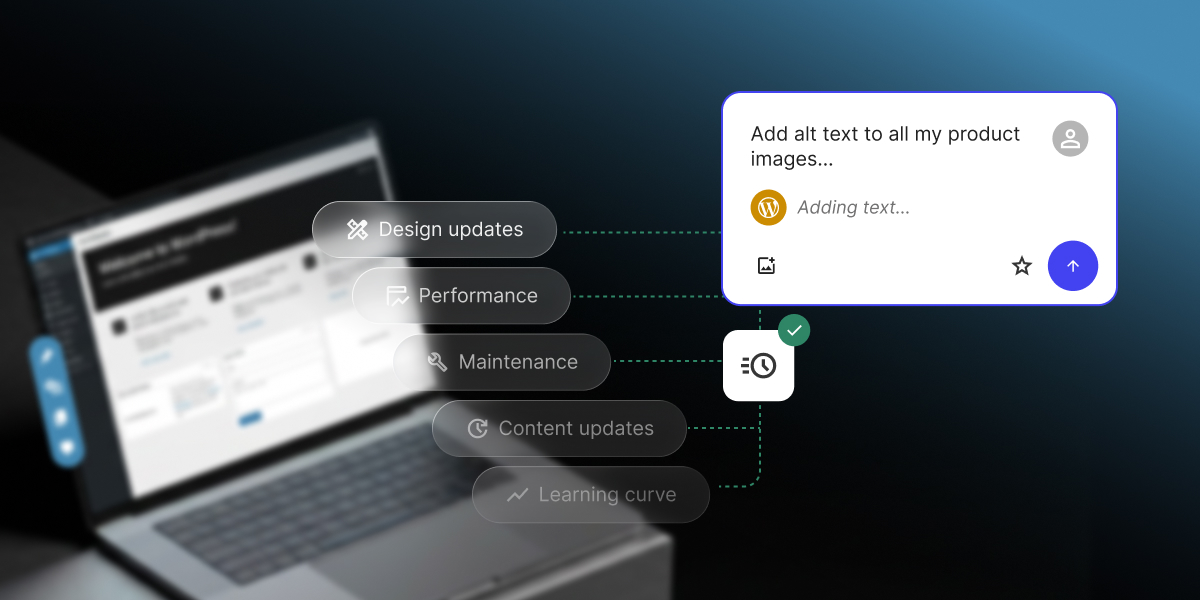
If keeping your WordPress site running has ever felt like more work than it should be, you’re in good company. Our 2026 report on AI in WordPress for small businesses found that most small business owners running their own sites hit the same walls: design and site updates, performance optimization, technical maintenance, content updates, and the steep learning curve of how the platform actually works.
This guide walks through the WordPress pain points that cost small businesses the most time, and how you can easily address them with a new kind of AI solution: an AI Agent for WordPress that connects directly to your site and executes real changes.
What are the most common WordPress pain points?
The most common WordPress pain points for small businesses are recurring WordPress site management challenges: design and site updates, performance optimization, technical maintenance, content updates, and the platform’s learning curve. They consume time because owners often manage the site themselves while running the rest of the business and trying to, you know, live their lives.
In our new research, which included a survey of more than 7,000 small businesses, managing design and performance optimization came out on top (respondents could pick more than one pain point, so the shares below add up to more than 100%):
| WordPress pain point | Share of small business owners |
| Managing design and site updates | 33.5% |
| Performance optimization | 33.1% |
| Technical maintenance | 29.5% |
| Managing content updates | 28% |
| Steep learning curve | 20.5% |
But here’s what most users don’t know: you can now handle all these pain points quite easily with the help of specialized AI for WordPress site management.
And we’re not talking about a chatbot that can tell you where to click in the dashboard or a plugin that can spit out a blog post. We’re talking about an AI Agent for WordPress that connects directly to your site and executes real changes: not just suggestions or generated text, but actual site management. It transforms tasks that typically take hours of manual WordPress admin work into minutes of simple chat with AI, freeing you to focus on growth and productivity.
Let’s see how you can manage the most common WordPress pain points with the help of SiteGround’s AI Agent for WordPress.
1. Managing design and site updates (33.5%)
Managing design and site updates tops the list as the biggest pain point for small business owners, and the reason is that almost nothing about it is as quick and easy as it sounds. Swapping a hero image, nudging the spacing between two sections, or changing how your menu behaves on a phone can send you deep into settings panels and half-matching tutorials, and it’s common to lose an afternoon (or a weekend) to a single change that never quite works.
And the moment your site grows past a page or two, you’re adding pages, arranging them into parent and child sections, and building the navigation menus that tie it all together so visitors can actually find their way around. Done by hand, that can be hours of repetitive clicking through the same screens, and one wrong setting can leave you with broken links or a website menu that makes no sense.
How AI can simplify WordPress design and site structure updates
This is where the AI Agent for WordPress earns its keep, because it handles the whole job in a chat, not just the fiddly bits:
- Set up or switch a theme. Ask it to search the WordPress repository, install and activate the theme you pick, or update and remove old ones, so managing the look of your site becomes a sentence instead of a trip through the Appearance menu.
- Sort out your images. Have it pull up your media library, upload the new photos you want live, and clear out the old or oversized files that clutter your site and slow it down.
- Structure at scale. Ask it to draft and publish a new landing page, edit one that exists, or remove a page you’ve outgrown, and it can even take a full page structure and create the pages for you in one go.
A full site structure in 40 minutes instead of 8 hours? One early adopter of the AI Agent for WordPress needed a multi-level site with more than 20 pages and three navigation systems, which is close to 8 hours of work by hand. The AI Agent did it in 40 minutes. Download our 2026 report on AI in WordPress for small businesses to see how they did it, along with more real-world results.
2. WordPress performance optimization (33.1%)
Performance optimization is a close second WordPress pain point at 33.1%, and for most small business owners, the trouble starts before any fixing: you can’t easily tell whether your site is as fast as it should be. And if you do sense it’s slow, the causes are the kind of thing you’d need to be fairly technical to chase down: oversized images, a plugin loading on every page, or caching that was never set up. So it lands in the “I should look into that” pile, while a slow site can cost you visitors and search rankings.
How AI can help diagnose WordPress performance problems
You can just ask the AI Agent for WordPress something very simple like “Is my website running as fast as it should?” And because the Agent is directly connected to your site, it goes and checks, then tells you what it found.
But instead of just giving you a diagnostic report and making you do the work, it acts as your hands-on technical administrator. You can use simple natural language commands to execute performance-enhancing updates directly in the chat:
- Clear your caches instantly: You can simply instruct the Agent to clear your site’s cache, and it will automatically flush it to ensure your pages load quickly.
- Update outdated software: Old core files, plugins, and themes can drag down speed and pose security risks. You can command the Agent to check your site health and instantly update your WordPress core, themes, and plugins to their latest, most optimized versions.
- Remove site bloat: Unused software takes up valuable server resources. You can ask the agent to list all installed plugins and themes, and then instruct it to permanently delete the inactive ones.
- Clean up the media library: To save storage space, you can have the agent retrieve your media library files and instruct it to delete specific old or unused images.
By the way, you don’t need to give the Agent elaborate instructions or even know what cache is. After asking simply “Is my website running as fast as it should?”, the AI Agent recommends what to change in order of impact, and then it offers to make those changes for you:
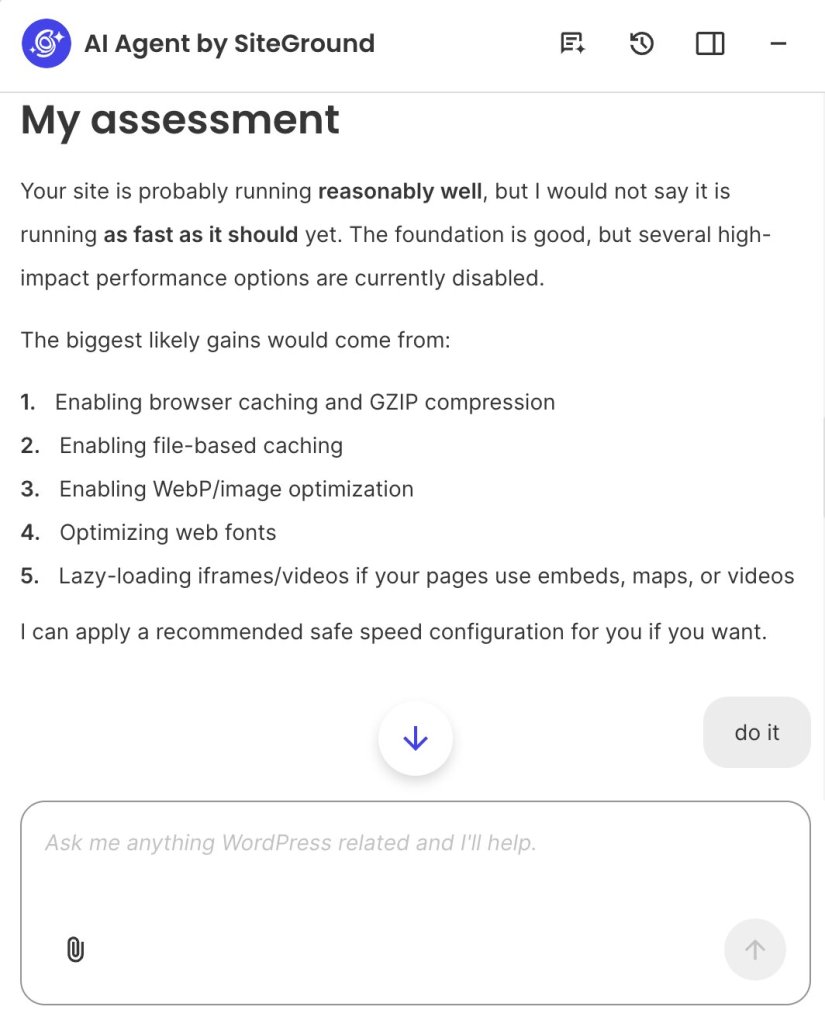
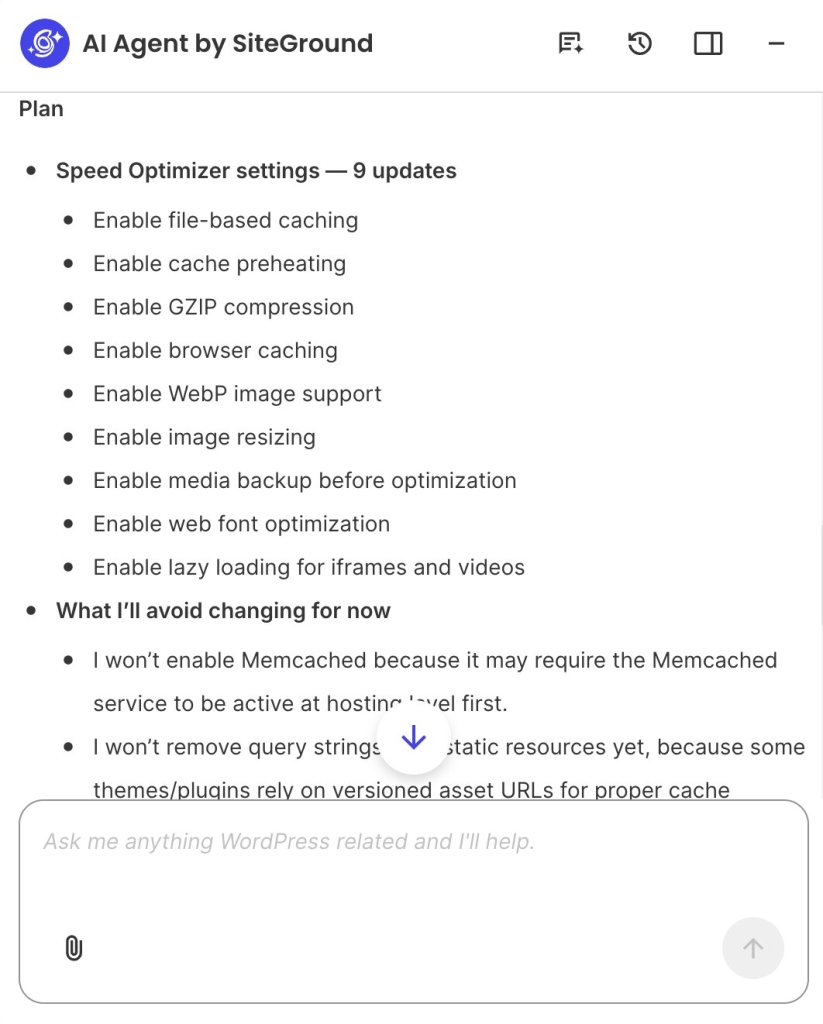
Tell the AI Agent to go ahead, and it first shows you a plan: the exact settings it intends to switch on, alongside a short note on what it’s choosing to leave alone for now and why, such as holding off on options that could depend on your hosting setup or break how certain themes behave. Then it asks whether you’re happy with that set before it applies anything.
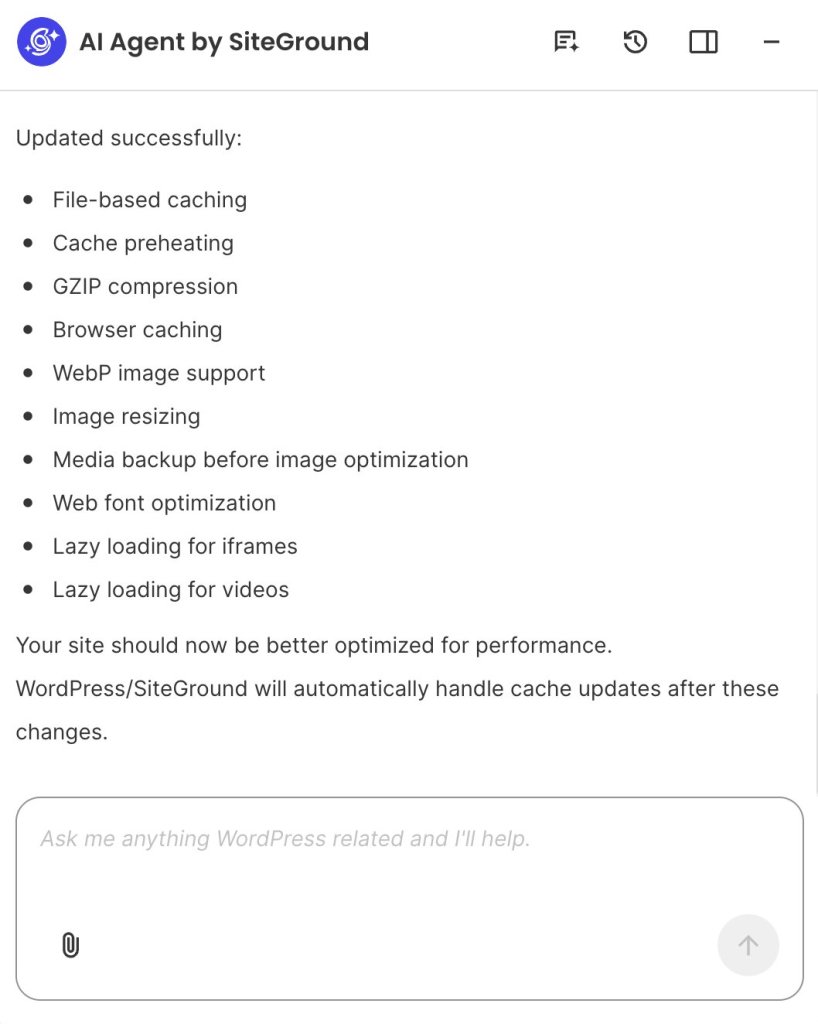
Give it the go-ahead, and it makes the changes, then reports back on what it did. So what started as a question you couldn’t answer, “is my site running as fast as it should?”, ends a few messages later with a faster site and a record of what changed, and you never had to open a settings panel.
3. Technical maintenance (29.5%)
Technical maintenance is a pain point for 29.5% of small business owners, and since most of them aren’t developers, it’s a similar issue to performance optimization: you’re not sure what actually matters, and you’re nervous about doing it. WordPress flags some of it: for instance, there’s an update badge in your dashboard counting the plugins and core files that are behind. But a number on a menu doesn’t tell you whether an update is an urgent security fix or a trivial tweak, what might break if you run it, or what to do first.
It also doesn’t help that outdated core software (the base software that runs your site) and plugins are the most common way small WordPress sites get hacked, so the delay carries a real cost.
How AI can reduce recurring WordPress maintenance work
The AI Agent for WordPress works like a site administrator you can talk to, keeping the WordPress maintenance tasks that pile up under control. It does the essential upkeep without you opening a settings screen:
- Run your updates. Ask it to update your WordPress core and language files along with your plugins and themes, so the security patches you keep putting off actually get applied.
- Manage plugins and themes end to end. Have it install and activate something new, update what you already run, or list everything installed so you can audit it and permanently delete what you no longer need.
- Change core settings without menu-hunting. Just tell it the setting you want changed, like your site title, timezone, or address, and it updates it, no digging through the Settings screens.
- Tidy up who has access. Ask it to list your user accounts so you can spot the old freelancer or former employee who still has a login, then have it change roles or remove the accounts that shouldn’t be there.
Pro tip: See our guide to 25 WordPress AI Agent prompts you can copy and adapt for ready-made prompts covering technical maintenance and other jobs that are slow to do by hand.
4. Managing content updates (28%)
Even now, when anyone can generate a blog post in seconds with AI, content updates still weigh on 28% of small business owners. That’s because publishing a single post in WordPress means drafting it, then formatting it block by block, sorting it into the right categories, adding tags, writing the metadata, uploading images, and adding alt text so it’s accessible and searchable. Try to publish regularly, keep a content calendar moving, go back and refresh old posts so they don’t fall out of date, fix broken links, and update internal links as your site grows, and it becomes a permanent part-time job.
And if you run a WooCommerce store, every product needs its own description, images, and metadata, and then the real grind starts: changing prices across a seasonal sale, updating stock and availability, adding a discount to a whole category, refreshing dozens of descriptions when a line changes, and translating it all if you sell in more than one language. All of it is repetitive, easy to postpone, and slow to catch back up on.
How AI can speed up WordPress content updates
The agent is happy to work at any scale, from one post to a whole WooCommerce catalog, and it makes the change directly rather than just handing you text to paste. You describe what you want, and it does it across the site:
- Write and publish posts and pages. Ask it to draft a new blog post, publish a landing page, edit copy that’s already live, or clear out old posts, and it can run the same change across many items when you need a batch done.
- Organize and optimize for search. Tell it to sort content into categories and tags and write the SEO metadata (the title and short description search engines show), so a growing library stays structured and nothing goes out with the gaps that cost you traffic.
- Handle your comments. Ask it to pull up recent comments and then approve the good ones, hold the questionable, or trash and mark spam, instead of moderating them one by one.
- Help with your store. Have it create and update WooCommerce products, categories, and coupons, change prices across your catalog, and check or update orders, all from the same chat.
Because it’s connected to your site, it works from real data: when it writes a product description, it’s describing your actual product at your actual price, not guessing from a prompt.
Updating 200 product images in no time. Another early adopter of the AI Agent for WordPress had more than 200 product images that all needed alt text, titles, descriptions, and keywords. Done by hand, that is about 58 hours of work. The AI Agent did it in 4.5. Download our 2026 report on AI in WordPress for small businesses to see how, plus more real results.
5. The steep learning curve (20.5%)
The learning curve is a pain point for 20.5% of the small business owners we surveyed, and it comes down to one thing: WordPress is powerful because it can do almost anything, and that same flexibility can make it hard to use.
Themes, widgets, permalinks, taxonomies, blocks: none of it means much until you have some real experience. Even simple-sounding changes can send you looking for a setting that’s three menus deep, or into a page builder you have to learn first, and anything more ambitious often runs into code.
How conversational AI can reduce the WordPress learning curve
This is the pain a conversational agent like the AI Agent for WordPress was built for, because it lets you skip learning the dashboard altogether:
- You ask in plain English. Instead of hunting for the right setting, you just describe what you want, and the Agent does it for you.
- It’s built for non-technical people. It’s made specifically for small business owners, solo founders, freelancers, bloggers, and small teams, so you can get real work done without knowing WordPress internals.
- Help stays where you work. The agent sits in a chat box in the bottom-right corner of your WordPress admin, on every screen, so you’re never hunting through menus or tabbing out to a tutorial.
- There’s nothing to figure out to get going. Setup is completely frictionless, making it incredibly easy to connect your site and start chatting, whether you host with SiteGround or somewhere else.
This all makes the AI Agent for WordPress the most practical WordPress site management approach you can pick up, and the shortest path to making the platform less of a headache.
| WordPress pain point | How the AI Agent for WordPress helps |
| Managing design and site updates (33.5%) | Ask it to find, install, or switch a theme, upload images, and build or edit whole pages applied straight to your live site. |
| Performance optimization (33.1%) | Instruct it to execute performance optimizations directly in the chat, such as clearing your caches, updating software, or permanently deleting the specific inactive plugins and old images weighing you down. |
| Technical maintenance (29.5%) | Have it list your installed core files, plugins, themes, and user accounts so you can easily audit them. Then, command it to instantly run updates or remove unused extensions and lingering logins. |
| Managing content updates (28%) | Ask it to draft, publish, or edit posts and pages, write SEO metadata, moderate comments, and manage WooCommerce products, prices, and orders. |
| Steep learning curve (20.5%) | Built for non-technical small business owners, with minimal setup, so you don’t need to know how WordPress works. |
What AI can’t (and shouldn’t) do for you
As capable as it is, the AI Agent for WordPress is built to do the work, not to decide what the work should be. It can suggest a layout, draft your copy, and roll a change across the whole site, and it’s genuinely good at all of it. But the judgment calls stay with you: the final word on your brand, big structural decisions, and a human review of anything your customers will see. As it’s often the case with AI, the best way to use it is to treat its output as a strong first draft you approve.
That’s the thinking behind its Power Mode feature. To prevent a simple typo from accidentally breaking your site’s layout or permanently erasing data, the agent pauses before high-impact actions (like deleting plugins, changing core settings, making bulk content edits, or managing WooCommerce orders). It reminds you that the action is irreversible and waits for you to explicitly click “ENABLE” to authorize it before proceeding. For ultimate control, you can also toggle Power Mode on or off directly from the plugin’s settings page inside your WordPress dashboard.
Where to start: pick the pain point costing you the most
If any of these WordPress pain points sound familiar, whether it’s one nagging thing or the whole list, the easiest way to see what AI can do for you is to give it something real to handle. Think of the task you’ve been putting off, and just ask the AI Agent for WordPress. If maintenance is the drain, have it audit your plugins and users. If it’s content, point it at a backlog of product descriptions. If it’s design, ask it to refresh a page that’s been bothering you. In all cases, you’ll be just describing what you need instead of clicking through it yourself.
The AI Agent for WordPress comes with the Essential AI Studio plan, free for every SiteGround customer, and includes 20,000 free AI tokens a month.
FAQs
The most common WordPress pain points for small businesses are managing design and site updates, performance, technical maintenance, content updates, and the learning curve. In SiteGround’s 2026 survey of more than 7,000 users, those five ranked highest among owners with live sites.
WordPress takes so much time to manage because most owners do it all themselves, and the platform tucks everyday tasks behind layers of menus and settings. About 67% of small business owners run their own site, so the small, recurring jobs stack up, and each one means another trip into the admin panel.
Yes. A site-connected AI agent can install or switch themes, manage images, and build or edit pages, applying the changes straight to your live site. Because it makes only the change you ask for, it does this without flattening your existing layout or formatting.
Yes. AI can clear your caches, tune your speed plugin, and remove unused plugins, themes, and oversized or orphaned images that slow a site down. On SiteGround-hosted sites it can also clear SiteGround CachePress. The best approach is to let it audit first, then approve what gets removed.
AI can handle WordPress maintenance tasks such as updating core, plugins, and themes, auditing and removing what you no longer use, changing core settings, and managing user accounts. Higher-risk changes, like removing users or deleting plugins, wait behind Power Mode for your approval, so routine upkeep gets done safely.
It creates, edits, and publishes posts and pages, organizes categories and tags, moderates comments, and updates WooCommerce products, coupons, and orders, including bulk changes across many items at once, while leaving your existing formatting untouched.
Yes. Beginners can manage routine WordPress tasks through an AI agent by describing the result in plain English through a chat box in your WordPress admin, and the agent carries it out, so you never have to learn where each setting lives. That’s how AI takes the WordPress learning curve off the table.
The WordPress tasks that still need a human include creative strategy, brand decisions, and big structural choices, as well as reviewing anything customer-facing. The best way to work is to treat AI output as a first draft you approve, keeping human judgment on the high-impact calls.