Email services have always been an integral part of SiteGround’s hosting offerings, and our customers heavily rely on them. Every day, we process hundreds of thousands of emails. Many of them are sent out by forwarders set on our servers by our clients. Ensuring the successful delivery of these forwarded emails can be more challenging than you think, as sender verification is not as straightforward as with direct emails.
With the introduction of our own Spam Protection system, we now have more options to enhance the handling of our outgoing email traffic. It allowed us to become one of the few hosting companies to implement Sender Rewrite Scheme (or Mail SRS) and thus significantly improve email forwarding delivery rates for our clients. Here are the details of how this new functionality works and how it benefits our users.
Why are forwarded emails harder to deliver?
Usually, when there is an incoming email, the receiving server tries to identify if the sending server is legitimate and if the email should be accepted. The purpose of this check is to prevent malicious senders from reaching your inbox (for example, a scam email pretending to be coming from your bank’s domain name).
Domain names used for legitimate email sending need to have an SPF (Sender Policy Framework) record, that defines the IP addresses or hosts that are allowed (or not allowed) to send messages on behalf of this domain.
In the Email Forwarding scenario, we have a Sender, who is sending an email to a destination address and after that, the destination address forwards the mail to its end recipient. This means that the end recipient is receiving an email coming from a “mediator” server, which might not be allowed to send messages on behalf of the sending domain, according to its SPF record.
This, based on the receiving servers’s policies, can result in mails being rejected or sent to your Spam folder due to SPF (Sender Policy Framework) failure.
How does SRS make email forwarding more reliable?
Sender Rewrite Scheme (or Mail SRS) is a mechanism that provides a solution in cases of email forwarding so that SPF failures can be avoided. This way legitimate forwarded mails can be successfully accepted from the receiving mail server.
SRS works by rewriting some of the metadata in the email messages after it’s passed the mediator server, “instructing” the destination mail server to check the SPF against the forwarding server, not the original sender’s domain. That way, the SPF check would pass because the forwarding server’s IP would match the sender’s address. Here is a real-life example of how this works:
Imagine a service you use (your bank, for example), sends an email to your business email address webmaster@yourdomain.com, which is hosted with SiteGround. The mail comes from your bank’s IP and its “from” address is billing@yourbank.com, for example – as these two are matching the SPF check passes and the mail is delivered to webmaster@yourdomain.com.
Now imagine that you would like to have this email forwarded from your business email webmaster@yourdomain.com to your personal email name@gmail.com.
If there is no SRS, Gmail will see an email sent from billing@yourbank.com but coming from a SiteGround IP. As these two do not match, the SPF check will not pass and Gmail will probably deliver the mail to the Spam folder.
If SRS is configured correctly, the “from” address will be changed to webmaster@yourdomain.com to match the SiteGround IP as its host. As these are matching, the SPF check will pass and you will receive the important email from your bank in your personal mailbox as well.
This makes SRS an important part of each mail server configuration for maintaining the efficiency and reliability of email forwarding services, ensuring that important communications are not mistakenly marked as spam or rejected due to SPF checks.
SRS Implementation Results
We’re already observing a very positive impact on the deliverability of the forwarded mails after SRS was made available on our servers. Our data shows 0% SPF failures for all forwarded email messages going through our servers, proving incredible stability and reliability of our mail service and improving the reputation of our mail system addresses. Needless to say, all of this directly benefits the mail reputation of the domains of clients hosted on our servers as well.
We believe that the mail Sender Rewrite Scheme is the best way to ensure trustworthy and reliable email services when it comes to email forwarding. Although it’s popular mainly in mail-specific providers and not so much in the majority of hosting companies, we’ve gone the extra mile to add this super useful and efficient mechanism to enhance the email experience of our clients even further.
May marks National Small Business Week in the USA for the past 60 years now. It recognizes the importance of SMBs to the U.S. economy. This year at SiteGround we went beyond that first week, and dedicated the whole month of May to helping small businesses start, grow and succeed online with informative content and useful resources:
Email course that helps you start your business online with actionable challenges to master your business skill set in one month;
Free guide: Journey of an online buyer that helps you learn how to build and optimize your website to increase conversions, based on the modern online buyer’s journey;
Tips from top business experts that help you navigate through everything you need to manage yourself – from the must-have elements on your website to the fundamental marketing channels, and many more.
To wrap up the SMB month, we prepared a fun business personality quiz to help you discover your entrepreneurial spirit and find out who is your perfect business match.
This content is only visible when the visitor has consented to marketing cookies.
Answer a few witty questions on how you approach your work and business tasks in order to:
Find out your entrepreneurial alter ego
Which one of the 16 business personalities are you – a Visionary Entrepreneur that approaches work with thoughtfulness and imagination, a Devoted Perfectionist that is committed to hard work, or someone else? Take our quiz to get a full description of your business personality straight to your inbox.
Unlock and download your custom digital badge
Once you complete the quiz, you’ll also receive your custom digital avatar, free to download and share with your friends and fellow business partners. It will correspond to your work approach and be a nice addition to your social media profiles.
Discover your entrepreneurial “soulmate”
As a bonus, you’ll learn what are the three business personalities that you work best with. Share your results with friends to find out who is your perfect business match among your friends and fellow entrepreneurs.
It’s been a month since we started our Internal Earth Day Bingo Challenge within the SiteGround team. Our collective efforts into living more consciously have not only impressed us but have also been recognized on a wider scale. Over 30% of our employees actively participated in the challenge. Their unwavering dedication to the well-being of our Planet, our environment, and our society has been truly inspiring.
Top Three Challenges:
Let’s shine a spotlight on the top three challenges that most team members completed during our internal Earth Day Bingo Challenge:
Choose paperless options for billing and other communications: An outstanding 88.5% of participants embraced this eco-friendly practice, reducing paper waste and minimizing our carbon footprint.
Turn off the faucet while brushing your teeth: A remarkable 85.8% of participants made a conscious effort to conserve water by turning off the tap while brushing their teeth.
Use a reusable bag for groceries or shopping: With 85% of participants opting for reusable bags, you’ve significantly reduced the consumption of single-use plastic bags and contributed to a cleaner, greener environment.
Acknowledging Our Team Efforts:
Now, let’s take a moment to applaud the exceptional efforts of our participants.
41% of all participants completed a full line in the Earth Day Bingo challenge, and they will be honored with a special badge in support of the Bulgarian Bird Protection Association.
A special shout-out goes to 11% of the participants who went above and beyond, completing the entire Bingo card. They will receive a SiteGround food box as a reward for their outstanding dedication to the planet.
Internal Campaign With External Recognition
Our hope of the internal Earth Day Bingo campaign was to achieve a meaningful impact in your everyday lives. But it also achieved remarkable recognition.
On May 15, we were awarded first prize in the category “Green internal communication campaign“ at the renowned “The greenest companies in Bulgaria” awards. We couldn’t be prouder of this achievement, which further validates our commitment to sustainability and environmental stewardship.
Here is to making a positive impact in our everyday lives and keeping up with our commitment to a better future.
This is a special time of the year for SiteGround and the vast WordPress community worldwide – WordPress, the platform that powers over 40% of all websites on the internet, is turning 20 on May 27, 2023! During almost all of its life, SiteGround has been actively involved with the WordPress project and its community, contributing, sponsoring, and providing expert WordPress hosting services to more than 2+ million WordPress sites. As we celebrate WordPress’ 20th birthday, we want to reflect on our shared journey, commemorate milestones, and express our unwavering commitment to empowering you – our valued customers and WordPress users.
A Shared Journey
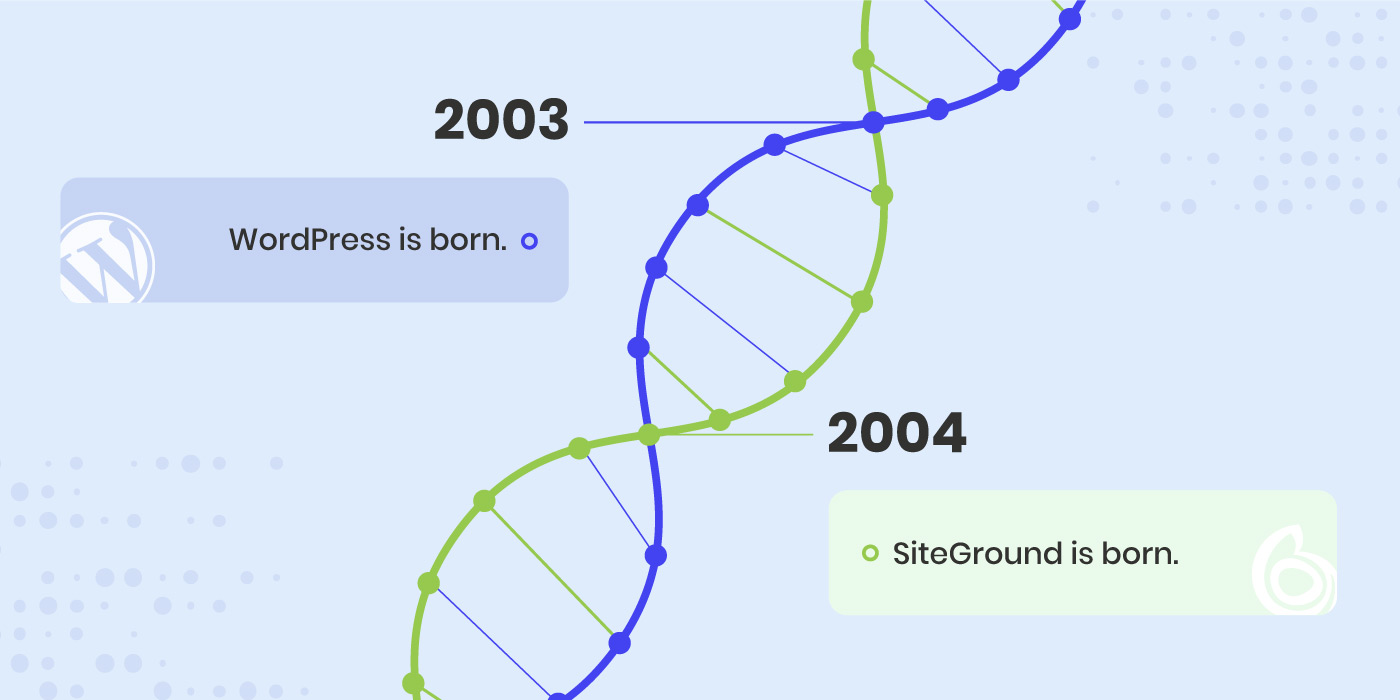
From the moment SiteGround was founded in 2004 (just 1 year after WordPress emerged), we recognized WordPress amazing potential. Back then, it was a new, blogging platform that had the opportunity to change the web – and it did! It evolved into one of the most powerful open source content management systems used by millions of websites worldwide. In these almost two decades, we have worked closely with the WordPress community, sponsoring and participating in hundreds of WordCamps and WordPress Meetups worldwide. During all these years we have been contributing to the project, offering our expertise, and developing a powerful platform for WordPress users to create, innovate, and thrive.
Contributing to better WordPress
Ever since the beginning, WordPress development has relied heavily on the contributions of its users. There is tons of voluntary work involved in maintaining, improving and developing WordPress. SiteGround has dedicated many hours of work of different members of its team to address various needs of the project. Some of our team members have contributed code, others organized events and translated help articles, etc. We have also supported external contributors, all with the purpose of helping make WordPress better for everyone using it. As a company, we believe that contributing to the WordPress project is one of the ways to pay back to the community and the opportunities WordPress brought to us and our clients. You can check our company profile and current list of active contributors on wordpress.org website.
In addition to contributing to the WordPress core and project needs, we have developed two of the most popular free-for-all plugins – the SiteGround Security and SiteGround Optimizer plugins. The plugins provided us with the opportunity to share our hosting expertise beyond our own hosting platform and enabled millions of WordPress users to immensely improve their websites’ security and performance – two of the pillars of any successful website.
Bringing the WordPress community closer
One of the key pillars holding WordPress community together are the community events – the most common being the WordPress Meetups and the WordCamps where diverse WordPress members come together to get to know each other, exchange ideas and find ways of cooperating more efficiently. Ever since 2011, SiteGround has been one of the main sponsors of WordCamps and later on of Meetups, helping empower these live interactions. As of this month (June 2023) we are also a Global WordPress sponsor, thus supporting pretty much all WordPress events around the world.
Providing hosting expertise
Throughout this amazing journey, SiteGround has been proudly supporting WordPress users in creating and managing their digital presence with premium hosting services designed specifically for WordPress websites, custom tools and features, custom plugins and more. Our commitment to delivering a high quality service has been recognized on the official wordpress.org/hosting website, where we are one of the only three recommended hosting providers.
Together with WordPress, we’ve reached numerous milestones. From WordPress’ evolution as a simple blogging platform to a full-fledged content management system, to SiteGround’s development of a state-of-the-art hosting platform with powerful WordPress tools and features, our combined journey has been nothing short of spectacular.
We are incredibly proud of our close relationship with WordPress and the immense value it has brought to our users. As a testament to this commitment, we continue to innovate and offer an extensive suite of WordPress-specific features and a premium hosting service. As WordPress continues to grow and innovate, so do we. Our goal remains to provide you with the best possible hosting environment for your WordPress website.
Thank you for being part of this incredible journey! Here’s to WordPress’ 20th Birthday, and here’s to another 20 years of innovation, growth, and shared success with SiteGround and WordPress!
We’re happy to announce that we’re expanding our data center and CDN network with a new location in Paris, France. Our new data center and CDN point will further increase the loading speed for French visitors of our clients’ websites that receive traffic from France.
New data center in Paris, France
Our new data center in Paris, France, is part of our data center infrastructure, powered by the premium Google Cloud platform. It ensures high redundancy and availability, fast connectivity, multi-layered security, and green-friendly service. We believe that our new data center will improve the experience of our customers even further. Here’s how:
What are the benefits of our new data center
The main benefit of our new data center in Paris is that it will improve the website loading speed of websites whose main traffic is from France. Having your website(s) hosted on a server closer to your main website audience shortens the distance between your website and its visitors, and thus speeds up its loading times.
This has a positive impact not only on your website speed, but on your visitors’ user experience as well. People are more likely to stay on your website, if it loads faster, and they tend to visit it again, if they had a good user experience. This in turn will lead to higher conversion rates as well.
How to move your website(s) to our new data center
If you would like to move any of your existing sites to our new data center in Paris, you could order their relocation in your Client Area > Marketplace > Hosting Services > Relocation. You can relocate each of your sites, hosted on a shared web hosting service, or your entire Cloud hosting account, if you are using Cloud hosting service.
From now on, all new sites created on StartUp, GrowBig and GoGeek plans by our French customers will be hosted by default in the new Paris data center for your convenience. Paris will be your default location for newly ordered Cloud hosting plans as well.
CDN Location in Paris, France
Our in-house built SiteGround CDN service provides multiple geographical locations around the world in order to optimize our clients’ websites loading speed. We’re now launching yet another location – a CDN point in Paris, which will significantly increase the loading speed of websites with traffic from France, both there and all over the world.
If you still haven’t activated our CDN service for your website(s), go ahead and enable it completely free of charge from your Site Tools > Speed > CDN.
With the launch of our new data center and CDN location in Paris, we hope that our customers will enjoy an even better hosting experience.
If the internet was a country, it would be the 4th largest source of carbon emissions. On average, a website produces 1.76g of CO2 per visit from the processing power needed to load and deliver the page. That’s why as a website hosting provider we have a responsibility to optimize our services and the performance of our clients’ sites to minimize these negative effects as much as possible.
To dive deeper into the topic of website sustainability, we organized a #WebSustainabilityChat on Twitter along with several experts in different fields of website development – Nora Ferreirós (@noraferreiros), Responsible UX/UI Designer, Ari Stathopoulos (@aristath), Web Developer, Accessibility & Sustainability Evangelist, and Marketa Benisek (@MarketaBenisek), Digital Sustainability Lead at WholeGrain Digital. Here’s a summary of their discussion with some useful tips and tools to help you measure and reduce your website carbon footprint.
How do websites contribute to carbon emissions
In short, the faster your website, the less server resources it uses. Likewise, the simpler the website, the less data it uses. Website speed optimization and keeping things simple are good both for the environment and for saving energy.
“Every bit of information you put on a website will need energy. The more information you put on your website, the more energy you need, and the more carbon emissions you will contribute to,” points out Nora Ferreirós, Responsible UX/UI Designer.
How to measure your website’s carbon footprint
Our experts agree that there’s no need to use many tools to measure your website’s carbon footprint, but rather find one tool that gets the job done. You simply run a test, make improvements on your site and see if that has an impact: “It doesn’t matter which tool you use, just use one consistently and make comparisons to see if your changes make sense,” says Ari Stathopoulos, Web Developer, Accessibility & Sustainability Evangelist. Here are a few examples that you can use:
The Website Carbon Calculator “gives context about the energy you consume with your website by comparing it with non-digital stuff – your website consumes X kg of CO2, and it’s the size of a car, for example”, explains Nora Ferreirós.
“Ecograder is more about metrics and all the settings you should improve in order to reduce your website’s carbon emissions,” says Nora Ferreirós.
Keep in mind that apart from using such tools, it’s even more important to have context about sustainability, Nora Ferreirós, points out because “sustainability is a way of doing things and understanding how they work – it’s not just about metrics”. The decisions you make about your website are just as important as the technology and tools you use, she adds.
5 tips to reduce your website’s carbon footprint
Once you’ve measured the carbon impact of your website or particular webpage, it’s time to work out a way to reduce their carbon emissions. Here are some top tips and immediate actions you can undertake to improve your website sustainability:
Improve your website’s performance
Let’s first look at the bigger picture in terms of website performance. According to Ari Stathopoulos, the best way to optimize your site is to get rid of all the things that are not related to what you actually want to do.
To explore this point, he gives an example with a website that sells T-shirts, for instance. In his opinion, most website owners would want their site to have everything – 10 images on the product page, a video presentation, plus a slider at the top with related products, and all that other stuff that are not really necessary in order to sell the actual T-shirt.
Marketa Benisek, Digital Sustainability Lead at WholeGrain Digital, elaborates further and explains that it all comes down to the elements that are causing the individual webpages and the website to be larger than necessary. In her opinion, these are usually “either very large stock images, or videos that are data heavy”. Here’s some advice on the images and videos:
Reduce the size of your images
As Marketa Benisek points out: “For example, if you have thumbnail images on the website’s team page, even though those images appear small on the site, they can sometimes be uploaded as full-size, like 1MB or 2MB. By reducing the size of those images, you also significantly improve the speed of that page.”
Rethink how you use videos on your site
If you have any videos, you might need to rethink the way you use them. First of all, “think whether the video really serves the purpose or whether it can be replaced, perhaps, with an svg animation, instead of a full-on video, and also avoid autoplay videos,” Marketa Benisek continues. Ari Stathopoulos adds another smart alternative as well – if you want to show a presentation of a product, you don’t need to embed a video, you could just link to the video on YouTube.
Optimize your website’s data transfer
To optimize your website’s data transfer, your starting point should be the notion that everything you put on your website is data – “every single pixel is a piece of data that people will have to download from the website,” Marketa Benisek points out.
You need to start with one step at a time. As Nora Ferreirós advises, it’s important to begin with having less things on your website (just the ones you need) and then build them up, if needed. The reason is that it would be more difficult to optimize a website later on, once it’s already big and has a lot of things: “If you want to optimize your data transfer, just transfer less data,” Nora Ferreirós says.
In case you already have lots of things on your website, you need to reduce them, as this can significantly reduce the overall size of the website, therefore the data transferred, and eventually the carbon footprint.
Bottom line is to keep everything on your website simple, minimal and clear for your users to easily find what they’re looking for. To achieve this, you need to “think about what would be most useful to your users and have an understanding of who your users are,” Marketa Benisek concludes.
Apply UX/UI optimizations
Not only should you have an understanding of who your users are, but also an understanding of how they are interacting with your website. For this purpose, you need to design the user journey on your website.
If you’re clear on who your audience is, then design your website accordingly, “simplify the entire user experience and make sure people find it easy to navigate when they visit your website”, Marketa Benisek advises. Nora Ferreirós shares an insight on how to achieve that: “A great exercise to keep things simple is to think about you as a user. When you’re a user, you don’t want things to be complicated, you want to understand what people are selling to you, so think as you navigate a website and apply this to your own.”
Once you’ve identified the user journey, the best way to achieve the objectives you have for your users, is to focus on one thing that you want to say. In Marketa Benisek’s opinion, simplicity on websites signifies a lot of confidence. For instance, Apple is one of the best examples to take as an inspiration. They have very little information on their pages, but they’re straight to the point. They only feature the information that people are looking for.
When your objectives and messages are clear, think about the website as a whole project, not about specific features (sliders, or videos, etc.) – only then you’ll be able to optimize your website and your UX/UI, Nora Ferreirós advises. Every part of your website should then work together for that main objective, she adds.
Adapt SEO practices
SEO also plays a huge role in website sustainability. For this purpose, Ari Stathopoulos advises you to think about the user journey again. He explains that most people go in a search engine, search for something, land on a website, and if it’s the wrong website, they try again with the next one and so on. Therefore, you need to be concise with your message – the clearer the text is, the more related users you’ll get, in his opinion. He warns that, on the contrary, “if you do keyword stuffing, all sorts of people will land on your website and none of them will stay, because your website will not be what they are looking for”.
SEO is indeed important, but we also need to keep it human, Nora Ferreirós warns. We sometimes begin to work for machines, while we’re supposed to work for people – get your website ready for helping humans and for giving them services and products they need, she points out.
Choose a sustainable hosting partner
The last but not least part of the puzzle is your web hosting provider. Ari Stathopoulos points out that there’s a lot of blame on hosting providers, regarding greenhouse emissions, but in conclusion he agrees that more web hosting companies are turning green, and that’s a strong and important tendency.
Here are a few questions to ask when choosing your web hosting provider, in order to make sure they are providing green and sustainable services:
Do they use renewable energy for their data centers?
Do they improve server software to minimize resource consumption?
Do they optimize websites for higher performance and less data transfer?
Do they have a sustainability-oriented company culture?
At SiteGround, for example, our efforts are dedicated to creating a green web hosting environment that helps both our business and our clients’ websites be sustainable.
Our data center network is powered by the premium Google Cloud platform that matches all electricity consumed by the servers with energy from renewable sources;
Our custom PHP setup lowers the server memory usage and gives more space for the server to handle more website traffic faster;
Our SiteGround CDN, SuperCacher, and other in-house built solutions maximize websites’ performance and increase their efficiency;
Our company operates in green offices and regularly initiates and supports green social causes.
Wrap up
The top advice our experts recommend to all website owners is to keep things as simple as possible. That will not only help your users navigate easily through your website, but also significantly reduce your website’s carbon footprint.
Check our YouTube recording to hear the whole Twitter chat conversation and follow us on Twitter for more news and discussions on useful topics.
As a small business owner, you need to manage almost everything yourself – your brand, your store, your website, etc. To help navigate through all that, we’ve got you covered with professional advice from top experts that will help you start, grow, and succeed online.
We organized an #SMBGrowthChat on Twitter Spaces along with Syed Balkhi (@syedbalkhi), Entrepreneur, Investor & CEO, Cal Evans (@CalEvans), eCommerce expert & Internet entrepreneur, Aleyda Solis (@aleyda), International SEO Consultant & Entrepreneur, and José Ramón Padrón (@monchomad), SiteGround Spain Country Manager. Here’s a summary of their discussion with some expert tips on how to succeed online.
Essential steps when starting an online business
The very first essential step to starting an online business is knowing your target market. “In my mind, the most important thing for a business is knowing who your customers are and how you can get that customer,” notes Syed Balkhi, Entrepreneur, Investor & CEO.
As a next step, you need to come up with a domain name and website idea. Aleyda Solis, International SEO Consultant & Entrepreneur, points out that “the building block, the main pillar of your online business should be your website”.
Create your small business website
Now that you are at the stage of building your website, you need to choose carefully which website building app to use for your small business site. It will all depend on the functionalities you need in order to provide your services or products, as well as on your own capabilities.
For example, if you have technical capacity, you’d probably be able to develop your website from scratch. However, that would take you much time and effort. For this purpose, as a programmer, Cal Evans recommends using WordPress: “The reason I say that is because I’m a programmer, but I can spin up WordPress and put a theme in there and put together 5-6 plugins and usually get exactly what I’d have done, without having to program”. Syed Balkhi also recommends WordPress and points out that 43% of the web uses it, including SMBs, developers, entrepreneurs, and others.
Must-have elements on your website
After you’ve built your website, let’s explore what are some of the must-have elements to include on it.
No matter what type of website you have, you need to communicate what you do. Aleyda Solis points out that “you should have at least a landing page, explaining what you’re offering, what’s the value of it, its price (range), and a contact form, so people can get in touch with you.” She adds that if you have many products, categories, or brands, then you need proper navigation that allows users to go through your web structure and reach your different offerings. Of course, if your website is very complex, you need to add a search feature as well.
Syed Balkhi builds upon this idea and notes that you need to have a way to stay in touch with your users, to enhance their user experience and help them get to the goal of conversion (subscribing, buying, etc.). In his opinion, it’s good to “add an email newsletter, or a push notification platform, because you need a way to connect to your visitors after they leave (the majority of people leave your website and they never come back – it’s like 70% or for some websites it’s even 97%), or even SMS notification.”
A general rule to follow when adding these elements is that “the most important content should be no more than two clicks away,” José Ramón Padrón says. Think about the user experience and the importance of CTAs – make it clear and simple for your users to get the information they need with minimum clicks.
Scale your online business
“You can not improve what you can not measure,” points out Syed Balkhi. To scale your business, you need to know your visitors – how they are finding and using your website, because this helps you focus on the content and products that matter the most, he adds.
For this purpose, Aleyda Solis recommends using marketing analysis tools “to better assess which are the keywords that are already bringing traffic to your website from an organic search point and from paid search perspective as well.” Some of the most popular marketing analysis tools you can use are Google Analytics, MonsterInsights, SEMRush, etc.
As a next step for scaling your business, Aleyda Solis recommends using marketing automation tools: “such tools will allow you to easily follow up with your customers, if at some point they leave a landing page, before converting […], to collect and develop your audience with forms that you can easily create, similar to email marketing.” If you’ve chosen WordPress, there are many plugins that can provide this automation, as well as plenty of integrations with some of the top marketing automation platforms.
“When you already have a product and you know what’s working, now you have to do a lot of testing and optimization, so you can use a landing page builder that lets you do dynamic personalization – you can try different offers, different PPC ads,” adds Syed Balkhi.
When your business is growing, it’s also important to use a hosting provider that offers a variety of products in order to avoid further migrations. As José Ramón Padrón points out, “you need a hosting provider with many data centers, CDN points all over the world, specific tools for improving website security”.
Sometimes, when the business grows, the team also grows with it. For this reason, there is a need for automation of internal processes – how the information flows inside the company – tools like Jira, Slack, etc. are important, José Ramón Padrón adds.
Fundamental marketing channels
The number one channel to reach your customers is through search engines (the biggest ones being Google and YouTube), thus SEO would be your most important starting point. Aleyda Solis advises you to have an SEO specialist, when building your website in order for SEO practices to be taken into consideration right from the start, so that later on, when you’re ready to launch your full SEO strategy, it would be easy for you to do so.
“Keyword research within the SEO process is super valuable not only for SEO, but also to understand when you still don’t have internal data, how your audience is looking for your products or services, and how to position yourself versus your competitors,” Aleyda adds.
Your mailing list is the next important marketing channel – “it doesn’t need to be a full email marketing strategy at the beginning, but starting to collect email contacts right away is something I’d recommend,” notes Aleyda Solis. This will allow you to build an audience and engage with it later on in a more personal way.
After that, you canstart building your mailing list with people that are interested in what you might be selling or the services you offer, as noted by Cal Evans, eCommerce expert & Internet entrepreneur. He adds that once you know you’ve got a product market fit and a website, then you can register your Twitter, Instagram and other accounts, and start building your mailing list.
Syed Balkhi gives you a bonus tip for you to engage and connect with the audience you’ve built by now: “Push notifications work equally as good, if not better than email marketing, and that would be a less known tip that not many SMBs take advantage of”.
Growing your mailing list
Now that you have a mailing list with subscribers, you need to figure out a way to further grow this list. We’ve got you covered with actionable tips from our experts:
Create compelling content
It’s easier to create compelling content than you think. “Look around for the questions that people ask you, and you can put together something like a pdf and build a landing page with it with OptinMonster,” explains Cal Evans.
Run social media campaigns
Cal Evans also shares that to boost his subscription rates, he runs social media campaigns about once a month and it works for him. “You have to be careful – you can end up spending a lot of money and getting absolutely nothing, but you’ve got to figure out where your target market/audience is – are they on Twitter, Facebook, etc.,” adds Cal Evans.
Implement exit intent
Exit intent is that thing you see when you start taking the mouse towards exiting the website – like a pop-up, for example. “Some people might think it’s really annoying, but the reality is that that user was going to leave. By showing them a good and targeted offer, it converts 2% of the users into subscribers,” Syed Balkhi points out.
Add content upgrades
It’s also important to analyze where your traffic is going to and then add content upgrades to these pages, such as your most popular blog post, for instance. “In this blog post, create a lead magnet – an eBook, a chat list, a worksheet, etc. – a freebie that’s specific to that blog post. For example, you have 12 tips to get more traffic, and then 5 bonus tips that you’d only be able to get, if you subscribe,” Syed Balkhi explains.
Do this by adding a CTA at the top, middle/bottom of your page (or both places). When the user clicks that link, a pop-up comes up and they should enter their name and email to access that content upgrade, Syed Balkhi advises.
Do on-site retargeting
You can always spend money on Google or Facebook retargeting ads, but there’s also a way to do on-site retargeting. If a user came to your website, then they left, and later on came back, there are ways to target that customer, using a plugin like OptinMonster, as Syed Balkhi points out. A simple message like “Welcome back! Consider joining our list, so you can get updates?” could do the trick.
Run on-site follow-up campaigns
When somebody visits a specific page on your website, you can prepare a follow-up, especially for them. “Maybe they’re already a subscriber to your email list, and when they come back to a specific page, you can give them an exclusive discount or a coupon. Also, if you’re just starting out, you can use giveaways,” advises Syed Balkhi.
These are all great ways to boost conversions and get more subscribers. A general advice that applies to all of these tips is to be very natural with them and avoid an intrusive approach. They “can be embedded/integrated within the workflow that you have for your user journey, in a way that’s actually attractive and appealing to the user,” Aleyda Solis summarizes.
Final thoughts
In 2020, we saw a lot of new businesses starting online, and then disappearing in 2021 or 2022. To avoid having such a short business lifetime, follow our experts’ tips and make sure you define your target market, prepare a competition analysis, build a marketing strategy, and create a website with customer experience around the product or service you want to sell.
Check our YouTube recording to hear the whole Twitter chat conversation and follow us on Twitter for more news and discussions on useful topics.
To celebrate Earth Day and reduce our impact on the environment, this April, we went all in to inspire both our clients and employees to adopt sustainable practices and embrace a more conscious lifestyle.
Earth Day Bingo
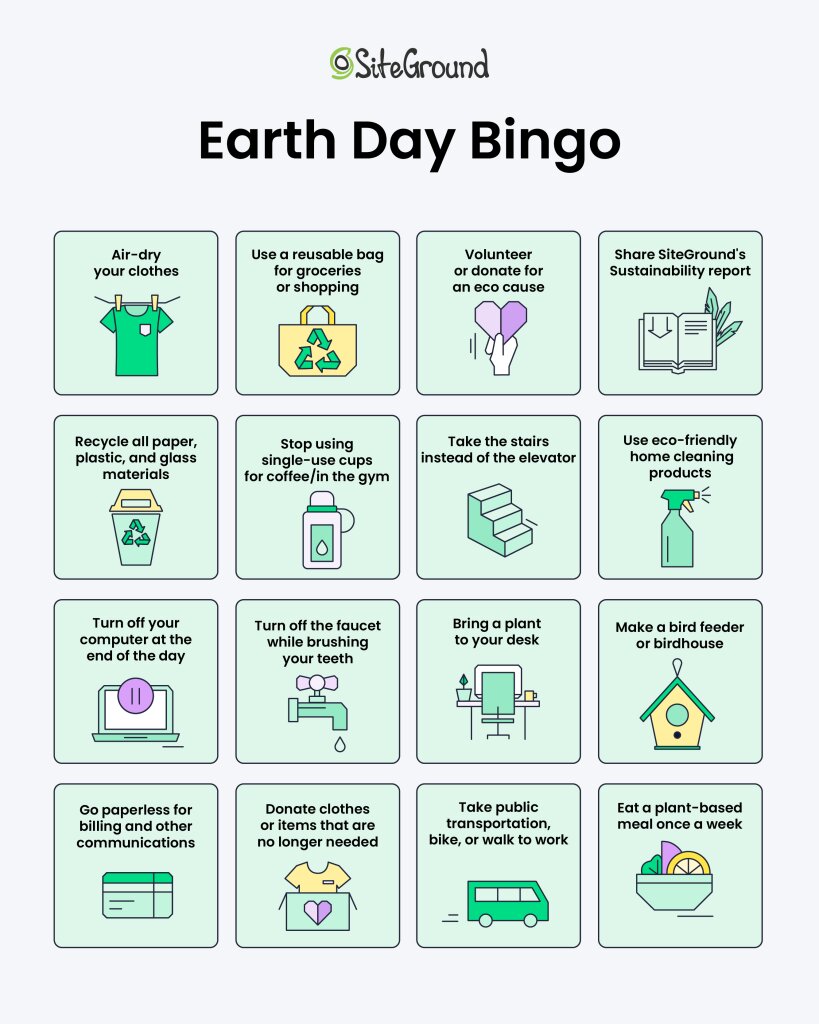
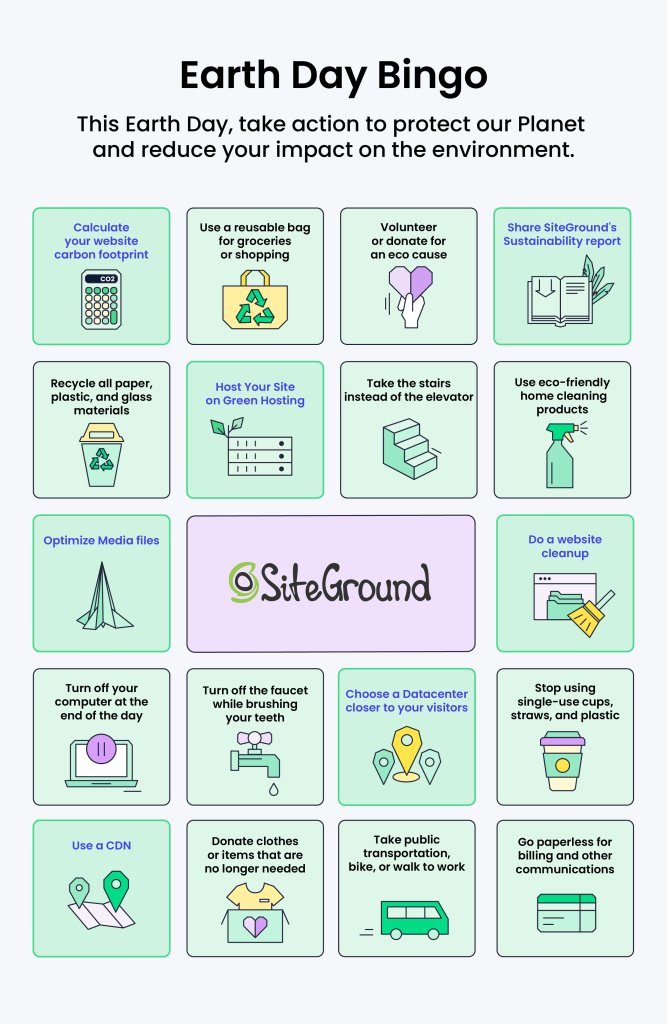
Right on time for Earth Day this year, we challenged our team to adopt sustainable living practices and reduce their impact on the environment with our Internal Earth Day Bingo.
If you’re also ready to get started on your journey toward sustainable living, set yourself up for the challenge by completing our Earth Day Bingo card!
Sustainability Report 2023 – Read, Share & Plant a Tree
At SiteGround, we have always taken responsibility for our environmental impact and have worked tirelessly to minimize the carbon footprint of our own and our clients’ websites. This year, we’ve compiled all our sustainable efforts into our Sustainability Report which outlines the aspects of our sustainability strategy from providing green hosting services to genuinely caring about the well-being of our employees, our communities, our cities, our society, and our Planet.
Earth Day is a good occasion to recognize that we all have a responsibility to protect our Planet – even though that’s something we should do every day, we usually take it for granted. So we wanted to use this as a reminder to adopt sustainable living and website management practices and reduce our impact on the environment by making small changes in our daily lives.
Set yourself up for the challenge by completing our Earth Day Bingo!
Manage More Efficient and Sustainable Websites
As a website owner, it’s crucial to recognize the impact your website has on the environment. Here are a few tips to help you manage a sustainable website:
Like your home, your website also accumulates dust and clutter over time that can slow it down and make it vulnerable to security threats. So cleaning your website is just as important as spring cleaning your home, and with our help, it can be much easier and faster.
Get started with our actionable tips on how to declutter your site for even stronger security and faster speed.
Clean up your WordPress website
For all of you, using WordPress, we’ve identified some crucial, yet easy-to-follow tips that will help you take special security and speed care of your WordPress website.
Quick website security tips
Keep your WordPress version and plugins up-to-date
It’s important to keep your WordPress version and plugins updated to the latest version, because hackers use every opportunity and backdoor to attack your website and get access to your files or valuable information. Keep an eye on the latest WordPress versions and plugins and install them in a timely manner. Luckily, SiteGround clients don’t have to worry about this, as we do it automatically for them – we autoupdate all WordPress installations, hosted with us.
Clean up your user roles and permissions
Make sure you review and remove inactive users or limit access for certain users only to the resources they require. For instance, give administrator access to your site only when strictly necessary and only to users that actually need it. The same applies to the login details for your hosting account.
Enforce strong and secure passwords
Weak passwords are one of the most common reasons sites get hacked. Always use secure credentials for accessing your account. On top of this, remember to store your passwords only in password vaults – no plain text, no writing them down, no sharing. As a complementary step, you’d also need to implement 2-factor authentication for login access. It will require an additional step of verification upon each log-in for an extra layer of security.
Clean up unused plugins and themes
Outdated plugins and themes can open up the backdoor for hackers to gain access to your website. That’s true even for deactivated plugins and themes. For this reason, delete any plugins and themes that you’re not using to lower the risk of security breaches on your site.
These are just some of the steps to follow in order to spring clean and secure your WordPress website. The good news is that you don’t have to do them on your own and one by one. Some of them and many more you can find as one-click features in the free SiteGround Security plugin, available for all WordPress users. Download it now and enable many powerful security options in just a few clicks. For SiteGround clients, it’s already been installed and working out-of-the-box.
Easy-to-follow website speed advice
Clean up your WordPress database
Your WordPress database can significantly affect the speed of your website, which, in turn, affects its overall health and search engine rankings. To ensure optimal performance, it is important to keep the database clean. Cleaning up your WordPress database is a vital part of refreshing your website and optimizing its functionality.
Compress large images
Large images can significantly slow down your WordPress website. Use image compression to speed up your site. You can compress them as much as you like, without compromising on their quality. For this purpose, make sure to always take advantage of the latest image formats, such as WebP format.
Minify CSS and JavaScript files
Minify your CSS and JavaScript files which will basically remove all unnecessary characters from them. Minification of CSS & JS files will speed up your website by reducing your site’s code weight.
Preload your fonts
Your website’s fonts are yet another thing that the browser needs to load in order for the users to see it. To keep them from slowing down your website and allow the browser to render faster, you need to preload your fonts. Keep in mind to preload only the font files that you use most oftenly, not all of them; otherwise, you might end up slowing down your site further.
To help you get access and enable most of the above options and many more with just a few clicks, we have an in-house developed SiteGround Optimizer plugin that’s free and available for all WordPress users. It also offers powerful caching features, frontend optimizations, as well as media and environmental optimizations.
Scan your website thoroughly
Continue with performing a complete and regular scan of your website, checking it for potential malware-infection and other security threats over time. There are different types of site scanning services available out there. At SiteGround, we have our in-house developed Site Scanner security service. The Site Scanner checks your entire website for malware and the latest threats, notifies you about any potential security issues in a timely manner, giving you enough time and tools to react in case of any suspicious activity.
Apply powerful website performance optimizations
Level up your website speed by implementing these powerful optimization tips:
Make sure your PHP is fast
Ensure that your website is running on the latest and fastest PHP version and that your web server handles that in the best way possible. SiteGround clients have the opportunity to take advantage of our ultrafast PHP setup that cuts the TTFB (time to first byte) and makes web pages load 30% faster in comparison to standard PHP setups.
Leverage caching
Caching is one of the most powerful techniques to make your website load even faster. You can apply caching at different levels, such as browser caching and server-side caching. SiteGround clients take advantage of our powerful caching technology out-of-the-box that’s built in-house on three levels – Nginx Direct Delivery for static content, Dynamic caching for dynamic content, and Memcached (object caching). All three can speed up website performance up to 5 times.
Use CDN
Speed up your website even further by enabling a content delivery network (CDN). A CDN keeps copies of your website on servers that are geographically closer to your end users. Then, when they request to see a web page, it gets served faster from a location that’s close to them. SiteGround clients take advantage of our free in-house built SiteGround CDN which now comes in version 2.0 that is even faster and more efficient.
Check your website security and speed status regularly
Once you’ve done all of the above, it’s good to keep an eye on your website security and speed status regularly. Make sure you’re aware of any potential backdoors on your website that might still be open for the hackers, or any performance issues that might slow down your website.
At SiteGround, we know how much time and effort this might cost you. That’s why our clients receive monthly security and performance reports, delivered straight into their inboxes, at no extra cost.
In the monthly security reports, we provide them with digestive summary results from automated security checks that we perform for their websites. Our clients get their site security status in a user-friendly and understandable format, along with actionable tips on how to reduce the risk of malicious attacks, in case we’ve identified areas that need their attention. With the free monthly security reports, we help our clients stay in control of their website security in the long run.
Similarly, the monthly performance reports provide our clients with easy access to information about their website speed status. We check a number of performance categories for our clients’ websites (e.g. cache ratio, CDN usage, WordPress optimization, and more), and give them an overall performance score in a user-friendly structure, plus actionable recommendations, if some areas need improvement.
As you can see, website security and speed are an ongoing process that needs your attention throughout the whole year, not just in the spring. Yet, now is the best time to start taking care of your site speed and safety in order to avoid any potential issues in the future.