Gemini AI: Now Included in All Google Workspace Plans Offered by SiteGround

Last year, we proudly announced our partnership with Google Workspace, bringing the ultimate collaboration and productivity toolkit to SiteGround customers. Today, we’re excited to share the next chapter in this journey: Gemini AI is now part of all Google Workspace plans offered by SiteGround, unlocking a new level of productivity, creativity, and efficiency for your business.

This major enhancement brings cutting-edge AI features to businesses of all sizes, making productivity, collaboration and communication easier than ever. Now, with Gemini AI woven into the very fabric of Workspace apps like Gmail, Docs, Sheets, Meet, and more, the way you work is about to transform dramatically.

What Is Gemini AI?

Gemini AI is Google’s next-generation artificial intelligence toolkit, designed to boost your productivity effortlessly. Whether you’re drafting emails, summarizing documents, analyzing data, or generating creative content and media, Gemini AI acts as your always-on productivity partner – built right into the tools you use every day.

AI Assistance Across All Your Favorite Apps

Empower Your Daily Workflow with Smart Automations 
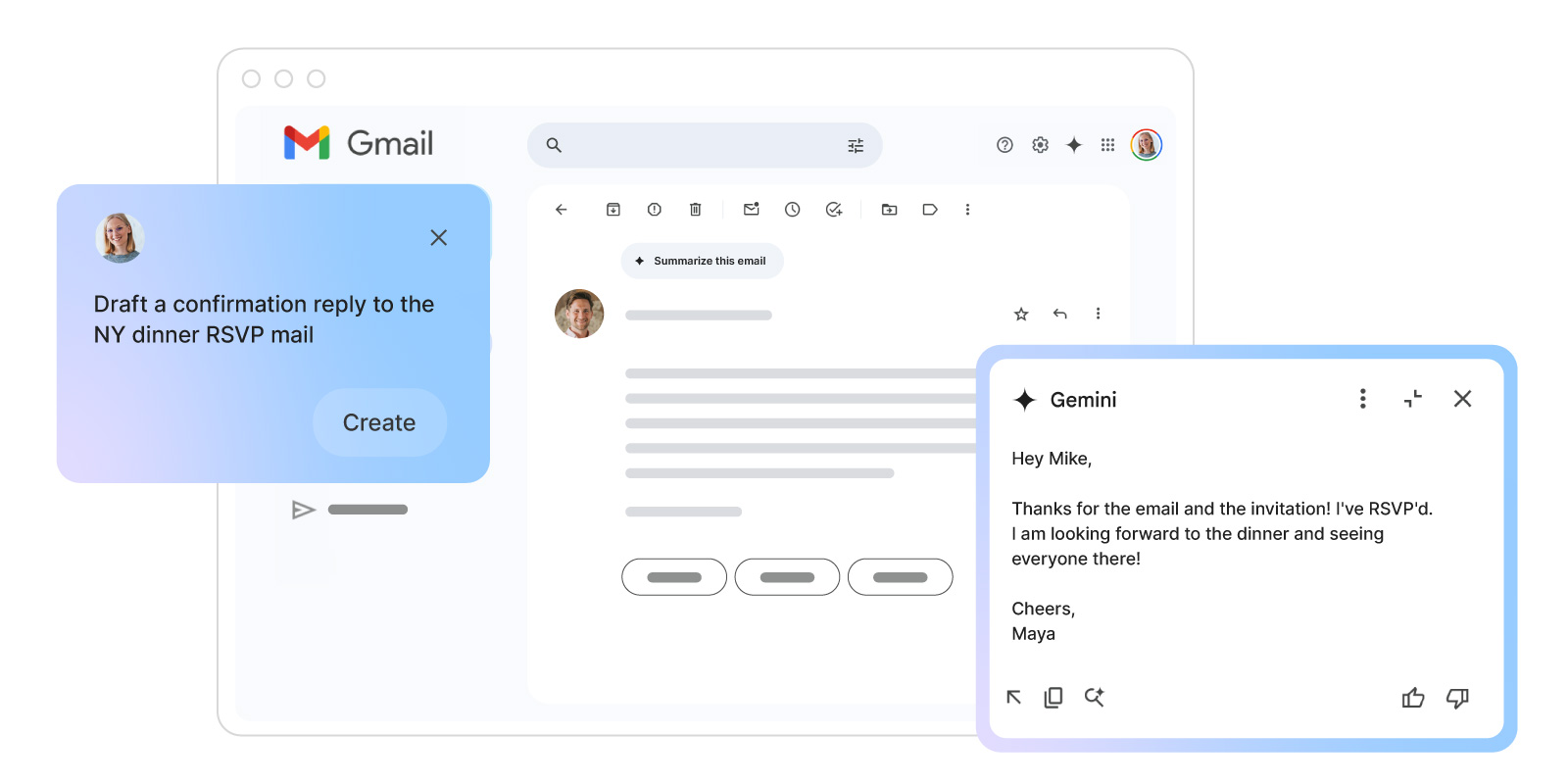
At its core, Gemini AI transforms how you handle everyday tasks across Google Workspace. In Gmail, you’ll experience smarter email management that goes beyond basic automation.

Draft professional responses in seconds, get instant summaries of lengthy email threads, and quickly surface important information from your inbox. For busy professionals, this means less time managing emails and more time focusing on what matters.

Supercharge Creativity and Analysis with Built-in AI Assistant
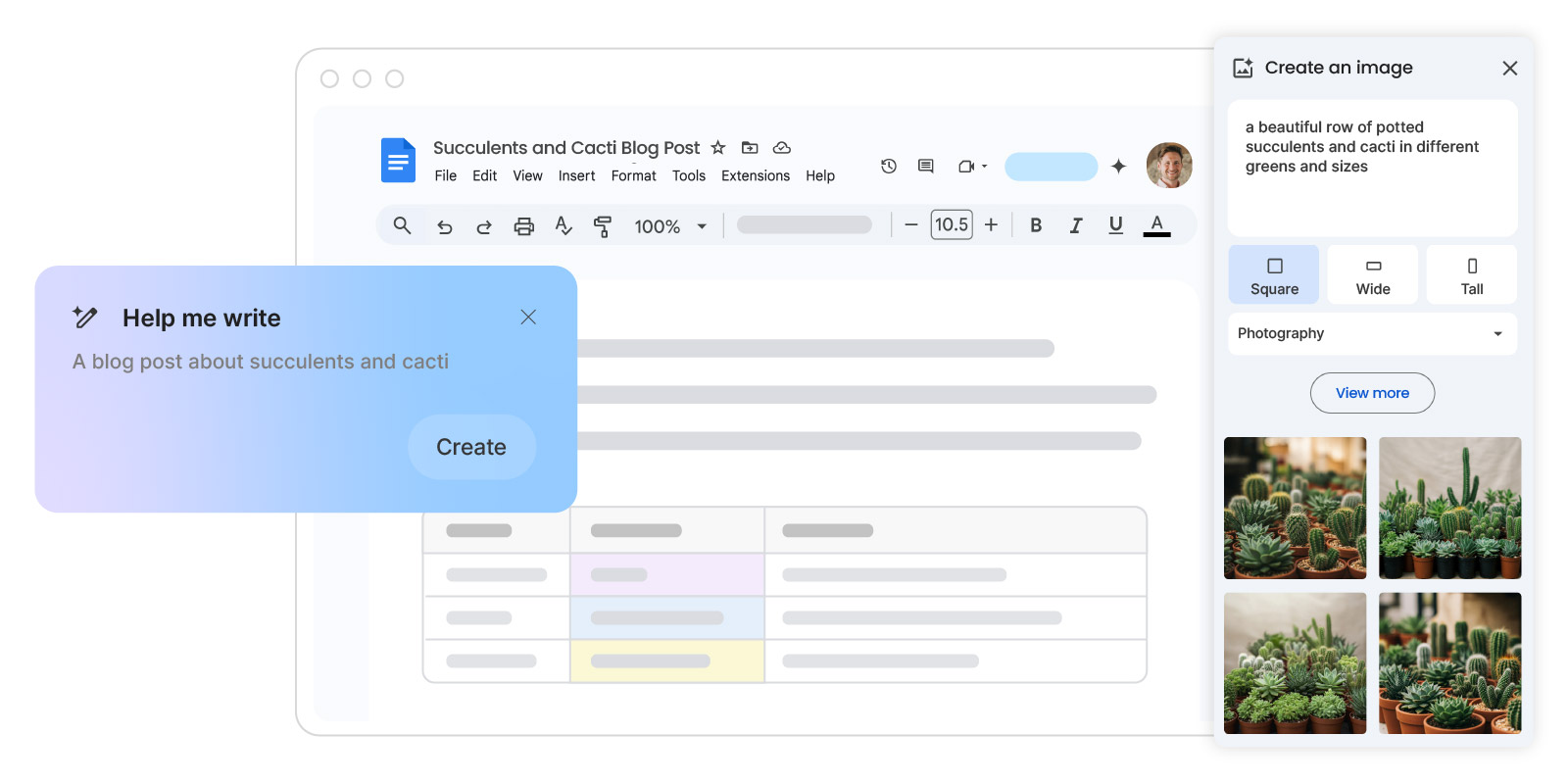
The real power of Gemini AI lies in how it enhances your creative and analytical work.

  • In Google Docs, writer’s block becomes a thing of the past as the built-in AI Assistant helps you generate fresh content and media, develop ideas, and summarize complex documents with ease. 
  • When working with data in Google Sheets, Gemini AI becomes your personal data analyst – creating tables, generating formulas, and uncovering insights from large datasets without requiring advanced technical expertise.
  • And across all your work in Google Drive, Gemini AI’s intelligent search and quick document summaries ensure you can find exactly what you need, exactly when you need it – making collaboration seamless and efficient.

Elevate Collaboration with Easy Summarization
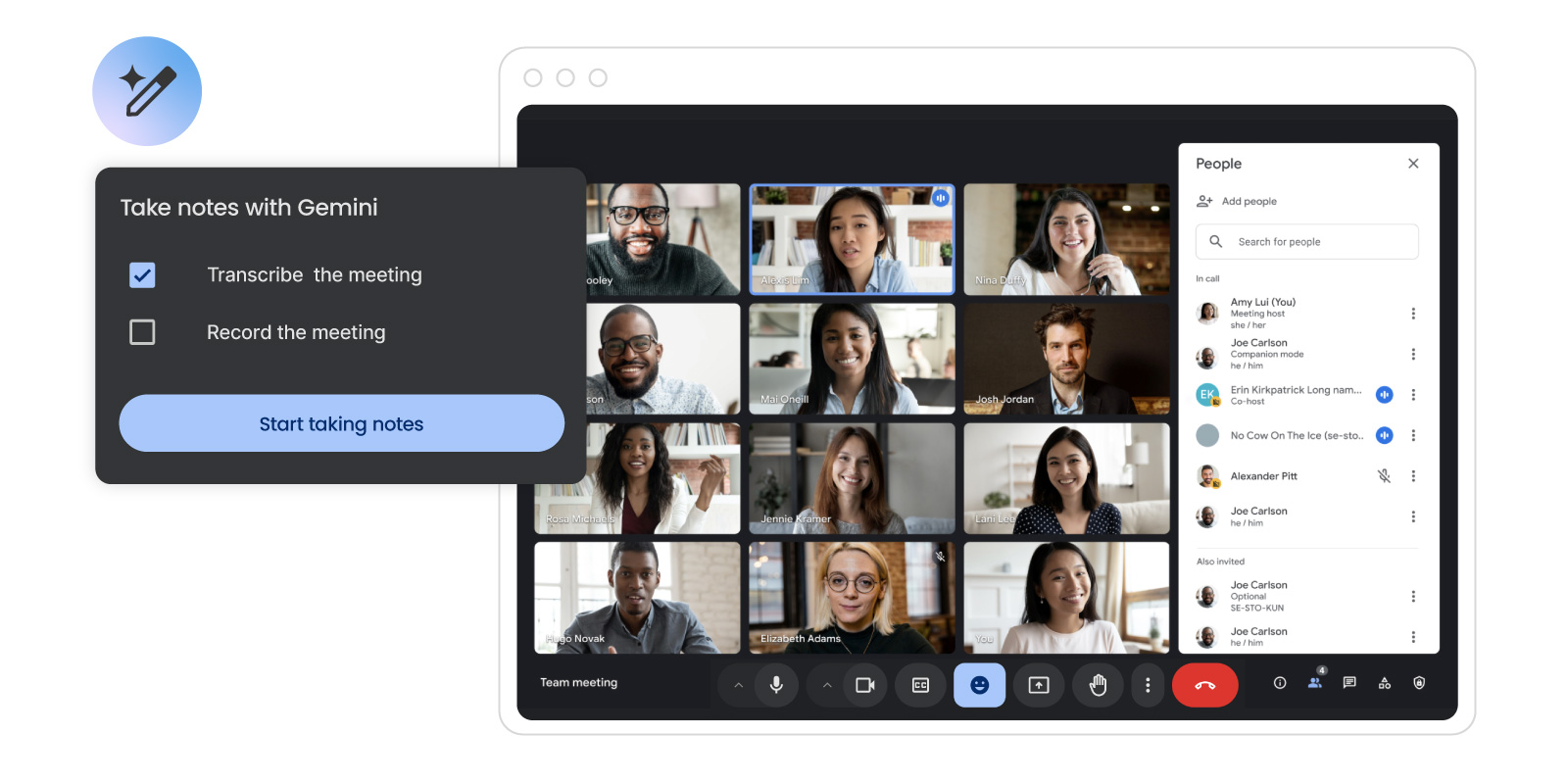
Gemini AI transforms how teams work together. 

  • During Google Meet sessions, it acts as your virtual assistant, capturing detailed notes and key points so you can focus entirely on the conversation. 
  • In Google Chat you can use Gemini to draft quick responses, set up meeting notes, or even create to-do lists.
  • When preparing presentations in Google Slides, it helps you create compelling content and suggests optimized layouts that capture your audience’s attention.

Security and Privacy First

Google has implemented robust security measures to protect the data you share with Gemini AI. All AI interactions are protected by Google Workspace’s enterprise-grade security, ensuring that your data remains confidential. This is specifically important for HIPPA-compliant businesses. Learn more about Gemini’s privacy measures here.

This integration marks a major leap forward in making AI accessible to businesses of all sizes. Whether you’re drafting emails, crunching numbers, or leading team meetings, Gemini AI is designed to help you achieve more with less effort. These capabilities could vary based on the user’s plan.

Ready To Experience The Future Of Productivity?

Start leveraging the power of Gemini AI today. Whether you’re running a small business, leading a growing team, or managing complex projects, Google Workspace with Gemini AI is designed to help you work smarter, not harder.
Get Started with Google Workspace for Free

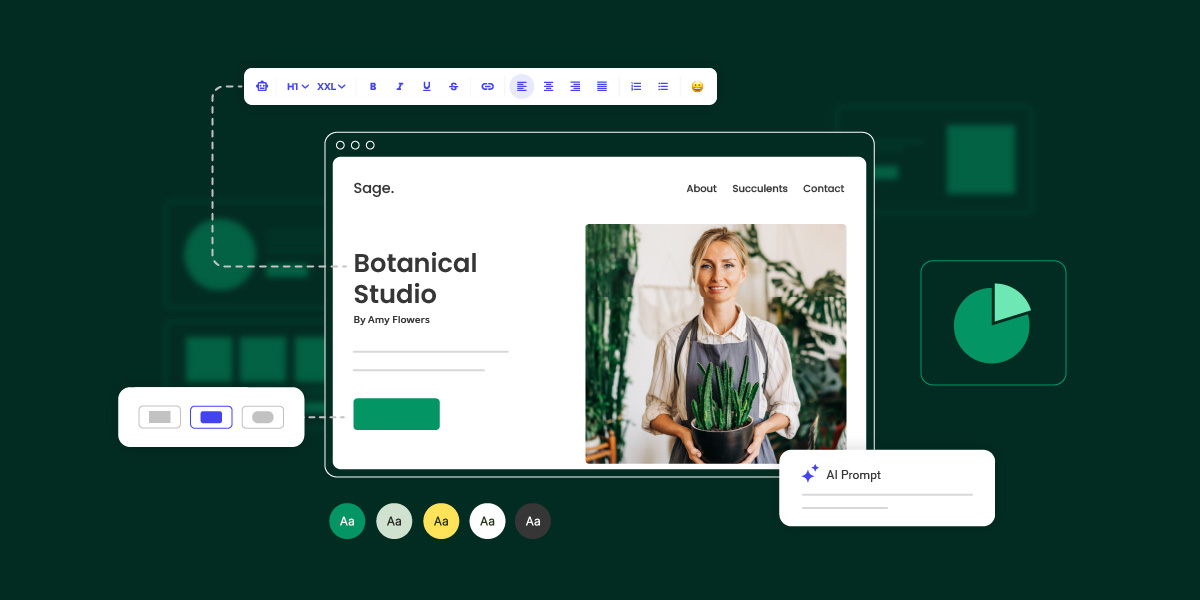
Introducing SiteGround Website Builder: A Simpler, Faster Way to Build Websites

Introducing SiteGround Site Builder

For two decades, we’ve been privileged to be part of your online journey, providing fast, secure, best-in-class hosting for millions of websites built with your own code or using popular CMS like WordPress, Joomla, Drupal and more. Through countless conversations with clients like you, we’ve learned about your challenges, celebrated your success, and understood your aspirations to create and manage your online presence.

Today, we’re excited to introduce something special – our very own SiteGround Website Builder, now included in all of our hosting plans. For us, this isn’t just a new project launch. It’s our response to all of those conversations we’ve had over the years, and our commitment to make your online presence an absolute success.

Why Launch A Website Builder

Every day, we witness the passion you bring to your businesses and projects. But we’ve also seen how technical complexities can stand in the way of your vision. We’ve heard from small business owners spending precious weekends configuring third-party themes for their CMS website, freelancers juggling multiple tools for different clients, and entrepreneurs delaying their dreams because website creation seemed too daunting.

Your stories inspired us to create something different. Something that would maintain the professional quality you deserve while removing the technical barriers that slow you down.

The Problems We’re Solving Together

We believe in products that solve real problems of real people, so we’ve focused on addressing the key challenges you’ve shared with us:

Complexity

Remember the last time you stared at a file manager or content management dashboard wondering where to start? Or spent hours trying to make a theme look like its demo? We believe creating a website should be intuitive and enjoyable. With our Website Builder, you’ll find familiar tools that work exactly as you’d expect – if you can use a doc file, you can build a beautiful website.

Time

We know you can’t afford to spend weeks learning new tools or fighting with technology. What used to be a multi-day project can now be accomplished in a single afternoon. Choose a template, customize it with your content, and launch your site – all before your coffee gets cold. Because your time is better spent growing your business, not building a website.

Technical Barriers

“But I’m not technical enough” – we’ve heard this too many times from talented entrepreneurs whose websites don’t reflect their expertise. SiteGround Website Builder handles all the complex details behind the scenes: mobile responsiveness, built-in SEO, performance optimization, and security considerations. You focus on your message and design, while we ensure everything works flawlessly behind the scenes.

Cost

Building a professional website traditionally means choosing between two costly options: hire a web developer to build and manage your site, or invest countless hours learning complex tools yourself. This should not be the case. Our Website Builder is available for free in every hosting plan, giving you the power to create professional websites without the professional price tag. If you have an unused site slot in any of your hosting packages, you can try it out right away.

Built For You, Growing For Everyone

The first version of the SiteGround Website Builder is built for our core users – business owners who want to create a simple, yet professional website without complexity. We have tons of features and functionalities in the pipeline to add to this experience and also cater to the needs of agencies, freelancers and professionals creating and managing websites for others. Every new item in our roadmap serves one goal – to help you create and manage a polished web presence that reflects your professionalism, while focusing on what matters most – running your business and serving your clients.

Everything You Need To Succeed

Our Website Builder comes packed with the essential tools that you’ve been asking for. Start with our professionally designed templates and customize them using our ultra-easy builder with premade sections. Access a free image gallery for stunning visuals, get help from our integrated AI content writer, and optimize your site with built-in SEO and analytics tools. Make it truly yours with extensive fonts and colors customization options – all without touching a line of code.

Just The Beginning

Today marks an exciting new chapter in our journey together. While we’re proud of what we’ve built, we know that this is just the beginning. We believe that the best products are built through collaboration with the people who use them every day. That’s why we’re starting with a simple, yet solid foundation, while keeping the flexibility to grow and evolve based on your feedback. Every new feature we add will be driven by your real experience and suggestions to make the SiteGround Website Builder even better for you.

Try It Yourself

Ready to create your website? The SiteGround Website Builder is available for free in any of our hosting plans. If you’re already our client, simply log in to your Client Area > Websites and start building your new website. New to our services? Choose any of our hosting plans and get access to the SiteGround Website Builder along with our award-winning hosting platform. Risk-free, with 30-day money back guarantee.

Let’s create something amazing together! 🚀

Introducing Google Workspace – The Ultimate Collaboration and Productivity Toolkit, Now at SiteGround

Introducing Google Workspace at SiteGround

In today’s digital world, the way we work has evolved significantly. Businesses and individuals alike need tools that enable them to collaborate efficiently, communicate effectively, and maximize productivity – regardless of location or device. That’s why we are thrilled to announce that SiteGround is now offering Google Workspace, the leading suite of collaboration and productivity tools trusted by millions of people and businesses worldwide.

What sets our Google Workspace offering apart is the seamless integration with our hosting services. As a SiteGround customer, you can now order and manage your Google Workspace plan directly from the same Client Area where you manage your hosting account. This means you have a single, centralized hub for all your digital services, making administration and management a breeze. And the best part – you’ll benefit from the same exceptional support you’ve come to expect from SiteGround, now extended to your Google Workspace.

Why Google Workspace?

Google Workspace brings together a powerful set of tools, including high-quota professional Gmail, Drive, Docs, Sheets, Slides, Meet, and more – all designed to help you work smarter and achieve more. Whether you’re a freelancer, small business owner, or part of a growing team, Google Workspace provides everything you need to streamline your workflow and take your productivity to new heights.

Professional Gmail with High Storage

First impressions matter, and having a professional email address that uses your own domain name can significantly boost your credibility and brand image. With Google Workspace, you get an ad-free Gmail account that offers ample storage space (up to 5TB per user), advanced spam protection, and a host of email management features. Say goodbye to generic email addresses and hello to a polished, professional online presence.

Supercharged Productivity

Google Workspace equips you with a suite of intuitive, cloud-based tools that make creating, storing, and managing documents and files effortless. With Google Docs, Sheets, and Slides, you can easily create and edit documents, spreadsheets, and presentations, while Google Drive provides secure cloud storage for all your important files. These tools are designed to work seamlessly together, allowing you to access, edit and manage your work from any device, anytime – even offline. 

By simplifying your workflow and enabling you to get more done in less time, Google Workspace helps you focus on what matters most – growing your business.

Seamless Collaboration

Effective communication and collaboration make all the difference when working in teams or doing business online. Google Workspace offers a range of powerful tools to help you stay connected and work together efficiently, no matter where you are. 

Google Meet allows you to host high-quality video conferences with team members, clients, or anyone else, while Google Chat provides instant messaging capabilities for quick, informal conversations. 

With Google Calendar, you can easily schedule meetings, manage your time, and stay on top of deadlines. These tools work together seamlessly, making collaboration feel effortless and natural.

Superb Support & Management by SiteGround

By getting your Google Workspace with SiteGround, you not only benefit from the convenience of unified billing but also gain access to our top-rated 24/7 support. With SiteGround’s commitment to exceptional customer service, you can rest assured that any questions or concerns will be addressed promptly and professionally. Plus, you can easily manage your Google Workspace subscription directly from your SiteGround Client Area for a seamless, all-in-one management.

Service in French Now Available at SiteGround

the map of France with the French flag announcing SiteGround service available in French

We believe that customizing our services for the local markets is key to an accessible, convenient and high-quality experience for our customers. We have already done this for our Spanish, Italian and German-speaking clients and we’re now proud to say that we have just added French to the list of languages we provide service in.

In the past few years the support and love we have received from our French clients and partners has been overwhelming. We’ve always wanted to do more for them and just recently we have expanded our datacenter and CDN network with a new location in Paris, France to improve loading speed and user experience for local businesses and individuals. The logical next step was to offer service in French and what better time to do that than the week of Bastille Day – the French national holiday!

Apart from the local fr.siteground.com site now available to all French visitors, SiteGround customers can now switch their language and start using their Client Area, Site Tools, knowledge base and tutorials, blog and support communication in French.

Switch your language to French

You can now easily change your current language preferences for your SiteGround service to French. Just go to the Profile page in your Client Area and select French in the Language dropdown. Once you have done this, your Client Area and Site Tools interfaces will appear in French. 

The change will also affect the rest of your SiteGround content – all tutorials, knowledge base articles, blog posts and support communication will now be in French. Changing back or switching to another language is just as easy. 

For more complex technical issues, you’ll be able to post support questions on chat and/or ticket in your preferred language and receive replies from our representatives in French as well. Please note that for all service languages except English, support communication may be aided by custom implementation of Google translate.

Migrate to our Paris datacenter

If the majority of your site visitors are located in France, you may consider moving your site(s) to our datacenter in Paris. This will significantly improve your site loading speed and overall customer experience for French visitors. And in case you only have occasional or a smaller portion of your visitors coming from France, make sure that you have our in-house built SiteGround CDN enabled – with its new CDN node in Paris, your French visitors will get faster, close to local loading speed.

You can move any of your existing sites to our new datacenter in Paris by ordering their relocation in your Client Area > Marketplace > Hosting Services > Relocation. You can relocate individual sites, hosted on a shared web hosting service, or your entire Cloud hosting account, if you are using Cloud hosting service.

If you’re an existing SiteGround client from France, all new sites you create on StartUp, GrowBig and GoGeek plans will be hosted by default in the new Paris datacenter for your convenience. Paris will be your default location for newly ordered Cloud hosting plans as well.

Adapting the user experience of our French clients is just another step towards our continuous commitment to offering optimized experience for our diverse international clients. As we celebrate this milestone, we look forward to providing faster, smoother and more personalized experience to every SiteGround customer.

[subscribe_cta]

New and Improved SG Site Scanner Security Service

Our SG Site Scanner service has been one of the most valued tools by our clients since we launched it back in 2017. It has helped tens of thousands of site owners to protect their sites from destructive hacks, data theft and reputation damages via early detection of malicious software. For the last four years, sites subscribed to our SG Site Scanner service had their URLs crawled for suspicious code and their domain reputation checked daily. Now, our clients using the service will also be able to run a thorough file scan of their site directly on the host server with a single click. Read below to learn how this new scanning method enhances the existing site scanner functionality. 

Daily URL scans and domain blacklist status checks 

As always, we will continue to scan the publicly available URLs of any site that is subscribed to our SG Site Scanner on a daily basis. This is a powerful method for detecting malicious code and infected file locations by scanning your public website source code. Additionally, we do reputation checks of the website domain by looking for it in the blacklists of security authorities like Google, PhishTank, McAfee and more. If a Site Scanner-subscribed domain is present in any of them, the owner gets an immediate notification.

NEW: Comprehensive file scans on demand

Apart from the automatic daily checks described above, the SG Site Scanner service also includes the option for an on-demand scan to be initiated by the customers in their Site Tools. Now on top of the Daily URL scans, these on-demand scans include a new scanning method, developed in-house by our DevOps team. The new method is a deep file scan done directly on the server. It can detect malware that is not publicly accessible and thus can be missed by the external URL scans. For example, if the malicious code is located in a password-protected folder, it will not be found by the URL scan, but the new file scan will easily detect it.

An additional benefit of the file scan is that it uses its own comprehensive definitions about what is malicious code and thus can catch threads that may be missed by the URL scan. Another big advantage of the file scan is that it can give you valuable information about the location of a problem that has already been detected by the URL scan. This information can make cleaning a hacked website much easier.

How to take advantage of the extended scanning capabilities?

All clients who already have the SG Site Scanner activated can log in to their Site Tools > Security > SG Site Scanner and click to run an on-demand scan. If domain is pointed to our servers, the scan will include the new files checks too, on top of the URL scan and the blacklist status checks.

We strongly recommend that each site have an active SG Site Scanner at all times. The service has proven over the years to be essential for keeping sites safe and preventing data loss and downtime. It now has an unmatched value thanks to the unique additional scanning method available. If you don’t have it yet, you can find it in your Client Area > Marketplace > Hosting Services.

[subscribe_cta]

New Webmail App To Manage Email Settings

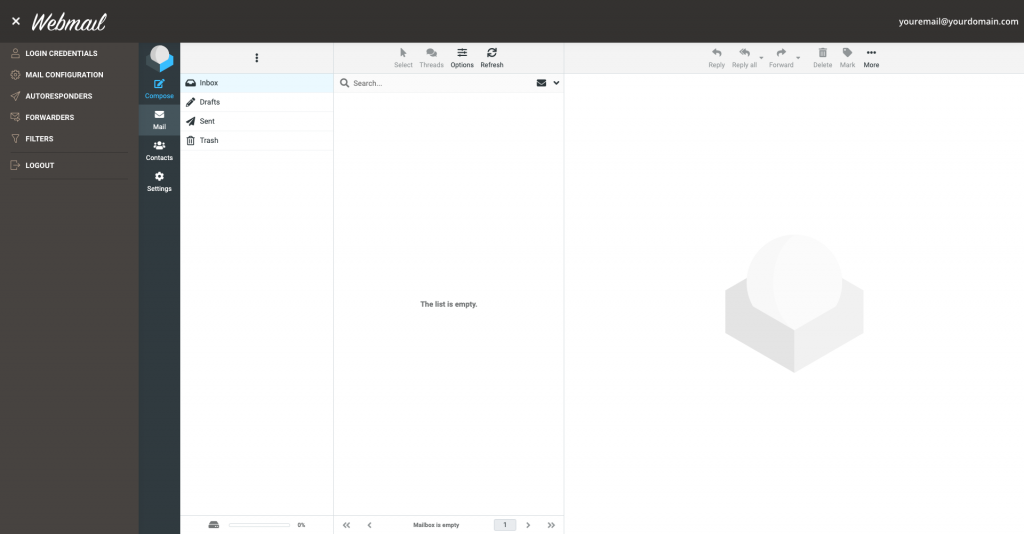
We have just released a stand-alone Webmail application for hosting plans using Site Tools, which allows all email users to change their password and set up different email automation like autoresponders, filters, and forwarders. Until now users could access their mail through a browser (yourdomain.com/webmail* or via the server name), but certain control features were a privilege of the hosting account owner through Site Tools only. 

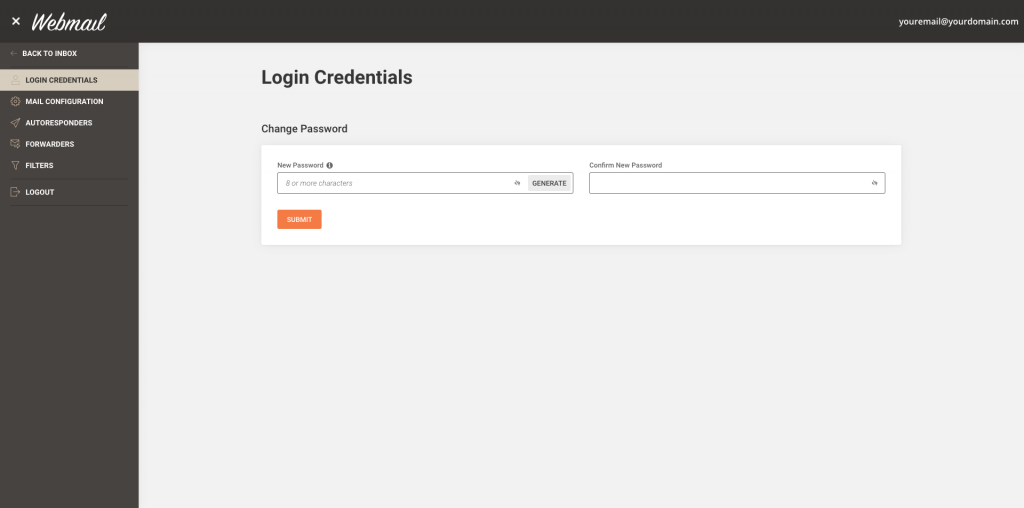
Users can change passwords and manage settings from their webmail interface

Hosting account owners have had access to a number of tools through Site Tools that allowed them to change passwords and set configurations for all the email accounts created and hosted on their hosting plan. Through the Webmail app now each individual email user gets access to the same tools for their account only:

  • Email users can change their email password directly from the Webmail app. 
  • Users can download an auto-config file for setting up their email account on different email clients or just get the needed settings to do it manually. 
  • Autoresponders can now be created and managed through the Webmail app. 
  • Webmail users can set up their own forwarding rules. 
  • Different email filters can be configured directly in the Webmail application to enable email users to organize and automate the distribution of their incoming emails. 
how to login in siteground webmail

More convenience for our clients and their users

Thanks to the new Webmail app, our clients and hosting account owners can now grant access to their users to all relevant email tools they need to manage their individual email accounts. That will offload part of the email maintenance work you may have been doing for your clients. 

 siteground new webmail app

When accessed through the webmail app, these tools work exclusively for the specific email account in which the user is logged. All the changes made through the Webmail are automatically reflected in Site Tools (the same applies in the opposite direction, too). That will allow you, the account owner, to monitor the changes your users make through Site Tools and intervene if anyone needs help.

If you need more guidance, feel free to check out our tutorial on how to use webmail in Site Tools

NOTE:

Just a reminder that you can access yourdomain.com/webmail only if your domain is pointed to our servers and if you have an SSL installed. If you don’t have an SSL, the browser will display an error.

[subscribe_cta]

Accessibility in Our New Client Area and Site Tools

As you probably know, we have recently introduced our new, in-house built interfaces for hosting account and website management. One thing we are truly proud of in both Client Area and Site Tools design is the attention paid to web accessibility. We have invested seriously in implementing multiple features that make our service easier to use for everyone, including people with different levels of motor or visual disabilities.

High Contrast Themes in Both Interfaces

Our designers, with the help of accessibility testers and consultants, have created high-contrast themes optimized for visual accessibility. Viewing a high contrast content is generally easier to comprehend, read, and navigate through, and is proven to be beneficial for some eye conditions.

High-contrast settings are also great if you’re working outside and you need a little something to fight sun glare. We have added standard contrast light and dark themes so that any user can choose the best color combination for them.

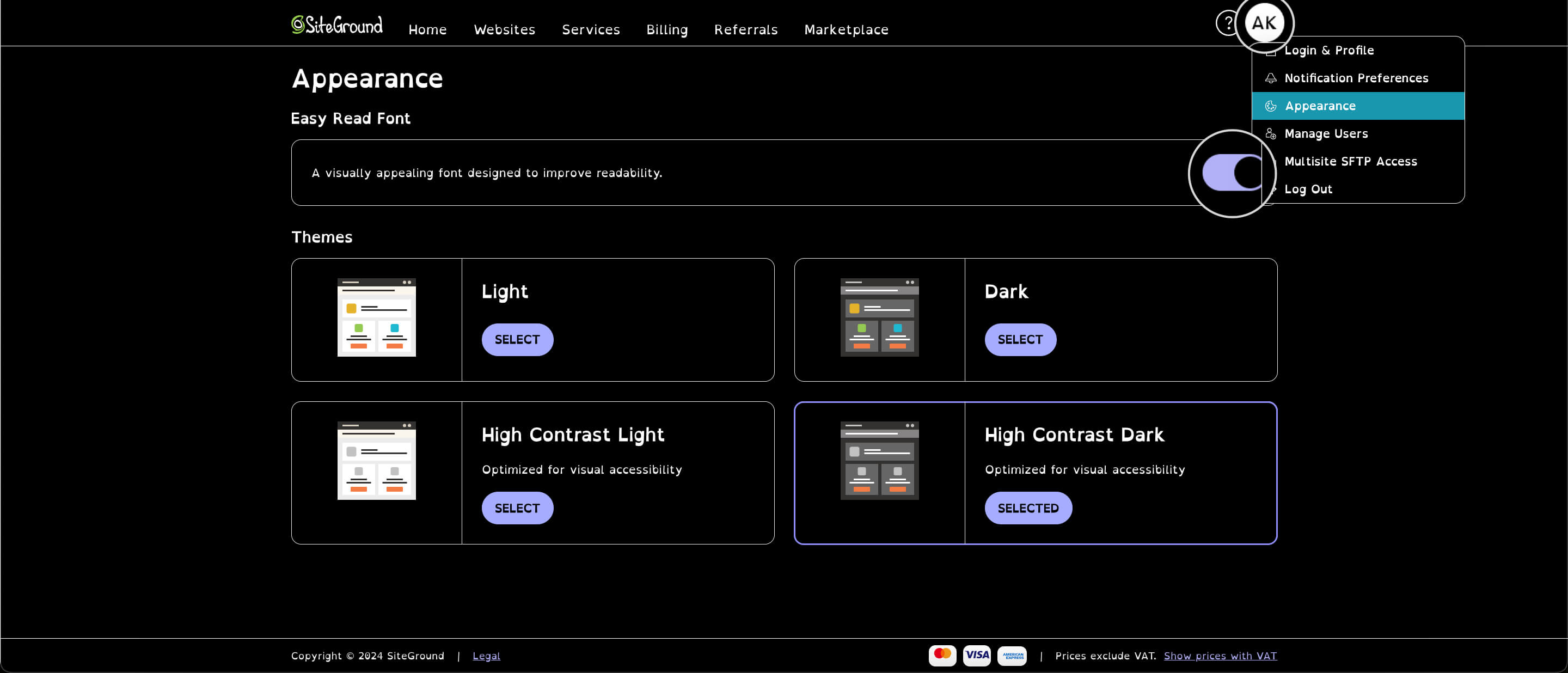
You can also enable the Easy Read Font option, which is specifically designed to improve readability. This makes the font in your Client Area and Site Tools dashboard more visually appealing and easy to read. 

To manage your theme and font settings, click your profile picture/initials in the upper-right corner > Appearance.

How to navigate to the Appearance page in the Client Area

Keyboard Handling 

Keyboard handling, or the functionality to navigate through a website just with your keyboard, is essential for people who need to use screen readers to navigate and read through web content, as well as users who are permanently or temporarily unable to use mouse and touchpads for a variety of reasons.

Besides an accessibility must-have, the keyboard handling implementation generally makes navigation through different tools and pages faster and more convenient for users, who spend a lot of time managing their site and tweaking multiple settings. You can try it yourself – start with the tab to move between elements and click on enter when you want to activate a switch or enter a menu.

Screen Reader Support

A considerable number of web users heavily rely on using a screen reader software for navigating the web due to permanent or temporary visual disability. Generally, just having a good code is enough to make your site readable for most screen readers.

However, a web application with a variety of custom tools, elements, and different settings such as the Client Area and Site Tools needs a bit more work done to make it accessible for screen reader users. We have dedicated a lot of time to research, develop and test each page in both interfaces to make sure that the content is readable in the most popular screen reader software programs such as JAWS, NVDA, and Voice Over.

Implementing screen reader support for the complex components needed for web hosting tools was uncharted territory for us. We have started the implementation following established accessibility standards and along the way, we have invited accessibility experts with different visual impairments to help us test and improve what we have done. Working closely with them and observing how our work enabled people to do things they weren’t able to do before made our efforts worthwhile.

What’s Next?

We consider the implementations described above essential for any web page. And while they certainly cover a lot of people’s needs for accessibility, we want to go even further and make the Client Area and Site Tools as accessible and easy to use as possible. To do that, in the next few weeks we’ll be releasing additional accessibility features such as an easy-read font.

Help Us Make Our Product Even More Accessible

We understand that due to the diversity of needs users may have and the variety of different software, browsers, and devices used, we may have missed something. Having said that, we’re constantly working on improving the accessibility of both interfaces and we’d love to hear your suggestions and feedback on what we’ve done so far.

If you’re using one of the accessibility features and notice behavior that may be improved, or you’re having trouble accessing specific content, drop us a line in the comments section below.

[subscribe_cta]

Free Let’s Encrypt Wildcard SSL

Free Let's Encrypt Wildcard SSL

Starting today, all SiteGround customers can get a free Let’s Encrypt Wildcard SSL. This will make the setup and maintenance of websites with subdomains much easier, as they can now be encrypted with a single certificate.

All it takes is a few clicks in our updated Let’s Encrypt interface in the cPanel. Ever since we heard that Let’s Encrypt plans to launch free Wildcard SSL, we’ve been eagerly waiting for this and we are proud to be among the first hosting companies to successfully integrate the new SSL into their platform. We strongly believe that global adoption of SSL certificates makes the Internet a more secure place.

Continue reading “Free Let’s Encrypt Wildcard SSL”

Our WordPress Autoupdate Just Got Better

If you have a WordPress website and you’re a SiteGround customer, you’re most likely taking advantage of the SiteGround WordPress auto-update service. Having your WordPress installation up-to-date is crucial for a stable and secure website. To make auto-updates hassle-free, we have developed our own WordPress Autoupdate Tool, which is included in all SiteGround hosting plans.

Continue reading “Our WordPress Autoupdate Just Got Better”

1,000,000 Domains and 97% Satisfaction

Last year we reached a new, important and very exciting milestone! Over 1,000,000 domains are now hosted by SiteGround. With the big breakthrough though, comes big responsibility. So many talented people have entrusted their websites with us and we wanted to make sure that we continue to meet and exceed the expectations to every single one of you. To do that, in our annual client satisfaction survey, we’ve asked you how we did last year and what is it that you wanted us to improve. And here is the valuable feedback we received from you.

Continue reading “1,000,000 Domains and 97% Satisfaction”