New Email Migrator Tool for Fast and Easy Email Transfers

migrating email messages from one server to another

When changing your hosting provider, sometimes it is not only about moving your website and pointing your domain to the new server. If you also use email services as part of your hosting plan, the most challenging part of the process may be transfering your email accounts and messages without losing data or creating disruption to your business communication process. To address this challenge for people, who prefer to have everything hosted at one place, we have now added a new Email Migrator tool. It allows you to transfer your mail service from another server to our mail servers fast, easy and securely.

Why did we develop the Email Migrator

SiteGround clients who are transferring from other hosting providers already benefit from our automatic website transfer options. The Email Migrator tool streamlines this process even further, making the transfer of email services possible in just a few clicks, even by not so tech-savvy users. On top of that, the tool helps you keep your email communication intact and safely transfer all of it to our servers.

What are the benefits of our Email Migrator tool

In addition to making it easier to transfer your emails to SiteGround and have everything in one secure place, our Email Migrator has a couple of other added benefits:

  • Intuitive interface for easy migration start 🏗️

The tool interface guides you through the few steps needed to get the process started.

  • Secure and reliable transfer 🛡️

We’ll move your emails in a secure manner, ensuring privacy and data protection.

  • Fast migration 🚀

We’ve developed the tool in a way that the procedure won’t take too long. Yet, the exact time needed will depend on different factors, such as the size of the mailbox, remote server speed, and others.

  • Keeping the structure of the email account being migrated 📧

We’ll transfer your email account for you, including folders, messages and attachments.

  • No duplicates created 📑

We’ll make sure that there are no duplicates created during the migration process.

  • Automated process 🪄

There’s no manual work required on your end, as the migration happens in the background. You’ll need, though, to set up the systems that are beyond SiteGround control: point your MX records to make the new messages come to our server and reconfigure your email client to start receiving the messages from our server.

How to transfer your emails with the Email Migrator

To transfer your emails, you need to follow a few simple steps in your Site Tools > Email > Email Migrator. Read detailed instructions on how to transfer your emails and enjoy a hassle-free email migration to SiteGround!

The Email Migrator is basically the last piece of the puzzle that lets you have everything in one place. Transferring all things to SiteGround allows you to easily manage both your website and email in one account. Not only do you have everything in one place, but you’re counting on our proven expertise in both web hosting and email services.

[subscribe_cta]

Our USA Data Center and CDN Network Just Got Bigger

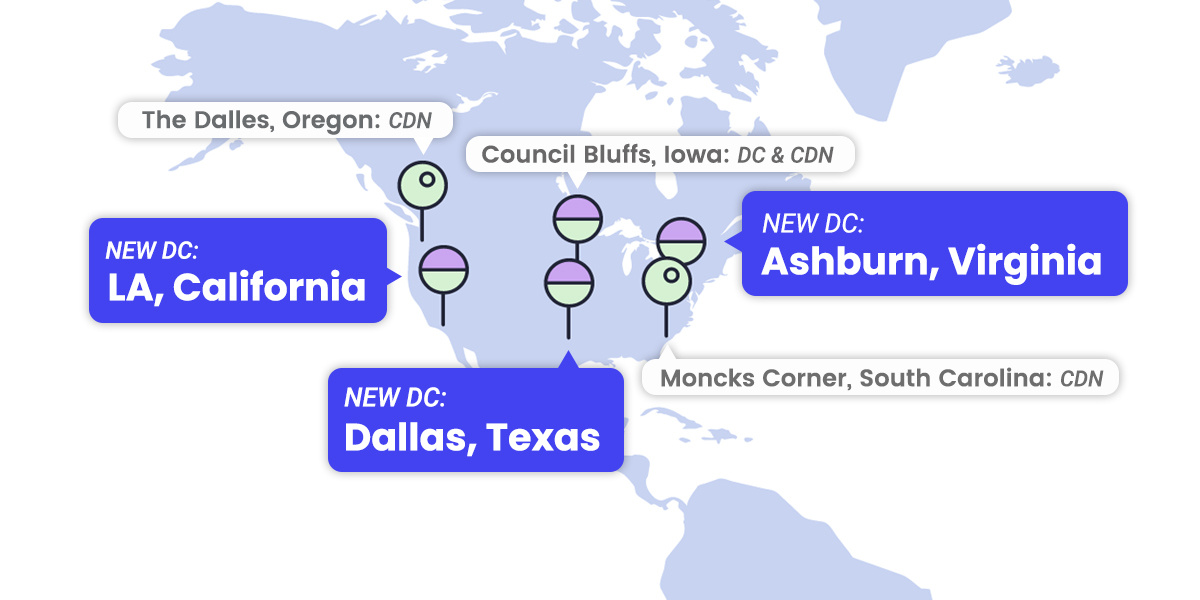
map of the USA with pins where SiteGround has data centers

We are happy to announce that we have increased the number of our data centers and CDN locations in the USA. Our clients may now choose among four US-based data centers to have their sites hosted as close as possible to their visitors. What is more, we already have six US-based CDN edge points, which help improve the website speed in the region as a whole for all our CDN users.

4 Data Centers in the USA

With the introduction of three new data centers, we now have four locations in the USA, all part of the modern Google Cloud infrastructure that ensures high redundancy, fast connectivity, and multi-layered security:

  1. USA North in Council Bluffs, Iowa — best for websites that have visitors predominantly from the northern US and/or Canada
  2. NEW: USA South in Dallas, Texas — best for websites that have visitors predominantly from the southern US and/or Central and South American countries
  3. NEW: USA East in Ashburn, Virginia  — best for websites that have visitors predominantly from the Eastern US states 
  4. NEW: USA West in Los Angeles, California — best for website that have visitors predominantly from the Western US states

When choosing which of our data center locations is best for you, you should take into consideration where the majority of your website traffic is coming from. In case you have a strictly local audience, it is best to have your hosting account placed in the data center closest to your audience. 


You can check where an existing hosting account is currently placed and order a relocation if you think there is a better option for you through Client  Area > Marketplace > Hosting services > Hosting relocation.

6 CDN edge points in the USA

We are also aware that many of our clients receive traffic not just from one state, but from many and it’s hard to choose one, most convenient hosting server location. For such cases, any US-based data center is a good choice for being the original home of your site. However,  the best site loading results will be achieved by using our CDN. The CDN makes sure that a copy of your website is accessible from a location closer to your visitors from all over the USA, and even from all over the world. 

We now have the following CDN locations in the USA: Council Bluffs (Iowa, USA), Moncks Corner (South Carolina, USA), The Dalles (Oregon, USA), Los Angeles (California, USA), Ashburn (Virginia, USA), Dallas (Texas, USA). 


We encourage all our customers receiving traffic from different geographic locations to activate the CDN service. This can be done completely free of charge through your Site Tools > Speed > CDN.

[subscribe_cta]

95% Less Bad Traffic with Enhanced Brute-force Prevention

brute force system improvement

We have been talking about brute-force attacks in the past, but the truth is that many of our clients don’t even realize how real and how common the threat of these attacks is for anyone with a website. Based on our experience of hosting millions domains, we fully understand the destructive potential of brute-force and we have set defence mechanisms to prevent and mitigate such attempts directed at the websites we host. For years our AI brute-force prevention system has been successfully blocking millions of attacks every day. Now, we are happy to announce that the system got even better – by constantly learning from thousands of brute-force attempts per day and adding new functionality for traffic validation, it now filters 95% more of the bad queries!

Advanced AI system that recognizes & blocks brute-force attempts

Analyzing traffic behaviour and recognising patterns is the core feature that makes our AI brute-force prevention system so effective. When a behaviour that matches a certain pattern associated with brute-force is detected (like too many unsuccessful login attempts from an unrecognized location for example), the suspicious source is immediately challenged with a CAPTCHA page that only a real human can pass. This effectively stops brute-force attempts, adds up to the system knowledge and enables legitimate users who have accidentally mimicked a suspicious behaviour to reach the requested location by completing the captcha. The beauty of this constantly evolving system is that it gets better with every brute-force attempt it stops, it keeps sites under attack safe and it ultimately protects the other websites hosted on our servers by blocking bad traffic before it even targets them.

NEW: Traffic validation that minimizes the number of brute-force attacks

We have recently upgraded our system to become even more powerful.  We are now able to more efficiently block the great majority of malicious non-human bots – e.g. incoming brute-force attacks or data hunting agents which aim to profile your site and later hack you through future software exploits. That significantly boosted the system success rate and reduced bad visits by roughly 95%. 

The best example to illustrate how the system works is with the XML-RPC, a file in the root directory of every WordPress installation. Many (WordPress) hosts block its usage because it’s known to be insecure and blocking it is the easiest way to avoid XML-RPC-related hacks. However, XML-RPC also has many legitimate use cases for communicating with external systems and software. That is the reason we don’t aim at stopping XML-RPC – we want to empower our clients to use the tools and services they need to get the best of their websites. Instead of blocking it, we have looked for ways to harden its security and significantly decrease the potential for brute-force attacks. After our latest AI brute-force prevention system upgrade, we now validate all traffic coming through XML-RPC to stop all recognized malicious visits and eventually reduce the overall hits reaching the clients’ sites through XML-RPC by 99%. This means that we successfully filter potential brute-force sources before an attack is even attempted.

Less resource consumption, lower carbon footprint

The impact of this upgrade to our AI bruteforce prevention system is enormous. Not only are we further minimizing the chances for our sites to get brute-forced and potentially hacked, but we significantly reduce resource consumption (like CPU and RAM) generated by traffic coming from bots and brute-force attempts. Lower resource consumption effectively means more resources available for your legitimate visitors and a lower carbon footprint of your site. 

Preventing brute-force attempts is just one of the many ways we constantly protect the websites we host, along with our Smart Web Application Firewall, DDoS protection, 24/7 server monitoring and many more. We believe that security is one of the foundations for any successful website, and we continuously develop new prevention and mitigation solutions, improve existing ones and keep adding new security features to our hosting, so you can have the peace of mind that your website is in good hands and focus on what’s important – your business.

[subscribe_cta]

You Can Now Block Country Traffic to Protect your Website

traffic blocking tool announcement

The security of our clients’ websites has always been one of our top priorities and something that we continuously improve on. The latest tool in our website protection arsenal, available for FREE on all hosting plans, is the option to easily block the traffic coming to your site from specific countries. This will not only increase your website security, but can also help website performance by decreasing resource usage when blocking the traffic coming from locations you would rather not get traffic from.

When to consider blocking the traffic from a specific country?

There are different reasons why someone would like to block the traffic from a specific country to their site, but the most common are the following:

  • To Stop Malicious Traffic

If you notice abnormally high traffic from a country that your site is not targeting as audience, or you start receiving too many spam comments from such a country on your blog posts, or you identify any other behavior you consider suspicious, coming from a geographic region that’s not your main user target, it may be a wise idea to block the traffic from this location.

  • To Streamline Your Business

There are various reasons due to which you might not be willing or able to do business with certain countries. Some examples are expensive and/or complicated deliveries; legal requirements that prevent you from providing your service, heavy taxation requirements, etc. Now, if you need to stop access to your site from a specific country due to such reasons, this can be easily done through your Site Tools.

How does SiteGround country block work?

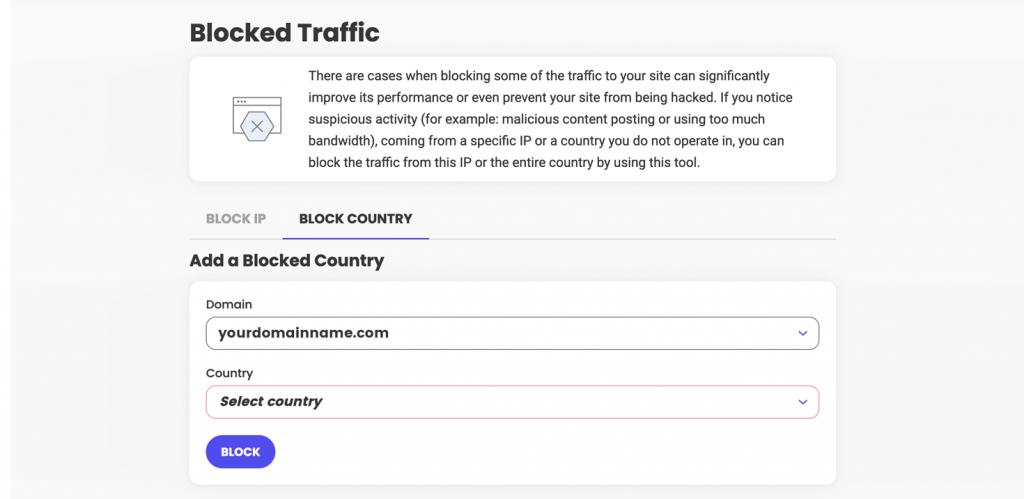
Adding a country to your Blocked list is easy. You need to go to your Site Tools > Security > Blocked Traffic  > Block Country section:

Once a country is blocked, all visitors coming from an IP address that we identify as being located in this country will start seeing our default Country Block HTML page.

The tool allows you to block multiple countries, and also to block certain countries from accessing your main domain, or specific sub-domains. You can review the list of all countries you have denied access to, and/or add or remove countries from it with a click of a button at any time. 


Our new Country blocking option is also fully compatible with our SiteGround CDN and visitors from blocked countries would not be able to access your website pages whether you have our CDN service activated or not.

[subscribe_cta]

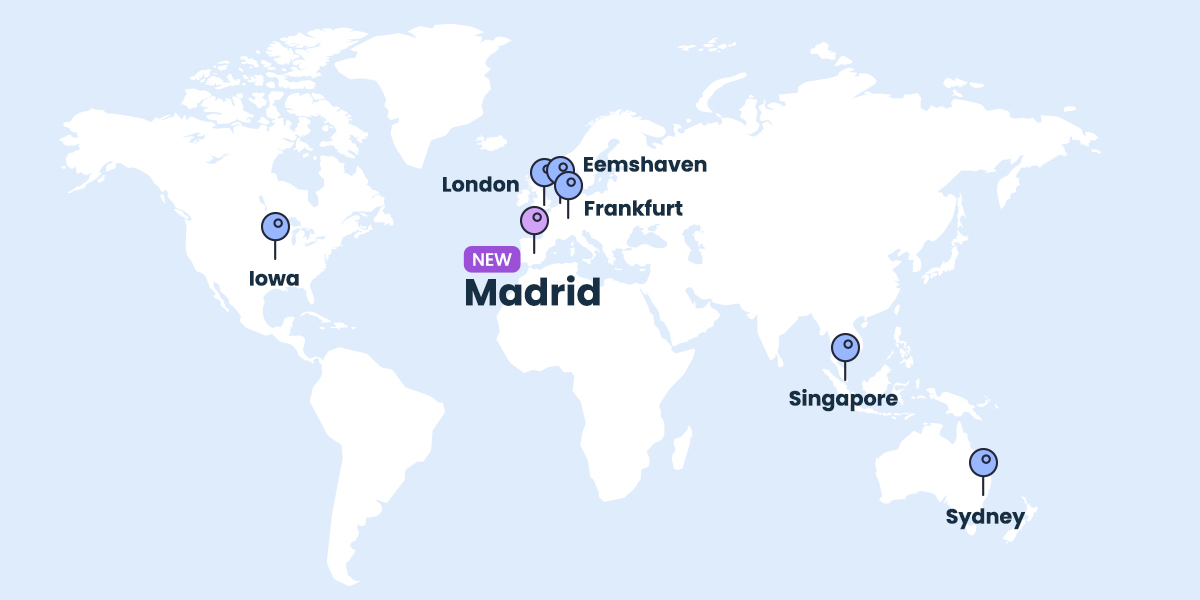
New Data Center and CDN Location in Madrid

map of the world with new Data center in Madrid, Spain

We’re expanding our data center and CDN network with a new location in Madrid, Spain. As soon as Google Cloud, on which our platform is built, announced the launch of their new region Madrid, we started the process of adding this location to our network too. Now all customers, whose websites receive traffic from Spain, may further increase the loading speed of their websites for Spanish visitors by using this new data center and CDN point.

Data Center in Madrid, Spain

Throughout the years, we’ve been growing our data center network by adding new geographical locations. We started off with one server location in the USA, and later on launched our first data center in Europe (in the Netherlands), followed by data centers in Singapore, London, Sydney, and Frankfurt. Currently, all our data centers are part of the modern Google Cloud infrastructure that ensures high redundancy, fast connectivity and multi-layered security.

When choosing which of our data center locations is best for you, you should take into consideration where the majority of your website traffic is coming from. If your website traffic is predominantly from Spain, our Madrid data center is now the best option as it shortens the distance between your website visitors from Spain and the best Google Cloud data center. The geographical proximity, combined with the unmatched Google network will result in reduced latency of the connection and faster page loading time, which in turn helps improve your SEO rankings, ensures better user experience, and leads to higher conversion rates.

Our newly launched data center in Madrid is available for all shared and cloud hosting plans. From now on all new accounts of our Spanish customers will be created by default in our Madrid data center, while existing customers can order a relocation to that data center in their Client  Area > Marketplace > Hosting services > Hosting relocation.

CDN location in Madrid, Spain

Our CDN service is used by thousands of websites with traffic from multiple geographical locations to optimize their loading speed globally. The CDN makes sure that a copy of your website is accessible from a location closer to your visitors from all over the world.

With the launch of our Madrid CDN location we provide an option for sites with traffic from Spain to increase their loading speed there and all over the world by simply switching the CDN on. We encourage all our customers to activate the CDN service. This can be done completely free of charge through your Site Tools > Speed > CDN.

[subscribe_cta]

SiteGround Launches New Site Scanner Plans

upgraded Site Scanner service

Since its launch in 2011, our Site Scanner website security service has helped hundreds of thousands of website owners protect their sites from destructive hacks, data theft and reputation damages via early detection of malicious software. We’ve been constantly improving the service for even higher website security by adding more functionalities, such as deep file scan done directly on the server in its previous update last year. Now we’re enhancing the existing Site Scanner service by adding a Site protect feature to it and we are also introducing a new premium plan that includes two more types of automatic scans and a quarantine option for malicious files.

What Is Site Scanner

Our Site Scanner feature is a security service that’s crafted to protect your website by:

  • Detecting malware and the latest threats that might affect your website;
  • Warning you about such potential threats at an early stage and in a timely manner;
  • NEW: Providing you with tools for reaction if your site is under attack. 

In order to do the above, Site Scanner runs a range of scans and checks on your website in search of any signs of malware daily. If it identifies a threat, you get notified by email which gives you enough time to react in case of any danger to your website security. With our latest Site Scanner version update we’re also adding tools that allow you to react and minimize the impact when your website is under attack.

The service now comes in two plans: Basic Site Scanner, which is an enhanced version of our current SG Site Scanner, and Premium Site Scanner, which includes a brand new set of features. Read on to learn more about each of these plans.

What’s Included in our Site Scanner Basic Plan

The Basic Site Scanner includes many functionalities that will detect and warn you about malware at an early stage, but now we’ve added a brand new feature that will allow you to minimize any damage in case of an attack, and further protect your website.

NEW FEATURE: Site protect

If you get a malware notification or you suspect that your website was compromised, you can now manage four different on/off options from the Site protect interface. They allow you to temporarily disable all file uploads to your website by three different methods: disabling FTP and/or SSH transfers, and disabling file upload via PHP. The fourth on/off option prevents the execution of malicious scripts on the server. While any of these options are enabled, you can safely review the site status and ensure that no additional threats can reach it. This gives you some time to assess the situation, take action to clean any malicious code on your site, and minimize the damage. Once you are sure that your site is safe, you can switch off the respective option from the Site protect interface and resume file uploads again.

URLs scan

The automatic URLs scan crawls your website URLs every day and checks if there is publicly detectable malware on your website.

Domain blacklist check

We automatically check whether your domain has been blacklisted for malware by some of the most popular and authoritative search engines, browsers and anti-virus databases. The blacklist check takes into consideration information from Google, Yandex, Chrome, Firefox, Norton, McAfee and many more.

On-demand manual scan (URLs, domain, and files)

With the Basic Site Scanner you can manually run an advanced scan of your site that will not only check your site URLs and your domain blacklist status, but will also make a comprehensive scan of all your files hosted on our server.

Email Reporting

You get immediately notified if our automatic scans detect anything suspicious with your site. Additionally, you will also get a weekly email summary of your website status.

30-day scan history

You can find a 30-day history of your site scans in your Site Scanner interface with the scan results and detailed information about threats and malware (if any).

NEW: Premium Plan With Awesome Additional Features

We now offer a Premium plan of our Site Scanner service that includes all the above-listed functionalities from the Basic plan, plus some premium-exclusive features for even more enhanced website security.

Daily automatic files scan

Whereas our Basic plan daily scan only checks your URLs and domain for publicly detectable threats, our Premium plan goes deeper. It includes our most thorough check, which goes automatically through every file of your website on the server and looks for malware, suspicious code that may remain publicly unnoticed.

File upload scan

With the file upload scan we will check every new file being uploaded to your site, through File Manager, FTP, WordPress backend or else. This is one of our best prevention tools that can detect malware as soon as it appears and notify you immediately with an instant email notification.

File upload quarantine

The Premium Site Scanner allows you to switch on an automatic quarantine. If you choose to do so, any newly uploaded file that is detected to be malicious will be automatically placed in quarantine (separate folder, outside of your document root), so that it does not become active on your website. You will then be able to manage each of these quarantined files separately, having the option to either restore them to their original location, or delete them. File upload quarantine is a powerful tool that may protect your site in times of an attack.

If you’d like to learn more about protecting your website and see the Site Scanner tool in action, watch the recording of our recent webinar that explains the different levels of protection websites get on our platform and the benefits of using our Site Scanner tool:

Activate or Upgrade Site Scanner for Your Site Now

If you still don’t use our Site Scanner service, we strongly recommend that you activate it to keep your site safe from malware. To purchase the Basic or Premium version of our Site Scanner security service for your site, go to your Client Area > Marketplace > Hosting Services > Additional Services

If you’re already using our Site Scanner service, you’ve been automatically switched to the Basic plan and all its latest features are now available for you to use. As a special offer for all our long-time Site Scanner users, we now offer a free upgrade to the Premium Plan until the end of your current service period. (Your Site Scanner should have been activated before June 15, 2022, in order to be eligible for the offer, regular Premium Site Scanner renewal prices apply after the end of your current term.)

To upgrade to the Premium version log in to your Client Area.

[subscribe_cta]

SiteGround CDN Is Now Officially Here

SiteGround new feature CDN official release

UPDATE

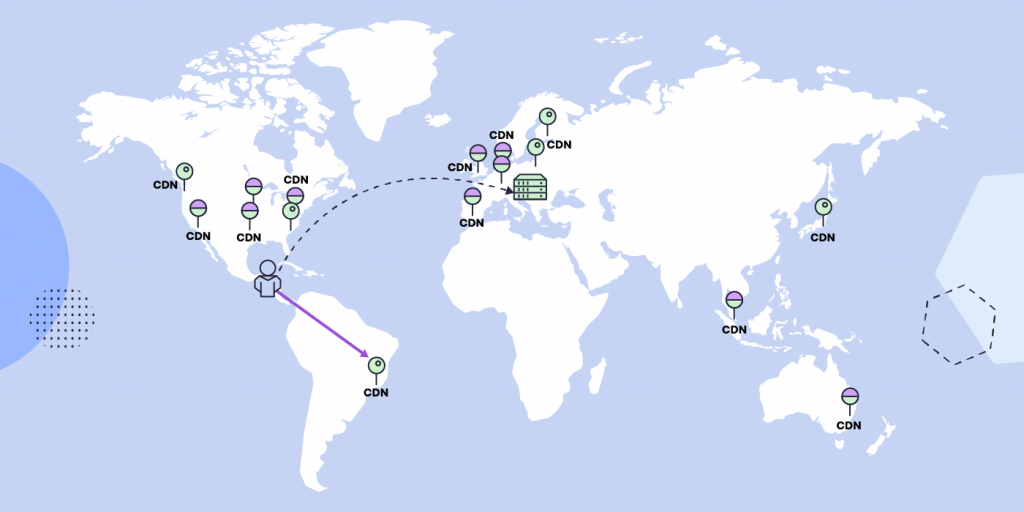
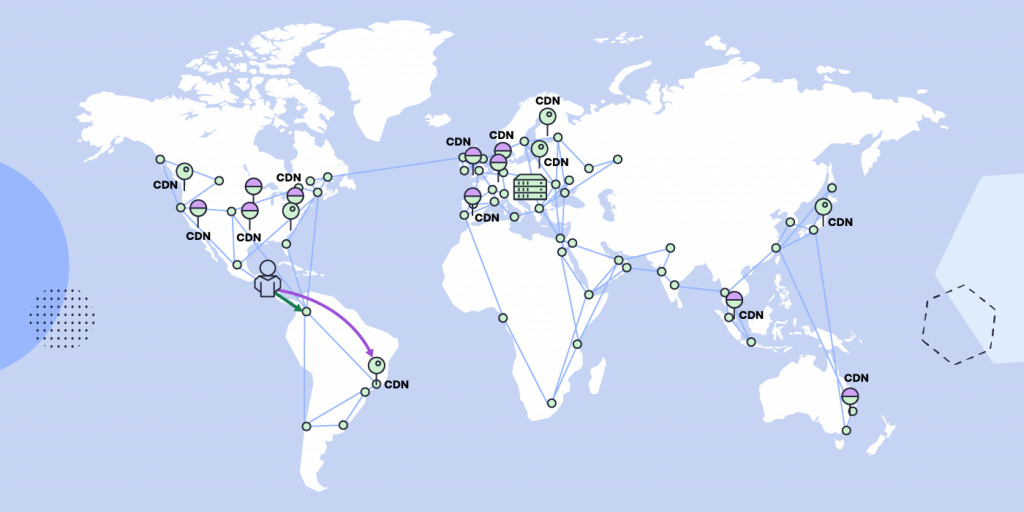
We’ve already launched a newer, even faster version of our CDN service – SiteGround CDN 2.0! It increases the website loading speed by 20% on average, going up to 100% for visitors located in some specific parts of the world, by utilizing the power of anycast routing and Google network edge locations.

We are excited to announce that the SiteGround CDN is out of its beta period and is now officially available for use to all our customers. SiteGround CDN is a site speed optimization service developed in-house specifically for our customers, who receive traffic from different geographic locations. Thousands of users have enabled the CDN during its beta phase and are already actively using it. We are happy and thankful for their strong positive feedback and their input that helped us apply the final touches to our CDN before its official release today.

What are the benefits of the SiteGround CDN

Our SiteGround CDN is an in-house built solution that provides you with a simple On/Off service with smart defaults and native server performance. It is carefully developed to incorporate all related services needed for best results. Here are some of its main benefits:

Blazing-fast websites loading speed

Our SiteGround CDN ensures the fastest loading speed for your websites to its visitors from different parts of the world, thanks to the facts that:

  • Our CDN service is hosted entirely in the Cloud where content is cached and replicated across multiple locations on 4 continents and thus served to your website visitors with minimal latency.
  • Our CDN ensures blazing-fast loading speed of your websites because it uses a super fast private network between our client-specific CDN locations and our hosting servers.

No configuration and easy management

Setting up your SiteGround CDN and managing its features happens with a few simple clicks in your Site Tools -> Speed -> CDN section, thanks to the fact that every layer of our system is built in-house. The activation of the CDN happens with a single click with NO additional site reconfiguration needed regardless of your site setup. No matter if your site is opened with www, or without www, or if it uses SSL or not, the CDN simply works.

SiteGround CDN plans and features

SiteGround CDN includes a free and a premium plan, that you can choose from, based on your website’s needs. Find out more about the two plans in the following sections:

Features in the Free CDN plan

If you choose to use the Free CDN plan, you can take advantage of the following functionalities, completely free of charge:

  • CDN activation for primary domain names with just one click
  • Caching of your website static content on CDN servers
  • Up to 10 GB bandwidth CDN traffic per month
  • Immediate initiation of purge of all cached resources for your website
  • Development mode for checking the latest website changes live quickly and ensuring everything looks good

Features in the Premium CDN plan

The Premium CDN plan includes all of the above-mentioned features in the free plan and in addition, it gives you access to the complete list of premium CDN functionalities:

  • CDN activation for all domains, including subdomains and parked domains
  • Advanced dynamic caching, delivering cached copies of the dynamically generated pages of your site by default
  • Unlimited CDN traffic
  • Custom TTL (time to live) that allows you to choose your desired cache time to live
  • “Always online” feature that keeps delivering the already cached pages from our CDN servers, in case your site starts returning errors

How to get started

You can switch on the Free CDN for your website with a single click from your Site Tools > Speed > CDN section. If you want to unlock the premium CDN features, you need to purchase the Premium CDN service from Client Area > Marketplace > Hosting Services > Additional Services, currently available with 50% off for the first 12 months, starting from $7.49/mo USD (prices are subject to change).

If you would like to use the SiteGround CDN, keep in mind that you cannot use it simultaneously in combination with another CDN. To be able to utilize the CDN service, you need to be using our centralized DNS as well, i.e. your domain should point to our name servers:

  • ns1.siteground.net
  • ns2.siteground.net

Try out our new CDN service for yourself and feel free to leave us a comment, in case you have any feedback or suggestions.

[subscribe_cta]

New Private DNS Service for Enhanced Online Privacy and Completely White-Label Hosting

image introducing our new Private DNS service

We are now introducing our own Private DNS service, which allows you to customize the default name servers on our platform for enhanced online privacy and completely white-label hosting. It takes full advantage of our centralized DNS service, which was built to ensure faster domain name resolving for a faster website loading, enhanced reliability, and easy DNS management, and which also formed the basis for our own Cloud-based Content Delivery Network to additionally improve site performance.

Introducing our Private DNS service

The DNS service translates the domain names (pages’ URLs) to the numerical IP addresses of the servers hosting the website content. Thus instead of visitors having to type a combination of numbers in the browser, they can use letters and words. Thanks to our centralized DNS service, all domains registered with SiteGround are now using the same default name servers: ns1.siteground.net and ns2.siteground.net. Our Private DNS service makes it possible to change those to your own custom name servers, based on your own domain names or your brand. It allows you to point all your websites’ domains to these unique name servers. For example:

  • ns1.mydomainname.com
  • ns2.mydomainname.com

What are the benefits of our new Private DNS service?

Enhanced online privacy

Using custom domain server names helps enhance your online privacy. The Private DNS service hides the default ns1.siteground.net and ns2.siteground.net name servers. This obfuscation of the information makes it harder for third parties to find out where exactly your domain is located, which hinders them from taking advantage of potential issues that may arise on the servers.

Completely white-label hosting

The Private DNS service is especially useful for white-label resellers. If you wish to offer hosting to your clients, but you don’t wish them to know that the service is provided by SiteGround and have them communicate with us directly, using the Private DNS is a great idea. That will help you conceal who’s the original host, which makes you the sole provider and increases your brand name visibility.

How to activate and manage the Private DNS service?

You can activate Private DNS for your domain from Client Area > Marketplace > Hosting Services > Additional Services. You get this service for free if you are on a GoGeek or Cloud hosting plan. The Private DNS is also available on a yearly subscription basis for all other customers who want to use this service. To be able to enable Private DNS for your domain name, it must be registered with SiteGround.

How to Activate Private DNS

To manage and view your DNS information, you can do so from Client Area > Services > Domains > Manage (for the associated domain) > Extras.

How to Manage Private DNS

[subscribe_cta]

Introducing SiteGround Cloud CDN in Beta

Not so long ago we launched a Centralized Anycast DNS service which made DNS management on SiteGround really easy and significantly boosted domain name resolving speed and redundancy for SiteGround clients compared to using local DNS servers. Our Centralized DNS also laid the foundation for another feature that is essential to website speed and performance –  our own Cloud-based Content Delivery Network – SiteGround CDN.

Why did we develop SiteGround CDN?

For the past 10 years, we’ve been partnering with CDN providers to offer free built-in CDN as part of our hosting services. However, third-party services invariably require additional setup and configuration, often involving managing things from separate interfaces or technical knowledge about DNS, HTTP, cookies, etc. On top of this, using third-party services may sometimes cause confusion for users or issues which are outside of our control. And at SiteGround, we’ve always strived to minimize the hassle as much as possible for our clients. 

That’s why we wanted to build our own CDN solution to provide a simple On/Off service with smart defaults and native server performance. SiteGround CDN is developed specifically for our clients to incorporate all related services needed for best results:

  1. Smart Anycast DNS to route the traffic to the geographically nearest CDN location
  2. More control over the backend hosting servers to increase redundancy and offer more features out of the box
  3. Greater flexibility to configure things for our clients without them having to do anything

What are the benefits of SiteGround CDN compared to a third-party service?

Cloud-native Performance

Our new CDN service is hosted entirely in the Cloud – multi-region, highly available, and redundant groups of servers, making it possible for your content to be cached and replicated across multiple locations, and be served to your website visitors with minimal latency. It works with our Centralized DNS and its high-speed Anycast routing technology to direct your site’s visitor requests to the closest SiteGround CDN location. In turn, it will serve the content from the cache in our CDN cloud (if the specific content has been cached previously) or proxy it to your site’s hosting server ensuring near-native server performance.

Client-specific Locations with Premium Networking

We carefully analyzed the aggregated main website traffic sources on our servers and created the following list of locations currently powering our CDN network: Tokyo (Japan), Singapore, Sydney (Australia), Warsaw (Poland), Hamina (Finland), London (England), Frankfurt (Germany), Eemshaven (Netherlands), Council Bluffs (Iowa, US), Moncks Corner (South Carolina, US), The Dalles (Oregon, US), Los Angeles (California, North America). 


Having CDN cloud servers at the locations above gives us a great advantage in terms of network performance. The fact that we have network control over both the CDN layer and your website’s hosting server makes the communication between them blazing-fast. By using internal routes between the servers we are eliminating any delays and latency that might be observed with third-party CDN providers utilizing the public network to communicate with your site’s hosting server. In short, this ensures the fastest private network between our CDN locations and our shared hosting servers, resulting in faster website loading speeds for our clients.

No Configuration and Simple Management

Thanks to the fact that every layer of our system – from the hosting environment, through your website management panel, to the Centralized DNS – is built in-house, we can provide our clients with an easy and comfortable way to add a CDN layer to their websites with literally one click. It also allows us to implement the CDN functionalities you need and make them available in an easy-to-use interface directly within SiteGround’s website management interface – Site Tools. 

Everything from setting up your SiteGround CDN to enabling/disabling a certain feature is handled automatically in our backend. The only thing left for you to do is click a few simple buttons in the Site Tools -> Speed -> CDN section of your site. This way we’re saving you a ton of annoying actions:

  • No external CDN control panels – you don’t need to log anywhere else except your Site Tools area
  • No need to change and use external Nameservers – it all happens within our central DNS records
  • No need to create additional DNS records for the www-prefixed version of your domains – we will route absolutely everything through our CDN service, regardless of whether your site is opened with the WWW or non-WWW version of your domain. 
  • No additional HTTP configuration – no specific Cookie settings, no need to implement anything in your application. You just click the “On” button and your content will be served from the closest SiteGround CDN location point to your site visitors.

SiteGround CDN Beta Features

After successfully passing our detailed internal testing, SiteGround CDN Beta is now available for testing. Currently, SiteGround clients can enable it for their sites’ primary domain names with one click, absolutely free. Here’s a quick overview of the features that are currently available for all users that decide to use the SiteGround Cloud CDN in Beta:

  • Access all available CDN locations that we currently offer
  • Static & Dynamic caching with no extra configuration – third-party CDN services usually only cache and serve static content by default ( website images, CSS, Javascript, ect). With SiteGround Cloud CDN, you can choose to cache both your site’s static and dynamic content with a single click. This way our CDN will instantly deliver cached copies of the dynamically generated pages of your site by default, instead of static content only.
  • Cache TTL (time to live) modification – SiteGround CDN currently has a global default value of 12 hours. However, if you want to set a different cache TTL you will be able to do it by simply choosing the desired cache time to live from a drop-down menu in your Site Tools interface.
  • Development mode – caching is good, but we know that sometimes you want to check the latest website changes live quickly to ensure everything looks good. Our Development mode functionality will allow you to bypass the cache and fetch fresh content from your site’s hosting server, instead of the CDN. So there’s no need to turn the CDN service on and off again and again when you’re making website changes.
  • “Always online” feature – we also know that sometimes things can go wrong. Our Always online feature tells our system to keep delivering the cached pages from our CDN servers, which comes in handy if your website application starts returning an error for some reason.

You can find detailed instructions on how to use our CDN interfaces in our CDN tutorial.

How to take advantage of the SiteGround CDN Beta?

You can activate SiteGround CDN Beta from Site Tools -> Speed -> CDN section of your site. Currently, it’s available for primary domain names only, and completely free with its full feature list. The official SiteGround CDN release will feature two plans – basic and paid with different functionality. All clients who activate the Beta version of our CDN get access to the complete list of features, and will be able to continue using them for free for 3 months after the Beta period is over.

Gaining even more data and insights during the Beta period, in addition to client feedback, would help us polish and perfect the nitty-gritty details. All clients using SiteGround CDN in Beta will be able to test its performance benefits and provide feedback about the service or what we can improve directly in our Support HelpDesk, so you’ll be able to communicate and share your opinion directly with the people who designed and developed the whole system. And how often, really, do you get to have that – free performance optimization and a direct feedback loop to the people who created it. At SiteGround it’s a win-win for all.

[subscribe_cta]

Speed Optimizer (formerly SG Optimizer) is Now Available аnd Free for All WordPress Sites

When we started developing the SiteGround Optimizer plugin back in 2012 we wanted it to be a bridge between our services and our clients’ WordPress sites. During the years we introduced more and more features and the SiteGround Optimizer (now named Speed Optimizer) became one of the best performance optimization plugins for WordPress, based on popular ratings. And naturally, we started getting inquiries about how websites non-hosted on our platform could benefit from it. That interest gave us a push to decouple the plugin from its dependency on our infrastructure and convert it into a hosting-agnostic, completely free solution for all. We are now excited to announce that as of its latest version, the Speed Optimizer plugin can be used by any WordPress website, regardless where it’s hosted! 

Features Available on Any Hosting Platform

Making the Speed Optimizer available on other platforms wasn’t a simple task. Part of the success of the plugin is tied to the SiteGround server setup that is built with performance in mind and takes advantage of some of its unique features. To open it up, for every feature that was dependent on our platform’s services, we had to come up with a solution that would work just as effectively on different platforms and configurations. 

File-based Caching (NEW FEATURE)

File-based Caching introduces preheating and cache for logged-in users!

Nowadays caching is one of the most effective means to optimize performance. When looking for alternatives to Dynamic Caching (built-in feature for all SiteGround websites) we decided to implement File-based caching because of its versatility and compatibility with different hosting configurations. File-based Caching can be used on its own on websites hosted outside SiteGround or as an additional caching layer for SiteGround customers who already have Dynamic Caching and Object caching (Memcached) enabled. 

Some great features of the File-based caching are the ability to keep cache for logged in users, pre-heating cache (especially useful for rarely opened pages that are opened for the first time in a while) and defining longer cache expiration. These options are configurable in the plugin interface. Although file-based caching alone is generally slower than the Dynamic caching, our tests show that its implementation in Speed Optimizer is still up to 20% faster than any other plugin that provide similar performance-optimization functionality that we have tested.

Environment Optimizations

All users can enjoy several types of environment optimizations that will tidy up your WordPress environment to achieve top performance. Here you can find features like WordPress Heartbeat Optimization where you can define how the WordPress API interacts with your application to optimize resource usage, and  Schedule Weekly Database Maintenance to make sure that your WordPress remains tidy and uncluttered.

Frontend Optimizations

The website’s front-end code can often be heavy and significantly reduce loading speed. There are several features in the Speed Optimizer that can optimize it and as a result speed up your website. Minifying your HTML, CSS and JavaScript output will decrease the size and number of server requests related to these types of files and as a result decrease loading time. We have made these functionalities available through simple toggles in the plugin. You can specify which types of files you want to minify, combine and even exclude from minification or combination. And if all of this sounds too technical for you, you can just look for the “Recommended” labels next to each option to figure out what would have the greatest impact on your website’s performance.

Media Optimizations

There are several media optimization tools in the Speed Optimizer that will work on all hosting platforms. You can enable Lazy Load with which only the media in the visible part of the browser will be loaded. This makes loading faster and smoother for longer pages with multiple media items. You can also define the Maximum Image Width allowed for images on your website. A lot of themes and plugins tend to upload excessively large images that slow loading speed without ever being displayed in their full width. 

SiteGround Exclusive Features

As mentioned earlier, our platform has some unique speed settings and services, which cannot be replaced with plugin functionality alone since they need the specific server environment to run as designed. These remain exclusively available to websites hosted on SiteGround. 

Dynamic Caching and Object Caching 

One of the best speed-enhancing features you can get for your website and our top choice when we talk about speed, is the Dynamic Caching. The Dynamic Caching is part of our proprietary 3-level server caching implementation that relies on NGINX Direct Delivery for static cache handling, Dynamic Cache for dynamic content and Object Caching (Memcached) for storing data and objects in the RAM. We believe that Dynamic Caching is essential for every website and we have it included in all of our hosting plans. From the Speed Optimizer plugin you have control over advanced WordPress-specific settings for the Dynamic Cache and Memcached to get the most of this technology. 

Image compression and WebP

The Image Compression and WebP features of the Speed Optimizer plugin are two essential features available to websites on the SiteGround platform exclusively. With our image compression algorithm you can decrease your image size (and respectively the time it takes for your images to load) by up to 85%, while keeping the image quality high for your visitors. You can also enable WebP which will convert your images to a WebP format which adds an additional reduction in size without affecting image quality. 

Opening the plugin to websites hosted outside of SiteGround was a big step for us. After running multiple tests on different hosting platforms and benchmarking performance against WordPress plugins with similar functionalities, we’re confident that the Speed Optimizer plugin is the best performance optimization tool you can get for your website regardless where it’s hosted. And it’s completely free. Download it here, try it yourself and let us know how it works for you by leaving a comment in the section below.

[subscribe_cta]