Expert Spotlight: The Team That Shapes SiteGround’s Culture

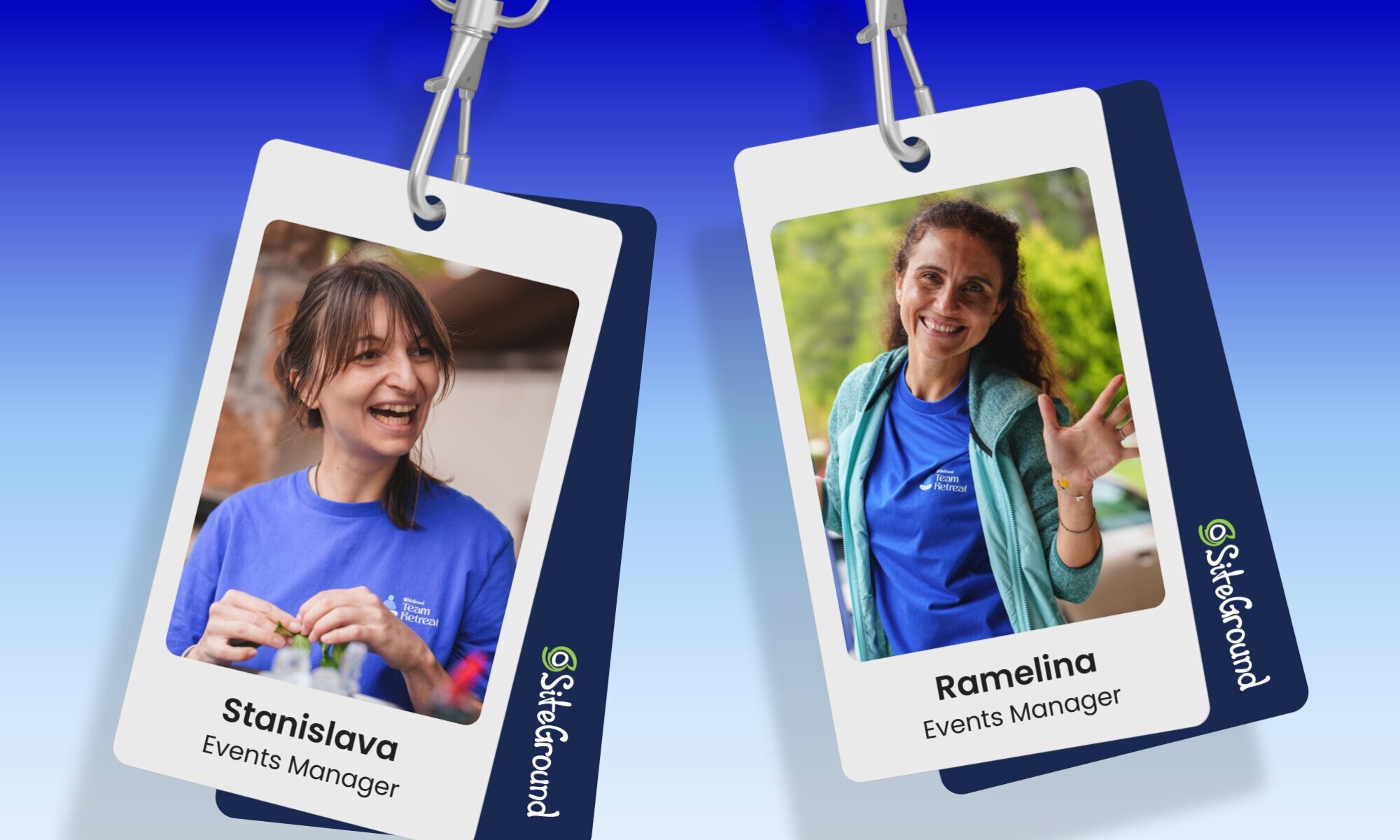
Expert spotlight with Stanislava and Ramelina

Building a strong team spirit and a genuine sense of belonging is never easy. When SiteGround first started, we were a small but ambitious team with a true startup mindset. But how do you preserve that same closeness when there are more than 550 experts, spread across different countries, teams, and generations? That challenge rests largely on the shoulders of our Events team – the people who craft experiences that bring our global community together.

Their work shines brightest during our Team Festivals – the moments when the entire SiteGround family comes together. Today, we’re taking you behind the scenes for an exclusive look at how it all comes together. Meet our Events Managers, who recently led our latest Team Retreat – a special event that unites 500+ SiteGrounders to share hobbies, learn new things, spark ideas, and truly connect.

From wild logistics to heartfelt teamwork, it’s clear that every event has its surprises. Here is what our events look like:

We sat down with them to learn what it really takes to shape SiteGround’s culture through events, and how their roles have evolved as the company has grown.

Q1: To set the stage, what’s something about your job that would surprise people?

Ramelina: I guess it would be the fact that I never get tired of my work. Every time I’m organizing an internal event, I’m genuinely excited to see my colleagues’ smiles. That excitement keeps me going—I’ve never felt exhausted, even when I’m holding flower scissors in my hand, removing vinyl from fences after only three hours of sleep. I truly love every minute of it.

Stanislava: The best thing about organizing events is that you never know what wild idea or unexpected task you’ll get involved in. For example, last year for our Team Festival, we had to find 30 huge water tanks to create a light installation, which led me to research where to rent water containers from! This year, we brought a giant floating SiteGround logo all the way to Greece and installed it in a pool. People are often surprised that all of these diverse projects are handled entirely in-house. And honestly, that’s one of the things I love most about being an Events Manager.

Q2: But beyond the behind-the-scenes hustle, how do these experiences actually shape SiteGround’s culture?

Ramelina: When you look at typical team-building photos or videos from different companies and then compare them to ours, you instantly see the difference. Our motto, “Never Bored. Never Boring.” isn’t just a marketing slogan, but a true reflection of who we are. Everything we create is by us, for us, driven by the creativity and enthusiasm of our colleagues across departments. That’s what makes our events so authentic and full of energy.

Stanislava: SiteGround’s annual Team Festival perfectly captures our team spirit. It brings together collaboration across many departments – Designers, Office managers, IT experts, Social media team and Creative teams, Accounting, Legal, and more. During the festival, it’s our own team members who lead the main workshops like 3D printing, electronics, handicrafts, sports activities, and many others. Despite everyone’s different day-to-day roles, we all become part of the ‘festival crew.’ This approach allows us to create something truly special, and everyone can feel it.

Q3: What’s one story from an event that perfectly captures the spirit of teamwork here?

Ramelina: One story? Impossible. There are dozens of them. However, the fact that we gather every year for a team photo, with all 500+ people coming together, and we’re still not bored from calling out “SiteGround” with broad smiles, speaks for itself. 

SiteGround team photo in Greece (2025)

Q4: How do you measure the success of an internal event? 

Stanislava: There are many common event metrics like attendance rates, social media engagement, or post-event surveys. However, since events are inherently emotional, I prefer to focus on the energy that lingers afterward. What I see is people buzzing with excitement – sharing videos, photos, and stories.

And perhaps most importantly, our festivals often spark new friendships. This is especially important for new colleagues, who instantly feel included and connected. I know that from personal experience. When I joined SiteGround, it was just before a team event, and it helped me feel at home from the very start.

Q5: As SiteGround continues to grow, how have the challenges you face as an organizing team changed?

Ramelina: When there were fewer than a hundred people, it was easy to think about what everyone might enjoy. Now, with more than 500 colleagues, we have to focus on what will appeal to the majority, while still making sure each person feels included and seen. That’s a tough balance to strike. But because our events are created by us, for us, and always infused with positivity, the result is inevitably something special.

Stanislava: With such a large and diverse team, it’s impossible to match everyone’s taste in a single event, especially when it comes to the music lineup. But the beauty of SiteGround’s diversity is that it brings so many hidden talents together. So we turn the challenge of diversity into an advantage by including our own colleagues in the lineup. For example, our amazing rock band, made up entirely of SiteGround team members from Tech Support, AI Development, DevOps, and QA teams, rocks the stage every year. We even have DJ sets performed by one of our Product Owners! And one more from the Customer Care team! 
Technical Issues band in SiteGround Team Retreat in Greece 2025

Q6: What is the biggest value of investing in memorable internal events?

Ramelina: Truly great internal events are a refreshing boost to our work-life balance. That’s why our team-buildings include a bit of everything – opportunities to learn something new, connect with nature, sing and dance, show your talents, and share your favorite hobbies. You even forget about your smartphone entirely and just enjoy being present with your teammates in real life.

Stanislava: SiteGround events remind me, and hopefully everyone, just how amazing the people we work with every day really are. They’re one of the things that truly set us apart because we pour our hearts into them, just like we do when creating our products and services. In the end, it’s these moments together that genuinely restore my faith in community and humanity in general.

Happy SiteGround employees enjoying the team retreat in Greece

We’ll leave you with a glimpse of the fun: check out our party photo gallery! And here’s a final thought from Ramelina that perfectly captures how our events shape SiteGround’s culture: “Creating only for work doesn’t work for long. You have to play. It’s a voyage, not a destination.”
P.S. Don’t forget to check out our Expert Spotlight series to get an inside look into different SiteGround departments!

From 30K to 2.5 Million Monthly Sessions: The Forked Spoon’s Growth Story with SiteGround

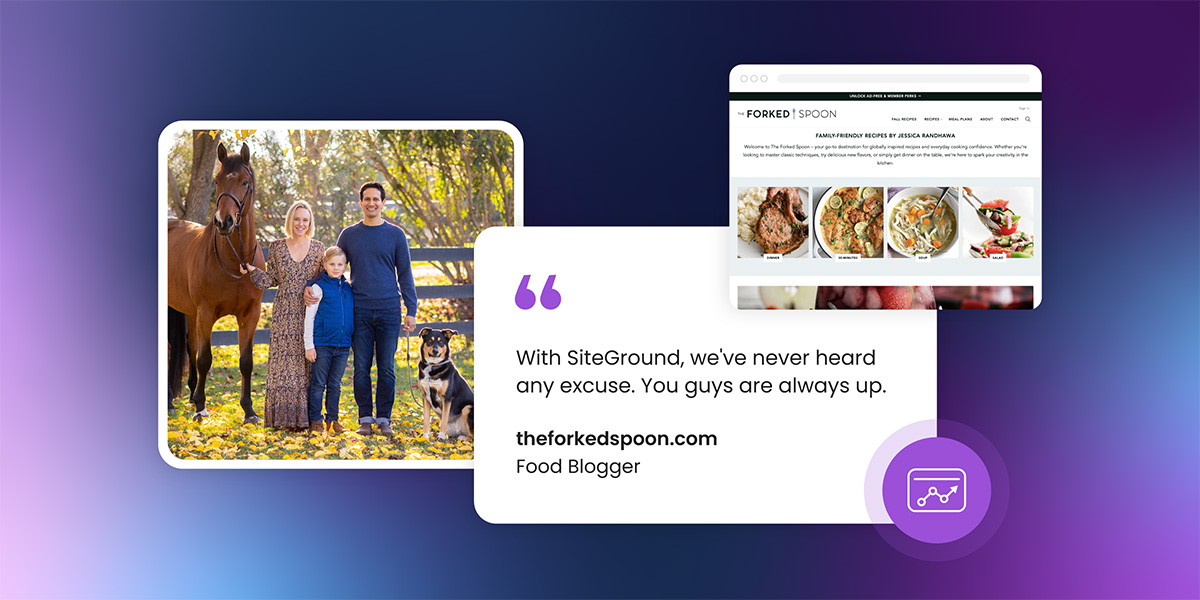
SiteGround customer testimonial featuring The Forked Spoon food blogger, showing family photo with horse and dog alongside food blog website screenshot displaying recipe content, with quote praising reliable uptime and support

It’s similar to every small business story. You start out doing something you love. Maybe you’re selling products, offering services, or simply sharing your craft or expertise online or offline. But somewhere along the way, you ask yourself, “Could this be a real business? And if so, what more can I do to help it grow and thrive?”

That’s exactly where Jessica and Aaron Randhawa found themselves in 2016 with their food blog, The Forked Spoon.

The Turning Point Every Business Owner Faces

Jessica started her blog on the free Blogger platform back in 2011 as a simple way to share family travels. Her space gradually transformed into a collection of personal stories mixed with food recipes. She moved to Squarespace, and for years, it stayed that way – a hobby, something she did out of passion. She earned a bit from brand sponsorships, but nothing significant.

Then one day, a fellow blogger shared their monthly income figures. The numbers stunned Jessica. She turned to her husband Aaron and asked a question you might be asking yourself right now: “What would it take to turn this into a real business?”

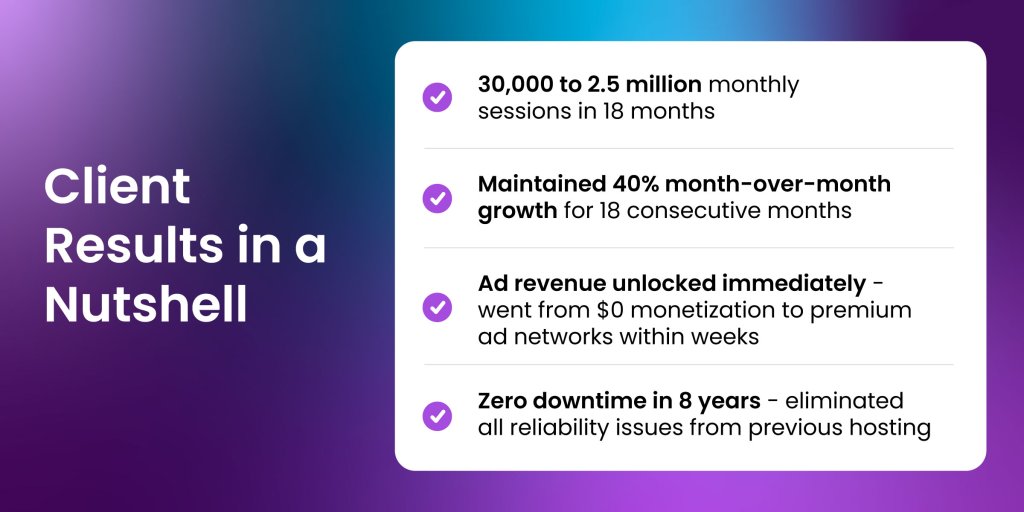
Summary of client achievements with SiteGround showing growth from 30,000 to 2.5 million monthly sessions in 18 months, sustained 40% month-over-month growth for 18 consecutive months, immediate ad revenue monetization through premium networks, and zero downtime across 8 years

The Squarespace Bottleneck

In 2017, following that eye-opening conversation about successful blogging, Jessica and Aaron began to seriously evaluate their setup. Squarespace was holding them back in ways they hadn’t fully recognized.

“We decided to switch everything over to WordPress to focus more on SEO since Squarespace at the time wasn’t able to do much for SEO.” – Aaron Ranhawa

The problems were significant and multifaceted:

  • SEO capabilities were virtually nonexistent
  • Oversized images were killing performance
  • Limited monetization potential
  • Technical limitations prevented the kind of optimization they needed for serious traffic growth

“The site was slow. It was a hot mess. Our images were way too big and heavy, which Squarespace didn’t care about.” Aaron recalls.

Sound familiar?

The SiteGround Difference

In mid-2017, The Forked Spoon made the leap from Squarespace to WordPress hosting with SiteGround. By 2018, they were focusing heavily on SEO, optimizing existing content, improving site speed, and publishing consistently.

The results came faster than they expected.

“In 2018, after focusing on SEO and everything being on SiteGround and WordPress, we started seeing month-over-month growth of 40% starting from 30,000 visitors.” 

Within just one month, they qualified for Mediavine, an advertising network that required a minimum of 50,000 sessions at the time. They’d increased their traffic by nearly 70% in 30 days.

But that was just the beginning. By November 2019 – roughly two years after the migration – The Forked Spoon was attracting 2.5 million sessions per month. That’s an 80x increase from their starting point.

“I was like, why didn’t we do this sooner!? Imagine where we would be now!” Jessica says.

The results were in:

  • Within 30 days: 70% increase in traffic, qualifying for premium ad networks
  • Within 18 months: 2.5 million sessions per month
  • Growth rate: 40% month-over-month for 18 consecutive months
  • Overall result: An 80x traffic increase from their starting point
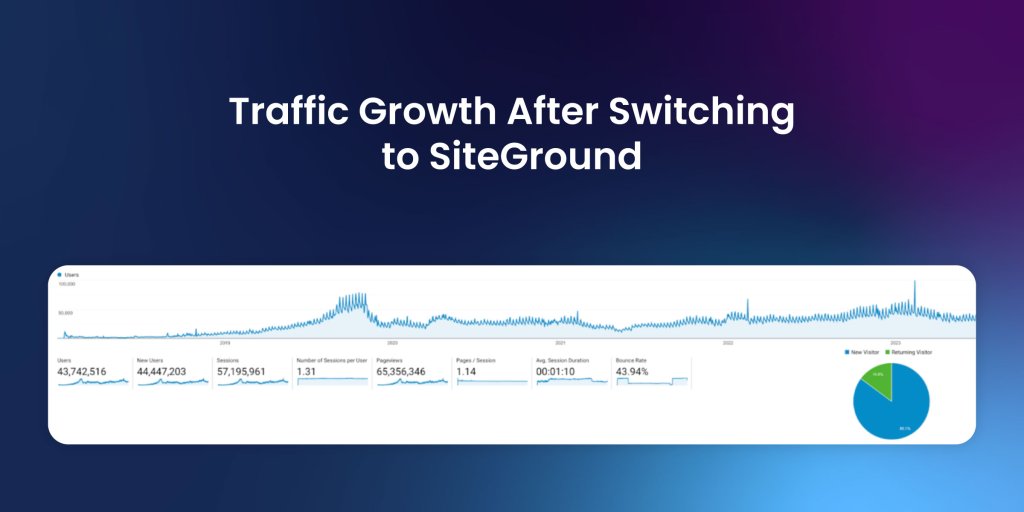
Google Analytics dashboard showing website traffic growth from 2019 to 2023 after switching to SiteGround hosting, displaying 43.7 million users, 44.4 million new users, 57 million sessions, and 43.94% bounce rate with upward trending visitor graph

A Migration That’s Worth It

Infrastructure That Grows With You

No business owner should have to worry about whether their website hosting can handle their success. 

The Forked Spoon started on a basic SiteGround hosting plan and scaled to cloud hosting as their traffic exploded. Simply because SiteGround’s infrastructure is built to grow with you.

“We love having you guys utilize Google’s cloud as a backbone, it just never goes down,” Aaron explains.

The Uptime Factor

Just like for any online presence, so in the food blogging world, downtime is a constant concern. Community forums regularly fill with complaints about outages, power failures, and networking issues. During those crises, The Forked Spoon stayed live.That’s not just convenience—that’s revenue you’re capturing while others are losing it.

“We’re in a lot of communities online for food bloggers, and we always hear, ‘Is anybody else down? Is this company down?’ And with SiteGround, we’ve never heard any excuses. You guys are always up,” Aaron shares.

Jessica and Aaron admit they deliberately kept quiet about their hosting provider for years, treating it as a competitive advantage in an industry where uptime directly impacts revenue during peak traffic moments.

“Uptime is a huge thing in food blogging, and we’ve just kind of kept you guys in our pocket, been quiet about it to keep it as a competitive advantage.” – Aaron Randhawa

Website Management Tools That Actually Work 

Managing the technical side of a high-traffic blog requires tools that make your work easier, not more complicated. This was SiteGround’s thought behind Site Tools – their custom-built website control panel replacing traditional cPanel. 

And Aaron found it did streamline his daily workflow.

“Site Tools is way better than cPanel. So much more intuitive. It’s got everything we’ve ever needed. I love the simplicity, and it’s easy to get to.” 

You need to be able to manage your site quickly, especially in critical situations, so you can get back to running your business. When something goes wrong—a plugin breaks, an update causes issues—you can restore from SiteGround’s automated daily backups in minutes, not hours.

“Having everything automatically backed up on your servers… I’ve had to roll back plugin updates or all of a sudden, something’s wrong with WordPress, and had to roll back a WordPress update–it’s really easy to do that with SiteGround’s Site Tools.”

Support That Doesn’t Make You Wait

For Jessica and Aaron, who manage everything from recipe development to website maintenance, knowing help is available around the clock just gives them this extra layer of peace of mind. When you’re running a business by yourself or with a small team, you can’t afford to wait hours for technical support.

“Another thing we really like is the 24/7 support. It doesn’t matter what time of the day it is, I’m always going to be able to talk to somebody. I don’t think I’ve ever had to wait more than two minutes to get a hold of somebody on chat.”- Aaron Randhawa

The Investment That Actually Pays Off

When they first considered making the switch to WordPress hosting with SiteGround, the investment in changing platforms and the cost of managed hosting services gave them pause. When you’re evaluating hosting costs, it’s easy to focus on the monthly price. But here’s the real question: What’s the cost of staying where you are?

For The Forked Spoon, the leap they took in 2017 wasn’t just about changing hosting providers. It was about removing the technical barriers standing between them and their business goals.

And the return became clear quickly. Within weeks, they qualified for premium ad networks. Within months, their traffic had multiplied. Within two years, they were running a highly profitable digital business.

Eight Years And Counting

Since 2017, The Forked Spoon has remained with SiteGround. In an industry where business owners constantly chase better deals or performance promises, that loyalty tells you something.

“We’ve had no issues or reason to switch,” Jessica says simply.

That’s eight years without a single reason to look elsewhere. No downtime during crucial traffic spikes. No scrambling to find support during emergencies. No wondering if their infrastructure could handle their next growth phase.

Your Next Chapter Starts With a Decision

From a personal blog documenting travels to a food publication with 2.5 million monthly sessions, The Forked Spoon’s story shows what’s possible when technical limitations are removed. When you can stop worrying about whether your site will stay up and focus on what you do best.

Ready to remove the technical barriers holding your business back? Join thousands of entrepreneurs who’ve chosen SiteGround to power their growth—from your early days, to your days of glory, we grow with you.

Call-to-action banner with headline "Ready to transform your digital presence?" encouraging entrepreneurs to join SiteGround, featuring photo of smiling woman in beanie working on laptop with growth chart visible on screen, and purple "Get Started" button

Expert Spotlight: Turning Challenges Into Customer Success Stories

Every day, our clients trust us with the digital spaces that power their businesses, passions, and dreams. And behind the scenes, there are experts who make sure those dreams keep running smoothly, even when unexpected challenges arise.

Meet one of those experts — Nikolay Tonchev, a Technical Support Agent in our Customer Success team. Known for his calm approach, creative problem-solving, and knack for turning difficult situations into positive outcomes, he ensures our clients feel supported every step of the way. Keep reading to have a peek into the backstage world of SiteGround teams. 
If you had to explain your work to a 5-year-old, how would you do it?

“Imagine a big toy store where kids come to play. I’m like a special helper in this store who can fix small problems, like putting in new batteries or showing how to make a toy work. But sometimes, there are bigger problems that need extra care, or kids want to make their toys even cooler with upgrades like adding a shiny sword to a robot. That’s where I come in! I’m like a Toy Doctor and Toy Guardian who makes sure everything works, adds improvements, and keeps things safe for website owners around the globe.”

What do you love most about what you do?

“What I love most is that working on different cases doesn’t happen by the book. You shouldn’t fit in a frame. You have the freedom to face problems with your own skillset in the way you are truly yourself. There are indeed general good practices to follow; however, each case pushes you to find your own approach to it.”

Advice for someone just starting in your career?

“Embrace the opportunity to step out of your comfort zone. Discover something you love doing and take it one step at a time to excel at it.”

Favorite work hack?

“Automation! If there is one thing I consider a ‘hack,’ it’s automating repetitive tasks, as it saves valuable time for pursuing more complex cases.”

What 3 qualities does someone in your shoes need to have?

“The three qualities I prioritize are staying curious, being open-minded, and paying close attention to the tasks at hand.”

A tough interaction turned positive?

“A few years ago, I had a client whose domain was registered with another provider. We had already migrated their website to SiteGround, but they still needed to point their domain to our platform.

Not realizing the domain name was not transferred to us, he saw it listed for auction with his previous provider and panicked. The client was almost ready to bid for it and try to “buy” it from their previous provider, but we cleared it out  – it’s just that their previous provider offered the option to auction any domain registered with them. To prevent future mix-ups, they went ahead and transferred the domain to SiteGround as well. Once everything was sorted, we had a good laugh about it.”

What’s your go-to recharge activity outside of work?

“One activity that has consistently refueled my energy is cooking (pun intended). On sunny days, I enjoy heading outside to explore the city on my electric unicycle or staying in to practice my drum skills.”

How do you keep your work fresh and motivating?

“To keep my work exciting and maintain a healthy work-life balance, I make it a priority to regularly disconnect from the digital world with walks in nature, exploring places like serene waterfalls and lush forests. This way, I recharge and return to the office with a clear mind and a positive attitude.”

What is it like to work at SiteGround?

“Thanks to SiteGround, I’ve met many motivated and talented like-minded people. Over the years, I’ve built lasting friendships, thanks to the wealth of knowledge and the incredible atmosphere. I truly enjoy being part of a community that values and appreciates my efforts.”

Stay tuned for the next Expert Spotlight, where we’ll continue sharing the stories of the experts who make SiteGround a place where clients and their dreams can thrive.

Finding a Host That Can Actually Keep Up with Your Growth

A photo of Wingman Planning's team standing together in an office setting, with several people wearing blue Wingman branded t-shirts. The image includes both the Wingman and SiteGround logos displayed prominently.

Founded in 2009 by Tom Mirabella in New Jersey, Wingman Planning began when local business owners kept asking Tom for help building websites. What started as informal requests soon blossomed into a full-service digital marketing agency that’s become an integral part of their local business community.

Today, with over 1150 websites built, Wingman Planning has established itself as a powerhouse in the digital marketing space. Their services span website design, SEO, paid advertising, social media management, and graphic design – everything from business cards to complete brand identity packages.

Infographic titled 'Client Results With SiteGround in a Nutshell' on a dark blue gradient background, featuring four key achievements with blue checkmark icons: 3x infrastructure scaling (grew from one to three servers in two years for business expansion), Zero downtime deployments (staging environments enable quick launches without accessibility issues), Hundreds saved annually (reduced hosting costs while gaining more resources and better performance), and Zero speed complaints (clients consistently experience fast loading with no performance delays).

The Challenge: Finding a Hosting Solution That Could Keep Up

As Wingman Planning grew, its previous hosting infrastructure became a critical bottleneck. The team’s experience with their previous hosting provider was far from ideal.

With our previous provider, we felt like we weren’t getting the level of service that we owed to our customers. When you came to them with a technical issue, they were unable to help and simply directed you to speak with a developer. – Toni Shrewsberry, Director of Website Development

For Allan Portera, Director of Marketing at Wingmann Planning, who had been using various hosting solutions for years, the technical limitations were equally frustrating. The cPanel-based systems he was familiar with had become clumsy, and the agency needed a hosting solution that could:

  • Handle rapid scaling as they migrated multiple client websites
  • Provide reliable technical support for hosting-related issues
  • Offer an intuitive interface that wouldn’t slow down their development process
  • Deliver consistent performance without the lag common with other providers

The Solution: SiteGround’s Comprehensive Hosting Platform

Discovery Through Partnership

The transition to SiteGround came through a recommendation related to their preferred website theme, but Allan had actually discovered SiteGround several years prior and had been using the platform for six to eight years personally before bringing it to Wingman Planning. 

When I started my own little personal marketing agency, someone had referred SiteGround to me and I know all the features really stood out to me, and that was what drew me in.

Streamlined Management with Site Tools

The switch proved to be transformative, starting with SiteGround’s Site Tools interface. 

You guys kind of reinvented cPanel. That’s my big takeaway. Everything just works. It’s the unified dashboard. It’s the ease of use. It’s so easy. – Allan Portera, Director of Marketing 

Toni, as a newcomer to the platform, particularly appreciated the user-friendly approach:

It makes it easy for people who aren’t developers or understand code. It’s almost like in layman’s terms and everything is very clear and concise and you understand what each thing needs to do.

Performance That Actually Delivers

The agency quickly adopted several key SiteGround features that streamlined their development process:

WordPress Staging Environments

SiteGround’s WordPress Staging functionality became an immediate game-changer for the team’s workflow.

 I love how easy it is to go from a staging to a live environment. It’s a timesaver. It helps us launch sites extremely quickly without any downtime. – Toni Shrewsberry, Director of Website Development

SSL Certificate Management

Managing SSL certificates across hundreds of client websites was previously a significant administrative burden. SiteGround’s automated SSL certificate provisioning and renewal eliminated this pain point entirely. 

The built-in SSL certificates save us so much from having expired certificates and having to renew every year. Oh my god, I can’t even tell you how much that’s changed. – Allan Portera, Director of Marketing

SiteGround Migrator Plugin 

The SiteGround Migrator plugin became a particular favorite for the team handling multiple website transitions. 

I love the migration tool, it just makes the transition so seamless. The automated migration tool handles the complex process of moving websites between hosting providers, including files, databases, and configurations. – Toni Shrewsberry, Director of Website Development

Temporary Domains

For testing and development, SiteGround’s temporary domain feature proved invaluable for Wingman Planning:

 The temporary domains make it very easy to just deploy new websites. I never had that experience anywhere else. This feature allows developers to work on websites before the final domain is configured, streamlining the development process. – Allan Portera, Director of Marketing

File Management and Monitoring

Allan particularly appreciates the advanced file management capabilities: 

I like being able to just go through the file manager and like reviewing things by the inode usage and being able to like clean up our websites, and if we find out there’s a caching plugin that’s making or a backup plugin that’s making all these backups, we need to delete those. It’s easy to identify problems.

This level of visibility into resource usage helps the agency maintain optimal performance across all client websites and identify potential issues before they impact site performance.

Support That Goes the Extra Mile

The biggest game-changer has been SiteGround’s customer support quality. Unlike their previous provider, SiteGround’s team takes ownership of problems.

With SiteGround, they dig in and say, ‘we’re going to get this solved. If they can’t fix it directly, they give you the tools to solve it yourself. – Toni Shrewsberry, Director of Website Development

Allan has become such a frequent user of the support that Toni jokes he’s “their best friend”. The support team has educated Allan on advanced topics that extended far beyond basic hosting issues. 

They’ve educated me on things that I never thought I’d be able to do, like cron jobs. They taught me how to clean up the file manager, you know, all these things that we take notes.

The hands-on approach of SiteGround’s support team sets them apart from typical hosting providers. 

They’re able to tap into our accounts and just sometimes even fix things for us or look at logs that we’re not able to see and just easily identify what the problem is. We’re constantly migrating websites and each website is very much unique. So, we’ve run into some old PHP problems and it’s been a breeze.  – Allan Portera, Director of Marketing

AI-Powered Support Integration

SiteGround’s AI support integration has streamlined many routine support interactions. 

Тhe customer support with the AI integration is pretty awesome because half the time I don’t even need to talk to someone. The AI just answers it, which is great.  – Allan Portera, Director of Marketing

The Results: Scaling Success with Confidence

Financial Impact

The switch to SiteGround delivered immediate cost savings without sacrificing quality or features. 

We’ve been able to save hundreds of dollars per year and we have much more resources with you guys. – Allan Portera, Director of Marketing

This cost efficiency allowed the agency to reinvest savings into growth initiatives while providing better service to clients.

Operational Efficiency

The agency’s migration capabilities have dramatically improved. They successfully migrated 15 sites in just two months with complete confidence in the process.

Seamless Scaling

As the agency continues to grow, SiteGround’s infrastructure scales effortlessly with its needs. 

It’s easy to scale. We started out with one server and now we’re on our third and it’s been probably two years since we’ve been using it. So it’s extremely easy to scale. – Toni Shrewsberry, Director of Website Development

Time Savings on Technical Issues

When asked directly about time spent on technical issues, both Allan and Toni responded definitively: “Definitely,” confirming they’re spending significantly less time on technical problems compared to their previous hosting provider.

Website Performance Excellence

Client satisfaction with website performance has reached new heights.

Our clients love the speed. The speed’s a huge thing. It’s never ever ever slow. There’s never delay. If it is, it’s always our fault. – Allan Portera, Director of Marketing

This performance consistency has become a competitive advantage for Wingman Planning, allowing them to deliver superior results that clients notice and appreciate.

The Bottom Line: Complete Hosting Confidence 

I’m not lying when I say SiteGround is the best web hosting company on Earth. For what we do, there’s nothing else that compares.- Allan Portera, Director of Marketing

By defaulting all clients to SiteGround, Wingman Planning is literally staking its business reputation on the platform’s reliability. It’s the ultimate vote of confidence from an agency that’s tried the alternatives and found them lacking.

Most of our clients don’t know hosting and that’s not their thing. They’re working in plumbing or building houses. They let us handle what we do best.- Toni Shrewsberry, Director of Website Development

A promotional image for SiteGround featuring three people working around a table, with text highlighting the benefits of saving time and scaling a WordPress agency. The text reads, "Ready to Save Hours of Work and Scale Your WordPress Agency? Trust SiteGround to deliver the solid foundation your agency deserves. Elevate your web management processes with a hosting service that ensures peace of mind for both you and your clients." A "GET STARTED" button and a 98% satisfaction rating bar graph are also included.

The Pros and Cons of AI Bot Crawling & How SiteGround Helps

Illustration showing AI automation concept: sparkles connected to a gear with a chatbot icon, which is linked to a web browser window on a gradient blue-purple background.

AI technology has been developing for decades, but it was only within the past few years that we began to truly feel its impact – affecting our daily lives from handling basic chores to solving and automating whole business processes. 

When AI technology exploded 2-3 years ago, the tech world witnessed an unprecedented surge in automated crawling activity. AI companies were racing to collect as much web content as possible to train their large language models (LLMs), often without website owners’ knowledge or consent. This led to the rapid evolution of AI models, forging more usage and breaking changes in search behavior by diminishing the importance of traditional search engines and SEO practices to that of new generative engine optimization (GEO).

Understanding AI technology’s complex effects on client websites, we proactively balance mitigating potential risks while helping our customers embrace new opportunities. Let’s explore the downsides and upsides of AI bots crawling your site before diving to our actions to help you navigate this rapidly changing environment.  

The Pros and Cons Of AI Bot Crawling

In our experience, technology is rarely all good and all bad – and AI is no exception. While AI algorithms and bot behavior have matured significantly, several key issues require careful consideration.

Lack of Privacy and Intellectual Property Regulation

AI bots are systematically crawling and using original content – blog posts, product descriptions, creative writing, proprietary information – without explicit permission. This content is then used to train LLMs with no attribution to the original creators. Imagine discovering that your carefully crafted articles, unique business insights, or creative work had been incorporated into an AI system that could then generate similar content, potentially competing with your original work while providing you with no recognition or compensation. 

While major AI providers have become less aggressive in their crawling behavior and are trying to develop more respectful crawling practices, the problem is still very much open to debate and regulation, and it will surely take a few more years of work until we manage to resolve it.

Lack Of Transparency And Control 

Unlike established search engines that provided clear guidelines, robots.txt compliance, and webmaster tools, early AI crawlers operated with little transparency. Website owners had no way to understand what content was being collected, how it would be used, or how to opt out of this data collection. This lack of control over your own digital assets is fundamentally problematic, adding to the more complex ethical dilemma along with the point above.

Admittedly, things are moving in the right direction, with AI companies implementing proper user agent identification, which helps in distinguishing between training crawlers and user-session crawlers.

Spike In Server Resource Consumption 

AI bots operate with an intensity that is unlike traditional search engine crawlers. Where Google’s bot might visit your site periodically and respectfully, AI training bots would often make hundreds or even thousands of requests in rapid succession. This aggressive crawling pattern can impact server performance, leading to slower loading times for real visitors, and increased resource usage and costs. For businesses relying on their websites for sales, customer service, or lead generation, any performance impact translates directly into lost revenue.

Generative Search Is The New Must

As the LLMs are getting better and smarter, the search behavior of the users is changing. We are less frequently using standard search engines to collect information, and more frequently asking AI to gather and analyze the information for us. Consequently, online businesses and websites now look for ways to be listed in AI overviews and chat responses. And in order to be there, the website must be crawled for a start.

SiteGround’s Policy On AI Bot Crawling

In the early years of AI bots development, we witnessed first-hand how almost all of their traffic was for training purposes. It was often so aggressive that we had to kill the requests in order to not let them overload our servers. To protect our customers’ websites from unauthorized content harvesting while maintaining optimal server performance for legitimate visitors, we had to block the majority of aggressive AI crawlers.

Fast-forward a few years, we now observe a different situation. The profile of the AI crawlers has changed and we see much less training, and a lot more chat-initiated visits, which indicate that AI is checking your site for the purpose of a conversation with a legitimate user, potentially interested in your service. That is why we’ve changed our approach to AI crawler management. Instead of blocking the majority of AI crawlers, we’re now making a distinction between different types of AI traffic. 

Allowed: AI Chat Session Crawlers 

AI crawlers that are used when real users interact with AI platforms like ChatGPT, Claude, Gemini, or else are allowed by default. This means when someone asks these AI assistants to visit or analyze your website, they’ll be able to access it successfully.

❌ Blocked: AI Training Bots 

We block AI crawlers that are specifically designed to scrape content for AI model training purposes, protecting your intellectual property and original content from unauthorized use. Blocking these crawlers means your content will be protected from AI models being trained on it, but people should be able to use platforms such as ChatGPT, etc – and AI will be able to crawl your site when providing an answer. The full technical details on which specific AI crawlers are allowed by default and which you can enable on request is available in our Knowledge Base

What This Means for You

Here are the immediate benefits of this policy:

  • Your website is accessible when users ask AI platforms to visit or analyze it
  • You have increased discoverability through AI-powered searches and recommendations
  • Your visitors have a better experience when using AI tools to research your content

At the same time, we continue to ensure the following protection:

  • Your content remains protected from unauthorized training data collection
  • Your website’s performance is protected through continued blocking of aggressive crawlers
  • Ongoing monitoring and rate limiting of all bot traffic

Looking Ahead

The digital landscape will keep evolving, and so will we. At SiteGround, we believe in empowering you to embrace technological progress while maintaining the security and performance standards your business depends on. As the relationship between AI technology and web content continues to evolve, what remains constant is SiteGround’s commitment to helping you navigate this landscape with both protection and flexibility. 

Your success in this AI-driven future starts with having a website and hosting partner who understands both the opportunities and the risks—and knows how to help you capitalize on one while avoiding the other.

Why Web Design Agency Pix Web Chose SiteGround—and Never Looked Back

A testimonial image with a blue gradient background, featuring a quote from Pixweb.fr Web Design Agency: "I was trying to talk with my bank just now and it wasn't instantaneous. I was disappointed because I'm used to SiteGround's standards." The image includes a photo of a man, a website preview, and a rocket icon, with the agency name "pixweb.fr Web Design Agency" at the bottom.

Pix Web is a web design agency that helps businesses grow with websites built to convert. Instead of chasing trends or flashy animations, founder Oscar Rabasse keeps it smart and strategic—focusing on websites that move people through the funnel, spotlight what matters, and drive real action.

To deliver that kind of performance without the tech headaches, Pix Web counts on SiteGround to keep things fast, secure, and refreshingly simple—for both the agency and its clients.

Working with clients around the world, Oscar and his small team design websites that are easy to use, easy to manage, and built to scale. But building a business that runs smoothly across time zones and cultures wasn’t always straightforward.

A promotional image highlighting client benefits with SiteGround, featuring a dark blue background with white text "Client Results With SiteGround in a Nutshell." On the right, a white card lists four benefits: "Up to 40 Sites Per Server" with scalable agency hosting, "Streamlined Launch Process" with quick domain transfers, "Fewer Headaches for Clients" with bundled hosting and support, and "Built-In Tools That Just Work" with daily backups, SSL, and Speed Optimizer.

The Challenge: Complex Interfaces, High Prices & Support That Didn’t Show Up

Oscar had tested a wide range of hosting providers over the years—both in France and abroad—but none lived up to expectations.

I really tried to have a French-first mindset, but every time I was disappointed. It was complicated. The support always sucked.

From local providers to more premium options, the issues were always the same: high costs, confusing platforms, slow or unhelpful support, and features that made basic tasks harder than they needed to be.

Even when clients came in with their own hosting setups, it rarely made things easier.

Every time I work with client-hosted solutions, it’s a bad experience. It makes delivery harder, more expensive, and less efficient.

Oscar needed something that made it easier—not harder—to launch websites, manage clients, and grow his business.

👉 Choosing a Web Host? Here’s What Matters

The Solution: Scalable, Simple, and Supported by SiteGround

The moment Oscar switched to SiteGround, everything clicked. Hosting became fast, control became centralized, and support was finally reliable. 

He quickly realized he could centralize all his client sites under one ecosystem—without sacrificing performance or control. That meant faster launches, better client experiences, and a hosting setup that actually worked for the way Pix Web operates.

I can host multiple websites for a very reasonable price. It’s perfect for offering clients a bundle that includes hosting, maintenance, and peace of mind.

For Oscar, SiteGround wasn’t just a way to fix technical headaches—it became the foundation for a scalable, client-friendly business model.

Strategic Architecture, Seamless Execution

Pix Web’s approach stands out for its focus on usability and clear communication, rather than chasing design trends.

We start with in-depth conversations to understand the client’s business, then plan the entire site with wireframes and user flow. Only once that foundation is solid do we think about design—colors, fonts, and visuals come last.

That kind of structure demands fast feedback loops and stable development environments. SiteGround allows Oscar to spin up temporary domains for live previews, share prototypes, and get client approval before launch—all without switching platforms or losing time.

We always build client sites on a temporary domain first so they can review everything. With SiteGround, moving the site to the final domain is super easy. If it’s not hosted on SiteGround, it’s often a problem.

Built-In Tools That Power Growth

SiteGround’s features go far beyond just hosting. For Pix Web, built-in tools like the daily backups, free SSL, and the Speed Optimizer aren’t just nice to have—they’re key to how Oscar delivers reliable, high-performing sites to his clients. Whether it’s improving load times, keeping sites secure, or managing everything more easily, these tools help him work faster, stay flexible, and grow his agency without getting bogged down in technical issues.

Speed Optimizer for Performance Tuning

Oscar uses the Speed Optimizer to keep sites running fast and responsive. He just turns on the settings that fit, and most of the time, everything works without any extra hassle—making sure visitors have a good experience and sites rank well.

Performance-wise, you can definitely see the difference when using SiteGround’s Speed Optimizer. Especially compared to mainstream hosts that aren’t optimized for WordPress, the speed improvement is huge.

SiteGround CDN to Prevent DDoS Slowdowns

When one of Oscar’s client sites—a high school in France—suddenly went down, he suspected a DDoS attack. Worried it could be something serious, he looked to SiteGround’s CDN for backup. While the free CDN is part of the standard setup, the “under attack” mode is included in the premium CDN plan. Oscar never had to fully activate this mode, but just having the option gave him peace of mind. For him, choosing the premium plan is crucial because he manages business-critical websites. It gives him peace of mind, knowing he’s prepared to tackle any spikes or threats that might occur in the future.

SiteGround Site Tools for Intuitive Management

SiteGround’s Site Tools provide an easy-to-use dashboard for managing websites without needing third-party apps or complicated interfaces. Oscar appreciates this simplicity because it lets him handle daily tasks quickly, from setting up SSL certificates to managing files and databases.

One thing I really like about SiteGround’s Site Tools is the site files feature. It lets me manage website files easily without having to use complicated tools like PHPMyAdmin. It just makes things usable.

Daily Backups for Fast Recovery

Even when clients accidentally delete files or break their website layouts, Oscar knows he can rely on SiteGround’s daily backups. This feature allows him to quickly restore sites to a previous working state, minimizing downtime and stress for both him and his clients – and it’s absolutely free with every plan

Sometimes we hand the website over and the client wants to try things themselves. If they make a mistake and don’t know how to fix it, the daily backups are super useful.

With the technical side handled, Oscar was free to focus on growing his agency and delivering value to clients at scale.

A Scalable System That Works

SiteGround gives Pix Web more than reliable hosting—it provides the framework they need to grow their business efficiently and confidently.

Whether a client wants to be hands-off or manage their own account, Oscar uses SiteGround’s collaborator access to step in when needed without friction.

Once they add me as a collaborator, I can manage everything from my account. Honestly, I forget I’m not on my own server. It’s that smooth.

This straightforward access means he can handle multiple clients’ websites without juggling different logins or accounts, making it easier to onboard new clients and grow without added hassle.

Support That Actually Has Your Back

For Oscar, SiteGround’s support has been one of the biggest differences of all.

I rarely wait more than 30 seconds to talk to someone—and usually three messages later, the issue is solved.

This reliability and responsiveness have completely changed his expectations—not just for hosting, but for service in general.

Just right now, I was trying to talk with my bank and it wasn’t instantaneous. I was disappointed because I’m used to SiteGround’s standards.

It’s the kind of support that makes you feel like you’ve got a team behind you—even if you’re running a small agency halfway across the world.

🚀 Checklist for a Trouble-Free Hosting Setup:
✅ Choose a hosting provider that’s fast, reliable, and easy to use
✅ Look for built-in tools like daily backups, SSL, and performance optimizers
✅ Make sure support is responsive and helpful when you need it
✅ Centralize client sites under one scalable platform
✅ Bundle hosting with maintenance for easier client management

The Bottom Line?

Oscar Rabasse didn’t set out to build a hosting business. He wanted to build great websites that help businesses grow. But with SiteGround, he’s been able to do both—offering a reliable, easy-to-manage hosting solution for his clients while scaling Pix Web into a sustainable, location-independent agency.

For agencies like Pix Web, SiteGround is the perfect fit for agencies like Pix Web. They can host up to 40 websites on a single server, bundle in maintenance, and create a steady stream of recurring revenue—something that really helps smooth out the slower months. They’ve looked into other hosts over the years, but none have come close to offering the same mix of flexibility, speed, and dependable support.

When it comes to hosting, I focus on performance, reliability, and support. Trust me, SiteGround is the best option if you don’t want to spend time figuring things out.

A promotional image for SiteGround featuring three people working around a table, with text highlighting the benefits of saving time and scaling a WordPress agency. The text reads, "Ready to Save Hours of Work and Scale Your WordPress Agency? Trust SiteGround to deliver the solid foundation your agency deserves. Elevate your web management processes with a hosting service that ensures peace of mind for both you and your clients." A "GET STARTED" button and a 98% satisfaction rating bar graph are also included.

How Alixr Achieved 54% Better Performance With SiteGround

Justin Blackmore, with a white shirt, stands in front of a marina. Beside him is a quote: "Since migrating, my site has gotten faster, which has really helped with the increase in organic traffic I'm seeing." A screenshot of his website is also displayed.

Justin Blackmore’s journey reads like an adventure novel of constant reinvention. From the British Army, where he gained engineering expertise, to business consultancy and commanding luxury sailing yachts in the Mediterranean and Caribbean, his path has been marked with challenging career opportunities and bold transitions. 

But at one moment, Justin noticed friends and colleagues developing chronic health conditions – a wake-up call that sparked his latest venture: Alixr, a health and longevity business. This marked the beginning of Justin’s exciting new journey in managing his business’s online presence single-handedly. It wasn’t always smooth sailing, but thankfully, he had the support of SiteGround to guide him along the way. 

"Client Results with SiteGround in a Nutshell" infographic showing four key benefits with green checkmarks: 54% boost in website performance, Improved SEO rankings, Significant growth in organic traffic, and Manages his site independently with beginner-friendly tools. The image has a purple gradient background with white text boxes containing the results.Retry

The Challenge

Justin’s journey with Аlixir began in 2024, but his initial hosting setup created an unexpected obstacle. His website was managed through a business partnership that eventually dissolved, leaving him without direct control over his online presence.


I was using a company to create and host my website, and it was actually part of a partnership that didn’t go in the right direction. When we went our separate ways, I needed to find a solution that was simple, cost-effective, and made sure that I was in control of every element.


For Justin, taking control of his website meant venturing into unfamiliar territory. As someone whose background was never in web management or marketing, he knew he faced a steep learning curve.

My background was never in marketing. So, I’m learning every day. From websites, social media, and ads, it’s all a massive learning curve for me.

Finding the Right Hosting Solution

Given his limited technical web experience, Justin needed more than just a hosting provider. He was looking for a solution that would not only give him control but also provide the support and guidance necessary for someone new to website management.

I’m an engineer originally, so generally I hit things with a hammer so they work.

After receiving a recommendation from his networking contacts, Justin made the switch to SiteGround, aided by a bit of research and comparison with his then hosting provider SiteGround. The decision was driven by three key factors: simplicity, cost-effectiveness, and, of course, complete control.

SiteGround just seemed like that solution I was looking for, and certainly, the whole process was very easy. I no longer have to go through other people to get very small tasks done. I can come straight to you, and I can do most of it myself.

Seamless Migration Experience

One of Justin’s first concerns was migrating his existing website without disruption. Using the SiteGround Migrator Plugin, the process exceeded his expectations.

I didn’t have any issues at all. The migration worked really well – it was seamless and everything moved across nicely. I tested the website a lot before I finished and got rid of my old provider, and everything worked perfectly.

Key Benefits: Speed, Security, and Reliable Support

Enhanced Performance and Organic Traffic

Just by switching to SiteGround, Alixr’s website speed improved by 54% compared to when he was with his previous hosting provider. Together with his SEO consultant, Justin witnessed this speed shift directly translated into significant improvements in his website’s search engine performance.

I’ve definitely seen a much better improvement in the performance and SEO results. I’m getting a lot more organic traffic, so that’s fantastic.

Backup and Recovery Made Simple

When WordPress updates caused content loading issues, Justin discovered SiteGround’s backup features were both powerful and intuitive.

I had an issue where some of my content was not loading after a WordPress update. It was really simple to go into my Site Tools, revert back to the previous backup, and everything worked fine. I did find that fantastic – it was very intuitive to find out where it was as well.

Responsive Customer Support

As someone learning the technical aspects of website management, Justin appreciated SiteGround’s support approach.

The support is always very good. If I asked a question, people would explain it in simplified language for me and point me in the direction of what I needed to look at.

Scaling with Confidence

As a solo entrepreneur managing all aspects of his business, Justin values the independence SiteGround provides. The ability to maintain control while delegating technical tasks gives him confidence in his growth plans.

I’m confident that SiteGround provides me the tools that I can start leveraging and using them to maximum effect to grow the website. I’m glad that I’m able to have an impact in that or delegate that down to a staff member at some point.

When asked what he would tell other business owners, Justin’s recommendation focuses on the core benefit that transformed his experience:

Owning a website is when you know you’re in control of your business’s online presence. It’s that confidence of knowing you own it completely – no one else can switch it off or take it away from you

Promotional image with heading "Ready to See The SiteGround Difference Yourself?" featuring a stylized  interface on the left with icons for SiteGround Migrator's icon, security shield, settings, and growth chart. The right side contains marketing text about joining thousands of small business owners who've discovered reliable, fast hosting, followed by three green checkmarked benefits: "Easy migration - Move your existing website in minutes, not days", "Beginner-friendly tools - No technical expertise required", and "24/7 expert support - Get help when you need it, explained in simple terms". Below is additional text "And more tools and features built for online growth!" with a blue "MIGRATE TODAY" call-to-action button at the bottom.

Introducing Custom Fields: Unlock Better Targeting And Higher Email Conversions

Newsletter subscription form with running track background image showing runner in motion, featuring name and email input fields, interest selection dropdown with options for news, discounts, and events, and blue subscribe button.

Struggling with low open and engagement rates? It’s not your writing, it’s relevance. When emails don’t match what your audience cares about, they get ignored. Even experienced marketers face this challenge.

But when your emails are relevant, you can:

  • Boost open rates by 29% and click-throughs by 41% (Experian)
  • Convert up to 6× better (Experian)

Your subscribers aren’t all the same. So why send them the same email?

Meet Custom Fields: Your Key To Better Performing Emails 

We added the option to create Custom Fields in your email marketing to help you send better, more targeted emails.

Think of Custom Fields as a way to learn more about your subscribers than just their name and email. Custom fields allow you to record and use extra information about your subscribers beyond the default fields like name and email. This enables you to create more targeted and relevant email campaigns, leading to higher engagement and conversions.

You can add Custom Fields in your signup forms using the SiteGround Lead Generation plugin. Or, manually update someone’s profile whenever you learn something new about them.

They work seamlessly with your existing forms and campaigns, so you can start personalizing right away. 

A good first step? Pick just one thing you’d like to know like your subscriber’s location or content interest and add it to your forms and see how easy and useful it is. You can always add more fields later.

What Can You Do With Custom Fields?

You can start personalizing your emails in a few clicks.

Imagine you run a cooking blog and you’re sending out a newsletter. Instead of sending the same recipes to everyone, you can ask subscribers about their culinary preferences when they sign up. Just add a custom field to your form with the question: “What recipes do you want to receive?” Then offer options like Vegan, Quick meals, Gourmet cooking, etc.

Now when you write your newsletter, you can adapt your content to the different interests of the groups that follow you. Creating a vegan recipe? Send it only to subscribers who chose “Vegan.” Have a quick 15-minute meal idea? Send it just to the “Quick meals” group. Your latest fine dining dish?  Share it with the subscribers who crave restaurant-level meals at home.

Or say you own a local training studio and you wish to keep subscribers informed about your schedule updates. Add a custom field to your signup form asking “What’s your workout preference?” with options like Yoga, Strength Training, or Cardio. Instead of one generic announcement about your new class schedule, you can send more engaging updates to each group: yoga fans hear about the new morning yoga sessions, weightlifters get news on strength-training workouts, and everyone gets something that feels relevant to their goals.

That’s what Custom Fields do: they give your emails context, so every message is written for the person reading it.

Start Using Custom Fields Today

Log into your Email Marketing Dashboard → Contacts → Custom Fields, create your first custom field (takes about 2 minutes), and start collecting the information that will make your emails more relevant. Need help getting started? See our full Custom Fields guide here.

Custom Fields let you treat your email subscribers with personalized content. When you know what your audience cares about, your emails become more relevant. More relevant emails get opened, clicked, and convert better. Try it with your next campaign and see how your email performance improves!

Expert Spotlight: How a Product Designer Shapes Experiences to Empower Real People?

Featured image of Daniela Borisova in SiteGround's "Spotlight Expert"

Have you ever opened a website or app and felt like everything just flows – every click leading naturally to the next, like a smooth sail on a Summer day? That seamless experience doesn’t just happen. The truth is there’s a team of people, all pulling the ropes with lots of thinking and testing behind the scenes, so that you feel that breeze of ease in every click.

In this edition of Expert Spotlights, we’re excited to introduce one of the people in charge of designing these experiences throughout – a talented Product Designer on our SaaS product team, Daniela Borisova. She is constantly helping real people around the world on their journey to launch their dream site and succeed online with ease.  

Tell us a bit about what you are currently working on?

Currently, I’m working on SiteGround’s Website Builder, which aims to empower small business owners to launch their websites and grow their businesses. I love that we serve as the bridge between individuals who have the courage to launch their dream business and their customers, who will be the power that keeps it going. I’ve always believed that being a product designer is a very powerful and responsible position, as your solutions can have a direct impact on people’s dreams. It is so exciting!

Daniela working in SiteGround

What sparked your love for Product Design?


To be honest, I never imagined I’d become a Product Designer. I studied at the National Academy of Arts, aiming for a career in the arts field, but during my final year, I realized it no longer fulfilled my need for self-expression. That’s when I started exploring graphic design, but it was a weekly web design class in my last semester that changed everything. The incredible teacher introduced me to a world beyond visual design, showing me that web design involves much deeper and complex considerations. 

Daniela Borisova at an art museum

One story she told stuck with me. It was about how she was designing for an Arabic brand, where the team had to deeply understand a culture so different from their own. This story about how product designers need to immerse themselves in others’ lives and cultures left me inspired and curious. Later on, after a friend’s encouragement, I completed a series of design courses, worked pro bono, and eventually, after many ups and downs, got my first UX design role five years ago.

How is working the job different from studying about it?

The reality of working as a product designer is quite different from the academic one. This is something I always talk about when mentoring aspiring product designers.

When we study product design, the cases are usually idealised, where companies have no boundaries in terms of time, budget, and legacy. It’s not impossible to design “by the books”, but the truth is, when you join a company, it already has an existing product, and it comes with its own challenges. Often, schedules are tight, and design depth is accumulated. We as designers need to learn how to navigate this dynamic and look at it as an opportunity to make decisions quickly and perform faster, smaller iterations.

Another misconception is that the research, design, and development process is streamlined and linear. In reality, it’s not always like that, and that’s OK. When I started as a Junior Designer, I also had this belief, and it took me some time to embrace the dynamic environment and create a process that works for me.

You mentioned mentoring, can you share a bit about that?

I’ve always felt the urge to share my knowledge with those who might benefit from it, yet an inner voice often whispered, “What if it’s not good enough?”. 

Last year, I decided to challenge myself and accepted an invitation from one of the major Universities in my home country to deliver a lecture on contemporary art, choosing a topic of my interest. Speaking in front of students and educators, including PhDs and professors, was a transformative experience. The room was full, and I was pleasantly surprised by the audience’s keen interest. This led to an invitation to make it an annual event. Even right now I’m working on the next one I’m about to lead. 

Daniela Borisova delivering a lecture on contemporary art in university

Overcoming my fear made me realize that people are eager to listen to my insights. I was also a guest lecturer at the university where I received my design education, conducting a seminar attended by almost 400 people!

The biggest lesson I’ve learned from this series of events is to never underestimate your knowledge and to act regardless of your insecurities. 

Speaking of lessons, which are the three qualities a successful Product Designer should have?

To me, the three most important qualities are:

  1. Be open to feedback and collaboration
  2. Be attentive and dive deep into the problems you are solving
  3. Be adaptive to changing environments. 

I think that it’s fairly easy to learn a design tool or even coding with all the information we have nowadays, not to mention AI. But it’s not that easy to understand a complex problem with all its constraints or to accept that a design idea that you absolutely love might not always be the most appropriate for the business need. We need to be able to listen, leave our ego aside, and be open to anything. I deeply believe in being a good colleague and a person that others will love working with will take you a long way.

You mentioned AI, can you share whether you think AI has any place in Product Design? 

AI is a powerful assistant that can boost productivity and creativity when brainstorming ideas, the initial research phase, and many other activities. But it can’t replace a real human in solving complex problems and taking many aspects and constraints into account. We should not forget that we are building products for people (until we start doing it for AI agents as well).

Daniela Borisova with her Design colleagues

Is there a go-to approach you rely on in your daily work?

I definitely believe in the “tried and trusted” processes. I always start my work by doing research on how other people solved similar problems to mine, because the existing solutions out there are what our users are using and are familiar with, have spent time with, and tend to search for similar solutions. It’s not me who claims that – it’s Jacob Nielsen (Jacob’s law).

In the design field, there is a very fine line between creating something that feels natural and innovation. Users don’t want to spend time navigating a steep learning curve for new products, so giving them already working patterns is helpful in making them feel confident.

How do you manage to stay creative and maintain your work/life balance?

The most important aspect of staying creative is bouncing ideas off my teammates. Everybody has different knowledge that can help you develop an idea and find the right solution.

As for work/life balance, it is very important for me to physically and mentally differentiate my personal space from my work space. Actually, my best office hack is to always “unwind” after work with a good workout. My advice is just move, regardless of the activity – you’ll feel great afterwards.

Daniela Borisova - Race For The Cure

And during the weekends, I try to disconnect by learning new things and researching contemporary artists, practicing different sports, and going on long walks. I often joke that if you forget what you’ve been working on before the weekend, then you really had a good rest.

Finally, what’s the next big thing in your field of work that you’re excited about?

I am excited about diving deeper into our portfolio of products, contributing my expertise, and making a positive impact. There are amazing things to come at SiteGround, and we are working passionately to make them happen, so stay tuned.

More Styling Controls And Email Marketing Integration: Website Builder Updates

Website Builder interface featuring the same flower-crowned Border Collie image. The layout includes an email icon, text formatting toolbar, and an open color picker showing navy blue and coral color swatches for button customization.

Your website is where your business starts. But turning it into a tool for growth means helping visitors take action and giving them a reason to stay connected.

The latest Website Builder release brings updates that help you do both. With new styling controls and a seamless integration with SiteGround Email Marketing, it’s easier to guide attention and build lasting relationships right from your site.

So, here’s what’s new.

New Text Styling Options To Make Key Messages Stand Out

Website Builder editor interface with formatting toolbar including paragraph styles, Montserrat font, and text formatting options. Below are three rounded images of happy dogs wearing flower crowns - a white Husky, a tan mixed breed, and a Golden Retriever. At the bottom are three colored oval buttons in blue, coral, and purple.

Not every part of your website content carries the same weight. Some words highlight a feature, others call attention to a price or a key message. Now, you have the tools to make those key parts pop.

Click on any word or sentence and from the floating toolbar, change fonts for a single word, shift capitalization, or add color to key phrases, all while keeping your focus on the section you’re editing. This precise control helps you emphasize what matters most without disrupting your editing flow.

Because when the right words stand out, people understand faster and are more likely to take action.

New Button Controls to Drive More Clicks

Website Builder interface showing a text formatting toolbar with bold, italic, underline, and strikethrough options. Below is a coral-colored button element with a color picker dropdown displaying navy blue and coral color options for customization.

Beyond styling your words, you need buttons that drive action. They’re one of your website’s most important elements since they turn visitors into customers and readers into subscribers.

Until now, your buttons followed your global site styles, sharing the same colors as your text. Now, you can style buttons independently, giving them their own colors and alignment right where you edit.

Just click on a button, open the contextual toolbar, and adjust its color and position without leaving your canvas.

This makes your most important actions stand out on the page helping visitors know exactly where to click and driving more results for your business.

Unified Color Picker To Keep Design Consistent

Website Builder interface with a color palette selector on the left showing light green, blue, purple, coral, and white theme options. The center displays a modal with text and background color settings, while the right shows an advanced color picker with a red-to-black gradient, color wheel, hex value input (#FFFFFF), and color swatch options.

Now that you can style buttons, text, and sections individually, we’ve made the color picker work the same everywhere. Your global palette and recently used colors are always on hand, making it easy to highlight what matters to your business.

You get more creative freedom to draw attention where it counts without losing the consistency that makes your website feel professional.

SiteGround Email Marketing Integration That Helps You Turn Visitors Into Subscribers

Browser window displaying an email sign up form with a happy Border Collie wearing a colorful flower crown made of yellow and white daisies. The dog's tongue is out in a cheerful expression against a blue sky background. Interface elements include an email icon with notification badge and a small analytics chart widget.

Your website might still be a work in progress, but sooner or later, someone’s going to land on it. A curious visitor or a future customer. When that happens, will you be ready to keep the conversation going?

With our new SiteGround Email Marketing integration, you don’t need to figure it all out today. Just add a signup form to your site, and we’ll take care of the rest. We’ll collect subscribers, save them to your list, and help you send your first email with ready-made templates and built-in AI writing assistant.

It’s the easiest, most cost-effective way to start email marketing and grow your business directly from your website. The SiteGround Email Marketing is available as a paid plan and fully integrated into your SiteGround account, making setup seamless.

Simple Changes That Make A Big Difference

All of these updates follow the same idea: making your Website Builder more powerful without making it more complicated. Whether you’re customizing your first page or refining a bigger website, you’ll find it easier to build, edit, and connect with your audience.

Stay tuned for even more helpful improvements coming your way!