SiteGround AI Agent for WordPress: Your AI assistant for WordPress management

WordPress dashboard with AI management tools, a sport-themed website preview, and floating interface illustrating an AI assistant managing multiple WordPress sites.

Managing a WordPress site means endless clicks, repetitive tasks, and hours spent in the admin dashboard. But what if you could trade all of that for a simple chat with AI? 

The SiteGround AI Agent for WordPress makes this (and so much more) possible.

What is the AI Agent for WordPress?

The SiteGround AI Agent for WordPress is an AI-powered assistant that connects directly to your WordPress installation and executes real changes on your site – not just suggestions or generated text, but actual site management. It transforms tasks that typically take hours of manual WordPress admin work into minutes of simple conversation, freeing you to focus on growth and productivity.

The AI Agent for WordPress is part of the recently launched SiteGround AI Studio service, where clients get access to chat with multiple AI models and 15+ AI agents, and is available for free to all SiteGround customers with 20,000 AI tokens monthly.
The AI agent for WordPress connects directly to your WordPress sites and lets you manage content, plugins, WooCommerce, users, and more through natural language prompts, saving you precious time and reducing the learning curve and technical barriers to maintaining a successful website.

Why SiteGround’s AI Agent for WordPress is a game-changer?

The AI Agent for WordPress is a game-changer for bloggers, WooCommerce store owners, and agencies who want to spend less time on WordPress admin and more time growing their business. Unlike AI writing plugins that generate text for you to copy and paste, the AI Agent works directly on your live site – it creates, edits, publishes, updates, and deletes on your behalf.

  • Execute tasks in minutes, not hours – Tasks that used to eat up your afternoon now happen while you take your coffee.
  • Do bulk actions at scale – Update 200 images, translate 50 products, restructure an entire taxonomy. Even manage multiple WordPress sites simultaneously. One prompt can handle them all.
  • No WordPress expertise required – You won’t get instructions to follow or code to insert. The agent performs the actual task on your WordPress site based on what you ask, making it accessible to beginners and non-technical users alike.
  • Delegate entire AI Agent workflows for WordPress – Hand over not just the boring small stuff, but entire workflows, asking the AI assistant for WordPress to execute multiple consequential steps to a complete solution. 
  • Reduce errors – The agent not only performs, but also protects you from irreversible mistakes, thanks to the “Power mode” feature available. The SiteGround AI Agent Power Mode safety guide explains the permissions, confirmation steps, and live-site precautions.

What can the AI Agent for WordPress do?

Among AI plugins and AI agents, SiteGround’s AI Agent is the most powerful AI tool for managing WordPress sites right now. Here’s an overview of its capabilities:

Complete content management 

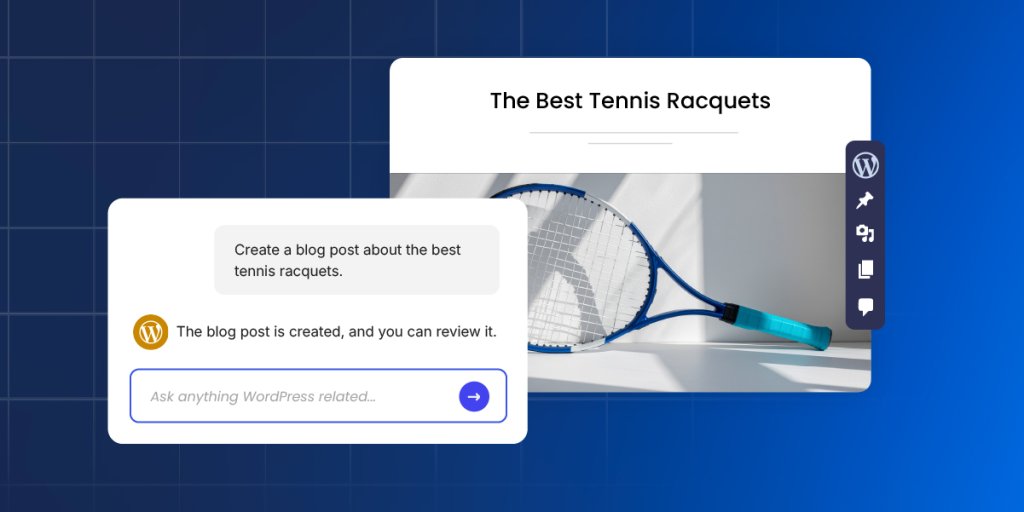
Interactive WordPress interface where a user asks an AI assistant to create a blog post about the best tennis racquets and instantly receives a completed draft preview, illustrating automated content and image generation.

Content management is where most WordPress site owners feel the daily grind. SiteGround’s AI Agent for WordPress transforms this entire experience, letting you accomplish in minutes what used to consume hours of scattered admin work.

Create, edit and publish blog posts

The AI Agent is able to create posts in WordPress, generate the necessary content, including text and images, assign them to the right categories and add tags, upload media files, and publish them when you’re ready. A single prompt can replace the entire manual workflow of drafting, formatting, categorizing, and scheduling, saving you significant time and effort on every piece of content you create. See these AI Agent for WordPress prompt examples for clear, review-friendly requests you can copy and adapt.

Updating old content is also a piece of cake. Ask the agent to make specific updates, and it makes only the targeted changes while leaving everything else untouched. Your Gutenberg blocks stay perfectly formatted. Your shortcodes keep working. 

Build site structure and pages

The agent creates and edits pages the same effortless way, whether it is a simple About page, a complex Services page with multiple sections, or an entire site architecture with parent-child page hierarchies.

What is more, you could give the agent a sitemap – just describe it or paste your planned page structure – and it creates all the new pages with proper hierarchies, builds your navigation menus (primary, secondary, footer), and assigns each page to the right menu. A full day of clicking through WordPress admin becomes a single conversation.

Organise content with categories and tags

You can have the AI agent create new categories and tags, update existing ones, rename them, change their slugs, or delete them entirely. It handles successfully complete taxonomy restructures – merging categories, creating new hierarchies, and reassigning posts to different tags.

Optimise for search engines

The agent generates metadata for new WordPress posts and pages and identifies missing such for your existing content – SEO titles, meta descriptions, keywords, alt text, and captions.

Point it at a media library with 200+ product images, and it adds the needed metadata for each one, maintaining consistent keyword usage throughout. That’s 800+ individual fields – a week and a half of mind-numbing work, finished in an afternoon.

Manage media

Upload images and files to your media library, then let the agent handle the metadata. Or point it at your existing library and have it update titles, alt text, captions, and descriptions across dozens or hundreds of files. The agent identifies unused media files bloating your library, deletes the clutter, and helps reorganize what’s left.

Moderate comments

The agent retrieves comments from any post, shows you what’s been submitted, and handles moderation. Approve pending comments, delete spam – all through conversation instead of endless clicking through the Comments section.

WooCommerce store management

Product grid of tennis accessories in a WooCommerce store with sale prices highlighted, while an AI Agent for WordPress updates the sale price of all products in the “Tennis” category, illustrating bulk e‑commerce management.

WooCommerce store owners know how overwhelming store management can be. Small tasks multiply quickly, and before you know it, store administration consumes hours that should go toward marketing, customer relationships, or strategic planning. SiteGround’s AI Agent for WordPress removes this overhead entirely – you manage your store through the same conversational interface you use for everything else.

Create, organize, update, delete products

Tell the agent to create or update one or multiple products and specify the details in your own words.

  • Create one or multiple products from a prompt 
  • Instantly build or reorganize your entire product category hierarchy from a single spreadsheet
  • Make bulk price updates across hundreds of SKUs
  • Request seasonal description changes for your entire inventory
  • Add new attributes to all items in a category
  • Update stock levels across multiple product lines
  • Delete products through a prompt with “Power mode” On

For example, you can say “Reduce all prices in the Summer Collection by 20%” – one prompt, and it ripples through your entire catalogue. Updates that would eat up a full day of copying, pasting, and double-checking happen in minutes.

Manage orders

The AI Agent helps you handle orders more quickly and efficiently, keeping your customers happier. 

  • Ask AI to find specific orders and pull details instantly – customer information, items purchased, status, shipping address, and payment method. 
  • Change order statuses from ‘processing’ to ‘shipped,’ or modify details like client address.
  • Reply to customer inquiries faster and better with relevant information retrieved and processed by AI.

Track store performance

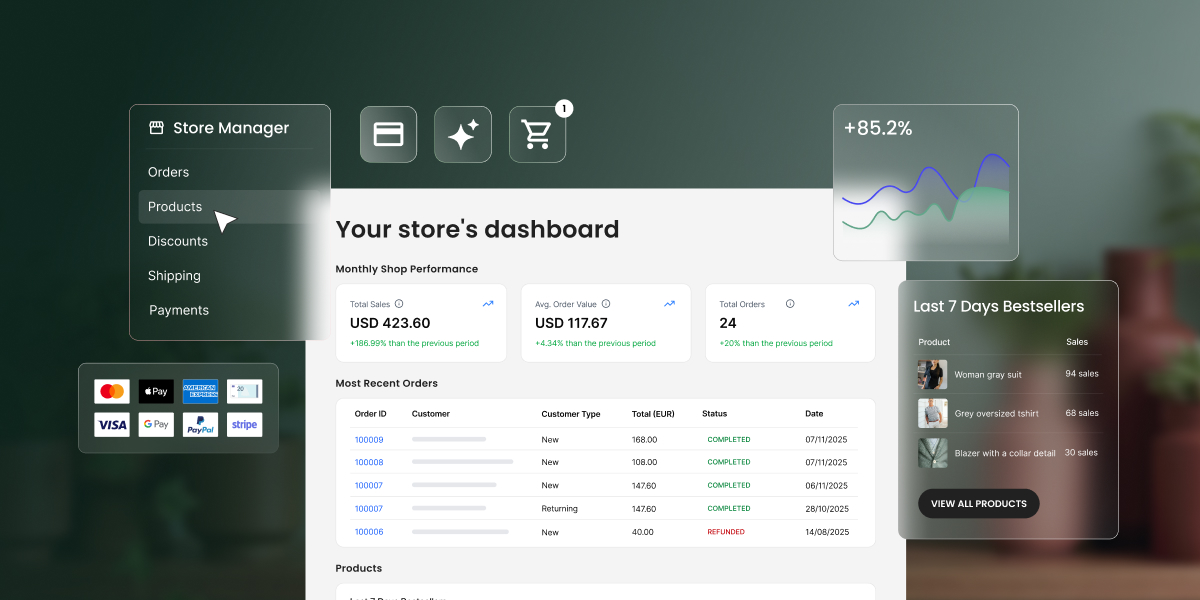
Sales reports, trends, bestselling items, customer growth, coupon usage – get all the data you need delivered to you through a quick question to the AI agent.

Ask the agent about your sales and it not only retrieves the data – for this week, this month, last month, this year, or any custom date range you specify, but also analyzes it, reporting on changes you need to watch out for.

Want to know what’s selling best? The agent identifies your top-performing products, filtered by whatever time period matters to you. 

Translate product catalogues

Expanding into new markets stops being a choice between expensive human translators and awkward machine output. Ask the AI agent for WordPress to translate your entire product catalogue in your target language and brand tone. It will do it with commercial awareness – copy that sounds like it was written by a native speaker and expert marketer in one. Technical specifications stay accurate. HTML formatting stays intact. Products with complex details get translated without the budget you’d normally need for professional localisation.

Technical website maintenance

Every WordPress site needs ongoing maintenance – plugin and theme updates, security audits, user management, and performance optimization. It’s the work that keeps your site secure and fast, but rarely feels like a good use of your time. The AI Agent acts as your expert technical assistant, taking the entire burden off your shoulders.

Update general WordPress settings

Site title, tagline, timezone, date format, permalink structure – the core settings buried in your WordPress admin are all accessible through a simple chat with the AI agent. Tell it to change your site’s tagline or adjust how dates display, and it makes the change. 

Manage plugins

Keeping your plugins in order is one of the most critical and often tedious parts of WordPress maintenance that AI can handle for you. Between the constant update notifications, the fear that an update might break your site, and the security risk of old, forgotten plugins, it’s a job that never ends – and one that AI can help you with.

  • Find and install plugins: Tell the agent what kind of plugin you need and it will locate the best option, install it, and even activate it for you.
  • Plugin updates: You can ask it to update a single or multiple plugins at once to their latest versions. For total peace of mind, you can even tell it to back up your site before running the updates.
  • Deactivate and delete plugins: Instead of manually deleting old, deactivated plugins, you can simply tell the agent to identify them and do it for you. 
  • Audit your plugins: Not sure what’s even running on your site? Ask the agent, “Give me a list of all installed plugins and their status.” You’ll get a clean audit, helping you spot outdated or unnecessary extensions that could be slowing you down.

Handle themes

Theme management with the AI agent works the same way as the plugins maintenance. Tell the agent the name of a theme or describe what you’re looking for, and it finds and installs it for you. 

Ask for an audit, and this AI tool for WordPress lists every installed theme with version numbers and update status. Unused themes get identified and removed when you’re ready to clean house. 

Manage and delete users

The AI agent for WordPress creates new user accounts with username, email, password, and role (Administrator, Editor, Author, Contributor, or Subscriber). 

It helps you manage existing users by helping you reset passwords, change email addresses, update a display name, or modify roles. Ask for a list of everyone with access, and it shows all users with their roles and registration dates. 

When someone leaves, ask the agent to remove their account. 

Manage multiple WordPress sites simultaneously

Dashboard-like view of several WordPress websites, all linked to an AI Agent for WordPress panel that shows multiple domains marked as connected for unified multi‑site management.

The real game changer for agencies and freelancers: everything above works across multiple WordPress websites simultaneously. Just make sure all sites are connected to SiteGround AI Studio and have the AI agent for WordPress installed and activated. You can: 

  • Install, update, or delete plugins and themes across your entire portfolio with one command. 
  • Manage users at scale, like adding a new editor to all sites or auditing Admin access everywhere.
  • Perform bulk content changes, such as updating text or URLs across dozens of pages simultaneously.
  • Standardize WordPress settings, like the site title or timezone, across all your client installations instantly.

For agencies managing client sites, this transforms maintenance completely. Hours of repetitive logins become single instructions that execute everywhere they apply.

The Power Mode: your built-in protection 

Power Mode is a built-in safety layer within the SiteGround AI Agent for WordPress designed to prevent accidental or irreversible changes to your website. Disabled by default, it must be enabled before the agent can execute high-impact actions like deleting data, modifying core configurations, or performing bulk updates. The actions that typically require you to enable Power mode are:

  • Deletions: Removing plugins, themes, users, products, posts, pages, categories, tags, media files.
  • User management: Creating and updating user details.
  • Site settings: Modifying general WordPress settings such as the Site Title, Site URL, or Timezone.
  • Bulk operations: Performing mass changes, such as editing all post titles at once or mass-deleting drafts.
  • WooCommerce management: Creating or updating orders, canceling pending orders, deleting transactions, and managing products or coupons.
  • Core updates: Updating WordPress core files or language files.

By default, the Power Mode is disabled. This ensures that the agent cannot perform “risky” high-impact actions without your explicit confirmation. When you issue a command that requires high-level privileges (like deleting a plugin), the agent will display a warning message and ask you to enable “Power mode.”

How to connect SiteGround’s AI Agent for WordPress to your website?

At this time, the AI agent for WordPress and the related AI Studio service (which provides access to our AI tools) are available only to existing SiteGround customers. Regardless of whether their WordPress site is hosted with us or not, our customers can easily connect their installations and manage them with the AI agent. This includes WordPress sites hosted on other platforms.

One-click connect is available for WordPress sites hosted on SiteGround

To connect your sites, go directly to the AI Studio interface > Connectors page in your profile. You’ll see a list of all WordPress installations hosted on your SiteGround accounts, and you can connect them with a click. You could also add other instances that are not in the list. 

You can disconnect any site at any time through the Connectors page in AI Studio, or from your WordPress Admin dashboard.

Need help connecting? Learn how to connect the SiteGround AI Agent for WordPress in our step-by-step guide. Once your site is connected, follow the complete AI Agent for WordPress tutorial to learn how to manage content, WooCommerce, plugins, SEO, and maintenance tasks.

Try SiteGround’s AI Agent for WordPress today

Ready to simplify your WordPress workflow and reclaim hours of your time? Start using SiteGround’s AI Agent for WordPress and see how much easier and faster site and store maintenance could be.

How SiteGround gave Japonismo room to grow

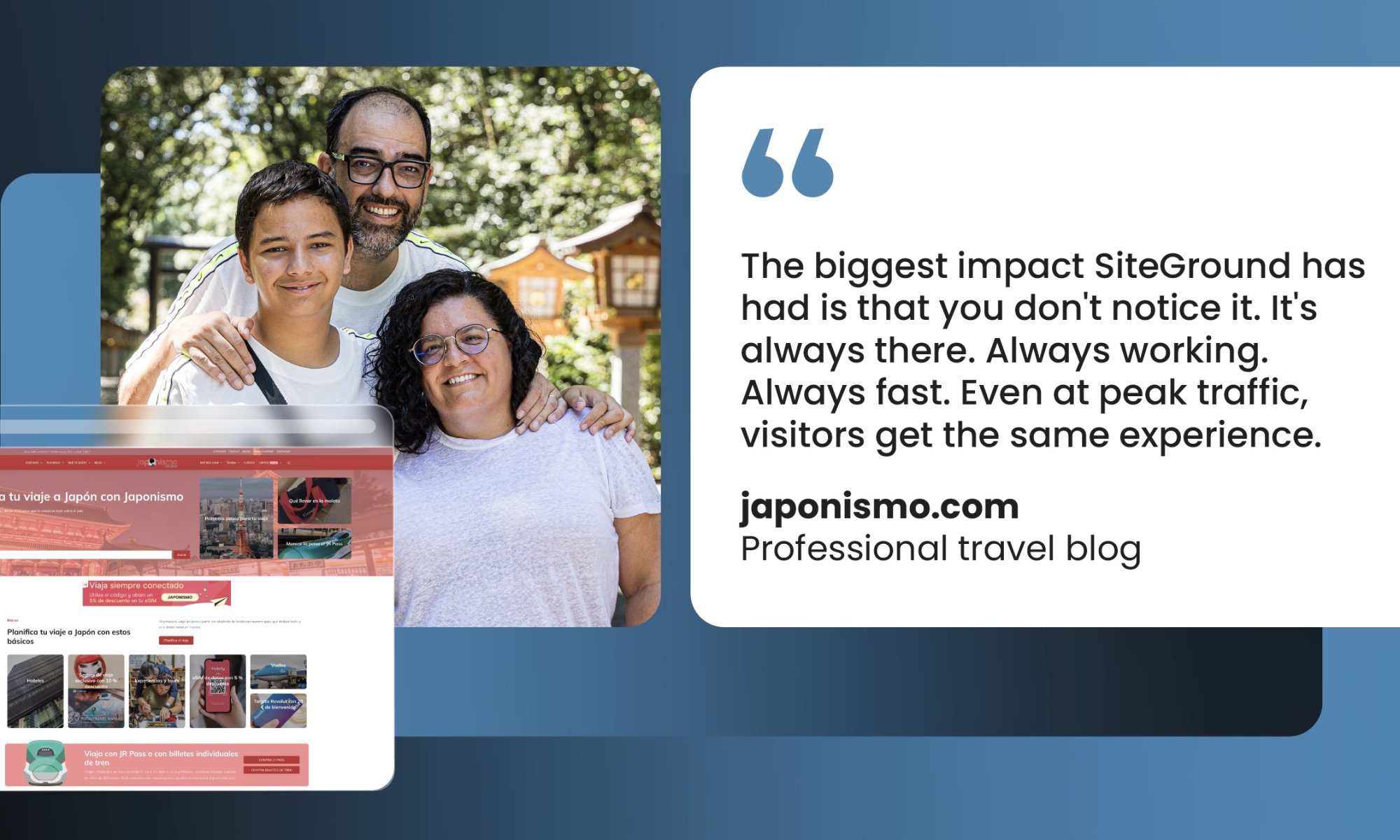
Family of three smiling outdoors next to laptop displaying japonismo.com travel blog website with Spanish content about Japan. Quote reads: 'The biggest impact SiteGround has had is that you don't notice it. It's always there. Always working. Always fast. Even at peak traffic, visitors get the same experience.' - japonismo.com, Professional travel blog

You know that moment when your side project stops being just a side project? When the thing you started for fun—sharing what you know, building something you care about—suddenly has an audience that depends on you?

For Luis Rodríguez and his wife who run their professional travel blog Japonismo, that realization came with a phone call he’ll never forget. His hosting provider was shutting down his site—not temporarily, just off—right when his traffic was finally taking off. Everything he’d built since 2006, all those readers planning their Japan trips based on his advice, suddenly couldn’t reach him.

And his hosting provider couldn’t tell him why or how to fix it. 

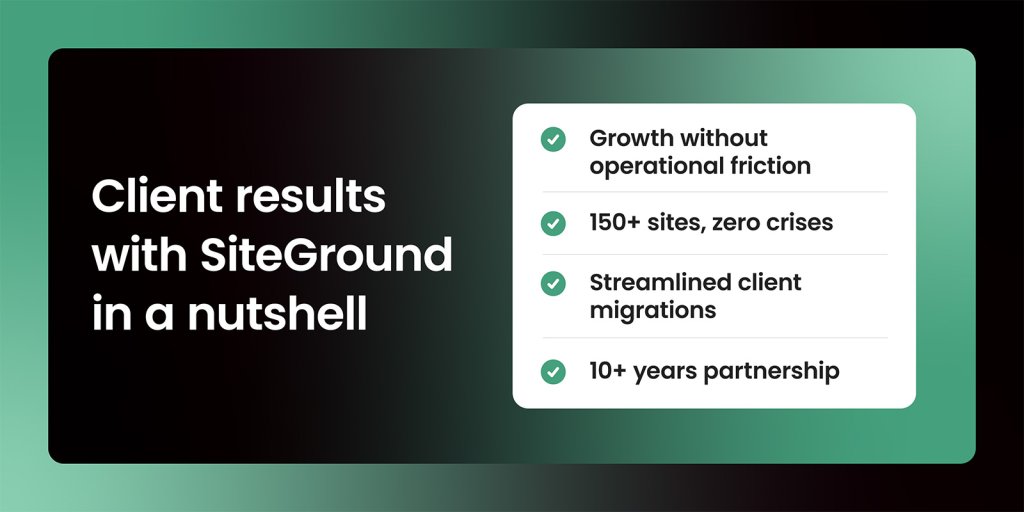
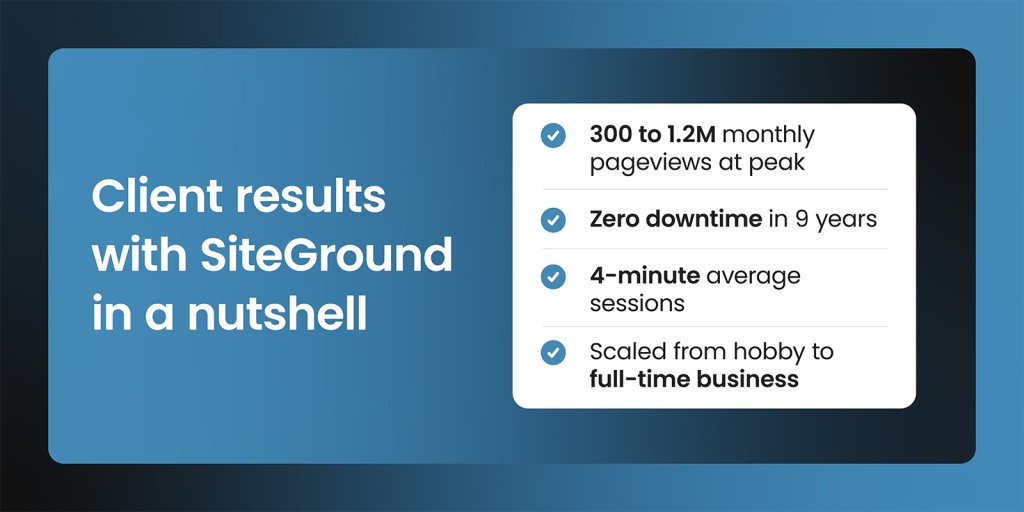
Client results summary showing japonismo.com growth metrics: 300 to 1.2M monthly pageviews at peak, zero downtime in 9 years, 4-minute average sessions, and scaled from hobby to full-time business

The breaking point: months without access

Here’s a scenario most site owners dread: You’re building something that matters. Your audience is growing. People are starting to trust you. And then your hosting provider calls to tell you they’re shutting down access to your site.

Not temporarily. Not for maintenance. Just… off. That’s exactly what happened to Luis with his previous hosting provider.

“They called me while I was in New York and said they were removing access to index.php—basically making Japonismo unavailable to everyone who wanted to visit. And they couldn’t tell me why or how to fix it.”

But that phone call was just the breaking point. The real problem had been building for months.

“We had hosting that left us without access to the website for several months—right when the site was starting to grow and gain audience trust. Just imagine what that meant for us at that critical time.”

If you’ve ever built something while working another job, you know that sinking feeling. You’re already stretched thin. Now you’re troubleshooting server issues at midnight because your hosting provider has no answers.

The problems Luis faced aren’t unusual—they’re the same frustrations many site owners hit when their hosting can’t keep up:

  • Constant crashes that knock your site offline
  • Slow loading times that send visitors straight to your competitors
  • Images that won’t optimize, killing page speed—especially painful if your content is visual
  • Support that can’t actually help when things break

“I didn’t want to spend my time on hosting technicalities that weren’t adding value to the project. I just wanted to write about Japan, share photos, and help people plan their trips. Instead, I was constantly dealing with hosting problems I didn’t understand and couldn’t solve.”

If that sounds familiar, you’re not alone.

Finding a partner, not just a provider

When a friend told Luis about SiteGround in 2016, his expectations were modest. He needed a hosting company that actually understood WordPress. One that wouldn’t leave him stranded.

“My friend told me, ‘SiteGround will save you. They’re serious people who know WordPress inside and out. Migration will be easy and everything will just work. At that point, I had nothing to lose.”

The migration was straightforward—none of the drama he’d come to expect. But more importantly, once Japonismo was on SiteGround, Luis could finally stop firefighting and start building.

Finally, room to build the site you’re envisioning

Everything that had been a daily struggle suddenly just… worked. The site was stable. Images loaded quickly. And Luis could access tools he’d never had before:

  • Staging environments to test new page designs and layouts without breaking the live site
  • Built-in image optimization that handled compression automatically—no technical expertise required
  • Early access to new technology like HTTP/2 for faster loading
  • HTTPS security certificates when they were still relatively new, making Japonismo one of the first Spanish-language travel sites with that level of security

“I remember being among the first sites with HTTPS. SiteGround was always ahead technically, allowing your site to be faster, more accessible, and reducing your technical worries—which I sincerely appreciate.”

For a site built around visual storytelling—articles with 8,000 to 10,000 words, 20 to 25 high-resolution images showing temples, food, landscapes—that technical foundation made all the difference.

Handling peak season: the real test of hosting

But having reliable hosting doesn’t just matter during normal traffic days. For a travel site focused on Japan, the real test came during peak season.

Japan tourism has intense peaks and valleys. Summer months bring massive traffic. Winter slows down. August alone can hit 1.2 million pageviews for Japonismo.

“When traffic is low, any hosting can seem fine. But when August arrives and everyone’s planning their Japan trips, you need infrastructure that doesn’t buckle. Your site can’t slow down when it matters most.”

With his old hosting, those peak months meant crashes and lost visitors. With SiteGround, they became his strongest months.

With all those high-resolution images and long-form content, Japonismo could easily be a slow site. Instead, visitors stay an average of four minutes—far above the typical 30-60 seconds for most pages—reading, scrolling through photos, absorbing the depth of information Luis provides.

That doesn’t happen by accident. It happens when your hosting can handle the load and optimize the delivery.

Support that actually responds

“I’ve never waited more than two minutes to reach someone on chat. And it’s not just fast—it’s actually helpful. They look at logs, identify the issue, and fix it. Sometimes problems that could take hours are resolved in five or ten minutes.”

For someone running a business largely solo, that responsiveness matters. Luis doesn’t need to become a server expert. He needs answers when something breaks—and ideally, he needs things to rarely break in the first place.

“Even when issues aren’t technically SiteGround’s responsibility, they investigate and help anyway. That’s what partnership looks like.”

And that partnership has lasted.

Nine years on SiteGround and counting

Japonismo has been with SiteGround since 2016. Luis has moved from shared hosting to cloud hosting as traffic grew. The site has evolved from a hobby project to a full-time business—and eventually into a specialized media outlet focused on Japan, with the website remaining the core of everything they do. And through all those changes, the hosting hasn’t been something he’s had to think about.

“The biggest impact SiteGround has had is that you don’t notice it. It’s always there. Always working. Always fast. Even at peak traffic, visitors get the same experience—which means I can focus on what I actually do: helping people connect with Japan.”

That’s the real lesson here.

What actually matters when you’re building something

When you’re starting a digital project—whether it’s about travel, food, business advice, or anything else—there’s a temptation to cut costs where you can. Hosting seems like an easy place to save money.

Luis learned otherwise.

“Cheap becomes expensive when your site goes down during your peak season. Or when loading times drive visitors away. Or when you spend hours dealing with technical problems instead of creating content. Finding a hosting partner who knows what they’re doing—that’s not an expense. That’s what makes growth possible.”

For anyone building something online, the lesson is straightforward: Your hosting provider should remove obstacles, not create them.

That’s what partnership actually means.

Ready to stop wrestling with server issues and get back to what you actually do? Thousands of creators and business owners made the switch to SiteGround for the same reason Luis did—they wanted hosting that works so they could focus on building something that matters.

[86]

Scale your business with SiteGround AI Studio (Webinar Video + Q&A)

In our January 2026 webinar, Product Director Daniel Kanchev and Product Marketing Manager Simona Petrova demonstrated how leading AI models and specialized agents in SiteGround AI Studio solve real business challenges. Through live demos, they showed how the all-in-one workspace can handle day-to-day business tasks, from content creation to streamlining WordPress and WooCommerce management.

For anyone who couldn’t join the live webinar, or for those who would like a second look at the demos, the full webinar recording is now available to watch on YouTube.

Key takeaways 

We covered a lot during the session, so we’ve distilled it down to the most important takeaways for you below.

1. Use the right AI model for every task

Different AI models excel at different tasks, so a core feature of the AI Studio is providing access to multiple leading models from a single workspace. During the webinar, we showcased this “right tool for the right job” approach, explaining how some models are better for summaries while others excel at creative work. We demonstrated this with specific examples, using ChatGPT to instantly summarize a long article into a 30-day action plan, and then switching to Nano Banana Pro to create a unique, high-quality image for a blog post. 

With AI Studio, you can explore which model works best for your specific needs without managing separate subscriptions. This full suite of AI models is available for free to all SiteGround customers as part of AI Studio Essential.

2. Streamline WordPress management with the WordPress AI Agent

Included free in the Essential plan, the WordPress AI Agent helps you manage and maintain your WordPress sites through simple chat commands. During the webinar, we showed how you can perform bulk actions like updating multiple WooCommerce products at once – all with a single prompt. You can even manage multiple WordPress instances at once – like rolling out a plugin update across some or all of your WordPress installations, or creating a new user in every site you manage – just by telling the WordPress agent what you need to do. The agent works both in the AI Studio interface and directly inside your WordPress dashboard.

3. Get marketing campaigns done in minutes with AI agents

The Plus plan unlocks 15+ specialized AI agents built with input from real-world business and marketing professionals who know what works. During the webinar, we demonstrated a few of them in action. We showed that unlike general-purpose AI that often requires several rounds of back-and-forth, these agents deliver strategic, ready-to-use output from the start. 

For example, the Social Media AI Agents for Facebook, Instagram, and LinkedIn turn your main message into channel-ready posts and publish them directly to your connected pages. They can also analyze engagement and suggest improvements based on best practices. Meanwhile, the Email Marketing AI Agent builds a complete campaign from a single prompt, including subject line, body copy, and images. You can import the output directly to your SiteGround Email Marketing or download the HTML to use in third-party applications.

Answering your questions

We also got a great deal of interesting questions, so we summarized the most popular ones.

Is AI Studio included in my hosting plan, or is it an additional cost?

SiteGround AI Studio offers two plans: Essential and Plus. Every SiteGround customer gets free access to the Essential plan, which includes 20,000 monthly tokens, multiple leading AI models, and the AI Agent for WordPress. The Plus plan is available for an additional cost and provides 100,000 monthly tokens, 15+ specialized business agents for tasks like marketing, content creation, and more, plus a library of ready-to-use prompts to help you get started faster.

What are tokens and how do they work?

Tokens are the units that measure AI usage in SiteGround AI Studio – think of them as the “currency” for every AI interaction. Every task you perform, whether it’s generating text, creating images, running web research, or using AI Agents, consumes tokens based on both your input (your prompt and any uploaded files) and the AI’s output (the generated response). More complex tasks like image generation, file analysis, or multi-step Agent operations use more tokens than simple text requests. 

The AI Studio essential plan (free for every SiteGround customer) includes a monthly token allowance of 20,000 tokens, and you can track your usage anytime in AI Studio or your Client Area. Your allowance resets automatically each month.

What is the difference between AI agents and generic chat?

The key difference is expertise. Generic chat is great for brainstorming and quick answers, but it relies entirely on your prompts to guide the conversation. AI Studio agents, on the other hand, have specialized knowledge built into their core instructions. Secondly, our AI agents can execute tasks directly through platform integrations – they don’t just give you text, they can publish a blog post to your website or update products in your e-commerce store.

Does the WordPress AI Agent work with page builders like Divi and Elementor, or only the native WordPress editor?

The vast majority of the WordPress AI Agent’s features work perfectly regardless of which page builder you use. The only limitation is block-level content editing and creation within the builder itself, since each page builder (Divi, Elementor, etc.) uses a unique content structure that requires dedicated integration.

Everything else works seamlessly on any WordPress site:

  • Complete content management for posts, pages, categories, tags, media library, and comments.
  • Full WooCommerce integration for products, orders, inventory, pricing, and sales reports – everything you need to run your online store.
  • User management to create accounts, update roles, and set permissions.
  • Plugin and theme management to install, update, activate, deactivate, or remove
  • Site configuration to adjust settings and optimize performance.

We’ve seen significant interest in native page builder support for visual editing, and we’re listening closely. We’ll prioritize which builders to integrate next based on user requests, so we encourage you to share your feedback directly through the AI Studio interface.

Can the WordPress Agent create or update products by uploading a spreadsheet with product information?

Yes, the SiteGround AI Studio WordPress AI Agent supports bulk WooCommerce product management through spreadsheet uploads. You can upload a spreadsheet containing your product data – such as descriptions, prices, and inventory – and the WordPress AI Agent can then use that data to either create new products or update existing ones in your WooCommerce store, depending on your instructions.

Can I use the WordPress AI Agent across multiple websites and share access with my team? 

Yes, you absolutely can manage multiple websites with the WordPress AI Agent. We designed it to be a core part of the experience for all our customers, which is why its multi-site management capabilities are included in the free Essential plan. There is no limitation on the number of WordPress sites you can connect, allowing you to streamline tasks across all of your web properties from a single, centralized workspace.

Regarding sharing access with your team, there’s a specific way to collaborate using the WordPress AI Agent right now. If a team member has access to your WordPress dashboard, they can use the agent’s features directly from within WordPress, and any tokens they consume will be drawn from the main account owner’s token pool. 

Can SiteGround AI Studio create and schedule social media posts automatically?

The SiteGround AI Studio social media agents for Facebook, Instagram, and LinkedIn excel at creating and posting channel-ready posts directly from your prompts. While you can create and publish posts straight to your social pages from the interface right now, scheduled posting – the ability to schedule posts for automatic publishing at future dates – is currently in development. A comprehensive scheduling system that applies to all types of tasks – not just social media – is a high priority on our roadmap and will be a core part of a future update to the SiteGround AI Studio.

Can specialized AI Ads Agents create ad copy and visual assets?

Yes, the SiteGround AI Ads Experts for Meta and Google are designed to create both ad copy and visual assets for your campaigns. You simply provide the agent with details about your product, target audience, and campaign goals, and it generates multiple ad variations around your core offer. Each variation is built to follow the specific structure guidelines of its platform, giving you different hooks and messages to test without having to write each one manually.

What email marketing services can I connect to AI Studio?

The SiteGround AI Studio Email Marketer offers a seamless, one-click integration with our own SiteGround Email Marketing service, allowing you to import your finished ready-to-send-email instantly. While we do not currently offer direct API connections to third-party services, we designed the agent’s output for universal compatibility. You can generate an email and export its full HTML, which you can then easily upload into any external email marketing platform you use.

Will search engines penalize AI-generated content?

No – Google and other search engines have been clear that they don’t penalize content when AI tools were used in the creation process. What matters is quality, not origin. Google’s guidelines focus on rewarding helpful, original content that demonstrates expertise and provides genuine value to readers, regardless of how it was produced.

The SEO risk isn’t AI itself; it’s publishing thin, generic, or mass-produced content that doesn’t serve your audience. To keep your rankings strong, focus on adding your unique perspective, expertise, and real-world examples to AI-generated drafts. Use AI as a starting point, then refine with your own insights and ensure everything is accurate and genuinely useful.

SiteGround AI Studio is designed specifically for creating search-optimized content. Our SEO Expert Agent helps with your keyword research, competitive analysis, and content briefs based on search intent, while the Copywriter Agent creates drafts you can shape to match your brand voice. The result is content that’s efficient to produce and built to perform.

Can AI Studio handle on-page SEO, and does it work alongside plugins like Rank Math or AIOSEO?

Yes, SiteGround AI Studio handles on-page SEO strategy and works seamlessly with SEO plugins like Rank Math, AIOSEO, and Yoast SEO. These tools complement each other rather than conflict – they serve different purposes in your SEO workflow.

Your SEO plugin (Rank Math, AIOSEO, Yoast, etc.) handles the technical implementation: meta tags, schema markup, XML sitemaps, canonical URLs, and on-page analysis. AI Studio’s SEO Expert Agent works upstream as your strategist, helping you with keyword research, competitor analysis, content briefs, and optimization recommendations. You then use insights from the SEO Expert to create content with the Copywriter Agent, and finally publish it to your site using the WordPress AI Agent – where your SEO plugin takes over to handle the technical details.

AI Studio is also developing AI visibility optimization to help content rank across AI platforms (ChatGPT, Claude) and traditional search engines – addressing both SEO and emerging AEO (AI Engine Optimization).

What makes a good AI prompt?

Good prompts are specific prompts. The more details you provide – goal, audience, tone, and any specific requirements – the better your results. To make this easier, our AI Studio Plus plan includes a Prompt Library with ready-to-use prompts for common business tasks like blog posts, product descriptions, and social media content. You can also save your best-performing prompts to reuse them anytime, ensuring consistent, high-quality results without starting from scratch.

What is the difference between Coderick AI and Siteground AI Studio?

The simplest way to think about the difference is that SiteGround AI Studio is designed to help you manage and grow your existing business, while Coderick AI is designed to build new websites and applications from scratch.

SiteGround AI Studio is your day-to-day AI workspace for ongoing business tasks. You use its specialized agents for things like maintaining your WordPress site, creating social media content, running email marketing campaigns, and generating ad copy. It’s a tool for enhancing your productivity and managing your existing business operations. Coderick AI, on the other hand, is a development platform used to create new, fully functional websites and applications without any coding. You simply describe your idea – for example, “build a client invoice tracker with a dashboard” – and Coderick AI generates the entire application, complete with hosting and a database.

Tell us what you need 

We’re just getting started with what SiteGround AI Studio can do, and we’re excited for what’s next. Your feedback is what will guide our development, so please don’t hesitate to share your thoughts with us as you work with it. We want to hear your success stories and learn what tools and improvements you need to help you scale your business. 

From world-class hosting to your growth partner: SiteGround is now your all-in-one platform for online success

From World-Class Hosting Provider to Your Growth Partner: SiteGround Is Now Your All-in-One Platform for Online Success

Today, we’re excited to announce that SiteGround has entered a new chapter of its journey: our evolution into an all-in-one platform for online success, empowering you to build, host, and grow your business. This is us fundamentally rethinking what our customers need to succeed online and delivering it in one unified ecosystem.

For the past 20 years SiteGround has been synonymous with world-class web hosting. Our commitment to offer high-quality services, harness innovative technologies, and provide exceptional support to our customers has earned us the trust of millions of businesses worldwide. 

But what is more, these same values have driven us forward to innovate and push industry boundaries. For the past few years, we have worked on several new products that empower you to overcome the ever-evolving challenges of building your online presence and keep up with the fast-paced digital world. We’ve naturally gone much beyond what’s expected from a web hosting provider to become your business ally in the digital space. 

Our redefined identity is now reflected on the redesigned SiteGround.com, which clearly signals our commitment to being an all-in-one platform dedicated to your online success.

SiteGround’s expanded product suite

Our outstanding hosting service remains the high-performing foundation you’ve come to love and trust. But you can now experience the expanded suite of SiteGround products designed to help you grow and succeed online.

Premium web hosting

Hosting is still the foundation of any online presence. SiteGround’s high-performing, secure and highly available web hosting remains your rock-solid base to grow online.

Easy Website Builder


Sitebuilding has been one of the main challenges for many clients – finding the right tool, learning how to operate it, figuring out the design elements, investing time in new plugins to add functionality, and more. Last year, we finally launched the easiest Website Builder that takes all these complexities off your plate. 

It combines simplicity with sophistication, featuring built-in AI assistance that helps you create professional-grade websites effortlessly, without the steep learning curve. Whether you’re starting fresh or reimagining your online presence, building a beautiful site has never been easier.

Coderick AI: the powerful vibe coding tool

And just when we thought we can’t make it any easier for you to get your idea online, we joined the vibe coding revolution and saw its potential to empower businesses to build and grow in a new, simpler way. Our Coderick AI builder is now live.

Coderick AI brings the power of AI-driven development to everyone, allowing you to build and launch sophisticated websites and applications just with your words and AI. Describe what you want to create, and watch this intelligent technology bring your vision to life.

SiteGround AI Studio

AI has quickly become a huge part of our world. But let’s be honest: while it opens up amazing new possibilities, it can be a bit overwhelming. There are so many AI models, so many tools claiming to do all sorts of tasks for you, that you literally get lost in information. 

That’s why we introduced SiteGround AI Studio. It gives you access to multiple cutting-edge AI models all in one place and over 15 specialized agents designed to help you tackle real business tasks. From content creation to data analysis, from strategic planning to marketing-specific tasks, your AI-powered workspace is here to amplify your productivity.

SiteGround Ecommerce

When it comes to selling online, there are a whole new set of challenges you need to tackle. An online store is hard to build, overwhelming to manage, and quite demanding when it comes to compliance and maintenance. But not any more. 

SiteGround Ecommerce embodies everything you need to overcome the hurdles: intuitive functionality, conveniently integrated, and packed with all the features needed to sell online on your terms. It’s already available for SiteGround clients in your SiteGround Client Area, and will soon be open to new customers.

Email Marketing made simple

When it comes to business growth, there is no channel more effective than email marketing. Yet, many of the email tools out there are heavy with complex functionality that you just don’t need, but have to pay for. That’s why we designed our Email Marketing tool – to let you connect with your audience through streamlined, lightweight email campaigns. It’s built on the same core belief as our hosting: that the best tools should be simple to use.

Beyond hosting: your growth partner

SiteGround’s transformation isn’t just about what we offer. It’s about what you can achieve. 

The dynamic changes in the way we do business and the quick adoption of AI into our daily work have created amazing new possibilities for businesses, but also a new set of challenges and needs. And as your needs have evolved, so have we and our products.

Whether you’re launching your first website, scaling an established business, or exploring new digital opportunities, SiteGround is now equipped to support you at every turn. We are now more than your trusted hosting provider. We are your growth partner.

A fresh identity for a bold future

SiteGround’s evolution deserves a visual identity that captures our expanded vision of who we are and where we’re going. That is why we’re introducing our new design and website – a true reflection of the modern, integrated platform we’ve become. Every element has been crafted to make your experience more intuitive, more inspiring, and more aligned with the goals you’re pursuing.

The same foundation you trust

Even as we add these new services, some things will never change. The exceptional support, reliable infrastructure, and customer-first philosophy that built SiteGround’s reputation are still the bedrock upon which everything else is built.

Your success is our mission

This transformation isn’t just about what we offer. It’s about what you can achieve. Whether you’re launching your first website, scaling an established business, or exploring new digital opportunities, SiteGround is now equipped to support you every step of the way.

Welcome to the new SiteGround – your all-in-one platform for online success, a unified ecosystem where tools work in harmony to help you build, host, and grow.

Let’s build something extraordinary together.

Nikolay Todorov
CEO of SiteGround

Multiple client sites, one platform: the SiteGround choice

Team photo of TheAD.com.au digital studio alongside their portfolio website, with testimonial quote: 'SiteGround is the way to go. This is the only place for you to use as a hosting.'

If you’re running a service business and managing client websites across multiple projects, your choice of hosting partner becomes crucial, as it can make or break your process. Different dashboards for every task. Inconsistent site speed. Slow support responses. Every client update takes twice as long as it should.

That’s where Max Narelik found himself in 2019 with TheAD, his digital marketing agency in Sydney. Then he switched to SiteGround—and stopped fighting his hosting setup.

Graphic showing client results with SiteGround: 80-95% page speed across all sites, seamless migrations, fast reliable support, and six years on the same platform since 2019

The small team doing everything

Max has spent more than 20 years in digital advertising and marketing. His agency serves businesses across Australia: from bakeries to major construction companies and everyone in between. Companies that need marketing expertise but can’t justify a full-time department.

“We’re going to provide on-demand marketing services for the companies who do not have a budget or ability to have the full marketing department within their company,” 

Sound familiar? If you’re running a similar operation, you know the drill. TheAD handles everything in-house with a small team. 

  1. It starts with positioning and branding—logo design and brand identity. 
  2. Then websites and social media creatives. Traditional advertising like cinema, radio, billboards, and bus stops. Photo and video production—all done in-house. 
  3. Then the active stage: SEO and Google Ads. YouTube ads, social media management, ongoing technical support.

“We’ve got everything under one roof. We can deliver relatively seamlessly, consistent with the idea from brand identity to the idea of creative, idea of advertising, to delivery to photography, videography, then to manage the actual campaign itself.”

The tricky part: every client is different.

“You have to research the competitors, you have to research the target audience, you have to research the point of difference. None of them is the same as the other.”

With this many moving parts across different industries, you need tools that save time, not waste it.

The switch to SiteGround

Max had tried other hosting services before. The problem? When you’re running SEO campaigns for clients, slow site speed kills your results. And logging into different dashboards just to update client sites adds up fast.

In 2019, Max needed three specific things: 

  1. Managing multiple sites from one place 
  2. Speed that actually helps rankings 
  3. Pricing that makes sense for an agency

 And SiteGround delivered them.

“With SiteGround, it was easy to manage the multiple sites, speed, and the price as well,” Max recalls. “It was way easier to manage our client sites, to be honest.”

The migration? Simple.

“For us, it’s super easy, and it’s getting easier”

The features that matter

When you’re choosing hosting for client work, some features sound good on paper but don’t move the needle. Here’s what actually makes a difference day-to-day.

Speed that affects rankings

When you’re optimizing client sites, you’re probably targeting similar benchmarks.

“We’re doing SEO, so site speed is important for us.”

If you’re running SEO campaigns, you know this matters. That’s often the difference between ranking on page one versus page two for clients.

Usability that saves time

“The ease of use is crucial, because there’s a lot of requests. We have to go and change a lot of things. Usability is important.”

When clients need quick updates—and they always do—you need a system that doesn’t fight you. TheAD uses managed hosting for WordPress on SiteGround as their standard. No complicated builders, just a clean, fast system.

When something does go wrong?

“SiteGround support is quite good. We got a nice confident reply within a timely manner. That’s all we need.”

The real reason agencies stick with SiteGround

You’ve probably been there: a client calls with a site issue, and you’re scrambling through unfamiliar documentation or waiting on support.

After six years with SiteGround for WordPress sites, Max has eliminated that problem.

“SiteGround is the way to go. This is the only place for you to use as a hosting,” 

Deep platform knowledge means faster fixes. When clients have issues, his team already knows the solution—no hunting through forums or waiting on callbacks.

“We’re super familiar with SiteGround’s system. And if customers have an issue, they’re going to come back to us. When the customer comes back to us, we know how to suggest to them what to do.”

The math is simple: faster troubleshooting means lower client costs and more time for billable work. Platform familiarity isn’t just convenient—it’s profitable.

Growing through good work

Max’s hosting choice wasn’t just about technical features—it supports his entire business philosophy. If you’ve ever felt pressure to lock clients into long-term contracts, his approach might resonate with you.

Here’s his philosophy: no lock-in contracts. No hard selling. Just build great websites that do the talking for you. When potential clients land on a site, they should get their questions answered and start building trust before they ever pick up the phone.

Sound idealistic? Maybe. But it works—especially in a tight-knit market like Sydney where your reputation travels fast. Do good work, and people remember. Mess up, and they remember that too.

Most of Max’s new business comes through referrals and word-of-mouth. The SEO work delivers steady growth across different client industries. Some grow faster than others, but the trajectory stays consistent.

When your business model depends on your work speaking for itself, your hosting can’t be the thing that lets clients down.

Less time on hosting, more time on clients with SiteGround

When you can hit 90%+ speed scores, manage all your client sites from one place, and get support that responds when you need it—you spend less time troubleshooting and more time on billable work.If your current hosting creates more problems than it solves, you’re not alone. Agencies managing multiple client sites need hosting that scales without adding complexity.

[82]

How a tour photographer transformed her online portfolio with SiteGround

Tour and brand photographer Anna Lee with teal hair wearing a checkered top, shown alongside her testimonial quote "I always recommend SiteGround, as it's such a positive contrast to my previous experiences" and a preview of her website annaleemedia.com featuring yellow branding and improved site performance metrics

For photographers, designers, artists, and creative entrepreneurs, a portfolio website isn’t just nice to have — it’s pivotal for your career. It’s where potential clients discover your work, where you showcase your best projects, and where first impressions either open doors or close them.

As a Los Angeles-based tour, live music, and portrait photographer working with major artists like Coldplay, Anna Lee needed a website that matched the caliber of her work. Instead, she spent over a decade fighting with hosting that held her back at every turn.

The shift to SiteGround didn’t just solve technical problems. It removed barriers that were quietly hindering growth, productivity, and professional confidence.

Comparison graphic titled "Client Results in a Nutshell" showing previous hosting problems versus SiteGround solutions. Left side lists issues with red icons: slow WordPress, confusing site management, no real support solutions, and more time spent troubleshooting. Right side shows improvements with green checkmarks: instant speed boost, easy migration and management, genuine and timely assistance, and more time to focus on work.

The problem with “just any hosting would do” 

By 2020, when Anna planned a complete website redesign, the limitations became impossible to ignore. 

“The process of improving my website was always frustrating. I would call their customer service with an issue, then leave without any real solution, while always being talked into buying more products and services.”

  • Slow performance undermining professional credibility
  • Unresponsive WordPress backend that made every task tedious
  • Confusing interface that required exceptional technical knowledge
  • Unhelpful support that prioritized upselling over problem-solving

“I knew that I wanted to overhaul the infrastructure at the hosting level. I knew I needed a better option that was more WordPress-friendly.”

The vision for her new portfolio required a foundation that could actually support it — specifically, hosting optimized for WordPress and built with creative professionals in mind.

The SiteGround switch: removing barriers to growth

Anna’s decision to switch came through a recommendation from a website building coach specializing in helping creative professionals establish their online presence. SiteGround was her consistent recommendation for WordPress sites — backed by research showing it as the preferred choice for users prioritizing performance without complexity.

Stress-free migration

Website migration can feel like a daunting process to most people, especially after a decade with the same provider. However, it doesn’t have to be.

For Anna, clear documentation replaced guesswork and timely, reliable support eliminated the anxiety of going through the process alone, without a high level of technical expertise. 

“Migrating is always intimidating, but it went so much more smoothly than I expected. SiteGround’s articles were very helpful resources to walk me through the process and what to expect.”

Moving at the right speed

The speed difference was undeniable from day one. Not just faster page loads for visitors, but instant responsiveness throughout the WordPress backend.

“The main difference I noticed was speed. I could tell right away. Especially with back-end WordPress loading.”

This allowed Anna to seamlessly organize her work, manage workshop information, and set up a functioning contact form that connects her with the right people — ultimately turning her website into a central hub of information about her business.

Intuitive site management

SiteGround’s Site Tools transformed Anna’s hosting experience making navigation intuitive and processes — easy to go through and complete.

“The hosting level navigation is very clear and easy.”

For creative professionals without technical backgrounds, this clarity matters the most. You can manage your portfolio confidently, make updates independently, and solve basic issues without requiring support intervention. The interface becomes a tool that serves you, rather than a puzzle to solve.

Support that actually solves problems

The contrast in customer service revealed what genuine support looks like.

After switching to SiteGround, Anna’s conversations with customer service representatives focused on solving problems, not selling add-ons. The support team provided real help during migration and beyond, without aggressive upselling tactics. 

“The support team is helpful, and I don’t end up spending more money on ‘solutions’ after communicating with them.”

Daily peace of mind

Knowing the website functions properly, loads quickly, and stays secure eliminates a constant source of background stress. For someone traveling for work and managing multiple projects at once, this peace of mind frees mental energy for what actually matters — creating exceptional work and growing the business.

“Having a functional website that I’m proud of allows me to share my work professionally, and this, no doubt, leads to more opportunities as a result of a beautiful portfolio.”

The right hosting choice for creative professionals 

After over a decade with underperforming hosting providers, and the transformation that followed the switch to SiteGround, Anna’s perspective is clear:

“When it comes to website hosting, I always recommend SiteGround, as it’s such a positive contrast to my previous experiences. “

Better hosting is the foundation that allows you to spend less time fighting technology and more time doing meaningful work.

SiteGround has become that foundation for many entrepreneurs and creative professionals — because it understands what they actually need and delivers it without complexity or compromise. 

If you need help on choosing the right hosting provider for your website or project, this is a helpful guide on how to choose the right hosting partner

[82]

Introducing Coderick AI: Build Apps and Websites Without Writing a Single Line of Code

Coderick AI, SiteGround's AI-powered platform, which creates websites and apps

Whether you’re a business owner who’s been putting off that internal tool because “it’s too technical and expensive” or an agency juggling client projects and wishing you could deliver twice as much without doubling your team, there’s never been a better time to build. The way we create apps and websites is fundamentally changing, and we want you to be part of it.

We’re thrilled to introduce Coderick AI – SiteGround’s brand-new AI-powered platform that lets you build fully functional web apps and websites simply by describing what you want. No coding skills required. No technical headaches. Just you, your ideas, and a simple chat interface.

What Is Coderick AI?

Coderick belongs to a new category of AI tools known as “vibe coding.” And if you haven’t heard the term yet, you will soon. Vibe coding is not just a buzzword. It’s a fundamental shift in how software gets built.

Instead of wrestling with programming languages, frameworks, and deployment configurations, you simply describe what you want – just with your words. Coderick AI interprets your intent, generates the user interface, creates the backend logic, and handles the technical complexity behind the scenes. You focus on what you want to build, Coderick figures out how.

For small business owners, this means finally being able to build that client portal you’ve been dreaming about – in an afternoon, at the cost of two coffees. For agencies and freelancers, it means delivering more projects in less time without expanding your team. For anyone with an idea, it means removing the biggest barrier between concept and reality: the technical know-how.

Build, Launch, and Host – All in One Place

Abstract of bringing an idea to life with Coderick AI

The AI app-builder space has exploded recently, and we’ve been watching closely. We saw tools that were fast but fragile. Powerful but fragmented. Impressive demos that fell apart when it was time to actually go live. So we didn’t just build another option – we built something better.

Most AI builders create a new problem while solving an old one. They help you build the app but then you’re left scrambling to figure out hosting, deployment, and security. You end up paying separately for your builder, your database, your hosting, and your domain. Costs pile up. Complexity creeps in.

Coderick takes a different approach.

Everything Included

SiteGround offerings including enterprise security, premium hosting, ultrafast performance, custom domains, and an integrated database

When you hit “Publish” in Coderick, your app or website goes live instantly on SiteGround’s rock-solid hosting infrastructure. No additional database setup needed. No domain configurations to manage. No wondering if your hosting can handle traffic spikes.

Every Coderick plan includes:

  • Premium hosting built directly into the platform
  • Automatic database setup and configuration
  • Ultrafast performance backed by SiteGround’s infrastructure
  • Custom domain support on all paid plans

This isn’t added-on hosting as an afterthought or a free trial you’ll be forced to pay for later. It’s hosting built into the DNA of the product – by a company that’s been perfecting web hosting for over two decades.

Secure by Default

When you’re building with AI, security isn’t optional; it’s essential. Coderick protects your work at every level: your conversations with the AI, your data, and your code are all processed securely and stay protected.

Every app or website you launch benefits from SiteGround’s enterprise-grade security infrastructure – the same systems that protect millions of websites worldwide. Build with confidence, knowing your projects and your users are safe.

Built for Real Work, Not Just Prototypes

Many AI builders are fantastic for creating demos and prototypes. But when it’s time to go live with real users and real traffic, cracks start to show.

Coderick AI is built for production from day one:

It comes with built-in version control so you can experiment freely and roll back anytime. 

User authentication is ready out of the box, letting you build apps that serve real customers from day one. 

Every project is responsive by default, looking sharp on any device. 

And the backend? Auto-generated, so you never have to touch server-side logic unless you want to.

What Can You Build with Coderick AI?

The short answer: almost anything you can imagine.

Portfolio sites, startup landing pages, restaurant websites, event pages, booking platforms, client portals, invoice trackers, CRM systems, internal dashboards, inventory tools, project management apps, fitness logs, recipe managers, budget planners, movie trackers – these are just a few examples. 

If you can describe it, Coderick can build it.

See It in Action

The prompt:

“Build a client invoice tracker with a dashboard that shows paid vs. unpaid invoices, lets me add new clients, and sends email reminders for overdue payments.”

The result:

Coderick AI, SiteGround's AI-powered platform in action creating an app

A fully functional invoice management app, complete with database, authentication, and a clean dashboard, built in under five minutes.

We’ve included ready-made prompts and templates to help you get started quickly, but the real magic happens when you describe exactly what you need. Want a portfolio site with a modern, dark aesthetic? Ask for it. Need a task planner that integrates with your team’s workflow? Describe it. The AI adapts to your vision, not the other way around.

Built on Two Decades of Hosting Expertise

Here’s something no other vibe coding app can offer: Coderick AI is built by SiteGround.

That means every app and website you create is backed by the same infrastructure that powers millions of websites worldwide. The same security systems. The same support team. The same commitment to performance that’s earned us a 4.8-star rating from over 25,000 clients on Trustpilot.

When you build with Coderick, you’re not gambling on a startup’s servers. You’re deploying to a platform that’s been battle-tested for over 20 years.

Ready to Start Building?

The barrier between your ideas and a live, working application has never been lower. Whether you’re a business owner looking to automate operations, an agency seeking to deliver more value to clients, or someone with a side project waiting to come to life—now is your time to start.

With plans starting from just $10/mo and a no-credit-card free trial, Coderick is ready when you are.

No code. No complexity. Just your ideas, brought to life.

Meet SiteGround AI Studio: your AI workspace for business success

AI Studio introduction

For over twenty years, we’ve stayed ahead of every major shift on the web, so you don’t have to. We’ve built solutions that solved real website and business problems, and adopted the latest and smartest technologies to give you an edge. Now AI is reshaping how businesses work, and we’re approaching this new shift the same way – by building tools that solve real problems and give you a competitive advantage, not just chasing trends.

We are happy to introduce our latest service – SiteGround AI Studio – your in-built AI workspace to chat with leading AI models like ChatGPT, Claude, Gemini and more; create AI images with Imagen and Nano Bananna; use an AI agent for WordPress management and access 15 more specialized agents, trained to perform real business tasks.

What is AI Studio by SiteGround?

SiteGround AI Studio gives small business owners access to full-scale AI capabilities, intelligently enhanced to solve diverse challenges in one convenient AI workspace. It integrates several services in one platform and gives you access to:

The best AI models in one place

Access the leading AI models from one workspace without hopping platforms, or paying multiple subscriptions. You want to try Imagen, ChatGPT, Claude, Nano Banana, or Gemini? We’ve got you! Go to SiteGround AI Studio and choose the model you want to chat with. 

You can even compare how different models handle the same task. Does Claude Sonnet 4.5 or GPT 5.1 create better marketing copy? What about Gemini Pro versus Claude for technical documentation? Are the images generated with Imagen better suited for your needs than the Nano Banana ones? In AI Studio you can check for yourself – all in the same interface.

Multiple AI agents, trained to perform real business tasks

AI Studio's agents helping businesses grow

Access 15+ powerful agents, smartly trained by our AI engineers to help you maintain your WordPress, do marketing, create polished images, and more. Treat them as your new team members that help you scale work with high quality and efficiency.

  • AI Agent for WordPress: It handles WordPress maintenance, content creation, troubleshooting, WooCommerce product updates, plugin and theme updates (for a single or multiple sites at once!), user management, and more through simple chat prompts. When Power mode is enabled, it can manage core settings and critical actions as well.
  • Email Marketing Agent: It builds email campaigns from a single prompt, including subject line, body copy, and related images. You can export the ready HTML, or import it in a click into SiteGround Email Marketing, ready for send out.
  • Ads Experts for Google and Meta: The Meta Ads Expert and Google Ads Expert generate multiple ad variations around the same offer and follow the ad structure guidelines of each platform, giving you different hooks and messages to test without writing each one manually.
  • Social Managers for Facebook, LinkedIn, and Instagram: The Social Media Managers for Facebook, Instagram, and LinkedIn turn your main message into channel-ready posts and publish them straight to your connected social pages.
  • SEO Expert, Copywriter, Reputation Manager, Image Designer, Logo Designer, Signature Creator, Web Researcher, Translator – specialized agents that can support various business needs small business owners and individuals may have, with more agents coming soon!

Ready prompts that make AI usage easier and more efficient

SiteGround AI Studio also includes a library with smart prompts that can save you time, tokens, and brainwork, but most importantly – produce great results. Because we’ve all been there at some point – testing AI and wondering why everyone else is so hyped when we just can’t make it work. And many of us have figured it out the hard way – the key to using AI successfully is in the prompt. The more specific and elaborate your prompt is, the better the AI’s response will be. Use our ready prompts and get to the next level right away.

What can SiteGround AI Studio do for small and medium-sized businesses?

SiteGround AI Studio helps small and medium-sized businesses and individuals by streamlining workflows, amplifying productivity, and cutting time and costs. 

Do your daily tasks better and faster using the simple AI Studio chat

AI Studio models - ChatGPT, Claude,  Gemini, Nano Banana and more

Now you can use AI Studio’s multi-model AI chat to significantly improve your everyday work. AI enhances both the quality and efficiency of your work by combining speed with intelligent assistance that catches errors, suggests improvements, and provides expert-level insights instantly. It acts as a collaborative partner that helps refine your thinking – offering alternative perspectives, identifying gaps in logic, checking for inconsistencies, and drawing on vast knowledge to strengthen your output. 

This means you can iterate faster through multiple drafts, test different approaches in seconds, and arrive at polished, well-considered results in a fraction of the time traditional methods require. The technology handles the heavy lifting of research, data analysis, and initial content generation while you focus on strategy, creativity, and final refinement – ultimately producing higher quality work in less time. 

Here are some ideas to try out and see how you can up your game in no time:

  • Struggling with handling customer complaints? Give AI an email from a customer and ask it to write a response. 
  • Writing a blog post that typically takes hours? Sketch a rough draft and ask AI to turn into an engaging content piece.
  • The first time writing a job ad? Tell AI what role (and company) you’re hiring for and it will get you a solid one.
  • Not having time to read a lengthy industry report? Just attach the report to the chat and get a meaningful summary of the most important takeaways in no time. 
  • Need strategic advice? Ask AI to act as your co-founder and help you make a decision, or give you arguments against and in favor.

Manage your WordPress website more efficiently with SiteGround’s AI agent

AI Studio's chat for creating a blog post about a specific topic

WordPress maintenance tasks have a way of piling up, and the more sites you run, the longer the list gets. Product information needs adjusting, service pages need refreshing, plugins need updating, WooCommerce orders need attention, blog posts need to go out regularly to serve your content strategy, etc. Every maintenance task pulls you away from work that actually grows your business. With AI Studio and the AI agent for WordPress, you can connect multiple WordPress sites and manage them all from a single AI-powered workspace. It can take much of that ongoing work out of your hands.

Go ahead and ask the AI agent to do some of the following for a start to see how easy it gets:

  • Refresh an outdated services page with the latest information
  • Create a new blog post from a brief outline
  • Update multiple WooCommerce product descriptions for clarity and consistency
  • Apply 10% discount to all products in a category
  • Add Alt text to all images in your blog posts
  • Update plugins across several WordPress instances
  • Add new categories and tags and assign them to existing posts
  • Review last week’s comments and mark suspicious as spam
  • Run an SEO audit on your site and suggest improvements

Instead of clicking through menus and editing fields one by one, you give instructions and the AI agent turns them into real changes on your site. Updates that used to take days now get done in minutes.

Scale capacity and do more with AI agents

AI Studio's Facebook Agent showing instructions on creating and publishing a Facebook post

Growing your business calls for more marketing experts and tasks in the pipeline. Then effective marketing means regular campaigns, testing different messages, and staying consistent across channels. But even a “simple” campaign quickly turns into updating a landing page, writing at least one email, creating several social posts, and drafting multiple ad variations. You may know exactly what would work, but creating all those assets fast enough is where most small teams get stuck.

That’s where the AI Studio agents come in – many of them trained to do marketing like real experts and save you hiring, onboarding and then managing new people in the team.

  • Treat the Image Designer like your in-house web designer and ask it to create images for your social campaigns, banners, emails, blog posts, and website. 
  • Give your new copywriter – the AI Copywriter Agent – a short brief and see how it turns it into a complete campaign copy with clear headlines, benefits, and CTAs.
  • Your email marketer – the Email Marketer Agent will take over your email campaigns from the subject line, body and visuals, to sending them directly into your SiteGround Email Marketing Service. All you’ll need to do is press SEND.
  • Let your Social Media Managers for Facebook, Instagram, and LinkedIn turn your main message into channel-ready posts and publish them straight to your connected profiles.
  • Work with the Meta Ads Expert and Google Ads Expert to create new ads and update existing ones without writing anything manually.

Beyond these examples, SiteGround AI Studio includes more agents that support different parts of your work. Together, they help you do more work, test more ideas, and scale without hiring. And as AI Studio grows, we’ll continue adding new agents to cover even more of your everyday business tasks.

How to start using AI Studio by SiteGround?

SiteGround AI Studio is already available for all existing customers, regardless of what service they’re currently using. It is conveniently linked on your Client Area dashboard.

The service will soon be available to new customers as well from our website.

Free AI Studio Essential plan for all SiteGround customers

SiteGround AI Studio comes in two plans – Essential and Plus. All SiteGround customers now get an exclusive, completely free AI Studio Essential plan. No setup, no extra subscription – it’s already available in your Client Area.

  • The AI Studio Essential Plan includes 20,000 monthly tokens and access to chat with multiple AI models and the AI Agent for WordPress. 
  • The AI Studio Plus plan includes 100,000 tokens and access to chat with multiple AI models and the AI agent for WordPress, and unlocks access to the 15+ powerful AI agents and the prompt library. You can easily switch to the Plus plan from your Client Area.

AI Studio is also integrated with SiteGround Email Marketing, Website Builder and Ecommerce services. Clients who use AI to write content and generate images from the interfaces of these services will now be spending tokens of the AI Studio Essential when performing those tasks.

Try SiteGround AI Studio Today

Ready to try it out? Go to your SiteGround Client Area dashboard and look for the blue banner ”AI Studio” to start your AI journey.

From Weekly Hacking Attacks to 8 Years Without a Security Breach

Freelance web designer Gellert Geszvein next to his quote "I have never had to use SiteGround support, ever!" with his website antaresarts.com displayed showing a digital marketing agency portfolio

You know that sinking feeling when a client messages you on a Saturday night saying their website is down? Or when you log in Monday morning to find three client sites have been hacked over the weekend?

That was life for a freelance web and UI/UX designer and illustrator Gellert Geszvein who runs AntaresArts.com – until switching to SiteGround changed everything.

Purple graphic showing client results with SiteGround including zero security breaches, 8 years without contacting support, and peace of mind regained

The Moment Hosting Problems Outgrew the Business

Most freelancers follow the same path. You start with a few projects, teach yourself as you go, take on clients when they come. For years, it’s manageable – maybe a handful of sites to maintain, occasional updates, nothing too complicated.

Then things shift. The client list grows. Each new project means another website to maintain, another domain to manage, another hosting account to worry about. When you’re the one responsible for keeping everything running, every server issue becomes your problem to solve.

For Gellert, the turning point came when he and his family launched Sunnyhelps.com – an ecommerce site selling visual schedules and learning tools for toddlers and neurodivergent children. Suddenly he wasn’t just building sites for clients anymore. He was running his own online business, dealing with orders and customers and inventory, while still managing his client work.

“There are so many things we have to micromanage: orders, customer messages, new products, marketing activities. The server things shouldn’t be one of them.”

But server problems were exactly what he spent his time managing. And every hour fixing hosting issues was an hour not spent on actual client work or growing the business.

The Endless Hosting Shuffle

You know what nobody puts on their portfolio? The hosting shuffle. You start with one provider, things break, so you switch to another one your client swears by. Then that one has issues. So you try another.

“I have worked with almost every major hosting provider in the past and numerous smaller ones from Europe and North America. The experience was never flawless and I never felt like I had arrived and could forget about the servers. I spent years searching and trying.”

The problems never really changed:

  • Support was nearly impossible to reach. Getting through could take an hour. Sometimes multiple attempts just to reach someone. Then you’d explain the issue, wait, explain it again to someone else, wait more. Meanwhile, your client’s business was offline.
  • Sites broke without warning. An update would push through, and suddenly a site wouldn’t load. Or a backup restore would fail. Or a domain connection would drop. Never at convenient times.

Every incident cost billable hours. Time Gellert couldn’t bill for, time his clients lost, time that should have gone into actual design work or growing his business.

“It was very difficult to contact support, took a long time to get through, and in many cases it took several attempts. This meant a lot of inconvenience and wasted time for me and for my customers.”

When you’re building a reputation as someone clients can rely on, unreliable hosting becomes your problem. Customers don’t distinguish between a hosting failure and your failure – it all reflects on you.

Website Security – the Hosting Issue You Can’t Ignore

The hosting shuffle might have continued indefinitely – annoying but manageable – except for one thing: security breaches.

If you’ve ever had a client site get hacked, you know the panic. The emergency calls, the scramble to restore backups, the explanations to angry clients. Now imagine that happening repeatedly across multiple sites, despite every protection plugin and security solution you can find.

For clients running actual businesses – ecommerce sites processing transactions, service companies managing customer data, agencies with reputations on the line – these attacks aren’t just technical inconveniences. They threaten revenue, destroy customer trust, and can shut down operations entirely.

That’s when one of Gellert’s clients mentioned SiteGround Web Hosting. After researching the platform, Gellert decided to move the most vulnerable sites to more secure infrastructure. At that point, he’d tried everything else.

The expectation was straightforward: fix the security problem. Nothing more.

What happened went beyond that.

The SiteGround Difference

Migrating the website to SiteGround did solve the hacking problem. But it also fixed issues Gellert had spent years accepting as “just how hosting works.”

The Attacks Stopped. Completely.

Not “reduced” or “mostly prevented.” Zero successful hacking incidents since transferring to SiteGround. The security crisis that had driven the switch simply stopped being an issue. SiteGround’s security system handled threats automatically in the background – without Gellert needing to manage any of it.

Site Management Finally Made Sense

This part was unexpected. After years of wrestling with clunky control panels and unclear interfaces, Site Tools – SiteGround’s website management interface – actually made sense.

“The Site Tools user interface is so easy to use yet comprehensive that I can easily do anything. Somehow all the features are right where I would look for them and as easy to use as can be.”

Coming from someone who designs UI/UX professionally, that’s not a casual observation. Site Tools demonstrated how website management should work – intuitive enough for beginners, comprehensive enough for professionals.

PHP updates happened instantly. New site setups ran smoothly. Domain configurations worked on the first try. The technical tasks that used to require support tickets or hours of troubleshooting just worked.

Support Stopped Being Necessary

Here’s the most unexpected part: 

“I have never had to use SiteGround support, ever!”

Over eight years, Gellert has done full website resets, complex database work, site migrations between servers, and multiple domain changes. Never once needed to contact support.

When he did need guidance on specific technical configurations, SiteGround’s documentation (the knowledge base and tutorials) had clear, current instructions. The articles were actually useful – written by people who understood the technical problems he needed to solve.

The value of a support system, it turns out, isn’t just about having someone available when things break. It’s about building a platform that rarely breaks in the first place.

The Invisible Business Win

There’s a business impact here that’s hard to put in a spreadsheet but impossible to ignore.For any client site hosted on SiteGround, server management disappeared from Gellert’s mental task list. Setting up domains, configuring email accounts, managing SSL certificates – all of it became fast and forgettable in the best possible way. These things worked, then faded into the background where infrastructure belongs.

“SiteGround saves a lot of time and effort whether I’m looking at it from my clients’ side or as a service provider.”

The constant low-grade anxiety – “what’s going to break this week?” – was gone. That mental bandwidth freed up actually mattered. More focus on design work. More capacity for new client projects. More energy for growing both AntaresArts and Sunnyhelps without worrying about adding technical liability with every new site.

That’s the transformation that doesn’t show up in feature comparison charts.

What This Means for Freelancers and Business Owners

Eight years in, Gellert hasn’t looked back. No emergency switches when something breaks. No reason to look elsewhere.

He recommends SiteGround Web Hosting to every new client now – not because he’s selling it, but because he’s tested nearly every alternative and knows what they cost in time, stress, and lost weekends.

  • For freelancers managing multiple client sites like Gellert does, reliable hosting means spending time on billable work instead of emergency fixes. 
  • For business owners running their own sites while juggling client work, it means reclaiming the hours that used to disappear into troubleshooting. 

Nobody starts a business thinking “I can’t wait to spend my evenings troubleshooting server issues.” But somehow that’s where a lot of us end up.

Unless your hosting just works. Then you get to do what you actually signed up for: building, creating, growing. Join millions of businesses doing just that with SiteGround.

SiteGround's AI-powered Site Builder interface showing a flower shop website template for "Dahlia" with tone of voice options and AI prompt feature, alongside text promoting easy website creation with hosting and built-in tools

Scaling Nexus Lean Agency to 20x Clients with SiteGround

Quote from Nexus Lean Digital Transformation Agency stating "There's so many extra steps that SiteGround takes that separate them from the competition" alongside a browser mockup display

Running a web agency on referrals alone sounds perfect, right? No ad spend eating into your business margins. Clients who trust you and who you actually know. Growth that feels organic and sustainable.

But here is the thing: referral-based growth is fragile. One site goes down during a client’s critical moment, and suddenly your reputation takes the hit. Your setup that worked fine for five clients suddenly struggles with fifteen. Two or three failures, and the referrals stop coming. 

For Tyler Voase and his consultancy Nexus Lean, these stakes carried extra weight. His clients weren’t typical agency customers—they were people from disadvantaged backgrounds rebuilding their lives through entrepreneurship. When a website goes down for them, it’s not just lost revenue. It’s a setback that can derail everything they’re working towards.

The Hosting Decision That Makes or Breaks Referrals

Tyler’s portfolio grew entirely through word-of-mouth. Zero paid advertising. Every new client came because an existing client’s business actually worked.

“I’ve never run any paid ads. It’s all been organic. I love to engage and build—that’s the fun part for me.”

That model only scales when your hosting partner can keep up with your growth. 

SiteGround’s reliability made it possible for Tyler to take on clients who need education and hands-on support—the kind of work that requires trust—without worrying that technical failures would undermine everything.

“A good host could be the difference between somebody paying you money and not paying you money.”

In 15 months, Tyler scaled from only 2 clients to 39 active websites—every single one through word-of-mouth. That kind of growth only works when your technical foundation holds. This is how reliable WordPress hosting became the difference between managing chaos and confidently scaling a mission that matters.

Three key results displayed with checkmarks: 20x client growth in 15 months through referrals without paid advertising, 20% cost savings from eliminating platform fees by bringing ticketing in-house, and zero hosting-related failures due to automatic backups preventing multiple disasters

From Personal Experience to Purpose

Tyler’s background wasn’t typical for an agency owner. Growing up in a challenging household gave him a different perspective on what people need when they’re trying to rebuild.

Sales became his strength. Before working for himself, Tyler spent years in sales roles, developing skills that would later drive his consulting work. When he finally started his agency, he didn’t have much—but he knew he wanted to build something that mattered.

His focus on helping disadvantaged communities happened organically. The early days were lean. Working with clients who couldn’t afford mistakes, learning web development as he went, running a business on tight margins—one hosting failure could mean someone giving up on their fresh start entirely.

“When I first started, I had this idea of an agency. I’ll find clients who are going to pay me thousands and thousands. But that doesn’t scratch the itch I have. I fell into a niche of people who needed the help rather than wanted the help.”

The Roadblocks That Stop Most Agencies Cold

If you’re running an agency—especially if you’re learning as you go—these challenges might sound familiar:

  • You’re not a developer, but you’re expected to solve technical problems. Tyler wasn’t a coder. He was a business guy who learned websites out of necessity. Managing 30+ client sites without a technical background? That requires tools that actually make sense, not ones that demand a computer science degree.
  • Support that wastes your time is support you can’t afford. When you’re juggling multiple client sites, waiting hours for help isn’t just frustrating—it’s losing you money.

“With other hosting companies, if you need help with something, they make it so difficult to just get something quick.” 

Recognize that frustration?

  • Every decision feels high-stakes when you’re running lean. When Tyler’s hosting renewal with his previous provider came up, he was at a crossroads many agency owners face: Do you cut corners to save money, or do you invest in reliability your clients depend on? For Tyler, cutting corners on hosting meant cutting corners on his clients’ success.
  • Your clients can’t afford your technical failures. Whether you’re working with startups, small businesses, or people rebuilding their lives, downtime isn’t just inconvenient—it’s revenue lost and trust broken.

SiteGround: The Safety Net That Never Failed

When you’re managing multiple client sites, your hosting needs to work as hard as you do. Tyler found that in SiteGround.

Tools That Don’t Require a Manual

If you’ve ever struggled with cPanel, you’ll appreciate what Tyler discovered in Site Tools. For someone managing 30+ websites without a technical background, the difference was immediate.

“It’s really nice being able to look at analytics all within the Site Tools section. Even if you’ve got 30 websites, you can go between them really easily and just go through the traffic. The built-in metrics and analytics—that’s super helpful.”

The best part? His clients could navigate it too. No more hand-holding through basic tasks.

Backups That Save Entire Projects

Here’s a scenario every agency owner dreads: You update a plugin, and suddenly half the site’s functionality disappears. Now what?

For Tyler, this wasn’t hypothetical.

“I’ve made a change to plugins, and suddenly half the functionality is completely gone. I hadn’t made any backups. But then I realized—SiteGround has regular backups made automatically.”

This automatic daily backup service has saved Tyler from recreating entire projects multiple times. When you’re learning on the job with clients who can’t afford mistakes, that’s not just convenient—it’s business-saving.

“There’s been times where you guys have completely saved me having to recreate like seven pages of a website because of my own mistake. Little things like that—the security features, the Optimizer that SiteGround puts on all their websites, the WebP converter for images. There’s so many extra steps that SiteGround takes that separate them from the competition.”

Support That Actually Supports

You know what’s better than support that solves your problem? Support that shows you how to solve it yourself next time.

When Tyler hit an SSL issue he couldn’t figure out, SiteGround’s approach surprised him:

“The guy was just like, ‘Yeah, give me two minutes.’ Not only did he fix it for me, he also taught me how to fix it in the future. That’s when someone goes above and beyond.”

This approach mattered enormously to Tyler and it wasn’t just about hosting.

“There isn’t another service provider that I pay for—there isn’t a better company than SiteGround that I’ve used.”

When Your Hosting Matches Your Ambition

When your hosting infrastructure works, you stop firefighting and start building. Tyler’s journey shows what you can achieve when technical failures stop holding you back. 

His client results tell the story: One clinic increased revenue by 268%, collected over 133 five-star reviews in months, and now appears in ChatGPT search results—not just Google—attracting higher-value clients who find them through AI-powered search. Another eliminated nearly £5,000 in platform fees by bringing ticketing in-house, sold 1,600+ tickets generating £45,000 in revenue, and landed a partnership with Nike.

“That Nike partnership—that’s probably the biggest work I’ve done. We built the booking system, the email capture, everything in-house.”

These aren’t outliers. They’re what happens when an agency can focus on client success instead of technical problems.

3 Lessons From Tyler’s Journey

Tyler shares what he’s learned building a business that matters:

1. Admit What You Don’t Know

Early on, Tyler did what a lot of new business owners do—he pretended he had all the answers. Clients would call asking if he could deliver something, and he’d immediately say yes without knowing if it was possible. The result? He’d end up looking foolish when he couldn’t deliver.

“Don’t be embarrassed to admit you don’t know things. At the very start, clients would ask, ‘Can we do this?’ And I’d just say, ‘Yeah, of course I can’—without actually knowing if I could.”

His advice now: abandon the notion that you know everything. Start from scratch. If you have questions, ask.

2. Care About What You’re Doing

Tyler’s definition of success isn’t measured in revenue alone. He believes that if you only chase money and fall short of your financial goals, you’ll always feel unsuccessful. But if you genuinely want to help people—whether that’s through creative work, business growth, or transformation—helping even one person means you’ve done well.

“Be violently committed to what you’re doing. Care about what you’re doing. If you care, you will do well.”

That commitment shows. It’s what turns clients into advocates and builds the kind of reputation that brings referrals without advertising.

3. Choose Partners Who Support Your Mission

Tyler knows that choosing the wrong partners can sink a mission. You need people who understand what’s at stake—where quality isn’t negotiable and reliability matters more than a low price tag.

“SiteGround is the perfect middle ground. You’re not super expensive in the grand scheme of things, but the service, delivery, and quality are exceptional.”

Whether you’re serving clients rebuilding their lives, creative agencies launching campaigns, or startups racing to market—technical failures aren’t just inconveniences. They’re reputation risks that can stop referrals cold. That’s why choosing partners who understand the stakes matters. Tyler chose SiteGround—the partner who gets it.

When Your Agency Needs Infrastructure That Keeps Up

Tyler’s growth shows what becomes possible when you can stop worrying about whether your hosting will hold up and focus on the work that actually matters—whether that’s serving disadvantaged communities, scaling your creative agency, or building something that makes a difference.

The technical stuff should be the easy part. Your hosting should work so well you forget it’s there.

Ready to build something that matters? Join the businesses who’ve chosen SiteGround WordPress Hosting to handle the tech while they focus on changing lives—because when your hosting just works, you get to focus on what drives you.

A promotional image for SiteGround featuring three people working around a table, with text highlighting the benefits of saving time and scaling a WordPress agency. The text reads, "Ready to Save Hours of Work and Scale Your WordPress Agency? Trust SiteGround to deliver the solid foundation your agency deserves. Elevate your web management processes with a hosting service that ensures peace of mind for both you and your clients." A "GET STARTED" button and a 98% satisfaction rating bar graph are also included.