It’s that time of the year when the days go faster than the speed of light – which is what we’d wish for all websites! In honor of the shortest month of the year, this February, we are taking website speed to Olympic heights!
Page loading time on the web is a never-ending optimization championship for website owners. But with the right tools and services, you can achieve the coveted “gold medal”. Take our quiz, get our free guide, and follow our Website Speed blog section for regular tips on how to optimize your website for best performance.
The Bulgarian Stefan Ivanov took part in the venture, the main sponsor of which was SiteGround
The world’s first rowing boat expedition from the Antarctic through the Southern Ocean was successfully completed on January 17, 2023, and brought six Guinness records.
First expedition from Antarctic
First expedition in the Southern Ocean from south to north
First Scotia Sea Expedition
Southernmost starting point of an ocean rowing expedition
Fastest rowing expedition in the Southern Ocean
Fastest polar rowing expedition
The expedition was carried out under the flag of the renowned “The Explorers Club”, founded in 1904, and under whose flags the first expeditions to the South and North Pole, Everest, the Moon and others were carried out.
The Bulgarian IT company SiteGround, which is one of the world leaders in the hosting industry, supported the venture as the main sponsor.
The leader of the expedition was the Icelander Fian Paul – he is the explorer with the most Guinness records in the world, after the current expedition their number exceeds 40. Fian says: “It was by far the most difficult expedition I have done, logistically and weather wise. I still have pain in my hands.” Bulgaria has its own representative in the expedition – Stefan Ivanov, a banker and adventurer, who in 2020, together with his son Maxim, crossed the Atlantic in a rowing boat. Stefan shares about his new experience in the Antarctic expedition: “This rowing expedition in the Southern Ocean took me the furthest from my comfort zone, but it brought me endless satisfaction. We battled gusty winds, huge waves, biting cold and wetness. On the other hand, we were like in an ice fairy tale – surrounded by icebergs and occasionally visited by whales, penguins, seals and albatrosses. We realized once again how imperative it is that we all get involved in protecting the ecological balance of the planet.”
The other members of the expedition were Jamie Douglas-Hamilton from the UK, Lisa Farthofer from Austria, Mike Matson and Brian Krauskpf from the USA – all experienced ocean and/or competitive rowers and sailors.
One of the main objectives of the expedition is to help declare new protected areas of over 4,000,000 km2 in the Southern Ocean. Considering that more than 90% of the big fish in the oceans have already been gone, the organizers are calling on anyone who wants to give their voice to the special petition: www.change.org/SouthernOcean.
“We believe that success lies only outside the comfort zone, that the courage to follow a dream, even if everyone tells you it’s impossible, makes you a true adventurer and a true entrepreneur. This similarity is at the heart of our support for Stefan and this mission. We are glad that it ended successfully and brought six Guinness Records, which we Bulgarians can be proud of, it is unique that we had our own representative in something so significant. More importantly, however, the mission raises the alarm about the protection of the oceans and the protection of nature in general: a cause that we also protect and find close to our values”, shared Tenko Nikolov, CEO and Ivo Tzenov, founder of SiteGround.
Website speed optimization is crucial for creating a positive user experience. A positive user experience is marketing speak for happy users. Happy users visit your site and buy things. Unhappy users leave because they are tired of waiting for your website to load. Marketers call this “bounce rate” but really, it’s just unhappy users.
Why is site speed so important?
In the early days of the web, our mantra was “Content is King”. These days, if content truly is King, the Queen is speed. They go hand-in-hand. The best content or even product or service in the world won’t get noticed on a slow website.
User experience (Usability)
As we said above, a slow website can lead to a poor user experience. This can cause visitors to leave the site and potentially lead to a high bounce rate. A fast website, on the other hand, leads to a better user experience, which increases user engagement. When people don’t have to wait for the page they want to read to slowly load, they are more likely to stick around and read it. If that page is selling them your widgets, then they are more likely to buy them because they read your page.
All search engines have announced that they now use website speed as a ranking factor for their mobile search results as well. This means that a website that is not optimized for speed may rank lower in mobile search results than a faster website, which could lead to a decline in both traffic and revenue.
Website speed optimization is critical for your business if your users are primarily mobile.
Conversion (for E-commerce sites)
When a website is slow, users may become frustrated and abandon their shopping carts, leading to lost revenue for your business. A fast website, on the other hand, can provide a seamless shopping experience, which will increase conversions and ultimately drive more revenue.
Amazon is famous for computing the price of a second of load time. The slower their site loads, the less they sell and they know exactly how much. You may not be able to calculate your loss like that, but you will see that when you optimize your website’s speed, your sales will increase.
In summary, if you aren’t getting the page views you think you should be, maybe it’s time to look at optimizing your website speed. Optimizing your website for speed can lead to a better user experience, improved search engine rankings, and higher revenue. Here are our best website optimization tips and tricks:
How to check the performance of your website
There are many good tools on the web to help you compute your website’s speed so you can tell if your site is running fast or not.
SiteGround Optimizer Plugin and Google PageSpeed
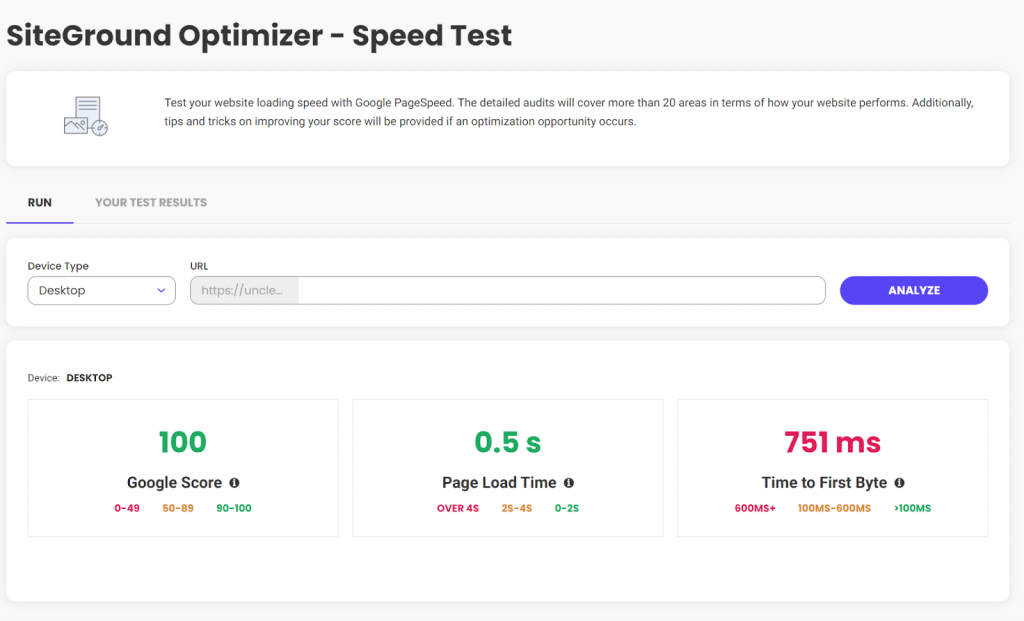
One of the best tools for measuring website speed metrics out there is Google PageSpeed. There are several tools you can use to increase your site’s PageSpeed score, my favorite is the SiteGround Optimizer plugin. I have it installed on almost all of my WordPress sites and using it, my Google PageSpeed score is only a couple of clicks away. If you already have SiteGround Optimizer installed, then just click on the menu and select “Speed Test”. If you don’t yet have SiteGround Optimizer installed, it’s free and works even if you don’t host with SiteGround.
As a bonus, if your score isn’t as high as you want it, SiteGround Optimizer will help you increase your score. After implementing the suggestions, SiteGround Optimizer had for one of my graphic-heavy sites, this is my Google PageSpeed score.
Yeah, that’s not bad at all.
webpagetest.org
The other tool I’ve been using for the past 10+ years is webpagetest.org. Whereas Google PageSpeed boils everything down to three easy-to-understand numbers, if you want to dig into the details, you need a tool like webpagetest.org. It gives most website owners more information that is easily digested, but if you spend the time to learn what the numbers mean, they can give you some deep insights into why your website loads the way it does. webpagetest.org also lets you configure things like desktop vs. mobile, where you are testing from, etc.
6 Undisputable Website Optimization Tips
Now that we’ve discussed why website speed optimization is so important, let’s talk about six things you, as a non-technical site owner, can do to make sure you are running at optimal speed.
Achieve lightning-fast loading times by choosing the right host
Choosing the right web host is one of the most important factors in website speed optimization. It is also the first decision you need to make. Honestly, if your host is slow, none of the rest of these optimization tips are going to make much difference.
Choose a website theme that won’t weigh you down
If your site uses WordPress, the theme you choose for your WordPress website will have a significant impact on its speed. A well-designed and optimized theme can help improve website speed and performance, while a poorly designed theme can have the opposite effect.
All themes can stand to lose a little weight, even the best ones. So to help your site reach its maximum speed, make sure that you have SiteGround Optimizer installed and configured. As discussed above, it can really make a difference in your site’s overall speed.
When choosing a theme for your website, it’s important to consider things like code quality, graphic sizes, and support.
Code quality
A well-coded theme will be lightweight, use minimal resources, and be optimized for speed. It is important to choose a theme that is coded to the latest web standards, WordPress standards, and has been reviewed by other users.
Graphics Sizes
All themes will let you use your graphics, however, some work with plugins to optimize graphic size, while others do not. If you choose a theme for your website that does not automatically optimize the graphic sizes for speed, all is not lost, you can install the SiteGround Optimizer plugin. It will not only optimize all of your existing images, but will automatically optimize any new graphic as you upload it.
Support and updates
A theme that is regularly updated and supported by the developer can help ensure that your website stays optimized. As technologies change, you want to make sure your theme changes with them to ensure it is always the fastest that it can be.
If you have a WordPress website, hosted with SiteGround, you benefit from their in-house WordPress Autoupdate feature, which automatically backups and upgrades your site each time there is a new WordPress version, along with all of your plugins, if you wish so. That helps you avoid vulnerabilities related to the old application, and you’re up to date with the latest security fixes.
Choosing the right theme is just one part of website optimization. You’ll still need to do things like minify code, and use caching to help improve website speed.
The theme you choose for your WordPress website can have a significant impact on website optimization. By considering the factors mentioned above, you can choose a theme that is well-designed, optimized for speed, and will provide a better user experience for your visitors.
Trim down unnecessary plugins
In the past, I’ve written about removing unused or deactivated plugins. One of the main reasons to do this is speed. The less code there is, the faster your site will run. Even disabled plugins force WordPress to decide between them at each page load. If you delete them, WordPress doesn’t need to worry about them.
Once a year – or more frequently, if possible – you should do a complete audit of the plugins installed on your site. Deactivate and delete any that are not actively being used. If you need them again later, then reinstall them later.
Remove unnecessary redirects
Redirects will affect website speed optimization.
They add an additional step to the page load process, which can increase the amount of time it takes for a page to load. This will negatively impact the user experience and website speed.
Search engines follow redirects to find the final URL of a page. When search engines crawl your website, they follow each redirect, which can slow down the crawling process and affect your website’s SEO. Additionally, redirects can cause the search engines to see the redirecting page and the final page as two different pages, which can lead to duplicate content issues and affect the website’s SEO.
Redirects can be confusing for users and will lead to a poor user experience. If a user clicks on a link that redirects them to a different page than they expected, they may become frustrated and leave the website.
Redirects can be useful in certain situations, such as when a web page has moved or is no longer available, or when you want to redirect traffic from a non-preferred domain to a preferred domain. In these cases, it’s important to use the correct type of redirects and to minimize the number of redirects used to maintain website speed and SEO.
To avoid the negative impact of redirects on website optimization, it’s important to use them sparingly and to use the correct type of redirect. Additionally, implementing a proper redirect strategy and keeping track of the redirects that are in place can help to minimize the negative impact on website optimization.
Cache your way to faster load times
Caching can have a positive impact on website optimization by improving your website’s speed and performance. Caching is the process of storing a copy of a web page or its resources, such as images or scripts. When a user visits a website, their browser can load the cached version of the page, which can reduce the amount of time it takes for the page to load.
Caching can be implemented at different levels, such as browser caching and server-side caching. Each type of caching can have a positive impact on website optimization.
Browser caching
When a user visits a website, their browser stores a copy of the web page and its resources on their device. When the user visits the website again, their browser can load the cached version of the page, which will dramatically reduce the page’s load time.
If you’re using the SiteGround Optimizer plugin for WordPress, available for free download on any hosting platform, you can use the browser caching option it provides. This feature stores the static content of your website in the users’ browsers and cache longer. If you’re a SiteGround client, this option in the plugin will be enabled by default for you.
Server-side caching
Server-side caching can reduce the amount of time it takes for a page to load by storing a copy of the page on the server. When a user visits the website, the server can deliver the cached version instead of having to regenerate it each time. This will reduce page load time.
If you’re hosted with SiteGround, you already take advantage of their powerful caching technology – SuperCacher which includes three levels of server-side caching:
NGINX Direct Delivery Caches static content like images, CSS files, JavaScript
Dynamic Cache Dynamic cache caches your dynamic content and stores it in the server’s RAM
Memcached An object caching mechanism designed to improve the connection between your application and its database
When all these three are in action, they improve your website performance up to 5 times!
Speed up your site with CDN
A good CDN, or Content Delivery Network, is a critical next step for optimizing your website’s speed. A CDN is a group of servers in different locations around the world that work together to deliver your website to users faster by delivering large files from servers near your users.
When a user visits your website, the CDN will direct them to the server that is closest to them. This can help reduce the distance between the user and the server, which will improve website speed.
CDNs also help to reduce the number of requests made to your server, which can help to improve website speed. This is because CDNs can store a copy of your website’s files, such as images and videos, and deliver them to users without having to request them from your server.
The less work your server has to do, the faster it will do the work only it can do.
Using a CDN will help to improve the website’s speed and that will create a better user experience for your visitors. It’s a great option to consider if you want to optimize your website and reach a global audience.
You can use a third-party CDN, which will take some time and extra knowledge to configure. Alternatively, you can ask your host to help you select one and then pay them to configure it. A better option is to use SiteGround’s native CDN. SiteGround has a one-click CDN that is already integrated and configured for your site. They offer the essential features free for all customers hosting websites on their platform. For those needing more, they offer a premium version for heavy international traffic websites.
How to Speed up Your WordPress Website Like a Pro – Video Tutorial
Conclusion
Entire books have been written on the topic of optimizing a website’s speed. In this article, we’ve taken a look at why it’s important, discussed some tools you can use to see how fast your site is now, and then six things you can do without the help of a programmer to speed things up.
It is important that before you start tinkering with your website to optimize it, you check its speed first. Then, do one thing at a time and after each change you make, re-test. This is the only way to tell for sure that you are making things better and not worse.
SiteGround is excited to support the Bulgarian Freeride ski and snowboard team for a second year in a row! The 2022 – 2023 winter season is starting strong for the young professionals. Despite the lack of snow in her homeland and, therefore, the impossibility of preliminary training, the young snowboard star Teodora Ilieva has already won one silver and one bronze medal at the first starts of the season in Chamonix and Avoriaz, France.
In general, the Bulgarian team made a good start, but the competition is extremely tough , and most competitors have a head start in the preliminary field practices due to the better winter weather conditions in their home countries.
“We are happy with this start in France, and we hope for more podium finishes until the end of the season. We are in high spirits.”, commented Simona Kamberova, the team’s manager.
The full standings for the two starts in France are as follows:
Chamonix:
Teodora Ilieva – 2nd place, snowboard
Iliana Mihovska – 4th place, snowboard
Simeon Pavlov – 5th place, skiing
Tina Bliznakova – 7th place, skiing
Boryana Angelova – 10th place, skiing
Daniel Uzunov – 23rd place, skiing
Valentin Balov – 30th place, skiing
Martin Roshkov – 31st place, skiing
Avoriaz:
Teodora Ilieva – 3rd place, snowboard
Iliana Mihovska – 6th place, snowboard
Tina Bliznakova – 8th place, skiing
Martin Roshkov – 22nd place, skiing
Simeon Pavlov – 24th place, skiing
Daniel Uzunov – 27th place, skiing
There are nine athletes representing Bulgaria this season at eleven starts in five locations worldwide. Three of the boys’ and girls’ team members move on to the “big league.” They are Tina Bliznakova (ski), Teodora Ilieva (snowboard) and Martin Roshkov (ski). Eagerly-awaited is the prestigious competition with the rank of “3 stars”, which will be held on the freeriders’ favorite slope under Mount Todorka, in Bansko, Bulgaria on March 17-19, 2023; and at its last year’s edition, our team won two podium finishes. Keeping our fingers crossed for an even more successful race this year!
Our commitment to the team as an official sponsor for the forthcoming year continues our dedication to the development and promotion of sports and a healthy lifestyle. Over the past three years (2020, 2021 and 2022), SiteGround’s management team has supported social causes with nearly 900,000 BGN, including the Mountain Rescue Service at BRC-Bulgaria, the Organization of Observation Lodges in Bulgaria, hospitals, non-governmental organizations, and other institutions of public importance in the country. Thanks to its large-scale commitment and investment, SiteGround is the recipient of more than 20 awards in 2022 as an employer and a socially responsible company.
The results from our traditional annual client survey are here! Looking back at 2022, we’ve been working hard to introduce new and improve existing tools and services that make your websites even faster and safer. But at the end of the day, what really matters is the impact of these improvements and the positive effect they brought for our users. Here is what you had to say and how you rated our efforts and your experience with our hosting services throughout the past year.
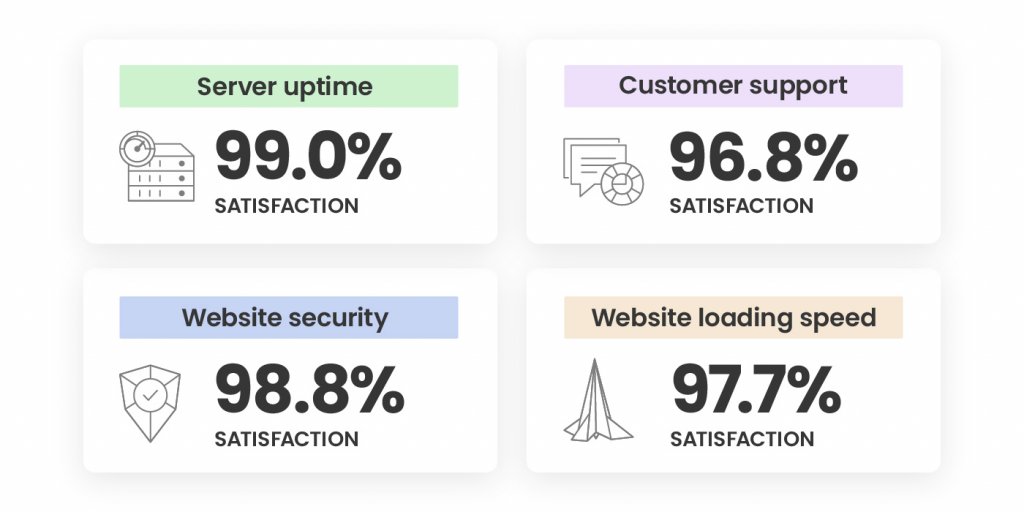
An Outstanding 98.8% Satisfaction with Site Security
Securing your websites has always been a top priority for us during the years. 2022 was not an exception and our efforts didn’t go unnoticed – our Website Security was rated high by an overwhelming 98.8% of all respondents! Here’s what we did to achieve that:
We improved our already great-performing Site Scanner with features improving early malware detection and introduced a new plan with proactive reaction tools in case of a website attack. During our #CyberSecurityMonth campaign last October, we went even further. We not only ran an intense email awareness campaign about website security, but we also introduced new security features, such as an on-demand IP and Geo traffic blocking tool. We also improved our AI-driven brute-force prevention system and its state-of-art self-learning mechanism, which now blocks over 95% more bad traffic before it even reaches our servers. Here’s a recap of all essential website security features for your website, in case you’ve missed it.
Last but not least, towards the end of 2022, we launched our new monthly security reports, included for free with all our plans. You can now sign up and receive directly in your inbox a personalized security overview of your website(s) every month, with highlights of what security measures we’ve applied and suggestions of what you can improve.
A Supreme 97.7% Satisfaction with Website Loading Speed
Website loading speed is important for your conversion rates, SEO rankings, and users’ experience. That’s why boosting website performance is of utmost importance to us and we’re constantly working on making your websites as fast as possible.
As early as February 2022, we introduced a newer version of our SiteGround Optimizer plugin for WordPress, making it available and free to all WordPress users, regardless of where they host their websites and included new advanced speed features, such as file-based caching. The plugin now has over 1 Million active installations and was voted Silver in the top 3 best WordPress optimization plugins in the annual WordPress community awards.
One of our biggest speed-boosting achievements in 2022 was the launch of our in-house built SiteGround CDN which not only makes websites load blazingly fast around the world, but it’s super simple to configure in a few clicks and included free in all our plans. We didn’t stop there and kept on growing our CDN and data center networks with a new location in Madrid and a few new locations in the USA.
Top Marks for Easy Website Migration and Setup
We’re happy to welcome those of you who have recently joined SiteGround as clients.
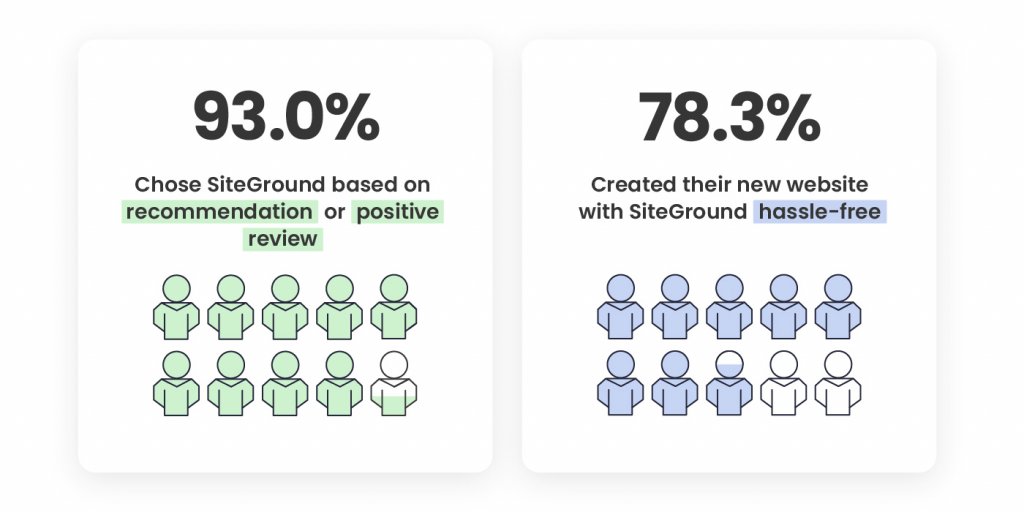
48.6% of our new clients say that the number one factor that led to the decision to get on board was a recommendation for SiteGround by someone they trust. 44.4% of you point out positive reviews about SiteGround were what influenced your decision to choose our hosting services, which is the greatest mark for the level of quality we provide, and the recognition and loyalty of our clients.
Your feedback about how easy our onboarding process is was also extremely valuable. A total of 78.3% of you, who created a new website with us, have noted that setting up a website on SiteGround wasa hassle-free process. 76.9% of you, who switched over from another host, pointed out in the survey that transferring your websites to us was a seamless process.
Now it’s even easier to migrate and manage all elements of your website presence to SiteGround with our newly launched Email Migrator tool. It helps you transfer emails to SiteGround servers easily, securely, and automatically.
We’re looking forward to making your future experience with us even better and contributing to your websites’ success.
A Steady 98% Overall Satisfaction In the Last Few Years
We completed 2022 with an overall client satisfaction rating of 98.1% which solidifies our top-rank customer happiness rate in the last couple of years. The overall satisfaction rate is based on your reviews for the following services we provide:
The breakdown of the satisfaction rate of each aspect of our services is based on the evaluation of both long-term and new clients. The overall ratio of all respondents is 90.40% long-term clients and 9.6% clients who have joined in the past 12 months. The fact that the majority of respondents have been with us for a couple of years now, and continue to express their satisfaction with our services with top marks is the greatest recognition a company can have.
You Helped the Environment by Completing Our Client Survey
Just like everything else we do, we also tried to maximize the impact of our client survey this year. In return for completing it, we committed to donate funds for planting a SiteGround forest. Thanks to you, we’ve already planted more than 11,000 trees worldwide – in the USA, Spain, Portugal, France, Indonesia, Madagascar.
We’d like to thank you for your trust, for your feedback, and for helping the environment! Stay tuned for all the upcoming services improvements and new tools launches that will aim to make your websites even more secure, better-performing and successful in 2023.
The new year is here, and what better way to start it off right than turning a business idea into reality? You can do just that with SiteGround’s new email course – Start Your Business Online in 2023. This comprehensive course will teach you everything you need to know to get your business up and running – from ideation to execution.
What does the course cover?
This email course provides a step-by-step blueprint for successfully launching a business. Over a month, you’ll receive eight in-depth emails that will teach you how to:
Validate your idea and define your target audience
Develop your brand identity
Craft your SEO strategy
Build, customize, and optimize your website
Launch your project and start growing
The email course comes with a bundle of downloadable assets and additional resources to help you throughout the learning process. By the end of the course, you’ll be ready to launch your dream project.
Who is this course for?
This course is perfect for entrepreneurs of all experience levels looking to start their own business. Whether you’re starting from scratch or need guidance on where to go next with your existing project, this course will provide invaluable insights tailored to help power up your inner entrepreneur.
Win free hosting!
We believe in the power of new ideas to drive business success. That’s why, as a special bonus, five people who sign up for the course in January will receive one year of free hosting from SiteGround.
So don’t wait any longer – start your business in 2023 with SiteGround’s email course and make your dreams a reality. Your future success is just a few clicks away!
December 2022 was magical, full of joy, gratitude, happiness, and fun.
The month started with an amusing Movember contest at the office accompanied by laughter and pizza. During “No Shave November” some colleagues grew and groomed nice mustaches and beards for a full month supporting the cause of raising awareness about men’s health.
We gladly announced our support for the World’s first expedition by rowing a boat from Antarctica across the Southern Ocean, in the face of our Bulgarian representative Stefan Ivanov, whom you might know from Neverest Ocean Row. The expedition is planned to begin in January 2023 and is set to accomplish six Guinness World Records. You may follow the expedition in real time via this tracker.
Our country manager for Spain José Ramón Padrón and Joan Boluda met for the monthly Uptime Podcast to review the latest news in digital business, web hosting, and technology.
Santa Claus and Snow Maiden came to our offices to bring presents and make our employees’ kids happy. We gathered a total of 152 children who were playing and dancing. It was a magical event!
We’ve enjoyed a Secret Santa gift exchange with our colleagues. All presents came along with many happy faces and excitement!
And last but not least, right before the holidays, we organized our company’s End-of-Year event and annual internal presentation in which we wrapped up the previous 12 months. Afterward, we ended the day perfectly with a Top Gun-themed party to pay homage to the sequel of the legendary movie released this year – with lots of music and dancing together.
It’s the beginning of a new year, and our team is ready to take on even more significant challenges and adventures! We are so looking forward to seeing what 2023 holds!
The webinar recording is available on our official YouTube channel for those interested in getting started with a WordPress website, or brushing up on their knowledge:
We also got a great deal of interesting questions which we didn’t have the time to address during the webinar, so we’ve provided the answers in the blog post below.
First Steps in WordPress Site Management
How do you customize my URL, so it just has my own domain and doesn’t include “wordpress”?
It seems that you are hosting on WordPress.com and using a free wordpress.com domain name, hence the wordpress keyword in your domain name. You should be able to purchase a custom domain and change it from your WordPress.com control panel.
If you move to a paid hosting provider such as SiteGround, you can register any domain name you wish as long as it’s not taken by someone else, and easily set your site to be accessible by that domain.
When I go to my website link /wp-admin WordPress login page, the SiteGround login does not come up. How do I sign in to my SiteGround website?
The key factor here is that the SiteGround.com portal and the Admin panel of your website are two different areas. By accessing your SiteGround Client Area, you can manage all your sites and payments, and access site-specific tools such as backups, emails, etc. The wp-admin page will lead you to log into your WordPress Admin panel to edit and customize the content of a specific site. To access your SiteGround Client Area, you need to go to login.siteground.com and type your SiteGround username and password. They may be different from the ones you use for accessing your WordPress Admin, so if the system does not accept them, you can use the Login recovery option available on screen.
How do I go about adding a new site to my plan on SiteGround? When is it advisable to have multiple sites?
All hosting plans we offer, except for the StartUp package, allow you to create and manage multiple websites. To create another site under your account, simply access your Client Area > Websites > Add new and go through our Website Setup Wizard. It takes just a few minutes to spin off new sites using the wizard and we have depicted the whole process in these guides.
It’s advisable to create an additional website in case you have a plan of what you want to use it for and, of course, time, as you will need some extra effort to develop and maintain the site. If you want to write on a totally different topic or start a completely new project, then it’s a good idea to create a new site for it.
Customizing your WordPress Site
Can I publish/display a “coming soon”/”under construction” page as the Home page while I work on my website in private?
In case you haven’t started your site yet, you can always create it on a temporary url provided by SiteGround which is not indexable by search engines (so random people on the web can’t find it accidentally) and later change it to your real domain name. By doing this, you won’t have to worry about installing additional plugins or doing additional configuration.
If you already created your site, one of the easiest ways to create a “Coming soon”, “Under Maintenance” or similar landing page is by using a plugin. It will allow you to design the page using a template and show it to your regular site visitors, while you will be able to access your dashboard and work on your site as usual. Once you’re ready to go live, you can easily disable the page and show the expected content. There are multiple Maintenance plugins available for free in the WordPress repository and one of the best documented is SeedProd.
If I have some pages that I only want subscribers to see, how do I control the login process?
Depending on your final objective, you have a couple of options.
The simplest way that does not require any plugins or whatsoever is to set your desired pages to require username and password to be accessed. This way only website users who have the necessary credentials may be able to view the content on the page. You can password protect your pages from the native WordPress Password Protected option described in our tutorial on adding pages to WordPress. Among the downsides is that there is no automation, in other words you will have to provide the credentials manually to each user.
If you are looking for more robust options for turning WordPress into a community site, you can install a Membership plugin. It comes with elaborate options that you can set to your preference, including enhancing the registration process and personalizing the login screen and dashboard. One of these plugins is BuddyPress and you may read more about it in our tutorial.
How can we add more themes to WordPress?
Additional themes can be installed from the WordPress Admin panel > Appearance > Themes > Add New. You can check our tutorial for step-by-step instructions or watch the webinar from this moment, if you prefer to see the steps.
If we change themes and there are some leftover images and text of the first theme, how can we remove them and troubleshoot this issue?
This looks like a development question, related to the specific site setup, but generally changing your theme should not affect your image and text content because the latter is added by you, while the theme is only responsible for the overall appearance of your site.
If you are referring to demo/imported content from the previous theme that you don’t need, you can either delete it manually from your posts/pages/media library or if you want to start literally from scratch, you can delete WordPress, reinstall it from Site Tools and apply the new theme.
Can I embed code from another site for my contact form?
You can copy and embed code from a different site into WordPress, but this usually requires advanced coding skills to configure properly. Most of the time, it’ll be easier to check if the other site offers a plugin for better integration.
Should I ask for the contact plugin from the email provider I will use?
The actual contact form setup depends on the email provider you’ve chosen. If you are using a business email provider (SiteGround offers business email service on all hosting plans at no additional cost), it’s likely that they do not offer a contact form plugin as it’s not within their scope. This is the more common scenario and what you can do is download and use a free third-party contact form plugin from the WordPress repository and set it up with your business email address. The one that we recommended during the webinar was WPForms and it has detailed instructions on how to create a contact form and add it to a page.
On the other hand, there are email marketing platforms that come with a greater toolkit for managing emails, but usually have a corresponding cost. If you’re using such a service, then it probably offers a plugin that lets you easily integrate the contact form you create on its platform with your own site. You would find information about their plugin, instructions on how to use and get support directly on their website.
Do you recommend using Divi/Elementor? If so, could you do one of these workshops on how to best use it?
With WordPress, you get a built-in block editor that is capable of both formatting and editing content, and our Start creating content with WordPress webinar covers exactly that. Divi and Elementor are addons that work on top of this native framework with some caveats among which is the fact that each comes with its own learning curve, which will require additional time and effort to master. Certainly, you can use them, but it’s best to get a better understanding of the basic WordPress framework before using any addons, partly because these addons largely revolve around it as well.
Check out our YouTube channel for an introductory webinar on Divi.
When Your WordPress Site is Ready to Go Live
Is the HTTPS protocol enabled automatically for WordPress websites?
Securing your website with HTTPS protocol is essential. We install an SSL certificate automatically for free on all new websites as long as the website is resolving from our servers. WordPress requires an additional step required before your site loads with HTTPS – to reconfigure your urls and enforce the HTTPS protocol.
We do not automate this, as it is a webmaster decision that we cannot make on behalf of the owner of the site, but we have developed a tool that allows you to do it instantly. If you are already using the SiteGround Optimizer plugin, access its Settings > Environment settings > HTTPS Enforce. In rare occasions, some of your site elements (most often images) may still load with http leading to the so-called mixed content issue. If this happens and your site does not appear as fully secure, toggle also the Fix Insecure Content option. More details can be found in our article.
How do I connect Google Search Console to my site?
To add your site to Google, you will need to verify that you are its owner. This can be done in several ways, but one of the easiest methods, if you are a SiteGround customer, is to create a TXT record in your Site Tools DNS Zone Editor. You’ll be able to get the TXT record during the setup.
Head to the Google Search Console website to get started and check out their official guide for step-by-step instructions.
Will you be doing a webinar on e-commerce on your site?
We’re passionate about eCommerce and we’re definitely considering it. Meanwhile, you may want to check out some of our previous webinars on using WordPress as an eCommerce tool, such as our step-by-step walkthrough on setting up WordPress as a store with WooCommerce.
2022 is coming to an end, and here at SiteGround, we marked another winning and eventful year. We worked hard on enhancing our services and tools and fine-tuning our hosting environment to be even faster and safer for our clients.
Now it’s time to wrap up and look back on the whole year! Go to our 2022 Recap, unlock our milestones, collect points, and enter to win a pair of customnoise-canceling BOSE headphones!
Technology Optimizations for Faster and More Secure Websites
In the past year, we took our hosting environment security and speed to yet another level. Some of the service enhancements and cutting-edge tools we launched are:
In-house built CDN for blazing-fast website loading time with a one-click setup.
Private DNS Service for enhanced online privacy and seamless white-label hosting management.
New Block country traffic tool to limit unwanted or malicious traffic and streamline your business.
Boosted AI brute-force blocking system with a traffic validation functionality, which cuts down the number of brute-force attacks by 95%.
Improved WordPress Tools For All
Our custom plugins for unmatched WordPress speed and security – SiteGround Optimizer and SiteGround Security – have together been installed nearly 3 Million times already. This year marked another big step on this journey, after we released both plugins for free use by everyone, regardless of the hosting platform you are using. In less than a year, SiteGround Optimizer has had more than 1,000,000 active installations on top of the 2+ Million SiteGround users and is ranked among the top 3 performance optimization plugins. The SiteGround Security plugin is close to 1 Million new installations and is ranked as one of top WordPress security plugins by the community.
In 2022, we also increased the WordPress memory limit for all of SiteGround clients in response to a growing demand in the community for raising the default WP memory value and to accommodate the ever-growing development of WordPress sites. The new limit of 256 MB on our servers means our WordPress clients have more room to expand their WordPress sites right out of the box.
Expanded Data Center and CDN Network
In 2022, we introduced 4 new Data Centers and 7 CDN locations across Europe and the USA. Our new geographical locations provide better website performance and faster content delivery.
Our clients can now host their websites as close as possible to where their visitors are to ensure faster page loading time and better user experience.
98% Client Satisfaction Rate
Being customer-driven has always been a cornerstone for us. Our clients’ feedback is the driving force behind everything we do at SiteGround. For this reason, each year we ask our customers to rate our efforts and services throughout the year.
This year our client satisfaction rate remained a steady 98% on our annual end-of-year survey. And to share our gratitude for our customers’ input, we’ll plant a tree through TreeNation for each person who completed the survey.
Explore Our Milestones and Win Bose Headphones
Revisit these and more annual accomplishments in our SiteGround Year in Review and enter our raffle for a chance to win a pair of custom noise-canceling BOSE headphones! And that’s not all – get extra entries by sharing our recap on social media with #SiteGround22 by January 9, 2023!
2023 is around the corner – supercharge it with some extra points from 2022 and SiteGround, and let’s see what it has in store for us!
Do you know how secure your site is and if its security level is changing over time? Have you ever wondered how many actual attacks toward your site are being mitigated? Do you want to know if you have missed doing something easy that may protect your site from incidents?
Now with SiteGround’s Monthly Security Reports, you can get all that information and more – straight to your inbox. Just sign up and start receiving an actionable monthly report covering what SiteGround is doing to safeguard your site and highlighting security measures that you may have overlooked.
What’s in the Monthly Security Reports?
Each month we will perform automated security checks for your website covering malware protection, SSL certificates, software exploits, brute force attacks, and other security areas. Based on our checks, you’ll receive a digestible summary of the results – including a total site security score, breakdown score for each security check, and actionable tips if some area needs your attention. The monthly security reports will be your go-to place to get an overview of your website security status.
The benefits of the Monthly Security Reports
Site security information in one place
Performing website security checks manually can be an investment of valuable time, effort, and money that most website owners can’t commit. With the monthly security reports, SiteGround will handle the heavy lifting for you, performing all necessary security checks and delivering user-friendly reports straight into your inbox. So you get to know everything with no effort required on your side.
Easy to understand format
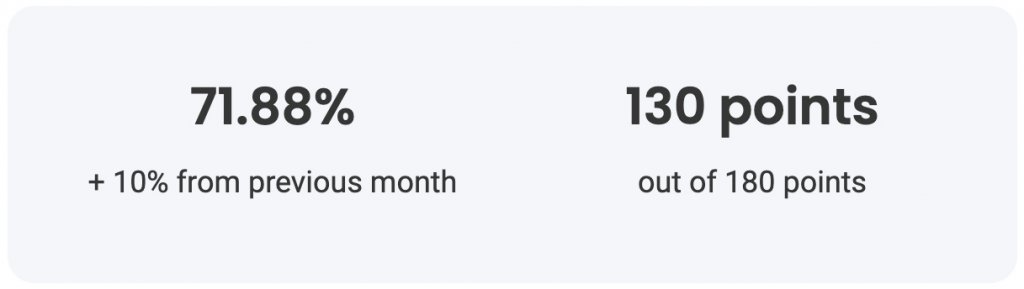
With our user-friendly design, you can quickly scan the report and easily identify areas that need your attention, if any. All you have to do is follow our straightforward color codes: green when everything is good; yellow: needs improvement; red: definitely needs attention. You also receive an overall score for the month and information how it has changed in comparison with the previous month.
Actionable advice when needed
If we have identified an area of your site security that may be improved, the report will include easy-to-follow instructions on what can be done. For example, if we detect that you don’t have an SSL certificate installed on your site, it will provide you with a link to the information on how to set it up.
Confidence that your website is protected
By signing up for our monthly security reports, you may easily monitor what we do on a regular basis to keep your website safe. Each month you will see information like: how many software vulnerability attacks have been prevented; how many malicious IPs were stopped from reaching your site; how many backups you may count on, etc. Making sure your site is secure is an enormous part of our job as a host, and with the reports you can keep an eye on this process.
How to get the Monthly Security Reports?
Starting from next year we will gradually begin to proactively send the reports to all our clients. However, you may hurry up and sign in yourself today and be among the first to receive their report in early January 2023.
The reports are sent out at the beginning of each month for sites that have been active for more than 30 days and have their domains pointed to SiteGround. You can see detailed information on subscription, content and score calculation in our Security Reports Explained article.
Sign up today and sleep soundly, knowing that all relevant site security information is right at your fingertips.