


PHP 8.4: Stay Updated! 🚀 Check out our latest blog post to explore the newest features and enhancements in PHP 8.4.
Today PHP 7 has reached its General Availability status. As you probably know it has been available on SiteGround servers for quite a while and you can refer to an earlier post of ours about its features. Now it has reached GA status which means PHP7 can be used on production sites.
PHP 7 Adoption Status Among CMS Used By Our Clients
Many of the most popular content management systems on our servers such as Drupal, WordPress and Joomla! have decided to support PHP 7. Some of them have already officially announced that their code is compatible with PHP 7 and others will need more time to get to that point. Here is what our tests indicate as of today:
- Drupal 8 – Officially supports PHP 7. Available for download.
- Drupal 7 – Works with PHP 7. Available for download.
- WordPress 4.3.1 – Works with PHP 7. Available for download.
- Joomla! 3.4.5 – Does not support PHP 7.
- Joomla! 3.5 – Supports PHP 7. Will be released in January 2016.
Please have in mind that even if you’re using an app that supports PHP 7.0 some of its components like plugins, themes, modules, etc. may have old code that will not work on the latest version. This is why we advise that you always test on a staging environment before you enable it on your live site.
How to Enable PHP7 on SiteGround servers?
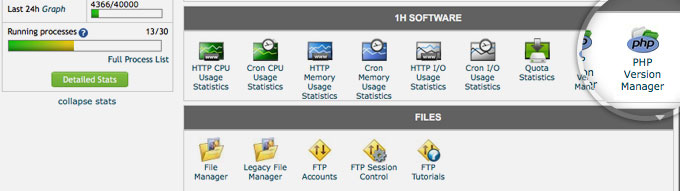
To enable PHP 7 for a certain account or part of an account you can use the PHP Version Manager in your cPanel:
Important Notice for the Users of our SuperCacher plugin for WordPress
Up until now our SuperCacher plugin for WordPress (SG CachePress) has been using the Memcache PHP PECL module. The Memcache PECL, however, is not available for PHP 7. PHP 7 is working with Memcached only. That is why today we released a new version of the SG CachePress plugin which uses Memcached – a new PECL for PHP, which provides more features and better performance.
If you would like to take advantage of the PHP7 and Memcached for your WordPress site, please follow the steps below:
1. Update the SG CachePress plugin to the latest version – 2.3.0.
2. Disable the plugin from the WP dashboard.
3. Re-enable the plugin to apply the new Memcached settings.
4. Change the PHP version for your site from the cPanel -> PHP Version Manager tool.
[subscribe_cta]
Have you done any tests on performance improvements when using PHP version 7?
Thomas, in our previous blog post about PHP 7 we added a link to the following performance infographic by Zend:
https://pages.zend.com/rs/zendtechnologies/images/PHP7-Performance%20Infographic.pdf
Our internal tests show almost the same results.
Daniel.
Hope you don’t mind me contacting you like this!
But, I am new with Siteground and WordPress – plus also new with cCommerce and Blogging etc…
Just starting off and trying to learn…I had WordPress installed just a couple of days ago – and
I would like to use it to build WordPress sites with the british “XSitePro” software which I have the permission to use.
However, It apparently uses PHP for it’s Forms Wizard and Site Search Tools, but when I asked a Siteground chat agent about XSitePro he was not familiar with it.
I am hoping you might be able to help me with whatever is required to set this up correctly, as I don’t see any help scripts for this sort of application. (Or perhaps direct me to a more senior
person who might also be knowledgeable regarding my request)?
Any help much appreciated!
Thank you,
Kevin
Hello Kevin,
I am afraid that we are not familiar with the XSitePro software. However, if it is based on PHP/MySQL then you can use it on our servers. For more information about how to install XSitePro please contact their support team or if you want us to install the app for you then post a support ticket via our ticketing system.
Does this translate to faster load times for low traffic sites?
When will PHP7 be standard on SG shared hosting?
PHP 7 performs way faster than any previous PHP version available and it’s available on all our shared servers.
Perfect, we will use PHP 7 for the WordPress folder. PHP 5.6 had only advantages compared to version 5.5. So we are looking forward to try the newest version.
Why did you skip PHP6?
We did not skip PHP 6 because there is no PHP 6. The developers of PHP decided to release PHP 7 instead of PHP 6. Please find more information here:
https://wiki.php.net/rfc/php6
As expected from best hosting provider who always strive to give the best to their customers. Good job! No wonder why more and more people migrate to SiteGround. ^_^
Doing our best!
You should also advice people to empty their ~/.opcache directory. Random weirdness can occur.
“Why did you skip PHP6?”
They were probably too busy migrating to Windows 9.
Can a staged WP instance be tested for PHP7? I would like to determine why it isn’t working on my main site without taking that down to troubleshoot.
Yes, simply modify the staging folder to use PHP7.
I’m getting a “Fatal error: Uncaught Error: Class ‘Memcache’ not found” for PHP7, WordPress 4.4 and latest W3 Cache using memcache, also have latest SG super cache plugin.
Please update the plugin top its latest version, then disable it and enable it again. It should work after that!
Hi, thanks for the suggestion, this is the error now:
Fatal error: Uncaught Error: Class ‘Memcache’ not found in /site/wp-content/plugins/w3-total-cache/lib/W3/Cache/Memcached.php:38 Stack trace: #0 /site/wp-content/plugins/w3-total-cache/lib/W3/Cache.php(42): W3_Cache_Memcached->__construct(Array) #1 /site/wp-content/plugins/w3-total-cache/lib/W3/ObjectCache.php(567): W3_Cache::instance(‘memcached’, Array) #2 /site/wp-content/plugins/w3-total-cache/lib/W3/ObjectCache.php(166): W3_ObjectCache->_get_cache(0, ‘site-transient’) #3 /site/wp-content/plugins/w3-total-cache/lib/W3/ObjectCacheBridge.php(32): W3_ObjectCache->get(‘itsec_upload_di…’, ‘site-transient’) #4 /site/wp-content/object-cache.php(51): W3_ObjectCacheBridge->get(‘itsec_upload_di…’, ‘site-transient’) #5 /site/wp-includes/option.php(1559): wp_cache_get(‘itsec_upload_di…’, ‘site-transient’) in /site/wp-content/plugins/w3-total-cache/lib/W3/Cache/Memcached.php on line 38
Please, disable all memcache / memcached options from W3 Total Cache and utilize it through our SG CachePress plugin. If the issue persists, please post a ticket in your Help Desk 🙂
I tried PHP7, but had to go back to to 5.6 because 7 caused problems with a plugin that is neccessary for my websites.
Soon most of the quality plugins will update to support the latest PHP versions. If that doesn’t happen with yours, I would consider replacing it with one that does support PHP7.
I found it excellent so far, and have it running on a WP site with at least 30 plugins and have found no issues to date, was well worth the risk as the speed is much zippier.
Thanks for your feedback. Glad you’re seeing improvements.
Hristo, I’m not succeeding with going to PHP7 on 2 of my SG sites, even though the SG CachePress recycle is properly done and also SG support people have taken a pretty good run at it but still failed. After switch PHP version to 7.0.0 (btw, where’s 7.0.1), both sites show very similar same behavior – most of it seems to work, but random out of memory and fatal errors with garbage symbols start showing up in debug.log. This is not about plugins being incompatible – I’ve been running PHP7 on staging for a month+ for both sites without a single issue. This is something with the SG platform. Please see ticket #1523566 to start.
Thanks for reporting this. PHP7 is still new, we will dig into it! We will update your ticket with more info.
Why not upgrade to the newest version of PHP it have some issues corrected now I can see 🙂
We do reply all PHP branches on a regular basis after an extensive testing procedure.
Mara CMS has supported php7 since the beta -In fact it was less of a problem to get that working than with 5.6. Just done a brief test on SG with 7.02 and everything seems to work. Excellent.
Great, happy that it’s working smooth!
I am “almost” sure my PHP 5.6 site will work in PHP 7. Is it relatively easy to roll back to 5.6 if 7 causes my site to crash? My web-site is already super fast on your SG servers, I can only image how it will perform on with PHP 7.
Hello, Jonathan and thank you for your question. You can change the PHP version used by your site directly from your cPanel -> PHP Version Manager tool. For more information how to do this check this article:
https://www.siteground.com/kb/how_to_have_different_php__mysql_versions/
In case anyone runs across this thread and uses W3 Total Cache with PHP 7, you’ll probably get the following php error:
PHP Warning: Parameter 1 to W3_Plugin_TotalCache::ob_callback() expected to be a reference, value given in /home/[…]/public_html/[…]/wp-includes/functions.php on line 3464
The fix is very simple. Open the following file:
wp-content\plugins\w3-total-cache\lib\W3\Plugin\TotalCache.php
Go to line 512 and remove the “&” from the following code:
function ob_callback(&$buffer) {
Thanks for sharing this, but I think you should post in the plugin’s page in wordpress.org so the developer can patch the code in next release.
Hi,
Still having huge problems, when moving to PHP 7 on Siteground. Random “memory exhausted”, even though the site only uses around 20 MB of memory. Problems are showing up randomly and are happening more often when SG Cache is enabled. I am running the same setup on a local PHP 7 setup and on 2 other servers online, without any problems! No fatal errors on our end, while debugging the system on any other system. Sadly this means back to PHP 5.6x on Siteground for now.
Regards
Alex
Hello, Alexander. We do host thousands of sites that use PHP 7 + Memcached and also our SuperCacher without any issues. I do suspect a specific problem with a plugin or with your theme. Please post a support ticket and provide instructions how the issue could be recreated on our end. Then ask our colleagues to forward the ticket to me or to Ivan Yordanov. We’ll be glad to check this problem in details and hopefully resolve it.
Same deal with me,
I have had to revert to PHP 5.6 to get a new project to work happily with certain plugins, one being BuddyPress, however BP is not exactly playing ball yet with PHP 7+ so will wait for some plugins new versions, then update on staging and push to live if we do not get a whole raft of errors here.
Other dev’s are also reporting better results on other host’s
Come on SiteGround, get with the program, if WP Engine can do it, why can’t you? 😉
Cheers.
JB
Not sure what WP Engine are doing that we’re not 🙂 I don’t think any hosting company is patching plugins so they can work with PHP 7.0. To be honest, if a plugin, important for you is failing on PHP7.0 all you can do is either replace it or wait for an update on a lower version.
Is there a way to update all sites to php 7 on our account at the same time instead of doing it one by one?
Yes, you can place an .htaccess file in your home folder with the appropriate line and it will apply to all sites you have unless specified explicitly in their sub-folders. Check out this article for the appropriate line of code you need to paste: https://www.siteground.com/kb/how_to_have_different_php_versions/