Green Web Hosting And SiteGround’s Commitment To Sustainability

Data centers play a big role in the Internet industry: they store, process and deliver all the websites’ information on their non-stop running servers. They are usually part of massive facilities which need a controlled and artificially-cooled environment to run properly. That requires a huge amount of energy, indeed, according to recent studies, global data centers are estimated to consume 1% of global electricity use, issuing high quantities of CO2.

As an international hosting provider that manages more than 2 Million domains and 5PB of data, we are fully aware of this impact on the environment and it is in our hands to actively mitigate it by committing to provide green web hosting services as much as possible. From designing our hosting operations and services with the highest efficiency in mind, to implementing several policies that support an environmentally-friendly mindset, we take it seriously because we truly care.

Since today is Earth Day and we want to celebrate that day with joy and gratitude, it seemed relevant to give you some background on what it means to be a green web hosting provider, what to keep in mind when choosing one, and what actions SiteGround is taking towards sustainability.

What is green web hosting and how hosting providers can mitigate their environmental impact?

Green web hosting means that the hosting provider is committed to contribute towards the health of the environment and proactively takes eco-friendly actions that involve either carbon offsetting or renewable energy usage in order to reduce or mitigate the environmental impact of their servers’ energy consumption.

There are two main actions a hosting provider can take on the way to offering green hosting service:

  1. Use renewable energy to power up their data centers and facilities. This means that the electricity they use comes from natural resources that are replenished naturally, such as sunlight, wind, rain, tides and geothermal heat.
  2. Buy carbon credits. With this option, the company can buy a permit to emit one ton of carbon dioxide per credit or its equivalent of any other greenhouse gas with the aim to offset their carbon footprint.

As the internet industry evolves, so does the amount of energy and resources needed to process all the operations that the content storage and traffic implies. Choosing a hosting provider which is actively running actions towards better efficiency of their data centers and fostering initiatives to reduce their business environmental footprint is becoming ever so important, as it all makes a great impact on climate change, in addition to having several advantages for you. Three of the main ones are:

  • Carbon footprint reduction of your e-business and online operations, since green hosting providers usually opt for renewable energy usage or buy carbon credits.
  • Better efficiency of your website, as their efforts towards sustainability may include the adoption of latest technologies and resources optimization. 
  • Easiness to be part of the green change, as at the very moment you host your website with a hosting committed to the environment, you are already making a difference compared to others in regards to climate change.

Actions SiteGround is taking as a green web hosting provider:

Reducing our carbon footprint by partnering with commited providers

Since we are not a data center provider, and are not operating our own data center facilities, we need to rely on the green policies of our main data center partners. That’s why, a key motivating factor for our decision to move our infrastructure to Google Cloud Platform was their commitment to sustainability. Google’s data centers match 100% of the energy consumed by their global operations with renewable energy and maintain a commitment to carbon neutrality. Choosing such a leader in energy efficiency as our infrastructure partner is something that we are very proud of.

Optimizing resources by providing customers with top-notch technologies for better efficiency of your website applications

Efficiency is another key factor of green web hosting. Simply put, every website operation is managed and executed by its hosting server processor, and requires CPU, RAM, and storage resources. The heavier your website is, the longer its server processor and resources are in use, the more electricity it consumes. 

At SiteGround, we are constantly optimizing our server software to get the most out of our technology and reduce the resource usage of our clients’ websites. As a result, the better optimized our servers are, the less resources and less energy your website will use for the same volume of tasks, making our operations and clients’ websites “greener” thanks to our software performance. For example, our Ultrafast PHP can speed up website performance up to 30%, making it consume proportionally less energy. Our latest RAM optimization of our cloud MySQL setup on our servers additionally increases client websites’ resource usage efficiency. 

We also constantly look for ways to optimize our internal operations for maximum efficiency – for example, performing regular backups at certain hours when the overall server resources usage is relatively low, to avoid putting extra load on the server processors, thus balancing energy consumption. Overall, our policy to always strive to make the latest website technologies available for our clients to use not only helps you reach top website performance, but promotes energy efficiency, as well.

Reducing the environmental impact of our workplace

In early 2019 we finished the building project of the new SiteGround Headquarters building. One of our main goals was for it to be built entirely in accordance with the Leadership in Energy and Environmental Design (LEED) requirements. LEED is the most widely used green building certification in the world, globally recognized as a symbol of sustainability achievement.

SiteGround Headquarters Building is built entirely in accordance with the LEED requirements.

Encouraging a more conscious lifestyle among our team members

In addition to our efforts on a business and company level to become a green web hosting provider, we constantly try to maximize our impact by encouraging every single employee of SiteGround to lead a more conscious lifestyle. We are running several internal initiatives to help us do that:

  • Company E-cars, e-bikes and free e-charging stations at the disposal of our employees during work hours or for running small errands. Following this benefit, we saw more colleagues opting for electric cars in their own households and others seriously considering it!;

Company E-cars are at the disposal of our employees during work hours.
  • No plastic water bottles, containers, or water coolers in the office: we installed water filter dispensers across all our offices to replace plastic use due to daily water consumption;
  • Using custom green-friendly tissue for our company gifts: For all SiteGround-branded gifts and packages that we send to employees and partners, we use a custom-design eco-packaging by Noissue’s Eco-Packaging Alliance. For every order made they plant a new tree, contributing to global reforestation and carbon neutrality;
  • Our last (for now) team building event in 2019 was dedicated entirely to the Zero-waste idea, which was reflected not only in all team workshops and activities, but across the whole event organisation, banning single-use plastics, separating and recycling all our waste from the event, etc.

Having in mind all of the above, we are fully aware that sustainability is a process – it starts with an intention and only goes on and improves with time. We will continue looking into adding even more meaningful actions to continue delivering green web hosting features. But the future depends on all of us. We all need to realize that our personal choices have public consequences, and be more conscious about what we can do in order to sustain our business or way of life, but in a way that is also considerate for the environment.

In addition to us sharing our efforts towards sustainability, we’d love to hear from you! Share in the comments below what you are individually doing to achieve a greener way of living, working, and doing business. It is always comforting to know every single step that is done at every level, as when put all together, they will sum up to turn into a big leap towards mitigating environmental issues.

[subscribe_cta]

Adopt a Bird for Earth Day – Support for Green Balkans and Bulgarian Nature

SiteGround_Adopt_Bird_Earth_Day_Help_Bulgarian_Nature

This year’s Earth Day, April 22 comes with a green team initiative in support of Green Balkans, the leading organization in the conservation of rare species in Bulgaria. As part of our environmentally-friendly efforts and culture, we’ve also been involved with the cause of Green Balkans for over 3 years when the organization was referred by a teammate for our internal Host a Cause program. The idea of this program is simple – it encourages team members to help the online presence of NGOs they care about. Every SiteGrounder can choose a non-profit initiative, project, or foundation to support by giving them a free website hosting account for life. Why? Because we care about our employees and the things that matter to them. This is how we started supporting Green Balkans 3 years ago, and continue our efforts now.

Contribute to Bulgarian Nature

To celebrate this year’s Earth Day on April 22nd, we decided to go further and contribute to the cause of Green Balkans as a team and as a company.  We encouraged our teammates to help adopt a special kind of bird called “Cinereous Vulture”. Cinereous Vulture is known as the largest bird of prey in Europe and an extinct species in Bulgaria. Green Balkans have been striving to bring it back for nearly 30 years because it plays an essential role in our nature and biodiversity. It seems that their constant efforts to achieve recovery of the species to our country have recently proved worth it. The first two Black Vulture couples have settled in Bulgaria for the first time after so many years just a few weeks ago. However, to achieve long-term success, Green Balkans need further support for the full recovery of the extinct species to our country.

That is why we’ve started a donation campaign for our team – every SiteGrounder can donate a sum of their choice, and SiteGround will double it to support the cause. As adopters, we will have the privilege to name one of the special birds and also once it starts living freely and safely in our regions, to receive signals of its location due to a special tracking system Green Balkans use. Of course, to include every team member in the process, we opened an internal poll for the name of the bird, and will later on have a team vote on the most favoured name suggestion by popular choice inside our team.

You’re very welcome to support Green Balkans, too. Feel free to contribute to the good cause on a personal level by donating an amount of your choice to Green Balkans and the Bulgarian biodiversity, following their user-friendly donation methods here.

Every action is important as the future of the world we live in depends on each and every one of us and the actions we choose to take or not on a daily basis. Be part of the change you want to see in the world and a good example to yourself. And if you love technology and nature as much as we do, make sure to check our SiteGround jobs and current openings here.

Update:  We’re happy to announce that together with our team we donated a total of 3700 BGN to a cause of Green Balkans. Big thanks to our teammates and all of you who joined the campaign in support of Green Balkans and by doing this helped for the preservation of an extinct bird species called “Black Vulture”, which are nesting in Bulgaria for the first time in 30 years. The good news is that the couple now has a baby bird! We’re also excited to announce the name of our newly adopted bird for which the majority of our team voted. We chose Avalon – named after one of our internal server systems.

Optimizing the RAM Utilization by the MySQL on the Cloud

Over the last 6 months, it has been all about speed at SiteGround. We have boosted the performance of the websites hosted with SiteGround up to 5 times by launching the new Ultrafast PHP and MySQL setups and enabling the dynamic cache (full page caching) for all sites. As a next major step in this process, we have turned our attention to our cloud servers and are glad to announce that we rolled out a new dynamic RAM-allocation algorithm that further improves the resource utilization of the MySQL and makes the database-intensive websites hosted on our higher cloud plans run faster. 

What is the problem with MySQL?

MySQL could be a real troublemaker. When left untamed, it devours resources and keeps asking for more. If it doesn’t get what it wants, it starts slowing processes one after the other and turns into a bottleneck for database-driven apps like WordPress. So the MySQL settings are the key to resolving many of the site slow issues reported, but many webmasters have difficulties tracing the origins of the slow performance. It is not just a question of adding more RAM. This RAM should be smartly utilized in a way that allows MySQL to run as fast as possible, but still to be restrained from eating up all the available resources.  

We have been helping clients with evaluating what is an optimal allocation of RAM to the MySQL given the specific services running on the website and the available specs and manually resolving those case by case, but, now we have come up with a way to automate that and diminish the amount of work and expertise required by our clients in the process.

What have we done?

We have implemented a dynamic configuration that depends on the amount of memory your Cloud account has. This means that MySQL settings will be adjusted depending on the available resources. We will not only start new Cloud instances with predefined configurations, but in case of an Automatic Scale event (or upgrade), the server config will adjust itself for optimal resource utilization without manual intervention.  That means that database queries will be processed faster and the I/O usage will be lower. Last, but not least, the additional RAM you add will now be utilized more efficiently, and even fast-growing sites will have to add less of it less often and thus save on their hosting expenses.  

Who Gets It?

The new system is already deployed on all Cloud servers! You don’t need to enable it or otherwise configure it. Just watch out for performance improvements and do let us know your feedback. The more database-intensive your site is (such are, for example, membership sites, online stores, forums, etc.), the bigger the improvement from the change will be!

[subscribe_cta]

All SiteGround Accounts are Now Using Site Tools

Mission Accomplished! The last one of our cPanel servers was switched to Site Tools yesterday. We are so excited to see this long and complex migration come to an end as now each and everyone of our customers is safely brought to the new era of SiteGround development. A year and a half ago we started the transition from a 15-year old server setup, dominated by third-party software that was inevitably putting reins on many of our boldest dreams, to the new state-of-the-art hosting management platform, driven by our own unique server software. Since we launched our first server on the new platform in 2019, we were finally able to unleash the full potential of our imagination and we have already created a lot of speed, security and usability improvements that would have never been possible with the old platform. And, we know that the best is yet to come!

The idea and vision for our new cutting-edge platform was born about 4 years ago and soon after, we dived into building SiteGround’s Site Tools and new Client Area. We started onboarding new clients to it in the summer of 2019, but switching all our existing clients was a hugely complex task that took us another 1.5 years and tons of hard work. Here’s a glimpse of all the effort that went into this complex migration process to explain why this is such a milestone and a proud moment for us.

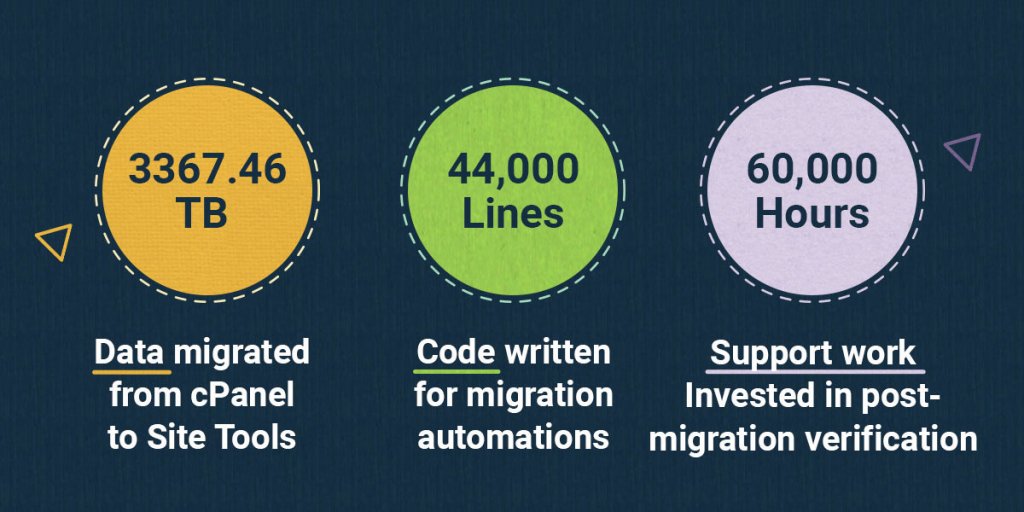
Large Number of Accounts and over 3367.46 TB of Data Migrated 

The huge amount of live hosting accounts and website data that had to be transferred from servers with cPanel to servers with Site Tools setup was a fundamental part of the challenge. Performing such a massive operation successfully required a meticulous organization of manpower and resources. During the past 1.5 years our management team spent countless hours coordinating teams and shuffling resources to ensure that we are migrating away from cPanel in the fastest and safest way possible for our clients. To sum it all up, we transferred a total of 15 774 servers with 3367.46 TB of data on them in the period from September 2019 to April 2021, and that is a huge deal! 

A Multitude of Use Cases and 44,000 Lines of Code Written for Migration Automations

Besides the large volume of data, the second biggest challenge was the multitude of edge cases that had to be reviewed and addressed with a solid technical solution – multiple applications set to use absolute paths in their configuration; websites with either addon, parked or subdomain infinite setup option; multiple addon domains using the same database; and more! Our DevOps, Software Engineers and Technical Support teams all had to dig deeper into identifying, analyzing, and providing a solution for each of those cases. Once we identified them and crafted an efficient solution for each, we got to automate it. Our DevOps would write scripts for pre-migration checks to detect matching potential issues on a server, call special migration rules for them, and then run post-migration checks to make sure nothing was broken. If anything did go wrong, we would audit the scripts and get back to coding to improve them. In addition, in case of any issues with the automations, our Technical Support representatives would take over by running manual website checks and fix them.

We had 35 of our experts in charge of writing migration scripts, iterating, testing, and enhancing their code over and over until we made them as fast and efficient as possible. Together, these dedicated professionals lived and breathed this project every day, writing 44,000 lines of code in total to get us where we are today.

Our Best Record: 8985 Accounts Migrated in One Day 

In the beginning, we were shyly moving at a few hundred account transfers per day with a high fail rate, meaning we had to go over many of them manually and fix any issues that might have been caused by the migration. Thanks to the constant improvement of our scripts and our admins’ growing expertise, we managed to speed up the process tremendously and drop the fail rate significantly. It all led up to our record-breaking day – March 7, 2021 when we migrated 8985 accounts in a single day!

60,000 Hours Invested in Manual Post-migration Verification

Another big challenge was our determination to move all of the accounts in the shortest time possible without affecting the availability and functioning of the sites. As explained above, manual checks were an intrinsic part of the process, no matter how much the fail rate was dropping. We counted 60,000 human hours in total distributed among 160 000 accounts that were audited for post-migration issues and manually fixed after.

So many new features now available to all!

On behalf of the whole SiteGround team, make yourself at home with Site Tools! Here’s a short overview of the new features you will enjoy:

  • Easy multiple website management under one login, 
  • Seamless team work by adding website collaborators,
  • One-click transfers of ready-made sites to your clients,
  • Giving your clients  white-label access to their websites’ Site Tools, 
  • Interfaces designed in line with accessibility standards,
  • Faster MySQL setup,
  • Unique Ultrafast PHP setup,
  • Top speed technologies being implemented much faster on the Site Tools servers such as Brotli compression, support for the Webp image format, and more.

We are truly excited and proud of being able to provide so many new features and service improvements to all our customers in such a short time. Despite the adversities, we have proven once again that even the most ambitious goals and complex processes can be successfully mastered when the best team runs a tight ship, paddles in the same direction and gets the best source of motivation – the trust of all our beloved clients and the desire to deliver the best customer experience!

[subscribe_cta]

Supporting Bulgarian Mountain Huts with Live Web Cameras and Internet

SiteGround Supports BOHO - Huts.bg

Even as winter is already towards its end here, going to the mountains will never be out of season. That’s why we’re excited to share one more initiative that we recently supported in addition to our help for the Bulgarian Mountain Rescue Service.

A few months ago we were approached by The Bulgarian Observable Huts Organization (BOHO) – looking for a partner for one of their latest projects. The Bulgarian Observable Huts Organization is a donation based non-profit entity. Their goal is to equip as many huts and lodges in Bulgaria as possible with Internet, online meteorological stations, and web cameras. Thanks to their efforts travellers can easily check the meteorological situation and actual weather forecast in a particular hut from BOHO’s network in order to better prepare for trips in advance.

We know how important the right preparation and equipment are. What’s more, BOHO contacted us at the same time while we were working on our Mountain Safety Checklist and Mountain Phone Wallpapers, as part of our support for the Mountain Rescue Service – the Bulgarian Red Cross. Since in our team we have many avid hikers, bikers, peak and mountain lovers, we thought there couldn’t be a better moment to support one more organization who develops safe and sustainable tourism for everyone in Bulgaria.

Balkanity Hut

So, a few months later, thanks to our donation, the team of BOHO managed to equip one more new mountain hut with Internet and live web cameras. That’s how everyone can at all times check the view from the new Balkanity hut, situated in Vitosha mountain Park, and plan their next mountain trip there, or just enjoy the scenery from their couch or office desk. 

Check huts.bg if you wish to have a look at the current weather conditions at some of the other 13+ mountain huts in Bulgaria that BOHO equipped. It’s good to know that the website is yet only in Bulgarian, but BOHO are in the process of developing a new one with more languages and functionalities, giving advantages to even more people. If you have plans to stay in a mountain hut in Bulgaria soon, you might also be interested in the online huts map that BOHO uploaded here. 

“Be sure to go to the mountains always fully prepared and do not overvalue your capabilities”, is the go-to advice from Boyan Georgiev, the founder and the main driving force of BOHO. 

With the online map of BOHO, a smartphone, and our Mountain Safety Checklist, everyone is all set to go on a happy (and safe) mountain trip! And if you love technology and mountains as much as we do, check out our SiteGround careers opportunities here.

Update: In April, 2021 we continued our support for BOHO with a new donation for the equipment of one more cosy place – September hut – in Vitosha mountain, very close to the capital Sofia. Thanks to our efforts, the hut will be equipped very soon with Internet access, and live web cameras, so you can work remotely from there and check the conditions anytime. It’s a very popular and chill spot, especially among younger people, so we encourage everyone to pay it a visit.

We Are Turning 17 And This Is How We Have Matured

SiteGround_17_Birthday

Turning 17 is exciting for everyone, even for a hosting provider! And today, March 22, 2021 marks our 17th Birthday! During these years we managed to keep our enthusiasm and spirits just as high as that of a high school senior, but gain even more experience. In this past year alone we matured tremendously, having been through a lot of changes and facing challenging times that made us stronger and better than ever before, especially in terms of our service and commitment to our communities and those who were in need during the COVID-19 crisis. What helps us celebrate and enjoy this anniversary is knowing that we have done a lot of good work and we want to invite you to join us on a short walk down memory lane.

Enhancing our interfaces for a smooth user experience

Looking back at our beginnings, it is quite impressive how our increasing focus on delivering a top-notch user experience has been reflected in our interfaces. Those days in which website platform, dashboard or control panel were a synonym for complicated routes to follow only suitable for the most technical ones are gone.

SiteGround User Area from 2012 to 2019

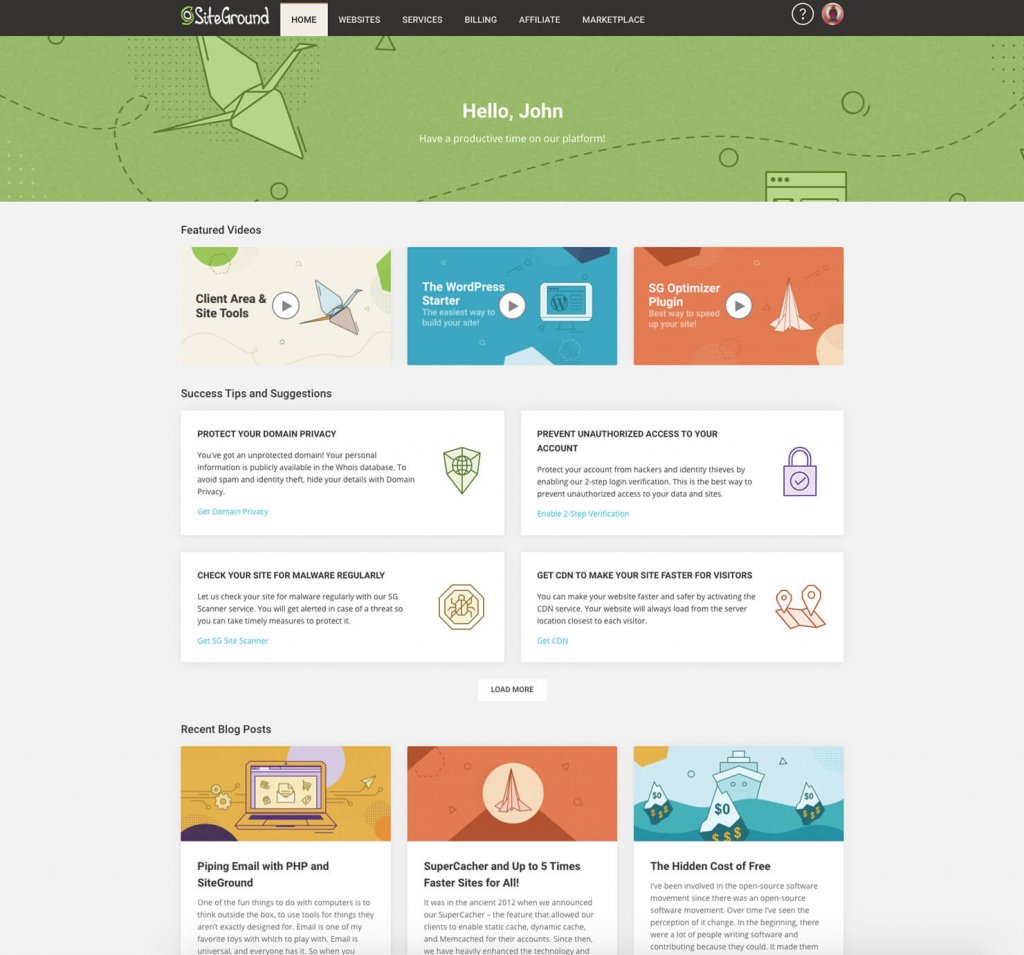
Now with our renewed User Area and Site Tools interfaces, which are already available for ALL clients on our shared hosting servers and almost all of our Cloud ones, the experience of managing a website has become easier than ever and accessible to all.

SiteGround User Area from 2019 onwards

Developing the fanciest, high-quality hosting platform

Our platform has evolved tremendously since when we started back in 2004. Moving from bare metal servers with a pretty standard LAMP setup (Linux-Apache-MySQL-PHP) with cPanel (a control panel used by pretty much every other host out there) to a sophisticated cutting-edge platform with in-house developed technologies and a unique control panel is our pride and joy.  Our clients now enjoy one of the fastest and safest hosting services thanks to a unique configuration built over the years by some of the best IT experts. To remind you about a few of the more recent ones:

  • Unique Ultrafast PHP configuration for up to 30% faster sites;
  • Custom MySQL setup to reduce the number of slow queries on our servers;
  • Nginx Direct Delivery for caching of static resources like images and CSS and dynamic caching mechanism now available to all clients for up to 5 times faster sites;
  • The one and only SiteGround Optimizer plugin that allows users to enable tons of performance boosting features on their WordPress sites;
  • An ultrafast Daily Backup System that saves hours in data recovery;
  • AI antibot system to prevent the most obnoxious brute force attacks;
  • Infrastructure powered by Google Cloud that helps us be even more stable, faster and greener, and more…

Maturing as a socially responsible company

Part of growing up means maturing in many different ways. One of the aspects that we are much proud of is how we evolved with regard to our corporate social responsibility. Although we don’t often put our good deeds in writing, nor do we have a corporate page officializing these responsibilities (yet),  we care and we get involved. 

The COVID crisis hit all of us hard both personally and professionally. In a moment when so many people were in need and such a large number of businesses had the urgency to go online, we put all our efforts to help as much as we could with our #StaySafeBeKind initiative, giving free renewals to clients and free accounts to local heroes, donating more than 350,000 EUR to hospitals, and more.

  • Thinking about the environment and creating awareness

Our increasing concern about the environment is like a red light that moves us to sponsor, support and organize various green projects – Zero-waste team building in 2019 (the last one we had unfortunately), partnering with Google Cloud and the importance of their carbon-neutrality program in our decision, building a green headquarters building, buying electric cars for our corporate needs, and more! We act whenever we can because we care.

  • Supporting open source communities

OK, let’s not forget about the open source. Ever since the beginning, we have been involved with various open source communities – Mambo, Joomla, WordPress being the forerunners. We believe in the open source software because it lowers entry barriers and makes technology more accessible and we support it by sponsoring conferences, building solutions for the communities and more.

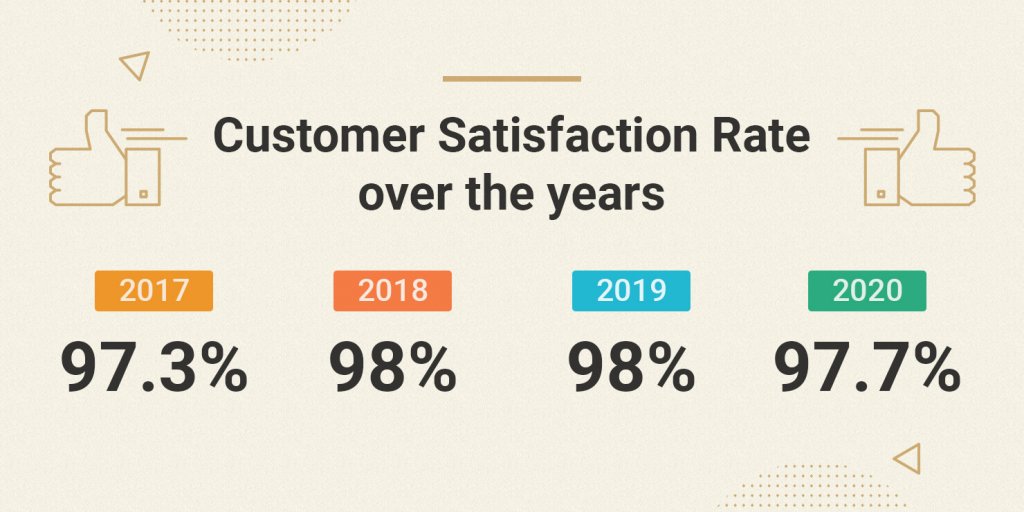
Keeping high client satisfaction rate across the years

There are many things that have changed along our journey, but one has remained unchanged over the years – the high client satisfaction rate. 

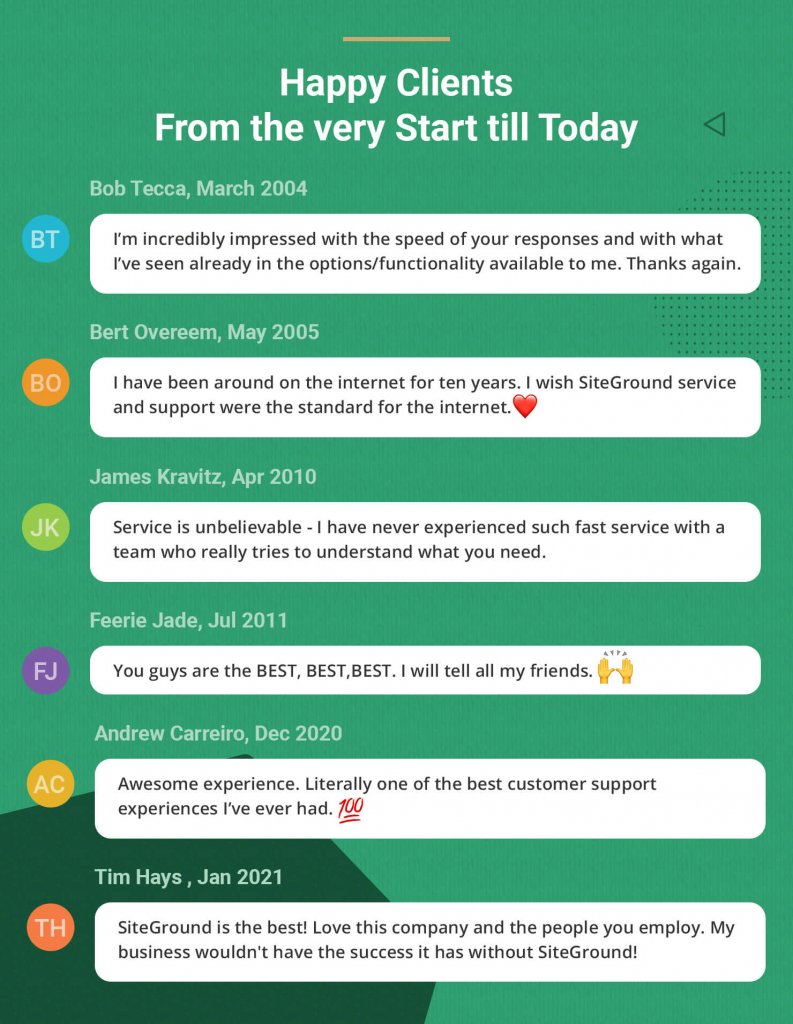
Our commitment to deliver the best service and experience has been strong since our beginnings, and we assure you that it will endure for many more to come.

Time for sharing…

Now that we have shared ours, let’s see what you have got down your SiteGround memory lane 😉. We invite you to comment under this post and tell us some of your best moments with SiteGround. A good story always melts our hearts and help us make this day special!

Last, but not least, we would like to thank all of You for choosing SiteGround as your hosting provider. We couldn’t have made it without you and we hope you join us on this exciting ride to our next anniversary.

[subscribe_cta]

Piping Email with PHP and SiteGround

One of the fun things to do with computers is to think outside the box, to use tools for things they aren’t exactly designed for. Email is one of my favorite toys with which to play with. Email is universal, and everyone has it. So when you create a new user for it, everyone can now do that.

What can we make email do that it doesn’t do already? Well, email is a delivery system, so we can use it to not only deliver data of some kind, but also to trigger an event that causes a computer somewhere to do something. If necessary, email can also respond back to you.

In the early days of the web, there were email addresses you could send an email to with a URL in the body. It would retrieve the URL and send you back the copy. Email pre-dated the web on the Internet, so there was a time when people had email but not web browser. This was a great way to get to the web before you got a web browser. The downside was that most email at that time didn’t support images, but this was okay because most webpages at this time didn’t HAVE images. 🙂

I’ve also used email to deliver data and trigger processing. Last year for Mother’s day, I built my mother and mother-in-law digital picture frames based on Raspberry Pis. The front-end media management for these frames is a WordPress site. This gave me a convenient API already built to deliver images to. The problem is that my siblings are not programmers, so I needed an easy way for them to send images to these frames. Email was that easy way.

I created a system that allows them to send a picture via email. Each digital picture frame has an email address, and they can send pictures to it. While WordPress handles all the user management and image processing, SiteGround’s email system allows me to make all of this happen.

The way to do this is called a “pipe” because you are “piping” the contents of an email to a program of your choosing.

I’ll stop here and tell you upfront that if you are not a programmer or at least a very technical user, this is not for you. Programmers can write programs (like I did) to take the input and process it. Technical users may also be able to install programs on their server that will accept the input and do something with it. If you are not in one of these two groups, I suggest you go find a programmer you trust and hire them to help you do this.

In SiteGround, the process is pretty simple. You first create an email address, then you create a filter for that email address. In my case, I created momspictureframe@example.com (not the real email address) in my Site Tools.

Then I went to filters and created a filter for momspictureframe@calevansxample.com.

  • I gave it a name that I could recognize, “Pipe Pictures to Mom’s Frame”.
  • I set the proper condition. I want this filter to trigger any time any email comes to momspictureframe@example.com. So I set it to:
    • IF ANY
      And then, I set it to trigger on the TO email address.
    • TO EQUALS momspictureframe@example.com
  • Finally, I set it to perform actions. In this case, I perform 2 actions.
    • First, “Pipe to a program”
      This is where you need to be a programmer. I wrote the program necessary to process the emails and uploaded it to my SiteGround site. I have to know the exact path and program name for this to work. Even a good programmer is going to have to experiment a little to get this right. Still, once they get it right once, it’s easy to do it again for other pipes.
    • Second, I set a “Discard Message” action.
      Remember that the first thing I did was create an actual email address? This means that unless I do something, emails will actually be stored for this address. Since I never plan to log into the email server to view them, I want it to toss each and every email coming to momspictureframe@example.com after I’ve handed it off to my script for processing. If I wanted to archive the email for future use, I would drop this action.

That’s it. Assuming you have a program handy that will accept the contents of an email and do something, you can now trigger it using a SiteGround email pipe.

Once you understand the power of piping emails to programs, the possibilities are endless. The example I gave you was a simple one but by no means the only one I’ve written. Again, since email is ubiquitous and available on just about any platform, you can open up a whole new world of processing and interactions for your users.

One word of caution, be aware that email is designed to be mostly insecure. You need to build security into your applications to make sure that only the users you want to, can interact with your system. The easy way to do this is to check the sender of the email, but that’s also insecure. If you do this, it should just be one of the checks you do.

[subscribe_cta]

SuperCacher and Up to 5 Times Faster Sites for All!

It was in the ancient 2012 when we announced our SuperCacher – the feature that allowed our clients to enable static cache, dynamic cache, and Memcached for their accounts. Since then, we have heavily enhanced the technology and fine-tuned its behavior and we believe it is one of the most powerful speed tools we have created for our clients. Currently, the most massively used part of our SuperCacher is the Static cache (NGINX direct delivery), as it is switched on by default on all our plans. Today we take a major step that will result in much more massive adoption of the other two SuperCacher layers and will significantly increase the speed of the sites we host. We now make Dynamic Cache and Memcached available at no additional cost on our StartUp plans too. Additionally, the dynamic cache will be activated on our servers by default. 

Dynamic caching ON for everybody!

Between 50% and 500% faster page loading

To briefly recap, dynamic caching is a technology that caches the HTML output of your PHP code. The PHP language is used so that the content of that same HTML is changed dynamically and upon a set of conditions predefined by the web creator. When using cache, next time that a page is requested, the pure HTML will be displayed from the Cache which is in the server’s RAM, as opposed to wasting CPU and I/O resources to read the PHP file from the disk. Thanks to that mechanism the web page loads significantly faster. And by “faster”, we mean like 50-500% faster based on our internal statistics for sites that have it turned on. The bigger the impact we see on heavier sites – those with more products and queries. Once you enable the cache, the pages start loading as fast as your Internet allows it, literally, since the page response is returned instantaneously from the memory of the server.

WordPress cached out-of-the-box, other applications can also be configured

Until now, the dynamic cache has been available on our GrowBig and higher plans and had to be activated by the users through our WordPress SiteGround Optimizer plugin. Now, we are making the cache available on all plans and we are activating it by default on all servers. Thus, all WordPress sites hosted on our platform will be cached out of the box. Additionally, our clients will be able to configure other applications to take advantage of the cache too. For instructions on how to use the Dynamic Cache with some of the other popular applications, you can refer to our SuperCacher Knowledge base articles.

Dynamic cache management options 

As already mentioned, our dynamic cache option will now work with WordPress installations out-of-the-box. However, WordPress users will achieve the best results through the Dynamic Cache controls of our SiteGround Optimizer plugin. The plugin acts as an additional connector between our dynamic cache and the WordPress application. For example, the SiteGround Optimizer tells your server to clean the cache automatically on each relevant content change and it provides you with an easy option to exclude URLs from being cached altogether. You can also turn off the caching through the plugin. 

If you are using another application, you may need to allow the caching from its backend in order to start using it, regardless that it is activated on server level by us.

As for the flush option, if a change on your website is not shown immediately, as the cached version is still served, you may always use the Flush button in your Site Tools. 

Memcached available on all plans to opt-in

Memcached is probably the most popular memory caching system that is used by thousands of database-driven sites, which speeds up these websites by caching results from database queries in the server’s RAM. Thus, if the result of the same query is needed again, it will be instantaneously taken from the RAM, rather than generated again from the Database, which is usually a slower process and requires more computing power.

Memcached is now available on StartUp plans with Site Tools as well. You can enable it from Site Tools > Speed > Caching, look for tab Memcached. However, please bear in mind that you also need to configure your application to use this cache, once you switch it on from our interface. For WordPress, this takes just a click in our SiteGround Optimizer plugin > Memcached control section, for some of the other popular applications you can refer to our SuperCacher Knowledge base articles. 

Note:

The described changes will affect only our Site Tools based servers. However, in case your account is still on cPanel, don’t you worry – by the end of March 2021 we aim to complete all migrations from cPanel to Site Tools so you’ll also get these SuperCacher enhancements soon.

[subscribe_cta]

The Hidden Cost of Free

the hidden cost of free

I’ve been involved in the open-source software movement since there was an open-source software movement. Over time I’ve seen the perception of it change. In the beginning, there were a lot of people writing software and contributing because they could. It made them feel good to give to others.

Users of open-source software recognized this gift they were being given and respected it and the talents of those doing the giving. Many users contributed back to their favorite projects by way of code, documentation, advocacy, and sometimes even money.

Over time, things have changed. These days I see more people using open-source software because they think it’s free. They think that because they didn’t have to pay a programmer for their efforts they are getting away free. Sometimes, this is true, sometimes you can install a piece of software and just start generating value from it. WordPress used to be like this.

These days, however, software, even open-source software, is complex. Yes, WordPress used to have the “5-minute install,” and yes, you may actually still be able to install WordPress in 5 minutes. However, if your goal is to do anything more than write your own blog, you are going to need to add a few hours, or days, to that number.

These days software is complicated. WordPress themes used to be pretty simple. Now, they are complex beats with settings pages and many configuration options. Options that, if you aren’t familiar with the theme, can be difficult to navigate.

This is the hidden cost of free. These days, this is the high cost of free.

Many plugins are “free” these days, but they require you to subscribe to their underlying backend service. Technically they are free, but it is still going to cost you. Other plugins offer you a free version but lock the best features until you pay. Again, technically free, but if you want them to do the cool stuff, you are going to have to pay.

Don’t get me wrong, I am not advocating that all software should be free. As someone who earns their living writing code, I strongly advocate paying developers. It’s just that as a non-technical site owner, you have to understand the cost of “free.”

Be prepared to hire someone to help you. In most cases, you will need:

  • A project manager. We used to call these “implementers,” but these days, I think that term has fallen out of favor. This is a technical person but may not be a programmer. They understand WordPress, plugins, and they know how to make them work together to get things done. They also know when a developer is needed and usually know a couple they can call on for help.
  • A designer. You will most definitely need someone who can make your site look good. Bonus points if they are also a User Experience (UX) expert so they can make your site easy to understand and use.
  • A copywriter. (You thought I was going to say developer, didn’t you?) Yes, you are going to need a copywriter — someone who is a wordsmith. You want them to look at every word on your site and make sure that what you are saying is clear and easy for your user to understand.
  • Optionally you may need a developer. If you do, your project manager will know this and should know who to hire. Don’t go around them and hire your niece and put her on the team. Let the experts do the job you hired them to do.

Once you’ve got your site up, it’s still not free. Make sure you are hosting it with a reputable host who understands WordPress. It may come as a surprise to some of you, but I have sites that are not hosted at SiteGround. Some of my WordPress installs are hosted on a virtual server that I manage myself. I understand what needs to be done, and I understand the risks of managing my own server.

The projects I host myself are fringe projects with special requirements that many hosts won’t provide out of the box. While in a technical sense, yes, each additional site I spin up on my virtual server is “free,” it’s also one more thing that I have to worry about. My time is not free so hosting sites on that server turns out to be very expensive.

For all my sites that do not have very special requirements, I use SiteGround. After 25+ years of managing web servers and 15+ years of managing WordPress, I know what I need in a web hosting partner, and SiteGround ticks every box.

Free and Open Source (FOSS) software is awesome. It literally powers the world we live in. But a lot of times, free only applies to the price you pay for the code itself. When you are preparing to launch your next site, factor in more than just the cost of the code. If your site is going to add value to your enterprise, prepare a budget that will let you do it right. Don’t forget the high cost of free.

[subscribe_cta]

What are Brute Force Attacks and Why YOU Don’t Have to Worry About Them

Exactly what is a “brute force” attack on a website? Just the name “brute force” conjures up a bad guy in a cheesy action movie. For most websites, a brute force attack can be very serious.

What is a brute force attack?

A brute force attack is exactly what the name sounds like. There is no deep logic involved in guessing logins or passwords, it’s just a bot that starts with a login of “A” and a password of “A” and works from there. It will patiently try every combination of letters and numbers there is until it finds a login and password that works. When brute force attacks started, that was all there was to it. Over the years, they have gotten more sophisticated, but at the core, it’s just a bot.

These days, you have bot networks that do this. The problem was that brute force attacks from a single computer were real easy to detect and block. So now a network of hundreds or thousands of computers work together to attack your site and guess a login or password.

Also, these days we have “dictionary tables” which are just lists of passwords that have already been used or words that can be combined together to make a password. A bot network can try thousands of times per second to guess a login and password. Your site is only as secure as the weakest password on it.

In addition to dictionary tables, attackers have gotten even smarter. As a site is hacked and all of the user info is pulled down, the logins and passwords for that site are added to the ones to try. They know that a lot of people don’t bother to create different logins and passwords most of the time so a login on one site is probably good on another.

How do you mitigate a brute force attack?

Well, there are 2 answers to this question.

If your website is not hosting with SiteGround

If you are not hosted with SiteGround then you need to start researching security plugins and configuring firewalls. We’ve talked about some of this before in previous blog posts. You will need to:

Install an application firewall and properly configure it.
There are several good plugins in the WordPress plugin repository that will secure your site against brute force attacks and other types of attacks. The top 3-5 are well respected and while I won’t recommend one here, you can probably find one that comes highly recommended and get it implemented. All of the good ones have a monthly fee associated with them but that’s what it takes to protect your site.

Require strong passwords for all users
We’ve talked about passwords before but it bears repeating. Strong passwords are your first line of defense. Your users might not like it but it will keep your site and their data secure.

Require Two-Factor Authentication (2FA) for all logins
2FA mitigates brute force attacks 100% because the login and password are only 2/3 of the login procedure. For the final 1/3, you have to have the person’s phone. That’s a game-ender for brute force attacks.

As with strong passwords though, users usually hate 2FA. You can limit 2FA to admin accounts but if an attacker gets into your site, you are compromised. So you have to decide which is more important and that’s a bad choice to have to make.

Implement a password rotation policy that forces new passwords at least every 90 days
Another one that users hate but is effective in helping prevent brute force attacks is requiring users to reset their passwords. This is another thing that users hate and if you do enough things in the name of security that users hate, you start to lose users. So it’s a tightrope you have to walk.

Bonus tip: Fail2Ban
In addition to all of those, my personal favorite tool is Fail2ban and WP-fail2Ban. Properly configured (and it takes a developer or network admin to properly configure) this combination can be a very powerful tool to prevent a brute force attack. It’s not easy to configure but it is very powerful. Fail2ban is open source and free, the plugin WP Fail2Ban has a pro version that seems to be worth the money.

I don’t usually recommend specific plugins but this one is unique. I have the free version installed on all my blogs that are not hosted on SiteGround and it works wonderfully. I am strongly considering upgrading to the pro version.

WARNING: This plugin requires Fail2ban to be properly installed, configured, and working on your server. Fail2ban itself has a couple of requirements as well. This is not a trivial plugin to get working. If you are not a developer or very familiar with Linux, get help.

If your website is hosted with SiteGround

If your site is hosted with SiteGround, go back to sipping your coffee. SiteGround has a full suite of tools already implemented including AI to detect brute force attacks from bot networks. This doesn’t mean your site is 100% absolutely secure, nobody can get to 100% safe. It does however mean that this is one less thing you have to worry about.

Wrapup

Brute force attacks are well known and well understood. There are tools that you can install that will mitigate the risks of them compromising your site. That having been said, your best bet is a hosting partner like SiteGround that deals with it for you to that you can spend your time making your site more awesome.

[subscribe_cta]