What’s New in WordPress 5.4

What's New In WordPress 5.4

On March 31st, the latest version of WordPress was released, number 5.4 and named after Nat Adderley, an American trumpet player, continuing the tradition of naming WordPress releases after jazz players.

I had the honor to be involved once again as the release co-lead, in the role of coordinator. This was possible with the support of SiteGround, donating my hours to the project.

By now, depending on the settings of your auto-update function in the SiteGround user area, your version of WordPress should be updated to 5.4, so let’s check the most exciting new features from the WordPress end-user perspective. 

Two new blocks

You can now add social media widgets in your post. By clicking on each icon you can add your link and show them inside a post.

The second one is the button block: now you don’t have to fiddle around with CSS to create your own buttons to use in those Call to Actions at the end of your sales page. Just add the button, or the buttons, you can have multiple inside the same block, adjust the settings (background color, text color, border width, link) and hit publish!

More Coloring options 

You can now selectively color parts of a text within a block. Gradients were added to the button and cover blocks and you can now apply color options to  Group and Columns blocks.

Fullscreen Editing 

New WordPress installs now open the block editor in fullscreen mode by default for a distraction-free writing session. The W logo in the left corner is the shortcut to going back to the admin area, Posts list. If you want to switch off the fullscreen mode, click on the three small buttons to the right of your screen and unflag “Fullscreen Mode”. 

Full Screen Editing

Improved navigation and accessibility

It is now clearer to see what block you are using with block breadcrumbs: you will notice them on the very bottom of the screen.

breadcrumbs navigation

With each new release, the block editor becomes more accessible for people that rely on screen readers or keyboard navigation to use WordPress. The tabbing across elements has been improved and your screen reader will tell you if you are un Edit or Navigation mode.

What’s next

WordPress 5.4 has just been released, but the Core team is already working on preparing for the next two planned releases for 2020, 5.5 and 5.6. Josepha Haden, the WordPress.org Executive Director, wrote an update on the status of some upcoming projects and these are some of the features I am most excited about:

  • A block directory, so you can discover blocks and easily install them on your website like you would do for plugins. This is an opportunity to experiment with blocks and think of new ways to organize and show your content.
  • Support for blocks in the Customizer to make it easier to change the appearance of your website. This is another step towards full site editing via blocks. Endless possibilities!
  • A navigation block that will allow you to add a menu inside a post or a page. For example, you could create a “Where to start page” with links to relevant sources that might help your visitor move around easily.

Passing the mic to you

What do you like the most about the new release? What are you excited about in terms of future features. Let us know in the comments!

[subscribe_cta]
Winning Two Stevie Awards for Customer Service and The Hard Work Behind It

We’re thrilled (and humbled) to announce that SiteGround won the People’s Choice vote and the Silver award in the jury vote for Customer Service Department of the Year in Computer Hardware & Services category in the 14th annual Stevie® Awards for Sales & Customer Service. “The Stevies” as they’re known, are one of the most prestigious international business awards, recognizing excellence in business-crucial disciplines.

They attract more than 12,000 nominations each year in different industries. With over 2600 evaluated nominations and over 101,000 votes cast in the People’s Choice awards, SiteGround ranked first in the Customer Service in Computer Services category, thanks mostly to the support of our loyal clients. Additionally, we were announced as a Silver winner in the awards’ jury prizes, selected by the average scores of more than 180 professionals worldwide. 

Winning such a massive vote does not come easy and it takes years of hard work, dedication, and consistency to get to where we are today. It involves training sessions, processes, monitoring, and lots of coordinated efforts by a lot of people whose dedication, expertise, and efficiency should never fall short. Here is a quick look of what happens behind the scenes of our Customer Service success.

Complex Recruitment Process

Our customer service team who are available 24/7 via Live Chat, Phone, and Helpdesk ticketing in English, Spanish, and Italian now counts 350 people and it keeps on growing. Over the past 3-4 years, we have been hiring new member groups roughly every 3 months. For every recruitment cycle, we get hundreds of resumes. It’s a huge pile that we have to sort through carefully because we don’t just let anyone in. We want smart, friendly, eager to learn, not afraid of hard work, and committed people to become part of our team.

Our HR department filters about 12-13% of those to meet in person and in the end, only 4% get hired. The best of the best. 

Long and Heavy Training

Most of the people who join our customer service team are not familiar with the web hosting industry. Even if they had some technical background, they still have tons of terminology to learn, adapt to our expectations and standards for customer service, and become quick to deliver. All that takes time, training, and experience. Our initial on-boarding training takes two weeks and covers the theory and the basics of the role. Then we continue with a 4-week mentoring program with a supervisor, processing one client inquiry at a time and discussing the case in detail until the agent fully understands how to best approach and handle it. 

Then, it’s time for more training. Within the first year on the SiteGround customer service team, our team members have to complete more than 10 different training sessions, seminars, and workshops. Since the tech industry is very dynamic, we make sure that even our experienced agents have the opportunity to constantly improve and build on their skills. In 2019 we completed over 600 up-skill training sessions across all our customer service divisions.

Timely feedback and management support

No matter how good and motivated people are, everyone needs attention and encouragement to know they are on the right track. That is why all our customer service team members receive regular evaluations and feedback sessions, happening on a monthly basis during their first year. In case an agent is performing below our standards and expectations, their supervisors dedicate time and create personalized support sessions to educate them and motivate them to get better at the job. 

Excellent customer service is not an easy task, but thanks to our team’s persistence and willingness to improve, we’ve been consistently increasing our speed of resolution within the past 4 years and getting to 90% of all client inquiries being resolved at first interaction. 

Client Ratings And Easy Escalation Path

Staying on top and maintaining a high level of service requires the introduction of checks and balances. We found that client ratings are an extremely good indicator of performance. That is why we ask clients to rate their interactions with our agents and we monitor the individual ratings of all team members. Poor client ratings are a red flag urging their direct supervisor to take action.

At the same time, we have an easy escalation path that in addition to being very convenient for clients, also acts as an alert when things go south. Clients can escalate their case to a supervisor and make sure that whatever issues they had with the case resolution, get noticed and eliminated in a timely manner.

Thanks to these two mechanisms and the willingness of the agents to learn and improve, in the past year we also helped over 1.1 million clients on live chat. Most of those were rated by the client parties afterward, and 98% of the rated were marked as “Extremely helpful.”

Optimizing Customer Service Channels

No matter how well-prepared а team is, there always comes a moment when you have to stop and think – are we doing the best we can? Dealing with the winter flu season, for example, when we encourage people to stay home and rest, it becomes twice as difficult to process all the incoming client inquiries. So we figured it’s not only about hiring more people to process more inquiries. Over the past few years SiteGround more than doubled its client base, which made optimizing our customer services a top priority. 

We enhanced our customer support experience by introducing automatic recommendations of the fastest and most relevant channel for each specific request. Our in-house AI-powered system reviews incoming inquiries and depending on the type of issue and on the current load on all our customer service channels, it recommends the one that will be most efficient (lowest wait time combined with the skill level to resolve the issue in question). 

We developed a custom Artificial Intelligence (AI) Chat Bot and AI search tool to assist clients right away reducing wait time. That’s not one of those funny moments when you chat with a machine like in the movies, it’s a real-time educated software that tries to match your inquiry to previous conversations and if the issue has been addressed in the past, it will suggest a solution right away, without sending you to an agent. Of course, if the suggested solution is not useful, you get in touch with a member of the team. That’s how we keep our average wait time on the phone lines at 2 minutes, and our HelpDesk tickets are resolved in 15 mins. on average, with the majority of issues resolved with our first response.

Tuning in to What Our Clients Say Year after Year

And last but not least, besides relying on the external evaluation of prestigious third-party institutions such as the Stevie Awards, we ask our clients every year how they rate our support and other parts of our service. That is how we know we are still on the right track. Over the last years, we have been receiving consistent 98% customer satisfaction scores in our annual client surveys, which makes all that hard work we do worthwhile. 

We also closely monitor our Net promoter score (NPS), based on how likely our clients are to recommend us. NPS is a complexly-calculated value between -100 and 100. Scores higher than 0 are typically considered to be good and scores above 50 are considered to be excellent. SiteGround’s NPS is 62. To put that in context, companies with the same NPS as SiteGround in different industries include Apple Cloud Storage, Sony, Trader Joe’s, Zoom communications, and more, so we’re in excellent company! 

For us, optimizing our customer experience is a never-ending process, and we are committed to going above and beyond, thanks to the extreme dedication of our team and the priceless support of our loyal clients.

[subscribe_cta]

Even faster WordPress sites with our Speed Optimizer plugin (formerly SiteGround Optimizer)

Even faster WordPress sites with our SiteGround Optimizer plugin

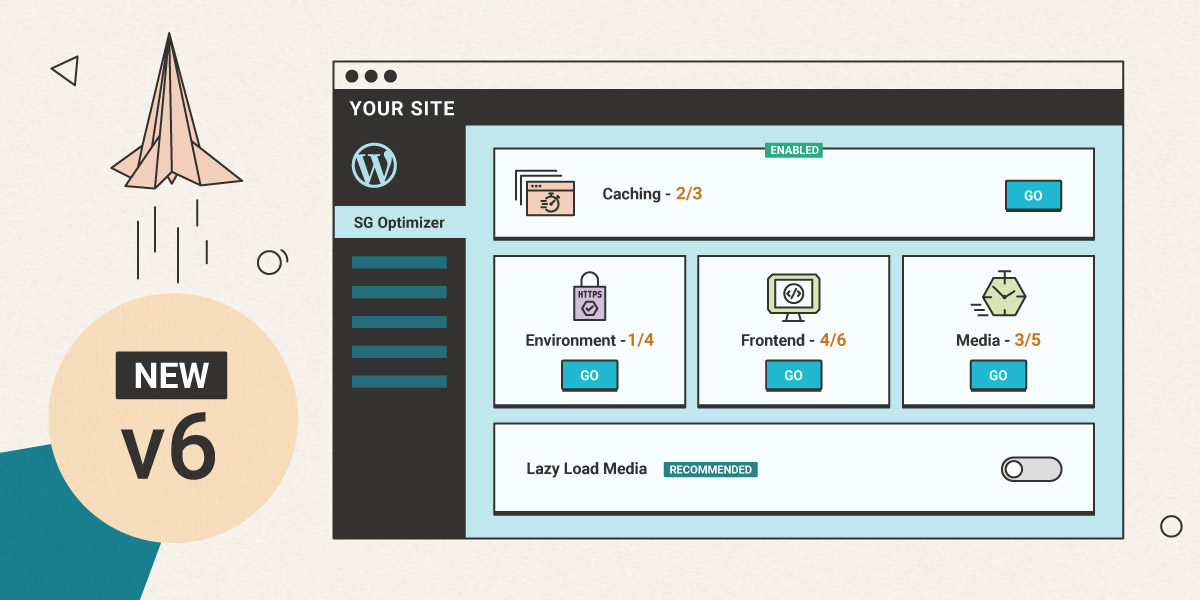
During the past few years, the SiteGround Optimizer plugin has become an essential part of the SiteGround WordPress hosting product. We’re constantly adding new features and improving existing functionality to make your WordPress sites faster. Now, we would like to tell you more about the most exciting changes we have introduced with the latest versions of our plugin. Read below to find out about the most recent front end and media optimizations in the plugin and how to test your site speed easily through your site backend using our cool integration of the Google PageSpeed test.  

Stop render-blocking JavaScripts from slowing down your site

Very often JavaScripts in the site header do not allow the rendering of the rest of your web page until they are fully loaded. With our new feature you can defer render-blocking JS and load the rest of the page without waiting. Thus, your visitors will see a fully loaded page faster. We are aware that some scripts should always remain render-blocking. For example, like in the case of the jQuery script, there might be other scripts that rely on them. To accommodate such scripts, we’ve created an easy-to-use functionality to exclude specific scripts from being deferred. You can find and manage this new option in the Front End tab of the SiteGround Optimizer plugin.

Stop render-blocking JavaScripts from slowing down your site

Avoid unnecessary video loading with our new lazy load options

Lazy load of images has been available in the SiteGround Optimizer for quite some time. When enabled, it stops images from loading until they are scrolled to in the browser. Thus the first visible part of your page is loaded faster without waiting for images, that may never be reached by the visitor, to load at the background. Now you can use lazy load for iframes (YouTube, Vimeo & other embeds) and directly imported videos too. Another new feature allows you to select whether you want to lazy load your site on mobile devices or not.

Avoid unnecessary video loading with our new lazy load options

Use the latest and fastest web image format – WebP

WebP is the newest, extremely exciting image format that has a great potential to optimize loading speed of all images on the web. This format may decrease the size of your images between 25% and 35%. The SiteGround Optimizer now allows you to create webP versions of all the images from your WordPress site with a click. Once you do that, we will load these smaller and faster images for browsers that support this format.

Use the latest and fastest web image format - WebP

IMPORTANT: WebP support is available for websites hosted at SiteGround using our Site Tools. 

Load Google Fonts without slowing down your website

Using multiple fonts, weights and languages from an outside source like Google can easily add up a lot to the number of site requests and slow it down if those requests are done in a render-blocking way. To tackle this, we’ve developed a mechanism to catch loaded fonts, parse them and load them in-line asynchronously. This method proved to be the fastest way to handle Google fonts, the most commonly used font sets online. Once they get cached by your browser, the effect they have on your page speed is reduced to zero.

Load Google Fonts without slowing down your website

Test your site speed with Google Pagespeed 

Another great functionality we’ve added to the plugin is the ability to test your site speed using the Google Pagespeed test right from the SiteGround Optimizer interface. Not only that, but we’ve linked each performance recommendation to a specific functionality in the plugin to guide you how to better optimize your site and achieve top performance!

Test your site speed with Google Pagespeed

Although we believe that the plugin now is the best optimization solution for every WordPress site on a SiteGround server, there are still things that we want to implement and will introduce with upcoming updates. Our roadmap is full of awesome new ideas that will soon become available to you. So keep an eye on our blog and the SiteGround Optimizer change log!

[subscribe_cta]
Moving to Google Cloud

We are excited to announce that we have started using the Google Cloud platform to host part of our infrastructure.  We are constantly researching possible new data center options so that we can offer the newest technologies and the highest level of speed and reliability at convenient geographical locations to our clients. During the last year, we have explored services provided by the biggest cloud providers to evaluate who could meet our needs best and the Google Cloud platform stood out. The first Google Cloud locations, which we already use, are in Iowa, USA; Eemshaven, Netherlands; London, UK; and Singapore. All of our new customers get activated in these locations and we have started to move some of the existing US and European customers too.  

Continue reading “Moving to Google Cloud”

Moving to PHP 7.3 and Managed PHP Updates

An update of our default server PHP version is planned for February 26, 2020. We are going to move forward to PHP 7.3. The version has been around long enough and has already become widely compatible with different CMS’s, themes and plugins. With PHP 7.3 we will be also introducing our new Managed PHP service. Its purpose is to automatically update the PHP version of all users that are currently relying on our choice of default server PHP.

PHP 8.4: Stay Updated! 🚀 Check out our latest blog post to explore the newest features and enhancements in PHP 8.4.

Continue reading “Moving to PHP 7.3 and Managed PHP Updates”

We moved from Static Cache to NGINX Direct Delivery

With the launch of our new Site Tools-based infrastructure we have opened a wide range of opportunities to further improve the loading speed of the websites hosted on our servers. The first change we have already introduced to everyone using Site Tools is the replacement of the Static Cache with a new NGINX Direct Delivery. We no longer serve images, CSS, JS files, and other static content from the server memory, but we use NGINX for direct loading of these files from the SSD instead. This improves browser caching for your site and also makes CDN usage easier and more efficient. Most importantly, NGINX Direct Delivery allows more RAM space to be used for dynamic content caching, without compromising on static content loading speed.

Continue reading “We moved from Static Cache to NGINX Direct Delivery”

​How to use social media to get traffic to your shop

Ecommerce has definitely gained huge popularity in the last few years.  In fact, holiday eCommerce sales reached a total of $126 billion last year — up from $108.2 billion in 2017. That’s a 16.5% increase in online sales! Most people do not feel like going to crowded malls anymore. They prefer shopping online and finding the largest discounts from the comfort of their own home. 

Industry experts say social media plays a major role in eCommerce businesses because it helps companies establish a strong web presence and increase their website traffic. When it comes to Black Friday, people are particularly ready to spend. That is why you have to make sure your eCommerce store is ready for this special day and come up with the right strategies, which include social media.

Review last year’s Black Friday campaign

Before you rush into planning anything for the upcoming Black Friday, you should definitely take the time to review your campaigns from previous years. Check how it went and whether you fully achieved your goals at the time. Do you think your last campaign was successful? Ask yourself similar questions and figure out what went wrong. This first step is about reflecting on your previous success or failure. In this way, you can see what you can improve for the next campaign. It will be better if you break down last year’s results by channel. For example, if you ran ads and promotions on Facebook, Instagram, and Twitter, you need to decide which one had the best return on investment. Finally, you have to figure out what you definitely want to repeat this year. There might be certain things that can be effective for this year’s campaign as well.

🔥 Check out the 15 Black Friday Ecommerce tips that will help you drive more online sales during the year’s most important shopping season.

Black friday. Vector illustration.
Black friday text on the airport timetable. Sale theme. Vector illustration.

Start planning earlier

Success comes to those who plan ahead. Unfortunately, when companies have to create social media content, it often falls to the last minute. And of course, if someone is pressed for time, the results are normally less inspiring. You should consider creating a social media calendar. This way, you can map out when your Black Friday campaign starts and when it has to finish. Besides this, you also have to decide which channels to use. Most people think it is better if you create a large number of posts, but be careful. You certainly do not want to be annoying and annoy your customers with all the spam. Planning these things earlier improves your chances of success in Black Friday sales.

[bf_prep_checklist_download]

Get more creative

When you launch your social media campaign, you have to choose which channels to use. Ideally, you would have a slightly different strategy and approach to each one of them. For example, what you create for Facebook should be completely different from what you post on Instagram. People can get “ad fatigue” seeing the same ads and posts and are looking for variety. If you want to keep your regular customers, you have to offer them something unique and appealing. Spend more time discovering the audiences on each channel and make sure your content is going to serve the needs of the audience in the best way possible. Come up with some Black Friday themed content that is specific to your business, to the channel, and be creative!

Choose the best products to promote

Person Hands Shopping Online With Credit Card And Laptop At Desk

If you are looking for success in the Black Friday sales and promotions, don’t just promote any products. Choose them wisely. Every eCommerce company has its own top products and bestsellers. They are usually what your company is known and famous for, so you should not miss the chance to promote their discounts on your social media Black Friday posts. When people check on Facebook and see them at a lower price, they will not hesitate to take advantage and order them.

Save time and use social media tool to schedule and post

When your posts are ready for your social media channels use a social media tool such as Social Web Suite to schedule all your posts in advance. This will save you a lot of time and you will be able to see all the posts on your social media calendar so you can add more if you need it. This will also allow you to publish your posts to all your social networks at the same time which is great for time-sensitive news. The best thing is that after the Black Friday promotion, you will be able to see the analytics of the posts and see how your social media marketing efforts performed.

Planning a Black Friday social media campaign might not be an easy task, but in the end, it will be worth your efforts. Fewer people are visiting physical shops and are now spending a lot of time and money online shopping. Social media certainly helps them to find various products easily and reminds followers that sales are a limited-time offer. The most important thing is to prepare your Black Friday strategy with thought. Creating high quality and engaging social media posts shouldn’t be rushed. Remember, quality over quantity. There is no point in creating hundreds of posts with no value. Black Friday is a favorite day of many people of all ages, and if you are well prepared for, it can bring you huge profits.

This was the final installment of our Black Friday series. Check out all our past content on the blog for tips on how to improve your website design, conversions, online marketing, and more.    

[subscribe_cta]

Santa’s Got a Bag Full of PHP 7.4 Goodies

PHP 7.4 is already available on all SiteGround servers and we have invited our great friend Cal Evans, who is also one of the most admired people in the PHP community, to share which are the best things in the new PHP version. 

It’s that time again. Time for Santa to hitch up the ElePHPants that power his sleigh and deliver that present all good developers have been waiting for, the newest release of PHP. I took a quick peek in Santa’s bag and here are my top three features coming in PHP 7.4.

PHP 8.4: Stay Updated! 🚀 Check out our latest blog post to explore the newest features and enhancements in PHP 8.4.

Continue reading “Santa’s Got a Bag Full of PHP 7.4 Goodies”

Contributing to Open-Source: Insights On the Latest Major WordPress Release

Plenty of work happens behind the scenes of a regular website. But even more work is needed for the maintenance and development of a Content Management System (CMS) like WordPress – the software that powers 34% of all websites on the web. New WordPress versions are released regularly to provide new functionality, security improvements, and all types of fixes. In the case of WordPress, which is an open-source software, a big part of the work is thanks to the voluntary support of dedicated individuals and companies within the WordPress community. 

The team at SiteGround has a long history of WordPress involvement – we organize and sponsor both local and worldwide WordCamps, work on WordPress core and plugins, and are active on the WP.org security, community, marketing, and hosting teams. So we were stoked when our WordPress community manager, Francesca Marano was selected as a Release Coordinator for the latest major version, WordPress 5.3. On the verge of the official release, 12 weeks after she took upon that role, here is our chat with Francesca about her role and responsibilities in the process, and of course – what you can look forward to with the new release.

Read more

Webinar About the New Client Area and Site Tools

Last week we featured our new Client area and Site Tools in a webinar. We share the recording in this post together with the answers of all questions to which we could not reply during the live show.

A lot of users’ questions were answered by Nikolay and I during the live webinar. However, there were some that we couldn’t get to and we’ve added them below along with the answers.

Questions about addon domains:

Q: [Bruce Gandy:] What about existing Addon Domains?
A:
Existing add-on domains will become separate independent sites in the new User Area. Each site will have its own sets of Site Tools. Once you log in to Site Tools with your username and password, you will be able to change between your sites from the Site dropdown in the header.

Q: How do I manage addon domains?
A:
Existing add-on domains will become separate independent sites in the new User Area and each will have its own sets of Site Tools. You will not be able to create new addons, instead, you can easily create new sites in your hosting plan (Websites > New site).

Q: I have MANY ‘Addon Domain’.s. what will happen to them?
A:
All your addons will be converted to sites. The advantage of having them independent from each other is the enhanced security and isolation.


Questions regarding the File Manager:

Q: [Sune:] Can we copy files from one website to another website as in old filemanager root?
A:
As each site has its own set of Site Tools, including separate File Managers, copying files from one site to another within the File Manager is not possible at this point. You can use SSH or FTP client if you need to transfer files between sites.

Q: [Terri Z:] Also, will I still be able to see all account (multiple sites) files in ONE place, as I can in File Manager?
A:
As each site is independent from the rest, you can only see the content of the site you’re currently managing in the File Manager.

Q: [Art B.:] Will we still be able to upload plugins using file manager?
A:
Sure. You can upload plugins directly in the File Manager by dragging the plugin files and dropping them in the relevant folder of your installation in the File Manager.

Q: [Kieran:] With the new Collaborator/Client tools, will we be able to limit access to certain Site Tools like File Manager or Databases?
A:
The default collaborator and client roles do not allow you to define access to specific tools, but we are working on offering the option to create your own custom roles and customize the access you grant. That option will be available together with the tools replacing the WHM.

Q: [Patrick:] Isolation Question: If a client of ours requires admin access and then installs a “File Manager plugin”… While in the past, most File Manager plugins allow full GoGeek account directory access to our “entire GoGeek Account”. Does the new isolation structures provide less concern for other client domain files? Or would some file manager plugins still be able to access the entire specific GoGeek acct?
A:
With our new site-centric setup each site has its own set of Site Tools, including a File Manager, completely isolated from the rest of the sites. While you can easily switch between all of the sites you have access to, technically each of these sites is their own entity. If you give access to a particular site to your client, they will only have access to this one site with no risk of accessing files or sites they are not supposed to.

Q: [Loni:] Do we still get access to wordpress toolkit and file manager
A:
Yes! You can find the File Manager in section “Site” and the tools currently located in the WordPress toolkit are found in section “WordPress > Install&Manage” (check the action menu next to the installation).

Q: [Random:] I often used File Manager to clean .staging Backup or Removed files so my Node usage would lower sooner than later.. How will I do this now that File Manager only shows public?
A:
You can still remove files from the /home folder using SSH. However, note that inside the /home folder are generally saved system files that are needed for your website to operate normally.

Q: [Random:] Hi, you answered my .staging cleaning question… but it sounded like you didn’t understand the reason for needing to do this… It is because my storage often is close to max and I do many staging design tests, when I delete the staging copy the .staging Backup & Removed folder doesn’t clear for days and so I get Node max warnings.. so I manually clear those files.
A:
Ok, in that case you have to do it via SSH.


Questions regarding backups:

Q: [Terri Z:] What is Missing? I’m specifically concerned about manual backup that can be downloaded (cPanel backup) and database tools, particularly phpMyAdmin
A:
We offer backups (automatic daily backups and the option to create instant ones with a friendly restore tool), but we do not offer the cPanel backup. PhpMyAdmin is available in section Site > MySQL > PhpMyAdmin tab.

Q: [Mark M.:] Is it easy to find and download a backup?
A:
You can find your backups in Site Tools > Security > Backups. Restoring a backup is even easier than before. Just select the backup you wish to restore from and select the item you wish to restore from the Action menu next to it. Downloading a backup is not possible at the moment.

Q: [Ingrid B.:] How long is this webinar? I need to know how much time to allow for it as I have potential diary conflicts to sort out! Also, is the backup facility negatively affected by this new development? It’s one of the things I paid for!
A:
The webinar took roughly 1.5 hours and you can watch it here at a time when it’s convenient for you. We continue to offer the same backup service – automatic daily backups and option to create instant ones manually. Easy restore tool is also available. You can manage backups and restores from Security > Backups.


Questions regarding our Reseller program:

Q: [Sandra:] How will these changes affect reseller accounts?
A:
We are migrating the existing reseller functionality and setups on the new platform with two changes – 1) we remove cPanel and replace it with our own Site Tools; 2) the removal of the credit system – this change is not related to the new interfaces’ business logic, but coincides in timing with the switch. Resellers won’t be able to purchase new credits after they get switched to the new interfaces. Yet, existing resellers will be able to use their outstanding credits same way as until now – for purchases of StartUp plans and renewals of those. Once these credits are over, you will get fixed discounts on purchases and renewals of StartUp plans.

Q: [Vincent P.:] Will this affect the Reseller administration panel from which we could instantly login into cPanel or WHM?
A:
Instead of logging into cPanel (and WHM) you will now be logging into our Site Tools via a single login from your Client area. As an added convenience you will be able to switch between your sites from the Site Tools themselves.

Q: [Kyle:] Will the discounted rates for resellers for startup accounts remain discounted at $3.95/month when they renew or will the price increase?
A:
Yes, resellers will be able to buy and renew StartUp plans at a discounted price (3.95/mo in USD prepaid annually). The renewal price is the same as the initial price for resellers.

Q: [Emily:] Having just moved a bunch of our client websites to SiteGround and priced according to the credit structure we’re really worried about the price going up. It’s a massive issue for a small business like ours. Would you consider keeping the credit pricing structure?
A:
We decided to remove the credit system because we have seen that our “typical” reseller is not managing a large number of accounts and is not really taking advantage of the growing discount in the credit price. That combined with the fact that we have not made changes in the reseller pricing for the last 10 years (unlike what we did for standard clients) made us want to simplify the terms and unify prices as much as possible. The new reseller prices equal the initial (discounted) price for standard clients.


Questions regarding Joomla!:

Q: [Jen:] I use Joomla. Are all the changes mainly for WordPress users?
A:
Joomla users will also be switched to the new interfaces. Features like Joomla installation and Joomla auto-updates will be available (you cannot see them in the demo as we were still working on them at the time when we launched the demo). The main change for Joomla users is that we plan on discontinuing the current Joomla staging tool due to low usage, however, we are working on an alternative solution that could accommodate most of the use cases.

Q: [Kathy A.:] Is Joomla still supported? I understand for demo he used WP. But I’m too old and unpaid volunteer to spend another 10 years learning a new OS at this time. Will I get any benefits from this rework on my Joomla sites?
A:
Yes, we continue to fully support Joomla. However, we use the switch moment to discontinue tools that are not largely used such as the Joomla staging. We are working on a more generic solution as an alternative to it.

Q: [Becky R.:] Do we have to use Auto-Update tool for Joomla? Can we opt out?
A:
Yes, you can opt-out from the autoupdates. Currently, you can do that from the Joomla Autoupdate manager in cPanel.

Q: [Mitch:] where are the Joomla Tools tab? How do we load a Joomla platform without Softaculous?
A:
You can install a new Joomla from Site > App manager (select Joomla from the application drop down). Your active Joomla installations will be listed in the same section and you will be able to access the available Joomla tools from the action menu next to the installation.

Q: [Gwallter R.:] Wordpess is upfront – what about Joomla?
A:
We continue to fully support Joomla.


Q: [Terri Z:] I’m on a roll lol. Will there be any account/site downtime?
A:
We expect roughly 2 minutes of downtime upon switching the interfaces, but there will be no DNS and IP change so it will feel like a glitch. However, we ask you to avoid updating your sites during the migration period in order to facilitate the process.

Q: [Adriel B.:] Will IP addresses change with the migration?
A:
No, there will be no IP change or DNS propagation.

Q: [Loni:] When does this go live for us?
A:
We start with a small batch of clients shortly, but it will take a few months to switch all of the existing clients. You will get an email with a 7-day notice once any of your accounts get scheduled for a switch.

Q: [Jozef S.:] When do you plan to make a switch to this new interface?
A:
New clients are already being activated on the new interfaces. We plan to start switching existing clients in the second half of September slowly.

Q: [John M.:] Are we going to receive a target date for the conversion to the new Client Area & Site Tools?
A:
Yes, once any of your accounts get scheduled for the switch, we will send you an email 7 days before the actual change date.

Q: [Jonathan:] The migration starts in September – When do you expect to be finished with all migration?
A:
We think it will take us a few months to switch all clients, but we will know how many exactly after we actually start migrating and do a few runs.

Q: [Tim:] Will my cloud account automatically transfer without any downtime to sites or email?
A:
We will convert cloud accounts automatically and we do not expect downtime more than 2 minutes. As there will be no DNS and IP change it will feel more like a glitch.

Q: [Carolyn:] what if i sign up as a new customer now to build out a separate site with the new interface while waiting for my existing accounts migrate later this month. can they be merged later?
A:
Of course, you can now sign up for a new hosting plan as a new client (you need to use a new email address), which will be created in the new Client area. Just one small detail – your existing accounts may not get scheduled for the switch this month. But, we’ll keep you posted when the switch option becomes available on demand so you can request it upfront if you wish.

Q: [Jackie T.:] Does the migration affect our mail box?
A:
We will migrate automatically your emails and keep usernames and passwords, so your mail service should not be affected. The only difference will be that if you have email accounts on addon domains, you will see them listed in the Site Tools > Email section of the addon site, hence not all mail accounts will be listed in the same place as you may be used to.


Miscellaneous questions:

Q: [Irving B.:] Can we now store unlimited number of credit cards (one for each website / client) ?
A:
You can store up to 3 credit cards as you like, but you cannot specify which card to be used for which website. Cards are still associated with the user and not with the specific plan or site and in case of automatic renewal of service, the primary card on file will be charged (if valid).

Q: [Jozef S.:] I have some issues with my website. Could it be because of you were making changes and transition to this new interface?
A:
The switch to the new interfaces has not yet started so it has no impact on the status of your site. If you’re experiencing issues with your account, please log in to your User Area and contact our Technical Support.

Q: [Marge K.:] I see you have many requests for this webinar to be done again or at a different time. I also would like to attend at a different time as I have an appt. for more than 3 months scheduled at that time. Thank you. Marge
A:
You can watch the webinar here or on Youtube at a time convenient for you. We want to make more webinars about the new interfaces, but they will probably be zooming on a smaller set of items and functionalities.

Q: [Mitch:] where did the softaculous function go?
A:
We now offer an “App manager”, which is powered by Softaculous Remote and allows you to install new applications easily. You can find it in section Site>App Manager.

Q: [Matt:] Since you are not using cpanel anymore is there going to be a way to transfer (copy the etc & mail folder) clients emails from another cpanel to this new platform and keep users/passwords and all mail?
A:
For cPanel accounts hosted on our platform we will automatically switch the emails and keep the users and passwords as set. For accounts migrating from other cPanel hosts – not yet, but we are working on a tool that will allow that.

Q: [Rubin B.:] I was interested to know if when I transfer ownership of a site, the Invoices, Support Tickets etc. linked to that site will be deleted from my account and moved to my client’s account?
A:
No, you will still see in your Account the invoices and tickets associated with the website that were generated before the transfer. They will neither be deleted nor transferred to the new owner.

Q: [James:] Will we need separate ssh for each site?
A:
Each site is created and managed separately and has its own SSH and FTP credentials.

Q: [Sabina M.:] I haven’t used it yet (was just about to…), but the staging of sites, will that still be available? And as easy to use as it is promised?
A:
Creating a staging copy of your WordPress site is a one-click process, and deploying a staging copy to production is just as easy. You can test it yourself in WordPress -> Staging. If you are a Joomla user you will not be seeing the staging tool for now as we are discontinuing the current tool and working on a more generic alternative.

Q: [Terri Z:] About the collaborator role. Love it – 2FA available to both of us when we don’t both need to use the same login to access their account. But am I correct in understanding that I (developer) can only be added as a collaborator by a client who has a GrowBig account? Lots of my clients have only one site (Startup) and are not techie – which is why they have me, and why it makes sense to me that they could also add me as a collaborator.
A:
Indeed, collaborators can be added to websites hosted on GrowBig or higher plans. We consider the StartUp plan a service for DIY sites.

Q: [Mika:] Sounds like for new people is there a behind the sites area so we can manage multiple settings like pho versions etc in mass?
A:
We aim to offer a bulk management of sites some time next year, although centralized PHP version control for all sites is still debatable. In this first launch phase of the new interfaces we aimed at offering the tools that were already available with some sweet, but basic additions, which will be upgraded to more powerful tools in the upcoming months.

Q: [Susan:] I am a bit new to all of this. My website isn’t showing up in search engines even though I have put tags on pages. Is this something through my website or something through the SiteGround services or something else?
A:
Whether your site gets crawled by search engines and gets listed in searches is not related to the host server itself. You may want to submit it manually if you haven’t done that yet.

Q: [Mary:] Do you have instructions for updating content on WordPress? For example, rotating pictures or menu titles. Thanks!
A:
We have a tutorial that may be helpful: https://www.siteground.com/tutorials/wordpress/

Q: [Mark:] Can you still clone a website like in Softaculous?
A:
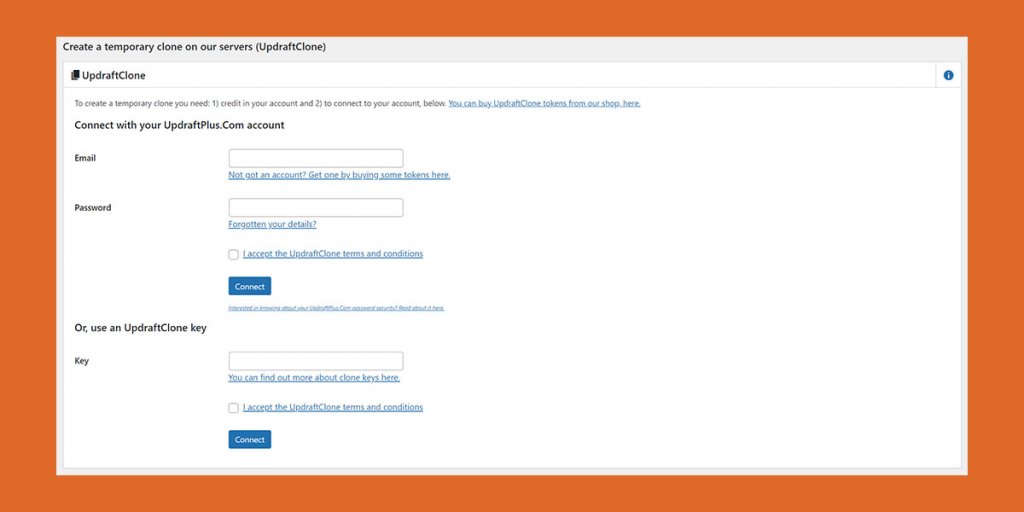
It’s work in progress, but we want to make this service available.

Q: [Eric H.:] Will the Move wordpress, move my site from my staging.xxxx site to my xxxx site for me, and take care of everything?
A:
The Move functionality will move your WordPress site and will make the appropriate changes in the WordPress configuration, so you don’t have to do anything else yourself. However, if you want to deploy a staging site, we recommend that you use the Staging tool where you can safely create and deploy staging copies. Every time you deploy a Staging copy from the Staging tool, you also have a backup automatically created for you, so you can easily revert to the previous version of your website if something goes wrong.

Q: [Corinne:] how can I install a wordpress on a subdomain?
A:
You can go to Site Tools > WordPress > Install & Manage. Select WordPress or WordPress with Woo, and select the domain or subdomain you wish to install WordPress to from the Domain dropdown. There you will find all existing domains and subdomains in your site. If you want to create a new subdomain first, go to Subdomains.

Q: [Tim:] Will traffic be exportable as a PDF? maybe add our own logo too?
A:
This feature is not available at the moment.

Q: [Heidi:] Is there a way to download stats and have them on a pdf file or something ?
A:
Unfortunately, not at the moment.

Q: [Jon:] when will we have the server details for email accounts?
A:
You can find the email configuration details Site Tools > Email > Accounts. You can find it in the create form, as well as in the Actions menu next to each email account. The Autoconfig files are also available in the Actions menu.

Q: [Michael S.:] How do I migrate email account(s) from another host?
A:
Here’s some detailed information on how you can transfer your email accounts and content over to us – https://www.siteground.com/kb/transfer-emails-imap-between-servers

/

Q: [Susanna:] If we create a site and then transfer it to a new owner, will we automatically receive the affiliate credit for that new owner’s site?
A:
At the moment you need to contact Affiliate support for that, but we are working on automating that.

Q: [Katy:] If my websites is broken will siteground fix it back to the original prior to migration
A:
We don’t expect any site issues as a result of the migration. After the switch sites will be verified manually to make sure the scripts have properly converted the data such as addons to sites and related services.

Q: [Sean H.:] How can I move both a website AND all its email accounts with the new interface? Will it be easier than with cPanel?
A:
If you mean moving from another host, migration process will be different if you do it yourself. But you can always rely on our support team to do it for you and if you are transferring a WordPress site you can use our Migrator plugin.

Q: [Kieran:] We have a GoGeek account with Add On domains, currently the SiteScanner tool scanned the main domain associated with the GoGeek account. Will the Site Scanner now scan each website under the GoGeek account individually?
A:
The Site Scanner will continue to be associated with your main domain and will not scan all sites under the account.

Q: [Steven W:] One of the features I have loved about Siteground is the transfer of cPanel accounts from a client’s existing web host to Siteground, that includes email accounts and email messages. Apparently with the UI that won’t be possible. Is there a plan to provide for moving email accounts and messages from cPanel to the new UI?
A:
We are working on scripts that will allow you to migrate cPanel accounts from other hosts easily, but I don’t have a solid ETA for that.

Q: [Jim:] What about Moodle and other plug-ins. We that have an automatic install?
A:
You can install new Moodle installations and manage your existing ones from Site Tools > Site > App Manager.

Q: [Don M.:] Will you be able to use program like InfiniteWP to control website from one location
A:
Yes, there is no change in this aspect.

Q: [Greg:] As for quarterly billling methods, did you add Paypal and American Express?
A:
We do accept American Express for some regions and PayPal payments, but you may need to contact Customer service for assistance if you wish to pay with PayPal.

Q: [Stacey:] Will websites be faster now that cpanel is removed?
A:
Replacing cPanel with our Site Tools will definitely make our platform lighter and vacate server resources that will also make it faster, which we also expect to have a positive impact on the speed of our clients sites.

Q: [James S.:] What is this new interface called – cpanel was easy to state … 🙂
A:
We don’t really have a name other than ‘Site Tools’ 🙂

Q: [Christophe C.:] On the new interface, I saw when installing Let’s Encrypt SSL certificate, that the free version was for 3 month… Is that a new condition ? For the moment we don’t have any end date for those certificates…
A:
Let’s Encrypt certificates have always been issued for 3 months as per the issuer’s protocols and automatically renewed at least a couple of weeks prior to their expiration date to ensure an uninterrupted encryption. This hasn’t changed, we’re just showing more information in the new interface.

Q: [Ben H.:] How is the domain folder isolation done on the backend? Vhosts?
A:
Site isolation is done using the chroot technology, where every process runs within an isolated environment.

Q: [Stacey:] Will there ever be a promo/sale where we can upgrade our current hosting plan and extend it another 3 years without paying the higher price?
A:
I am not sure to which price you refer, but we have a promotion ending today that might be interesting. Next one will most likely be the Black Friday promo, which we have not planned yet so I cannot say if it will affect upgrades.

Q: [John M.:] Will MySQL user accounts still have very short names?
A:
MySQL users and databases are both created with random automatically-generated names, but you can label them any way you like afterwards.

Q: [RJ:] Will the new platform provide an equivalent to Softaculous for installing other applications besides WP/Joomla?
A:
You can use the App Manager in Site Tools to install the latest version of the most popular and stable applications.

Q: [James:] separate ssh for each site?
A:
Each site is created and managed separately and has its own SSH and FTP credentials.

Q: [Sueli:] What about AFFILIATE programs? I don’t see the SWITCH TO AFFILIATE AREA in the new Client Demo.
A:
Affiliates will also take advantage of the new interfaces. There will be a menu item “Affiliates” with subsections for reports, banners, and more. For the sake of simplicity, we did not feature them in the demo.

Q: [Markz:] Any plans for a staging option for Magento?
A:
We are working on a concept for a basic CMS-agnostic staging tool, which should cover Magento as well. No ETA for that yet.

Q: [Sune:] Can we have the websites listed as a list with few lines per website? With MANY websites the overview can be difficult…
A:
Yes, point taken, we will work on that. Thank you for the feedback 🙂

Q: [Anyilloyd:] Can i install python Django in my Gogeek account? if yes, how do i do it.
A:
No, you cannot do that on GoGeek plan.

Q: [Ben H.:] What if we need to send test emails as a client to test things like email security (SPF/DKIM/DMARC)?
A:
If you mean if you can test this during the Client Area and Site Tools beta, I am afraid this is not possible. Still the SPF and DKIM setups haven’t undergone any major changes so both work as expected. As to the DMARC, this isn’t supported with our current platform, but it is in the Site Tools roadmap.

Q: [Becky R.:] Can we test a separate version of PHP in a staging area? We used to control this by adjusting the PHP version per folder, which we can’t do anymore.
A:
Yes, you can still do this. The difference is that with the new Site Tools you do not choose a folder, but a domain or subdomain. You should choose the subdomain that represents the staging copy you want to change the PHP version for.

Q: [James:] This question may already have been asked but have you got a local client tool that can connect to the the website? Or is everything done in the cloud?
A:
We do not have such tooling, yet. Everything you do should be done either via Site Tools or SSH.

Q: [Eric O.:] I’m used to changing PHP settings for my sites in a Plesk control panel, with 25 or so options that I could just enter new specifications like memory and time settings. cPanel forced us to actually enter the PHP command and the new variable. Does the new tool panel address this?
A:
I am afraid, currently not, but we will consider the suggestion. The new interface provides you a list and values for all PHP variables and you have to find the one you indent to change. Search functionality is a work in progress.

Q: [Helen B.:] I use Sucuri.net to protect my websites. Because I have several add-on websites I just need one sucuri account to protect all my websites. Now that add-ons are isolated, will they all still be protected by the single sucuri account?
A:
I need some more clarifications on this one. How do you setup your sites with Sucuri.net, so that they are monitored by a single Sucuri account?

Q: [Angela B.:] With blocked IPs, I have been confused. Should I wipe out all the past blocked IPs and start over? I’m afraid I’ve blocked people that shouldn’t be blocked from the old system.
A:
The blocked IPs that you already have will be preserved after the migration, but won’t be listed the Site Tools interface. The way cPanel use to block IPs is to add “deny from” rules inside the .htaccess file. With Site Tools we do it a bit differently, by adding it to the Nginx configuration directly. You can still use the .htaccess file to block IPs, but you should do it by manually editing it and records added to it won’t be listed on the Blocked IPs page in Site Tools.

Q: [Ben H.:] How will the port of our current sites to isolated directories work?
A:
The isolation of the websites is done via the chroot Unix technology. The difference compared to the old platform is that, before your main site + addon site were isolated in the same virtual environment, because they were running under the same linux user, while with the Site Tools – every single website is isolated in its own environment.

Q: [Eric O.:] Is this system different from a virtual private server?
A:
Yes, it is different. As you may know, for a long time we have stopped using standard virtual servers with hypervisors. Since then we have been using our own implementation of Linux Containers. Every server that hosts your websites is a linux container. But if you ask for the site itself – every site’s process runs within its own isolated environment, which is powered by a minimal operating system (based on the chroot Unix technology ). This minimal operating system is isolated from the host OS.

Q: [Stacey:] I’m wondering where to find the FTP Sessions in the new control panel? Often I get the error “too many connections” on FTP and have to manually clear the sessions, but this feature I cannot find anywhere.
A:
Unfortunately, this is one of the tools with a really low usage that we decided to drop.

Q: [Paul s.:] i joined siteground and cloudflare 2 days ago, is the security good enough that i can do away with wordfence on my wordpress..
A:
It’s always good to have another security layer on top of all the things we do. Wordfence has a lot of nice features and tracks a lot of WordPress-specific processes so we believe it’s good to have it. Yet, if you cannot afford to pay for it, the essential server and application security is covered by us so you do not have to worry, as long as you manage carefully your login credentials and the access to your account.

Q: [Susanna:] I don’t see how this can possibly be an improvement for people who manage multiple sites. Is there any way to keep cpanel?
A:
We plan on discontinuing the usage of cPanel after we switch all existing clients to the new interfaces. The main source of improvement comes from the added new features that allow better access control to each site in your account. The changes will also allow us to add more conveniences and tools for bulk management faster.

Q: [Sean H.:] How can we move both website AND email between to GoGeek accounts? Will it be easier than with cPanel. I have 2 GoGeeks and would like to move all sites and email into one. Shall I wait until the upgrade?
A:
There is no new shortcut for this use case.

[subscribe_cta]