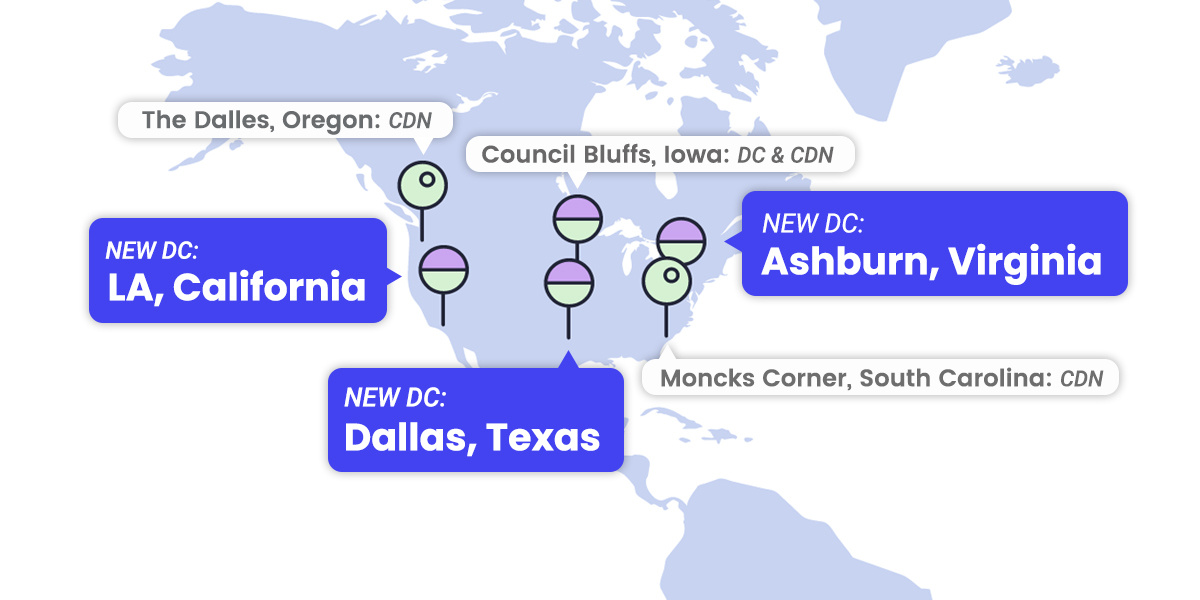
We are happy to announce that we have increased the number of our data centers and CDN locations in the USA. Our clients may now choose among four US-based data centers to have their sites hosted as close as possible to their visitors. What is more, we already have six US-based CDN edge points, which help improve the website speed in the region as a whole for all our CDN users.
4 Data Centers in the USA
With the introduction of three new data centers, we now have four locations in the USA, all part of the modern Google Cloud infrastructure that ensures high redundancy, fast connectivity, and multi-layered security:
USA North in Council Bluffs, Iowa — best for websites that have visitors predominantly from the northern US and/or Canada
NEW: USA South in Dallas, Texas — best for websites that have visitors predominantly from the southern US and/or Central and South American countries
NEW: USA East in Ashburn, Virginia — best for websites that have visitors predominantly from the Eastern US states
NEW: USA West in Los Angeles, California — best for website that have visitors predominantly from the Western US states
When choosing which of our data center locations is best for you, you should take into consideration where the majority of your website traffic is coming from. In case you have a strictly local audience, it is best to have your hosting account placed in the data center closest to your audience.
You can check where an existing hosting account is currently placed and order a relocation if you think there is a better option for you through Client Area > Marketplace > Hosting services > Hosting relocation.
6 CDN edge points in the USA
We are also aware that many of our clients receive traffic not just from one state, but from many and it’s hard to choose one, most convenient hosting server location. For such cases, any US-based data center is a good choice for being the original home of your site. However, the best site loading results will be achieved by using our CDN. The CDN makes sure that a copy of your website is accessible from a location closer to your visitors from all over the USA, and even from all over the world.
We now have the following CDN locations in the USA: Council Bluffs (Iowa, USA), Moncks Corner (South Carolina, USA), The Dalles (Oregon, USA), Los Angeles (California, USA), Ashburn (Virginia, USA), Dallas (Texas, USA).
We encourage all our customers receiving traffic from different geographic locations to activate the CDN service. This can be done completely free of charge through your Site Tools > Speed > CDN.
There is a saying amongst tech companies that if you can’t afford to pay for security, you can’t afford a security breach. The consequences of a breach can be quite expensive in terms of data loss, human involvement, costs for business recovery, reputation damages, and many more. That is why big companies spend millions of dollars to protect their data and spend significant time in implementing and maintaining data safety procedures and security strategies. Naturally, small businesses cannot afford any of that and usually have a limited budget dedicated to security. That’s when and where using the services of a secure web hosting provider becomes critical.
Although web hosts cannot be solely responsible for your website security, the good ones can do a lot to help you stay safe and prevent the worst from happening. Here at SiteGround, we have developed a centralized, enterprise-grade security system to protect our clients’ sites, applications and data. Its complexity has grown over time and describing it in whole can be quite overwhelming, but in this post we’ll give you a glimpse on how we analyze and filter web traffic coming to your sites and how we prevent on a daily basis hundreds of millions attacks to the sites we host.
Effective security-building blocks
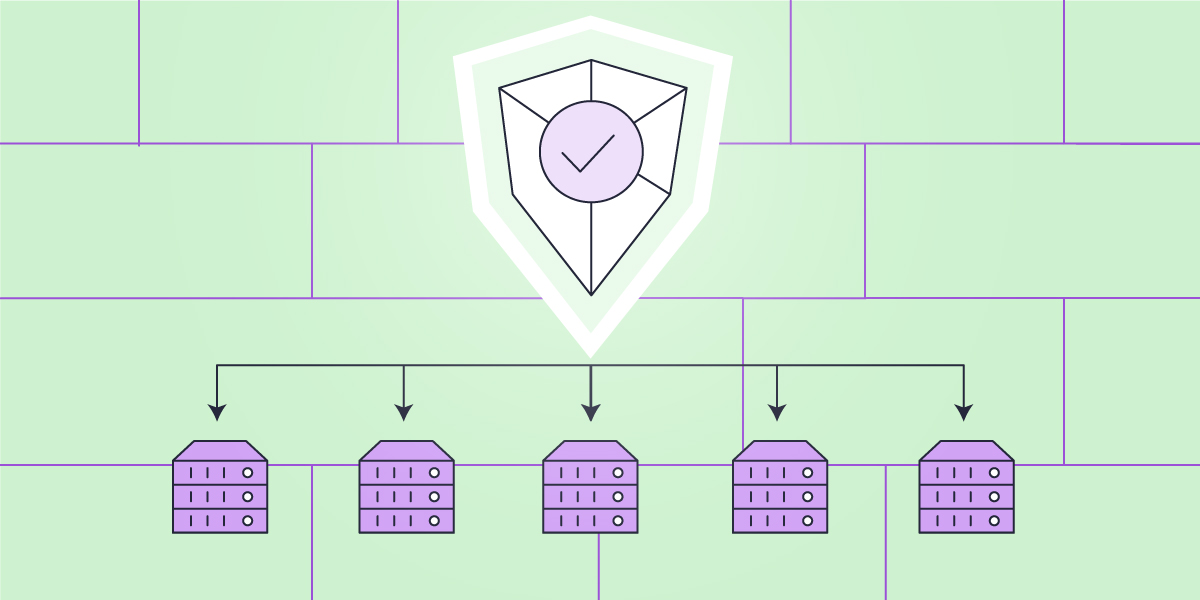
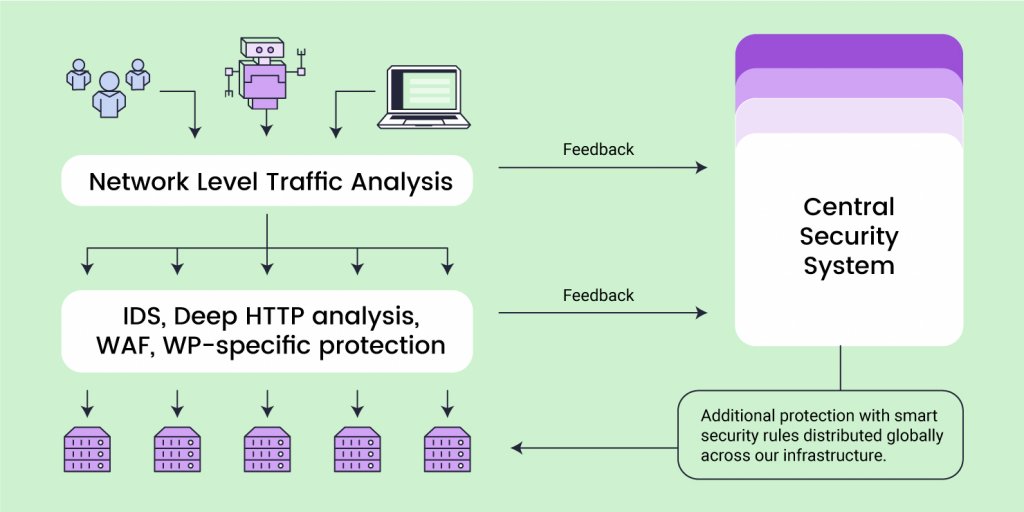
All our servers have essential security software installed on them and systems set to work locally per server – a network traffic firewall, Web Application Firewall, IDS/IPS (intrusion-detection/prevention-systems such as brute-force prevention), deep HTTP analysis of meta data, DDOS protection and more. These are classic and very effective means of filtering bad traffic and preventing brute-force attacks, malware injections, denial of service, and more, which we heavily rely on. Under the competent management of our DevOps engineers and System Administrators, these systems are constantly improved and all of them together filter roughly 1 TB of bad traffic and more than 300 million bad requests across our servers daily!
But if those systems operate stand-alone, on a server-level only, the following issues appear: in case a hacker threatens server A, even if the server’s individual security systems can keep the server safe, they can’t stop the hacker from attempting the same attack on servers B, C, etc. To ensure that all of our servers are protected at all times, we have built our Central Security System that constantly gathers and analyzes data from all individual server security systems, and distributes smart security rules that are applied to and protect all machines.
Centralized big data analysis
Our Central Security system relies on the big data it receives from all the other server-level systems and analyzes the various attack sources, detects bigger patterns, and blocks many more attacks globally on the whole platform.
Web Application Firewall Data Feed
As mentioned above, every server has a WAF, whose main responsibility is to protect web applications like WordPress, Magento, Joomla, Drupal and others from a variety of attacks such as cross-site scripting (XSS), SQL injection, and more. The moment we become aware of a security threat (software vulnerability), our security engineers write a new rule to patch it and add that rule to our local WAFs.
Every request that is not dropped at network level, is filtered by the server WAF. If the request is hitting the parameters of a WAF rule, the WAF sends information about it to the Central Security System. The Central System logs and analyzes all requests hitting WAF rules across all our servers (for example their IP and other metadata). If it detects a pattern, like multiple requests across many servers coming from the same IP address, the Central System will block that IP and distribute a rule to all the machines in our infrastructure. Depending on the specific case and the rule, the system may limit the suspicious IP requests to be challenged by captcha or entirely limit the traffic from it to any of our servers for a specific period (hours, days, weeks or even permanently).
Brute-force Prevention Traffic Patterns
As part of our brute-force prevention strategy, we have deployed local monitoring systems on all our servers. They monitor the login attempts to all applications hosted with us and report every failed one to the Central Security System. The system is notified of the attempt along with all important security information related to it, like an IP address, number of requests, IP history and more. Every 60 seconds the Central Security System reviews the aggregated data and analyzes the volume and frequency of repetitive metadata looking for patterns. When patterns are clearly identified, the system creates blocking rules that are distributed to all servers.
An example of this would be multiple failed login attempts on one or more servers, coming from the same IP address within a short period of time (different time thresholds are set for higher precision and effectiveness). In a case like this, our system would flagg the IP and the future requests coming from it towards any of our servers would be challenged with captcha.
Many more systems send data to our Central Security System
There are many more ways we feed our Central Security System with data – like monitoring login attempts to a server-level services like FTP, EXIM, Dovecot, etc; reviewing XML-RPC traffic of WordPress sites; inputting different traffic patterns from third-party systems, and more.
The more relevant data sources we input, the bigger the pool of data becomes, which significantly improves the analytical power and accuracy of the Central Security System. Over time the System’s capability of effectively preventing attacks grows bigger and bigger.
Enterprise-grade Protection on a Global Scale
And to wrap it up, here are some numbers that can help you understand the scale and effect of what the Central Security System does. On a daily basis over 260 million requests are challenged with captcha and less than40,000 actually pass the challenge. We have more than 50,000 IPs currently flagged as bad or suspicious and nearly half of them are completely blocked from reaching our servers. The number is changing daily, as new IPs are flagged and challenged due to suspicious activity, while previously flagged ones get cleared after successful verification or ban expiration.
All of these numbers and the comprehensive work involved in maintaining an effective Central Security System lead to the number that matters most – 99,99%of bad traffic blocked before it reaches your website.
In the middle of June, we launched our upgraded Site Scanner service. Little did we know back then how soon we would see the new functionality in full action. Just a few months after the upgrade the Site Scanner saved thousands of WordPress sites from a well-disguised attack, aiming to redirect traffic to bogus sites through a fake plugin, called Zend Fonts. Imagine all the reputation and other business damages a hack like this could have caused and take a read how our hero, the Site Scanner, saved the day.
How does the “fake Zend Fonts plugin” work?
The attack involved uploading an infected fake plugin called Zend Fonts through a backdoor. Once uploaded, the infected plugin would redirect site visitors to bogus scam sites without the site owner even suspecting it. The uploaded plugin file looks like that:
What makes the attack really bad is that this plugin file is hidden from the wp-admin or wp-cli plugin list, meaning the WP Admins would not be able to easily spot it, due to the following function:
Also it is configured to trigger the redirect only if the website is accessed by a normal user, not the site admin or editor:
//do redirect if user from REF and NOT Admin
        if(isset( $_SERVER['HTTP_REFERER']) && !$isAdmin){
                redirect();
        }
All these factors make the attack pretty much invisible for the site owners/editors, while the normal visitors would be redirected to scam sites. This hack could easily result in significant losses of sales, reputation damages, and other harms such as bad standings in search engines and more.
How did SiteGround detect the attack?
Our System Administrators monitor the load and behavior of our servers 24/7 and soon after this exploit was launched, we observed an abnormally high number of malicious files detected by our Site Scanner service crawling for malware. Our Sys Admins started digging further and spotted a pattern – there was an attempt for a massive fake Zend Fonts plugin upload affecting by that time around 2000 of our clients’ WordPress installations.
How does Site Scanner protect the sites it’s on?
Usually, in attacks like the Zend Fonts one, for the sites with Site Scanner Basic, reports are received in less than 24 hours after the malware is detected (right after the scheduled daily scan) and for those with Site Scanner Premium, an alert is received immediately after the (attempted) upload, giving our clients the opportunity to quickly react and delete the malicious files before they can cause any damage.
Furthermore, for the sites with Site Scanner Premium where quarantine is switched on, the files never reach the attacked sites – they are safely quarantined for the site owners to review and delete when convenient. The quarantine effectively stops the attack and protects the sites from malicious hack attempts, and the business and reputation impact resulting from them. And the best part – the site owners don’t have to do anything.
Using Site Scanner data to protect all clients
Once our System Administrators had detected that the Zend Fonts plugin upload was not something isolated, but was happening across the whole platform, they deleted all malicious files from our servers. Furthermore, our Security Engineers added a new rule to our web application firewall (WAF) to prevent further attacks towards other WordPress sites hosted with us.
We are quite excited to see how our Site Scanner service is actively protecting sites from a variety of really bad attacks. For massive, large-scale attacks such as the Zend Fonts plugin one, the Site Scanner helps us detect a pattern and take actions to protect all our clients by implementing WAF rules or enhancing our monitoring system. While this is something that we will continue doing, updating a platform-wide system takes some time and will not include smaller, site-specific malware attacks. If you want to have an early-on, comprehensive malware detection for your site, we strongly recommend that you activate one of our Site Scanner plans. And if you’re looking to not only detect but proactively stop malware attacks, get the Premium Site Scanner with quarantine on.
With the rapid development of technology, the complexity of phishing attacks improves. The more technologically advanced people become, the more advanced the phishing attacks. Last but not least, now that everybody spends more time online, the number of phishing attacks also rises. Here is our short guide on simple things to remember in order to stay safe from phishing attacks, while browsing online.
What is Phishing?
Born circa 1995, just 4 years after the first site appeared, phishing refers to the practice of using deceptive emails and websites to illegally get personal and corporate information from users. That information – usernames, password, credit cards – is later used to steal either money or more information.
The word “phishing” itself is a combination of “fishing” and “phreaks” which was what hackers used to call themselves. The practice of phishing is considered a form of social engineering, which is a term for manipulating people by falsely representing oneself in the context of web security.
Types of phishing techniques
Spear phishing
What is spear phishing? Spear phishing targets a specific person or organization rather than random users. This scam usually intends to steal sensitive data or information from the specific victim, such as account passwords or financial information for malicious purposes. It requires specific knowledge about the victim such as some personal details. The cybercriminals use this information, usually in an email, to pretend they’re a trustworthy organization or person and acquire the data they need.
Spear phishing vs phishing
Both of them are online attacks that intend to steal sensitive information. However, phishing is the more general term for this type of attack, as this is basically any attempt to trick victims to share sensitive data.
As per the spear phishing definition, it is personalized to the specific victim. It requires more thought, time and knowledge to achieve its goal. Since spear phishing’s messages are personalized, it’s more difficult to identify these types of attacks.
What helps protect from spear phishing is generally being careful with your online presence. Here are a few tips to follow in order to avoid spear phishing:
Be careful what personal information you post on the internet
Use smart and strong passwords
Update your software regularly
Watch out when opening emails and clicking on links
Microsoft 365 phishing
These types of attacks are phishing emails that target Microsoft 365 users. One of the most common things that attackers usually do is tricking victims into downloading a file by disguising its extension. Attackers use a special Unicode character, the right-to-left override. It allows them, for example, to disguise an “.exe” file as a “.txt” file. As a result, the victim downloads the “.exe” file which installs malicious software on their computer or laptop.
Whaling phishing
Whaling phishing is a highly targeted attack. This type of phishing attack targets particular individuals, such as senior executives, and disguises as a legitimate email. It attempts to encourage victims to do a particular action, usually related to transferring money or giving out specific information. Whaling phishing emails often target large financial institutions and are more complicated than general phishing emails because they target C-level executives.
These emails usually contain personalized information about the organization/C-level executive, create a sense of urgency, comply with the business tone, and they encourage you to do some of the following:
Click on a link that eventually brings malware
Transfer money to the attacker’s bank account
Provide further information about the business or individual
Voice phishing
Voice phishing is an attack which tricks individuals to provide important financial or personal information over the phone to third parties. You can become a victim of a voice phishing attack over various channels and devices, such as voice email, smartphone, landline phone, voice over IP, etc.
The message of such an attack usually informs the victim of a suspicious activity, related to their bank account/credit or debit card, etc. Then the attacker encourages the victim to call a phone number and provide more personal information or verify their account/identity.
To protect yourself from such an attack, the best approach is to call the given institution via a valid contact channel you have and make sure that your account has not been compromised.
Business email compromise (BEC)
Business email compromise is an email message that appears legitimate, requests a particular action, and targets a specific company. The request in the message is usually about transferring funds to the attacker’s bank account that:
Pretends to be the “regular supplier” that has sent an invoice from an updated mailing address
Pretends to be the CEO of the company
Pretends to be an employee of the company and has hacked their email address
Pretends to be the lawyer of the company
Social media phishing
Social media phishing is related to attacks via social media such as Facebook, Instagram, Twitter, LinkedIn, etc. It aims at stealing your personal information or taking over your social media account. Such an attack can also result in financial loss due to getting data for access to financial accounts. To protect yourself from a social media phishing attack, follow these simple rules:
Don’t add/accept strangers as friends
Don’t click on links to update your personal information
Don’t use the same username and password for all your accounts
Use the latest version of your operating system
How Can You Prevent Phishing?
Because phishing can truly cost you a lot – from stolen money to huge data breaches in your company – taking proper safety precautions is a must. We’ve put together a shortlist of the things you need to keep in mind in order to stay safe online.
1. Pay Attention To The Sender and The URL in Your Emails
One of the most common phishing scams is to spoof a big brand by sending an email with their name (and usually color palette), and say there is something wrong with your account and ask you to log in “to fix it”. Usually, the look of the email is very similar to the original brand, however, there is a sure way to distinguish whether you’re looking at the real deal.
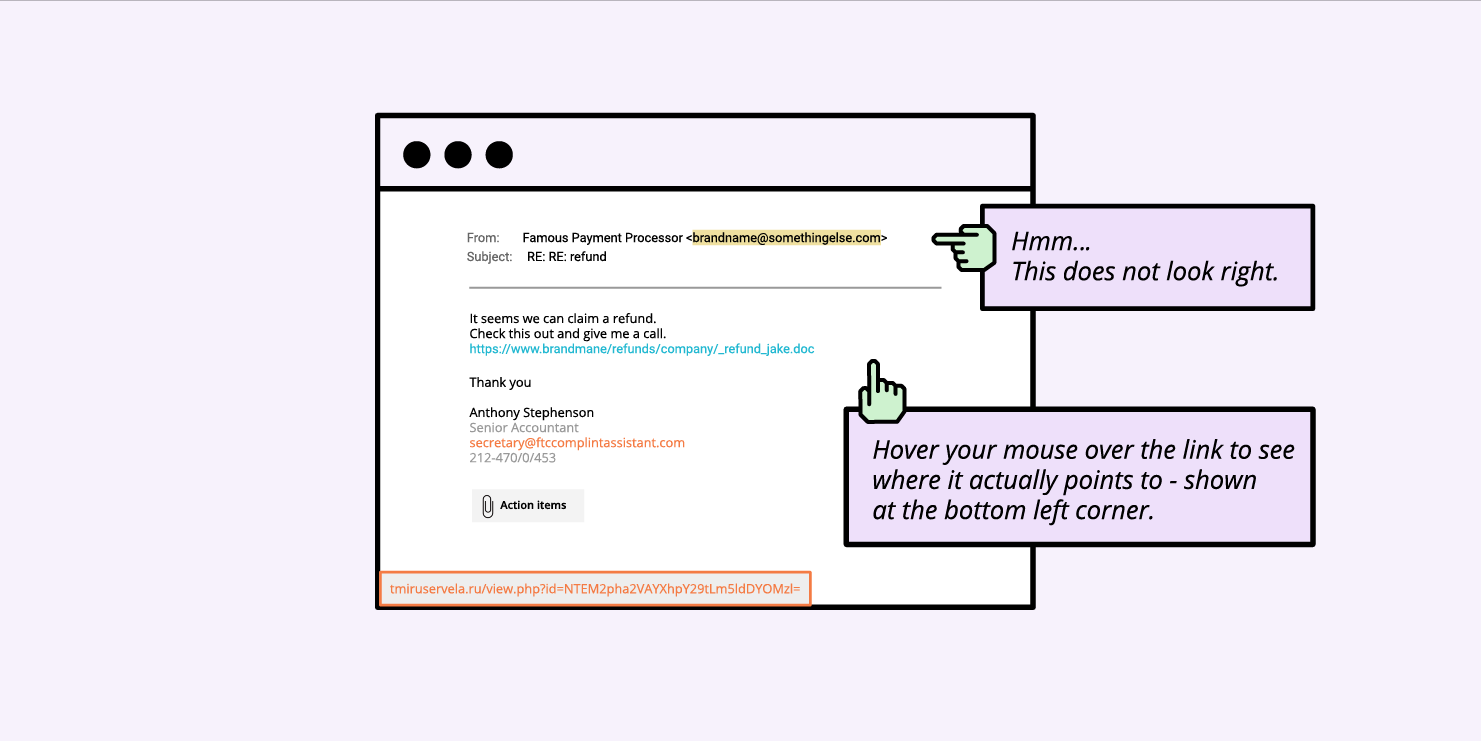
A good way to identify phishing emails is to check the email address: scammers cannot create email addresses with the actual domain name of the company, so instead of help@bigbrandname.com it will usually look like bigbrandname@somethingelse.com. Look carefully at the email address and not just the name appearing in your email client!
You should also check the URL before clicking. This can be done by hovering the mouse over the URL provided in the email, it will usually reveal the domain it’s pointing at, so you can see where this email actually wants to take you. If it’s not the official domain of the brand, don’t click on it.
2. Avoid Downloading Email Attachments You Don’t Expect
Sometimes the email looks like legitime business emails, and they don’t pretend to be a big company, but instead send over an attachment containing some sort of malware. The email is often structured as a business offer or аn email sent by the recipient’s own company/management containing files with sensitive information.
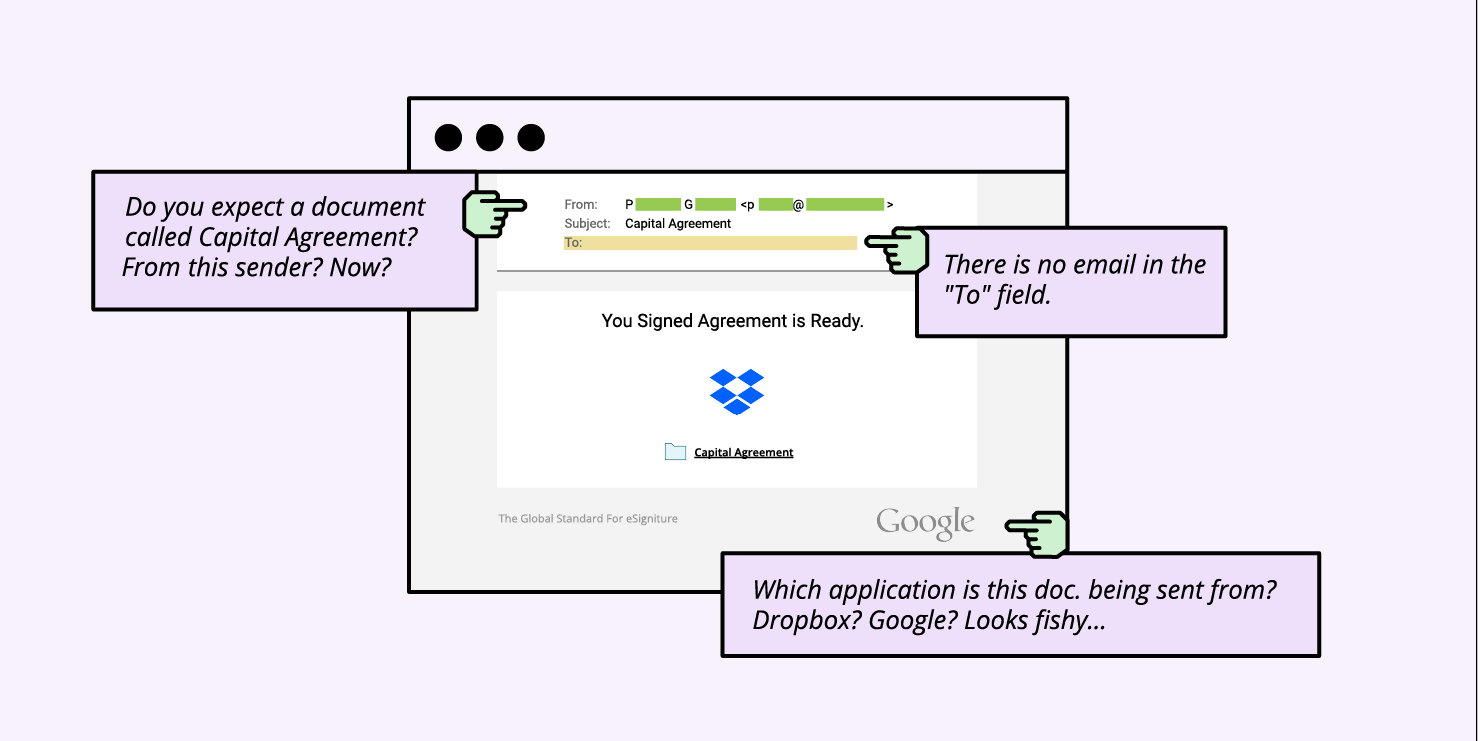
If you don’t know who the sender is, definitely don’t open any attachments. If you know the sender, but you don’t expect anything from them, or there is something fishy about it, it’s better to be cautious. Call the sender and ask them if they meant to send you anything, as sometimes scammers hack into people’s email boxes and use them for phishing attacks by spamming their contacts.
The most common format for the attachments is zip (.exe is usually not allowed), however, even Microsoft Office files can contain viruses, which can contain macros that need to be enabled. Overall, keep an eye for all kinds of attachments.
3. Always Check The Site You’ve Landed On
If you happen to click on a phishing link (usually via email or through instant messages), it will often take you to a website with a form of some sort. The purpose of these forms most often aim to gather your most sensitive information – usernames and passwords.
In order to be sure you’re at the correct site and before filling in any data, check the website address in the browser address bar.
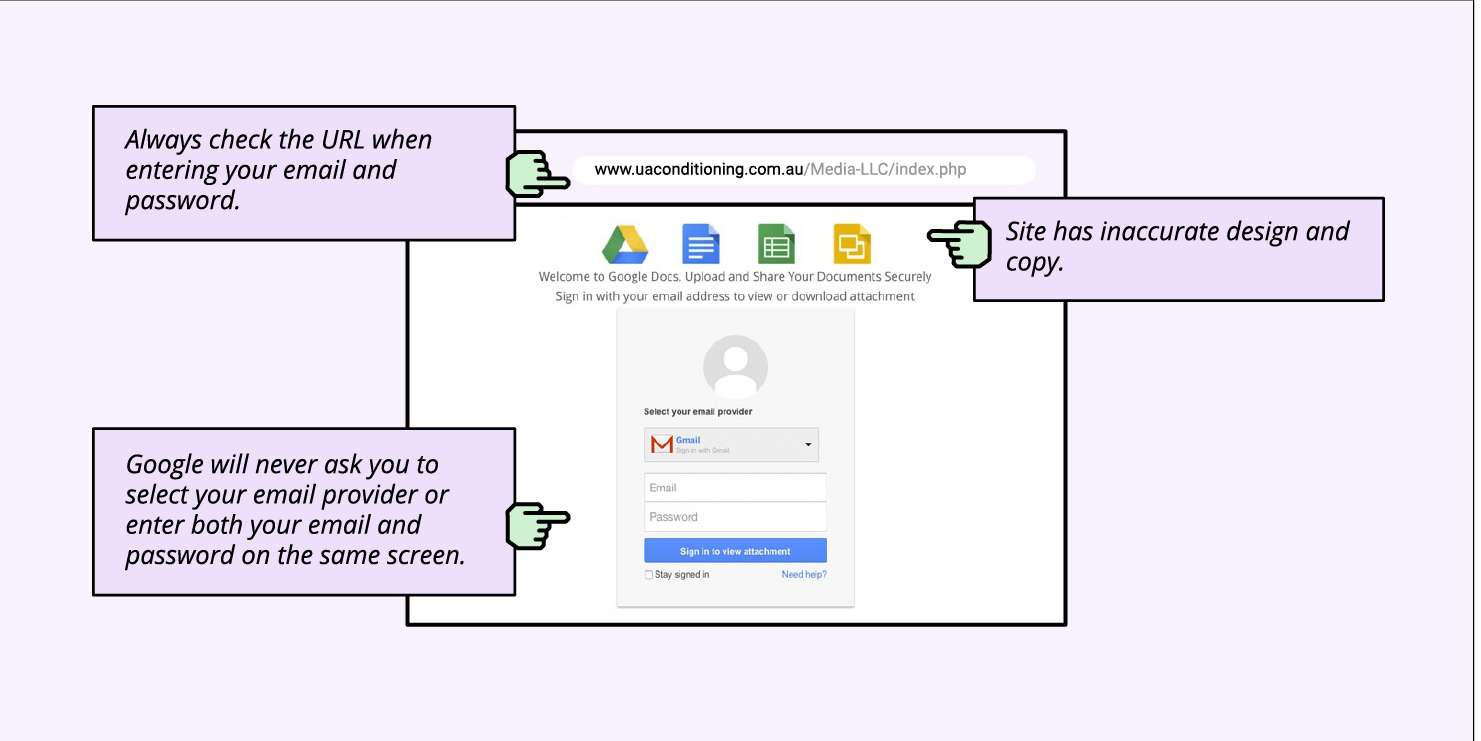
Scammers can create a website closely resembling the design of the respective brand, but they can’t use their official domain or have the brand name in the domain (assuming the brand is trademark protected). So, often, these domains may resemble a brand’s name, but will never be the original one, and will have additional symbols, letters, or words.
Usually, the scammy domains look completely nonsensical and sometimes the design and flow also feels odd, especially if it’s a known brand that you often see.
For example, when signing into Gmail, Google will never ask you to select your email provider or enter both your email and password on the same screen. So the flow you will often see on phishing sites is designed to resemble the original one, but it’s not.
4. Ignore Money Requests
Another type of online scam that social engineers often use is misrepresenting themselves and asking for money under some form. An example of such phishing emails is a person in trouble, asking for financial help; you’re asked to send a small amount of money with the promise you’ll get way more in return.
Sometimes these scams can take the form of extortion. A popular one was an email circulating in the past couple of years, stating that users have been recorded through their own webcams watching adult content and asking for money. Actually, this scam attack was so scary, it made the news as people were terrified – understandably so!
Either way, if you are getting a money request under any form by strangers, it’s usually a scam; never give out money or financial information no matter how the situation is presented.
What should you do if you receive a phishing email?
Every time you receive an email, you need to be extra careful of the email address, the URL, their spelling, etc. After checking these and identifying that the email is actually a phishing email, you need to follow all of the steps below:
Don’t click on any links & don’t open any attachments & don’t reply;
Contact the alleged sender via official channel for communication;
Report the email to your company & email provider & government body & the organization that allegedly sent the email;
Mark the sender as junk or spam;
Delete the email & remove from recycle bin/deleted items folder.
How to report phishing emails?
As previously mentioned, you need to report the phishing email to several people/institutions. Here we’ll show you how to report the email both to the email provider and to the government body.
How to report phishing emails to your email provider
Let’s take as an example, Gmail accounts. Next to the “Reply” option in Gmail, click the “More” option and select “Report phishing”.
If you are an Outlook user, you need to select the phishing email message from the message list and above the reading pane, select Junk > Phishing > Report.
Other email providers have similar easy to use options for reporting phishing emails.
How to report to a specific institution, based on the country you’re in
The Anti-Phishing Working Group (APWG) is an international coalition that attempts to eliminate cybercrime. If you receive a suspicious or malicious email, forward it to this organisation at reportphishing@apwg.org.Below you can see some other country-specific institutions that can help you too:
For the USA, forward phishing emails to the National Cybersecurity Communications and Integration Center (NCCIC) at phishing-report@us-cert.gov.
For the UK, report the phishing email to Action Fraud, the UK’s fraud and cyber crime reporting center.
If you’re living in a European Union country, here you can find the reporting website, corresponding to your country, in case you are a victim of a cybercrime.
Final thoughts
Now that you know what is a phishing attack, you are much better prepared to protect yourself from it with our simple actionable advice. You can further explore our blog for similar topics and read how to protect your reputation by protecting your email.
Website security should be on the mind of every site owner. It doesn’t matter if your site is large or small – if it is important to your business, you need to keep it safe and secure. As a site owner myself – and primarily a WordPress site owner – I’ve come up with a checklist I go through every time I spin up a new website for myself or a client. Let me share it with you in hopes that you will pick up a few new ideas. Let’s look at what it takes to secure a website.
Choosing A Secure Web Host
It should go without saying, but security starts with your web hosting company. I’ve used everything from ‘do it yourself web hosting’ to ‘concierge level hosting’. The trick is to find the level you need and the support you are comfortable with.
Check their support
The first thing I do when considering a new web host is to check their support and response time. I’ll sign up for a free trial, put up a site, and then ping support to ask a question. How quickly they respond and how well they understand the question gives me clues as to what I can expect from them if I host with them.
Check their security features
I’ll then check their website and hosting plans to see what security tools and features they provide. I’ll look for essential things like an SSL certificate to encrypt and protect my website data, domain privacy to hide my personal information from public Whois databases, 2-factor authentication to protect my website from unauthorized access, geographically distributed backups to have a safe copy of my website in case something goes wrong.
Other key security measures I’d like my website hosting provider to have in place is a Web Application Firewall – software that sits in front of my website and protects it from known bad traffic – to keep my host server safe from software exploits, DDOS and brute-force attacks protection, and the option for automatic updates to the latest PHP and WordPress versions to keep your site secure from malware.
If the host provides yet more security tools, that would be even better. For example, on top of all these features, available on the SiteGround platform, they also offer an in-house developed Site Scanner service and a free in-house built SiteGround WordPress Security plugin to make sure that your website would be as secure as possible.
Check their blog
Step 3 when selecting a web host is always to read the last 5 entries in their blog.
Are they recent?
Do they talk about security?
Do the blog posts seem helpful?
No, not all blog posts are going to be about security, but I’d better be able to find a recent one. The Security landscape changes quickly so they need to be posting regularly.
Check their price
Finally, I check their pricing tiers and figure out where my site will fall. Price is the last thing I check because if the first two boxes aren’t checked then the price doesn’t matter. They could be giving it away for free and I wouldn’t use them.
Build Your Site Securely From The Beginning
Once you’ve laid a secure foundation for your website, it’s time to start framing it and building it out. At every step, you need to make sure that security is “baked in” not “bolted on”.
Security is bolted on when you build out your entire website and then decide to just add a security-focused plugin to cover your bases.
Baked in is always better.
What does it mean to bake in security?
Install an SSL certificate as soon as you get the website set up
Don’t wait until you are ready to deploy your website before you remember to install your SSL certificate. These days a secure website is just a few clicks away. Take the time to do it now and then make sure you force all traffic to be https after it is installed. For those users hosting with SiteGround, your Site Tools makes setting up and enforcing SSL easy. Just a few clicks and you are in business.
Set a strong password policy before you start adding users
Passwords are the lock on the front door to your site. When building out your site, put a strong lock on the front door by requiring all users to use strong passwords. Doing this before you let users start coming into your site will make sure that no users set up weak passwords.
Require Two-Factor Authentication (2FA) for any user that will have admin-level rights in the system.
Two Factor Authentication is the deadbolt on the inner office of your site. Yes, a strong password is important for anyone to get into the site, but to get to things like financial information or user management, you want a strong deadbolt as well. Keep your system secure by implementing 2FA for all your admins. The SiteGround Security plugin makes setting up 2FA very easy.
Set up a backup system that will regularly backup your entire website and store those backups securely.
You need a 30-day backup system implemented from day 1. Not 1 day, not 7 days, 30 days. The reason is, that if your site gets hacked, you may not notice immediately. Once you do notice, you want to clean your site and one of the best ways to do that is to restore your site from a clean backup.
SiteGround’s Site Tools provides an intuitive tool for scheduling nightly backups and restoring from them when needed.
While we are talking about backups. Don’t forget to force a backup before any upgrade, major site redesign, or installing a new plugin. It never hurts to have a fresh backup in case things go bad.
Adhere To The Principle Of Least Privilege
Before you start letting users into your system, think about the roles that they will play. A role is a set of permissions or privileges and you want to give each user the absolute minimum level of privilege they need to use your site.
There are several good role editors for WordPress and I suggest you install one, learn how to use it, and then audit the roles you have in your site to make sure they have only those privileges they need to use your site.
On a regular basis – at the very least once a year – review these privileges to make sure they are still valid and to make sure that no role has been granted a privilege it does not need.
Most users are not trying to do bad things, but we have to assume they would if they could. Adhering to the Principle of Least Privilege will help make sure that bad actors, or curious users, can’t do things to your site they aren’t supposed to.
Only Use Software From A Trusted Source
In software development – as in building a house – your supplier’s reputation is critical to your project’s success. If you use a cut-rate supplier for the framing materials of your house, the entire project will suffer. Worse yet, it will cost you more later on to fix these problems than it would to just buy good materials to begin with.
Building your website with quality materials like plugins and themes from reputable vendors will usually cost you money in the short run. However, knowing that you have companies standing behind their products and updating them when issues arise is worth the money.
Yes, you can choose a free plugin or theme to build a critical feature of your website. However, what do you do if you discover that there is a security flaw? Worse yet, what do you do when you discover that flaw and then discover that the author has abandoned the project? At that point you have 2 options, neither good.
Hire a developer to fix the security flaw
Rip out the plugin, find another one that does the same thing, implement it and make any changes to your process that are necessary.
Both of these can be expensive propositions that could be avoided by simply choosing wisely in the beginning.
SiteGround recently looked at the data from a lot of compromised websites. What they found was that the majority of the compromised websites were compromised because they had unpatched plugins that had security flaws in them. Much of the time these were the free versions of paid plugins downloaded from untrustworthy sources. Only download plugins and themes from trusted sites like WordPress.org or vendors you trust.
The WordPress plugin repo is a reputable source. WordPress.org has implemented a review process – both human and scanning software – to help filter out plugins that have potential security issues or otherwise violate WordPress policy.
Scan Your Site Regularly
Just like you build a security system into your house, you want to set up a security scanner for your website as soon as you build it. Security scanners look at your site both internally and externally to make sure that there are no known vulnerabilities. It will check your website for viruses as well. No security scanner is perfect, just like no home security system is perfect. But your website is more secure with one.
A good scanner will look for things like cross-site scripting vulnerabilities among other things. These vulnerabilities can allow your site to be used in the attack of other sites or attacks on the end user themselves.
SiteGround has a great scanning system available. I get regular emails from it telling me which sites it has scanned and either that they are all clear or that there is an issue I need to address…immediately.
Beware of Phishing Scams Related To Your Site
Once you’ve built a new house, you don’t hand out keys to anyone who asks, even if they claim to have a good reason for wanting in. Similarly, you want to make sure that if you get an email that says it is from your site, you don’t automatically click on the link.
You should know every email your system is capable of sending. When you get one that you don’t remember setting up, you need to investigate. Don’t click, start looking at it. Check the headers, look at the exact URL any links go to. Most importantly, quarantine the email using your virus detection software.
Unknown emails purporting to come from your site are just another way that bad actors try to get into your site. These phishing attacks come from servers that are not under your control, so you can’t stop them. You can, however, be aware so that when you get them, you delete them. In almost all cases, if you don’t click, the email itself can’t do any damage.
Tools I Regularly Use To Bake Security Into My Sites
Keeping a WordPress website secure doesn’t have to be a full-time job if you bake security into it from the beginning. To do this, there are a couple of tools I use on almost every WordPress website I have.
The SiteGround Security Plugin is the first plugin I install on any new website I spin up. I install it, I install an SSL certificate, and I configure everything to be secure before I do anything else. If I get this part right, everything else is easier.
The SiteGround Optimizer plugin is a great way to make my site faster, but it is also where I check the “HTTPS Enforce” checkbox. This way all the traffic on my site goes over HTTPS even if it wasn’t originally. Having an SSL certificate is important, enforcing it on all traffic is equally important.
SiteGround’s Site Tools have a lot of great options to make managing a website easy. The one tool I use in setting things up though is the Backup tool. After I get SiteGround Security and SiteGround Optimizer setup and configured, I have my foundation laid – I force a backup. This is my fallback in case I mess something up while building out my site.
Then before I install each plugin or theme, I create a new one. I name these backups “BEFORE “ + the plugin or theme name. This way I can roll back to any point in the process.
Wrap Up
If you lay a secure foundation for your website and then think about security at every turn, then you can rest easy at night, knowing that your site is as secure as possible. No website, however, is bulletproof. Therefore, the last step is to build your Disaster Recovery plan. What steps do you take when your site has been hacked?
The SiteGround Security plugin has a series of steps you can take just for that situation. It is not a complete disaster recovery plan but when you combine it with 30 days of backups, you are well on your way to having one.
It’s amazing to see how when people get back from summer breaks, September is always full of events, conferences, initiatives… and awards.
We attended the biggest local QA Conference: QA Challenge Accepted. We listened to some great lectures and greeted QA and DEV enthusiasts at our booth.
Our CEO, Tenko Nikolov, got invited several times on stage this September – on TV, radio, and at the Forbes Innovation Forum. The reason was him being invited to the Board of Teach for Bulgaria Foundation and the founding of the Role Model Foundation by Tenko and Ivo of SiteGround, which has pledged to donate 100 Mln BGN for education, sport, and healthcare initiatives.
As a big WordPress contributor, we had a very strong presence at WordCamp US in San Diego, California. It was great to be back in person after two years and meet many of our community friends. We also hosted the WordPress MeetUp in Plovdiv and represented at WordCamp Pontevedra.
We have been big supporters of the career development of young people, and we met with very talented and dedicated people at the Tuk-Tam Hive in Sofia.
We are very proud and happy to receive 3 GOLD Awards and 3 BRONZE Awards from Career Show. This is a great recognition of our efforts.
Protecting the environment is a very important cause for us, and for the first time, we participated as a company in World Cleanup Day and helped clean the Batak Dam, a favorite place for us for team-building and off-site events.
At SiteGround, we support the learning and development of our colleagues, and September had some great conferences where they got to learn and explore new ideas:
What a great start to the fall season! We are excited about all that we have prepared until the end of the year. If you are interested to learn more about us, check out careers.siteground.com.
We have been talking about brute-force attacks in the past, but the truth is that many of our clients don’t even realize how real and how common the threat of these attacks is for anyone with a website. Based on our experience of hosting millions domains, we fully understand the destructive potential of brute-force and we have set defence mechanisms to prevent and mitigate such attempts directed at the websites we host. For years our AI brute-force prevention system has been successfully blocking millions of attacks every day. Now, we are happy to announce that the system got even better – by constantly learning from thousands of brute-force attempts per day and adding new functionality for traffic validation, it now filters 95% more of the bad queries!
Advanced AI system that recognizes & blocks brute-force attempts
Analyzing traffic behaviour and recognising patterns is the core feature that makes our AI brute-force prevention system so effective. When a behaviour that matches a certain pattern associated with brute-force is detected (like too many unsuccessful login attempts from an unrecognized location for example), the suspicious source is immediately challenged with a CAPTCHA page that only a real human can pass. This effectively stops brute-force attempts, adds up to the system knowledge and enables legitimate users who have accidentally mimicked a suspicious behaviour to reach the requested location by completing the captcha. The beauty of this constantly evolving system is that it gets better with every brute-force attempt it stops, it keeps sites under attack safe and it ultimately protects the other websites hosted on our servers by blocking bad traffic before it even targets them.
NEW: Traffic validation that minimizes the number of brute-force attacks
We have recently upgraded our system to become even more powerful. We are now able to more efficiently block the great majority of malicious non-human bots – e.g. incoming brute-force attacks or data hunting agents which aim to profile your site and later hack you through future software exploits. That significantly boosted the system success rate and reduced bad visits by roughly 95%.
The best example to illustrate how the system works is with the XML-RPC, a file in the root directory of every WordPress installation. Many (WordPress) hosts block its usage because it’s known to be insecure and blocking it is the easiest way to avoid XML-RPC-related hacks. However, XML-RPC also has many legitimate use cases for communicating with external systems and software. That is the reason we don’t aim at stopping XML-RPC – we want to empower our clients to use the tools and services they need to get the best of their websites. Instead of blocking it, we have looked for ways to harden its security and significantly decrease the potential for brute-force attacks. After our latest AI brute-force prevention system upgrade, we now validate all traffic coming through XML-RPC to stop all recognized malicious visits and eventually reduce the overall hits reaching the clients’ sites through XML-RPC by 99%. This means that we successfully filter potential brute-force sources before an attack is even attempted.
Less resource consumption, lower carbon footprint
The impact of this upgrade to our AI bruteforce prevention system is enormous. Not only are we further minimizing the chances for our sites to get brute-forced and potentially hacked, but we significantly reduce resource consumption (like CPU and RAM) generated by traffic coming from bots and brute-force attempts. Lower resource consumption effectively means more resources available for your legitimate visitors and a lower carbon footprint of your site.
Preventing brute-force attempts is just one of the many ways we constantly protect the websites we host, along with our Smart Web Application Firewall, DDoS protection, 24/7 server monitoring and many more. We believe that security is one of the foundations for any successful website, and we continuously develop new prevention and mitigation solutions, improve existing ones and keep adding new security features to our hosting, so you can have the peace of mind that your website is in good hands and focus on what’s important – your business.
The security of our clients’ websites has always been one of our top priorities and something that we continuously improve on. The latest tool in our website protection arsenal, available for FREE on all hosting plans, is the option to easily block the traffic coming to your site from specific countries. This will not only increase your website security, but can also help website performance by decreasing resource usage when blocking the traffic coming from locations you would rather not get traffic from.
When to consider blocking the traffic from a specific country?
There are different reasons why someone would like to block the traffic from a specific country to their site, but the most common are the following:
To Stop Malicious Traffic
If you notice abnormally high traffic from a country that your site is not targeting as audience, or you start receiving too many spam comments from such a country on your blog posts, or you identify any other behavior you consider suspicious, coming from a geographic region that’s not your main user target, it may be a wise idea to block the traffic from this location.
To Streamline Your Business
There are various reasons due to which you might not be willing or able to do business with certain countries. Some examples are expensive and/or complicated deliveries; legal requirements that prevent you from providing your service, heavy taxation requirements, etc. Now, if you need to stop access to your site from a specific country due to such reasons, this can be easily done through your Site Tools.
How does SiteGround country block work?
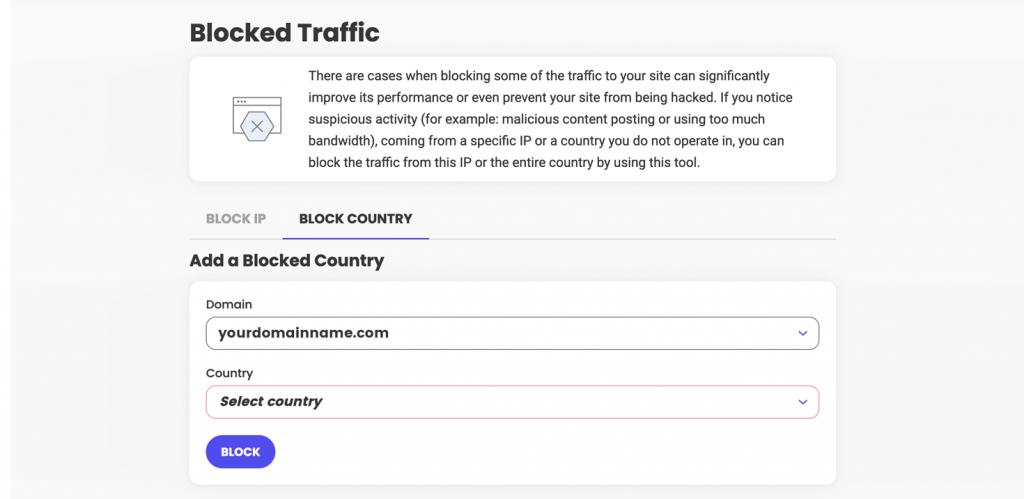
Adding a country to your Blocked list is easy. You need to go to your Site Tools > Security > Blocked Traffic > Block Country section:
Once a country is blocked, all visitors coming from an IP address that we identify as being located in this country will start seeing our default Country Block HTML page.
The tool allows you to block multiple countries, and also to block certain countries from accessing your main domain, or specific sub-domains. You can review the list of all countries you have denied access to, and/or add or remove countries from it with a click of a button at any time.
Our new Country blocking option is also fully compatible with our SiteGround CDN and visitors from blocked countries would not be able to access your website pages whether you have our CDN service activated or not.
At SiteGround we’re constantly working to add even more value to our services and respond to our customers’ growing business needs. Now, we’ve made it easier than ever to sell digital products online by partnering with Easy Digital Downloads – the leading WordPress-based eCommerce platform for selling digital products. You can now take advantage of a powerful managed eCommerce hosting platform for EDD to launch a ready-to-go eCommerce WordPress website in minutes and grow your online business even further!
Selling Digital Products Online Is a Growing Trend
Digital products are booming nowadays because of their numerous benefits. They provide high profits, as their production costs are low. Unlike physical items, there’s no limit to the inventory and no delivery costs. Digital buyers get what they need easily and immediately – in just a few clicks. Let’s take eBooks as an example. They are the top-trending digital item, and their industry is projected to reach $13.62 billion revenue in 2022. Other digital products in high demand include audio books, podcasts, videos, music, photography, software, web designs, and many more.
All You Need to Easily Start, Manage, and Grow an Online Store
If you want to join this growing trend and start selling digital products on WordPress, we’ve got you covered. Our new Managed EDD eCommerce hosting solution dramatically simplifies the process for setting up a WordPress eCommerce site by combining the premium hosting services of SiteGround and the eCommerce functionality of Easy Digital Downloads. You get WordPress pre-installed with the Vendd theme – a full-featured marketplace theme for EDD that gives you many options and features, together with the EDD plugin – the complete eCommerce solution for selling digital products on WordPress. On top of that, we add our powerful WordPress speed and security boosters – our top-rated SiteGround Optimizer and SiteGround Security plugins.
All you need to do to get all that is visit our Managed EDD Hosting page and choose the best hosting plan option for your online business. With no technical skills required, you’ll have your eCommerce site ready and fully equipped with premium features in a few clicks:
Sell online any digital products, such as eBooks, photos, videos, PDFs, plugins, software licenses, and more.
Have payment flexibility and accept credit card payments using Stripe, Apple Pay, Google Pay, and PayPal. Besides, you get flexibility on recurring payments and additional payment gateways.
Manage customers easily by keeping a record for each customer and tracking customer lifetime values. What is more, the managed hosting platform includes a built-in Customer Area so you can easily access the purchased digital goods and keep track of purchases.
Create and manage promotional campaigns by choosing the type of discount, specifying the products, setting an automated time period (start and end dates), and more.
Get full data reporting with the built-in reporting feature for stats viewing and custom reports creation. You can filter, track and export data about specific products, earnings, downloads, sales and more.
Enjoy tried-and-true website speed and security solutions – our top-rated SiteGround Optimizer and SiteGround Security guarantee the best performance and security for your eCommerce website.
Enhance your store functionality with tons of extensions, such as a simple plugin installation or marketing integrations to improve your store and your visitors’ user experience and respond to your needs and budget growth.
Get top-rated, 24/7 live support for your eCommerce site.
Why Easy Digital Downloads (EDD)?
We’re already offering plenty of ecommerce features, like a free SSL, free CDN, business email, premium support, and more, but we were looking to simplify the online store management experience even further. We only partner with services that complement our own with the highest standard of quality and best in their class, and we’re committed to long-term partnerships with trusted providers we’ve been working with and using throughout the years.
Easy Digital Downloads is the most popular and useful WordPress-based eCommerce platform for selling digital products for WordPress online and is already used by more than 50,000 website owners. It was recently acquired by Awesome Motive, the leading software and media company helping shape the web for billions worldwide. Collectively, their software powers over 20 million websites and includes many of the well-known website tools such as OptinMonster, WPForms, MonsterInsights, All in One SEO, etc., and now also Easy Digital Downloads.
Syed Balkhi, CEO of Easy Digital Downloads, who’s also contributed to our expert round-up How to start your online business on a budget, commented, “EDD’s partnership with SiteGround offers small businesses around the world an easy way to start their eCommerce website and have peace of mind when it comes to on-site payments, security, and performance. Because EDD is open-source, it also helps small business owners retain full control and freedom over their online business vs. getting locked into a proprietary SaaS eCommerce platform”.
To start selling digital products easily on WordPress, go to Managed EDD Hosting, purchase the hosting plan that best suits your business needs, and get your eCommerce website ready-to-go in no time.
The leading Bulgarian IT company SiteGround is the best employer in Bulgaria according to this year’s edition of the Career Show Awards. The company received a total of six awards in a contested competition with 457 projects: gold in the category of best employer, green office and employee engagement strategy, and bronze in the corporate social responsibility strategy, work-life balance and outstanding team achievements.
“For us, SiteGround being honored as a Best Employer and simultaneously winning several other awards related to the company’s team, is a testament to our successful social practices and human resource management. The investment in the development and building of the team, social benefits and satisfaction are a key element of our overall policy in terms of providing the best conditions and opportunities for our employees and customers every day”, says Victor Fachev, Director of Human Resources in the company.
This year in June, SiteGround also received a silver award in the ranking “Top 100 of the best employers in Bulgaria 2022”, according to the criteria of the Career Show Index. The ranking is compiled on the basis of Bulgarian and international awards won in the last three years. SiteGround is in the top places for the second year in a row, topping the rankings in 2021.
SiteGround has three offices in Sofia, Plovdiv and Stara Zagora. They employ more than 500 employees, and the company continuously invests in the development of their expert skills and professional competences.
SiteGround also offers many benefits, including shorter working hours on Fridays, own restaurant and barista, own gym, additional health insurance, annual medical check-ups, psychologist, massages, sports cards, unique office environment, various traditional initiatives to support the physical , emotional, personal and professional development of employees.