Navigate Your Website to Success: Speed Improvement To-Do List

speed improvement to do list

With summer in full swing in the Northern Hemisphere and business slowing down, now is the perfect time to optimize your website for the busy season in September. Use this quieter period to improve your site’s speed and implement new features, so that you’ll be well-prepared to attract and engage more customers when business picks up.

Why optimize website speed?

A website is considered fast if it loads for under 2 seconds. If your page takes more than 3 seconds to display all of its assets, the chance of bounce triples as visitors nowadays aren’t willing to wait anymore!

Having a fast site is critical, as it directly affects user experience, engagement, conversions, and SEO. Here’s how:

  • User experience: consumers expect websites to load quickly, and if that doesn’t happen, the likelihood of them leaving the website – bouncing – before it fully loads increases. 
  • Engagement: an optimized website responds more quickly to visitors’ interactions (e.g. clicking on menus, buttons, filling out forms) and respectively, encourages visitors to engage more with the website’s content.
  • Conversions: the more visitors interact with the website, the bigger the chance of them completing desired actions such as making a purchase, signing up for your newsletter, etc.
  • SEO: Web page speed is a ranking factor in Google’s search algorithm as it impacts user experience. Faster sites rank better!

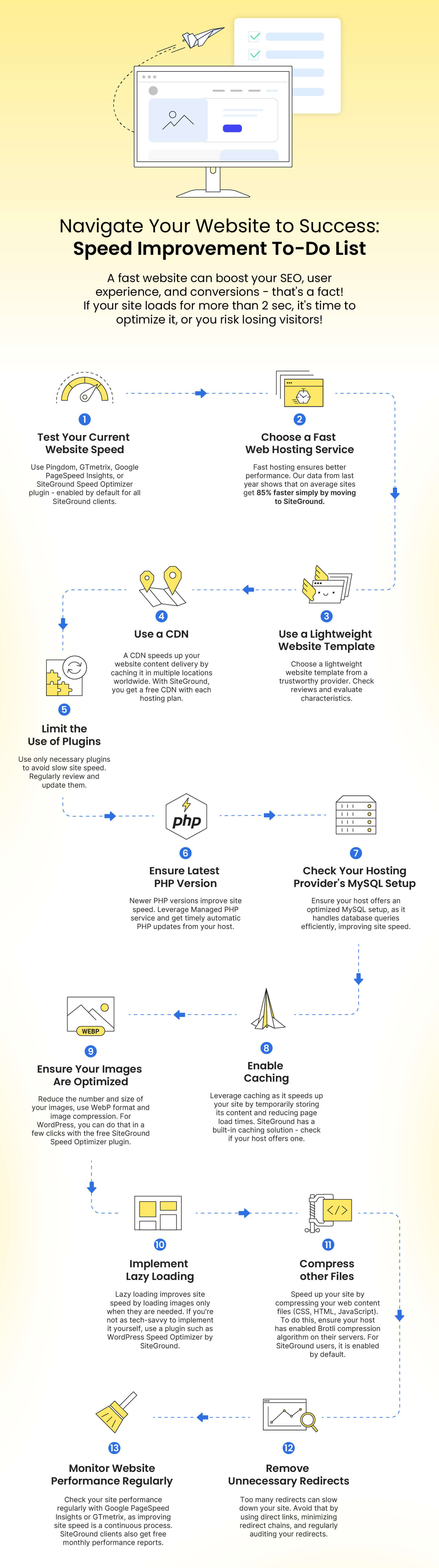
Website Speed Improvement To-Do List:

To help you improve your speed, we’ve created an easy-to-apply to-do list with essential steps. Follow it to make a noticeable difference in your site’s performance.

1. Test your current website speed

💡WHY: When it comes to website speed, every second counts, so it’s a good practice to test your website periodically. As we mentioned, if your website loads for more than 2 seconds, then it’s considered slow, and applying the next steps is crucial.

❓HOW: You can test how fast your website loads for real users with online tools like Pingdom, GTmetrix, or Google PageSpeed Insights. If you have installed our Speed Optimizer plugin, you can check your site speed directly there.  

Along with your website loading time, these tools can help you observe: your page size, content size by content type, performance grade (an assessment of your website overall performance), the load time of the largest content element (e.g. your hero image), suggestions on how to improve page speed, and more.

2. Choose a fast web hosting service

💡WHY: As a website owner, choosing the right web hosting solution is the first critical decision you have to make. Having your website hosted on a fast infrastructure is the foundation of a well-performing website. It has a direct impact on key aspects like server performance, the way traffic is handled and allocated (especially important for sites with traffic spikes during busy periods), network latency, caching and CDN mechanisms, redundancy, uptime, server-level security, and many many more. It can also save you quite a lot of the work mentioned in this to-do list.

❓HOW: Before choosing a web hosting provider, or transferring to a new host, research their hosting infrastructure and technologies provided. With SiteGround, you can rest assured that your website will have one of the best foundations for optimal performance, powered by the latest technologies in the industry. As a company with 20 years of experience in providing advanced web hosting and trusted by the owners of over 3,000,000 domains, we have crafted a robust, ultrafast infrastructure:

3. Use a lightweight website template

💡WHY: Having a lightweight and reputable website template for your website is an important aspect of its good performance. Such templates usually have well-written, optimized code which makes it easier and quicker for a browser to render the page. They are optimized for mobile devices, have smaller graphic file sizes, and respectively – less data to be downloaded. 

HOW: When choosing a template for your website, make sure to select a lightweight one from a trustworthy provider. Spend some time browsing reviews and evaluating its characteristics. If you’re looking for a WordPress theme, check out our detailed article on how to choose a theme. If you already have a website but wish to change its WordPress theme due to non-optimal performance, follow the steps in our article on what to do before changing a WordPress theme. If you’re using another content management system (Joomla, Magento, Drupal, etc.), browse their knowledge base resources to find similar guides on the steps you should not miss.

4. ​Use a Content Delivery Network (CDN)


💡 WHY: Using a CDN is a smart decision if you have visitors from different countries or continents and you want your website to load quickly from any part of the world. A CDN caches your site’s content and distributes it across multiple data centers worldwide. So when a visitor opens your website, it loads faster from the nearest to that visitor data center for optimal performance.

❓HOW: At SiteGround, you get a standard CDN integrated and free with every hosting plan. You can also enjoy our Premium CDN at 50% OFF (a limited-time promo!) – a powerful upgrade of the standard service that will turbocharge your website. With it, you can activate the CDN service for all your domains (subdomains, parked, etc.) and cache unlimited CDN traffic. The Premium CDN stores not only the static, but also the dynamic content of your website which makes it a top performance enhancement for dynamic websites.

5. Limit the use of plugins and third-party scripts on your website

💡 WHY: Third-party plugins, scripts, and extensions can introduce important and useful new functionalities to your website, however, it’s crucial to limit their use as they can also contribute to a slow website. The more add-ons you get, the higher the risk of cluttering and deteriorating website performance.

❓HOW: As a start, make sure you’re using only the solutions you actually need. Regularly review them and remove the ones you don’t use anymore or those that have overlapping functionalities. Opt for lightweight plugins with good reputation and reviews as they have a greater chance of being well-coded and optimized for performance. Regularly update them as developers often release updates to improve performance and security issues.

6. Ensure your site is running on the latest stable version of PHP

💡 WHY: PHP is a widely used open-source language for web development. Many popular website content management systems like WordPress, Magento, Drupal, and Joomla are built using PHP. If your website is PHP-based, make sure it is on the latest PHP version as it influences both security and performance. Newer versions typically include optimizations that can greatly improve the speed of code execution, and provide important security improvements.

❓HOW: Managing the PHP of your website depends on the control panel and functionality that your web host provides. With SiteGround, you get a Managed PHP service which means that we will update your PHP whenever there is a new, stable version so that you don’t have to worry about it. The service is enabled by default for all new websites, and clients can switch it OFF and ON in their Site Tools. To check if your Managed PHP is enabled, go to Devs > PHP Manager > PHP Version > pencil icon.

7. Check your hosting provider’s MySQL setup

💡 WHY: MySQL, as one of the most popular database management systems, is used for storing and retrieving data efficiently on countless modern applications and websites. 

Having a fast MySQL setup is vital for the overall performance of your database-driven websites (online stores, blogs, news sites, online forums and communities, streaming and educational sites, job portals, financial, and many more). A well-optimized setup would be able to handle a large number of database queries much more efficiently, thus leading to significantly improved website loading time. 

❓HOW: While having a fast MySQL setup is important, it is also quite technical and is usually in the hands of the web hosting provider so make sure they do their best to make their MySQL work fast. For SiteGround clients, we created an out-of-the-box server-side solution years ago to optimize the processing of MySQL database queries. It is enabled by default and brings down the number of slow queries between 10 and 20 times.

8. Enable caching

💡WHY: Caching is an effective technique to optimize the load time of your website by storing a copy of its content temporarily on the server. This significantly reduces the time it takes for a web page to load for visitors and enhances their website navigation experience.

❓HOW: Reputable web hosting providers usually provide their users with built-in caching solutions that can be enabled with a few clicks. For instance, at SiteGround, we have an in-house caching system called SuperCacher. It offers three caching layers: 

  • NGINX Direct Delivery for caching static content like images, CSS and JavaScript files; 
  • Dynamic Cache – a full-page caching mechanism for dynamic resources;
  • Memcached which caches and speeds up database queries results.  

With Dynamic and Memcached solutions enabled on top of the static cache, you can expect a website boost by up to 5X!


Alternatively, for WordPress, you may activate plugins that would cache the content of your site, but the level of performance improvements they would deliver cannot match the boost you would get when the caching happens in the server memory.

9. Ensure your images are optimized

💡 WHY: It’s a good practice to resize your images before even uploading them to your website as large image files can significantly slow down your website. Having them optimized after upload is crucial to improve loading time and lower bandwidth costs.

❓HOW: There are several basic things that you can do to optimize your images. 

  • Reduce their number: browse your website’s images and leave only those that add value to your website, delete the rest.
  • Reduce their size: before uploading images to your website, make sure they are optimal in size, not bigger than the size you’ll be displaying them in, and preferably save them in the WebP format which offers good compression while keeping high quality. As for the images that are already on your site, use image compression to reduce their size. There are different third-party tools and plugins you can use for that purpose. If you’re on WordPress, the Speed Optimizer can again come in handy.

10. Implement lazy loading

💡 WHY: Lazy loading is a technique used to optimize web page performance by loading images and other resources only when they are needed. By deferring the loading of non-essential content until it’s about to come into view, lazy loading significantly reduces initial page load times and data usage. This is especially beneficial for visitors on slower connections or mobile devices. 

HOW: If you’re using WordPress, you can use a plugin such as the Speed Optimizer plugin with the built-in lazy load media functionality. For non-WordPress websites, consider exploring different lazy loading techniques outlined here, ensuring your websites enjoy faster loading times.

11. Compress other files

💡 WHY: Another way to reduce your website loading speed is by compressing your web content files (CSS files, HTML, JavaScript files) to make them smaller. For that purpose, you can use Brotli which is a highly effective compression algorithm developed by Google. Other popular algorithms include Gzip and Deflate. Learn more about them in our article where we explain the difference between Brotli and Gzip in detail.

HOW: Brotli needs to be enabled on your server by your web hosting provider. If you’re more tech-savvy and manage your own server, check out this article on Brotli compression for details. For SiteGround users, it is enabled by default. 🎉

12. Remove unnecessary redirects

💡 WHY: Redirects are used for forwarding visitors (or search engines) of a specific URL to another URL (for example, when redirecting from a deleted page to an existing one). Having too many unnecessary redirects is considered a bad practice and can slow down your website. The reason is that each redirect adds extra HTTP requests and delays the loading time.

HOW: To avoid that, there are several steps that you can follow such as using direct links, minimizing redirect chains, and more. Go to our article on how to avoid unnecessary redirects for more details.

13. Monitor website performance regularly

💡WHY: Improving your website’s speed and performance is an ongoing process as you constantly upload new content to it. To ensure your website is always well-optimized, you need to regularly monitor its performance.

HOW: As we mentioned in the beginning, you can easily do so, using tools like Google PageSpeed Insights or GTmetrix, which can also hint at specific recommendations for improvement. On our side, to make performance monitoring easier for SiteGround customers, we send monthly performance reports. These reports provide valuable insights into your total website performance score, web traffic cache utilization, CDN usage, data center and network speed, and more. 

By regularly reviewing this information, you can identify performance bottlenecks and take steps to resolve them, enhancing your site’s performance. To ensure that you are subscribed to them, go to your Client Area > Notification Preferences > Monthly Performance Reports. Don’t forget to pay attention to the recommendations we provide there for improving your site’s performance and use this info to pinpoint areas that need improvement.

Summary

All these steps are quick and easy. They will enhance your website’s speed, ensuring a more enjoyable experience for your visitors. Apply them now to make your site lighter yet stronger, preparing to attract and engage visitors as the busy period approaches.

Quick Cheat Sheet

If you’ve found this checklist helpful, share the blog post or the infographic link with your friends to help them improve their websites too!

Celebrating a Year of Website Success: Your Website Year in Review

website year in review siteground 2023

As we wave goodbye to the passing year, we invite you to take a moment and reveal the amazing transformation of millions of websites, hosted with SiteGround.

See how websites changed in 2023, explore website speed, security, sustainability, and more. View your customized report per website by clicking the Login button on our Website Year In Review page. Here’s a sneak peek of the milestones we achieved together this year. ❤️💪

Faster and Better-Performing Websites

In 2023, an impressive 85% speed boost was experienced by 82% of websites that migrated to SiteGround, thanks to our hosting infrastructure and numerous website optimization technologies. We continued to help clients make their websites faster after hosting with us.

Performance stats were delivered directly to our clients’ inboxes showing them what exactly they could improve on their websites, which led to an average 70% monthly performance score for SiteGround-hosted sites. The expansion of our global data center and CDN network was another milestone we’re proud of as it also contributed to improving the performance and loading speed of clients’ websites.

Even Stronger Website Security

We ensured extra peace of mind for website owners by keeping their sites safe on multiple levels. Every day, our AI brute-force prevention system blocks an average of 670,000,000 harmful requests, and our Spam Protection solution filters 12 million spam emails. We also proactively update our server software when major web threats appear to keep clients’ websites safe.

Thanks to this approach, in 2023, our users remained unaffected by the HTTP/2 Rapid Reset Attack, Exim’s mail vulnerability, and many others. On top of that, our customers achieved a 70% monthly security score on average, following the actionable tips regarding our suite of security tools, received in their monthly reports.

Empowered Small Businesses & Creators

In 2023, we were committed to helping clients not only with quality hosting but with more tools to grow their businesses online. With the launch of the SiteGround Email Marketing tool, we helped them elevate marketing communication easily, with no technical or design skills. Over 7,000 enthusiasts learned how to start their online business in just 30 days with our email course.

Greener Websites & Planet-friendly Initiatives

Minimizing websites’ carbon footprint was another priority for us. We’re happy that in the past 12 months, we provided sustainable hosting and multiple speed-boosting features to our clients that led to 3 times less CO2 emissions of the websites hosted on our platform, compared to the average site.

With the help of our customers and followers, we also planted a forest with 11,400 trees. With our support for the platform Tree Nation, a tree was planted for every single share of our Sustainability Report on social media. Isn’t that amazing!

Thank You for the Recognition!

Along with making clients’ websites greener, faster, and safer, in 2023, we made sure to support our users all the way. Our award-winning Customer Care and Support teams solved over 965,214 website requests this year with an average resolution time of 15 minutes on chat, and 20 minutes on tickets! No wonder they got a bronze Stevie Award for Customer Service Department of the Year after competing with teams from 61 nations.

Our AI assistant also helped deliver detailed information instantly, answering more than 110,000 questions just within the first couple of months since its release in 2023. But for you, the true impact of all these efforts is measured in client feedback. So we couldn’t wait for the results from our annual client survey to start coming in!

For a sixth consecutive year, our annual survey revealed a 98% Client Satisfaction Rate for our overall hosting service. It is based on our customers’ evaluation of our website security services, loading speed, server uptime, customer support, range of tools, additional services, and value for money. Thank you!

It’s an honor to watch your websites grow on our hosting platform – and here is to another year of online success!

Wrapping Up 2020: Service Enhancements, 97.7% Client Satisfaction (& A Gift To You)

2020 was unquestionably a memorable and overwhelming year for all of us. It was full of challenges, worries about staying safe, working, and living in isolation. Throughout a rough year, our team has found comfort and motivation in providing lots of service enhancements to YOU, our clients, and supporting different communities the way we can.

⚙️ New Tools & Service Enhancements

In just 12 months, we managed to introduce many new tools and service upgrades. They make your website faster, help you manage it more comfortably, and give you more resources than before.

Some of the great improvements we did in 2020 are the complete switch to the Google Cloud platform, the development of the Ultrafast PHP setup, many speed optimizers for WordPress sites, the additional resources we added for free to our hosting plans, and more!

Learn more >>

❤️ Support for Communities in Need

Alongside upgrading our service, we also dedicated time and effort to support our communities in their battle with the COVID-19 challenges. We made donations to various medical institutions, gave away free hosting and renewals to highly affected clients, and helped our employees adapt to the new normality of working entirely remotely with a special wellness program.

Learn more >>

🥇97.7% Customer Satisfaction Rate & Awards Received

We are proud to see that all our efforts paid off with the appreciation we got from our customers and other stakeholders. Traditionally, at the beginning of December, we ask clients what they think about our service. We’re incredibly proud and happy to see that we earned an average of 97.7% client satisfaction across the key service indicators – speed, security, support, uptime, value for money, and range of tools.

We were also honored to receive 2 Stevie awards for Customer Service, BigSEE award for our HQ building, and 12 Employer Awards! We couldn’t be happier and more thankful for that evaluation, and we hope we will keep up to it this year too!

🎁 Share Our Recap & Win Bose Headphones

You can read the full 2020 recap here and share the page on your Facebook, Twitter, or Instagram profile until January 29, 2021, along with the hashtag #SiteGroundRecap2020. One lucky winner will get a special prize from SiteGround – branded Bose headphones!

We hope our work throughout the year has managed to generate value and positivity for You, our clients! Stay tuned for more service enhancements coming up in 2021! 🎉

>> SHARE RECAP & WIN

[subscribe_cta]

Ecommerce Terms and Conditions Protect Your Online Store – Webinar

Does your online business have Terms and Conditions (“T&Cs”) document? If you haven’t established one for your store yet, it’s good to dedicate some time and specify your T&C because they are crucial for protecting you from potential liabilities and misunderstandings. In the case of e-commerce, that’s a vital step that you shouldn’t miss as you handle sensitive client information.

What are Terms & Conditions?

Terms and Conditions (also known as Terms of Use or Terms of Service) allow you to set the way in which your product, service or content may be used, in a legally binding way.

While they cannot be used to avoid complying with applicable law (e.g., GDPR), they protect you for almost everything else and can be used to set favorable conditions for your business.

Who needs Terms & Conditions?

Almost everyone from Bloggers to E-commerce, SaaS, and Enterprise businesses – as they are both practical and preventative. They often contain legally mandatory information which makes them not just practical, but necessary in some cases which brings us to e-commerce.

What’s the legally required information that applies in regards to e-commerce?

Under most countries’ consumer laws, in addition to the default required privacy disclosures, you’ll need to inform customers of the following:

  • Returns/Refund details;
  • Warranty/ Guarantee information (where applicable);
  • Safety information, including info on proper use (where applicable);
  • Terms of delivery of product/ service;
  • Identifying information such as a legal address and business name;
  • Industry-related legal disclosures;
  • Rights of consumers (such as withdrawal rights), where applicable;
  • Seller contact details (e.g., email address).

Note: In some cases, e.g., in the EU, where return and withdrawal specifics are not stated, the user is granted extended rights. So, for example, where the legal withdrawal/return time frame is 14 days, if you do not state this in your terms and conditions, the user is granted 14 days under the law. Likewise, if you do not specify who bears the return shipping cost, the cost falls to you by default.

How Terms & Conditions protect you?

Aside from helping you to comply with the law, terms also help you with handling user-related issues when they arise and – even more importantly – aid in preventing problems in the first place. They do this by setting a legally binding agreement between you and your users, on the subject of your rules for accessing/using your service.

  • In regards to protecting your business in a preventative way, be sure to include things like:
  • Disclaimers & limitation of liability
  • Shipping, processing and return rules
  • Account creation & termination conditions, accepted behavior
  • Setting your law of governance

How can I create legally valid Terms and Conditions to suit my specific business?

Iubenda’s Terms and Conditions Generator lets you easily generate and manage Terms and Conditions that are professional, customizable from over 100 clauses, available in 8 languages, drafted by an international legal team, and up to date with the main international legislations.

The solution is optimized for everything from e-commerce, and apps, to complex scenarios like marketplace and Affiliate scenarios. Read more about it here. We also have a 20% discount available for SiteGround users!

Watch the Webinar

To help you go through that process, we organized and held a webinar on the topic with our friends from Iubenda. Abbie Clement, Head of Content at Iubenda and Andrea Giannangelo, CEO of Iubenda, talked about how T&Cs protect your e-store, what you need to include in your T&C, and how their service can help you with that. You can watch the recording of the webinar below:

Special Discount

To make it even easier for you to start, we have set up a special discount for Iubenda’s services that you can quickly get from this link or by going to SiteGround’s Marketplace. You can find the coupon in your Client Area > Marketplace > Partner Perks.

Webinar Questions Recap

When you go to a website, and they ask you to “agree” to the Terms and Conditions, do they keep any proof that you agreed to it as proof?

Yes, this is often done. It is always a good idea to keep proof of any consent that users might give. There are several ways to keep track of this: one option is to do it manually, or you can use something like Iubenda’s Consent Solution, which records and stores proof of consent for each of your users. The solution comes with a dashboard from which you can review and manage these consents. For more information on this, please visit this page.

What should be included for a service business, such as а therapist, life coach, etc.? No products or shipping involved?

The T&Cs for this kind of service should, at the minimum, contain identifying information for the company, a description of the service, risk allocation, disclaimer and liability relation information is also important for this type of business. Also, if there exist any mandatory industry-related disclosures – it’s a good idea to also add them in your

Terms & Conditions. Do note, though, that product-based businesses and service-based businesses have different warranty and withdrawal requirements, so we invite you to read further here.

What are key items that need to be implemented through terms of use or privacy policies to be GDPR compliant?

GDPR compliance is covered by the Privacy Policy of a given website and not by the Terms & Conditions. At this link, you can find all the basic elements that need to be included (alternatively, this information is included and explained in the webinar recap video above).

How do we know what to include in T&C and how to word it? Can we add whatever we want? Go through a lawyer?

Some of Iubenda’s clients chose to work together with their lawyer when determining which clauses to add to their documents – and this is always a good idea. With that said, the Terms & Conditions Generator includes a guided set-up to id you in determining what’s needed for your site or app. Furthermore, Iubenda’s customer support staff are available via live chat or email to help you.

What are the available languages?

All of Iubenda’s solutions are available in 8 languages: English, Italian, German, French, Dutch, Russian, Spanish, and Brazilian Portuguese.

I have terms and conditions on my e-commerce site in the UK. I buy from a supplier that offers Dropship as well as wholesale. They have no terms and conditions on refunds of postage. With distance selling, I have to refund the original postage cost, if any, and the cost of goods if the customer returns the product as they don’t like it. But the supplier only returned my product cost, not the postage. Are the rules different for Dropship suppliers?

Dropshipping is a bit tricky because often, the customer cannot return the product directly to your supplier. One way to address this issue can be to state an alternative return address in your documents. Another solution can be to add in your T&Cs that the buyer pays for the shipping cost in cases where they return simply because they do not like the product.

Overall, when it comes to dropshipping, especially with overseas-based suppliers, it’s best to understand or set all terms before working with the supplier to avoid complications. Where you can’t do this, setting favorable terms and conditions document can help – provided that they do not conflict with applicable law.

How does a potential buyer who visits an e-commerce store agree to the terms and conditions stated on the site? If the visitor does not agree, can he/she still purchase from the site?

One way to implement an “agreeing” action can be to add a checkbox and statement linking to your terms and conditions at various points throughout your site (e.g., on a sign-up form). How you chose to set this up is entirely up to you – however, it is best practice to additionally link your terms and conditions from the footer of all pages of your site so that it’s always easily accessible to users.

Regarding purchases, in most cases, websites will not allow users to purchase without first agreeing to the terms and conditions. The terms can be linked at the point of payment so that the user can read and agree (by checking a checkbox, for example) before signing up or purchasing.

If the company is registered in one country but offers online services to another, to which law should we comply to?

A good general rule of thumb is to comply with the laws of the country in which you base your operations, as well as those of the country your site targets. You can read more on this topic here.

Does your Consent Solution integrate with WordPress?

Yes, it does. Here’s a guide on how to install Iubenda’s WordPress plugin.

When we work with kids and parents, what should be considered?

Regarding kids, there are enhanced requirements. The following resources will shed some light on this topic:

How can I apply the SiteGround/Iubenda discount code to the business bundle?

You need to click the link we have provided, and you are automatically redirected to Iubenda’s website. Hover over “Products and Services” and click on “Pricing” from the drop-down menu, there you need to choose “Bundles” and pick the Business Plan. The full price for 1 year is $99, and with the discount applied a bit less than $80 per year ($7 per month). The license for this also includes access to the Pro version of the Privacy and Cookie Policy Generator.

Is there a developer package, or would my clients need to purchase their own license for their individual site?

Yes, you can set up an account and purchase a multi-license subscription and resell to your clients yourself, otherwise, you can join Iubenda’s affiliate program and earn 30% on each purchase while giving a 10% discount to your clients.

On your site, you talk about a “license” is that per website? So 1 website = 1 license?

Yes, one license is needed for every website or app in 1 language. So if you have 1 website available in 2 languages, then you need to buy 2 licenses to create all the documents you need. (Note: Multi-license plans are available which offer huge discounts where more than 4 licenses are needed).

Do you give your clients a choice if they want to add terms and conditions to their site?

There are multiple integration options that include a simple embedding that allows adding a widget to the footer of your website, having a direct link that you can add anywhere on your site or app. Alternatively, you can also directly embed your document into the body of your web pages or via API. For further details, see this post.

Do you have a T&C generator for tour companies?

Iubenda’s solution works for any business – we cover everything from the most common scenarios to the most complex cases. You can read more about it here.

[subscribe_cta]

Contributing to Open-Source: Insights On the Latest Major WordPress Release

Plenty of work happens behind the scenes of a regular website. But even more work is needed for the maintenance and development of a Content Management System (CMS) like WordPress – the software that powers 34% of all websites on the web. New WordPress versions are released regularly to provide new functionality, security improvements, and all types of fixes. In the case of WordPress, which is an open-source software, a big part of the work is thanks to the voluntary support of dedicated individuals and companies within the WordPress community. 

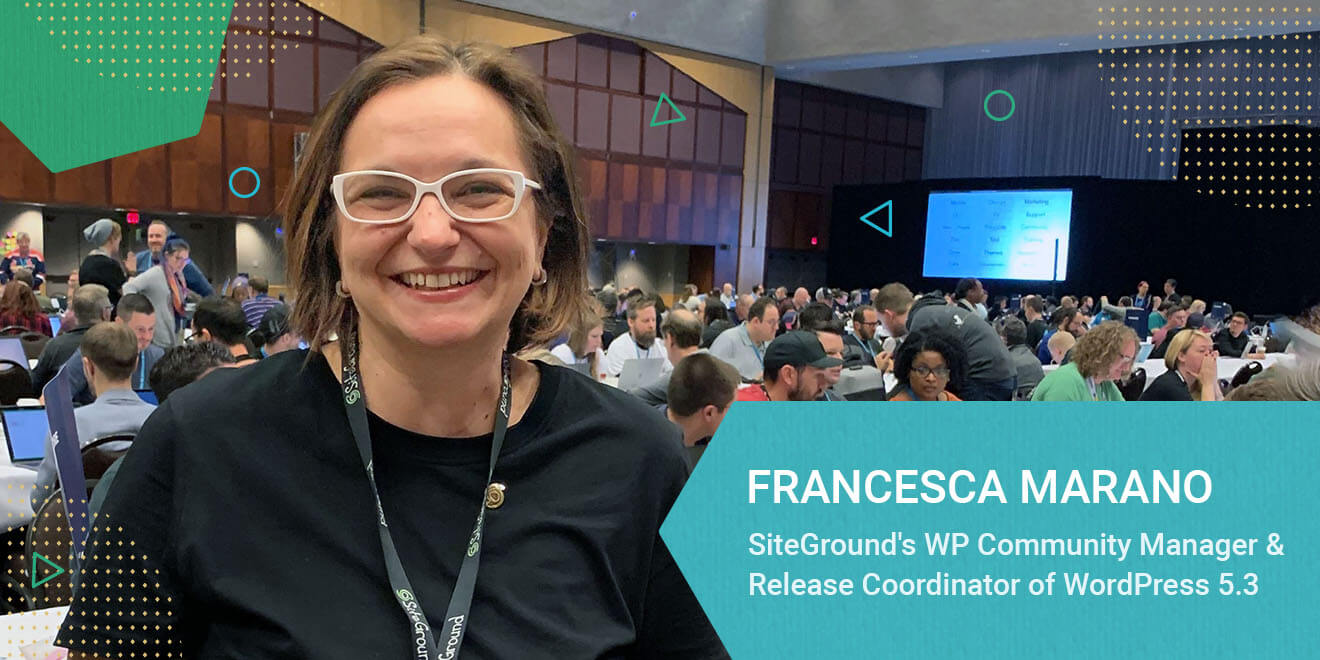
The team at SiteGround has a long history of WordPress involvement – we organize and sponsor both local and worldwide WordCamps, work on WordPress core and plugins, and are active on the WP.org security, community, marketing, and hosting teams. So we were stoked when our WordPress community manager, Francesca Marano was selected as a Release Coordinator for the latest major version, WordPress 5.3. On the verge of the official release, 12 weeks after she took upon that role, here is our chat with Francesca about her role and responsibilities in the process, and of course – what you can look forward to with the new release.

Read more

Best of 2018: More Site Speed, Better Security, Plenty of New Tools, and 98% Client Satisfaction

This year was quite busy and eventful for us at SiteGround. We worked hard on multiple projects that extend and improve the tools we offer, enhance the performance of all websites on our platform, and block millions of security threats daily so that they never reach your sites. It’s been a remarkable year, but what matters most for us is what difference did it all make for you. Judging by the outstanding 98% client satisfaction in our end-of-year survey, our efforts did not go unnoticed. Here are some of our highlights of the things we launched that helped us get your high mark.

Continue reading “Best of 2018: More Site Speed, Better Security, Plenty of New Tools, and 98% Client Satisfaction”

SiteGround Gets Inspiration from the Dribbble Community

At SiteGround, we take pride in calling web hosting our “craft.” For us, a craftsperson is someone who puts heart and soul in their work, aims for delivering high-quality service, and pays attention to detail in all aspects of the process. But we were curious: is that how other people see it as well? How do we visually communicate the idea of craftsmanship in the highly technological context of the web hosting industry?

Continue reading “SiteGround Gets Inspiration from the Dribbble Community”

Web Craft Masters: From Tech Businesses to Bootstrapping Happiness

Today, we are excited to share with you the next interview in our series, featuring David Henzel, ex-MaxCDN, and current entrepreneur consultant. He is one of those rare people who are not afraid of making big changes in their lives. With a huge entrepreneurial flair, he co-founded the popular tech company MaxCDN, moved from Europe to the US to develop and grow his business and after selling it in 2016, decided to make another significant move – to settle in Bodrum and start a radically new project.

At Managing Happiness David teaches entrepreneurs to apply business practices to their personal life. He also hosts an amazing podcast, recently featuring SiteGround’s own CEO Tenko Nikolov. Read our interview for David’s tips on how to live and do business with more meaning.

Continue reading “Web Craft Masters: From Tech Businesses to Bootstrapping Happiness”