How to Maximize Your Website Speed on a Budget: Twitter Chat

twitter chat about maximising website speed on a budget

As a small business owner, your website performance is crucial for your users’ experience, SEO rankings and even more importantly – for your conversion rates.

 To help you maximize your website speed on a budget, we organized an #SMBGrowthChat on Twitter Spaces along with Arnout Hellemans (@hellemans), Online Strategy Consultant & SEO Expert, and Nat Miletic (@natmiletic), Web Dev, WordPress, SEO, Agency Growth. Here’s a summary of their discussion with some professional advice and expert tips on improving your website speed in a cost-effective way.

Why should you care for your website speed

Before digging deep into improving your website speed, let’s explore why it’s so important for your small business. A faster website means:

  • Better user experience

Your website performance impacts your users’ experience – when your site loads faster, users are more likely to interact with it and spend more time on it. The happier they are with your website, the more visits you’re likely to have, because your brand reputation will also improve.

  • Higher SEO rankings

Website speed is one of the metrics Google looks at from an SEO perspective. Arnout Hellemans, Online Strategy Consultant & SEO Expert, notes that “if a user can’t get to your site or it takes too long to load, they might not be able to consume the information on it, will go back to the search engine, and click on another result – that’s a signal you haven’t been able to answer a user’s query, which has a big influence on ranking”. 

  • More conversions

Website performance is also a very important factor for your conversion rates. Nat Miletic, Web Dev, WordPress, SEO, Agency Growth, points out that it’s “even more important when it comes to eCommerce because how long the checkout process takes, directly impacts sales, sign-ups, etc.”

How to track your website performance

Given the fact that your website speed is so important for your small business, you’re probably wondering how to figure out how your site is performing. Here are a few free tools you can use, recommended by our experts: GTMetrix, Google PageSpeed Insights, webpagetest.org, or SEO tools, such as ahrefs and SEMrush, which also test for speed.

“For simple tests, I like to use GTMetrix – it gives you a good overview, it’s free to use, they even have bookmarks, so you go to a page, you click it, and it’ll automatically generate a report,” suggests Arnout Hellemans.

If you’re using Google Chrome, “you can basically right click and Inspect element – you get a console and go to the Performance tab, do a Lighthouse test, which will test the whole page. Half a year ago, they introduced Performance Insights that will show you which elements on the site are influencing the core web vitals scores,” adds Arnout Hellemans.
In case you decide to use the Chrome development tools to run performance tests, beware that “it will show you localized performance tests. If you have a very fast machine and internet connection, by default, it will show you that you’ve got great performance, but if you test with some other options […], your performance picture is going to look a lot different,” warns Nat Miletic.

How to speed up your website cost-effectively

If the tests show that your website performance needs improvement, here are some professional tips from our experts on how to do that in a cost-effective way:

1. Choose a good hosting provider 

If you’re still at the very beginning – in the process of starting a website, begin by picking a good hosting provider: “From my experience, I think one of the main things to worry about is the hosting and what is going on in the background. […] It all starts with good quality hosting to improve performance,” advises Nat Miletic.
2. Pick a fast and efficient theme (if you’re using WordPress)

While you’re building a website, “if you’re using WordPress, pick a fast and efficient theme, because it will make all the difference and go a long way in terms of website performance,” notes Nat Miletic. He points out that there are a lot of free themes that you can use, such as Astra, GeneratePress, and many others.

3. Apply caching mechanisms

“My personal preference for free or inexpensive tools – caching is a must, especially for WordPress sites […] It creates static pages on the server that are quicker to come up on a user’s browser,” explains Nat Miletic. 

However, Arnout Hellemans warns that “when you refresh pages, make sure you purge the cache, because otherwise, people will still see the older version – if you remove a link, it will still be there”.

What is more, there are different types of caching, which can be quite complicated, especially for small business owners. That’s why Nat Miletic advises you to “pick a tool that’s easy to use – SiteGround Optimizer is very easy to use and has fairly simple options […] It’s now available to any site owner”.
4. Use a CDN

Usually, if you have website visitors from all over the world, but even if you don’t,  you should consider using a CDN. It helps serve your website to your visitors from where they actually are geographically, but it also helps serve your content faster in general. 

Nat Miletic reminds that “it goes back to the hosting – a lot of hosting providers have these things baked in already, so they have their own CDN network, they have their own plugins to help with performance”.
This is also true about SiteGround – our in-house built SiteGround CDN is free and makes websites load blazingly fast around the world. It now comes with Version 2.0 which increases the website loading speed by 20% on average, going up to 100% for visitors located in some specific parts of the world.

5. Compress images

There are large images that slow down websites, but there are also ways to compress them and make them more efficient: “You’ve got all kinds of image compression tools out there. Most of them are free. WebP format, in the majority of cases, is 20% better in size than .jpg,” suggests Arnout Hellemans. “There are also plugins for WordPress – SiteGround Optimizer can be used to convert images to WebP format,” adds Nat Miletic.
6. Minify JavaScript and CSS files

Excessive JavaScript and CSS also slow down your website by adding a lot of code to the weight of your site. To speed up your website, you need to minify JavaScript and CSS files, which removes all unnecessary characters from them. For this purpose, you can use a free plugin, such as the SiteGround Optimizer plugin for WordPress websites, which will do all that for you, no matter where your site is hosted. 

7. Optimize fonts

Another thing that can slow down your site is the fonts. These can be things like little emojis or social share buttons. “What you can do, instead of loading those social share icons, for example, is using the .svg version of that. If you need a Twitter button, or a Facebook button, use an .svg version of that – it’s going to be much smaller than the font,” advises Nat Miletic.

He adds that “a lot of people use Google Fonts which are typically hosted outside of your website, using the Google service. You’re making round trips to their servers in order to download fonts and it’s not very efficient. Sometimes, there are options to download those fonts locally on your site and then use them”.

With the free SiteGround Optimizer plugin for WordPress websites, you can do the above-mentioned tips with a few simple clicks. Our in-house built plugin provides you powerful features that are available to you even if you’re not that technically advanced.

Wrap up

Our experts all agree that website performance is an ongoing process – there’s always something to fix, so you need to make small improvements as you go and keep speeding up your website.

You can listen to the whole Twitter chat conversation by checking our YouTube recording. Follow us on Twitter for more news and discussions on useful topics.

[subscribe_cta]
Client Survey Results 2022: Superb Website Speed and Security

client survey results 2022

The results from our traditional annual client survey are here! Looking back at 2022, we’ve been working hard to introduce new and improve existing tools and services that make your websites even faster and safer. But at the end of the day, what really matters is the impact of these improvements and the positive effect they brought for our users. Here is what you had to say and how you rated our efforts and your experience with our hosting services throughout the past year.

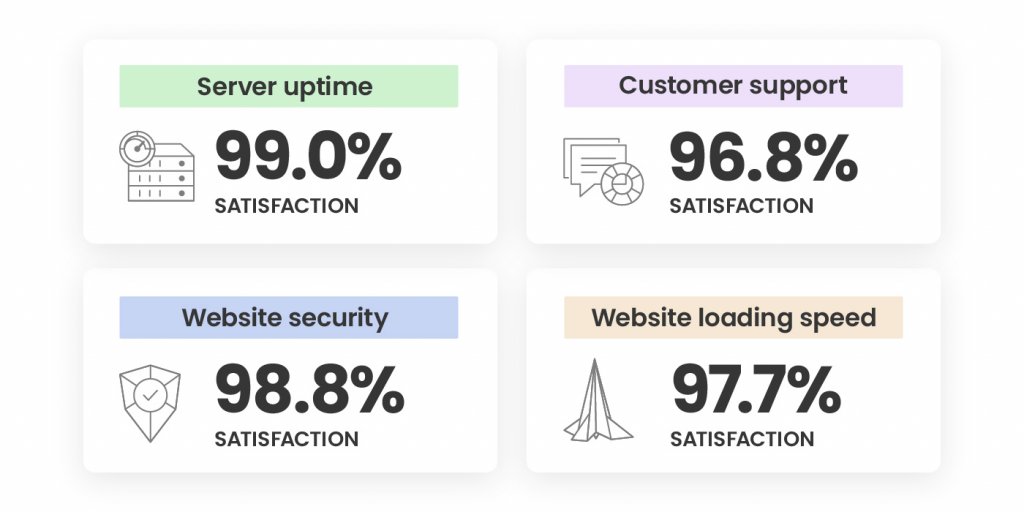
An Outstanding 98.8% Satisfaction with Site Security

Securing your websites has always been a top priority for us during the years. 2022 was not an exception and our efforts didn’t go unnoticed – our Website Security was rated high by an overwhelming 98.8% of all respondents! Here’s what we did to achieve that:

We improved our already great-performing Site Scanner with features improving early malware detection and introduced a new plan with proactive reaction tools in case of a website attack. During our #CyberSecurityMonth campaign last October, we went even further. We not only ran an intense email awareness campaign about website security, but we also introduced new security features, such as an on-demand IP and Geo traffic blocking tool. We also improved our AI-driven brute-force prevention system and its state-of-art self-learning mechanism, which now blocks over 95% more bad traffic before it even reaches our servers. Here’s a recap of all essential website security features for your website, in case you’ve missed it.

Last but not least, towards the end of 2022, we launched our new monthly security reports, included for free with all our plans. You can now sign up and receive directly in your inbox a personalized security overview of your website(s) every month, with highlights of what security measures we’ve applied and suggestions of what you can improve.

A Supreme 97.7% Satisfaction with Website Loading Speed

Website loading speed is important for your conversion rates, SEO rankings, and users’ experience. That’s why boosting website performance is of utmost importance to us and we’re constantly working on making your websites as fast as possible.

As early as February 2022, we introduced a newer version of our SiteGround Optimizer plugin for WordPress, making it available and free to all WordPress users, regardless of where they host their websites and included new advanced speed features, such as file-based caching. The plugin now has over 1 Million active installations and was voted Silver in the top 3 best WordPress optimization plugins in the annual WordPress community awards. 

One of our biggest speed-boosting achievements in 2022 was the launch of our in-house built SiteGround CDN which not only makes websites load blazingly fast around the world, but it’s super simple to configure in a few clicks and included free in all our plans. We didn’t stop there and kept on growing our CDN and data center networks with a new location in Madrid and a few new locations in the USA.

Top Marks for Easy Website Migration and Setup

We’re happy to welcome those of you who have recently joined SiteGround as clients.

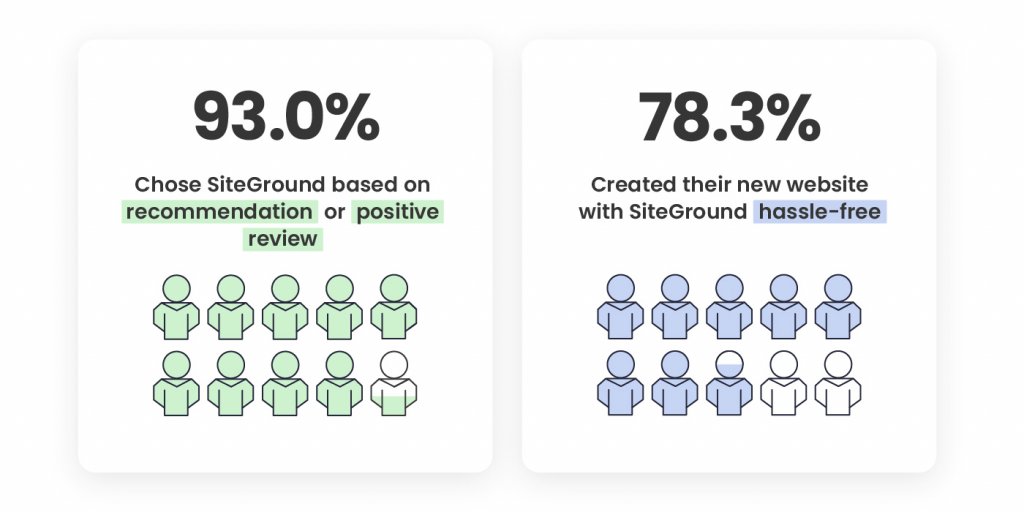
48.6% of our new clients say that the number one factor that led to the decision to get on board was a recommendation for SiteGround by someone they trust. 44.4% of you point out positive reviews about SiteGround were what influenced your decision to choose our hosting services, which is the greatest mark for the level of quality we provide, and the recognition and loyalty of our clients. 

Your feedback about how easy our onboarding process is was also extremely valuable. A total of 78.3% of you, who created a new website with us, have noted that setting up a website on SiteGround was a hassle-free process. 76.9% of you, who switched over from another host, pointed out in the survey that transferring your websites to us was a seamless process.

Now it’s even easier to migrate and manage all elements of your website presence to SiteGround with our newly launched Email Migrator tool. It helps you transfer emails to SiteGround servers easily, securely, and automatically.

We’re looking forward to making your future experience with us even better and contributing to your websites’ success.

A Steady 98% Overall Satisfaction In the Last Few Years

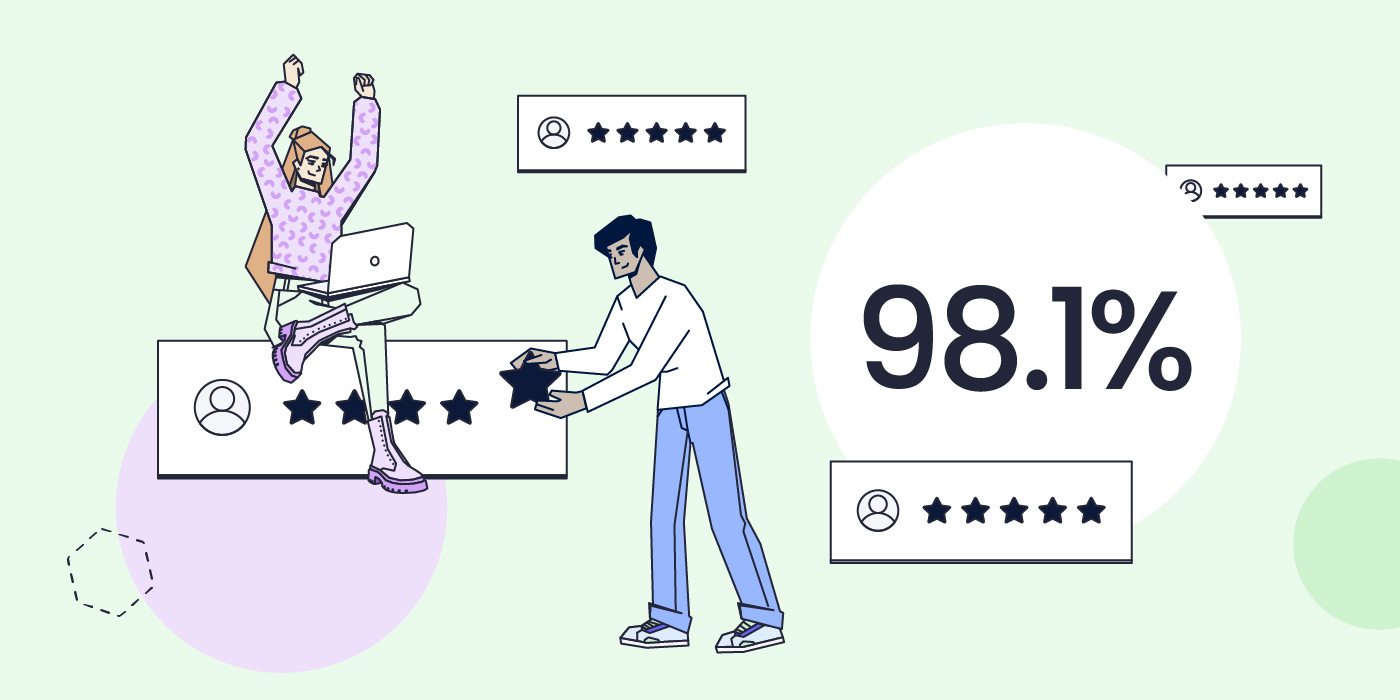
We completed 2022 with an overall client satisfaction rating of 98.1% which solidifies our top-rank customer happiness rate in the last couple of years. The overall satisfaction rate is based on your reviews for the following services we provide:

The breakdown of the satisfaction rate of each aspect of our services is based on the evaluation of both long-term and new clients. The overall ratio of all respondents is 90.40% long-term clients and 9.6% clients who have joined in the past 12 months. The fact that the majority of respondents have been with us for a couple of years now, and continue to express their satisfaction with our services with top marks is the greatest recognition a company can have.

You Helped the Environment by Completing Our Client Survey

Just like everything else we do, we also tried to maximize the impact of our client survey this year. In return for completing it, we committed to donate funds for planting a SiteGround forest. Thanks to you, we’ve already planted more than 11,000 trees worldwide – in the USA, Spain, Portugal, France, Indonesia, Madagascar.

We’d like to thank you for your trust, for your feedback, and for helping the environment! Stay tuned for all the upcoming services improvements and new tools launches that will aim to make your websites even more secure, better-performing and successful in 2023.

[subscribe_cta]

What is Phishing and How to Protect Yourself from It

Stay Safe From Phishing Attacks

With the rapid development of technology, the complexity of phishing attacks improves. The more technologically advanced people become, the more advanced the phishing attacks. Last but not least, now that everybody spends more time online, the number of phishing attacks also rises. Here is our short guide on simple things to remember in order to stay safe from phishing attacks, while browsing online.

What is Phishing?

Born circa 1995, just 4 years after the first site appeared, phishing refers to the practice of using deceptive emails and websites to illegally get personal and corporate information from users. That information – usernames, password, credit cards – is later used to steal either money or more information. 

The word “phishing” itself is a combination of “fishing” and “phreaks” which was what hackers used to call themselves. The practice of phishing is considered a form of social engineering, which is a term for manipulating people by falsely representing oneself in the context of web security. 

Types of phishing techniques

Spear phishing

What is spear phishing? Spear phishing targets a specific person or organization rather than random users. This scam usually intends to steal sensitive data or information from the specific victim, such as account passwords or financial information for malicious purposes. It requires specific knowledge about the victim such as some personal details. The cybercriminals use this information, usually in an email, to pretend they’re a trustworthy organization or person and acquire the data they need.

Spear phishing vs phishing

Both of them are online attacks that intend to steal sensitive information. However, phishing is the more general term for this type of attack, as this is basically any attempt to trick victims to share sensitive data. 

As per the spear phishing definition, it is personalized to the specific victim. It requires more thought, time and knowledge to achieve its goal. Since spear phishing’s messages are personalized, it’s more difficult to identify these types of attacks.

What helps protect from spear phishing is generally being careful with your online presence. Here are a few tips to follow in order to avoid spear phishing:

  • Be careful what personal information you post on the internet
  • Use smart and strong passwords
  • Update your software regularly
  • Watch out when opening emails and clicking on links

Microsoft 365 phishing

These types of attacks are phishing emails that target Microsoft 365 users. One of the most common things that attackers usually do is tricking victims into downloading a file by disguising its extension. Attackers use a special Unicode character, the right-to-left override. It allows them, for example, to disguise an “.exe” file as a “.txt” file. As a result, the victim downloads the “.exe” file which installs malicious software on their computer or laptop.

Whaling phishing

Whaling phishing is a highly targeted attack. This type of phishing attack targets particular individuals, such as senior executives, and disguises as a legitimate email. It attempts to encourage victims to do a particular action, usually related to transferring money or giving out specific information. Whaling phishing emails often target large financial institutions and are more complicated than general phishing emails because they target C-level executives.

These emails usually contain personalized information about the organization/C-level executive, create a sense of urgency, comply with the business tone, and they encourage you to do some of the following:

  • Click on a link that eventually brings malware
  • Transfer money to the attacker’s bank account
  • Provide further information about the business or individual

Voice phishing

Voice phishing is an attack which tricks individuals to provide important financial or personal information over the phone to third parties. You can become a victim of a voice phishing attack over various channels and devices, such as voice email, smartphone, landline phone, voice over IP, etc.

The message of such an attack usually informs the victim of a suspicious activity, related to their bank account/credit or debit card, etc. Then the attacker encourages the victim to call a phone number and provide more personal information or verify their account/identity. 

To protect yourself from such an attack, the best approach is to call the given institution via a valid contact channel you have and make sure that your account has not been compromised.

Business email compromise (BEC)

Business email compromise is an email message that appears legitimate, requests a particular action, and targets a specific company. The request in the message is usually about transferring funds to the attacker’s bank account that:

  • Pretends to be the “regular supplier” that has sent an invoice from an updated mailing address
  • Pretends to be the CEO of the company
  • Pretends to be an employee of the company and has hacked their email address
  • Pretends to be the lawyer of the company

Social media phishing

Social media phishing is related to attacks via social media such as Facebook, Instagram, Twitter, LinkedIn, etc. It aims at stealing your personal information or taking over your social media account. Such an attack can also result in financial loss due to getting data for access to financial accounts. To protect yourself from a social media phishing attack, follow these simple rules:

  • Don’t add/accept strangers as friends
  • Don’t click on links to update your personal information
  • Don’t use the same username and password for all your accounts
  • Use the latest version of your operating system

How Can You Prevent Phishing?

Because phishing can truly cost you a lot – from stolen money to huge data breaches in your company – taking proper safety precautions is a must. We’ve put together a shortlist of the things you need to keep in mind in order to stay safe online.

1. Pay Attention To The Sender and The URL in Your Emails

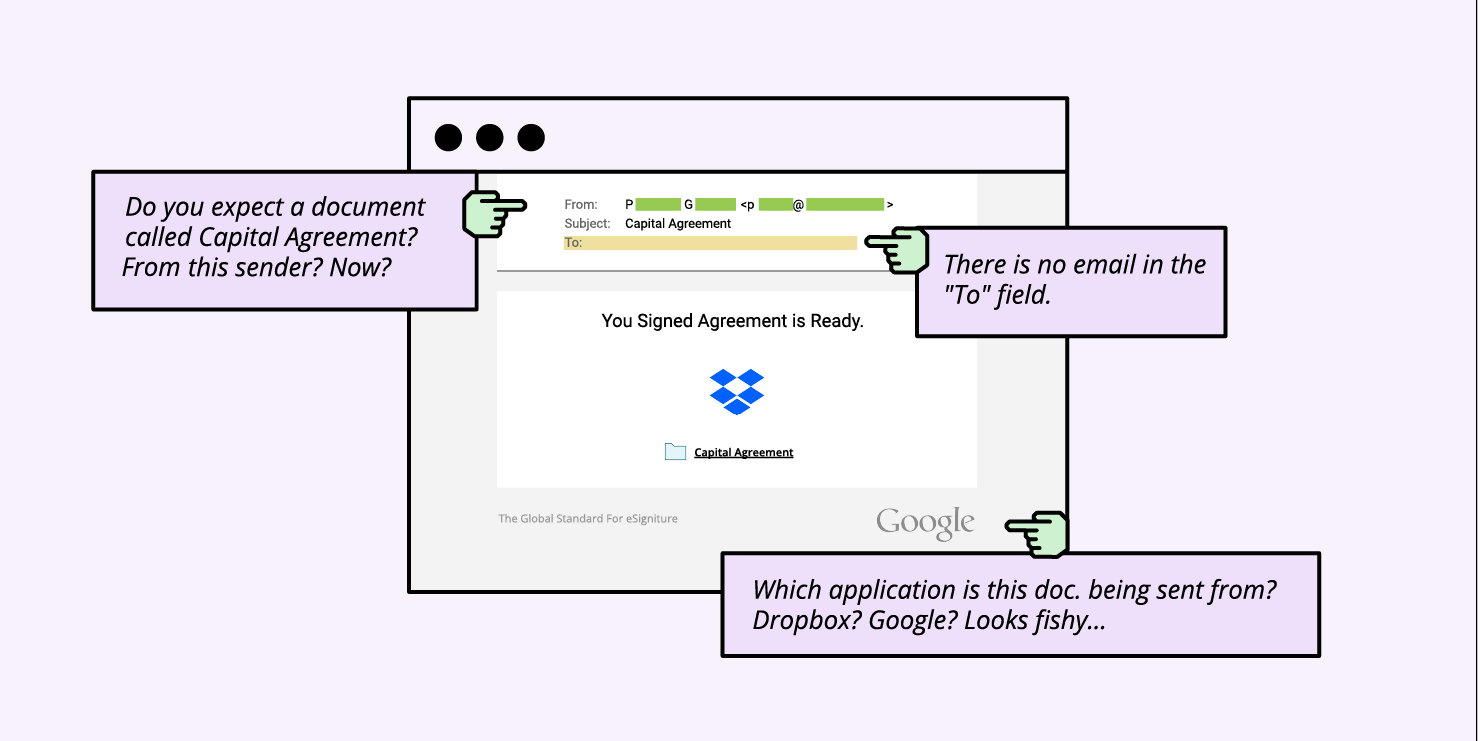
One of the most common phishing scams is to spoof a big brand by sending an email with their name (and usually color palette), and say there is something wrong with your account and ask you to log in “to fix it”. Usually, the look of the email is very similar to the original brand, however, there is a sure way to distinguish whether you’re looking at the real deal. 

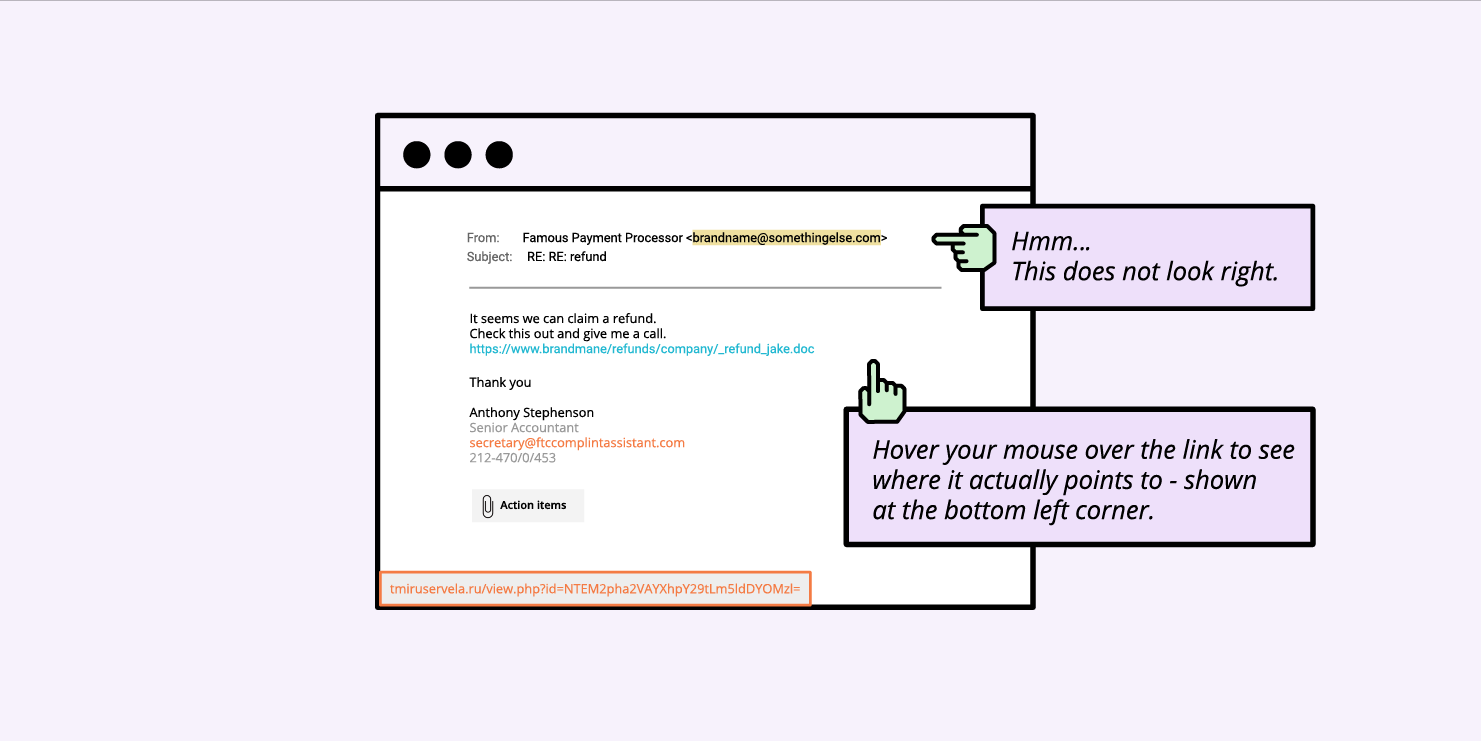
A good way to identify phishing emails is to check the email address: scammers cannot create email addresses with the actual domain name of the company, so instead of help@bigbrandname.com it will usually look like bigbrandname@somethingelse.com. Look carefully at the email address and not just the name appearing in your email client!

Check the email sender and hover over the link to see the destination

You should also check the URL before clicking. This can be done by hovering the mouse over the URL provided in the email, it will usually reveal the domain it’s pointing at, so you can see where this email actually wants to take you. If it’s not the official domain of the brand, don’t click on it.

2. Avoid Downloading Email Attachments You Don’t Expect

Sometimes the email looks like legitime business emails, and they don’t pretend to be a big company, but instead send over an attachment containing some sort of malware. The email is often structured as a business offer or аn email sent by the recipient’s own company/management containing files with sensitive information.

If you don’t know who the sender is, definitely don’t open any attachments. If you know the sender, but you don’t expect anything from them, or there is something fishy about it, it’s better to be cautious. Call the sender and ask them if they meant to send you anything, as sometimes scammers hack into people’s email boxes and use them for phishing attacks by spamming their contacts.

Be watchful of the mail title, recipient and body

The most common format for the attachments is zip (.exe is usually not allowed), however, even Microsoft Office files can contain viruses, which can contain macros that need to be enabled. Overall, keep an eye for all kinds of attachments.

3. Always Check The Site You’ve Landed On

If you happen to click on a phishing link (usually via email or through instant messages), it will often take you to a website with a form of some sort. The purpose of these forms most often aim to gather your most sensitive information – usernames and passwords.

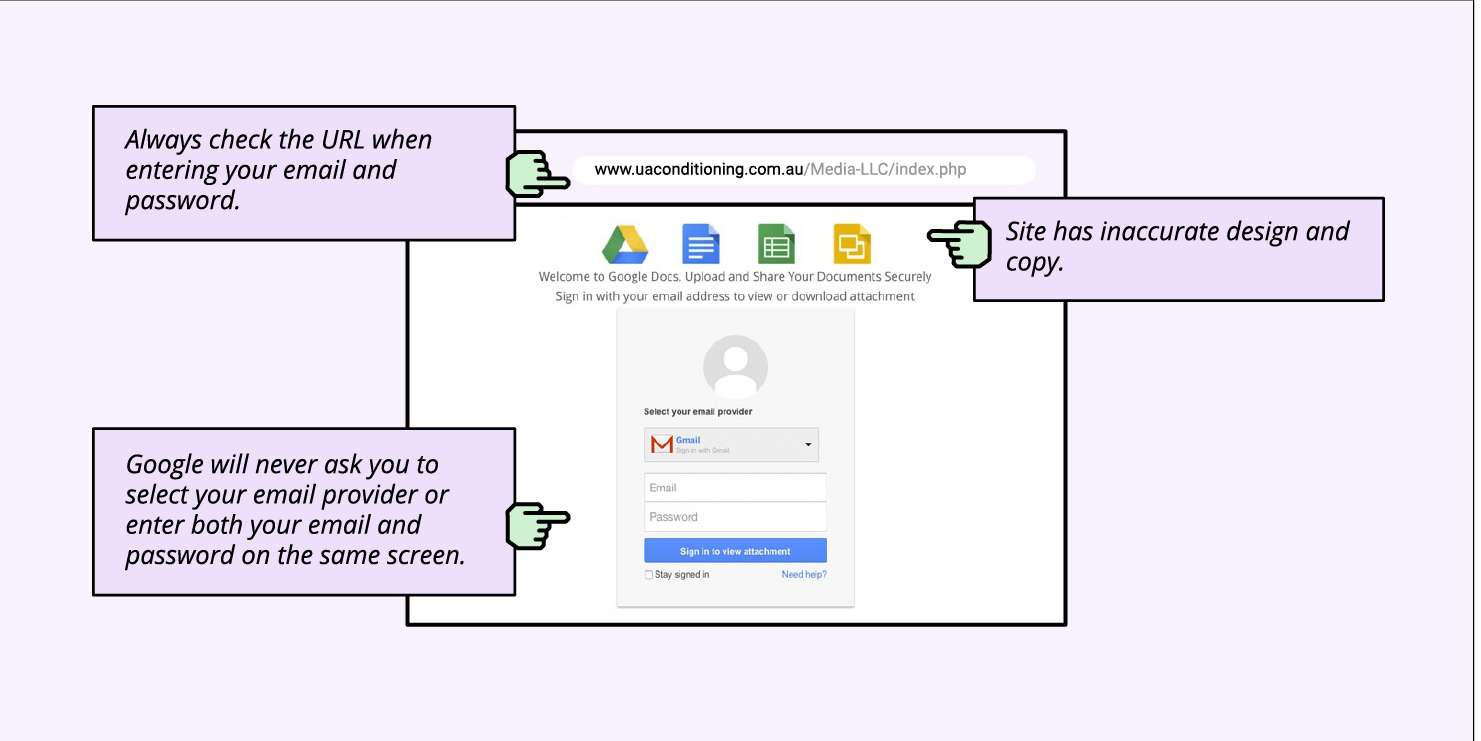
In order to be sure you’re at the correct site and before filling in any data, check the website address in the browser address bar.

Scammers can create a website closely resembling the design of the respective brand, but they can’t use their official domain or have the brand name in the domain (assuming the brand is trademark protected). So, often, these domains may resemble a brand’s name, but will never be the original one, and will have additional symbols, letters, or words. 

Usually, the scammy domains look completely nonsensical and sometimes the design and flow also feels odd, especially if it’s a known brand that you often see.

For example, when signing into Gmail, Google will never ask you to select your email provider or enter both your email and password on the same screen. So the flow you will often see on phishing sites is designed to resemble the original one, but it’s not. 

Always check the destination URL and site design before you enter your credentials

4. Ignore Money Requests

Another type of online scam that social engineers often use is misrepresenting themselves and asking for money under some form. An example of such phishing emails is a person in trouble, asking for financial help; you’re asked to send a small amount of money with the promise you’ll get way more in return. 

Sometimes these scams can take the form of extortion. A popular one was an email circulating in the past couple of years, stating that users have been recorded through their own webcams watching adult content and asking for money. Actually, this scam attack was so scary, it made the news as people were terrified – understandably so!  

Either way, if you are getting a money request under any form by strangers, it’s usually a scam; never give out money or financial information no matter how the situation is presented.

What should you do if you receive a phishing email?

Every time you receive an email, you need to be extra careful of the email address, the URL, their spelling, etc. After checking these and identifying that the email is actually a phishing email, you need to follow all of the steps below:

  1. Don’t click on any links & don’t open any attachments & don’t reply;
  2. Contact the alleged sender via official channel for communication;
  3. Report the email to your company & email provider & government body & the organization that allegedly sent the email;
  4. Mark the sender as junk or spam;
  5. Delete the email & remove from recycle bin/deleted items folder.

How to report phishing emails?

As previously mentioned, you need to report the phishing email to several people/institutions. Here we’ll show you how to report the email both to the email provider and to the government body.

How to report phishing emails to your email provider 

Let’s take as an example, Gmail accounts. Next to the “Reply” option in Gmail, click the “More” option and select “Report phishing”.

If you are an Outlook user, you need to select the phishing email message from the message list and above the reading pane, select Junk > Phishing > Report.

Other email providers have similar easy to use options for reporting phishing emails.

How to report to a specific institution, based on the country you’re in

The Anti-Phishing Working Group (APWG) is an international coalition that attempts to eliminate cybercrime. If you receive a suspicious or malicious email, forward it to this organisation at reportphishing@apwg.org. Below you can see some other country-specific institutions that can help you too:

  • For the USA, forward phishing emails to the National Cybersecurity Communications and Integration Center (NCCIC) at phishing-report@us-cert.gov.
  • For the UK, report the phishing email to Action Fraud, the UK’s fraud and cyber crime reporting center.
  • If you’re living in a European Union country, here you can find the reporting website, corresponding to your country, in case you are a victim of a cybercrime.

Final thoughts

Now that you know what is a phishing attack, you are much better prepared to protect yourself from it with our simple actionable advice. You can further explore our blog for similar topics and read how to protect your reputation by protecting your email.

[subscribe_cta]